

From prompts to partnership, the LTM story captures a broader shift now reshaping enterprise AI: Microsoft 365 Copilot is moving from an individual productivity aid to a platform for organizational change. At the center is Rajesh Kumar, CIO at LTM, who is using Copilot not just to speed up tasks, but to build a more AI-fluent workforce, rethink research workflows, and create custom agents that help match people to projects. The takeaway is bigger than one company. It shows how Researcher and Copilot Studio are turning prompts into operating leverage, while also raising important questions about governance, trust, and the future of internal expertise.
The Microsoft Source feature on Kumar reflects a pattern increasingly visible across enterprise IT: the first wave of AI adoption is about personal efficiency, but the second wave is about process redesign. Users begin with summaries, drafts, and search assistance, then quickly discover that the same tools can support deeper work such as vendor comparisons, market scans, and strategic research. Microsoft’s own documentation positions Researcher precisely for that kind of multi-step analysis, emphasizing that it combines web and work content to generate source-cited reports.
Kumar’s usage is instructive because it moves beyond the familiar “copilot for writing” narrative. He is using prompts to request exhaustive comparisons, risk analysis, and strategic briefings, which is a sign that the value proposition has matured. That matters because enterprises rarely adopt new software on novelty alone; they adopt it when it starts to replace recurring effort, reduce dependency bottlenecks, and support repeatable decision-making. Microsoft’s guidance on Researcher reinforces that this is an intended use case, not an accidental byproduct.
The article also highlights an important cultural inflection point. Kumar says he no longer needs to interrupt colleagues for research, slides, or perspective, because Copilot gives him a “great starting point.” That may sound modest, but in a large organization it is a meaningful shift in how knowledge work gets routed. Instead of funneling every exploratory question through subject-matter experts, teams can let AI handle the first pass and reserve human time for judgment, nuance, and escalation.
Just as important, the LTM example suggests that AI adoption is becoming a management discipline, not merely a tooling decision. Kumar is not only using the product himself; he is organizing department-specific sessions and hackathons to make sure non-technical employees understand the platform’s breadth, including Copilot Studio, Microsoft’s low-code environment for building agents. That is the real strategic storyline: AI success depends less on a single app and more on whether leadership can create the habits, incentives, and internal confidence to use it well.
The enterprise benefit here is not just speed, but consistency. If multiple managers can generate comparable first-pass research using a shared platform, organizations can standardize how they frame decisions and reduce the randomness of ad hoc methods. That is especially valuable in companies where institutional knowledge is distributed unevenly and managers vary in how much they lean on analysts, peers, or external consultants.
For CIOs, that distinction matters. Traditional AI chat interfaces can be excellent for quick ideation, but they are often less useful when a task requires layered reasoning, evidence gathering, and synthesis. Researcher addresses that gap by prioritizing depth over speed. Microsoft’s own comparison says the standard Copilot experience is better for fast summaries and short replies, while Researcher is meant for deeper analysis and reports.
This does not eliminate the need for expertise. Instead, it changes where expertise is applied. Humans still need to validate assumptions, interpret what matters, and decide what to do next, but they do so with a more complete and better organized starting point. In practice, that often means fewer blind spots and faster consensus.
That is a major milestone in enterprise AI maturity. The early phase of adoption is about showing employees that AI can help them; the next phase is about asking employees what they can create themselves. Kumar’s framing of “What can they create on their own?” captures the heart of that transition. It shifts AI from a top-down capability to a participatory platform.
The strategic significance is that employees closest to the work can prototype solutions faster. That reduces the gap between identifying a pain point and testing a fix. It also allows companies to discover high-value automation opportunities that central IT might never prioritize on its own, especially when the need is niche but recurring.
That kind of use case has obvious appeal for services firms, consultancies, and delivery-heavy organizations. Speeding project staffing can improve utilization, reduce idle time, and increase responsiveness to clients. It also creates a more dynamic internal talent marketplace, where skills are surfaced more intelligently than through manual spreadsheets or email chains. That is the sort of use case that can quickly pay for itself.
That is important because enterprise AI failures often have less to do with model quality and more to do with behavior change. If employees do not understand where the tool helps, where it does not, and how to use it responsibly, adoption stays shallow. Training sessions and hackathons help create the shared vocabulary necessary for AI to become routine rather than exceptional.
Hackathons for functional users are especially effective because they encourage experimentation without requiring deep engineering skills. They also produce visible internal wins, which helps convert skeptics. When employees see peers build useful agents, AI becomes less mysterious and more actionable. That shift in mindset is often the difference between a pilot and a platform.
This is where enterprise AI becomes organizational design. Companies need to define not only what their workers do, but what their agents do, how they are supervised, and how outputs are validated. The firms that succeed will likely be the ones that treat AI skills as part of employee development rather than as a one-time deployment project.
This is also a good illustration of how AI can exploit structured enterprise data without requiring a massive transformation program. Many organizations already have the building blocks: HR profiles, skills inventories, delivery records, and project systems. What they often lack is a connective layer that makes that information usable in real time. Agents can provide that layer.
There is also a planning benefit. If managers can see skill availability more clearly, they can forecast delivery bottlenecks earlier and avoid last-minute staffing scrambles. This makes the organization more resilient, especially in environments where demand shifts quickly and expertise is unevenly distributed. That resilience is easy to overlook until it is missing.
This creates a healthy pressure on data governance. AI doesn’t remove the need for good records; it makes bad records more visible. That is a useful discipline because it pushes organizations toward cleaner master data, clearer role definitions, and more accountable workflow ownership.
That kind of spillover matters because consumer familiarity often lowers resistance inside the enterprise. Employees who already understand how to ask, iterate, and refine prompts are better positioned to use AI productively in structured business settings. Microsoft’s product strategy benefits from this overlap because the same underlying model of interaction can carry across home and office.
This is why the personal anecdote is more than a human-interest detail. It illustrates the emotional component of adoption: confidence. When a tool produces a genuinely helpful answer in a real-world setting, it earns permission to be used more broadly. That trust is fragile, but once established, it can become a major adoption accelerator.
In that sense, Kumar’s holiday example is not trivial at all. It is a reminder that AI succeeds when it behaves like a capable assistant, not just a feature. Enterprises that understand this will focus less on whether users typed a prompt and more on whether the interaction helped them make a better decision.
Competitors face a difficult challenge here. They may match individual features, but it is harder to replicate the combination of enterprise data access, built-in collaboration surfaces, low-code agent creation, and broad distribution through Microsoft 365. The value proposition is not just AI quality; it is proximity to the daily tools employees already use.
For rivals, that means the competition is not merely about model performance. It is about workflow gravity, administrative controls, permissions, and the ability to embed AI where work already happens. Companies may tolerate a slightly less flashy assistant if it fits naturally into existing processes and governance.
The companies that benefit most will probably be those that combine three ingredients: executive sponsorship, strong data foundations, and a culture that treats AI as a collaborator rather than a magic trick. That sounds simple, but it is hard to execute. The LTM example is noteworthy because it shows all three in motion, even if only in early form.
Source: Microsoft Source From prompts to partnership: How LTM’s Rajesh Kumar collaborates with Microsoft 365 Copilot - Source Asia
 Overview
The Microsoft Source feature on Kumar reflects a pattern increasingly visible across enterprise IT: the first wave of AI adoption is about personal efficiency, but the second wave is about process redesign. Users begin with summaries, drafts, and search assistance, then quickly discover that the same tools can support deeper work such as vendor comparisons, market scans, and strategic research. Microsoft’s own documentation positions Researcher precisely for that kind of multi-step analysis, emphasizing that it combines web and work content to generate source-cited reports.Kumar’s usage is instructive because it moves beyond the familiar “copilot for writing” narrative. He is using prompts to request exhaustive comparisons, risk analysis, and strategic briefings, which is a sign that the value proposition has matured. That matters because enterprises rarely adopt new software on novelty alone; they adopt it when it starts to replace recurring effort, reduce dependency bottlenecks, and support repeatable decision-making. Microsoft’s guidance on Researcher reinforces that this is an intended use case, not an accidental byproduct.
The article also highlights an important cultural inflection point. Kumar says he no longer needs to interrupt colleagues for research, slides, or perspective, because Copilot gives him a “great starting point.” That may sound modest, but in a large organization it is a meaningful shift in how knowledge work gets routed. Instead of funneling every exploratory question through subject-matter experts, teams can let AI handle the first pass and reserve human time for judgment, nuance, and escalation.
Just as important, the LTM example suggests that AI adoption is becoming a management discipline, not merely a tooling decision. Kumar is not only using the product himself; he is organizing department-specific sessions and hackathons to make sure non-technical employees understand the platform’s breadth, including Copilot Studio, Microsoft’s low-code environment for building agents. That is the real strategic storyline: AI success depends less on a single app and more on whether leadership can create the habits, incentives, and internal confidence to use it well.
Why This Matters for Enterprise AI
The shift described by Kumar mirrors what many CIOs are discovering in practice. Once employees realize they can use Copilot for research, analysis, and workflow support, the tool stops being a novelty and starts becoming part of the operating rhythm. That changes the economics of knowledge work, because small gains in drafting speed or search efficiency compound across entire teams. Microsoft’s Researcher documentation frames this as a deliberate move toward deeper reasoning and more shareable outputs.From individual productivity to organizational throughput
A simple summary is no longer the headline. The more important question is whether AI can improve throughput across business functions, from pre-sales to procurement to staffing. Kumar’s use of Copilot to compare software alternatives and weigh risks shows how the tool can support high-stakes evaluation, not just routine paperwork. That matters because enterprise software decisions often depend on the quality and speed of early-stage research.The enterprise benefit here is not just speed, but consistency. If multiple managers can generate comparable first-pass research using a shared platform, organizations can standardize how they frame decisions and reduce the randomness of ad hoc methods. That is especially valuable in companies where institutional knowledge is distributed unevenly and managers vary in how much they lean on analysts, peers, or external consultants.
Why “good enough first drafts” matter
One of the most underappreciated effects of AI is that it lowers the cost of asking better questions. When a CIO can quickly request an exhaustive market summary, a product comparison, or a risk assessment, the quality of the next human conversation improves. The first draft becomes the boundary object around which people debate tradeoffs rather than starting from a blank page. That is a subtle but powerful change.- It reduces time spent on repetitive information gathering.
- It gives leaders a faster path to structured analysis.
- It makes it easier to compare options side by side.
- It helps teams focus on judgment instead of formatting.
- It lowers the activation energy for strategic research.
Researcher as a Strategic Assistant
Microsoft’s positioning for Researcher is clear: this is not a lightweight chatbot. It is designed for complex, multi-step research that draws from both organizational data and trusted web sources, producing structured, cited outputs suitable for decision support. That maps closely to the use cases Kumar describes, from evaluating case studies for an audience to assessing vendors for productivity tools.For CIOs, that distinction matters. Traditional AI chat interfaces can be excellent for quick ideation, but they are often less useful when a task requires layered reasoning, evidence gathering, and synthesis. Researcher addresses that gap by prioritizing depth over speed. Microsoft’s own comparison says the standard Copilot experience is better for fast summaries and short replies, while Researcher is meant for deeper analysis and reports.
Strategic topics need more than search
Kumar’s example prompt is telling because it asks for an “exhaustive summary,” a comparison of alternatives, and a detailed discussion of risks and pitfalls. That is the kind of request that once would have taken an analyst, a manager, or a consultant several hours or days to assemble. Researcher’s design makes it plausible to compress that workflow into a much shorter cycle while still preserving source traceability.This does not eliminate the need for expertise. Instead, it changes where expertise is applied. Humans still need to validate assumptions, interpret what matters, and decide what to do next, but they do so with a more complete and better organized starting point. In practice, that often means fewer blind spots and faster consensus.
Reducing friction in the knowledge graph
There is also a social dimension to this shift. Kumar explicitly notes that he no longer needs to ask colleagues to research, compile slides, or offer perspective for every exploratory question. That kind of interruption cost is real in large organizations, and it often goes unnoticed because it is spread across many small requests. AI becomes valuable not only when it saves the requester time, but when it protects everyone else’s focus.- Fewer ad hoc interruptions for subject-matter experts.
- Less dependence on fragmented manual research.
- More consistent starting points for leadership discussions.
- Better auditability when citations are included.
- Faster iteration on strategic questions.
Copilot Studio and the Rise of Internal Agents
The LTM story becomes especially interesting when it moves from usage to creation. Kumar’s team is not just consuming Copilot features; it is using Copilot Studio to introduce “agent thinking” and encourage users to build functional assistants tailored to their workflows. Microsoft describes Copilot Studio as the graphical low-code option for Copilot extensibility, enabling organizations to build custom agents and actions.That is a major milestone in enterprise AI maturity. The early phase of adoption is about showing employees that AI can help them; the next phase is about asking employees what they can create themselves. Kumar’s framing of “What can they create on their own?” captures the heart of that transition. It shifts AI from a top-down capability to a participatory platform.
Low-code does not mean low impact
Organizations sometimes misunderstand low-code tools as lightweight or tactical. In reality, low-code often accelerates the exact kinds of internal solutions that would otherwise sit in a backlog. Copilot Studio sits in a broader Microsoft ecosystem that includes connectors, Power Platform, and Microsoft 365 extensibility, which means agents can become part of real business processes rather than isolated experiments.The strategic significance is that employees closest to the work can prototype solutions faster. That reduces the gap between identifying a pain point and testing a fix. It also allows companies to discover high-value automation opportunities that central IT might never prioritize on its own, especially when the need is niche but recurring.
From prompts to workflows
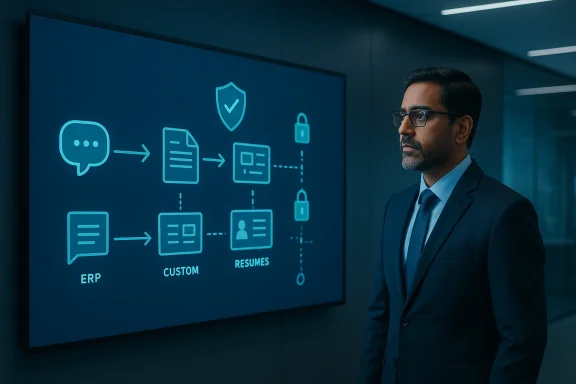
Kumar’s team uses Copilot Studio in conjunction with enterprise data, including ERP information and digital resumes, to build agents that match available skills to projects. That is a concrete example of AI moving from text generation to operational decision support. In other words, the system is helping decide who should be staffed where, and how quickly, based on the information already inside the organization.That kind of use case has obvious appeal for services firms, consultancies, and delivery-heavy organizations. Speeding project staffing can improve utilization, reduce idle time, and increase responsiveness to clients. It also creates a more dynamic internal talent marketplace, where skills are surfaced more intelligently than through manual spreadsheets or email chains. That is the sort of use case that can quickly pay for itself.
AI Adoption as a Cultural Program
One of the strongest themes in Kumar’s approach is that AI adoption is treated as a culture-building exercise, not a software rollout. He and his team organized department-specific Copilot sessions and hackathons for functional users, which indicates a deliberate effort to move beyond the usual pilot-group model. Microsoft’s broader Copilot ecosystem and partner messaging increasingly emphasize the need to pair technology with organizational readiness.That is important because enterprise AI failures often have less to do with model quality and more to do with behavior change. If employees do not understand where the tool helps, where it does not, and how to use it responsibly, adoption stays shallow. Training sessions and hackathons help create the shared vocabulary necessary for AI to become routine rather than exceptional.
Why department-specific training works
Generic AI demos are easy to forget because they do not map to daily work. Department-specific sessions, by contrast, can show employees exactly how a tool fits procurement, staffing, sales, or operations. That relevance matters because people adopt what helps them solve real problems, not abstract ones.Hackathons for functional users are especially effective because they encourage experimentation without requiring deep engineering skills. They also produce visible internal wins, which helps convert skeptics. When employees see peers build useful agents, AI becomes less mysterious and more actionable. That shift in mindset is often the difference between a pilot and a platform.
Agent thinking as a management skill
Kumar’s remark about “introducing agent thinking” is more than a buzz phrase. It implies a new managerial competency: knowing which tasks should be delegated to an AI assistant, which should remain human-led, and which can be split between the two. Microsoft’s ecosystem now supports that hybrid model across chat, apps, connectors, and custom agents.This is where enterprise AI becomes organizational design. Companies need to define not only what their workers do, but what their agents do, how they are supervised, and how outputs are validated. The firms that succeed will likely be the ones that treat AI skills as part of employee development rather than as a one-time deployment project.
- Training should be tied to specific business functions.
- Functional users should be encouraged to prototype.
- Leaders should model practical, responsible use.
- Internal wins should be shared widely.
- AI literacy should become part of routine management.
What the LTM Example Says About Staff Matching
The staffing use case described by Kumar is one of the most compelling in the piece. By using agents tied to ERP data and digital resumes, LTM is building a mechanism to match available talent with the right project faster. That sounds like an internal admin tool, but in services businesses it can have direct financial consequences because staffing speed affects revenue recognition, utilization, and client satisfaction.This is also a good illustration of how AI can exploit structured enterprise data without requiring a massive transformation program. Many organizations already have the building blocks: HR profiles, skills inventories, delivery records, and project systems. What they often lack is a connective layer that makes that information usable in real time. Agents can provide that layer.
Matching people to work faster
The promise here is not just efficiency. It is better alignment between human capability and business need, which is a more strategic outcome. When the right person gets placed on the right project sooner, the organization can improve both execution quality and employee experience. That is a rare combination, and it is one reason talent-matching agents are likely to spread.There is also a planning benefit. If managers can see skill availability more clearly, they can forecast delivery bottlenecks earlier and avoid last-minute staffing scrambles. This makes the organization more resilient, especially in environments where demand shifts quickly and expertise is unevenly distributed. That resilience is easy to overlook until it is missing.
Why internal data quality suddenly matters more
Agentic staffing only works if the underlying data is current and trustworthy. Digital resumes need to reflect real skills, project systems need accurate availability data, and ERP records need to be sufficiently complete. Otherwise, the agent may confidently surface poor matches, which would undermine trust quickly.This creates a healthy pressure on data governance. AI doesn’t remove the need for good records; it makes bad records more visible. That is a useful discipline because it pushes organizations toward cleaner master data, clearer role definitions, and more accountable workflow ownership.
Consumer Spillover and the Personal Side of AI
Kumar’s travel anecdote is easy to dismiss as charming color, but it also reveals something important about adoption. Once people use AI successfully in personal life, they are more likely to trust it at work, and vice versa. His example of asking Copilot what to do in a European city for a three-hour window shows the same core behavior as his enterprise use: asking for a constrained, high-value recommendation based on context.That kind of spillover matters because consumer familiarity often lowers resistance inside the enterprise. Employees who already understand how to ask, iterate, and refine prompts are better positioned to use AI productively in structured business settings. Microsoft’s product strategy benefits from this overlap because the same underlying model of interaction can carry across home and office.
Trust builds through small wins
The most effective AI deployments often start with narrow, low-risk tasks. A travel recommendation, a meeting summary, or a list of local attractions provides an immediate demonstration of usefulness without carrying heavy business consequences. Once users see that the system can handle these tasks well, they become more willing to test it on harder problems.This is why the personal anecdote is more than a human-interest detail. It illustrates the emotional component of adoption: confidence. When a tool produces a genuinely helpful answer in a real-world setting, it earns permission to be used more broadly. That trust is fragile, but once established, it can become a major adoption accelerator.
Consumer behavior shapes enterprise expectations
The line between consumer and enterprise AI is blurring. People bring their experiences with generative AI into the workplace, and they expect similar convenience, speed, and usefulness. That raises the bar for IT departments, which must now support tools that feel personal while still meeting enterprise standards for privacy, security, and compliance.In that sense, Kumar’s holiday example is not trivial at all. It is a reminder that AI succeeds when it behaves like a capable assistant, not just a feature. Enterprises that understand this will focus less on whether users typed a prompt and more on whether the interaction helped them make a better decision.
Competitive Implications for Microsoft and Rivals
The LTM story also matters in the competitive landscape. Microsoft is clearly trying to move Copilot beyond a generic productivity layer and into an extensible platform where Researcher, agents, and low-code customization reinforce one another. That kind of bundling strategy raises the switching cost for organizations once they start building internal workflows around the ecosystem.Competitors face a difficult challenge here. They may match individual features, but it is harder to replicate the combination of enterprise data access, built-in collaboration surfaces, low-code agent creation, and broad distribution through Microsoft 365. The value proposition is not just AI quality; it is proximity to the daily tools employees already use.
Ecosystem strength is the real moat
Microsoft’s advantage is increasingly systemic. Researcher taps into work content and the web, Copilot Studio supports custom agents, and the broader platform includes connectors and actions. That makes Microsoft less of a standalone chatbot vendor and more of an operating layer for enterprise knowledge work.For rivals, that means the competition is not merely about model performance. It is about workflow gravity, administrative controls, permissions, and the ability to embed AI where work already happens. Companies may tolerate a slightly less flashy assistant if it fits naturally into existing processes and governance.
Why industry-specific proof points matter
Microsoft’s Source coverage of companies such as Cognizant also shows that the company is trying to build credibility through industry use cases rather than abstract AI claims. The LTM feature sits in that same pattern, giving Microsoft a practical narrative about agentic adoption in services and knowledge-intensive environments. That is far more persuasive to enterprise buyers than generic benchmark talk.- Platform integration strengthens customer stickiness.
- Low-code agent creation broadens who can build.
- Work content + web research increases utility.
- Industry examples make adoption feel achievable.
- Distribution inside Microsoft 365 reduces friction.
Strengths and Opportunities
Kumar’s approach offers a clean example of how enterprises can move from experimentation to scale without losing sight of business outcomes. The biggest strength is that it blends personal productivity, leadership sponsorship, employee enablement, and process redesign into one coherent AI strategy. That combination is still rare, and it is what gives the LTM example outsized relevance.- Clear executive ownership gives AI adoption a mandate rather than a hobbyist feel.
- Researcher provides a credible way to handle deep, multi-step research.
- Copilot Studio lets business users create useful agents without waiting on engineering queues.
- Department-specific sessions make the training practical and memorable.
- Talent-matching agents target a concrete business problem with measurable upside.
- Reduced interruption cost frees subject-matter experts to focus on deeper work.
- Consumer familiarity helps employees trust and adopt AI faster.
Risks and Concerns
The same features that make this story compelling also introduce risk. AI-generated research can be useful, but it can also create overconfidence if users forget that an “exhaustive” answer is only as good as the available data and source quality. That is especially important when the tool is used for vendor evaluation, financial checks, or staffing decisions, where errors can be expensive.- Hallucination risk remains a concern whenever AI synthesizes complex information.
- Data quality problems can undermine staffing and matching agents.
- Shadow automation may emerge if users build tools without proper oversight.
- Change fatigue can slow adoption if training is too abstract or too frequent.
- Permission and compliance gaps may appear if governance is not tight.
- Overreliance on AI could erode human research discipline over time.
- Uneven skill levels may produce inconsistent quality across departments.
Looking Ahead
The next phase of enterprise AI will likely be less about getting people to try Copilot and more about deciding where agents should sit in the workflow. Kumar’s language about agent thinking suggests that this transition is already underway at LTM, and Microsoft’s product direction reinforces it. As organizations accumulate more use cases, the question will shift from “What can AI draft?” to “What can AI safely own?”The companies that benefit most will probably be those that combine three ingredients: executive sponsorship, strong data foundations, and a culture that treats AI as a collaborator rather than a magic trick. That sounds simple, but it is hard to execute. The LTM example is noteworthy because it shows all three in motion, even if only in early form.
- Broader rollout of department-specific Copilot training.
- More custom agents tied to real business processes.
- Stronger use of AI for staffing and internal mobility.
- Deeper integration of Researcher into strategic decision-making.
- Increased scrutiny of data governance and oversight.
- Wider acceptance of low-code agent creation among non-technical users.
Source: Microsoft Source From prompts to partnership: How LTM’s Rajesh Kumar collaborates with Microsoft 365 Copilot - Source Asia
