

Microsoft on May 28, 2026, announced a redesigned Microsoft 365 Copilot experience for desktop, mobile, and Office apps, promising faster loading, cleaner navigation, richer prompt handling, and higher usage across Word, Excel, PowerPoint, and Outlook for enterprise and commercial users. The headline is not that Copilot has a new coat of paint. It is that Microsoft is trying to turn Copilot from a bolted-on chatbot into the connective tissue of Microsoft 365 work. For IT departments, that makes the redesign both more useful and harder to ignore.
The first wave of Microsoft 365 Copilot asked enterprises to believe that a chat box sitting near familiar apps could materially change how work gets done. That was always a half-truth. Chat is a powerful interface for reasoning, drafting, summarizing, and retrieval, but most business work still ends in a document, spreadsheet, deck, calendar invite, ticket, audit trail, or approval workflow.
The redesign is Microsoft’s tacit admission that Copilot cannot remain a detachable assistant if it is going to justify enterprise licensing at scale. The company says the new experience turns the prompt line into a more task-aware workspace, expands the prompt surface for deeper work, and creates a more consistent Copilot entry point across Microsoft 365 apps. In plainer English, Microsoft is trying to reduce the number of moments where a user must stop working, think about where Copilot lives, and translate a messy business task into a sterile prompt.
That matters because enterprise productivity tools rarely fail from lack of features. They fail from friction. A tool that saves five minutes only after requiring three minutes of context-switching, explanation, and cleanup is not an accelerator; it is an interruption wearing a badge.
Microsoft’s design argument is therefore more consequential than the usual “cleaner interface” language suggests. The company is trying to make Copilot feel less like another destination and more like a layer of intent across the Office canvas. If it works, the redesigned Copilot becomes less visible precisely because it becomes more central.
In consumer apps, waiting is annoying. In enterprise software, waiting is political. A sluggish AI assistant becomes evidence for skeptics, a reason for finance teams to question licensing, and a convenient excuse for employees who never wanted another tool in the first place. If Copilot appears slow during the first week of rollout, the CIO may still call it a pilot, but the users have already written the review.
That is why Microsoft’s performance numbers should be read as part of the redesign rather than as a separate engineering footnote. Faster loading supports the company’s deeper ambition: to make Copilot available at the moment of intent. If the assistant arrives after the user has already solved the task manually, the product has missed its window.
There is an important caveat. Microsoft’s own figures come from controlled comparisons and short-term measurements, not a neutral industry benchmark. The company also acknowledges that results may vary by device, network, organization, and usage pattern. That is not a scandal; it is how enterprise software works. But it means IT leaders should treat the performance claims as a reason to test, not a reason to declare victory.
The redesigned experience leans into that shift. Microsoft describes a single, flexible entry point for Copilot across Microsoft 365 apps, one that sits above the work and understands the context beneath it. Copilot can open a side pane, work with the current document, suggest edits, make changes, and appear directly on the canvas inside a paragraph, cell, or slide.
That sounds subtle until you imagine the daily mechanics of office work. A manager drafting performance feedback does not want “AI” in the abstract; she wants a rough paragraph tightened without losing tone. A finance analyst does not want to discuss Excel; he wants a variance explained and a chart prepared without breaking the workbook. A sales lead does not want a generic chatbot response; he wants the next client-ready slide to reflect the latest account context.
The more Copilot moves into these surfaces, the more Microsoft changes the definition of an Office app. Word is no longer just the place where prose is typed. Excel is no longer just the grid where formulas live. PowerPoint is no longer just a slide layout tool. Each becomes a workspace where the user, the document, organizational data, and AI agents negotiate the next action.
Work IQ is Microsoft’s answer to the central weakness of generic AI tools in the workplace. A public chatbot may be impressive at summarizing a concept or drafting a generic email, but enterprise work is specific. The useful answer often depends on who owns the account, which document is authoritative, what was decided in last week’s meeting, what the finance policy says, and which data the user is allowed to see.
That is also where the risks gather. The more context Copilot can use, the more valuable it becomes. The more valuable it becomes, the more urgently organizations must clean up identity, permissions, retention, sensitivity labels, and data governance. Copilot does not magically solve the old SharePoint problem of overshared files; it makes that problem easier to surface at machine speed.
Microsoft is trying to square that circle by emphasizing control, governance, and enterprise-grade security. But no redesign can substitute for organizational hygiene. If your tenant is a decade-old landfill of stale Teams, orphaned sites, public-by-accident document libraries, and ambiguous data ownership, a smarter Copilot may simply become a faster shovel.
First, the comparison windows are short. Microsoft’s published notes indicate that Word, Excel, and PowerPoint usage changes were measured across a few days in May 2026 before and after rollout, while Outlook used a longer comparison from late December 2025 through February 2026. Short-term spikes can reflect novelty, nudges, interface changes, or employee curiosity as much as sustained productivity.
Second, “usage” is not the same as “value.” A user may click Copilot more often because the entry point is easier to find. That is a design win, but it does not prove the output was good enough to save time, improve quality, or change a workflow. Enterprises buying Copilot seats need to measure not only engagement but downstream results.
Still, the usage numbers are not meaningless. In productivity software, discoverability is destiny. A feature buried three clicks deep in an app used by millions might as well not exist. If Microsoft has made Copilot more visible without making it more obnoxious, that alone is a significant product achievement.
This is why the enterprise pitch now sounds less like software licensing and more like operating-model consulting. Microsoft is telling customers that productivity gains come not merely from giving employees Copilot, but from redesigning work around AI-assisted execution. That message is convenient for Microsoft, because it makes Copilot more strategic. It is also uncomfortably true.
Many organizations are still stuck in the pilot phase. They have a handful of enthusiastic users, a few impressive demos, and a slide showing possible time savings. What they often lack is a repeatable model for deploying AI across departments with consistent governance, training, metrics, and accountability. The redesigned Copilot does not solve that by itself, but it gives Microsoft a more credible product surface for the next conversation.
That conversation will be about business process. Can Copilot help prepare audit documents, summarize case histories, reconcile sales notes, draft regulated communications, or coordinate project work across systems? The answer depends less on the sparkle of the UI and more on whether the organization has connected the right data, defined the right guardrails, and trained people to use AI outputs critically.
That mobile emphasis is easy to dismiss as secondary, especially among Windows-heavy admins who still think of serious work as something done at a desk. But Microsoft is clearly designing for a world where work fragments across meetings, commutes, client sites, factory floors, airports, and after-hours catch-up sessions. The phone is not replacing the workstation; it is becoming the place where intent is captured before the workstation is available.
Voice is particularly important here. Typing a polished prompt on a phone is awkward. Speaking a messy thought is natural. If Copilot can turn that spoken intent into a structured draft, task list, summary, or document action, mobile productivity becomes less about miniature Office and more about continuous work capture.
That raises another management challenge. The easier it becomes to act on work from anywhere, the easier it becomes for work to invade everywhere. Enterprise leaders who celebrate mobile AI productivity without also defining norms for availability, approval, and review may discover that the assistant has made burnout more efficient.
For Windows and Microsoft 365 shops, this has obvious advantages. A single AI layer across familiar tools can reduce training complexity, simplify procurement, and give administrators a clearer governance model than a patchwork of browser-based AI tools. If Copilot is already aware of tenant permissions and Microsoft 365 context, it has a built-in enterprise advantage over standalone assistants that require additional integration work.
But the same coherence can become lock-in. If an organization trains employees to rely on Copilot-mediated workflows across Office documents, Teams meetings, Outlook mail, SharePoint files, and third-party connectors, moving away becomes harder. The cost is not just license migration. It is the accumulated habit of how work is expressed, delegated, reviewed, and completed.
This is not unique to Microsoft. Every major enterprise AI vendor is trying to become the system of action, not merely the system of record or system of engagement. Microsoft’s advantage is that it already owns much of the work surface. The redesign is how it makes that advantage feel like convenience.
The first issue is data access. Copilot’s usefulness depends on what it can retrieve, but its safety depends on what it cannot. Organizations should review overshared SharePoint sites, stale groups, guest access, sensitivity labels, retention policies, and data loss prevention rules before assuming Copilot will behave the way executives expect.
The second issue is measurement. Microsoft’s usage statistics are useful background, but each organization needs its own definition of productivity. Time saved is not always the right metric. In some workflows, quality, consistency, compliance, faster onboarding, fewer rework cycles, or better knowledge discovery may matter more.
The third issue is user education. Copilot is not a magic command line for business outcomes. Employees need to know when to trust it, when to challenge it, how to supply context, how to protect sensitive information, and how to review generated work. The redesign may reduce interface friction, but it does not remove the human responsibility to verify output.
The weakest case is that redesign can be mistaken for transformation. A cleaner Copilot app will not fix broken processes. A faster response will not make poor data reliable. A consistent entry point will not teach employees judgment. A more agentic experience will not automatically produce accountable outcomes.
This distinction matters because enterprise AI is entering its second phase. The first phase rewarded access: who had licenses, who ran pilots, who could show a demo. The second phase will reward operational discipline: who can deploy AI into real workflows, govern it, measure it, and improve the work rather than merely accelerate the old mess.
Microsoft’s redesigned Copilot is built for that second phase. Whether customers are ready for it is the larger question.
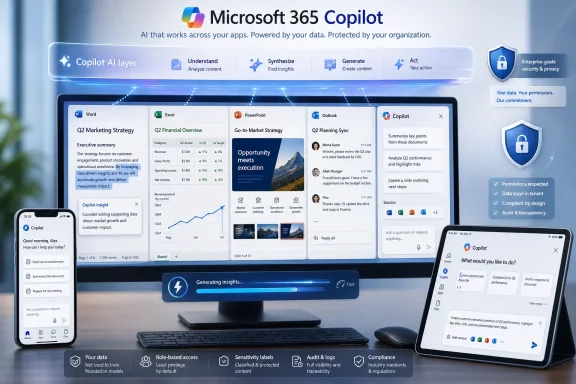 Microsoft Finally Admits the Chatbot Was Not Enough
The first wave of Microsoft 365 Copilot asked enterprises to believe that a chat box sitting near familiar apps could materially change how work gets done. That was always a half-truth. Chat is a powerful interface for reasoning, drafting, summarizing, and retrieval, but most business work still ends in a document, spreadsheet, deck, calendar invite, ticket, audit trail, or approval workflow.The redesign is Microsoft’s tacit admission that Copilot cannot remain a detachable assistant if it is going to justify enterprise licensing at scale. The company says the new experience turns the prompt line into a more task-aware workspace, expands the prompt surface for deeper work, and creates a more consistent Copilot entry point across Microsoft 365 apps. In plainer English, Microsoft is trying to reduce the number of moments where a user must stop working, think about where Copilot lives, and translate a messy business task into a sterile prompt.
That matters because enterprise productivity tools rarely fail from lack of features. They fail from friction. A tool that saves five minutes only after requiring three minutes of context-switching, explanation, and cleanup is not an accelerator; it is an interruption wearing a badge.
Microsoft’s design argument is therefore more consequential than the usual “cleaner interface” language suggests. The company is trying to make Copilot feel less like another destination and more like a layer of intent across the Office canvas. If it works, the redesigned Copilot becomes less visible precisely because it becomes more central.
The Speed Claims Are Really Adoption Claims
Microsoft says the redesigned Copilot app loads more than twice as fast, with load times reduced by more than 50 percent in customer testing. It also says response times for complex chat prompts improved by 10 percent at the slow end of the distribution. Those are performance claims, but their real target is behavior.In consumer apps, waiting is annoying. In enterprise software, waiting is political. A sluggish AI assistant becomes evidence for skeptics, a reason for finance teams to question licensing, and a convenient excuse for employees who never wanted another tool in the first place. If Copilot appears slow during the first week of rollout, the CIO may still call it a pilot, but the users have already written the review.
That is why Microsoft’s performance numbers should be read as part of the redesign rather than as a separate engineering footnote. Faster loading supports the company’s deeper ambition: to make Copilot available at the moment of intent. If the assistant arrives after the user has already solved the task manually, the product has missed its window.
There is an important caveat. Microsoft’s own figures come from controlled comparisons and short-term measurements, not a neutral industry benchmark. The company also acknowledges that results may vary by device, network, organization, and usage pattern. That is not a scandal; it is how enterprise software works. But it means IT leaders should treat the performance claims as a reason to test, not a reason to declare victory.
The Office Ribbon Gives Way to the Floating AI Layer
For decades, Office productivity has been organized around visible commands: ribbon tabs, menus, panes, toolbars, templates, and keyboard shortcuts. The user learned where the command lived, then applied it to the object on screen. Copilot reverses that logic. The user expresses an intention, and the software attempts to infer the command sequence, the relevant data, and the likely output.The redesigned experience leans into that shift. Microsoft describes a single, flexible entry point for Copilot across Microsoft 365 apps, one that sits above the work and understands the context beneath it. Copilot can open a side pane, work with the current document, suggest edits, make changes, and appear directly on the canvas inside a paragraph, cell, or slide.
That sounds subtle until you imagine the daily mechanics of office work. A manager drafting performance feedback does not want “AI” in the abstract; she wants a rough paragraph tightened without losing tone. A finance analyst does not want to discuss Excel; he wants a variance explained and a chart prepared without breaking the workbook. A sales lead does not want a generic chatbot response; he wants the next client-ready slide to reflect the latest account context.
The more Copilot moves into these surfaces, the more Microsoft changes the definition of an Office app. Word is no longer just the place where prose is typed. Excel is no longer just the grid where formulas live. PowerPoint is no longer just a slide layout tool. Each becomes a workspace where the user, the document, organizational data, and AI agents negotiate the next action.
Work IQ Is the Real Product Underneath the Redesign
The most important phrase in Microsoft’s announcement may not be “new design” at all. It is Work IQ, the company’s name for the intelligence layer that draws on emails, files, chats, meetings, and broader work context to help Copilot produce more relevant results. Interfaces change quickly; context layers become platforms.Work IQ is Microsoft’s answer to the central weakness of generic AI tools in the workplace. A public chatbot may be impressive at summarizing a concept or drafting a generic email, but enterprise work is specific. The useful answer often depends on who owns the account, which document is authoritative, what was decided in last week’s meeting, what the finance policy says, and which data the user is allowed to see.
That is also where the risks gather. The more context Copilot can use, the more valuable it becomes. The more valuable it becomes, the more urgently organizations must clean up identity, permissions, retention, sensitivity labels, and data governance. Copilot does not magically solve the old SharePoint problem of overshared files; it makes that problem easier to surface at machine speed.
Microsoft is trying to square that circle by emphasizing control, governance, and enterprise-grade security. But no redesign can substitute for organizational hygiene. If your tenant is a decade-old landfill of stale Teams, orphaned sites, public-by-accident document libraries, and ambiguous data ownership, a smarter Copilot may simply become a faster shovel.
The Usage Numbers Tell Microsoft’s Preferred Story
Microsoft says usage increased after the new in-app Copilot experiences rolled out: 27 percent in Word, 33 percent in Excel, 43 percent in PowerPoint, and 30 percent in Outlook. These are striking figures, but they should be interpreted with care.First, the comparison windows are short. Microsoft’s published notes indicate that Word, Excel, and PowerPoint usage changes were measured across a few days in May 2026 before and after rollout, while Outlook used a longer comparison from late December 2025 through February 2026. Short-term spikes can reflect novelty, nudges, interface changes, or employee curiosity as much as sustained productivity.
Second, “usage” is not the same as “value.” A user may click Copilot more often because the entry point is easier to find. That is a design win, but it does not prove the output was good enough to save time, improve quality, or change a workflow. Enterprises buying Copilot seats need to measure not only engagement but downstream results.
Still, the usage numbers are not meaningless. In productivity software, discoverability is destiny. A feature buried three clicks deep in an app used by millions might as well not exist. If Microsoft has made Copilot more visible without making it more obnoxious, that alone is a significant product achievement.
Enterprise Buyers Are Being Sold a Workflow, Not a Widget
Microsoft’s broader Copilot strategy has moved well beyond “AI assistant in Office.” In 2026, the company has been framing Copilot around agents, connectors, model choice, governance, and what it calls frontier firms. The redesign fits that larger campaign: AI is not a sidecar; it is the orchestration layer for work.This is why the enterprise pitch now sounds less like software licensing and more like operating-model consulting. Microsoft is telling customers that productivity gains come not merely from giving employees Copilot, but from redesigning work around AI-assisted execution. That message is convenient for Microsoft, because it makes Copilot more strategic. It is also uncomfortably true.
Many organizations are still stuck in the pilot phase. They have a handful of enthusiastic users, a few impressive demos, and a slide showing possible time savings. What they often lack is a repeatable model for deploying AI across departments with consistent governance, training, metrics, and accountability. The redesigned Copilot does not solve that by itself, but it gives Microsoft a more credible product surface for the next conversation.
That conversation will be about business process. Can Copilot help prepare audit documents, summarize case histories, reconcile sales notes, draft regulated communications, or coordinate project work across systems? The answer depends less on the sparkle of the UI and more on whether the organization has connected the right data, defined the right guardrails, and trained people to use AI outputs critically.
The Mobile Redesign Shows Where Microsoft Thinks Work Is Going
Microsoft’s redesign effort is not limited to desktop Office. The company has also been pushing a chat-first Microsoft 365 Copilot mobile experience, with navigation built around Chat, Agents, Search, Library, Notebooks, and Create. It has described features such as a Dynamic Action Button, contextual prompts, document previewing, and real-time voice interaction.That mobile emphasis is easy to dismiss as secondary, especially among Windows-heavy admins who still think of serious work as something done at a desk. But Microsoft is clearly designing for a world where work fragments across meetings, commutes, client sites, factory floors, airports, and after-hours catch-up sessions. The phone is not replacing the workstation; it is becoming the place where intent is captured before the workstation is available.
Voice is particularly important here. Typing a polished prompt on a phone is awkward. Speaking a messy thought is natural. If Copilot can turn that spoken intent into a structured draft, task list, summary, or document action, mobile productivity becomes less about miniature Office and more about continuous work capture.
That raises another management challenge. The easier it becomes to act on work from anywhere, the easier it becomes for work to invade everywhere. Enterprise leaders who celebrate mobile AI productivity without also defining norms for availability, approval, and review may discover that the assistant has made burnout more efficient.
The Redesign Helps Users, but It Also Tightens Microsoft’s Grip
There is a platform story underneath the productivity story. Every time Copilot becomes more coherent across Word, Excel, PowerPoint, Outlook, Teams, mobile, and the Microsoft 365 app, Microsoft increases the gravitational pull of its ecosystem. The redesigned entry point is not just a usability improvement; it is a strategic anchor.For Windows and Microsoft 365 shops, this has obvious advantages. A single AI layer across familiar tools can reduce training complexity, simplify procurement, and give administrators a clearer governance model than a patchwork of browser-based AI tools. If Copilot is already aware of tenant permissions and Microsoft 365 context, it has a built-in enterprise advantage over standalone assistants that require additional integration work.
But the same coherence can become lock-in. If an organization trains employees to rely on Copilot-mediated workflows across Office documents, Teams meetings, Outlook mail, SharePoint files, and third-party connectors, moving away becomes harder. The cost is not just license migration. It is the accumulated habit of how work is expressed, delegated, reviewed, and completed.
This is not unique to Microsoft. Every major enterprise AI vendor is trying to become the system of action, not merely the system of record or system of engagement. Microsoft’s advantage is that it already owns much of the work surface. The redesign is how it makes that advantage feel like convenience.
Admins Should Look Past the Demo and Into the Tenant
For IT pros, the redesigned Copilot should trigger a practical checklist rather than simple enthusiasm or cynicism. The product is becoming more capable, but that makes readiness more important. Copilot embedded more deeply in Office apps will expose weak information architecture, inconsistent permissions, and gaps in user training faster than older tools did.The first issue is data access. Copilot’s usefulness depends on what it can retrieve, but its safety depends on what it cannot. Organizations should review overshared SharePoint sites, stale groups, guest access, sensitivity labels, retention policies, and data loss prevention rules before assuming Copilot will behave the way executives expect.
The second issue is measurement. Microsoft’s usage statistics are useful background, but each organization needs its own definition of productivity. Time saved is not always the right metric. In some workflows, quality, consistency, compliance, faster onboarding, fewer rework cycles, or better knowledge discovery may matter more.
The third issue is user education. Copilot is not a magic command line for business outcomes. Employees need to know when to trust it, when to challenge it, how to supply context, how to protect sensitive information, and how to review generated work. The redesign may reduce interface friction, but it does not remove the human responsibility to verify output.
The Productivity Promise Now Has a Price of Admission
The strongest case for Microsoft’s redesign is that it attacks a real barrier to enterprise AI adoption: AI tools often live outside the flow of work. By making Copilot faster, more contextual, and more consistent across apps, Microsoft is reducing the gap between intention and execution. That is where productivity gains are most likely to appear.The weakest case is that redesign can be mistaken for transformation. A cleaner Copilot app will not fix broken processes. A faster response will not make poor data reliable. A consistent entry point will not teach employees judgment. A more agentic experience will not automatically produce accountable outcomes.
This distinction matters because enterprise AI is entering its second phase. The first phase rewarded access: who had licenses, who ran pilots, who could show a demo. The second phase will reward operational discipline: who can deploy AI into real workflows, govern it, measure it, and improve the work rather than merely accelerate the old mess.
Microsoft’s redesigned Copilot is built for that second phase. Whether customers are ready for it is the larger question.
The New Copilot Bargain for WindowsForum Readers
For Windows enthusiasts, admins, and enterprise users, the Copilot redesign is best understood as a shift from visible chatbot to ambient work layer. The immediate improvements are usability and performance; the long-term implication is a deeper Microsoft 365 dependency.- Microsoft’s May 2026 Copilot redesign makes the assistant faster, cleaner, and more consistent across the Microsoft 365 app and core Office applications.
- The most important change is the move from a static prompt box toward a task-aware workspace that can act inside documents, spreadsheets, slides, and email.
- Microsoft’s reported usage gains in Word, Excel, PowerPoint, and Outlook are encouraging, but they reflect short-term product telemetry rather than a final verdict on productivity.
- Work IQ and broader Microsoft 365 context are the heart of the product, which means permissions, identity, governance, and data hygiene matter more than ever.
- Enterprises should evaluate Copilot by workflow outcomes, not by demo appeal or raw click activity.
- The redesign strengthens Microsoft’s platform advantage by making Copilot feel less like an add-on and more like the default way to operate Microsoft 365.
References
- Primary source: harianbasis.co
Published: 2026-06-12T19:50:07.779808
Microsoft Copilot Redesign Enhances Enterprise User Productivity Significantly
Microsoft rolls out a faster 365 Copilot app interface, boosting user workflow activity across its productivity suite.www.harianbasis.co - Official source: support.microsoft.com
The Microsoft 365 app transition to the Microsoft 365 Copilot app | Microsoft Support
The Microsoft 365 (Office) app is now called the Microsoft 365 Copilot app. Get the details about the change and what it means to you.support.microsoft.com - Official source: news.microsoft.com
Introducing the Frontier Suite - Source EMEA
 news.microsoft.com
- Official source: blogs.microsoft.com
Announcing Copilot leadership update - The Official Microsoft Blog
Satya Nadella, Chairman and CEO, and Mustafa Suleyman, Executive Vice President and CEO of Microsoft AI, shared the below communications with Microsoft employees this morning. SATYA NADELLA MESSAGE I want to share two org changes we’re making to our Copilot org and superintelligence effort. It’s...blogs.microsoft.com - Related coverage: aibusinessreview.org
Microsoft 365 Copilot Redesign Doubles Speed
Microsoft's Copilot redesign delivers 2x faster load times and improved reliability, directly addressing enterprise productivity concerns with concrete performance gains. www.aibusinessreview.org
- Official source: microsoft.design
The new Microsoft 365 Copilot mobile experience - Microsoft Design
How we redesigned the Microsoft 365 Copilot mobile app to create a workspace built around conversation, dialogue, and discovery.microsoft.design
- Official source: microsoft.com
AI for Enterprise Productivity | Microsoft 365 Copilot
Explore how to boost enterprise productivity by automating tasks and generating content with one seamless AI enterprise tool from Microsoft 365 Copilot. (152 characters)www.microsoft.com
- Related coverage: pwc.com
PwC deploys Microsoft Copilot at enterprise scale: PwC
See how PwC deployed Microsoft Copilot to 285,000+ users worldwide, scaling secure, Responsible AI to help boost productivity, collaboration, and trust.www.pwc.com
- Related coverage: futurumgroup.com
Microsoft 365 Copilot's Redesign Raises Bar
Microsoft 365 Copilot's Redesign transforms enterprise AI with unified workspace, adaptive features, and Work IQ intelligence layer driving.futurumgroup.com - Related coverage: windowscentral.com
Microsoft is slowly turning Edge into another Copilot app — tests redesigned UI that takes inspiration from Copilot | Windows Central
The latest Edge preview builds now feature an updated UI that borrows the design language that first debuted in Microsoft's Copilot app.www.windowscentral.com - Related coverage: tomshardware.com
Microsoft unveils Project Solara AI, a chip-to-cloud platform built to power a new generation of 'agent-first' enterprise devices — hardware designed to run AI agents instead of traditional apps | Tom's Hardware
Microsoft ditches Windows to build OS on Androidwww.tomshardware.com - Related coverage: techradar.com
Microsoft 365 confirms new premium tier focused on AI and productivity | TechRadar
Microsoft adds new E7 plan to cope with AI usagewww.techradar.com - Related coverage: pcgamer.com
Using 'trillions of anonymised productivity signals', Microsoft thinks nearly half of people like AI in their work | PC Gamer
There's dozens of us who don't!www.pcgamer.com - Related coverage: itpro.com
Accenture has been trialling Microsoft Copilot since 2023 – now it’s rolling out the AI tool to all 743,000 staff | IT Pro
Accenture will roll out Microsoft Copilot to 743,000 employees after years of testing.www.itpro.com
