

Microsoft released its third annual AI in Education Report in June 2026 while expanding Microsoft 365 Education and Copilot classroom features for schools, colleges, teachers, students, and administrators trying to manage fast-growing AI use in everyday coursework. The company’s message is simple: AI is already in the classroom, whether institutions are ready or not. The more important story is that Microsoft is now trying to move the argument from “Should schools allow AI?” to “Who controls the terms of use?” That is a much harder problem than shipping another Copilot button.
The education AI market has spent much of the last three years stuck between panic and boosterism. Students discovered generative AI before most schools wrote policy for it, teachers were asked to police work they could no longer reliably inspect, and administrators were left to decide whether blocking tools was a policy or merely a delay tactic.
Microsoft’s latest education push lands squarely in that gap. The company is not just adding a few study features to Copilot. It is trying to make Microsoft 365 Education the place where AI permissions, assignments, lesson planning, student practice, and institutional training converge.
That matters because schools do not adopt technology the way consumers do. A student can start using a chatbot in seconds; a district has to think about procurement, age controls, data handling, curriculum standards, accessibility, teacher training, and whether parents will object. Microsoft’s advantage is not that it has the flashiest chatbot. Its advantage is that many schools already run on its identity, productivity, device, and administration stack.
The bet is that AI in education will be won less by raw model capability than by governable integration. If Microsoft can make Copilot feel like a managed classroom system rather than a general-purpose answer machine, it gets closer to the institutional buyer’s real problem.
The more revealing numbers are not the adoption figures. They are the training figures. Microsoft says 77% of students and 53% of educators have not received formal AI training. That is the real implementation story: usage has outrun instruction.
This is the familiar pattern of classroom technology adoption, but compressed into a much shorter timeline. Schools spent years learning how to manage laptops, learning platforms, cloud documents, video calls, and mobile devices. Generative AI arrived as a tool students could use before policy makers could define what responsible use even meant.
That creates a strange inversion. Students may be more familiar with AI tools than their teachers, but less prepared to judge them. Teachers may understand the learning goals better than anyone, but lack time, training, or institutional backing to redesign assignments around AI. Administrators may set broad principles, but classroom reality is decided at the point where a student opens an assignment and asks, “Can I use this?”
Microsoft’s answer is to move rules closer to that moment.
That distinction is everything. AI can be appropriate for brainstorming in one assignment, forbidden during a timed writing assessment, encouraged for code debugging, restricted during source analysis, or required as part of a reflection on process. A schoolwide policy can establish boundaries, but it cannot carry every instructional nuance.
By putting AI guidelines into Assignments, Microsoft is acknowledging that AI governance has to be granular. The teacher needs to define whether Copilot can help generate ideas, explain concepts, revise tone, create quizzes, summarize source material, or provide feedback. The student needs to see those expectations before the work begins, not after a misconduct dispute.
This is also where academic integrity becomes less of a surveillance problem and more of an instructional design problem. If the rule is simply “Do not use AI,” enforcement becomes a cat-and-mouse game. If the rule is “Use AI for these stages, disclose it here, and produce evidence of your own reasoning there,” the classroom has a better chance of measuring learning rather than merely detecting violations.
Microsoft’s framing is convenient for Microsoft, of course. Assignment-level AI rules work best when the assignment, identity, chat, and productivity environment are all inside the same ecosystem. But the underlying idea is sound: the future of classroom AI policy is not one giant toggle. It is many small decisions attached to real work.
The danger is that “AI-generated lesson plan” can sound like another attempt to automate professional judgment. Microsoft is trying to avoid that by positioning Unit Plans as a starting point: standards-aligned drafts that teachers refine rather than blindly accept. That distinction will matter in adoption.
Teachers do not need another system that produces generic classroom sludge. They need tools that respect the messy specificity of their rooms: reading levels, local standards, IEP accommodations, pacing constraints, prior misconceptions, language needs, and the teacher’s own style. The best version of Teach saves time on structure while leaving judgment with the educator.
The worst version turns every classroom into a templated content farm. That is the line Microsoft will have to walk, and it is not a purely technical problem. It depends on how districts train teachers to use the tool and whether teachers are given time to evaluate the output rather than being pressured to accept it because it is faster.
Microsoft’s broader education strategy depends on convincing teachers that Copilot is not another administrative burden disguised as innovation. If educators see it as a planning assistant they control, adoption can deepen. If they see it as a mandate from above, resistance will be rational.
That is a familiar ambition in edtech, but AI raises the stakes. If students are interacting with AI during practice, the teacher needs to know whether they are struggling productively, skipping the thinking, asking for answers, or moving ahead too quickly. Visibility becomes part of pedagogy.
There is an upside here. A teacher who can see patterns across a class may intervene earlier, group students more intelligently, and adjust pacing before a misconception hardens. Learning Groups in Assignments similarly suggests Microsoft wants AI-supported categorization to feed back into instruction rather than simply generate reports.
There is also a risk. Classrooms are not call centers, and students are not productivity dashboards. If real-time visibility becomes another layer of monitoring without enough human context, it can flatten learning into activity traces. The difference between helpful insight and surveillance will depend on implementation, training, and restraint.
For WindowsForum readers, the Windows 11 angle is not incidental. Microsoft says Learning Zone is broadly accessible for trial on Windows 11 devices for the next year, making the operating system part of the education AI funnel. That is good news for districts already invested in Windows hardware, but it also reinforces how tightly Microsoft wants the classroom AI experience bound to its platform.
Study and Learn is Microsoft’s attempt to reposition Copilot as a coach rather than a shortcut. The company describes guided practice, real-time feedback, and learning-science principles such as scaffolding and productive struggle. The phrase productive struggle matters because it signals the central challenge: good learning tools must sometimes refuse to be too helpful.
That is not a small design problem. Consumer AI products often optimize for satisfying the user quickly. Education often requires the opposite: slowing the student down, asking them to retrieve knowledge, forcing them to explain reasoning, and giving hints before answers. A good tutor knows when not to solve the problem.
If Study and Learn can consistently behave that way, it gives schools a more defensible alternative to unmanaged AI use. Rather than pretending students will not use chatbots, institutions can point them toward an environment designed around practice and feedback. That is the argument Microsoft wants administrators to make.
But there is still a trust gap. Schools will need evidence that these tools improve learning rather than merely increase engagement. They will also need clear controls for age groups, subject areas, data protection, and teacher oversight. “Available at no additional cost” is attractive, but free access does not eliminate operational responsibility.
Microsoft says demand for support is recurring, with many educators and students wanting monthly or quarterly institutional training. That cadence sounds right. AI tools change quickly, but more importantly, classroom norms change as teachers discover what works and what fails.
The involvement of ISTE + ASCD gives the program more education-sector credibility than a purely vendor-authored training path would have. Still, the institutional challenge remains. Districts and universities will have to decide whether AI literacy is optional professional development, mandatory compliance training, or part of a broader redesign of teaching and assessment.
That distinction matters because “AI training” can mean very different things. It can mean prompt tips. It can mean privacy rules. It can mean bias and hallucination awareness. It can mean redesigning writing assignments so process matters more than final prose. It can mean teaching students to challenge an AI response rather than accept it.
Microsoft benefits if AI literacy becomes a prerequisite for modern schooling, because it can supply both the tools and the credentialing path. Schools benefit only if the training helps teachers make better instructional decisions, not just better use of Microsoft products.
But cheating is not the whole problem. The deeper issue is assessment design in a world where fluent assistance is always nearby. If a take-home essay can be generated, revised, summarized, and rephrased by AI, then the assignment has to measure something more visible than the final document.
That does not mean abandoning writing, problem-solving, or independent work. It means bringing more attention to drafts, oral defense, in-class reasoning, source evaluation, reflection, and the student’s ability to explain choices. AI makes process harder to ignore.
Microsoft’s tools can support that shift, but they cannot substitute for it. Student AI Guidelines can clarify expectations. Study and Learn can encourage guided practice. Learning Zone can give teachers visibility. None of those features automatically creates a good assignment.
This is where the education AI debate often goes wrong. Vendors talk about guardrails as if they are product settings. Teachers know guardrails are also routines, norms, rubrics, conversations, and consequences. A toggle can help, but it cannot do the professional work.
The competition will not be decided only by model quality. Schools will look at cost, privacy commitments, admin controls, age restrictions, integration with learning management systems, accessibility, procurement simplicity, and whether teachers actually like the workflow. In education, friction is fatal.
Microsoft’s advantage is the Microsoft 365 footprint. If students already use Word, OneNote, Teams, Assignments, Entra ID, and school-managed Windows devices, adding Copilot features inside that environment may feel less disruptive than introducing a separate AI platform. That integration is both a convenience and a lock-in strategy.
Google has a similar argument in Chromebook and Workspace districts. OpenAI and Anthropic can argue from model experience and learning-specific modes. Smaller edtech firms may offer more focused pedagogy or district-friendly customization. The result is not a single AI classroom, but a platform contest over who gets to define the default workflow.
For IT administrators, that means the AI decision is becoming part of the broader productivity stack decision. Choosing an education AI platform is no longer just about chat. It is about identity, compliance, support, logging, licensing, classroom management, and the politics of vendor dependence.
That is the messy middle between executive enthusiasm and classroom reality. A superintendent can announce responsible AI. A teacher can write assignment rules. But someone has to configure the tenant, document the policy, train staff, manage exceptions, and explain why one feature is available to teachers but not students.
Licensing will matter. Microsoft’s announcement includes tools available at no additional cost with Microsoft 365 Education in some contexts, preview features, trials, and features dependent on administrator controls. That is exactly the kind of landscape that creates confusion unless districts communicate clearly.
Administrators also need to decide whether they are piloting or deploying. A pilot can tolerate uneven training and experimentation. A deployment requires help desk readiness, parent communication, accessibility review, data governance, and a plan for teachers who do not want AI in their assignments.
The best districts will treat this as a phased change management project, not a software rollout. The worst will turn on features and hope teachers absorb the complexity. Microsoft’s platform can make AI easier to manage, but it cannot make institutional planning optional.
The classroom test will be more mundane. Does Unit Plans save time without producing bland lessons? Do Student AI Guidelines appear clearly enough that students actually read them? Does Learning Zone give teachers useful insight without overwhelming them? Does Study and Learn resist doing the work for students? Do administrators understand the switches well enough to avoid accidental overexposure or underuse?
These are not glamorous questions, but they decide whether education technology survives past the announcement cycle. Teachers have seen plenty of tools that looked persuasive in demos and became another tab to ignore. Students have seen plenty of platforms that claim to personalize learning while mostly adding hoops.
Microsoft’s challenge is that AI raises expectations and suspicion at the same time. If the tools work, users will expect rapid improvement. If they fail, educators will be less forgiving because the stakes involve student learning, not merely productivity.
The company is trying to solve a real problem. But the solution will be judged not by the elegance of its product names, but by whether teachers feel more in control after adoption than before.
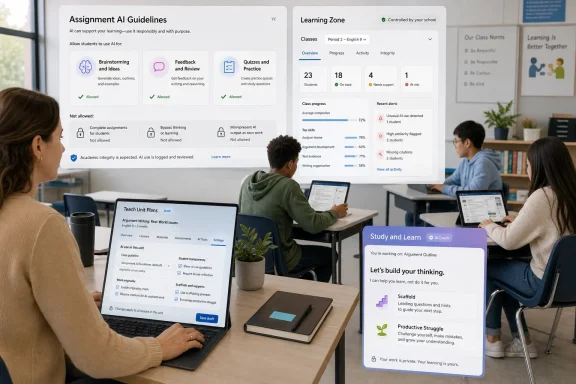 Microsoft Is Turning Classroom AI From a Product Pitch Into an Operating Model
The education AI market has spent much of the last three years stuck between panic and boosterism. Students discovered generative AI before most schools wrote policy for it, teachers were asked to police work they could no longer reliably inspect, and administrators were left to decide whether blocking tools was a policy or merely a delay tactic.Microsoft’s latest education push lands squarely in that gap. The company is not just adding a few study features to Copilot. It is trying to make Microsoft 365 Education the place where AI permissions, assignments, lesson planning, student practice, and institutional training converge.
That matters because schools do not adopt technology the way consumers do. A student can start using a chatbot in seconds; a district has to think about procurement, age controls, data handling, curriculum standards, accessibility, teacher training, and whether parents will object. Microsoft’s advantage is not that it has the flashiest chatbot. Its advantage is that many schools already run on its identity, productivity, device, and administration stack.
The bet is that AI in education will be won less by raw model capability than by governable integration. If Microsoft can make Copilot feel like a managed classroom system rather than a general-purpose answer machine, it gets closer to the institutional buyer’s real problem.
The Usage Numbers Are Big, but the Training Gap Is Bigger
Microsoft-reported survey figures say 92% of students and education leaders and 88% of educators have used AI for school purposes. Even with the necessary caveat that this is company-commissioned research, the direction of travel is not hard to believe. AI has already moved from novelty to background utility for writing, summarizing, brainstorming, translation, tutoring, coding, and lesson preparation.The more revealing numbers are not the adoption figures. They are the training figures. Microsoft says 77% of students and 53% of educators have not received formal AI training. That is the real implementation story: usage has outrun instruction.
This is the familiar pattern of classroom technology adoption, but compressed into a much shorter timeline. Schools spent years learning how to manage laptops, learning platforms, cloud documents, video calls, and mobile devices. Generative AI arrived as a tool students could use before policy makers could define what responsible use even meant.
That creates a strange inversion. Students may be more familiar with AI tools than their teachers, but less prepared to judge them. Teachers may understand the learning goals better than anyone, but lack time, training, or institutional backing to redesign assignments around AI. Administrators may set broad principles, but classroom reality is decided at the point where a student opens an assignment and asks, “Can I use this?”
Microsoft’s answer is to move rules closer to that moment.
Assignment-Level Rules Are the Real Classroom Control Surface
Student AI Guidelines may be one of the more consequential features in Microsoft’s announcement because it addresses a practical failure in many school AI policies. Broad acceptable-use documents are useful, but they often live too far away from the actual work. They tell students what the institution believes, not necessarily what this teacher permits on this task.That distinction is everything. AI can be appropriate for brainstorming in one assignment, forbidden during a timed writing assessment, encouraged for code debugging, restricted during source analysis, or required as part of a reflection on process. A schoolwide policy can establish boundaries, but it cannot carry every instructional nuance.
By putting AI guidelines into Assignments, Microsoft is acknowledging that AI governance has to be granular. The teacher needs to define whether Copilot can help generate ideas, explain concepts, revise tone, create quizzes, summarize source material, or provide feedback. The student needs to see those expectations before the work begins, not after a misconduct dispute.
This is also where academic integrity becomes less of a surveillance problem and more of an instructional design problem. If the rule is simply “Do not use AI,” enforcement becomes a cat-and-mouse game. If the rule is “Use AI for these stages, disclose it here, and produce evidence of your own reasoning there,” the classroom has a better chance of measuring learning rather than merely detecting violations.
Microsoft’s framing is convenient for Microsoft, of course. Assignment-level AI rules work best when the assignment, identity, chat, and productivity environment are all inside the same ecosystem. But the underlying idea is sound: the future of classroom AI policy is not one giant toggle. It is many small decisions attached to real work.
Teach and Unit Plans Aim at the Teacher Workload Crisis
Unit Plans in Teach is Microsoft’s clearest appeal to educators who are exhausted before the AI debate even begins. Lesson planning, standards alignment, differentiation, rubrics, quizzes, and remediation all consume time that teachers rarely have in abundance. If AI can reduce the mechanical burden of building instructional materials, the pitch becomes immediately practical.The danger is that “AI-generated lesson plan” can sound like another attempt to automate professional judgment. Microsoft is trying to avoid that by positioning Unit Plans as a starting point: standards-aligned drafts that teachers refine rather than blindly accept. That distinction will matter in adoption.
Teachers do not need another system that produces generic classroom sludge. They need tools that respect the messy specificity of their rooms: reading levels, local standards, IEP accommodations, pacing constraints, prior misconceptions, language needs, and the teacher’s own style. The best version of Teach saves time on structure while leaving judgment with the educator.
The worst version turns every classroom into a templated content farm. That is the line Microsoft will have to walk, and it is not a purely technical problem. It depends on how districts train teachers to use the tool and whether teachers are given time to evaluate the output rather than being pressured to accept it because it is faster.
Microsoft’s broader education strategy depends on convincing teachers that Copilot is not another administrative burden disguised as innovation. If educators see it as a planning assistant they control, adoption can deepen. If they see it as a mandate from above, resistance will be rational.
Learning Zone Tries to Make AI Visible During Class, Not Just Afterward
Learning Zone is aimed at a different problem: what happens while students are actually working. Microsoft describes educator-paced live classroom sessions with real-time visibility into student activity and control over lesson progression. In plain English, it is trying to give teachers a dashboard for guided digital instruction.That is a familiar ambition in edtech, but AI raises the stakes. If students are interacting with AI during practice, the teacher needs to know whether they are struggling productively, skipping the thinking, asking for answers, or moving ahead too quickly. Visibility becomes part of pedagogy.
There is an upside here. A teacher who can see patterns across a class may intervene earlier, group students more intelligently, and adjust pacing before a misconception hardens. Learning Groups in Assignments similarly suggests Microsoft wants AI-supported categorization to feed back into instruction rather than simply generate reports.
There is also a risk. Classrooms are not call centers, and students are not productivity dashboards. If real-time visibility becomes another layer of monitoring without enough human context, it can flatten learning into activity traces. The difference between helpful insight and surveillance will depend on implementation, training, and restraint.
For WindowsForum readers, the Windows 11 angle is not incidental. Microsoft says Learning Zone is broadly accessible for trial on Windows 11 devices for the next year, making the operating system part of the education AI funnel. That is good news for districts already invested in Windows hardware, but it also reinforces how tightly Microsoft wants the classroom AI experience bound to its platform.
Study and Learn Is Microsoft’s Answer to the “Answer Bot” Problem
Student-facing AI tools create the sharpest tension in education. A chatbot can explain a concept, quiz a learner, translate a passage, or help structure an essay. It can also produce the answer with enough fluency to let the student bypass the learning entirely.Study and Learn is Microsoft’s attempt to reposition Copilot as a coach rather than a shortcut. The company describes guided practice, real-time feedback, and learning-science principles such as scaffolding and productive struggle. The phrase productive struggle matters because it signals the central challenge: good learning tools must sometimes refuse to be too helpful.
That is not a small design problem. Consumer AI products often optimize for satisfying the user quickly. Education often requires the opposite: slowing the student down, asking them to retrieve knowledge, forcing them to explain reasoning, and giving hints before answers. A good tutor knows when not to solve the problem.
If Study and Learn can consistently behave that way, it gives schools a more defensible alternative to unmanaged AI use. Rather than pretending students will not use chatbots, institutions can point them toward an environment designed around practice and feedback. That is the argument Microsoft wants administrators to make.
But there is still a trust gap. Schools will need evidence that these tools improve learning rather than merely increase engagement. They will also need clear controls for age groups, subject areas, data protection, and teacher oversight. “Available at no additional cost” is attractive, but free access does not eliminate operational responsibility.
Microsoft Elevate for Educators Shows the Company Knows Features Are Not Enough
The free AI Literacy credential through Microsoft Elevate for Educators is an important part of the announcement because it tacitly admits that tools alone will not solve the classroom AI problem. Training has to be recurring, role-specific, and institutionally supported. A one-off webinar will not cut it.Microsoft says demand for support is recurring, with many educators and students wanting monthly or quarterly institutional training. That cadence sounds right. AI tools change quickly, but more importantly, classroom norms change as teachers discover what works and what fails.
The involvement of ISTE + ASCD gives the program more education-sector credibility than a purely vendor-authored training path would have. Still, the institutional challenge remains. Districts and universities will have to decide whether AI literacy is optional professional development, mandatory compliance training, or part of a broader redesign of teaching and assessment.
That distinction matters because “AI training” can mean very different things. It can mean prompt tips. It can mean privacy rules. It can mean bias and hallucination awareness. It can mean redesigning writing assignments so process matters more than final prose. It can mean teaching students to challenge an AI response rather than accept it.
Microsoft benefits if AI literacy becomes a prerequisite for modern schooling, because it can supply both the tools and the credentialing path. Schools benefit only if the training helps teachers make better instructional decisions, not just better use of Microsoft products.
Academic Integrity Is the Symptom, Not the Disease
Academic integrity remains the loudest concern because it is the easiest one to name. Teachers see polished work that may not reflect student ability. Students see uneven enforcement and unclear rules. Administrators worry about appeals, discipline, parent complaints, and reputational risk.But cheating is not the whole problem. The deeper issue is assessment design in a world where fluent assistance is always nearby. If a take-home essay can be generated, revised, summarized, and rephrased by AI, then the assignment has to measure something more visible than the final document.
That does not mean abandoning writing, problem-solving, or independent work. It means bringing more attention to drafts, oral defense, in-class reasoning, source evaluation, reflection, and the student’s ability to explain choices. AI makes process harder to ignore.
Microsoft’s tools can support that shift, but they cannot substitute for it. Student AI Guidelines can clarify expectations. Study and Learn can encourage guided practice. Learning Zone can give teachers visibility. None of those features automatically creates a good assignment.
This is where the education AI debate often goes wrong. Vendors talk about guardrails as if they are product settings. Teachers know guardrails are also routines, norms, rubrics, conversations, and consequences. A toggle can help, but it cannot do the professional work.
Rival Platforms Are Fighting the Same Institutional Battle
Microsoft is not alone in trying to make AI safe enough for schools. Google, OpenAI, Anthropic, and a long list of education technology vendors are all positioning AI around tutoring, learning support, privacy, institutional deployment, and teacher control. The market is converging on the same message: AI should support learning rather than replace it.The competition will not be decided only by model quality. Schools will look at cost, privacy commitments, admin controls, age restrictions, integration with learning management systems, accessibility, procurement simplicity, and whether teachers actually like the workflow. In education, friction is fatal.
Microsoft’s advantage is the Microsoft 365 footprint. If students already use Word, OneNote, Teams, Assignments, Entra ID, and school-managed Windows devices, adding Copilot features inside that environment may feel less disruptive than introducing a separate AI platform. That integration is both a convenience and a lock-in strategy.
Google has a similar argument in Chromebook and Workspace districts. OpenAI and Anthropic can argue from model experience and learning-specific modes. Smaller edtech firms may offer more focused pedagogy or district-friendly customization. The result is not a single AI classroom, but a platform contest over who gets to define the default workflow.
For IT administrators, that means the AI decision is becoming part of the broader productivity stack decision. Choosing an education AI platform is no longer just about chat. It is about identity, compliance, support, logging, licensing, classroom management, and the politics of vendor dependence.
District IT Now Owns the Messy Middle
The practical rollout burden will fall heavily on district and campus IT teams. They will have to determine which users get access, how age settings are configured, whether Copilot Chat is enabled for students, which licenses apply, how data protections are communicated, and how support tickets are handled when classroom expectations collide with technical settings.That is the messy middle between executive enthusiasm and classroom reality. A superintendent can announce responsible AI. A teacher can write assignment rules. But someone has to configure the tenant, document the policy, train staff, manage exceptions, and explain why one feature is available to teachers but not students.
Licensing will matter. Microsoft’s announcement includes tools available at no additional cost with Microsoft 365 Education in some contexts, preview features, trials, and features dependent on administrator controls. That is exactly the kind of landscape that creates confusion unless districts communicate clearly.
Administrators also need to decide whether they are piloting or deploying. A pilot can tolerate uneven training and experimentation. A deployment requires help desk readiness, parent communication, accessibility review, data governance, and a plan for teachers who do not want AI in their assignments.
The best districts will treat this as a phased change management project, not a software rollout. The worst will turn on features and hope teachers absorb the complexity. Microsoft’s platform can make AI easier to manage, but it cannot make institutional planning optional.
The Classroom Will Judge Microsoft by Friction, Not Vision
Microsoft’s education AI vision is coherent. It wants AI embedded in the tools schools already use, governed by administrators, shaped by teachers, and presented to students as guided support rather than answer generation. That is the right architecture for institutional adoption.The classroom test will be more mundane. Does Unit Plans save time without producing bland lessons? Do Student AI Guidelines appear clearly enough that students actually read them? Does Learning Zone give teachers useful insight without overwhelming them? Does Study and Learn resist doing the work for students? Do administrators understand the switches well enough to avoid accidental overexposure or underuse?
These are not glamorous questions, but they decide whether education technology survives past the announcement cycle. Teachers have seen plenty of tools that looked persuasive in demos and became another tab to ignore. Students have seen plenty of platforms that claim to personalize learning while mostly adding hoops.
Microsoft’s challenge is that AI raises expectations and suspicion at the same time. If the tools work, users will expect rapid improvement. If they fail, educators will be less forgiving because the stakes involve student learning, not merely productivity.
The company is trying to solve a real problem. But the solution will be judged not by the elegance of its product names, but by whether teachers feel more in control after adoption than before.
The 2026 School Year Will Belong to the Districts That Write the Rules Into the Work
Microsoft’s latest education AI push points to a concrete set of decisions schools cannot avoid. The institutions that do best will not be the ones with the longest AI policy documents. They will be the ones that translate policy into classroom routines, administrator settings, and assignment-level expectations.- Schools should assume students and educators are already using AI and focus policy on permitted uses, disclosure, and learning goals rather than blanket abstractions.
- Districts need recurring AI training for teachers, students, and administrators because tool behavior, classroom practice, and institutional risk are changing too quickly for one-time professional development.
- Assignment-level AI rules are more useful than broad policy statements because acceptable use changes by task, subject, grade level, and assessment purpose.
- IT teams must treat Copilot and Microsoft 365 Education AI features as governed services that require licensing review, age controls, administrator settings, and support planning.
- Teachers will need time to redesign assessments around process, reasoning, and reflection if schools want AI to support learning rather than simply polish outputs.
- Microsoft’s strongest advantage is integration, but that same integration will make vendor dependence and platform governance central parts of education AI strategy.
References
- Primary source: WinBuzzer
Published: 2026-06-30T07:28:16.838623
Microsoft Expands Education AI Tools as Training Gaps Persist
Microsoft is adding AI tools for educators and students as its report points to widespread school AI use, training gaps and demand for classroom guardrails.winbuzzer.com - Official source: microsoft.com
Study and Learn: AI built for your student | Microsoft Education Blog
Discover how Microsoft 365 Copilot’s Study & Learn Agent uses research‑based strategies and guided practice to deepen support institutions and students.www.microsoft.com - Official source: news.microsoft.com
- Official source: learningzone.microsoft.com
Microsoft Learning Zone
Design interactive lessons that engage every learner with an AI powered app for Copilot+ PCslearningzone.microsoft.com - Official source: cdn-dynmedia-1.microsoft.com

