

On May 21, 2026, Microsoft published a customer story detailing how Senac-RS in Rio Grande do Sul, Brazil, moved more than 120,000 annual students and over 5,000 academic devices onto Microsoft 365, Microsoft Entra ID, Intune, and Defender across more than 40 educational units. The headline is not that another large institution bought a Microsoft stack. It is that identity, endpoint management, and disaster-resilient access have become the new plumbing of public-facing education. In Senac-RS’s case, the classroom was no longer a room; it was a managed identity, a policy, a device, and a cloud account that could travel.
For years, educational IT has been judged by visible hardware: computer labs, carts of laptops, interactive displays, tablets, and, in Senac-RS’s case, mobile classrooms built into trucks. But the Senac-RS deployment makes a more modern argument. In a distributed school system, the student’s digital identity is now as important as the desk.
Senac-RS had a classic institutional problem hiding behind a scale problem. The organization serves more than 120,000 students annually across more than 40 units in a large Brazilian state where some locations sit hundreds of kilometers from headquarters in Porto Alegre. A centralized IT team could not realistically behave as if every lab machine were down the hall.
The old model relied on generic local accounts on shared machines. That approach is familiar to anyone who has managed school labs, libraries, training centers, or vocational classrooms: fast to set up, easy to understand, and catastrophic for visibility. It treats every student as the same user, every device as an island, and every software or security problem as something that may require a person to travel.
The shift to Microsoft Entra ID and Microsoft 365 replaced that anonymity with individualized cloud-based accounts. Students gained persistent access to email, OneDrive storage, and Microsoft 365 services. IT gained a directory-backed view of users and devices. That trade matters because the most important educational asset in a shared-device environment is not the PC itself; it is the continuity of the learner’s work.
But generic accounts also flatten responsibility. They make it harder to know who used what, which machine is failing, which device is patched, which user needs access, and which data belongs to which student. They are especially risky in environments where students rotate through labs, instructors move between classrooms, and devices are distributed across many sites.
Senac-RS’s own account of the project makes clear that security pressure helped accelerate the modernization effort. A cyberattack reportedly highlighted the risks of shared logins and unmanaged devices, pushing the institution toward centralized identity and endpoint control. That is a familiar sequence: the operational pain exists for years, but the security incident turns modernization from a “someday” project into an executive priority.
The lesson for Windows administrators is blunt. Shared accounts are not merely an inconvenience for personalization; they are a governance failure waiting to be exposed. Once an organization has thousands of devices and six figures of users passing through annually, “everyone logs in the same way” stops being simple and starts being a liability.
Remote management is often discussed as a convenience for IT departments, but in a geographically distributed education system it becomes an access issue. If software deployment, policy enforcement, antivirus updates, and configuration changes require physical travel, then students in remote regions receive a different quality of service than students near headquarters. The distance becomes part of the curriculum.
Intune does not magically solve bandwidth, hardware lifecycle, local support, or training. It does, however, change the default posture. Instead of assuming every endpoint must be touched by hand, the institution can push configurations and policies across the fleet, monitor compliance, and reduce the number of problems that require a technician to appear in person.
That is particularly important in vocational education, where the machines are not ornamental. Students may need specific applications, browser configurations, security settings, and collaboration tools to complete coursework. If the device is not ready when class begins, the loss is measured not just in IT tickets but in teaching time.
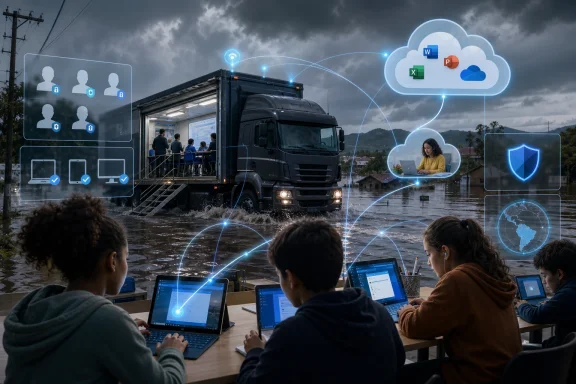
Senac-RS’s mobile units, described as high-tech classrooms housed in large trucks, can travel into remote areas and regions affected by natural disasters. Microsoft says these units include Intune-managed devices, allowing the institution to extend access to vocational training and digital resources outside traditional campuses. That is where cloud identity becomes physically consequential.
A student who can authenticate into a managed account, retrieve files, use cloud storage, and access coursework from a temporary or mobile environment is in a different position from a student whose work is trapped on a local lab profile. A truck full of laptops is useful. A truck full of managed endpoints tied to persistent student identities is an educational continuity platform.
This is not a romantic claim that Microsoft 365 solves disaster recovery in a flooded state. Roads, power, connectivity, housing, health, and public services matter far more in the immediate aftermath. But once the emergency turns toward rebuilding, education systems need ways to restart learning without waiting for every physical location to return to normal. Senac-RS’s deployment shows how endpoint management and identity can become part of that restart.
For administrators, that integration is the appeal. Entra ID establishes the user and device identity layer. Intune applies management and compliance policies. Defender adds endpoint protection and monitoring. Microsoft 365 gives users a familiar productivity environment. Teams and OneDrive turn the account into a collaboration and storage hub.
The strategic move is obvious. Once an institution’s student lifecycle, device fleet, security posture, and classroom workflows live inside the same ecosystem, replacing any one layer becomes harder. Microsoft does not have to win every feature comparison if it wins the architecture.
That should make IT leaders both appreciative and cautious. Integrated platforms reduce friction, but they also concentrate operational dependence. A school that standardizes around Microsoft can move faster, but it also becomes more exposed to licensing changes, service outages, admin-console complexity, tenant misconfiguration, and the long-term politics of vendor lock-in.
Before individualized accounts, students using shared profiles had limited ability to preserve work safely between sessions. Files could be left on a local machine, lost after reimaging, overwritten by another user, or exposed to someone sitting down later. That is not just inefficient; it teaches students that institutional technology is temporary and unreliable.
With Microsoft 365 accounts, students gain a persistent digital workspace. That matters for learners who may not have paid cloud storage or personal devices at home. It also changes the emotional relationship with the institution’s technology: the account becomes theirs, not merely a borrowed session on a public machine.
This is where digital equity becomes concrete. It is not only about whether students can access a computer for an hour. It is whether they can return to their work, trust that their files are still there, communicate through a professional email account, and learn inside tools they are likely to encounter in modern workplaces.
The first twenty minutes of a lab-based class are often where educational technology either justifies itself or betrays everyone in the room. If the instructor becomes a help desk technician, students lose focus before instruction begins. If software versions differ from one machine to another, the lesson plan fragments. If students cannot find or save their work, the technology becomes a source of anxiety.
Centralized management does not remove every classroom issue. Password resets, account onboarding, network outages, application bugs, and device failures remain part of the landscape. But it reduces the number of variables the teacher has to absorb alone.
For vocational education in particular, consistency is a pedagogical tool. A class designed to teach digital skills, business processes, design, administration, programming, or office productivity depends on the environment being predictable enough that the instructor can teach the subject rather than the infrastructure.
That is the fashionable part of the story, but it rests on the unfashionable work that came first. AI in an institution without identity governance, account lifecycle management, endpoint control, and data boundaries is not transformation; it is risk with a chatbot interface. Senac-RS’s Copilot-related work is notable because it reportedly sits inside the same managed account and security model as the rest of the environment.
This sequence matters for schools tempted to leap directly from unmanaged labs to generative AI pilots. The AI tool is not the foundation. Identity is the foundation. Data location, permission boundaries, device compliance, and user training determine whether AI becomes a controlled capability or another uncontrolled channel for institutional information.
Microsoft’s platform story benefits from this sequencing, of course. Copilot becomes easier to pitch when an institution already uses Microsoft 365, Entra ID, and Teams. But the architectural principle is sound regardless of vendor: do not put AI on top of chaos and call it innovation.
Large educational institutions do not merely create accounts; they constantly create, modify, suspend, license, and remove them. Students enroll, leave, graduate, return, change programs, move campuses, and shift between in-person and distance learning. Faculty and staff have their own lifecycle events. Manual account management at this scale is an invitation to stale access.
Automated provisioning ties identity to institutional reality. When the student information system changes, access can change with it. That is where security and operational efficiency meet: fewer orphaned accounts, fewer manual delays, fewer ad hoc exceptions, and a clearer line between enrollment status and digital entitlement.
For Windows admins, this is the part of the story that deserves special attention. Endpoint management gets the screenshots, but identity lifecycle management determines whether the environment remains trustworthy after the first rollout celebration ends.
That matters because the industry sometimes talks as if personal devices and browser-based services have made managed labs obsolete. They have not. Shared and institution-owned PCs remain essential where students lack personal hardware, where specialized software is needed, where assessment environments must be controlled, or where hands-on instruction requires consistent machines.
Intune’s role in this setting is not merely to manage mobility. It is to make fixed, shared, and mobile Windows devices behave like part of a coherent fleet. The endpoint can sit in a traditional classroom, a distant unit, or a truck deployed to a recovering community. The management model remains recognizable.
That portability is the real achievement. Senac-RS is not eliminating place-based learning; it is making place less determinative. The same student account and the same management model can follow the institution’s physical footprint as it expands, contracts, relocates, or responds to crisis.
Even so, vendor case studies can be useful when they expose the shape of a problem. Senac-RS’s before-and-after narrative is credible because it matches what IT pros see everywhere: unmanaged devices, shared accounts, patching challenges, limited visibility, local storage problems, and teachers losing class time to technical friction.
The story is also specific enough to matter. More than 120,000 students annually, more than 5,000 devices, more than 40 units, mobile classrooms, and a state recently hit by catastrophic flooding are not generic brochure abstractions. They are the kind of constraints that force architecture to prove itself.
The right reading is neither cynicism nor boosterism. Microsoft is selling the value of its platform, but Senac-RS appears to have solved a real operational problem with tools that many WindowsForum readers already administer. The interesting question is not whether Microsoft benefits. It is what the deployment reveals about where education IT is heading.
Once every student has an account, the institution must decide how long it persists, what happens after graduation, how storage quotas are managed, what data is retained, what devices can access services, and how exceptions are handled. Once every device is managed, the institution must decide which configurations are mandatory, which applications are allowed, how quickly patches are enforced, and what happens when a device falls out of compliance.
This is where the human-led part of Senac-RS’s modernization matters. Technology can enforce rules, but people still have to decide what the rules are. In education, those decisions touch pedagogy, privacy, accessibility, equity, and security at the same time.
The danger is that IT modernization becomes administrative centralization without sufficient feedback from classrooms. The promise is that teachers and students get a more reliable environment because the chaotic decisions have been moved into a managed process. Whether a deployment lands on the right side of that line depends less on the brand name of the tools than on the governance culture around them.
The most concrete lessons are practical rather than ideological.
 The Real Classroom Is Now the Account
For years, educational IT has been judged by visible hardware: computer labs, carts of laptops, interactive displays, tablets, and, in Senac-RS’s case, mobile classrooms built into trucks. But the Senac-RS deployment makes a more modern argument. In a distributed school system, the student’s digital identity is now as important as the desk.Senac-RS had a classic institutional problem hiding behind a scale problem. The organization serves more than 120,000 students annually across more than 40 units in a large Brazilian state where some locations sit hundreds of kilometers from headquarters in Porto Alegre. A centralized IT team could not realistically behave as if every lab machine were down the hall.
The old model relied on generic local accounts on shared machines. That approach is familiar to anyone who has managed school labs, libraries, training centers, or vocational classrooms: fast to set up, easy to understand, and catastrophic for visibility. It treats every student as the same user, every device as an island, and every software or security problem as something that may require a person to travel.
The shift to Microsoft Entra ID and Microsoft 365 replaced that anonymity with individualized cloud-based accounts. Students gained persistent access to email, OneDrive storage, and Microsoft 365 services. IT gained a directory-backed view of users and devices. That trade matters because the most important educational asset in a shared-device environment is not the PC itself; it is the continuity of the learner’s work.
Shared Logins Were a Convenience With a Security Bill Attached
The generic login has always had a certain institutional appeal. It is simple. It avoids account provisioning headaches. It lets a student sit down and start working without remembering credentials or waiting for help.But generic accounts also flatten responsibility. They make it harder to know who used what, which machine is failing, which device is patched, which user needs access, and which data belongs to which student. They are especially risky in environments where students rotate through labs, instructors move between classrooms, and devices are distributed across many sites.
Senac-RS’s own account of the project makes clear that security pressure helped accelerate the modernization effort. A cyberattack reportedly highlighted the risks of shared logins and unmanaged devices, pushing the institution toward centralized identity and endpoint control. That is a familiar sequence: the operational pain exists for years, but the security incident turns modernization from a “someday” project into an executive priority.
The lesson for Windows administrators is blunt. Shared accounts are not merely an inconvenience for personalization; they are a governance failure waiting to be exposed. Once an organization has thousands of devices and six figures of users passing through annually, “everyone logs in the same way” stops being simple and starts being a liability.
Intune Turns Distance Into a Manageable Variable
The deployment’s operational center of gravity is Microsoft Intune. Senac-RS is using it to manage more than 5,000 academic devices from a central console, including devices in traditional labs and mobile classrooms that can be far from headquarters. That is where the story becomes more than a marketing vignette.Remote management is often discussed as a convenience for IT departments, but in a geographically distributed education system it becomes an access issue. If software deployment, policy enforcement, antivirus updates, and configuration changes require physical travel, then students in remote regions receive a different quality of service than students near headquarters. The distance becomes part of the curriculum.
Intune does not magically solve bandwidth, hardware lifecycle, local support, or training. It does, however, change the default posture. Instead of assuming every endpoint must be touched by hand, the institution can push configurations and policies across the fleet, monitor compliance, and reduce the number of problems that require a technician to appear in person.
That is particularly important in vocational education, where the machines are not ornamental. Students may need specific applications, browser configurations, security settings, and collaboration tools to complete coursework. If the device is not ready when class begins, the loss is measured not just in IT tickets but in teaching time.
The Floods Made Resilience More Than an IT Slogan
The May 2024 floods in Rio Grande do Sul form the human backdrop to the story. The disaster was one of the most severe in the state’s history, inundating communities, disrupting infrastructure, displacing residents, and forcing institutions to rethink continuity under extreme conditions. In that context, a mobile classroom is not a gadget; it is part of a recovery model.Senac-RS’s mobile units, described as high-tech classrooms housed in large trucks, can travel into remote areas and regions affected by natural disasters. Microsoft says these units include Intune-managed devices, allowing the institution to extend access to vocational training and digital resources outside traditional campuses. That is where cloud identity becomes physically consequential.
A student who can authenticate into a managed account, retrieve files, use cloud storage, and access coursework from a temporary or mobile environment is in a different position from a student whose work is trapped on a local lab profile. A truck full of laptops is useful. A truck full of managed endpoints tied to persistent student identities is an educational continuity platform.
This is not a romantic claim that Microsoft 365 solves disaster recovery in a flooded state. Roads, power, connectivity, housing, health, and public services matter far more in the immediate aftermath. But once the emergency turns toward rebuilding, education systems need ways to restart learning without waiting for every physical location to return to normal. Senac-RS’s deployment shows how endpoint management and identity can become part of that restart.
The Microsoft Stack Wins by Becoming the Default Operating Layer
Microsoft’s customer story naturally frames the project around Microsoft 365, Entra ID, Intune, Defender, Teams, OneDrive, and Microsoft 365 Copilot. That framing is not neutral; it is the vendor’s version of events. But the underlying architecture reflects a broader reality in enterprise and education IT: Microsoft is trying to make identity, endpoint management, security, collaboration, storage, and AI feel like one continuous control plane.For administrators, that integration is the appeal. Entra ID establishes the user and device identity layer. Intune applies management and compliance policies. Defender adds endpoint protection and monitoring. Microsoft 365 gives users a familiar productivity environment. Teams and OneDrive turn the account into a collaboration and storage hub.
The strategic move is obvious. Once an institution’s student lifecycle, device fleet, security posture, and classroom workflows live inside the same ecosystem, replacing any one layer becomes harder. Microsoft does not have to win every feature comparison if it wins the architecture.
That should make IT leaders both appreciative and cautious. Integrated platforms reduce friction, but they also concentrate operational dependence. A school that standardizes around Microsoft can move faster, but it also becomes more exposed to licensing changes, service outages, admin-console complexity, tenant misconfiguration, and the long-term politics of vendor lock-in.
The Best Security Upgrade Was Probably Personal Storage
It is easy to focus on Defender and Intune because they sound like security tools. But one of the most meaningful changes for students may be the least glamorous: OneDrive storage attached to an individual account. In a shared-device education environment, personal cloud storage is both a productivity feature and a trust mechanism.Before individualized accounts, students using shared profiles had limited ability to preserve work safely between sessions. Files could be left on a local machine, lost after reimaging, overwritten by another user, or exposed to someone sitting down later. That is not just inefficient; it teaches students that institutional technology is temporary and unreliable.
With Microsoft 365 accounts, students gain a persistent digital workspace. That matters for learners who may not have paid cloud storage or personal devices at home. It also changes the emotional relationship with the institution’s technology: the account becomes theirs, not merely a borrowed session on a public machine.
This is where digital equity becomes concrete. It is not only about whether students can access a computer for an hour. It is whether they can return to their work, trust that their files are still there, communicate through a professional email account, and learn inside tools they are likely to encounter in modern workplaces.
Teachers Gain Back the First Twenty Minutes
One of the sharpest operational details in Microsoft’s account is that instructors previously spent time at the start of class dealing with logins, hardware configurations, and readiness problems. Senac-RS says the new environment allows classes to begin with tools and software already prepared. That sounds mundane until you multiply it across thousands of sessions.The first twenty minutes of a lab-based class are often where educational technology either justifies itself or betrays everyone in the room. If the instructor becomes a help desk technician, students lose focus before instruction begins. If software versions differ from one machine to another, the lesson plan fragments. If students cannot find or save their work, the technology becomes a source of anxiety.
Centralized management does not remove every classroom issue. Password resets, account onboarding, network outages, application bugs, and device failures remain part of the landscape. But it reduces the number of variables the teacher has to absorb alone.
For vocational education in particular, consistency is a pedagogical tool. A class designed to teach digital skills, business processes, design, administration, programming, or office productivity depends on the environment being predictable enough that the instructor can teach the subject rather than the infrastructure.
AI Arrives After the Boring Work Is Done
The Senac-RS story includes an AI chapter, and it is telling where that chapter appears. The institution developed SOL, an internal solution built on Microsoft 365 Copilot, to help administrative staff with routine work such as drafting and summarizing. It has also begun integrating AI concepts into curriculum and offering technical courses focused on AI.That is the fashionable part of the story, but it rests on the unfashionable work that came first. AI in an institution without identity governance, account lifecycle management, endpoint control, and data boundaries is not transformation; it is risk with a chatbot interface. Senac-RS’s Copilot-related work is notable because it reportedly sits inside the same managed account and security model as the rest of the environment.
This sequence matters for schools tempted to leap directly from unmanaged labs to generative AI pilots. The AI tool is not the foundation. Identity is the foundation. Data location, permission boundaries, device compliance, and user training determine whether AI becomes a controlled capability or another uncontrolled channel for institutional information.
Microsoft’s platform story benefits from this sequencing, of course. Copilot becomes easier to pitch when an institution already uses Microsoft 365, Entra ID, and Teams. But the architectural principle is sound regardless of vendor: do not put AI on top of chaos and call it innovation.
The Hidden Project Is Lifecycle Management
Behind the public story is a lifecycle problem. Senac-RS synchronized its educational management system with the cloud, allowing automated provisioning of individual accounts for more than 120,000 students. That integration may be less visible than mobile classrooms or Copilot, but it is the administrative heart of the project.Large educational institutions do not merely create accounts; they constantly create, modify, suspend, license, and remove them. Students enroll, leave, graduate, return, change programs, move campuses, and shift between in-person and distance learning. Faculty and staff have their own lifecycle events. Manual account management at this scale is an invitation to stale access.
Automated provisioning ties identity to institutional reality. When the student information system changes, access can change with it. That is where security and operational efficiency meet: fewer orphaned accounts, fewer manual delays, fewer ad hoc exceptions, and a clearer line between enrollment status and digital entitlement.
For Windows admins, this is the part of the story that deserves special attention. Endpoint management gets the screenshots, but identity lifecycle management determines whether the environment remains trustworthy after the first rollout celebration ends.
The Windows Endpoint Is Still the Institutional Workhorse
The modern Microsoft education pitch often emphasizes cloud services, Teams, and AI. Yet Senac-RS’s story is also a reminder that the managed Windows endpoint remains central to vocational training. Many educational tasks still depend on institution-owned computers configured for specific courses and controlled environments.That matters because the industry sometimes talks as if personal devices and browser-based services have made managed labs obsolete. They have not. Shared and institution-owned PCs remain essential where students lack personal hardware, where specialized software is needed, where assessment environments must be controlled, or where hands-on instruction requires consistent machines.
Intune’s role in this setting is not merely to manage mobility. It is to make fixed, shared, and mobile Windows devices behave like part of a coherent fleet. The endpoint can sit in a traditional classroom, a distant unit, or a truck deployed to a recovering community. The management model remains recognizable.
That portability is the real achievement. Senac-RS is not eliminating place-based learning; it is making place less determinative. The same student account and the same management model can follow the institution’s physical footprint as it expands, contracts, relocates, or responds to crisis.
Vendor Case Studies Tell the Truth Sideways
A Microsoft customer story is not an independent audit. It highlights success, selects favorable quotes, and naturally omits the messy parts: migration pain, licensing negotiations, user resistance, change management issues, connectivity constraints, support backlogs, and administrative learning curves. Readers should treat it as evidence, not scripture.Even so, vendor case studies can be useful when they expose the shape of a problem. Senac-RS’s before-and-after narrative is credible because it matches what IT pros see everywhere: unmanaged devices, shared accounts, patching challenges, limited visibility, local storage problems, and teachers losing class time to technical friction.
The story is also specific enough to matter. More than 120,000 students annually, more than 5,000 devices, more than 40 units, mobile classrooms, and a state recently hit by catastrophic flooding are not generic brochure abstractions. They are the kind of constraints that force architecture to prove itself.
The right reading is neither cynicism nor boosterism. Microsoft is selling the value of its platform, but Senac-RS appears to have solved a real operational problem with tools that many WindowsForum readers already administer. The interesting question is not whether Microsoft benefits. It is what the deployment reveals about where education IT is heading.
The Governance Burden Moves Upstream
Centralized identity and device management do not eliminate governance problems. They move them upstream, where policy decisions become more powerful. That is good when the policies are thoughtful and dangerous when they are not.Once every student has an account, the institution must decide how long it persists, what happens after graduation, how storage quotas are managed, what data is retained, what devices can access services, and how exceptions are handled. Once every device is managed, the institution must decide which configurations are mandatory, which applications are allowed, how quickly patches are enforced, and what happens when a device falls out of compliance.
This is where the human-led part of Senac-RS’s modernization matters. Technology can enforce rules, but people still have to decide what the rules are. In education, those decisions touch pedagogy, privacy, accessibility, equity, and security at the same time.
The danger is that IT modernization becomes administrative centralization without sufficient feedback from classrooms. The promise is that teachers and students get a more reliable environment because the chaotic decisions have been moved into a managed process. Whether a deployment lands on the right side of that line depends less on the brand name of the tools than on the governance culture around them.
The Senac-RS Playbook Is Smaller Than the Headline and Bigger Than the Stack
Senac-RS’s deployment should not be read as a universal instruction to buy the same Microsoft licenses and declare victory. It should be read as a model for how distributed educational institutions can think about access. The institution did not merely refresh devices; it connected identity, management, security, storage, classroom operations, and future AI use into one architecture.The most concrete lessons are practical rather than ideological.
- Institutions that still rely on generic logins in shared labs should treat that model as a security and continuity risk, not merely an old convenience.
- A student information or educational management system becomes more valuable when it can drive account provisioning and access lifecycle decisions.
- Remote endpoint management is an equity issue when campuses, labs, or mobile units are separated by long distances.
- Personal cloud storage can be a meaningful digital inclusion tool for students who lack reliable paid services or personal hardware.
- AI pilots are safer and more useful when they arrive after identity, device compliance, and data governance are already in place.
- Vendor integration can reduce operational friction, but schools should consciously manage the dependence it creates.
References
- Primary source: Microsoft
Published: 2026-05-21T20:50:07.274395
Senac-RS empowers 120K+ students with secure access using Microsoft 365 and Intune | Microsoft Customer Stories
Senac-RS modernizes education for 120,000 students using Microsoft Intune to provide secure, personal digital identities across 40+ units.www.microsoft.com
- Official source: learn.microsoft.com
Set up Microsoft Entra ID - Microsoft Intune | Microsoft Learn
Learn how to create and prepare your Microsoft Entra tenant for an education environment.learn.microsoft.com - Official source: support.microsoft.com
Register your personal device on your work or school network | Microsoft Support
Register your personal device on your work or school networksupport.microsoft.com - Related coverage: techtarget.com
How to add and enroll devices to Microsoft Intune | TechTarget
Microsoft Intune provides various Windows enrollment options, with Windows Autopilot being a top choice for corporate devices. Learn how to plan and configure these approaches.www.techtarget.com - Official source: adoption.microsoft.com
Microsoft Intune – Microsoft Adoption
Microsoft Intune is a cloud-based endpoint management solution that unifies security, access, and device management in a single platform.adoption.microsoft.com - Official source: news.microsoft.com
Microsoft Intune for Education supercharges schools
Microsoft has unveiled Intune for Education - the ultimate all-in-one solution for schools that want to set up and manage every aspect of their devices.news.microsoft.com
- Official source: download.microsoft.com
