

Windows users who balk at paying $100 a year for Microsoft 365 Personal can replace most everyday work with LibreOffice, Google Workspace, Thunderbird, and Google Drive, but only by accepting a patchwork of weaker compatibility, split workflows, and fewer integrated controls. MakeUseOf’s four-app prescription is persuasive because it dismantles Microsoft’s bundle one component at a time instead of pretending a single free suite can reproduce it. The catch is that free is not the same as equivalent. What users save in subscription fees, they may repay through file cleanup, account sprawl, retraining, and the friction of moving work among unrelated products.
Microsoft 365 Personal is sold as a unified subscription, but most people do not experience it as one indivisible product. They use a word processor, occasionally open a spreadsheet, receive email, save photographs, and expect files to appear on another device. The subscription’s power comes from making those functions feel like parts of the same system.
That integration also hides an important purchasing question: how much of the system does one person actually need? Someone who writes letters, maintains a household budget, and stores a modest collection of documents may be paying for breadth rather than necessity. MakeUseOf’s argument begins from that mismatch between what Microsoft 365 can do and what many personal subscribers routinely ask it to do.
The proposed alternative is not another monolithic office platform. It is a replacement stack: LibreOffice for substantial local documents, Google’s productivity tools for collaboration, Thunderbird for email, and Google Drive for storage. Each product competes with a different part of Microsoft 365, and the user becomes responsible for holding the pieces together.
That is both the strength and weakness of the approach. A modular stack lets users choose the best free tool for each job, but it eliminates the assumption that one account, one installer, one storage service, and one support channel will govern everything. The decision is therefore less “Can these apps replace Microsoft 365?” than “Which Microsoft 365 conveniences am I prepared to manage myself?”
That distinction matters on Windows. LibreOffice is installed software that can work completely offline, open local files, print through the operating system, and continue functioning without a cloud account. For users who regard their PC as the primary location of their work rather than merely a portal into a service, this is the closest philosophical replacement for traditional Office.
Writer can build tables, format pages, and track changes. Calc supports formulas and serious spreadsheet work, while Impress provides the expected presentation workflow. MakeUseOf goes so far as to characterize the suite as suitable for complex, long-form documents and massive spreadsheets, which places it well beyond the category of emergency freeware.
LibreOffice’s most meaningful advantage is not merely that it costs nothing. Its offline, open-source model reduces dependence on a vendor account and allows documents to remain ordinary files under the user’s control. That can be valuable for people with unreliable connectivity, privacy concerns, older working habits, or archives that must remain accessible independently of a subscription.
Yet LibreOffice replaces the applications more convincingly than it replaces the surrounding Microsoft environment. It does not, by itself, reproduce the effortless sharing, cloud synchronization, browser editing, and co-authoring that subscription users may now take for granted. MakeUseOf correctly identifies cloud integration as the suite’s biggest weakness for people who regularly jump between machines or edit alongside colleagues.
The mobile story is another dividing line. The article names LibreOffice Viewer for mobile use, but describes it as doing little beyond reading documents. Although LibreOffice is listed across Linux, Android, Windows, and macOS, that platform list should not be mistaken for a promise that the desktop editing experience follows users unchanged onto a phone.
For a Windows desktop owner who produces documents alone, those limitations may be irrelevant. For a student receiving instructor comments, a consultant exchanging heavily formatted files, or a team revising a proposal simultaneously, they can become the entire decision. LibreOffice is a strong replacement when the center of gravity is the local file; it is a weaker one when the center of gravity is the shared workspace.
MakeUseOf’s author describes Google’s tools as difficult to beat for cloud synchronization and real-time collaboration. They work across Windows, macOS, Chrome OS, Linux, Android, and iOS, and the browser-based experience remains broadly consistent regardless of which desktop operating system is underneath it. Mobile editing is also a credible part of the workflow rather than an afterthought.
Google’s official Workspace material reinforces that collaboration-first design. Gmail, Google Drive, Docs, Sheets, Slides, Meet, and Calendar are presented as connected services in which files, messages, meetings, and schedules revolve around a Google account. The absence of installation is not merely a convenience; it is the architectural decision that makes immediate sharing and synchronized editing possible.
Docs handles everyday writing and formatting, Sheets covers common spreadsheet work, and Slides produces presentations. MakeUseOf acknowledges that these tools are not as feature-rich as their Microsoft 365 counterparts, but argues that this restraint can be an advantage for users who need common functions without Office’s accumulated complexity.
That is a fair argument for personal productivity, where simplicity frequently outranks depth. Many letters, reports, invoices, lists, basic budgets, and presentations do not require the full capabilities of Microsoft’s desktop applications. A user who never touches advanced features receives little value from knowing that they are installed.
The browser model also changes maintenance. Updates arrive through the service, files remain associated with the account, and collaborators do not need to coordinate application versions. There is less software to install on a Windows PC and less concern about whether a document was saved to the correct local directory before the user switched devices.
But the browser is not magic, and the cloud is not neutral. Google’s free productivity environment shifts dependence rather than eliminating it: the Microsoft account and Microsoft storage model give way to a Google account and Google storage model. Users avoiding Microsoft because they dislike account-centered computing may find that they have changed landlords without leaving the building.
Google’s tools can be made available for offline work, as MakeUseOf notes, but offline capability is not their natural center. Users must think ahead about which files are available and should test the workflow before relying on it during travel or an outage. LibreOffice begins offline and adds sharing awkwardly; Google begins online and extends itself offline with qualifications.
There is also a naming trap. The free tools available through an ordinary Google account should not be confused with the premium business versions Google promotes under the Workspace brand. Google’s own business pages distinguish paid organizational services, custom business email, administrative controls, and additional security from the consumer experience.
For an individual replacing personal Microsoft 365 use, that distinction may not matter. For a company, school, nonprofit, or regulated office, it matters enormously. Free personal accounts are not a substitute for an administered business platform merely because the document editor looks similar.
MakeUseOf describes Thunderbird as an open-source, ad-free Outlook alternative developed under the Mozilla orbit, while listing MZLA Technologies Corporation as the developer. That apparent dual identity reflects Thunderbird’s unusual position: it belongs to a long-running open-source ecosystem associated with Mozilla while being developed and operated through a dedicated organization.
Thunderbird’s unified inbox is one of its clearest benefits for users with several accounts. Instead of opening multiple browser tabs or switching among provider-specific applications, messages can be brought into a single desktop interface. Search, spam filtering, multiple tabs, keyboard shortcuts, customization, and add-ons make it a real client rather than a stripped-down mail reader.
The local-client model also preserves a quality that webmail has steadily pushed into the background: email can remain usable when the web is unavailable. Thunderbird stores mail locally according to its configuration, making it suitable for users who want desktop access to their correspondence rather than total dependence on a browser session.
Its built-in calendar helps cover another Outlook role, but buyers should not mistake functional overlap for complete Microsoft integration. Outlook inside the Microsoft ecosystem can participate in a wider web of Microsoft accounts, storage, organizational policies, directories, and collaboration services. Thunderbird is strongest when the requirement is straightforward email and calendaring, not when Outlook is functioning as the front end for an employer’s entire communications infrastructure.
Mobile support has improved the proposition. Thunderbird is available on Android, but MakeUseOf notes that an iOS version is not available yet and remains in development. Thunderbird’s public roadmaps confirm ongoing work on an iOS client, illustrating both the project’s ambition and the incompleteness of its cross-platform coverage.
That missing iOS application can be a minor inconvenience or an immediate disqualifier. An Android and Windows user can build a relatively consistent open-source email workflow, while an iPhone owner must use another client on mobile. The result is another example of the central trade-off: Microsoft 365 charges for integration, while a free stack frequently asks the user to tolerate seams.
The headline needs qualification, however. Google states that the 15GB is shared across Google Drive, Gmail, and Google Photos. A full inbox, years of attachments, phone backups, and a growing photo library can therefore consume the same pool that appears generous when considered only as document storage.
That does not erase the advantage, but it changes how users should measure it. Fifteen gigabytes is substantial for text documents and ordinary spreadsheets; it is much less substantial when high-resolution photographs and videos are competing for the same quota. A user replacing OneDrive should audit the entire Google account rather than looking only at the Drive folder.
Google Photos strengthens the proposal because it is available on Android, iOS, and the web. MakeUseOf’s author regards it as better than OneDrive for photo management, and it undoubtedly offers a more photo-centered experience than treating an image library as a generic folder tree. Yet its convenience deepens the dependence on the same Google storage account.
The paid comparison is more provocative. Google One Premium provides 2TB for $99.99 a year, while the article compares that with 1TB in Microsoft 365 Personal at roughly the same annual cost. Taken purely as a storage purchase, Google supplies twice the capacity.
Taken as a productivity purchase, the comparison is less clean. Microsoft’s $100 annual subscription includes its Office applications alongside the 1TB of storage, while Google One Premium is primarily a storage proposition supplemented by Google’s broader ecosystem. MakeUseOf acknowledges this, and the concession is central rather than incidental.
A user who needs 2TB and is already satisfied with Google’s free editors has a straightforward reason to prefer Google One. A user who values the Microsoft desktop applications may reasonably conclude that 1TB plus those applications is a better package. Storage volume cannot settle a comparison between bundles whose other contents are materially different.
Google Drive can also appear in Windows File Explorer, allowing cloud files to be managed without keeping a browser open. This narrows one of OneDrive’s practical advantages and makes the Google option feel less foreign on Windows. Even so, users should test how their preferred files behave when synchronized, made available offline, moved between computers, or opened in non-Google applications.
MakeUseOf’s recommendation is strongest for documents that begin and end within the alternative stack. A report written in Writer and delivered as a finished file, or a shared plan created entirely in Google Docs, avoids much of the translation problem. The risk rises when files repeatedly cross between Microsoft applications and their competitors.
Microsoft’s formats are widely handled outside Microsoft 365, but “opens the file” and “preserves everything exactly” are different standards. Advanced formatting, elaborate spreadsheets, automation, unusual fonts, embedded objects, review workflows, and presentation layouts can expose differences among applications. Recent Office-alternative coverage generally reaches the same conclusion: free suites can be highly capable without guaranteeing perfect fidelity for complex Microsoft-originated files.
That distinction is especially important in employment and education. If a client, professor, government office, or employer requires a document that behaves exactly as expected in Microsoft’s software, the user may not control the relevant standard. Saving $100 is a poor bargain if a damaged submission costs hours of repair or undermines professional credibility.
Basic users face much less risk. A household budget, personal letter, simple résumé, club newsletter, or uncomplicated slide deck is unlikely to exercise every proprietary corner of Microsoft’s applications. The further the work moves from macros, specialized templates, complex revision processes, and automation, the more convincing the free alternatives become.
This is why a migration should begin with representative documents rather than ideology. Users should open the files they actually depend upon, edit them, export them, reopen the results, and inspect them on another device. The decision must be based on the difficult files, not the blank document that every office suite handles well.
This coexistence model is less rhetorically satisfying than declaring one ecosystem victorious, but it reflects how personal computers are actually used. A browser tool may be best for one project, a desktop application for another, and a provider’s native web interface for a third. Windows has always served as a platform on which competing services can overlap.
Users can also keep Microsoft-compatible workflows available without renewing immediately. Before cancellation, they can determine which existing documents genuinely require Microsoft’s applications and which are routine enough to move elsewhere. A short period of parallel use is safer than discovering a critical incompatibility after access to a familiar tool has become urgent.
The risk is organizational clutter. Documents may end up scattered across a local LibreOffice directory, Google Drive, email attachments, and an old OneDrive folder. Without a deliberate filing policy, the alternative stack can produce duplicate copies and uncertainty over which version is authoritative.
That is the unglamorous price of modularity. Microsoft charges for a system in which many defaults have already been selected; the free approach requires the user to design those defaults. Folder locations, backup routines, sharing conventions, primary file formats, and account-recovery methods all become user decisions.
For a technically comfortable Windows owner, that control may be welcome. For someone who simply expects a new laptop to restore files and applications with minimal thought, the integrated subscription can be worth more than the sum of its feature list. Convenience is not imaginary merely because it is difficult to quantify.
Administrators must consider identity management, access removal, retention, auditability, support, device policies, data location, account recovery, document compatibility, and the ownership of files when an employee leaves. An application being free and technically capable says little about whether it can satisfy those operational requirements.
Google’s own positioning makes the distinction visible. The company markets premium Workspace versions to businesses with organizational features beyond what a personal Google account provides. An employee creating company documents through an unmanaged personal account may solve an immediate licensing problem while creating a larger ownership and security problem.
Thunderbird presents a similar distinction. It can be an excellent client for standards-based mail services, but changing the client does not replace the mail server, identity system, compliance controls, or organizational calendar infrastructure behind Outlook. Administrators need to map which layer is actually being removed.
LibreOffice can reduce desktop application licensing costs, particularly where documents are produced internally and complex Microsoft compatibility is not mandatory. Deployment still requires template testing, user training, update management, file-association decisions, and a plan for the subset of documents that do not translate cleanly.
The correct enterprise question is not whether free software can open a document. It is whether the organization can support the full lifecycle of that document—from creation and collaboration through retention, discovery, transfer, and deletion—without introducing unacceptable risk.
LibreOffice is particularly compelling for people who prefer local files and offline access. Google’s tools are better suited to users who value sharing, browser access, and mobile editing. Thunderbird appeals to those who want a unified, customizable client instead of living in several webmail tabs.
The weakest candidate is someone deeply embedded in collaborative Microsoft workflows. If work revolves around exact document fidelity, advanced spreadsheet features, elaborate presentations, employer-managed Outlook, or seamless OneDrive integration, replacing the subscription may create more friction than the annual saving justifies.
Storage needs can reverse the calculation in either direction. Users approaching 2TB who do not need Microsoft’s desktop applications may see more value in Google One Premium at $99.99 a year. Users satisfied with 1TB who depend on Microsoft’s applications may consider Microsoft 365 Personal the more complete purchase at $100 a year.
Families and individuals providing informal technical support should also price in complexity. A four-product stack means several interfaces, update mechanisms, account systems, support communities, and recovery processes. The technically inclined person who sets it up may become the permanent help desk for everyone else using it.
This does not mean Microsoft 365 is mandatory for nontechnical users. It means cancellation should follow a workflow audit, not resentment at the renewal notice. The subscription is easiest to eliminate when its capabilities have already become redundant.
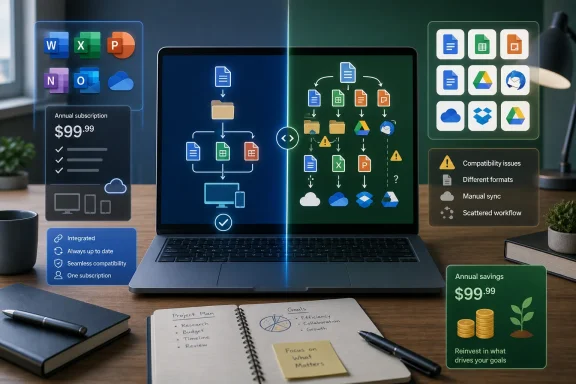 Microsoft’s Bundle Looks Less Essential When It Is Taken Apart
Microsoft 365 Personal is sold as a unified subscription, but most people do not experience it as one indivisible product. They use a word processor, occasionally open a spreadsheet, receive email, save photographs, and expect files to appear on another device. The subscription’s power comes from making those functions feel like parts of the same system.That integration also hides an important purchasing question: how much of the system does one person actually need? Someone who writes letters, maintains a household budget, and stores a modest collection of documents may be paying for breadth rather than necessity. MakeUseOf’s argument begins from that mismatch between what Microsoft 365 can do and what many personal subscribers routinely ask it to do.
The proposed alternative is not another monolithic office platform. It is a replacement stack: LibreOffice for substantial local documents, Google’s productivity tools for collaboration, Thunderbird for email, and Google Drive for storage. Each product competes with a different part of Microsoft 365, and the user becomes responsible for holding the pieces together.
That is both the strength and weakness of the approach. A modular stack lets users choose the best free tool for each job, but it eliminates the assumption that one account, one installer, one storage service, and one support channel will govern everything. The decision is therefore less “Can these apps replace Microsoft 365?” than “Which Microsoft 365 conveniences am I prepared to manage myself?”
| Alternative | Primary role | Price model | Supported systems or access | Strongest case | Principal compromise |
|---|---|---|---|---|---|
| LibreOffice | Documents, spreadsheets, presentations, drawing and PDF work | Free, open-source | Linux, Android, Windows, macOS | Full offline desktop work | Limited cloud collaboration; mobile use centers on LibreOffice Viewer |
| Google Workspace | Writing, spreadsheets, presentations, communication and collaboration | Free | Windows, macOS, Chrome OS, Linux, Android, iOS | Real-time collaboration and cross-device access | Less feature-rich than Microsoft 365 counterparts |
| Thunderbird | Email and calendar client | Free, open-source | Android, Windows, Linux, Mac | Unified local email client with broad provider support | Not yet available on iOS |
| Google Drive | Cloud files and photo storage | 15GB free tier | Cloud access integrated with Google’s ecosystem | More free storage than OneDrive’s 5GB | Storage is shared across Google services and remains account-dependent |
LibreOffice Replaces the Applications, Not the Microsoft System
LibreOffice is the most direct answer for anyone who thinks of Microsoft 365 primarily as Word, Excel, and PowerPoint. Writer handles documents, Calc covers spreadsheets, Impress creates presentations, and LibreOffice Draw adds vector drawing capabilities that MakeUseOf’s author also finds useful for PDF editing. The LibreOffice project itself presents these as parts of a full open-source productivity suite rather than lightweight viewers or browser accessories.That distinction matters on Windows. LibreOffice is installed software that can work completely offline, open local files, print through the operating system, and continue functioning without a cloud account. For users who regard their PC as the primary location of their work rather than merely a portal into a service, this is the closest philosophical replacement for traditional Office.
Writer can build tables, format pages, and track changes. Calc supports formulas and serious spreadsheet work, while Impress provides the expected presentation workflow. MakeUseOf goes so far as to characterize the suite as suitable for complex, long-form documents and massive spreadsheets, which places it well beyond the category of emergency freeware.
LibreOffice’s most meaningful advantage is not merely that it costs nothing. Its offline, open-source model reduces dependence on a vendor account and allows documents to remain ordinary files under the user’s control. That can be valuable for people with unreliable connectivity, privacy concerns, older working habits, or archives that must remain accessible independently of a subscription.
Yet LibreOffice replaces the applications more convincingly than it replaces the surrounding Microsoft environment. It does not, by itself, reproduce the effortless sharing, cloud synchronization, browser editing, and co-authoring that subscription users may now take for granted. MakeUseOf correctly identifies cloud integration as the suite’s biggest weakness for people who regularly jump between machines or edit alongside colleagues.
The mobile story is another dividing line. The article names LibreOffice Viewer for mobile use, but describes it as doing little beyond reading documents. Although LibreOffice is listed across Linux, Android, Windows, and macOS, that platform list should not be mistaken for a promise that the desktop editing experience follows users unchanged onto a phone.
For a Windows desktop owner who produces documents alone, those limitations may be irrelevant. For a student receiving instructor comments, a consultant exchanging heavily formatted files, or a team revising a proposal simultaneously, they can become the entire decision. LibreOffice is a strong replacement when the center of gravity is the local file; it is a weaker one when the center of gravity is the shared workspace.
Google Makes Collaboration Free by Moving the Workplace Into the Browser
Google Workspace attacks the problem from the opposite direction. Where LibreOffice treats the computer and its local files as the default, Google treats the account, browser, and cloud as the workplace. Docs, Sheets, and Slides do not attempt to mimic the traditional desktop environment in every detail because their principal advantage is that everyone can reach the same live document.MakeUseOf’s author describes Google’s tools as difficult to beat for cloud synchronization and real-time collaboration. They work across Windows, macOS, Chrome OS, Linux, Android, and iOS, and the browser-based experience remains broadly consistent regardless of which desktop operating system is underneath it. Mobile editing is also a credible part of the workflow rather than an afterthought.
Google’s official Workspace material reinforces that collaboration-first design. Gmail, Google Drive, Docs, Sheets, Slides, Meet, and Calendar are presented as connected services in which files, messages, meetings, and schedules revolve around a Google account. The absence of installation is not merely a convenience; it is the architectural decision that makes immediate sharing and synchronized editing possible.
Docs handles everyday writing and formatting, Sheets covers common spreadsheet work, and Slides produces presentations. MakeUseOf acknowledges that these tools are not as feature-rich as their Microsoft 365 counterparts, but argues that this restraint can be an advantage for users who need common functions without Office’s accumulated complexity.
That is a fair argument for personal productivity, where simplicity frequently outranks depth. Many letters, reports, invoices, lists, basic budgets, and presentations do not require the full capabilities of Microsoft’s desktop applications. A user who never touches advanced features receives little value from knowing that they are installed.
The browser model also changes maintenance. Updates arrive through the service, files remain associated with the account, and collaborators do not need to coordinate application versions. There is less software to install on a Windows PC and less concern about whether a document was saved to the correct local directory before the user switched devices.
But the browser is not magic, and the cloud is not neutral. Google’s free productivity environment shifts dependence rather than eliminating it: the Microsoft account and Microsoft storage model give way to a Google account and Google storage model. Users avoiding Microsoft because they dislike account-centered computing may find that they have changed landlords without leaving the building.
Google’s tools can be made available for offline work, as MakeUseOf notes, but offline capability is not their natural center. Users must think ahead about which files are available and should test the workflow before relying on it during travel or an outage. LibreOffice begins offline and adds sharing awkwardly; Google begins online and extends itself offline with qualifications.
There is also a naming trap. The free tools available through an ordinary Google account should not be confused with the premium business versions Google promotes under the Workspace brand. Google’s own business pages distinguish paid organizational services, custom business email, administrative controls, and additional security from the consumer experience.
For an individual replacing personal Microsoft 365 use, that distinction may not matter. For a company, school, nonprofit, or regulated office, it matters enormously. Free personal accounts are not a substitute for an administered business platform merely because the document editor looks similar.
Thunderbird Proves Outlook Is Not the Same Thing as Email
Email may be the easiest Microsoft 365 component to replace because the mailbox and the client are not necessarily the same service. Thunderbird can connect to Gmail, Outlook, Yahoo, and other compatible providers using IMAP or POP3, allowing users to retain existing addresses while changing the application through which they read and organize messages.MakeUseOf describes Thunderbird as an open-source, ad-free Outlook alternative developed under the Mozilla orbit, while listing MZLA Technologies Corporation as the developer. That apparent dual identity reflects Thunderbird’s unusual position: it belongs to a long-running open-source ecosystem associated with Mozilla while being developed and operated through a dedicated organization.
Thunderbird’s unified inbox is one of its clearest benefits for users with several accounts. Instead of opening multiple browser tabs or switching among provider-specific applications, messages can be brought into a single desktop interface. Search, spam filtering, multiple tabs, keyboard shortcuts, customization, and add-ons make it a real client rather than a stripped-down mail reader.
The local-client model also preserves a quality that webmail has steadily pushed into the background: email can remain usable when the web is unavailable. Thunderbird stores mail locally according to its configuration, making it suitable for users who want desktop access to their correspondence rather than total dependence on a browser session.
Its built-in calendar helps cover another Outlook role, but buyers should not mistake functional overlap for complete Microsoft integration. Outlook inside the Microsoft ecosystem can participate in a wider web of Microsoft accounts, storage, organizational policies, directories, and collaboration services. Thunderbird is strongest when the requirement is straightforward email and calendaring, not when Outlook is functioning as the front end for an employer’s entire communications infrastructure.
Mobile support has improved the proposition. Thunderbird is available on Android, but MakeUseOf notes that an iOS version is not available yet and remains in development. Thunderbird’s public roadmaps confirm ongoing work on an iOS client, illustrating both the project’s ambition and the incompleteness of its cross-platform coverage.
That missing iOS application can be a minor inconvenience or an immediate disqualifier. An Android and Windows user can build a relatively consistent open-source email workflow, while an iPhone owner must use another client on mobile. The result is another example of the central trade-off: Microsoft 365 charges for integration, while a free stack frequently asks the user to tolerate seams.
Storage Is Where the Supposedly Free Escape Starts Charging Rent
Google Drive is the connective tissue in MakeUseOf’s proposed stack, and its free allowance makes the initial comparison look decisive. A Google account includes 15GB of storage, while OneDrive’s free allocation is characterized as 5GB. For a light document user, that difference may be enough to postpone payment indefinitely.The headline needs qualification, however. Google states that the 15GB is shared across Google Drive, Gmail, and Google Photos. A full inbox, years of attachments, phone backups, and a growing photo library can therefore consume the same pool that appears generous when considered only as document storage.
That does not erase the advantage, but it changes how users should measure it. Fifteen gigabytes is substantial for text documents and ordinary spreadsheets; it is much less substantial when high-resolution photographs and videos are competing for the same quota. A user replacing OneDrive should audit the entire Google account rather than looking only at the Drive folder.
Google Photos strengthens the proposal because it is available on Android, iOS, and the web. MakeUseOf’s author regards it as better than OneDrive for photo management, and it undoubtedly offers a more photo-centered experience than treating an image library as a generic folder tree. Yet its convenience deepens the dependence on the same Google storage account.
The paid comparison is more provocative. Google One Premium provides 2TB for $99.99 a year, while the article compares that with 1TB in Microsoft 365 Personal at roughly the same annual cost. Taken purely as a storage purchase, Google supplies twice the capacity.
Taken as a productivity purchase, the comparison is less clean. Microsoft’s $100 annual subscription includes its Office applications alongside the 1TB of storage, while Google One Premium is primarily a storage proposition supplemented by Google’s broader ecosystem. MakeUseOf acknowledges this, and the concession is central rather than incidental.
A user who needs 2TB and is already satisfied with Google’s free editors has a straightforward reason to prefer Google One. A user who values the Microsoft desktop applications may reasonably conclude that 1TB plus those applications is a better package. Storage volume cannot settle a comparison between bundles whose other contents are materially different.
Google Drive can also appear in Windows File Explorer, allowing cloud files to be managed without keeping a browser open. This narrows one of OneDrive’s practical advantages and makes the Google option feel less foreign on Windows. Even so, users should test how their preferred files behave when synchronized, made available offline, moved between computers, or opened in non-Google applications.
Compatibility Is the Hidden Invoice Behind a Free Office Stack
The largest cost of leaving Microsoft 365 may never appear on a credit-card statement. It is the compatibility tax: the time spent checking layouts, repairing formulas, replacing fonts, validating exported presentations, and explaining to collaborators why a document changed after moving between applications.MakeUseOf’s recommendation is strongest for documents that begin and end within the alternative stack. A report written in Writer and delivered as a finished file, or a shared plan created entirely in Google Docs, avoids much of the translation problem. The risk rises when files repeatedly cross between Microsoft applications and their competitors.
Microsoft’s formats are widely handled outside Microsoft 365, but “opens the file” and “preserves everything exactly” are different standards. Advanced formatting, elaborate spreadsheets, automation, unusual fonts, embedded objects, review workflows, and presentation layouts can expose differences among applications. Recent Office-alternative coverage generally reaches the same conclusion: free suites can be highly capable without guaranteeing perfect fidelity for complex Microsoft-originated files.
That distinction is especially important in employment and education. If a client, professor, government office, or employer requires a document that behaves exactly as expected in Microsoft’s software, the user may not control the relevant standard. Saving $100 is a poor bargain if a damaged submission costs hours of repair or undermines professional credibility.
Basic users face much less risk. A household budget, personal letter, simple résumé, club newsletter, or uncomplicated slide deck is unlikely to exercise every proprietary corner of Microsoft’s applications. The further the work moves from macros, specialized templates, complex revision processes, and automation, the more convincing the free alternatives become.
This is why a migration should begin with representative documents rather than ideology. Users should open the files they actually depend upon, edit them, export them, reopen the results, and inspect them on another device. The decision must be based on the difficult files, not the blank document that every office suite handles well.
Windows Users Do Not Need to Make This an All-or-Nothing Migration
The most sensible arrangement for many people will be hybrid rather than pure. LibreOffice can remain installed for offline work and substantial local documents, while Google Docs handles shared drafts. Thunderbird can manage several mailboxes, and Google Drive can synchronize selected files through Windows.This coexistence model is less rhetorically satisfying than declaring one ecosystem victorious, but it reflects how personal computers are actually used. A browser tool may be best for one project, a desktop application for another, and a provider’s native web interface for a third. Windows has always served as a platform on which competing services can overlap.
Users can also keep Microsoft-compatible workflows available without renewing immediately. Before cancellation, they can determine which existing documents genuinely require Microsoft’s applications and which are routine enough to move elsewhere. A short period of parallel use is safer than discovering a critical incompatibility after access to a familiar tool has become urgent.
The risk is organizational clutter. Documents may end up scattered across a local LibreOffice directory, Google Drive, email attachments, and an old OneDrive folder. Without a deliberate filing policy, the alternative stack can produce duplicate copies and uncertainty over which version is authoritative.
That is the unglamorous price of modularity. Microsoft charges for a system in which many defaults have already been selected; the free approach requires the user to design those defaults. Folder locations, backup routines, sharing conventions, primary file formats, and account-recovery methods all become user decisions.
For a technically comfortable Windows owner, that control may be welcome. For someone who simply expects a new laptop to restore files and applications with minimal thought, the integrated subscription can be worth more than the sum of its feature list. Convenience is not imaginary merely because it is difficult to quantify.
Enterprise IT Cannot Deploy Consumer Freeware by Anecdote
MakeUseOf’s proposal is written from the perspective of personal use, and IT departments should preserve that boundary. LibreOffice, Google’s free consumer tools, Thunderbird, and free Drive storage may cover individual tasks, but an organization is buying governance as much as software.Administrators must consider identity management, access removal, retention, auditability, support, device policies, data location, account recovery, document compatibility, and the ownership of files when an employee leaves. An application being free and technically capable says little about whether it can satisfy those operational requirements.
Google’s own positioning makes the distinction visible. The company markets premium Workspace versions to businesses with organizational features beyond what a personal Google account provides. An employee creating company documents through an unmanaged personal account may solve an immediate licensing problem while creating a larger ownership and security problem.
Thunderbird presents a similar distinction. It can be an excellent client for standards-based mail services, but changing the client does not replace the mail server, identity system, compliance controls, or organizational calendar infrastructure behind Outlook. Administrators need to map which layer is actually being removed.
LibreOffice can reduce desktop application licensing costs, particularly where documents are produced internally and complex Microsoft compatibility is not mandatory. Deployment still requires template testing, user training, update management, file-association decisions, and a plan for the subset of documents that do not translate cleanly.
The correct enterprise question is not whether free software can open a document. It is whether the organization can support the full lifecycle of that document—from creation and collaboration through retention, discovery, transfer, and deletion—without introducing unacceptable risk.
Action checklist for admins
- Inventory which Microsoft 365 applications, storage features, templates, add-ins, and collaboration workflows users actually depend on.
- Test representative Word, spreadsheet, and presentation files in LibreOffice and Google’s editors, prioritizing the most complex documents.
- Separate consumer Google accounts from any approved organizational Workspace environment and define who owns stored files.
- Pilot Thunderbird against the organization’s supported mail providers before changing the default Windows email client.
- Establish approved storage locations, backup rules, file formats, sharing procedures, and account-recovery ownership.
- Retain a Microsoft-capable exception path for users or documents whose compatibility requirements cannot be met reliably.
The People Who Should Cancel Are Not the People Microsoft Built the Bundle Around
The strongest candidate for cancellation is a personal Windows user whose work is uncomplicated, mostly self-contained, and rarely exchanged in complex Microsoft formats. Someone who writes ordinary documents, maintains basic spreadsheets, uses several email accounts, and needs modest cloud storage can assemble a capable environment without paying the annual fee.LibreOffice is particularly compelling for people who prefer local files and offline access. Google’s tools are better suited to users who value sharing, browser access, and mobile editing. Thunderbird appeals to those who want a unified, customizable client instead of living in several webmail tabs.
The weakest candidate is someone deeply embedded in collaborative Microsoft workflows. If work revolves around exact document fidelity, advanced spreadsheet features, elaborate presentations, employer-managed Outlook, or seamless OneDrive integration, replacing the subscription may create more friction than the annual saving justifies.
Storage needs can reverse the calculation in either direction. Users approaching 2TB who do not need Microsoft’s desktop applications may see more value in Google One Premium at $99.99 a year. Users satisfied with 1TB who depend on Microsoft’s applications may consider Microsoft 365 Personal the more complete purchase at $100 a year.
Families and individuals providing informal technical support should also price in complexity. A four-product stack means several interfaces, update mechanisms, account systems, support communities, and recovery processes. The technically inclined person who sets it up may become the permanent help desk for everyone else using it.
This does not mean Microsoft 365 is mandatory for nontechnical users. It means cancellation should follow a workflow audit, not resentment at the renewal notice. The subscription is easiest to eliminate when its capabilities have already become redundant.
A Better Free Setup Starts With Honest Limits
The practical case for the four-app approach can be reduced to a few decisions rather than a sweeping verdict on Microsoft:- Choose LibreOffice when offline desktop work and local file ownership matter most.
- Choose Google Docs, Sheets, and Slides when live collaboration and cross-device access outweigh advanced features.
- Use Thunderbird when email needs a dedicated, unified client rather than another paid productivity bundle.
- Treat Google Drive’s 15GB as shared Google-account storage, not 15GB reserved solely for documents.
- Test complex Microsoft files before canceling, because compatibility failures are the most likely hidden cost.
- Do not treat personal free accounts as a substitute for managed business infrastructure.
References
- Primary source: MakeUseOf
Published: Sun, 12 Jul 2026 13:30:17 GMT
4 free apps I’d use before paying for Microsoft 365 again
Save $100 without missing a thing. www.makeuseof.com
- Related coverage: realitypathing.com
- Official source: microsoft.com
Compare Microsoft 365 Plans & Pricing (Formerly Office 365) - Microsoft Store
Compare Microsoft 365 subscription plans and pricing (formerly Office 365). Choose from Personal, Family and Premium subscriptions with Copilot AI, Word, Excel, PowerPoint, Outlook, and OneDrive. Works on PC, Mac, iPhone, iPad and Android. Find the right plan for your needs.www.microsoft.com
- Related coverage: windowsmode.com
Best Free Microsoft Office Alternatives in 2026 (7 Tested) - Windows Mode
The best free Microsoft Office alternatives are Google Docs for collabs, LibreOffice for desktop use and WPS Office. See our full comparison.www.windowsmode.com - Related coverage: freestackfinder.com
Best Free Microsoft Office Alternatives in 2026
Free Microsoft Office alternatives for Word, Excel, and PowerPoint — Google Docs for collaboration, LibreOffice offline, OnlyOffice for .docx fidelity.freestackfinder.com
- Related coverage: techygeekshome.info
Best Free Microsoft Office Alternatives in 2026
The best free Microsoft Office alternatives in 2026. LibreOffice, Google Docs, OnlyOffice, WPS Office and Microsoft 365 Online — reviewed and compared.techygeekshome.info
- Related coverage: captioza.com
Best Free Alternatives to Microsoft Office (2026 Guide) - Captioza
Microsoft Office has been the gold standard for word processing, spreadsheets, and presentations for decades. But with the shift toward subscription-based Microsoft 365, many users...captioza.com - Official source: services.google.com
