

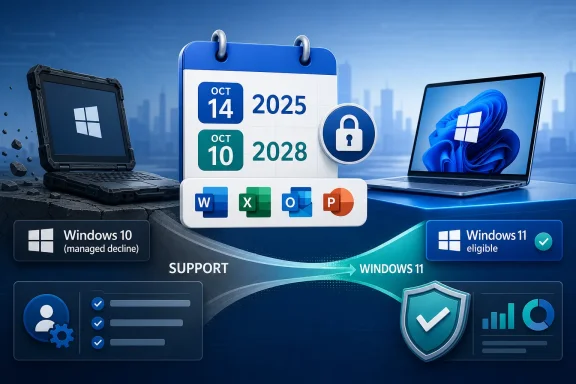
Microsoft says Microsoft 365 Apps on Windows 10 moved out of normal support when Windows 10 reached end of support on October 14, 2025, but Word, Excel, Outlook, PowerPoint, Project, and Visio will continue receiving security updates on Windows 10 until October 10, 2028. The headline is not that Office suddenly dies on old PCs. The real story is subtler and more consequential: Microsoft has turned the Office support clock into another lever for pulling the Windows 10 installed base toward Windows 11. For home users, small businesses, schools, and IT departments still sitting on fleets of perfectly serviceable machines, that distinction matters.
Microsoft’s message to Windows 10 users has been consistent in tone even when the details have shifted: Windows 11 is where the company wants its customers to be. The end of Windows 10 support was always going to be a pressure point, but tying Microsoft 365’s supported status to the operating system makes the deadline feel less like an OS lifecycle event and more like an ecosystem-wide migration campaign.
That matters because Microsoft 365 is not a niche add-on. It is the daily work surface for millions of users who may not care which Windows kernel is underneath their spreadsheet, mail client, or school assignment. When Microsoft says those apps are no longer fully supported on Windows 10, the audience hears something larger than lifecycle language: the tools they rely on are being moved onto a narrowing road.
The company’s current documentation softens the sharpest interpretation. Microsoft 365 Apps are not set to vanish from Windows 10 machines, and Microsoft says it will continue shipping security updates for three years after Windows 10’s end-of-support date. That is a meaningful concession, especially for organizations that cannot replace hardware overnight.
But the concession does not erase the strategy. Microsoft is drawing a line between functioning and supported, and that line is where administrators live. A machine that still opens Word is not necessarily a machine that belongs in a compliant, supportable, auditable environment.
The reality is more layered. Microsoft now says Microsoft 365 Apps running on Windows 10 will continue to receive security updates until October 10, 2028. Devices will also continue receiving feature updates and Copilot support, where eligible, until Version 2608 is released. After that, those Windows 10 systems remain on Version 2608 and receive only security updates.
That is not the same as “Office stops working.” It is also not the same as full support. Microsoft’s support policy after October 14, 2025, effectively tells customers that Windows 10 is a dead-end platform for Microsoft 365. If a problem occurs only on Windows 10 and not on Windows 11, support can direct the customer to move to Windows 11. If the customer cannot move, troubleshooting may be limited, and Microsoft will not treat the Windows 10 case as a reason to log product bugs or make product changes.
This is the kind of distinction that feels bureaucratic until it lands on a help desk. A broken Outlook plug-in, a printing regression, a OneDrive sync issue, or a strange Excel crash on a Windows 10 fleet may still get basic troubleshooting. But the escalation path narrows. The answer increasingly becomes: reproduce it on Windows 11, or accept that the platform is outside the future path.
Still, security updates for Office do not make Windows 10 a healthy long-term platform. The operating system itself has already left normal support. Consumers have limited Extended Security Updates options, while businesses can buy into a longer ESU path, but those programs are fundamentally bridges. They are priced, scoped, and messaged as temporary measures.
For administrators, the key point is that the software stack is becoming asymmetrical. The Office apps may receive security fixes through 2028, but the surrounding OS, drivers, management agents, security baselines, browser components, and third-party integrations all sit under increasing lifecycle pressure. A supported app on an unsupported or partially extended OS is not the same as a fully supported endpoint.
That asymmetry also complicates risk conversations. A finance department may ask why Excel still launches if the machine must be replaced. A security team may answer that “still launches” is not the control objective. Microsoft’s policy makes that argument easier for IT leaders, but it also puts them in the uncomfortable position of translating vendor lifecycle nuance into budget requests.
The tension comes from what blocks the upgrade path. Windows 11’s minimum requirements, especially TPM 2.0, Secure Boot, and supported CPU generations, left a large number of otherwise usable PCs outside the official upgrade fence. Microsoft has repeatedly defended those requirements as security-driven rather than arbitrary, and there is a legitimate technical argument behind stronger hardware roots of trust.
But from the user’s side of the desk, the distinction can feel academic. A laptop that browses the web, joins Teams calls, edits documents, and runs line-of-business software may be declared unfit not because it is slow, but because it lacks a supported security baseline. That is rational from a platform-security perspective and still expensive from a household, school district, nonprofit, or small-business perspective.
Microsoft’s full-screen upgrade notices and “new Windows 11 PC” messaging land differently in that context. They are not just reminders to patch. They are purchase prompts. The company may be right that modern hardware is safer and better aligned with where Windows is going, but it is also true that the Windows 11 transition turns a software lifecycle deadline into a hardware refresh cycle.
That is why the Microsoft 365 angle matters. Office is the application suite that makes many Windows PCs economically useful. When its support posture shifts, Microsoft is not merely nudging enthusiasts toward a cleaner Start menu. It is attaching the productivity layer to the hardware eligibility debate.
Many users do not know whether their PCs support Windows 11. Others have seen failed upgrade checks without understanding whether the blocker is TPM, CPU generation, firmware settings, storage layout, or something else. Some systems can pass after a BIOS change; others are permanently outside Microsoft’s official support list.
Microsoft 365 adds another layer of ambiguity. A user might hear that Office is “unsupported” and assume their subscription is worthless on Windows 10. Another might hear that Office security updates continue until 2028 and assume nothing needs to change. Both interpretations miss the middle: the apps continue, but Windows 10 is no longer the platform Microsoft wants to validate, enhance, or defend as a first-class environment.
That middle ground is hard to communicate in consumer language. “Your apps will still work, but you should not count on full support, and future features will stop arriving after a certain version” is accurate but unsatisfying. It does not fit neatly into a notification banner.
The risk is that users tune out. Windows 10 holdouts have already spent years dismissing upgrade prompts, telemetry nags, Microsoft account nudges, Edge promotions, and various Windows 11 invitations. If the Microsoft 365 message feels like another pressure tactic rather than a clear support boundary, some users will ignore the warning until a real failure arrives.
That affects inventory, procurement, security baselines, help-desk scripts, compliance attestations, and cyber-insurance conversations. It also affects how IT evaluates incidents. If a Microsoft 365 issue appears on Windows 10, the first question becomes whether the same issue exists on Windows 11. That is not just troubleshooting; it is a forced comparison with the target platform.
The Version 2608 cutoff is also important. Once Windows 10 devices stop receiving Microsoft 365 feature updates and remain on security-only servicing, they become increasingly different from Windows 11 devices running the current Microsoft 365 channel. In a large organization, that divergence can turn documentation, training, macro behavior, add-in validation, and support knowledge into moving targets.
Enterprises can absorb some of this with planning. They can segment Windows 10 machines, restrict them to defined roles, wrap them in ESU coverage, and accelerate replacement where risk is highest. But every exception has a carrying cost. Microsoft’s lifecycle policy makes that cost visible, and visibility is often the first step toward budget approval.
That does not mean every user wants those features. Many Windows 10 loyalists would be perfectly happy with stable Office applications, local files, predictable printing, and no AI assistant offering to summarize a meeting they did not want recorded. But Microsoft’s commercial incentives point in the other direction.
Windows 11 gives Microsoft a cleaner runway for that roadmap. It standardizes more of the security model, pushes users toward newer hardware, and aligns the desktop with a services business that depends on continuous feature delivery. Windows 10, by contrast, represents installed-base inertia: profitable in the past, costly to keep validating in the future.
The Microsoft 365 support timeline reflects that tension. Security fixes continue because abandoning users would be reckless and reputationally damaging. New features stop because Microsoft does not want to optimize the future for yesterday’s installed base.
That does not mean migration is easy. Microsoft 365 is sticky because of Exchange, Teams, SharePoint, OneDrive, macros, file compatibility, compliance tooling, identity integration, and years of user muscle memory. For most organizations, replacing Windows hardware is simpler than replacing Microsoft 365.
But the consumer and small-business edge is different. A family PC used for documents and email can often move to web apps or a free office suite. A small shop with a few spreadsheets may tolerate compatibility quirks if the alternative is replacing multiple PCs. Microsoft’s push may not trigger mass defection, but it will make the escape route more visible.
This is the danger of pressure campaigns: they can accelerate the desired migration, but they also invite customers to reassess the whole stack. A Windows 11 PC with Microsoft 365 is Microsoft’s preferred answer. For some users, the answer may instead become a Chromebook, a Mac, a Linux refurb, or an old Windows 10 box used carefully and outside sensitive workflows.
Those dates serve different audiences. Security teams care about the OS support boundary. Productivity teams care about Office feature divergence. Procurement teams care about refresh cycles. Executives care about the point at which delay becomes more expensive than replacement.
The worst strategy is pretending that because Microsoft 365 continues to receive security updates, nothing has changed. The second-worst strategy is panic-buying hardware without an inventory plan. The sensible path sits between those extremes: identify which Windows 10 devices can move to Windows 11, which require replacement, which can be isolated or retired, and which need paid extended coverage during the transition.
For home users, the same logic applies at smaller scale. Check whether the PC can officially run Windows 11. If it can, plan the upgrade before an emergency forces it. If it cannot, decide whether the machine’s role justifies ESU coverage, replacement, or a move to another platform.
 Microsoft Turns Office Into the Upgrade Stick
Microsoft’s message to Windows 10 users has been consistent in tone even when the details have shifted: Windows 11 is where the company wants its customers to be. The end of Windows 10 support was always going to be a pressure point, but tying Microsoft 365’s supported status to the operating system makes the deadline feel less like an OS lifecycle event and more like an ecosystem-wide migration campaign.That matters because Microsoft 365 is not a niche add-on. It is the daily work surface for millions of users who may not care which Windows kernel is underneath their spreadsheet, mail client, or school assignment. When Microsoft says those apps are no longer fully supported on Windows 10, the audience hears something larger than lifecycle language: the tools they rely on are being moved onto a narrowing road.
The company’s current documentation softens the sharpest interpretation. Microsoft 365 Apps are not set to vanish from Windows 10 machines, and Microsoft says it will continue shipping security updates for three years after Windows 10’s end-of-support date. That is a meaningful concession, especially for organizations that cannot replace hardware overnight.
But the concession does not erase the strategy. Microsoft is drawing a line between functioning and supported, and that line is where administrators live. A machine that still opens Word is not necessarily a machine that belongs in a compliant, supportable, auditable environment.
The October 2025 Date Was a Gate, Not a Guillotine
The original fear around Microsoft 365 on Windows 10 was easy to understand. Windows 10 support ended on October 14, 2025, and Microsoft said Microsoft 365 Apps would no longer be supported on Windows 10 after that date because the operating system would no longer meet Microsoft 365’s system requirements. That sounded final.The reality is more layered. Microsoft now says Microsoft 365 Apps running on Windows 10 will continue to receive security updates until October 10, 2028. Devices will also continue receiving feature updates and Copilot support, where eligible, until Version 2608 is released. After that, those Windows 10 systems remain on Version 2608 and receive only security updates.
That is not the same as “Office stops working.” It is also not the same as full support. Microsoft’s support policy after October 14, 2025, effectively tells customers that Windows 10 is a dead-end platform for Microsoft 365. If a problem occurs only on Windows 10 and not on Windows 11, support can direct the customer to move to Windows 11. If the customer cannot move, troubleshooting may be limited, and Microsoft will not treat the Windows 10 case as a reason to log product bugs or make product changes.
This is the kind of distinction that feels bureaucratic until it lands on a help desk. A broken Outlook plug-in, a printing regression, a OneDrive sync issue, or a strange Excel crash on a Windows 10 fleet may still get basic troubleshooting. But the escalation path narrows. The answer increasingly becomes: reproduce it on Windows 11, or accept that the platform is outside the future path.
Security Updates Buy Time, Not Indefinite Life
Microsoft’s three-year security update promise for Microsoft 365 Apps on Windows 10 is significant. It acknowledges the practical reality that many customers cannot move all devices at once, particularly when Windows 11’s hardware requirements block some in-place upgrades. It also gives enterprises a more defensible transition window than a hard cliff would have provided.Still, security updates for Office do not make Windows 10 a healthy long-term platform. The operating system itself has already left normal support. Consumers have limited Extended Security Updates options, while businesses can buy into a longer ESU path, but those programs are fundamentally bridges. They are priced, scoped, and messaged as temporary measures.
For administrators, the key point is that the software stack is becoming asymmetrical. The Office apps may receive security fixes through 2028, but the surrounding OS, drivers, management agents, security baselines, browser components, and third-party integrations all sit under increasing lifecycle pressure. A supported app on an unsupported or partially extended OS is not the same as a fully supported endpoint.
That asymmetry also complicates risk conversations. A finance department may ask why Excel still launches if the machine must be replaced. A security team may answer that “still launches” is not the control objective. Microsoft’s policy makes that argument easier for IT leaders, but it also puts them in the uncomfortable position of translating vendor lifecycle nuance into budget requests.
Windows 11’s Hardware Wall Is the Unspoken Business Model
The reason this story has bite is not that Microsoft is ending support for an old operating system. Software lifecycles end. Windows 10 was released in 2015, and a decade of mainstream life is not unusually short by modern platform standards.The tension comes from what blocks the upgrade path. Windows 11’s minimum requirements, especially TPM 2.0, Secure Boot, and supported CPU generations, left a large number of otherwise usable PCs outside the official upgrade fence. Microsoft has repeatedly defended those requirements as security-driven rather than arbitrary, and there is a legitimate technical argument behind stronger hardware roots of trust.
But from the user’s side of the desk, the distinction can feel academic. A laptop that browses the web, joins Teams calls, edits documents, and runs line-of-business software may be declared unfit not because it is slow, but because it lacks a supported security baseline. That is rational from a platform-security perspective and still expensive from a household, school district, nonprofit, or small-business perspective.
Microsoft’s full-screen upgrade notices and “new Windows 11 PC” messaging land differently in that context. They are not just reminders to patch. They are purchase prompts. The company may be right that modern hardware is safer and better aligned with where Windows is going, but it is also true that the Windows 11 transition turns a software lifecycle deadline into a hardware refresh cycle.
That is why the Microsoft 365 angle matters. Office is the application suite that makes many Windows PCs economically useful. When its support posture shifts, Microsoft is not merely nudging enthusiasts toward a cleaner Start menu. It is attaching the productivity layer to the hardware eligibility debate.
The Consumer Problem Is Confusion Masquerading as Choice
For consumers, the options appear simple on paper: upgrade to Windows 11 if eligible, buy a new PC if not, enroll in Extended Security Updates where available, or keep using Windows 10 without support. In practice, this is a mess.Many users do not know whether their PCs support Windows 11. Others have seen failed upgrade checks without understanding whether the blocker is TPM, CPU generation, firmware settings, storage layout, or something else. Some systems can pass after a BIOS change; others are permanently outside Microsoft’s official support list.
Microsoft 365 adds another layer of ambiguity. A user might hear that Office is “unsupported” and assume their subscription is worthless on Windows 10. Another might hear that Office security updates continue until 2028 and assume nothing needs to change. Both interpretations miss the middle: the apps continue, but Windows 10 is no longer the platform Microsoft wants to validate, enhance, or defend as a first-class environment.
That middle ground is hard to communicate in consumer language. “Your apps will still work, but you should not count on full support, and future features will stop arriving after a certain version” is accurate but unsatisfying. It does not fit neatly into a notification banner.
The risk is that users tune out. Windows 10 holdouts have already spent years dismissing upgrade prompts, telemetry nags, Microsoft account nudges, Edge promotions, and various Windows 11 invitations. If the Microsoft 365 message feels like another pressure tactic rather than a clear support boundary, some users will ignore the warning until a real failure arrives.
Enterprise IT Sees a Lifecycle Problem, Not a Desktop Preference
For enterprise administrators, the Microsoft 365 support shift is less about annoyance and more about governance. A Windows 10 device running Microsoft 365 after October 2025 becomes a policy exception. It may be permitted for a transition period, but it is no longer the default shape of a healthy Microsoft endpoint.That affects inventory, procurement, security baselines, help-desk scripts, compliance attestations, and cyber-insurance conversations. It also affects how IT evaluates incidents. If a Microsoft 365 issue appears on Windows 10, the first question becomes whether the same issue exists on Windows 11. That is not just troubleshooting; it is a forced comparison with the target platform.
The Version 2608 cutoff is also important. Once Windows 10 devices stop receiving Microsoft 365 feature updates and remain on security-only servicing, they become increasingly different from Windows 11 devices running the current Microsoft 365 channel. In a large organization, that divergence can turn documentation, training, macro behavior, add-in validation, and support knowledge into moving targets.
Enterprises can absorb some of this with planning. They can segment Windows 10 machines, restrict them to defined roles, wrap them in ESU coverage, and accelerate replacement where risk is highest. But every exception has a carrying cost. Microsoft’s lifecycle policy makes that cost visible, and visibility is often the first step toward budget approval.
The Copilot Era Raises the Stakes
There is another reason Microsoft wants the old Windows base to move: the company’s product roadmap is increasingly built around AI features, cloud identity, modern security assumptions, and hardware capabilities that Windows 10 was never designed to showcase. Microsoft 365 is no longer just Word, Excel, and PowerPoint with a subscription wrapper. It is the delivery vehicle for Copilot, cloud-connected collaboration, policy enforcement, and identity-aware workflows.That does not mean every user wants those features. Many Windows 10 loyalists would be perfectly happy with stable Office applications, local files, predictable printing, and no AI assistant offering to summarize a meeting they did not want recorded. But Microsoft’s commercial incentives point in the other direction.
Windows 11 gives Microsoft a cleaner runway for that roadmap. It standardizes more of the security model, pushes users toward newer hardware, and aligns the desktop with a services business that depends on continuous feature delivery. Windows 10, by contrast, represents installed-base inertia: profitable in the past, costly to keep validating in the future.
The Microsoft 365 support timeline reflects that tension. Security fixes continue because abandoning users would be reckless and reputationally damaging. New features stop because Microsoft does not want to optimize the future for yesterday’s installed base.
The Open Door for Alternatives Gets Wider
Microsoft’s decision will also give oxygen to alternatives, though not necessarily in the dramatic “everyone switches to Linux tomorrow” sense. LibreOffice, OnlyOffice, Google Workspace, web apps, and platform-agnostic workflows become more attractive when users feel squeezed by Windows hardware requirements. The more Microsoft makes Office feel conditional on Windows 11, the more some customers will ask whether the dependency is still worth it.That does not mean migration is easy. Microsoft 365 is sticky because of Exchange, Teams, SharePoint, OneDrive, macros, file compatibility, compliance tooling, identity integration, and years of user muscle memory. For most organizations, replacing Windows hardware is simpler than replacing Microsoft 365.
But the consumer and small-business edge is different. A family PC used for documents and email can often move to web apps or a free office suite. A small shop with a few spreadsheets may tolerate compatibility quirks if the alternative is replacing multiple PCs. Microsoft’s push may not trigger mass defection, but it will make the escape route more visible.
This is the danger of pressure campaigns: they can accelerate the desired migration, but they also invite customers to reassess the whole stack. A Windows 11 PC with Microsoft 365 is Microsoft’s preferred answer. For some users, the answer may instead become a Chromebook, a Mac, a Linux refurb, or an old Windows 10 box used carefully and outside sensitive workflows.
The Real Deadline Is the One Each Organization Can Defend
The practical deadline is no longer a single date. October 14, 2025, marked the end of normal Windows 10 support and the beginning of Microsoft 365’s constrained life on that OS. Version 2608 marks the feature freeze for Microsoft 365 Apps on Windows 10. October 10, 2028, marks the end of Microsoft 365 security updates on Windows 10.Those dates serve different audiences. Security teams care about the OS support boundary. Productivity teams care about Office feature divergence. Procurement teams care about refresh cycles. Executives care about the point at which delay becomes more expensive than replacement.
The worst strategy is pretending that because Microsoft 365 continues to receive security updates, nothing has changed. The second-worst strategy is panic-buying hardware without an inventory plan. The sensible path sits between those extremes: identify which Windows 10 devices can move to Windows 11, which require replacement, which can be isolated or retired, and which need paid extended coverage during the transition.
For home users, the same logic applies at smaller scale. Check whether the PC can officially run Windows 11. If it can, plan the upgrade before an emergency forces it. If it cannot, decide whether the machine’s role justifies ESU coverage, replacement, or a move to another platform.
Microsoft’s Office Deadline Leaves Windows 10 Users With Three Clocks
The useful way to read Microsoft’s policy is not as a single shutdown notice, but as three clocks ticking at different speeds. Windows 10 is already outside normal support, Microsoft 365 on Windows 10 is moving toward a feature freeze, and Office security updates have a final runway into 2028.- Microsoft 365 Apps on Windows 10 are no longer in the same support posture they had before Windows 10’s end-of-support date.
- Word, Excel, PowerPoint, Outlook, Project, and Visio are expected to keep receiving security updates on Windows 10 until October 10, 2028.
- Microsoft 365 feature updates and eligible Copilot support on Windows 10 continue only until Version 2608, after which those devices remain on that version.
- Microsoft support can limit escalation when an issue appears only on Windows 10 and not on Windows 11.
- Windows 11’s hardware requirements make this migration a hardware planning problem, not merely a software update problem.
- Users and administrators should treat remaining Windows 10 machines as exceptions with a retirement, replacement, or isolation plan.
References
- Primary source: it-daily
Published: 2026-06-02T17:20:25.456854
Microsoft announces end of support for Microsoft 365 on Windows 10
n October 2025, Microsoft 365 applications will no longer be officially supported under the expiring operating system.www.it-daily.net - Related coverage: windowscentral.com
HP’s Windows 10 holdouts show just how hard Microsoft’s Windows 11 upgrade push really is | Windows Central
Three out of ten HP PCs are still running Windows 10.www.windowscentral.com - Official source: learn.microsoft.com
Windows 10 end of support and Microsoft 365 Apps - Microsoft 365 Apps | Microsoft Learn
Provides Office admins with information about the implications of Windows 10 end of support on Microsoft 365 Apps.learn.microsoft.com - Related coverage: tomsguide.com
Microsoft 365 apps are officially dying on Windows 10 — here's what we know | Tom's Guide
Microsoft is officially calling it quits on Windows 10 in 2025, and it's ending support for Office apps on the OS — but not entirely.www.tomsguide.com - Related coverage: pcworld.com
Office 365 will officially lose support on Windows 10 come October | PCWorld
Ho boy, Microsoft. You're really doing your best to drive away customers, aren't you?www.pcworld.com - Related coverage: howtogeek.com
Microsoft Office Apps Soon Won’t Be Supported on Windows 10
You have less than a year left. www.howtogeek.com
- Related coverage: computerworld.com
Support for Microsoft 365 on Windows 10 ends in mid-October – Computerworld
Microsoft has now made it clear that support for Microsoft 365 on Windows 10 will cease at the same time as support for the older operating system. www.computerworld.com
- Related coverage: techradar.com
Microsoft is officially cutting support for Office apps on Windows 10, so update now | TechRadar
Microsoft 365 won’t be supported by Windows 10www.techradar.com - Related coverage: windowslatest.com
Microsoft publishes Windows 10 $30 ESU (Extended security updates) in the Store
Windows 10 End of Life is today, October 14, 2025, but you can increase its lifespan with the Extended Security Updates program www.windowslatest.com
- Related coverage: tomshardware.com
Microsoft 365 users still on Windows 10 will be out of luck when Windows 10 is retired in October | Tom's Hardware
What, you thought your subscription software would just keep working when you're already paying for it?www.tomshardware.com - Related coverage: hungerford.tech
- Related coverage: laptopmag.com
Microsoft recommends a drastic move for Windows 11 upgrade, report says | Laptop Mag
Windows 11 is a free upgrade for Windows 10 users, but Microsoft has a suggestion for those PC owners who need to update their operating system.www.laptopmag.com - Official source: microsoft.com
- Related coverage: atomicdata.com
- Related coverage: aor-its.com
