

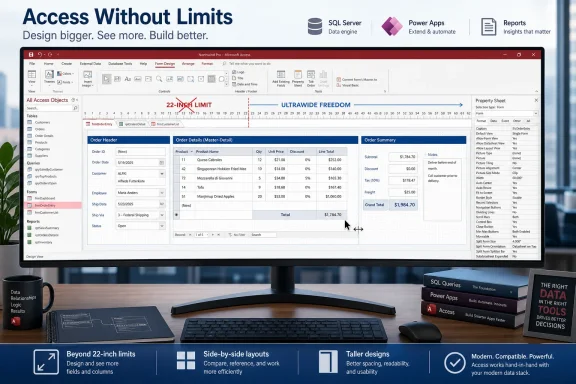
Microsoft is rolling out a Microsoft Access update in June 2026 that removes the long-standing 22-inch design limit for Access forms and reports on desktop, allowing developers to build wider and taller interfaces for modern large-format monitors. The change is small enough to sound like a footnote, but for the Access world it lands like a structural renovation. It tells us Microsoft is not trying to reinvent Access as a cloud-native app builder; it is trying to make the thing people actually still use less trapped in the assumptions of 1990s screens.
For years, Access developers have lived with a strange constraint: forms and reports could only be designed up to roughly 22 inches in size. That number was not merely a cosmetic annoyance. It shaped how Access applications looked, how they behaved, and how much contortion was required to fit modern workflows into an old canvas.
The limit made a certain kind of sense when desktop screens were small, resolutions were modest, and line-of-business applications were expected to show a few fields at a time. But the office desk has changed. A financial analyst may sit in front of a 34-inch ultrawide display; a production planner may use a wall-mounted dashboard; an administrator may run Access beside Teams, Outlook, browser tabs, and remote desktop windows on a high-DPI monitor.
Access, meanwhile, kept forcing designers to think like the monitor was still a beige CRT. The result was a mismatch between the application’s continued usefulness and the physical workspace where that usefulness now happens.
This update does not make Access fashionable. It does not make it a Power Platform competitor, a web app framework, or a modern database engine. What it does is more practical: it removes one of the most visible reminders that Access’s interface layer was carrying around an ancient ruler.
That phrasing matters. Microsoft is not describing a replacement architecture or a migration path. It is describing direct investment in the traditional Access client, specifically the forms-and-reports surface that makes Access valuable in the first place.
Access has always been an odd survivor in Microsoft’s portfolio. It is too local and file-oriented to fit neatly into Microsoft’s cloud-first story, too beloved by departments to kill casually, and too productive in the hands of power users to dismiss as mere legacy. Every few years, someone declares that Access should be replaced by SQL Server, Power Apps, SharePoint Lists, Excel, Dataverse, or a web app. Every few years, Access persists because the replacement is either too expensive, too governed, too underpowered for desktop interaction, or too far removed from the person who actually owns the problem.
The 22-inch-limit change is therefore a revealing kind of modernization. Microsoft is not pretending Access is something else. It is sanding down an old limitation that made Access applications look increasingly absurd in modern environments.
That is the right kind of maintenance for a product like this. Access does not need a keynote slot. It needs the accumulated friction of daily use reduced one stubborn edge at a time.
When the design surface stops at a fixed physical dimension, developers do not simply stop wanting more space. They invent workarounds. They cram controls closer together, split workflows across tabs, add subforms, use navigation buttons, squeeze columns, hide details behind secondary forms, or push users into exported Excel files when Access could otherwise have handled the job.
Some of those patterns are good design. Tabs and subforms can reduce clutter. A disciplined form should not become a giant spreadsheet with buttons. But artificial scarcity has a way of disguising itself as taste. Many Access interfaces are not compact because they are elegant; they are compact because the tool made width expensive.
The arrival of ultrawide displays made the problem harder to defend. A user could have abundant horizontal space available while the Access form itself remained bounded by a design ceiling from another era. That is the kind of mismatch that makes software feel old even when it still performs its job reliably.
Removing the limit will not automatically make Access applications beautiful. If anything, it may enable a new wave of sprawling internal tools that look like someone tipped a filing cabinet onto a 49-inch monitor. But it gives developers a choice they did not have before: to design for the screen in front of the user rather than the historical assumptions embedded in the product.
Access applications are often built by people who understand the business process better than they understand interaction design. That is part of Access’s genius and part of its danger. The payroll clerk, inventory manager, compliance analyst, or operations lead can build something that solves a real problem without waiting for a formal development team. But when screen real estate expands, informal design habits can scale badly.
A wider form can show a customer record, order history, shipping status, and notes side by side. It can also become an unreadable wall of controls. A taller report can reduce awkward page breaks and show richer operational detail. It can also become a dashboard that nobody can print, export, or review consistently.
The update therefore creates a new dividing line between Access apps that are merely enlarged and Access apps that are modernized. The better ones will use the additional canvas to reduce context switching, group related information, and make high-value comparisons visible. The worse ones will use it to avoid making decisions about hierarchy.
This is where Access developers should borrow from web and dashboard design without trying to become web developers. Wider screens are best used for relationships: master-detail views, side-by-side comparisons, exception queues, approval panels, and contextual histories. They are not best used for making a single row of fields stretch across a continent.
Access has historically struggled to feel native in that world. Fonts, controls, spacing, and window behavior can expose the age of the application model. Even when the database logic is sound, the interface can feel trapped in a pre-4K design vocabulary.
Larger form and report surfaces do not solve every high-DPI problem. They do not guarantee responsive behavior in the modern web sense. They do not make every legacy Access application scale gracefully. They do, however, remove one hard ceiling that made large-format design impossible before the real design conversation could even begin.
For IT departments, that distinction matters. Many organizations have Access apps that are not glamorous but are mission-critical in narrow ways. They track assets, schedule inspections, generate labels, reconcile exception lists, manage small inventories, or serve as front ends to SQL Server back ends. These apps may not justify a full rewrite, but they still need to function in a modern Windows estate.
A constraint like the 22-inch limit made those apps look older than they needed to. Removing it gives administrators and developers a chance to update the user experience without reopening the entire architecture debate.
Access developers should think less about physical inches and more about user tasks. A purchasing clerk does not need every supplier field visible all the time. A dispatcher may need route, vehicle, driver, exception, and contact information visible at once. A warehouse supervisor may benefit from a wide operational board. A finance user may need side-by-side monthly comparisons. The right layout follows the job.
The old limit often forced developers to break complex workflows into smaller pieces. Sometimes that fragmentation was harmful. Sometimes it protected users from bad design. Now that the constraint is loosening, developers will need to supply the discipline the software once imposed.
That means revisiting forms with real users, not just expanding them in design view. It means watching where users scroll, where they retype information, where they export to Excel, and where they keep a second window open because Access has not shown enough context. The best candidates for redesign are not the forms that look cramped to the developer. They are the forms that force the user to leave the workflow.
Reports deserve the same caution. Larger reports can be excellent for screen-first review and operational dashboards, but many Access reports still end up printed, emailed as PDFs, or archived. A report that looks great on a widescreen monitor may be useless on paper if pagination and output formats are ignored.
That front-end role is exactly where the 22-inch limit hurt. The data layer could be modernized, normalized, secured, and backed up, while the interface still looked constrained by a desktop past. Removing the limit helps Access do what it remains unusually good at: building usable internal tools quickly, especially where the users and the process are close together.
Power Apps is Microsoft’s more strategic answer for low-code business applications, especially when cloud access, mobile use, governance, and integration with Dataverse matter. But Power Apps is not a drop-in replacement for every Access scenario. Licensing, performance expectations, offline behavior, complex reporting, user familiarity, and development speed all complicate the migration story.
This update implicitly acknowledges that coexistence. Microsoft can push Power Platform while still improving Access because the two products solve overlapping but not identical problems. Access remains strong where a Windows desktop, a known group of users, a rich form experience, and fast iteration matter more than mobile-first deployment.
The risk for Microsoft is that half-modernizing Access keeps customers comfortable with architectures IT would rather retire. The benefit is that forcing premature migrations often creates worse shadow IT, not better systems. A healthier Access is not necessarily a threat to modernization. It can be a bridge to it, provided organizations treat it as part of an application portfolio rather than an invisible pile of files on a network share.
Access is full of these historical layers, which is why it inspires both affection and exasperation. It gives power users extraordinary leverage. It also exposes them to limits, quirks, and compatibility considerations that feel alien beside modern web software. The same product can feel brilliantly productive at 10 a.m. and absurdly archaic by lunch.
Microsoft’s challenge is that Access cannot be modernized by pretending those layers do not exist. Too many businesses depend on old databases, old VBA code, old forms, and old reports. A reckless redesign would break the very installed base that gives the product its relevance.
So the plausible path is incremental: remove hard limits, improve rendering, support modern display expectations, add conveniences where possible, and avoid breaking established applications. That is not glamorous platform strategy. It is stewardship.
The June 2026 rollout fits that model. It does not ask Access developers to rewrite everything. It gives them more room to make existing applications feel less trapped.
Access changes can be deceptively sensitive. A small rendering or sizing adjustment may affect forms built years ago, reports tuned for exact output, or VBA code that assumes particular dimensions. Microsoft has to balance the desire to unlock modern layouts against the obligation not to wreck old ones.
That is why the rollout framing matters. General Availability on desktop, in the standard worldwide cloud instance, means this is intended for ordinary Microsoft 365 Access users, not just a narrow preview channel or specialist build. For a product with as much legacy baggage as Access, broad rollout implies Microsoft believes the compatibility story is manageable.
Still, administrators should not read “rolling out” as “all environments will behave identically today.” Microsoft 365 feature deployment is staged, and Access installations vary by update channel, build, policy, and enterprise servicing choices. Anyone responsible for a fleet of Access front ends should test before redesigning core applications around the new canvas.
The practical advice is boring but important: create a copy, test on the target Office build, verify behavior on the monitors users actually have, and check reports in their real output formats. A larger design surface is useful only if the resulting application behaves reliably where it is deployed.
Access has always lived in the gray zone between sanctioned development and business improvisation. A department builds a tool because it needs an answer now. The tool becomes important. Then it becomes critical. Then IT discovers that a file share, a macro, and three people’s undocumented knowledge are holding up a business process.
Removing the 22-inch limit will not create that pattern, but it may extend the useful life of applications already in it. A previously cramped app can now be refreshed for modern desks instead of replaced. That may be the rational choice. It may also delay necessary work on security, backup, data integrity, and ownership.
IT leaders should therefore treat this feature as an opportunity to inventory, not just beautify. If an Access application is important enough to redesign for large monitors, it is important enough to ask where the data lives, who owns the code, how it is backed up, what happens when the maintainer leaves, and whether the front end should be split from the data store.
This is the mature way to handle Access. Not by banning it theatrically, and not by ignoring it until something breaks. The right stance is to recognize that Access often solves real problems and then put guardrails around the parts that can hurt the business.
A claims-processing form, for example, may benefit from showing claimant details, policy history, document status, and notes in one wide workspace. A manufacturing report may benefit from a landscape view that surfaces exceptions across production lines. A scheduling tool may finally be able to show a meaningful time horizon without compressing every column into unreadable slivers.
But the update should not erase the discipline of progressive disclosure. Some information belongs one click away. Some belongs in a subform. Some belongs in a separate report. Some belongs in a dashboard outside Access entirely. Bigger screens reduce pressure; they do not eliminate design judgment.
Access developers should also remember that not every user has the same monitor. A redesigned form that sings on a 32-inch display may frustrate a laptop user. If an application must serve both, developers need to plan for multiple layouts, window sizes, or separate forms for different roles. The removal of a maximum does not remove the need to think about the minimum.
That may be the most important practical lesson. The old limit gave everyone the same ceiling. The new world gives developers more responsibility to match interface design to real environments.
There is a broader lesson here about mature software. Not every valuable update changes a platform’s destiny. Some updates simply remove a pain point that users have endured for too long. In a product like Access, that may be more valuable than a flashy feature that does not match how the installed base works.
The Windows ecosystem is full of these quiet dependencies. A small accounting database, a maintenance tracker, a compliance report generator, a lab inventory tool: none of them are strategic in the PowerPoint sense, but they are strategic at 8:30 a.m. when someone needs the process to run. Access persists because it lives at that level of work.
The removal of the 22-inch limit respects that reality. It does not ask whether Access should exist. It assumes that it does, that people still build with it, and that those people now deserve a design surface that reflects the screens on their desks.
 Access Finally Outgrows the Monitor It Was Designed Around
For years, Access developers have lived with a strange constraint: forms and reports could only be designed up to roughly 22 inches in size. That number was not merely a cosmetic annoyance. It shaped how Access applications looked, how they behaved, and how much contortion was required to fit modern workflows into an old canvas.The limit made a certain kind of sense when desktop screens were small, resolutions were modest, and line-of-business applications were expected to show a few fields at a time. But the office desk has changed. A financial analyst may sit in front of a 34-inch ultrawide display; a production planner may use a wall-mounted dashboard; an administrator may run Access beside Teams, Outlook, browser tabs, and remote desktop windows on a high-DPI monitor.
Access, meanwhile, kept forcing designers to think like the monitor was still a beige CRT. The result was a mismatch between the application’s continued usefulness and the physical workspace where that usefulness now happens.
This update does not make Access fashionable. It does not make it a Power Platform competitor, a web app framework, or a modern database engine. What it does is more practical: it removes one of the most visible reminders that Access’s interface layer was carrying around an ancient ruler.
A Small Roadmap Entry Says a Lot About Microsoft’s Access Strategy
The Microsoft 365 Roadmap entry for this change is brief: Access forms and reports can now be designed without the 22-inch size constraint, giving apps room to use larger monitors, show more data, support flexible layouts, and improve the experience on wide and high-resolution screens. The feature is listed for Access on desktop, in General Availability, for the Worldwide standard multi-tenant cloud, with rollout and preview both tied to June 2026.That phrasing matters. Microsoft is not describing a replacement architecture or a migration path. It is describing direct investment in the traditional Access client, specifically the forms-and-reports surface that makes Access valuable in the first place.
Access has always been an odd survivor in Microsoft’s portfolio. It is too local and file-oriented to fit neatly into Microsoft’s cloud-first story, too beloved by departments to kill casually, and too productive in the hands of power users to dismiss as mere legacy. Every few years, someone declares that Access should be replaced by SQL Server, Power Apps, SharePoint Lists, Excel, Dataverse, or a web app. Every few years, Access persists because the replacement is either too expensive, too governed, too underpowered for desktop interaction, or too far removed from the person who actually owns the problem.
The 22-inch-limit change is therefore a revealing kind of modernization. Microsoft is not pretending Access is something else. It is sanding down an old limitation that made Access applications look increasingly absurd in modern environments.
That is the right kind of maintenance for a product like this. Access does not need a keynote slot. It needs the accumulated friction of daily use reduced one stubborn edge at a time.
The 22-Inch Wall Was More Than a Design Quirk
The old size limit was often treated as trivia, one of those Access oddities developers pass around like folklore. But in practice, it had consequences. A form is not just a piece of decoration in an Access app; it is the primary user interface. A report is not just a print artifact; in many organizations it is the operational record, approval document, invoice view, or management snapshot.When the design surface stops at a fixed physical dimension, developers do not simply stop wanting more space. They invent workarounds. They cram controls closer together, split workflows across tabs, add subforms, use navigation buttons, squeeze columns, hide details behind secondary forms, or push users into exported Excel files when Access could otherwise have handled the job.
Some of those patterns are good design. Tabs and subforms can reduce clutter. A disciplined form should not become a giant spreadsheet with buttons. But artificial scarcity has a way of disguising itself as taste. Many Access interfaces are not compact because they are elegant; they are compact because the tool made width expensive.
The arrival of ultrawide displays made the problem harder to defend. A user could have abundant horizontal space available while the Access form itself remained bounded by a design ceiling from another era. That is the kind of mismatch that makes software feel old even when it still performs its job reliably.
Removing the limit will not automatically make Access applications beautiful. If anything, it may enable a new wave of sprawling internal tools that look like someone tipped a filing cabinet onto a 49-inch monitor. But it gives developers a choice they did not have before: to design for the screen in front of the user rather than the historical assumptions embedded in the product.
Bigger Forms Will Reward Disciplined Developers and Punish Lazy Ones
The most important word in Microsoft’s description is not “larger.” It is “flexible.” Removing the 22-inch cap is useful only if developers treat the added space as an opportunity to rethink layout, not as permission to dump every field onto one endless form.Access applications are often built by people who understand the business process better than they understand interaction design. That is part of Access’s genius and part of its danger. The payroll clerk, inventory manager, compliance analyst, or operations lead can build something that solves a real problem without waiting for a formal development team. But when screen real estate expands, informal design habits can scale badly.
A wider form can show a customer record, order history, shipping status, and notes side by side. It can also become an unreadable wall of controls. A taller report can reduce awkward page breaks and show richer operational detail. It can also become a dashboard that nobody can print, export, or review consistently.
The update therefore creates a new dividing line between Access apps that are merely enlarged and Access apps that are modernized. The better ones will use the additional canvas to reduce context switching, group related information, and make high-value comparisons visible. The worse ones will use it to avoid making decisions about hierarchy.
This is where Access developers should borrow from web and dashboard design without trying to become web developers. Wider screens are best used for relationships: master-detail views, side-by-side comparisons, exception queues, approval panels, and contextual histories. They are not best used for making a single row of fields stretch across a continent.
High-DPI Reality Comes for the Departmental Database
The removal of the size constraint also belongs to a larger story about display technology. Modern Windows desktops are no longer defined by one predictable monitor size, one scaling level, and one application window. They are mixed-DPI, multi-monitor, high-resolution environments where a line-of-business app may be dragged between screens, used in a virtual desktop, or projected in a conference room.Access has historically struggled to feel native in that world. Fonts, controls, spacing, and window behavior can expose the age of the application model. Even when the database logic is sound, the interface can feel trapped in a pre-4K design vocabulary.
Larger form and report surfaces do not solve every high-DPI problem. They do not guarantee responsive behavior in the modern web sense. They do not make every legacy Access application scale gracefully. They do, however, remove one hard ceiling that made large-format design impossible before the real design conversation could even begin.
For IT departments, that distinction matters. Many organizations have Access apps that are not glamorous but are mission-critical in narrow ways. They track assets, schedule inspections, generate labels, reconcile exception lists, manage small inventories, or serve as front ends to SQL Server back ends. These apps may not justify a full rewrite, but they still need to function in a modern Windows estate.
A constraint like the 22-inch limit made those apps look older than they needed to. Removing it gives administrators and developers a chance to update the user experience without reopening the entire architecture debate.
This Is Not a License to Build Monster Forms
There is an obvious temptation to treat the new limit removal as a green light for bigger everything. That would be a mistake. In enterprise software, more visible data can be a productivity boost or a cognitive tax, depending on how carefully it is arranged.Access developers should think less about physical inches and more about user tasks. A purchasing clerk does not need every supplier field visible all the time. A dispatcher may need route, vehicle, driver, exception, and contact information visible at once. A warehouse supervisor may benefit from a wide operational board. A finance user may need side-by-side monthly comparisons. The right layout follows the job.
The old limit often forced developers to break complex workflows into smaller pieces. Sometimes that fragmentation was harmful. Sometimes it protected users from bad design. Now that the constraint is loosening, developers will need to supply the discipline the software once imposed.
That means revisiting forms with real users, not just expanding them in design view. It means watching where users scroll, where they retype information, where they export to Excel, and where they keep a second window open because Access has not shown enough context. The best candidates for redesign are not the forms that look cramped to the developer. They are the forms that force the user to leave the workflow.
Reports deserve the same caution. Larger reports can be excellent for screen-first review and operational dashboards, but many Access reports still end up printed, emailed as PDFs, or archived. A report that looks great on a widescreen monitor may be useless on paper if pagination and output formats are ignored.
The Real Winner Is the Access Front End
Access’s place in modern IT is often misunderstood because people talk about it as a database. In many serious deployments, the better way to think about Access is as a rapid front-end builder. The data may live in SQL Server, Azure SQL, SharePoint, or another system; Access supplies the forms, reports, queries, and local workflow glue that business users can understand.That front-end role is exactly where the 22-inch limit hurt. The data layer could be modernized, normalized, secured, and backed up, while the interface still looked constrained by a desktop past. Removing the limit helps Access do what it remains unusually good at: building usable internal tools quickly, especially where the users and the process are close together.
Power Apps is Microsoft’s more strategic answer for low-code business applications, especially when cloud access, mobile use, governance, and integration with Dataverse matter. But Power Apps is not a drop-in replacement for every Access scenario. Licensing, performance expectations, offline behavior, complex reporting, user familiarity, and development speed all complicate the migration story.
This update implicitly acknowledges that coexistence. Microsoft can push Power Platform while still improving Access because the two products solve overlapping but not identical problems. Access remains strong where a Windows desktop, a known group of users, a rich form experience, and fast iteration matter more than mobile-first deployment.
The risk for Microsoft is that half-modernizing Access keeps customers comfortable with architectures IT would rather retire. The benefit is that forcing premature migrations often creates worse shadow IT, not better systems. A healthier Access is not necessarily a threat to modernization. It can be a bridge to it, provided organizations treat it as part of an application portfolio rather than an invisible pile of files on a network share.
Old Limits Often Reveal Old Assumptions
The interesting thing about the 22-inch ceiling is that it was not merely a number. It encoded a worldview. Software assumed a page, a printer, a modest monitor, and a user who interacted with one application at a time. That worldview has been eroding for decades, but old assumptions persist in old products long after the hardware has moved on.Access is full of these historical layers, which is why it inspires both affection and exasperation. It gives power users extraordinary leverage. It also exposes them to limits, quirks, and compatibility considerations that feel alien beside modern web software. The same product can feel brilliantly productive at 10 a.m. and absurdly archaic by lunch.
Microsoft’s challenge is that Access cannot be modernized by pretending those layers do not exist. Too many businesses depend on old databases, old VBA code, old forms, and old reports. A reckless redesign would break the very installed base that gives the product its relevance.
So the plausible path is incremental: remove hard limits, improve rendering, support modern display expectations, add conveniences where possible, and avoid breaking established applications. That is not glamorous platform strategy. It is stewardship.
The June 2026 rollout fits that model. It does not ask Access developers to rewrite everything. It gives them more room to make existing applications feel less trapped.
The Roadmap Timing Suggests Maintenance, Not Resurrection Theater
The feature’s roadmap timing is also worth reading carefully. It was created in April 2025, updated in late June 2026, and listed for rollout in June 2026. That is a long enough runway to suggest this was not a last-minute cosmetic toggle. It was a planned change to a mature product surface where compatibility risk matters.Access changes can be deceptively sensitive. A small rendering or sizing adjustment may affect forms built years ago, reports tuned for exact output, or VBA code that assumes particular dimensions. Microsoft has to balance the desire to unlock modern layouts against the obligation not to wreck old ones.
That is why the rollout framing matters. General Availability on desktop, in the standard worldwide cloud instance, means this is intended for ordinary Microsoft 365 Access users, not just a narrow preview channel or specialist build. For a product with as much legacy baggage as Access, broad rollout implies Microsoft believes the compatibility story is manageable.
Still, administrators should not read “rolling out” as “all environments will behave identically today.” Microsoft 365 feature deployment is staged, and Access installations vary by update channel, build, policy, and enterprise servicing choices. Anyone responsible for a fleet of Access front ends should test before redesigning core applications around the new canvas.
The practical advice is boring but important: create a copy, test on the target Office build, verify behavior on the monitors users actually have, and check reports in their real output formats. A larger design surface is useful only if the resulting application behaves reliably where it is deployed.
Enterprise IT Gets a New Governance Problem in Disguise
There is a governance angle here that Microsoft’s short roadmap language does not dwell on. When Access becomes more comfortable on large monitors, it may become more attractive again for departmental application building. That can be good for productivity and dangerous for control.Access has always lived in the gray zone between sanctioned development and business improvisation. A department builds a tool because it needs an answer now. The tool becomes important. Then it becomes critical. Then IT discovers that a file share, a macro, and three people’s undocumented knowledge are holding up a business process.
Removing the 22-inch limit will not create that pattern, but it may extend the useful life of applications already in it. A previously cramped app can now be refreshed for modern desks instead of replaced. That may be the rational choice. It may also delay necessary work on security, backup, data integrity, and ownership.
IT leaders should therefore treat this feature as an opportunity to inventory, not just beautify. If an Access application is important enough to redesign for large monitors, it is important enough to ask where the data lives, who owns the code, how it is backed up, what happens when the maintainer leaves, and whether the front end should be split from the data store.
This is the mature way to handle Access. Not by banning it theatrically, and not by ignoring it until something breaks. The right stance is to recognize that Access often solves real problems and then put guardrails around the parts that can hurt the business.
Developers Should Redesign Around Workflows, Not Inches
The best use of the new design freedom will be selective. Developers should identify workflows that were visibly compromised by the old limit and redesign those first. The goal should be fewer pop-ups, fewer duplicate searches, fewer exports, and fewer moments where users have to remember context that the interface could have shown.A claims-processing form, for example, may benefit from showing claimant details, policy history, document status, and notes in one wide workspace. A manufacturing report may benefit from a landscape view that surfaces exceptions across production lines. A scheduling tool may finally be able to show a meaningful time horizon without compressing every column into unreadable slivers.
But the update should not erase the discipline of progressive disclosure. Some information belongs one click away. Some belongs in a subform. Some belongs in a separate report. Some belongs in a dashboard outside Access entirely. Bigger screens reduce pressure; they do not eliminate design judgment.
Access developers should also remember that not every user has the same monitor. A redesigned form that sings on a 32-inch display may frustrate a laptop user. If an application must serve both, developers need to plan for multiple layouts, window sizes, or separate forms for different roles. The removal of a maximum does not remove the need to think about the minimum.
That may be the most important practical lesson. The old limit gave everyone the same ceiling. The new world gives developers more responsibility to match interface design to real environments.
The Access Modernization Nobody Will Put on a Billboard
This feature will not generate the kind of excitement Microsoft gets from Copilot announcements, Azure services, or Windows security overhauls. It is too specific, too desktop-oriented, and too tied to a product many executives would rather categorize as legacy. But for the people who maintain Access applications, it is the kind of change that can save hours of awkward workaround design.There is a broader lesson here about mature software. Not every valuable update changes a platform’s destiny. Some updates simply remove a pain point that users have endured for too long. In a product like Access, that may be more valuable than a flashy feature that does not match how the installed base works.
The Windows ecosystem is full of these quiet dependencies. A small accounting database, a maintenance tracker, a compliance report generator, a lab inventory tool: none of them are strategic in the PowerPoint sense, but they are strategic at 8:30 a.m. when someone needs the process to run. Access persists because it lives at that level of work.
The removal of the 22-inch limit respects that reality. It does not ask whether Access should exist. It assumes that it does, that people still build with it, and that those people now deserve a design surface that reflects the screens on their desks.
The Wide-Screen Access Era Comes With Conditions
The June 2026 rollout gives Access developers and administrators a concrete reason to revisit old front ends, but the value will depend on how deliberately they use the extra space. The point is not to celebrate size for its own sake. The point is to remove an artificial constraint so useful applications can become clearer, faster, and less cramped.- Microsoft Access forms and reports on desktop are rolling out with the old 22-inch design constraint removed in June 2026.
- The change is aimed at large-format, wide, and high-resolution monitor scenarios rather than cloud or mobile app modernization.
- Existing Access applications should be tested on the target Microsoft 365 build before production redesigns depend on the new behavior.
- Wider forms are most useful when they reduce context switching, expose related data, or support side-by-side workflows.
- Organizations should use redesign projects as a trigger to review ownership, backup, data storage, security, and long-term support for important Access apps.
- Developers should avoid turning the new canvas into an excuse for clutter, because larger interfaces still need hierarchy and restraint.
References
- Primary source: Microsoft 365 Roadmap
Published: 2026-06-23T23:15:39.6678540Z
Microsoft 365 Roadmap | Microsoft 365
The Microsoft 365 Roadmap lists updates that are currently planned for applicable subscribers. Check here for more information on the status of new features and updates.www.microsoft.com
- Official source: support.microsoft.com
Use a screen reader with the Microsoft 365 Roadmap | Microsoft Support
Use a screen reader with the Microsoft 365 Roadmapsupport.microsoft.com - Related coverage: m365admin.handsontek.net
Access: Modernize Access Forms and Reports to work well on Large Format Monitors - M365 Admin
Remove the 22-inch size limit and modernize Access forms and reports work well on large format monitors and provide responsive behavior for different form factors. Product Access Release phase General Availability Release date July CY2025 Platform Desktop Cloud Instance Worldwide (Standard...m365admin.handsontek.net - Related coverage: medium.com
The Reason MS Access Forms and Reports are Limited to 22 Inches | by No Longer Set | Medium
The Reason MS Access Forms and Reports are Limited to 22 Inches With today’s large monitors, many Access developers have bumped into the 22" maximum form width. But do you know why it’s not 21" …medium.com - Related coverage: isladogs.co.uk
Create Forms Wider Than the Access Limit
Access has for many years had a specified form and report width limit of 22.75 inches (57.79cm). This restriction is likely to be removed later in 2025. However, this article shows that you can already exceed the specified limit for certain form and control types allowing you to get maximum... isladogs.co.uk
- Official source: cdn-dynmedia-1.microsoft.com
