

Microsoft used its Build 2026 keynote in San Francisco on June 2 to tease a Copilot “Super App” arriving this summer, but it did not publicly demo the unified app that many expected to anchor the company’s next AI push. That absence mattered more than the passing mention. Microsoft showed plenty of agentic machinery, including Scout, GitHub Copilot’s widening ambitions, Frontier experiments, and Windows developer plumbing. What it did not show was the thing enterprises most need to see: a coherent Copilot surface that proves Microsoft can turn its sprawling AI estate into one trusted daily workspace.
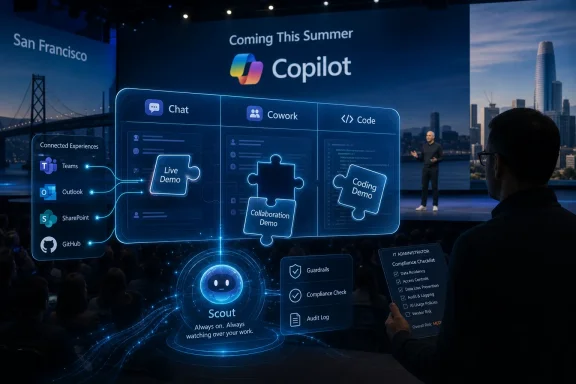
Satya Nadella’s Build line was short, but it was the sentence everyone will parse for months: Chat, Cowork, and Code are coming together in one Copilot app this summer. In Microsoft’s framing, that sounds like natural product convergence. In practice, it is a tacit admission that Copilot has become less a product than a family reunion with too many name tags.
The company has spent the past few years attaching the Copilot brand to Windows, Microsoft 365, GitHub, Edge, Security, Power Platform, Dynamics, and consumer chat. That strategy made sense when the goal was to establish AI ubiquity across Microsoft’s portfolio. It makes less sense now that users are trying to understand which Copilot can see which data, invoke which tools, obey which policies, and cost which budget.
The rumored Super App was supposed to answer that confusion with a single shell. Instead, Build delivered a map with the city center still under construction. Microsoft showed the roads, the vehicles, and the traffic-control theory, but not the downtown station where users are meant to board.
That is why the no-show was not merely a keynote scheduling curiosity. In the current AI race, interface is strategy. The company that controls the daily command surface for work can shape where coding, documents, meetings, search, workflows, and agents converge.
But the brand also blurred crucial boundaries. A consumer asking Copilot a web question is not doing the same thing as a lawyer asking Microsoft 365 Copilot to reason over privileged SharePoint documents, or a developer asking GitHub Copilot to modify a repository. The common name implied unity before the architecture, licensing, UX, and governance model had fully earned it.
Microsoft later appeared to recognize that problem by distinguishing consumer Copilot, GitHub Copilot, and Microsoft 365 Copilot as related but separate offerings. That was less elegant from a marketing perspective, but more honest from an IT perspective. Enterprises do not buy brand vibes; they buy permission models, audit logs, retention behavior, data boundaries, admin controls, and contractual assurances.
The Super App idea swings the pendulum back toward unity. Done well, it could be the missing abstraction layer that makes the Copilot portfolio feel less fragmented. Done poorly, it risks re-wrapping old confusion in a shinier interface.
The hard part is that Microsoft cannot merely build a chat launcher. A real Copilot Super App has to reconcile multiple identities at once: consumer assistant, enterprise work companion, developer agent, workflow automator, and perhaps always-on digital operator. Each of those roles carries different risk, trust, and compliance assumptions.
The important phrase is not personal agent. It is always-on. Traditional copilots wait for a prompt. Agents like Scout are meant to notice context, infer intent, and act across work systems. That is a qualitatively different bargain between user and machine.
Microsoft’s pitch is that Scout can draw on work context from apps such as Teams, Outlook, and SharePoint through the company’s WorkIQ layer. That makes the agent more useful than a generic chatbot, because it can reason over calendar commitments, message threads, files, meetings, and organizational context. It also makes the agent more sensitive, because those are precisely the systems where corporate risk lives.
The GeekWire report’s mention of OpenClaw matters because it captures the tension around this category. The industry is fascinated by agents that can operate without constant supervision, but enterprise buyers are paid to be frightened by exactly that behavior. An unrestrained agent is fun in a demo and terrifying in a regulated environment.
Microsoft knows this. That is why the company is talking about guardrails, Frontier programs, and trust. But the unresolved question is whether those assurances are productized deeply enough for broad deployment, or whether they remain a preview-era vocabulary wrapped around experimental autonomy.
The company has used “autopilot” language before in Windows deployment, where Windows Autopilot refers to device provisioning and management. That history may help IT pros understand the automation metaphor, but agentic AI changes the stakes. Provisioning a device according to a policy is one thing; letting a software agent interpret human intent across mailboxes, files, chats, and workflows is another.
A useful Autopilot needs enough authority to matter. A safe Autopilot needs enough constraint to avoid becoming a compliance incident with a friendly icon. That is the product paradox Microsoft must solve before the Super App becomes more than a brand container.
This is where WindowsForum readers should be especially skeptical of keynote language. “It works where you work” is a compelling line until “where you work” includes confidential HR folders, privileged Teams channels, legal holds, sensitive engineering repos, and customer data governed by regional residency rules.
The enterprise will not reject agents outright. It will demand that they be boring in all the right places: predictable permissions, reversible actions, transparent logs, clear ownership, admin kill switches, conditional access, DLP integration, and defensible defaults.
That expansion explains why Code belongs in the Super App alongside Chat and Cowork. Microsoft is no longer treating development as a separate technical priesthood. It is arguing that coding-like activities — structuring tasks, editing artifacts, transforming information, testing outputs, orchestrating workflows — are becoming part of knowledge work itself.
There is a real insight there. Many office workers do not want to become software engineers, but they increasingly want systems that behave like programmable colleagues. They want to turn an email thread into a plan, a spreadsheet into an analysis, a meeting into follow-up work, a repository issue into a patch, or a business process into a repeatable agent.
The danger is that Microsoft may over-collapse distinct audiences. Developers evaluate tools through version control, tests, diffs, reproducibility, and review. Knowledge workers often evaluate tools through convenience, polish, and confidence. A single Copilot shell has to respect both cultures without reducing either to a tab in a busy sidebar.
That is a design problem, not only a model problem. Anthropic’s Claude Code and OpenAI’s Codex pressure Microsoft from the developer side precisely because they feel purpose-built. A Super App can beat specialization only if it turns integration into real leverage rather than menu sprawl.
Microsoft sits on email, calendar, files, meetings, directory identity, device management, collaboration history, low-code workflows, cloud infrastructure, developer repositories, and security telemetry. If Copilot can coherently reason across that estate, Microsoft has something its rivals cannot easily replicate. If it cannot, the company has a pile of adjacent products wearing the same badge.
WorkIQ is therefore more important than the keynote glamour suggests. It is the connective tissue that lets Copilot understand who works with whom, what documents matter, what meetings are coming, what commitments were made, and what systems are allowed to be touched. Without that layer, a Super App is mostly a prettier prompt box.
But a work graph cuts both ways. The richer the context, the higher the trust burden. Users will ask not only “Can Copilot do this?” but “Why did Copilot know that?” and “Who allowed Copilot to use this information?” Those are not edge cases; they are the central adoption questions for large organizations.
Microsoft’s answer will likely be that Copilot inherits existing permissions and compliance boundaries. That is necessary, but not sufficient. Agents can combine innocuous facts into sensitive conclusions, surface information in unexpected places, or take actions that are technically permitted but organizationally unwise.
But “Frontier” is also a useful rhetorical device. It lets Microsoft suggest momentum without declaring general availability. It gives early customers access to experimental capabilities while giving Microsoft room to adjust, retreat, or repackage.
For IT leaders, the important question is not whether a feature is exciting in Frontier. It is what obligations arrive when that feature graduates. Will the capability be included in existing Microsoft 365 Copilot licensing, moved into a premium tier, bundled into broader suites, or reserved for organizations willing to accept new agent management costs?
Microsoft has already trained customers to expect packaging complexity. Teams, Security Copilot, Microsoft 365 Copilot, E5, add-ons, premium experiences, and now Frontier-style agent suites all sit inside procurement conversations that are rarely simple. A Super App could simplify the user experience while complicating the invoice.
There is also the matter of support. Preview programs are tolerant of rough edges. Production enterprises are not. Once an always-on agent misses a compliance boundary, sends the wrong message, mishandles a calendar conflict, modifies a file, or triggers a workflow incorrectly, the question becomes less “How smart is the model?” and more “Who owns the blast radius?”
That is a significant shift for Windows users and administrators. The operating system is becoming more than a shell around apps and files; it is becoming a broker for context, local models, NPUs, developer environments, and cloud-connected agents. Copilot+ PCs were an early consumer-facing expression of that idea, but the enterprise version is more consequential.
If the Super App becomes the front door, Windows may become the stage crew. Taskbar entry points, local AI runtimes, device management, identity, endpoint security, and enterprise app connectivity all matter more when agents are expected to operate persistently across work.
This gives Microsoft a structural advantage over cloud-only AI rivals. It controls the productivity suite, the developer platform, the endpoint, the identity plane, and much of the enterprise security stack. Few companies can match that surface area.
It also gives Microsoft more ways to stumble. Windows users still remember AI features introduced before the privacy model was fully persuasive. Any feature that feels like ambient surveillance, even if technically controlled, will face scrutiny. With agents, perception becomes part of security.
There is also the less charitable possibility: the Super App is not yet cohesive enough to withstand the spotlight. That would not be shocking. Pulling Chat, Cowork, Code, Scout-like autonomy, GitHub workflows, enterprise permissions, and consumer-commercial identity boundaries into one app is not a product sprint. It is an architectural reckoning.
Microsoft has a long history of previewing ambitious futures before the parts are ready. Sometimes that works because the platform catches up. Sometimes it produces impressive demos, delayed resets, and years of cleanup. The AI cycle compresses those risks because competitive pressure rewards speed and punishes visible caution.
Yet the absence may still have been wise. A flashy Super App demo could have temporarily thrilled developers and investors while alarming enterprise buyers who need slower answers. By teasing the summer timeline and showing adjacent agent capabilities, Microsoft bought itself a little room.
The problem is that room is expensive. Every month that passes gives rival tools more time to become the default for developers, analysts, and power users who are less loyal to Microsoft’s suite than their CIOs might assume.
That is why Scout and Cowork are strategically more important than generic Copilot chat. They promise movement from answering questions to completing tasks. They imply that Copilot will not merely describe the work but participate in it.
For enterprise IT, that shift changes the evaluation framework. A chatbot can be judged by accuracy, latency, grounding, data handling, and user satisfaction. An action-taking agent must be judged by authorization, exception handling, rollback, approval thresholds, monitoring, and governance.
This is where Microsoft’s enterprise DNA could help. The company understands admin centers, policy inheritance, compliance frameworks, and procurement committees better than most AI-native rivals. It can turn boring controls into competitive advantage if it resists the urge to treat them as launch-footnote material.
But Microsoft also has a habit of making governance feel like a scavenger hunt across portals, licenses, preview settings, and documentation. If Copilot becomes the place where work happens, then Copilot administration cannot remain an afterthought. The Super App needs a super admin story.
Microsoft’s advantage is distribution. It can place Copilot inside the tools many organizations already use every day. That advantage is enormous, but it is not absolute. Developers are unusually willing to adopt tools that save time, even if those tools sit outside the official productivity suite.
The same is increasingly true for knowledge workers. If an external AI tool feels faster, clearer, or more capable than the sanctioned corporate Copilot, users will find ways to use it. Shadow AI is the new shadow IT, and it spreads through convenience rather than rebellion.
A coherent Super App is Microsoft’s answer to that leakage. It says: do not leave the tenant, do not paste company data into outside tools, do not stitch together your own agent stack. The approved experience will be good enough, integrated enough, and safe enough.
That is a powerful promise. It is also a high bar. “Good enough” in enterprise software used to mean compliant and deployable. In AI, it increasingly means emotionally convincing, fast, context-aware, and visibly useful within the first few sessions.
The Super App could concentrate that confidence if it reduces cognitive overhead. One app, one mental model, one place to see what agents are doing, one place to switch between chat, coworking, and coding tasks. That would be a genuine improvement over the current sprawl.
But concentration also concentrates failure. If the Super App is confusing, buggy, over-permissioned, under-permissioned, slow, expensive, or too aggressively present, it will not merely hurt one Copilot product. It will become the symbol of Microsoft’s AI overreach.
The summer launch window therefore carries more weight than a typical app release. Microsoft is trying to shift Copilot from an embedded feature set to an organizing layer for work. That is a different kind of bet, closer to Teams than Clippy, closer to Office than Bing Chat.
The best version of this future is compelling. A user starts in chat, hands a task to Cowork, asks Code to build or modify the technical artifact, lets Scout watch for context changes, and reviews everything through transparent logs and approval gates. The worst version is five assistants in a trench coat.
 Microsoft Teased the Destination and Shipped the Detour
Satya Nadella’s Build line was short, but it was the sentence everyone will parse for months: Chat, Cowork, and Code are coming together in one Copilot app this summer. In Microsoft’s framing, that sounds like natural product convergence. In practice, it is a tacit admission that Copilot has become less a product than a family reunion with too many name tags.The company has spent the past few years attaching the Copilot brand to Windows, Microsoft 365, GitHub, Edge, Security, Power Platform, Dynamics, and consumer chat. That strategy made sense when the goal was to establish AI ubiquity across Microsoft’s portfolio. It makes less sense now that users are trying to understand which Copilot can see which data, invoke which tools, obey which policies, and cost which budget.
The rumored Super App was supposed to answer that confusion with a single shell. Instead, Build delivered a map with the city center still under construction. Microsoft showed the roads, the vehicles, and the traffic-control theory, but not the downtown station where users are meant to board.
That is why the no-show was not merely a keynote scheduling curiosity. In the current AI race, interface is strategy. The company that controls the daily command surface for work can shape where coding, documents, meetings, search, workflows, and agents converge.
The Copilot Brand Is Still Paying Down Its Original Sin
Microsoft’s early Copilot move was brilliant because it made AI feel native to existing work. GitHub Copilot met developers inside the editor. Microsoft 365 Copilot promised to meet knowledge workers inside Outlook, Teams, Word, Excel, and PowerPoint. Windows Copilot suggested the operating system itself could become a conversational layer.But the brand also blurred crucial boundaries. A consumer asking Copilot a web question is not doing the same thing as a lawyer asking Microsoft 365 Copilot to reason over privileged SharePoint documents, or a developer asking GitHub Copilot to modify a repository. The common name implied unity before the architecture, licensing, UX, and governance model had fully earned it.
Microsoft later appeared to recognize that problem by distinguishing consumer Copilot, GitHub Copilot, and Microsoft 365 Copilot as related but separate offerings. That was less elegant from a marketing perspective, but more honest from an IT perspective. Enterprises do not buy brand vibes; they buy permission models, audit logs, retention behavior, data boundaries, admin controls, and contractual assurances.
The Super App idea swings the pendulum back toward unity. Done well, it could be the missing abstraction layer that makes the Copilot portfolio feel less fragmented. Done poorly, it risks re-wrapping old confusion in a shinier interface.
The hard part is that Microsoft cannot merely build a chat launcher. A real Copilot Super App has to reconcile multiple identities at once: consumer assistant, enterprise work companion, developer agent, workflow automator, and perhaps always-on digital operator. Each of those roles carries different risk, trust, and compliance assumptions.
Scout Shows the Future Microsoft Wanted to Talk About
If the Super App was absent, Scout was the thing Microsoft was willing to put into the arena. Described as a personal agent for work and made available to Frontier customers, Scout is Microsoft’s clearest public step toward the always-on agent model that has been bubbling inside the industry all year.The important phrase is not personal agent. It is always-on. Traditional copilots wait for a prompt. Agents like Scout are meant to notice context, infer intent, and act across work systems. That is a qualitatively different bargain between user and machine.
Microsoft’s pitch is that Scout can draw on work context from apps such as Teams, Outlook, and SharePoint through the company’s WorkIQ layer. That makes the agent more useful than a generic chatbot, because it can reason over calendar commitments, message threads, files, meetings, and organizational context. It also makes the agent more sensitive, because those are precisely the systems where corporate risk lives.
The GeekWire report’s mention of OpenClaw matters because it captures the tension around this category. The industry is fascinated by agents that can operate without constant supervision, but enterprise buyers are paid to be frightened by exactly that behavior. An unrestrained agent is fun in a demo and terrifying in a regulated environment.
Microsoft knows this. That is why the company is talking about guardrails, Frontier programs, and trust. But the unresolved question is whether those assurances are productized deeply enough for broad deployment, or whether they remain a preview-era vocabulary wrapped around experimental autonomy.
“Autopilot” Is a Dangerous Word in a Windows Shop
Microsoft’s reported category name for always-on agents, Autopilots, is clever and risky. It evokes delegation, persistence, and background operation. It also evokes the exact nightmare scenario every administrator understands: software doing things while nobody is looking.The company has used “autopilot” language before in Windows deployment, where Windows Autopilot refers to device provisioning and management. That history may help IT pros understand the automation metaphor, but agentic AI changes the stakes. Provisioning a device according to a policy is one thing; letting a software agent interpret human intent across mailboxes, files, chats, and workflows is another.
A useful Autopilot needs enough authority to matter. A safe Autopilot needs enough constraint to avoid becoming a compliance incident with a friendly icon. That is the product paradox Microsoft must solve before the Super App becomes more than a brand container.
This is where WindowsForum readers should be especially skeptical of keynote language. “It works where you work” is a compelling line until “where you work” includes confidential HR folders, privileged Teams channels, legal holds, sensitive engineering repos, and customer data governed by regional residency rules.
The enterprise will not reject agents outright. It will demand that they be boring in all the right places: predictable permissions, reversible actions, transparent logs, clear ownership, admin kill switches, conditional access, DLP integration, and defensible defaults.
GitHub Copilot Is No Longer Just the Developer Wedge
Microsoft’s AI story still owes much of its credibility to GitHub Copilot. Long before Copilot became an all-purpose brand, GitHub Copilot proved that generative AI could find a daily workflow where users would tolerate imperfections because the productivity upside was obvious. Code completion was the wedge; agentic development is the expansion.That expansion explains why Code belongs in the Super App alongside Chat and Cowork. Microsoft is no longer treating development as a separate technical priesthood. It is arguing that coding-like activities — structuring tasks, editing artifacts, transforming information, testing outputs, orchestrating workflows — are becoming part of knowledge work itself.
There is a real insight there. Many office workers do not want to become software engineers, but they increasingly want systems that behave like programmable colleagues. They want to turn an email thread into a plan, a spreadsheet into an analysis, a meeting into follow-up work, a repository issue into a patch, or a business process into a repeatable agent.
The danger is that Microsoft may over-collapse distinct audiences. Developers evaluate tools through version control, tests, diffs, reproducibility, and review. Knowledge workers often evaluate tools through convenience, polish, and confidence. A single Copilot shell has to respect both cultures without reducing either to a tab in a busy sidebar.
That is a design problem, not only a model problem. Anthropic’s Claude Code and OpenAI’s Codex pressure Microsoft from the developer side precisely because they feel purpose-built. A Super App can beat specialization only if it turns integration into real leverage rather than menu sprawl.
The Super App Is Really a Fight Over the Work Graph
The phrase “super app” usually brings to mind consumer platforms that combine chat, payments, services, shopping, identity, and mini-apps. Microsoft’s version is not that. Its real asset is not a wallet or a social feed; it is the work graph.Microsoft sits on email, calendar, files, meetings, directory identity, device management, collaboration history, low-code workflows, cloud infrastructure, developer repositories, and security telemetry. If Copilot can coherently reason across that estate, Microsoft has something its rivals cannot easily replicate. If it cannot, the company has a pile of adjacent products wearing the same badge.
WorkIQ is therefore more important than the keynote glamour suggests. It is the connective tissue that lets Copilot understand who works with whom, what documents matter, what meetings are coming, what commitments were made, and what systems are allowed to be touched. Without that layer, a Super App is mostly a prettier prompt box.
But a work graph cuts both ways. The richer the context, the higher the trust burden. Users will ask not only “Can Copilot do this?” but “Why did Copilot know that?” and “Who allowed Copilot to use this information?” Those are not edge cases; they are the central adoption questions for large organizations.
Microsoft’s answer will likely be that Copilot inherits existing permissions and compliance boundaries. That is necessary, but not sufficient. Agents can combine innocuous facts into sensitive conclusions, surface information in unexpected places, or take actions that are technically permitted but organizationally unwise.
Frontier Is Where Microsoft Hides the Sharp Edges
The Frontier program has become Microsoft’s preferred staging ground for ambitious Copilot features. That is understandable. AI products need real-world feedback, and the lab cannot simulate the weirdness of enterprise workflows.But “Frontier” is also a useful rhetorical device. It lets Microsoft suggest momentum without declaring general availability. It gives early customers access to experimental capabilities while giving Microsoft room to adjust, retreat, or repackage.
For IT leaders, the important question is not whether a feature is exciting in Frontier. It is what obligations arrive when that feature graduates. Will the capability be included in existing Microsoft 365 Copilot licensing, moved into a premium tier, bundled into broader suites, or reserved for organizations willing to accept new agent management costs?
Microsoft has already trained customers to expect packaging complexity. Teams, Security Copilot, Microsoft 365 Copilot, E5, add-ons, premium experiences, and now Frontier-style agent suites all sit inside procurement conversations that are rarely simple. A Super App could simplify the user experience while complicating the invoice.
There is also the matter of support. Preview programs are tolerant of rough edges. Production enterprises are not. Once an always-on agent misses a compliance boundary, sends the wrong message, mishandles a calendar conflict, modifies a file, or triggers a workflow incorrectly, the question becomes less “How smart is the model?” and more “Who owns the blast radius?”
Windows Is Being Recast as the Agent Substrate
Build is nominally a developer conference, and Microsoft’s Windows messaging this year fits the larger agent thesis. Windows is no longer being pitched only as the place where apps run. It is being positioned as a trusted local-and-cloud platform for AI development, agent execution, and increasingly capable on-device workloads.That is a significant shift for Windows users and administrators. The operating system is becoming more than a shell around apps and files; it is becoming a broker for context, local models, NPUs, developer environments, and cloud-connected agents. Copilot+ PCs were an early consumer-facing expression of that idea, but the enterprise version is more consequential.
If the Super App becomes the front door, Windows may become the stage crew. Taskbar entry points, local AI runtimes, device management, identity, endpoint security, and enterprise app connectivity all matter more when agents are expected to operate persistently across work.
This gives Microsoft a structural advantage over cloud-only AI rivals. It controls the productivity suite, the developer platform, the endpoint, the identity plane, and much of the enterprise security stack. Few companies can match that surface area.
It also gives Microsoft more ways to stumble. Windows users still remember AI features introduced before the privacy model was fully persuasive. Any feature that feels like ambient surveillance, even if technically controlled, will face scrutiny. With agents, perception becomes part of security.
The Missing Demo May Have Been the Most Honest Moment
There are charitable reasons Microsoft did not show the Super App. The keynote was already crowded. The company may want a separate launch moment this summer. The app may depend on components that are still changing. Or Microsoft may have decided that a partial demo would create more confusion than anticipation.There is also the less charitable possibility: the Super App is not yet cohesive enough to withstand the spotlight. That would not be shocking. Pulling Chat, Cowork, Code, Scout-like autonomy, GitHub workflows, enterprise permissions, and consumer-commercial identity boundaries into one app is not a product sprint. It is an architectural reckoning.
Microsoft has a long history of previewing ambitious futures before the parts are ready. Sometimes that works because the platform catches up. Sometimes it produces impressive demos, delayed resets, and years of cleanup. The AI cycle compresses those risks because competitive pressure rewards speed and punishes visible caution.
Yet the absence may still have been wise. A flashy Super App demo could have temporarily thrilled developers and investors while alarming enterprise buyers who need slower answers. By teasing the summer timeline and showing adjacent agent capabilities, Microsoft bought itself a little room.
The problem is that room is expensive. Every month that passes gives rival tools more time to become the default for developers, analysts, and power users who are less loyal to Microsoft’s suite than their CIOs might assume.
The Enterprise Buyer Is Not Waiting for Another Chatbox
The market is past the stage where a larger prompt box counts as transformation. Users have seen enough AI panels, sidebar assistants, and document summarizers to know the difference between novelty and workflow change. The next adoption wave depends on action, not conversation.That is why Scout and Cowork are strategically more important than generic Copilot chat. They promise movement from answering questions to completing tasks. They imply that Copilot will not merely describe the work but participate in it.
For enterprise IT, that shift changes the evaluation framework. A chatbot can be judged by accuracy, latency, grounding, data handling, and user satisfaction. An action-taking agent must be judged by authorization, exception handling, rollback, approval thresholds, monitoring, and governance.
This is where Microsoft’s enterprise DNA could help. The company understands admin centers, policy inheritance, compliance frameworks, and procurement committees better than most AI-native rivals. It can turn boring controls into competitive advantage if it resists the urge to treat them as launch-footnote material.
But Microsoft also has a habit of making governance feel like a scavenger hunt across portals, licenses, preview settings, and documentation. If Copilot becomes the place where work happens, then Copilot administration cannot remain an afterthought. The Super App needs a super admin story.
Microsoft’s Rivals Are Forcing the Pace
The Build tease did not happen in a vacuum. Anthropic’s Claude Code has given developers a strong taste of agentic coding outside the Microsoft stack. OpenAI’s Codex work keeps pressure on the idea that code generation and software task execution can live as dedicated AI environments. Google, Amazon, and a growing ecosystem of startups are all trying to define where agents should live.Microsoft’s advantage is distribution. It can place Copilot inside the tools many organizations already use every day. That advantage is enormous, but it is not absolute. Developers are unusually willing to adopt tools that save time, even if those tools sit outside the official productivity suite.
The same is increasingly true for knowledge workers. If an external AI tool feels faster, clearer, or more capable than the sanctioned corporate Copilot, users will find ways to use it. Shadow AI is the new shadow IT, and it spreads through convenience rather than rebellion.
A coherent Super App is Microsoft’s answer to that leakage. It says: do not leave the tenant, do not paste company data into outside tools, do not stitch together your own agent stack. The approved experience will be good enough, integrated enough, and safe enough.
That is a powerful promise. It is also a high bar. “Good enough” in enterprise software used to mean compliant and deployable. In AI, it increasingly means emotionally convincing, fast, context-aware, and visibly useful within the first few sessions.
The Real Product Is Confidence
Microsoft can talk about models, agents, Frontier suites, work graphs, and developer platforms, but the product it must sell is confidence. Users need confidence that Copilot understands their intent. Administrators need confidence that Copilot respects boundaries. Executives need confidence that AI spending produces measurable productivity rather than expensive experimentation.The Super App could concentrate that confidence if it reduces cognitive overhead. One app, one mental model, one place to see what agents are doing, one place to switch between chat, coworking, and coding tasks. That would be a genuine improvement over the current sprawl.
But concentration also concentrates failure. If the Super App is confusing, buggy, over-permissioned, under-permissioned, slow, expensive, or too aggressively present, it will not merely hurt one Copilot product. It will become the symbol of Microsoft’s AI overreach.
The summer launch window therefore carries more weight than a typical app release. Microsoft is trying to shift Copilot from an embedded feature set to an organizing layer for work. That is a different kind of bet, closer to Teams than Clippy, closer to Office than Bing Chat.
The best version of this future is compelling. A user starts in chat, hands a task to Cowork, asks Code to build or modify the technical artifact, lets Scout watch for context changes, and reviews everything through transparent logs and approval gates. The worst version is five assistants in a trench coat.
The Build No-Show Leaves a Very Specific Checklist
Microsoft’s keynote gave enough clues to understand the direction, but not enough proof to settle the doubts. Before enterprises embrace a Copilot Super App as the front end for agentic work, Microsoft has to answer some concrete questions in product form, not only in blog language.- The summer Copilot Super App needs to make Chat, Cowork, and Code feel like modes of one workflow rather than separate products sharing a navigation bar.
- Scout’s always-on behavior must be bounded by visible controls, reviewable activity, and enterprise-grade approval paths before it can be trusted broadly.
- Microsoft must explain how consumer Copilot, Microsoft 365 Copilot, GitHub Copilot, and Frontier-only capabilities differ inside the unified experience.
- The licensing model has to be legible enough that CIOs can predict cost before users build habits around features that later move tiers.
- Windows integration should make Copilot more useful without making the operating system feel like a surveillance surface.
- The real test will be whether administrators can govern agents as confidently as they govern users, devices, apps, and data today.
References
- Primary source: GeekWire
Published: Tue, 02 Jun 2026 22:32:48 GMT
Mary Jo Foley: No Copilot 'Super App' at Microsoft Build, but plenty of agentic fodder – GeekWire
Microsoft teased its rumored Copilot "Super App" at Build but didn't demo it. Longtime Microsoft watcher Mary Jo Foley assesses the no-show, explains why the initiative matters, and considers what the company actually did announce.www.geekwire.com - Related coverage: techradar.com
10 products that launched at Microsoft Build — and what happened to them | TechRadar
From Windows 8 to Copilot, here’s everything that was born at Buildwww.techradar.com - Related coverage: tomsguide.com
Microsoft Build 2026 preview — all the big announcements to expect | Tom's Guide
Microsoft Build 2026 should be a showcase for the company's latest and upcoming AI efforts. Here are some of the big announcements we expect to see.www.tomsguide.com - Official source: blogs.microsoft.com
Introducing the First Frontier Suite built on Intelligence + Trust - The Official Microsoft Blog
Today Microsoft is announcing: Wave 3 of Microsoft 365 Copilot Expanded model diversity with Claude and next-gen OpenAI models available today General availability of Agent 365 on May 1 for $15 per user General availability of the new Microsoft 365 E7: The Frontier Suite on May 1 for $99 per...blogs.microsoft.com - Related coverage: techcrunch.com
Microsoft launches Scout, an OpenClaw-inspired personal assistant | TechCrunch
Launched at Build, Microsoft Scout is a new AI assistant meant to bring the power and flexibility of OpenClaw into the Microsoft 365 system.techcrunch.com - Official source: devblogs.microsoft.com
Frontier Tuning: Teaching AI to work the way you do - Microsoft 365 Developer Blog
We're announcing the private preview of Frontier Tuning, a new approach to making AI work the way your business does by applying reinforcement learning inside your compliance boundary with your own data, processes, and conventions.devblogs.microsoft.com
- Related coverage: abhs.in
Microsoft Copilot Super App: GitHub Chat, Cowork, Autopilot at Build | Abhishek Gautam
One shell for coding agents across VS Code, Teams, and Windows. Enterprise lock-in angle for developers choosing stacks.www.abhs.in
- Official source: learn.microsoft.com
New and planned features for Microsoft Copilot Studio, 2026 release wave 1 | Microsoft Learn
Summary of planned features for Microsoft Copilot Studio.learn.microsoft.com - Official source: news.microsoft.com
Microsoft Build Live
The home for real-time coverage of the news as it is announced from Microsoft Build, June 2-3, 2026.news.microsoft.com - Official source: blogs.windows.com
Build 2026: Furthering Windows as the trusted platform for development
Build is one of our favorite moments each year - a chance to connect with the global developer community and share what we’ve been building. Over the past year, we have connected with many developers pushing the boundaries of what’s possible onblogs.windows.com - Official source: adoption.microsoft.com
- Related coverage: reality-tech.com
