

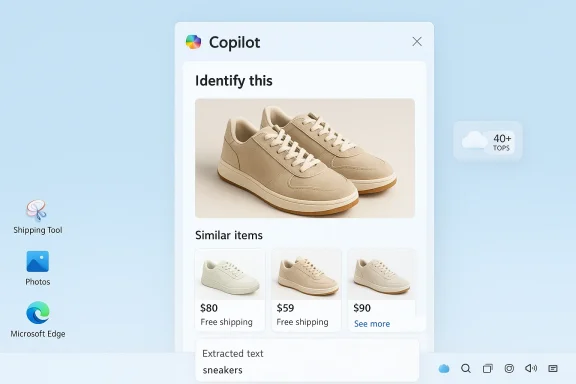
Microsoft’s Copilot now lets you point, upload, or screenshot and ask—“What is this?”—and it will try to answer, find matching products, extract text, or surface provenance information within seconds. That promise—search by image with AI—moves visual search beyond pixel-matching into meaningful visual queries powered by vision-language models, deep integration with Windows tools, and a hybrid on-device/cloud architecture. This feature is fast and convenient for everyday tasks like shopping, plant identification, or travel curiosity, but it also introduces meaningful accuracy, privacy, and governance trade-offs that users and IT teams must understand.
AI image search replaces the old reverse-image paradigm with a multimodal approach that links pixels to language. Traditional reverse image search simply attempts to find visually similar images on the web; modern systems use vision-language models (VLMs) to understand objects and context, then generate human-readable results and follow-up searches. The result is an assistant that can identify a dog breed, call out a shoe model, or extract table data from a screenshot—not merely surface lookalike photos.
Microsoft positions Copilot’s visual features as part of a broader multimodal assistant strategy across Windows, Edge, and mobile apps. The interface surface is intentionally lightweight: open Copilot (taskbar, Edge sidebar, or Copilot app), upload or snap a photo, optionally add a short text prompt (for example, “identify this plant”), and receive identifications, shopping cards, or suggested follow-up questions. That consumer flow is designed to reduce friction and embed visual search into everyday Windows workflows.
However, the technology is not infallible. Accuracy varies by image quality, dataset coverage, and visual ambiguity; provenance and IP rules remain unsettled; and default cloud processing can raise privacy and compliance concerns. The responsible path is clear: use Copilot’s visual features to accelerate exploration and creativity, but retain human verification, contractual protections for commercial uses, and governance controls for regulated environments.
The ability to search by image with AI transforms everyday curiosity into immediate, actionable insight—but it also changes the responsibilities of users and administrators. Use clear photos, add short prompts, and verify important results. For businesses, the right mix of pilot programs, admin controls, and staff training will unlock productivity while containing the legal and privacy risks that accompany cloud-based visual AI. Microsoft’s Copilot delivers a robust start to that journey; now it’s on users and IT teams to apply these tools prudently.
Source: Microsoft Search by Image with AI | Microsoft Copilot
 Background / Overview
AI image search replaces the old reverse-image paradigm with a multimodal approach that links pixels to language. Traditional reverse image search simply attempts to find visually similar images on the web; modern systems use vision-language models (VLMs) to understand objects and context, then generate human-readable results and follow-up searches. The result is an assistant that can identify a dog breed, call out a shoe model, or extract table data from a screenshot—not merely surface lookalike photos.Microsoft positions Copilot’s visual features as part of a broader multimodal assistant strategy across Windows, Edge, and mobile apps. The interface surface is intentionally lightweight: open Copilot (taskbar, Edge sidebar, or Copilot app), upload or snap a photo, optionally add a short text prompt (for example, “identify this plant”), and receive identifications, shopping cards, or suggested follow-up questions. That consumer flow is designed to reduce friction and embed visual search into everyday Windows workflows.
How AI image search actually works
From pixels to meaning: the VLM pipeline
At the core are vision-language models—architectures that combine an image encoder and a language component so the system can convert pixels into embeddings and then into text. The process generally works like this:- Image encoder: extracts features (shapes, textures, edges, color histograms) and converts them into numerical vectors.
- Multimodal layer: maps visual vectors to textual embeddings so the model can assert labels (“Labrador”), attributes (“red running shoe”), or contextual facts (“this looks like a Romanesque church”).
- Language module: composes readable results, clarifying questions, or retrieval queries for web search and product matching.
Hybrid inference: cloud plus on-device
Copilot’s visual pipeline is hybrid. Many image analyses run in the cloud to leverage large models and up-to-date web indexes. However, Microsoft has pushed on-device acceleration for Copilot+ certified PCs: machines with a neural processing unit (NPU) rated at 40+ TOPS can handle more inference locally—reducing latency and offering improved privacy controls when properly configured. That hybrid design aims to balance speed, capability, and data governance, but the default behavior commonly involves cloud processing unless on-device features and opt-ins are explicitly used.Using Copilot to search by image — step-by-step
Quick consumer flow (three steps)
- Open Copilot in Windows (taskbar Copilot, Copilot app, or Edge sidebar) or launch the Copilot mobile app.
- Upload a photo or take a live shot. Optionally add a short text prompt—“identify this gadget” or “where can I buy these shoes?”—to guide the search.
- Review Copilot’s identification, shopping suggestions, extracted text, or follow-up questions. If uncertain, try another image or angle.
Integrated Windows workflows
Copilot’s image features are embedded into multiple Windows surfaces: Snipping Tool, Photos, Paint, File Explorer AI actions, and the Copilot sidebar. That means visual queries are often only a right-click or a snip away—no need to copy-paste into a separate app. For example, the Snipping Tool can hand a screenshot directly to Copilot or invoke an AI action to extract text or identify objects. These integration points are the primary productivity wins for Windows users.Practical use cases that deliver value
- Shopping: Photograph a jacket or pair of shoes and Copilot returns visually similar items and purchase cards, speeding discovery and price comparison.
- Nature and pets: Quickly get likely species names for plants, birds, or dog breeds to support hobbies and informal learning.
- Travel and local discovery: Identify landmarks and receive historical or architectural context from a photo.
- Verification and provenance: Use visual search to trace an image’s origin, detect signs of manipulation, or locate the earliest known copy for fact-checking. This is valuable for social media verification workflows.
- Productivity: Extract text from images, convert tables into editable data, or redact sensitive fields before sharing—saving time on routine manual work.
Accuracy, limitations, and the risk of overconfidence
AI image search is powerful—but imperfect. Understanding failure modes helps prevent misuse.Common failure modes
- Low-quality images: blur, poor lighting, occlusion, or very small objects reduce accuracy and increase false positives.
- Obscure or custom items: rare hardware, handcrafted goods, or newly released products may not exist in training or indexed catalogs, producing nearest-match guesses rather than exact IDs.
- Visual ambiguity: many objects share visual features (generic earbuds, retro consoles, similar car models); models lack common-sense context and can mislabel without user guidance.
- Model hallucination: generative or classification models can invent plausible-sounding but incorrect details when forced into a best-guess. Treat AI identifications as leads, not authoritative facts.
Evaluation and benchmarking caveats
Model accuracy depends on datasets, geographic coverage, and labeling quality—meaning performance is uneven by region, product line, and taxonomy. For example, plant identification accuracy will vary depending on how well the training set covers local flora. These are empirical claims: measure performance for your own use case rather than assuming universal accuracy.Privacy, security, and enterprise governance
AI image search is not purely a UX feature—it’s a data-flow and compliance issue.Cloud vs. on-device processing: what to assume
By default, many Copilot/Visual Search flows analyze images in the cloud to leverage larger models and real-time web indexes. On Copilot+ NPU-equipped PCs, some analysis and local indexing (Windows Recall snapshots) can be done on-device if explicitly enabled; nevertheless, cloud handoffs still happen for many features unless admins or users opt into local-only modes. For regulated or highly sensitive content, assume that images may leave the device unless you verify configuration.Data retention and training uses
Microsoft exposes controls around data sharing and model training in product settings and tenant controls. In some configurations, interaction data may be used to improve models unless a user or admin opts out. Enterprise tenants and paid commercial plans often provide stricter defaults and options to disable model training or set retention rules. Review Copilot tenant settings and Microsoft 365 policy controls before enabling broad use.Practical enterprise guidance
- Inventory Copilot entry points across the organization (taskbar, Edge, Snipping Tool).
- Pilot with a small, trained group and monitor telemetry and helpdesk tickets.
- Create explicit policies that forbid uploading regulated content (patient records, proprietary code, PII) to cloud-based visual AI.
- Use network inspection, proxies, or endpoint controls to block or route cloud handoffs where required by compliance.
Best practices to get better results (and stay safe)
- Use clear, well-lit photos and crop out extraneous background clutter. This reduces false positives and focuses the model on relevant features.
- Add a short text prompt along with the image (for example, “identify this gadget” or “find similar sneakers”). Prompting drastically improves precision.
- Try multiple angles for unusual items—three or four perspectives dramatically improve identification chances.
- Treat identifications as leads, then verify via authoritative sources if the result affects decisions (medical, legal, financial).
- For sensitive screenshots, prefer on-device features (Windows Recall on Copilot+ PCs) or avoid uploading images entirely. Use built-in redaction tools to scrub PII before sharing.
Troubleshooting common problems
- Poor or irrelevant matches: retake the photo at higher resolution, crop to the object, or try a different angle.
- No shopping matches: the item may be out of catalog or visually generic. Focus on unique identifiers (logos, serial plates).
- Feature missing in your device: confirm you have the latest Windows updates, Copilot app version, and the feature isn’t gated behind Copilot+ hardware or subscription tiers.
- Privacy worries: check Copilot privacy settings, and disable cloud evaluation where necessary or restrict usage via enterprise policies.
Intellectual property, provenance, and legal considerations
AI image features sit squarely inside unsettled legal terrain. For usage that touches commercial publishing, advertising, or resale, creators and teams should be cautious.Licensing and commercial risk
If your use is commercial—ads, logos, merchandising—prefer providers or model endpoints with clear commercial licensing guarantees, or obtain written licenses. Microsoft’s model stack includes in-house engines and third‑party models; terms and allowed uses vary by endpoint and may change, so verify the specific model terms for commercial use. Where claims are ambiguous, seek legal advice.Provenance and content credentials
Platforms (including Microsoft and OpenAI) are moving toward embedding provenance metadata (such as C2PA content credentials) to label AI-origin media. These markers help downstream verification and raise transparency, but adoption and enforcement across the web are still incomplete. When provenance matters—journalism, legal evidence, or regulated publishing—preserve original metadata and generation logs.Artistic style and mimicry
Models trained on public datasets can recreate stylistic hallmarks of living artists. That raises ethical concerns and potential legal risk in jurisdictions where artist style rights or derivative-use rules are in flux. Platforms have added style filters and guidance, but ambiguity remains—exercise conservatism for commercial campaigns or when using images that intentionally mimic an identifiable artist.Vendor choices and model diversity: what Copilot actually uses
Copilot’s image features are not a single monolithic engine. Microsoft routes requests to a portfolio of models: historically DALL·E-family generators in Designer/Image Creator, GPT‑4o multimodal capabilities for conversational image tasks, and Microsoft’s MAI-Image-1 as a first-party option. The chosen engine can vary by surface (Copilot app, Bing Image Creator, Designer), region, user account type, and rollout phase. That model diversity delivers trade-offs in speed, fidelity, and safety filtering—but it also means the exact behavior and quality can change over time. Treat claims about a single underlying model as time-sensitive.Recommended rollout plan for organizations
- Discovery: inventory where Copilot image features touch your environment (taskbar Copilot, Edge, Snipping Tool, File Explorer AI actions).
- Pilot: enable visual AI for an opt‑in group with explicit training and monitoring (30–60 days).
- Policy: create simple, enforceable rules that prohibit uploading regulated content and require verification workflows for high‑impact decisions.
- Controls: configure tenant-level settings, endpoint policies, and network inspection to reduce unwanted cloud handoffs.
- Scale (or restrict): base the broader rollout on telemetry, compliance outcomes, and user productivity signals. Make the decision to scale contingent on measurable safety and business value.
Strengths, trade-offs, and a pragmatic verdict
Microsoft’s Copilot image search brings a genuine productivity story to Windows: quick context, shopping matches, and useful text extraction directly inside apps you already use. Tight integration with Windows tools—Snipping Tool, Photos, File Explorer, and Edge—reduces friction and makes the feature compelling for exploratory tasks. On-device acceleration on Copilot+ PCs and multiple model backends (MAI-Image-1, GPT‑4o options) offer a mix of speed and capability.However, the technology is not infallible. Accuracy varies by image quality, dataset coverage, and visual ambiguity; provenance and IP rules remain unsettled; and default cloud processing can raise privacy and compliance concerns. The responsible path is clear: use Copilot’s visual features to accelerate exploration and creativity, but retain human verification, contractual protections for commercial uses, and governance controls for regulated environments.
Final recommendations — what Windows users and admins should do now
- For hobbyists and casual users: experiment freely, add prompt text to images, and treat identifications as helpful leads rather than definitive answers.
- For creators and freelancers: confirm model terms and licensing for the specific Copilot or generation endpoint before selling or licensing AI‑generated imagery. Maintain generation logs and model identifiers for auditability.
- For IT/security teams: pilot with opt‑in groups, document acceptable use, and configure tenant-level privacy and data‑sharing controls. Block cloud handoffs for regulated data and train staff on redaction and verification practices.
The ability to search by image with AI transforms everyday curiosity into immediate, actionable insight—but it also changes the responsibilities of users and administrators. Use clear photos, add short prompts, and verify important results. For businesses, the right mix of pilot programs, admin controls, and staff training will unlock productivity while containing the legal and privacy risks that accompany cloud-based visual AI. Microsoft’s Copilot delivers a robust start to that journey; now it’s on users and IT teams to apply these tools prudently.
Source: Microsoft Search by Image with AI | Microsoft Copilot
