

Microsoft Copilot Tasks is a preview-era agentic AI feature for Copilot that lets Microsoft’s assistant plan, browse, schedule, and carry out user-directed tasks across web and app contexts, with availability still rolling out through signed-in Copilot experiences and related Windows Insider agent features as of May 2026. That dry description hides the real shift: Microsoft is trying to move Copilot from a chat box that suggests what to do into a software actor that actually does some of it. For Windows users, that is both the promise and the problem. The moment an assistant can click, submit, schedule, organize, or alter files, Copilot stops being a novelty pinned to the taskbar and becomes part of the operating system’s trust boundary.
For most of its public life, Copilot has been sold as an assistant but behaved more like a conversational search engine with Microsoft branding. It could summarize, draft, rewrite, brainstorm, and explain, but the final mile usually belonged to the user. You still copied the text, opened the app, made the calendar event, found the file, or pressed the button.
Copilot Tasks is Microsoft’s attempt to close that gap. In the new framing, the user does not merely ask Copilot how to do something; the user asks Copilot to do it. That distinction is the entire story.
This is what the industry now calls agentic AI, a term that has quickly become overused but remains useful here. A chatbot produces responses. An agent is expected to interpret an instruction, break it into steps, use tools, observe results, and keep going until the task is complete or until it needs human approval. Microsoft wants Copilot to move from the first category to the second without making Windows feel like a machine that has slipped out of the user’s hands.
The company’s challenge is not whether it can bolt task automation onto Copilot. Microsoft has spent decades building workflow systems, scripting environments, Office automation, Power Automate, Intune policies, and enterprise connectors. The harder question is whether ordinary users and cautious administrators will trust a general-purpose AI assistant to operate across the messy terrain of browsers, documents, account settings, email, calendars, and local files.
At the user level, Tasks is meant to let Copilot handle multi-step requests. That might mean looking up current information, creating reminders, managing calendar events, drafting emails, summarizing documents, organizing files, or interacting with supported websites. In more ambitious scenarios, it may handle recurring or scheduled jobs rather than one-off prompts.
At the platform level, Microsoft is building containment around the idea that an AI agent can act on a user’s behalf. On Windows, the company has described an agent workspace: a separated environment where an agent can interact with apps and files without simply becoming an invisible extension of the user’s live desktop session. That matters because the security model for “AI that answers” is very different from the security model for “AI that clicks.”
This is why Tasks should not be dismissed as just another Copilot button. It is part of Microsoft’s broader project to make Windows, Edge, Microsoft 365, and Copilot feel less like separate products and more like an AI-mediated workspace. The feature may appear first as a convenience for reminders and browser errands, but its strategic purpose is to normalize delegation.
That is the clean version. The real version is messier because Microsoft’s agentic rollout is staggered by geography, account type, app version, Windows channel, and feature flag. Some users may see Tasks in Copilot on the web before they see anything meaningful in Windows. Others may see Copilot Actions in Insider builds but not the broader Tasks experience. Some enterprise users may find the feature blocked or governed by administrator policy.
On Windows, the deeper agentic features are tied to preview controls under AI-related system settings. Microsoft has described an “Experimental agentic features” toggle that enables agent accounts and workspaces, and that setting is off by default. It requires administrator access on the device, and once enabled it can affect the device-level availability of agent workspace features for users.
This distinction is crucial. Signing up for Copilot Tasks is not the same thing as giving an AI agent local file access on a Windows PC. The former is a Copilot service feature; the latter is a Windows security and permissions decision. Microsoft’s own documentation treats these as related but separable layers, and administrators should do the same.
Financial transactions, personal information submissions, emails or messages to other people, account changes, file deletion, subscription cancellation, health-related submissions, government documents, and security-sensitive changes all sit in the danger zone. In those cases, Microsoft says Copilot should ask for explicit approval or hand control back to the user. That is not fine print; it is an admission that the product category is inherently risky.
The risk is not simply that Copilot might hallucinate. Hallucination is a familiar problem from chatbots, but agentic AI adds consequences. If a chatbot invents a fact, the user may be misled. If an agent misunderstands a prompt while connected to mail, storage, a browser session, or payment workflow, the mistake may become an action.
Microsoft also calls out prompt injection, especially in browser and document contexts. This is the scenario where a malicious page, email, document, or hidden instruction tries to manipulate the agent into ignoring the user’s command or leaking information. Traditional users do not read every invisible instruction on a web page; agents may be asked to interpret precisely that kind of content.
The security model therefore depends on three ideas: containment, observability, and consent. Containment limits what the agent can touch. Observability lets the user or administrator see what happened. Consent forces human approval before sensitive steps. If any of those layers becomes vague, Copilot Tasks turns from productivity feature into help desk incident generator.
The agent workspace concept is Microsoft’s answer to an awkward problem: if an AI assistant needs to use apps “like a human would,” where does it do that work? Running directly in the user’s active session would be simple but dangerous. A full virtual machine would be isolated but heavy and awkward. A separate Windows session for an agent is a middle path.
In Microsoft’s model, agents can have dedicated accounts distinct from the user account. They can be granted access to known folders such as Documents, Downloads, Desktop, Pictures, Music, and Videos, with permission prompts and per-agent controls emerging in preview builds. They can operate in parallel while the user continues working. In theory, this lets Copilot organize a folder, extract information from PDFs, or modify a document without commandeering the user’s mouse pointer.
That design is also a signal to developers. Microsoft is not merely building one Copilot feature; it is laying groundwork for Windows to host third-party agentic software with managed access to apps, connectors, and data. The Model Context Protocol references in Microsoft’s agent documentation are part of the same trend. Windows is being prepared for a future where AI agents are treated less like chat windows and more like constrained users.
That may disappoint people expecting a full autonomous digital employee, but it is the right place to start. Sorting files, preparing meeting notes, drafting a reply, creating a calendar entry, finding a booking, summarizing recent messages, or setting up a recurring reminder are all mundane tasks with measurable value. They are also tasks where the user can often inspect the result before anything irreversible happens.
Microsoft has learned, sometimes painfully, that AI features fail when they are presented as magic and judged as infrastructure. Recall, Copilot+ PCs, Bing Chat, Office Copilot, and Windows Copilot have all carried versions of the same tension: the demo looks effortless, while the real user asks whether the feature is accurate, private, controllable, and worth the interruption. Tasks will face the same test.
A successful Tasks experience would not need to be spectacular. It would need to be reliable enough that a user trusts it with low-stakes workflows and gradually expands from there. If Copilot can consistently turn a messy email thread into a calendar invite, collect action items from a document, or assemble a local folder into a cleaner structure with approval checkpoints, it becomes valuable without pretending to be sentient.
The danger is that Microsoft oversells the agent before the workflow is dependable. Users are forgiving when a chatbot gives a mediocre answer. They are less forgiving when an assistant takes ten minutes to automate a five-minute task, gets stuck on a sign-in prompt, asks for too many approvals, or confidently prepares the wrong action.
The first question is identity. Which account is Copilot using? Is the user signed in with a personal Microsoft account, a work account, or both? Which connectors are enabled? Which tenant policies apply? A feature that feels harmless in a personal browser session can become complicated when it touches corporate email, SharePoint, OneDrive, Teams, or line-of-business data.
The second question is data retention and review. Microsoft says task history, prompts, responses, limited logs, screenshots for browser tasks, optional cookies, task-specific memory, and connector-mediated data may be involved depending on the scenario. That is not inherently disqualifying, but it is exactly the kind of behavior administrators need to understand before allowing broad use.
The third question is auditability. If an agent drafts an email, edits a file, or submits a form, organizations will want to know who initiated the action, what the agent did, what it accessed, and whether the user approved the final step. Microsoft’s language around distinguishable agent activity and audit logs is encouraging, but preview claims need to become enforceable operational controls.
For now, cautious organizations should pilot agentic Copilot features with narrow groups, low-risk data, and clear policy boundaries. The worst rollout would be accidental availability: users discovering powerful features before IT has decided how those features fit into compliance, records management, data loss prevention, and incident response.
That answer will vary by task. Asking Copilot to remind you to renew a passport is low-risk. Asking it to find a cheaper subscription plan may be acceptable if it stops before making changes. Asking it to cancel accounts, submit forms, book travel, send messages, or handle financial details raises the stakes.
Microsoft’s promise that Copilot will require explicit approval for sensitive actions is necessary but not sufficient. Approval fatigue is real. If an agent breaks a task into many steps and repeatedly asks for confirmation, users may click through prompts just to get the job done. If it asks too rarely, users may feel blindsided. The interface has to make the right thing easy: inspect the plan, understand the consequences, and stop the task without hunting for a hidden control.
There is also the problem of mixed expectations. A user may say, “Cancel my subscription,” expecting Copilot to show instructions. Copilot may interpret that as permission to navigate account pages until the final confirmation. Another user may say, “Find the best flight,” not realizing that “best” involves preferences the agent does not know. Agentic systems turn ambiguity into workflow, and ambiguity is where mistakes breed.
The right consumer habit is to start with reversible tasks. Let Copilot research, draft, organize copies, prepare reminders, and assemble plans. Be far more careful when the task involves money, identity, health, legal documents, account settings, or messages to other people. The assistant may be new; the consequences are not.
For enthusiasts, this is irritating. For administrators, it is operationally dangerous. A user asking whether “Copilot can do tasks” might be talking about consumer Copilot, Microsoft 365 task extraction, Windows local file actions, Edge browsing actions, or a custom enterprise agent. Each has different permissions, data flows, and controls.
Microsoft needs a cleaner taxonomy. “Tasks” should mean scheduled or user-delegated work inside Copilot. “Actions” should mean the capability to operate tools or interfaces. “Agent workspace” should mean the Windows containment environment. “Connectors” should mean authorized bridges to apps and services. If Microsoft keeps blending those concepts in marketing copy, it will slow adoption among the very users who need precision most.
The irony is that Microsoft actually has a serious architecture story to tell. Dedicated agent accounts, contained workspaces, scoped file access, approval prompts, and policy controls are far more substantial than another AI sidebar. But the naming fog makes the whole thing feel more improvised than it may be.
The optimistic version is compelling. Instead of memorizing ribbon locations, Control Panel remnants, Settings panels, browser workflows, file management tricks, and Office automation, a user describes the desired outcome. The machine handles the routine manipulation. Windows becomes less about knowing where Microsoft hid the option and more about expressing intent.
The pessimistic version is equally plausible. Copilot becomes another layer of opaque automation on top of an already complex operating system. It asks for access, stores task context, captures page state, talks to connectors, and sometimes misunderstands what the user wanted. Administrators then spend the next year writing policies to contain the productivity tool that was supposed to save time.
Both futures may arrive at once. That is usually how Windows evolves. Power users will find clever workflows. Some consumers will ignore it. Some organizations will ban it temporarily. Others will pilot it aggressively because the labor savings are too attractive to dismiss. Microsoft’s job is to make the safe path the default path before habit and hype outrun governance.
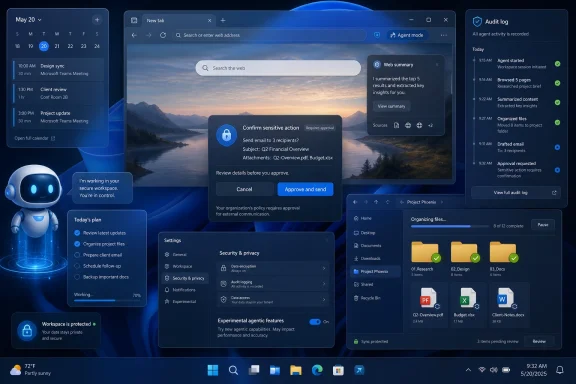 Microsoft Is Trying to Make Copilot Less Like Search and More Like Staff
For most of its public life, Copilot has been sold as an assistant but behaved more like a conversational search engine with Microsoft branding. It could summarize, draft, rewrite, brainstorm, and explain, but the final mile usually belonged to the user. You still copied the text, opened the app, made the calendar event, found the file, or pressed the button.Copilot Tasks is Microsoft’s attempt to close that gap. In the new framing, the user does not merely ask Copilot how to do something; the user asks Copilot to do it. That distinction is the entire story.
This is what the industry now calls agentic AI, a term that has quickly become overused but remains useful here. A chatbot produces responses. An agent is expected to interpret an instruction, break it into steps, use tools, observe results, and keep going until the task is complete or until it needs human approval. Microsoft wants Copilot to move from the first category to the second without making Windows feel like a machine that has slipped out of the user’s hands.
The company’s challenge is not whether it can bolt task automation onto Copilot. Microsoft has spent decades building workflow systems, scripting environments, Office automation, Power Automate, Intune policies, and enterprise connectors. The harder question is whether ordinary users and cautious administrators will trust a general-purpose AI assistant to operate across the messy terrain of browsers, documents, account settings, email, calendars, and local files.
Tasks Is the Consumer-Friendly Name for a Much Bigger Architecture
The Guiding Tech piece frames Copilot Tasks as the successor or broader evolution of Copilot Actions, and that is broadly the right mental model. Microsoft has used several overlapping names as it has tested agentic features: Copilot Actions on the web, Copilot Actions on Windows, Copilot Labs previews, agent workspaces, and now Copilot Tasks in the consumer-facing assistant experience. The branding is less important than the architectural direction.At the user level, Tasks is meant to let Copilot handle multi-step requests. That might mean looking up current information, creating reminders, managing calendar events, drafting emails, summarizing documents, organizing files, or interacting with supported websites. In more ambitious scenarios, it may handle recurring or scheduled jobs rather than one-off prompts.
At the platform level, Microsoft is building containment around the idea that an AI agent can act on a user’s behalf. On Windows, the company has described an agent workspace: a separated environment where an agent can interact with apps and files without simply becoming an invisible extension of the user’s live desktop session. That matters because the security model for “AI that answers” is very different from the security model for “AI that clicks.”
This is why Tasks should not be dismissed as just another Copilot button. It is part of Microsoft’s broader project to make Windows, Edge, Microsoft 365, and Copilot feel less like separate products and more like an AI-mediated workspace. The feature may appear first as a convenience for reminders and browser errands, but its strategic purpose is to normalize delegation.
The Enablement Story Is Still Messier Than the Marketing
The simplest consumer guidance is straightforward: users need to be signed in to Copilot with a Microsoft account, use a supported Copilot surface on the desktop or web, and join the preview or waitlist where Microsoft exposes Copilot Tasks. If the feature is available for the account, it should appear inside Copilot as a task-oriented or action-capable experience rather than a separate app.That is the clean version. The real version is messier because Microsoft’s agentic rollout is staggered by geography, account type, app version, Windows channel, and feature flag. Some users may see Tasks in Copilot on the web before they see anything meaningful in Windows. Others may see Copilot Actions in Insider builds but not the broader Tasks experience. Some enterprise users may find the feature blocked or governed by administrator policy.
On Windows, the deeper agentic features are tied to preview controls under AI-related system settings. Microsoft has described an “Experimental agentic features” toggle that enables agent accounts and workspaces, and that setting is off by default. It requires administrator access on the device, and once enabled it can affect the device-level availability of agent workspace features for users.
This distinction is crucial. Signing up for Copilot Tasks is not the same thing as giving an AI agent local file access on a Windows PC. The former is a Copilot service feature; the latter is a Windows security and permissions decision. Microsoft’s own documentation treats these as related but separable layers, and administrators should do the same.
Microsoft’s Safeguards Reveal the Risk Model
The most revealing part of Microsoft’s explanation is not what Copilot Tasks can do. It is what Microsoft says Copilot should not do without stopping for approval.Financial transactions, personal information submissions, emails or messages to other people, account changes, file deletion, subscription cancellation, health-related submissions, government documents, and security-sensitive changes all sit in the danger zone. In those cases, Microsoft says Copilot should ask for explicit approval or hand control back to the user. That is not fine print; it is an admission that the product category is inherently risky.
The risk is not simply that Copilot might hallucinate. Hallucination is a familiar problem from chatbots, but agentic AI adds consequences. If a chatbot invents a fact, the user may be misled. If an agent misunderstands a prompt while connected to mail, storage, a browser session, or payment workflow, the mistake may become an action.
Microsoft also calls out prompt injection, especially in browser and document contexts. This is the scenario where a malicious page, email, document, or hidden instruction tries to manipulate the agent into ignoring the user’s command or leaking information. Traditional users do not read every invisible instruction on a web page; agents may be asked to interpret precisely that kind of content.
The security model therefore depends on three ideas: containment, observability, and consent. Containment limits what the agent can touch. Observability lets the user or administrator see what happened. Consent forces human approval before sensitive steps. If any of those layers becomes vague, Copilot Tasks turns from productivity feature into help desk incident generator.
Windows Is Becoming an Agent Host, Not Just an App Launcher
The Windows angle is bigger than Tasks itself. For decades, Windows has been the place where humans launch applications and manipulate files. Microsoft is now preparing Windows for a world where software agents also need sessions, permissions, accounts, and audit trails.The agent workspace concept is Microsoft’s answer to an awkward problem: if an AI assistant needs to use apps “like a human would,” where does it do that work? Running directly in the user’s active session would be simple but dangerous. A full virtual machine would be isolated but heavy and awkward. A separate Windows session for an agent is a middle path.
In Microsoft’s model, agents can have dedicated accounts distinct from the user account. They can be granted access to known folders such as Documents, Downloads, Desktop, Pictures, Music, and Videos, with permission prompts and per-agent controls emerging in preview builds. They can operate in parallel while the user continues working. In theory, this lets Copilot organize a folder, extract information from PDFs, or modify a document without commandeering the user’s mouse pointer.
That design is also a signal to developers. Microsoft is not merely building one Copilot feature; it is laying groundwork for Windows to host third-party agentic software with managed access to apps, connectors, and data. The Model Context Protocol references in Microsoft’s agent documentation are part of the same trend. Windows is being prepared for a future where AI agents are treated less like chat windows and more like constrained users.
The Practical Use Cases Are Boring, Which Is Exactly the Point
The first wave of useful Copilot Tasks will probably not look futuristic. It will look like clerical work.That may disappoint people expecting a full autonomous digital employee, but it is the right place to start. Sorting files, preparing meeting notes, drafting a reply, creating a calendar entry, finding a booking, summarizing recent messages, or setting up a recurring reminder are all mundane tasks with measurable value. They are also tasks where the user can often inspect the result before anything irreversible happens.
Microsoft has learned, sometimes painfully, that AI features fail when they are presented as magic and judged as infrastructure. Recall, Copilot+ PCs, Bing Chat, Office Copilot, and Windows Copilot have all carried versions of the same tension: the demo looks effortless, while the real user asks whether the feature is accurate, private, controllable, and worth the interruption. Tasks will face the same test.
A successful Tasks experience would not need to be spectacular. It would need to be reliable enough that a user trusts it with low-stakes workflows and gradually expands from there. If Copilot can consistently turn a messy email thread into a calendar invite, collect action items from a document, or assemble a local folder into a cleaner structure with approval checkpoints, it becomes valuable without pretending to be sentient.
The danger is that Microsoft oversells the agent before the workflow is dependable. Users are forgiving when a chatbot gives a mediocre answer. They are less forgiving when an assistant takes ten minutes to automate a five-minute task, gets stuck on a sign-in prompt, asks for too many approvals, or confidently prepares the wrong action.
For IT Pros, the Default Answer Should Be “Not Yet, Not Everywhere”
Enterprise administrators should treat Copilot Tasks as a preview technology even where it appears in consumer-facing form. That does not mean it should be ignored. It means it should be evaluated like any other tool that can access organizational data and perform actions on behalf of users.The first question is identity. Which account is Copilot using? Is the user signed in with a personal Microsoft account, a work account, or both? Which connectors are enabled? Which tenant policies apply? A feature that feels harmless in a personal browser session can become complicated when it touches corporate email, SharePoint, OneDrive, Teams, or line-of-business data.
The second question is data retention and review. Microsoft says task history, prompts, responses, limited logs, screenshots for browser tasks, optional cookies, task-specific memory, and connector-mediated data may be involved depending on the scenario. That is not inherently disqualifying, but it is exactly the kind of behavior administrators need to understand before allowing broad use.
The third question is auditability. If an agent drafts an email, edits a file, or submits a form, organizations will want to know who initiated the action, what the agent did, what it accessed, and whether the user approved the final step. Microsoft’s language around distinguishable agent activity and audit logs is encouraging, but preview claims need to become enforceable operational controls.
For now, cautious organizations should pilot agentic Copilot features with narrow groups, low-risk data, and clear policy boundaries. The worst rollout would be accidental availability: users discovering powerful features before IT has decided how those features fit into compliance, records management, data loss prevention, and incident response.
The Consumer Version Has a Trust Problem Microsoft Cannot Brand Away
For home users, the core issue is simpler: do you want Copilot doing things for you?That answer will vary by task. Asking Copilot to remind you to renew a passport is low-risk. Asking it to find a cheaper subscription plan may be acceptable if it stops before making changes. Asking it to cancel accounts, submit forms, book travel, send messages, or handle financial details raises the stakes.
Microsoft’s promise that Copilot will require explicit approval for sensitive actions is necessary but not sufficient. Approval fatigue is real. If an agent breaks a task into many steps and repeatedly asks for confirmation, users may click through prompts just to get the job done. If it asks too rarely, users may feel blindsided. The interface has to make the right thing easy: inspect the plan, understand the consequences, and stop the task without hunting for a hidden control.
There is also the problem of mixed expectations. A user may say, “Cancel my subscription,” expecting Copilot to show instructions. Copilot may interpret that as permission to navigate account pages until the final confirmation. Another user may say, “Find the best flight,” not realizing that “best” involves preferences the agent does not know. Agentic systems turn ambiguity into workflow, and ambiguity is where mistakes breed.
The right consumer habit is to start with reversible tasks. Let Copilot research, draft, organize copies, prepare reminders, and assemble plans. Be far more careful when the task involves money, identity, health, legal documents, account settings, or messages to other people. The assistant may be new; the consequences are not.
The Naming Confusion Is a Symptom of Microsoft’s Copilot Sprawl
One reason Copilot Tasks feels harder to understand than it should is that Microsoft has made Copilot a brand umbrella for almost everything. There is Copilot in Windows, Copilot in Edge, Microsoft 365 Copilot, Copilot Studio, GitHub Copilot, Copilot Pro, Copilot Chat, Copilot Actions, Copilot Tasks, Copilot Labs, and organization-specific agents. Some of these share technology. Some share only a name.For enthusiasts, this is irritating. For administrators, it is operationally dangerous. A user asking whether “Copilot can do tasks” might be talking about consumer Copilot, Microsoft 365 task extraction, Windows local file actions, Edge browsing actions, or a custom enterprise agent. Each has different permissions, data flows, and controls.
Microsoft needs a cleaner taxonomy. “Tasks” should mean scheduled or user-delegated work inside Copilot. “Actions” should mean the capability to operate tools or interfaces. “Agent workspace” should mean the Windows containment environment. “Connectors” should mean authorized bridges to apps and services. If Microsoft keeps blending those concepts in marketing copy, it will slow adoption among the very users who need precision most.
The irony is that Microsoft actually has a serious architecture story to tell. Dedicated agent accounts, contained workspaces, scoped file access, approval prompts, and policy controls are far more substantial than another AI sidebar. But the naming fog makes the whole thing feel more improvised than it may be.
This Is Where Copilot Finally Meets Windows’ Oldest Argument
Windows has always been a platform of power and risk. Its strength is that it lets software do almost anything. Its weakness is also that it lets software do almost anything. Copilot Tasks brings that old bargain into the AI era.The optimistic version is compelling. Instead of memorizing ribbon locations, Control Panel remnants, Settings panels, browser workflows, file management tricks, and Office automation, a user describes the desired outcome. The machine handles the routine manipulation. Windows becomes less about knowing where Microsoft hid the option and more about expressing intent.
The pessimistic version is equally plausible. Copilot becomes another layer of opaque automation on top of an already complex operating system. It asks for access, stores task context, captures page state, talks to connectors, and sometimes misunderstands what the user wanted. Administrators then spend the next year writing policies to contain the productivity tool that was supposed to save time.
Both futures may arrive at once. That is usually how Windows evolves. Power users will find clever workflows. Some consumers will ignore it. Some organizations will ban it temporarily. Others will pilot it aggressively because the labor savings are too attractive to dismiss. Microsoft’s job is to make the safe path the default path before habit and hype outrun governance.
The First Rule of Copilot Tasks Is to Delegate Small Before You Delegate Big
The practical read is that Copilot Tasks is worth watching, worth testing, and not yet worth blind trust. Its promise is real because the next leap in AI productivity is not better prose; it is dependable execution. Its risk is real because execution touches accounts, files, money, and people.- Copilot Tasks is Microsoft’s agentic layer for letting Copilot carry out multi-step work rather than merely answering prompts.
- Availability is still uneven, and users may need to sign in, join a preview, update Copilot, or use supported Windows Insider features before seeing the full experience.
- Windows agent workspace features are separate from ordinary Copilot chat and involve device-level controls, agent accounts, file permissions, and administrator decisions.
- Microsoft says sensitive actions such as purchases, personal data submissions, messages, account changes, and security-related changes should require user approval.
- The safest early uses are reversible workflows such as research, drafting, reminders, summaries, and file organization with review.
- IT teams should pilot the feature under policy rather than allowing accidental adoption through personal accounts or unmanaged preview settings.
References
- Primary source: Guiding Tech
Published: Fri, 29 May 2026 08:22:09 GMT
What Are Microsoft Copilot Tasks and How Can They Be Enabled? - Guiding Tech
Microsoft Copilot Tasks uses AI to automate workflows, manage tasks, and interact with apps through natural language commands.www.guidingtech.com
- Related coverage: windowscentral.com
Microsoft’s Copilot marketing chief is leaving, but not before defining a radical ‘Agentic’ future for Windows | Windows Central
Yusuf Mehdi will depart Microsoft next year after helping reimagine Windows into its agentic phase.www.windowscentral.com - Related coverage: techradar.com
- Official source: support.microsoft.com
- Official source: blogs.windows.com
Copilot on Windows: Copilot Actions begins rolling out to Windows Insiders
Hello Windows Insiders, we are excited to begin rolling out a new update for the Microsoft Copilot app on Windows that introduces the following changes and improvements: Copilot Actions: Windows Insiders can now use Copilot Actionsblogs.windows.com - Official source: microsoft.com
Copilot on Windows: Your Built-In AI Assistant | Microsoft Windows
Discover how Copilot on Windows transforms productivity with AI-powered assistance built right into your computer. Launch Copilot on Windows today.www.microsoft.com
- Related coverage: windowslatest.com
Microsoft confirms AI agents are still coming to the Windows 11 taskbar as it prepares for public rollout
Microsoft has clarified that it's not giving up on an agentic Windows 11 experience and is still bringing agents to your taskbar. www.windowslatest.com
- Official source: learn.microsoft.com
Manage Microsoft 365 Copilot Scenarios | Microsoft Learn
Discover how to configure Microsoft 365 Copilot scenarios in the admin center. Streamline user access, data security, and Copilot actions for your team.learn.microsoft.com - Official source: news.microsoft.com
Copilot Tasks: De respuestas a acciones - Source LATAM
 news.microsoft.com
- Related coverage: tomshardware.com
Microsoft's vision of "AI-native" Windows is becoming real, update introduces agents that pilfer through your files — Latest Windows 11 Insider build includes experimental AI agents toggle that can perform tasks for you in the background | Tom'
Microsoft states that agents read files in an isolated runtimewww.tomshardware.com - Official source: microsoft.ai
- Official source: techcommunity.microsoft.com
