

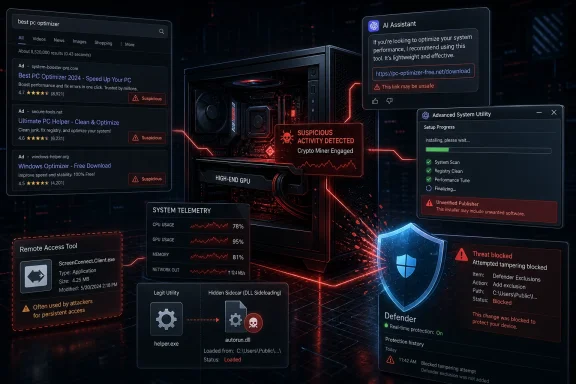
Microsoft disclosed on May 26, 2026, that Defender researchers are tracking an active cryptojacking campaign using poisoned search results, AI chatbot-recommended malicious links, fake Windows utility downloads, abused ScreenConnect remote access, and Microsoft-signed .NET utilities to mine cryptocurrency on high-GPU Windows systems. The story is not merely that another fake-download campaign exists. It is that attackers are now optimizing the whole infection path around the habits of the people most likely to own profitable hardware. For Windows users and administrators, the uncomfortable lesson is that “download the utility everyone recommends” has become a trust decision, not a routine chore.
Cryptojacking used to be a numbers game. Attackers compromised as many machines as possible, accepted that most of them were mediocre miners, and made up the difference with scale. Microsoft’s latest write-up describes something more selective: a campaign built to find the kind of Windows PCs where mining might actually pay.
The lure set is the giveaway. CrystalDiskInfo, HWMonitor, Display Driver Uninstaller, FurMark, K-Lite Codec Pack, and PDFgear are not random consumer bait. Several of them are staples of the PC enthusiast and troubleshooting world, especially among users who monitor thermals, test GPUs, reinstall display drivers, benchmark systems, or tune gaming rigs.
That makes the campaign more interesting than the usual “fake VLC installer” commodity malware story. The attacker is not just borrowing popular names; the attacker is using software choice as a proxy for hardware value. A person searching for FurMark or DDU is much more likely to have a discrete GPU than someone searching for a coupon printer driver.
This is a small but meaningful shift in cryptojacking economics. Instead of blasting the internet with a generic loader, the operator is letting search behavior perform preselection. The victim’s intent becomes the campaign’s targeting layer.
That distinction should not blunt the concern. A user asking an AI chatbot where to download a Windows utility is doing what software companies, search vendors, and AI vendors have spent the last two years training people to do: ask the assistant and trust the answer enough to click. If a malicious domain can get into that recommendation path, the old SEO problem has simply acquired a more persuasive interface.
Search poisoning has always exploited user impatience. AI-mediated search exploits something deeper: delegated judgment. The chatbot does not merely rank links; it often wraps them in a confident sentence that sounds like advice. That changes the psychology of the click, even when the underlying failure is still just a bad destination being surfaced at the wrong moment.
For defenders, this means security awareness training that says “don’t click suspicious search results” is now incomplete. Users are no longer always looking at a familiar results page with ads, snippets, and domain names. Sometimes they are looking at a generated recommendation that compresses the decision into a single suggested download path.
When the user launches the real executable, Windows behavior does the rest. The legitimate program loads the DLL from the same folder, allowing the attacker’s code to run through DLL sideloading. There is no flashy exploit, no kernel bug, no browser zero-day, and no obvious crash that tells the user something has gone wrong.
That is why sideloading remains so durable. It abuses the boundary between “this executable is legitimate” and “the files around this executable are trustworthy.” Users see the expected application. Security tools see a known program doing something that may not look immediately outrageous. The attacker gets execution without having to beat the operating system head-on.
Microsoft says it observed nine distinct
This is where the campaign stops being a nuisance and starts looking like a platform. A miner consumes electricity, degrades performance, and wears out goodwill. A remote access client gives the operator a durable path back into the machine. That path can support more mining, but it can also support credential theft, reconnaissance, lateral movement, or ransomware staging.
The distinction matters for incident response. If an organization finds a miner and simply removes the mining process, it may leave the attacker’s remote-control mechanism intact. Microsoft’s description makes clear that ScreenConnect is part of the early infection chain, not an incidental tool used later by a bored operator.
Legitimate RMM abuse has become one of the defining annoyances of modern Windows defense. These tools are signed, useful, and often allowed by policy. Blocking all of them is not realistic for many enterprises, but allowing any unapproved instance is increasingly reckless.
The malware copies itself as
The process-hollowing stage targets legitimate Microsoft-signed .NET Framework utilities, including
This is not magic, and it is not new, but it remains effective because Windows environments are full of trusted binaries that can be abused. The industry calls them living-off-the-land binaries, but the phrase can obscure the operational reality. Attackers are not living off the land because it is elegant; they are doing it because enterprise allow lists, administrator habits, and noisy telemetry often give signed utilities the benefit of the doubt.
This redundancy is not just belt-and-suspenders persistence. The hollowed process also checks whether the persistence mechanisms remain in place and recreates missing pieces. It reruns Defender exclusion registration as part of its ongoing cycle. That turns cleanup into a race against a self-repairing foothold.
The practical consequence is that partial remediation can fail silently. Delete one scheduled task and another mechanism may restart the loader. Remove an exclusion and the malware may put it back. Kill the miner and the control logic may decide when to reintroduce it.
This is why responders should treat the campaign as a system of cooperating components rather than a single bad executable. The ZIP, sideloaded DLL, ScreenConnect installation,
That modularity lets the operator adapt without rebuilding the first-stage malware. It also keeps the initial payload smaller and potentially less obvious. The miner is a component to be fetched when profitable, not the identity of the malware itself.
The campaign also monitors host state in ways that resemble product telemetry for a criminal business. It collects CPU and GPU details, RAM, Windows version, administrative status, local IP, country code, antivirus product, uptime, idle time, GPU temperature, GPU usage, and whether gaming or other GPU-heavy activity appears to be underway.
The purpose is not curiosity. Mining is most profitable when the user does not notice. If GPU usage spikes while someone is gaming or streaming, the miner can pause or terminate activity to avoid suspicion. That makes the malware “polite” in the same way a burglar may avoid turning on lights: not out of restraint, but out of self-preservation.
This is one of the clearest reminders that local administrative control is a security boundary in practice, even when it is not always treated that way in consumer Windows culture. If malware can run with sufficient rights to add exclusions, disable protections, install remote access software, and create high-privilege scheduled tasks, the machine is no longer merely “infected.” It is being administered by an adversary.
Enterprise customers have policy tools to restrict this behavior, but only if they use them. Tamper protection, EDR in block mode, attack surface reduction rules, controlled RMM policy, and alerting on Defender preference changes are not ornamental hardening steps. They are directly relevant to this campaign.
For home users, the lesson is more basic and more frustrating. A fake utility installer can turn a helpful troubleshooting session into an administrative compromise. Running random ZIP-contained utilities from unfamiliar download domains is no longer just a way to get adware; it can hand over persistent remote access.
This is standard tradecraft, but its presence reinforces the campaign’s maturity. The operator expects samples to land in sandboxes and labs. The malware exits silently when it thinks it is being watched, which can reduce automated detection and slow human analysis.
The same pattern appears in the use of encrypted command-and-control configuration and TLS certificate pinning. Microsoft reports that the WebSocket C2 address is stored in an AES-128-CBC encrypted blob and that the malware pins a hard-coded TLS certificate fingerprint during connection setup. That is not enough to make the campaign invisible, but it is enough to frustrate shallow network inspection and opportunistic takedown analysis.
Certificate pivoting reportedly led Microsoft to additional IPs and related Dynamic DNS infrastructure, including lookalike domains used for malicious downloads. This matters because infrastructure rarely exists as a single domain name. A defender who blocks only the first observed host may be defending yesterday’s doorway.
The user trusts a search result or AI-generated recommendation. The user trusts a brand name attached to a familiar utility. Windows trusts local DLL loading behavior enough for the sideload to work. The environment trusts ScreenConnect because remote management software is normal. Security tooling may initially trust Microsoft-signed .NET utilities. The miner then uses host telemetry to avoid breaking the illusion.
This is the attacker’s advantage: every stage borrows trust from something legitimate. There is no need for a Hollywood-grade exploit when the path from recommendation to remote access can be paved with normal-looking artifacts. The maliciousness lives in the composition.
That is also why defenders should be wary of advice that reduces the answer to “download from official sites.” That is correct, but insufficient. Users need safer default paths, browsers need better reputation signals, AI assistants need more careful handling of software-download recommendations, and enterprises need controls that assume some users will inevitably click the wrong thing.
But it does expose a gap. AI assistants are increasingly used as navigational interfaces to the web, yet many still handle software-download recommendations as if they were ordinary informational answers. That is dangerous. A recommendation to download a system utility is not like a recommendation for a keyboard shortcut or a registry path; it is a prompt that can lead directly to code execution.
A mature assistant should treat software downloads as a high-risk category. It should prefer official publisher domains, warn when a domain is unofficial, avoid fabricating or casually endorsing mirrors, and present uncertainty instead of a confident-looking answer when source reputation is unclear. The old web taught users to scan URLs; AI often hides that work behind prose.
This is not only a vendor problem. Organizations that allow AI tools in the workplace need policy around using them for software acquisition. “Ask Copilot or ChatGPT where to download it” should not be an approved procurement path unless the answer is constrained to trusted sources and validated by IT.
The answer is not to pretend all RMM software is bad. The answer is to know which tools are approved, which tenants or servers they are allowed to contact, which installation paths are expected, and which teams are allowed to deploy them. Anything outside that pattern should be suspicious by default.
This campaign also argues for monitoring the boring Windows plumbing that attackers repeatedly abuse. Scheduled task creation, Startup folder shortcuts, registry Run keys, Defender exclusion changes, unsigned DLLs loaded by newly downloaded utilities, and unexpected
Microsoft’s hunting queries point defenders toward
GPU owners are especially exposed because the habits that make them technically capable also make them frequent downloaders. They update drivers manually, test thermals, run benchmarks, troubleshoot codecs, reinstall utilities after Windows refreshes, and search for niche tools by name. Attackers do not need to fool everyone; they only need to sit between a familiar query and a hurried click.
The safest habit is boring: navigate from the publisher’s known domain, use trusted package managers or vendor stores where appropriate, verify signatures when practical, and treat ZIP archives containing “portable” utilities with adjacent DLLs as worthy of suspicion. A legitimate utility can be bundled with a malicious neighbor, and the user may still see the expected interface.
WindowsForum readers are better positioned than most to understand this, but expertise can become its own risk. The more often someone downloads low-level utilities, the more often they have to make trust decisions quickly. This campaign is designed for exactly that moment.
Cloud protection helps with fast-changing payloads and infrastructure. EDR in block mode gives Microsoft Defender for Endpoint a chance to stop behavior even when antivirus alone is not the controlling engine. Network and web protection can blunt malicious destinations before the ZIP arrives. SmartScreen helps with reputation checks. Attack surface reduction rules can make it harder for low-reputation executables to run or for suspicious behaviors to proceed unchecked.
The challenge is that many organizations own these controls but do not fully enable them. Compatibility fears, alert fatigue, legacy applications, and decentralized IT all conspire to leave policies in audit mode forever. Attackers benefit from that hesitation.
There is a useful lesson here for security teams trying to justify hardening projects. This is not an abstract “best practices” scenario. It is a live campaign where the defensive controls are directly relevant to the observed behavior, from blocking suspicious downloads to detecting unwanted RMM installation and tampered Defender settings.
Attackers are adapting to that same shift. If software discovery moves from blue links to generated recommendations, poisoning efforts will follow. If users trust brand names more than domains, fake-brand infrastructure will expand. If administrators allow remote management tools because they are operationally necessary, adversaries will keep hiding behind them.
The defense cannot be nostalgia for a cleaner web that never really existed. It has to be a more explicit trust chain for software acquisition: known publishers, verified downloads, stronger reputation systems, constrained AI recommendations, managed RMM allow lists, and endpoint controls that treat suspicious combinations as more important than isolated artifacts.
Microsoft’s disclosure is therefore less a one-off malware note than a warning about the next phase of Windows compromise. The attack does not need to break Windows if it can bend the user’s search path, borrow a legitimate executable, install a legitimate remote access client, hide inside Microsoft-signed utilities, and mine only when the owner is least likely to notice. That is the future defenders have to design against: not malware that looks obviously alien, but malware that understands the ordinary rituals of Windows maintenance well enough to disappear inside them.
 The Fake Utility Download Has Become a Hardware Filter
Cryptojacking used to be a numbers game. Attackers compromised as many machines as possible, accepted that most of them were mediocre miners, and made up the difference with scale. Microsoft’s latest write-up describes something more selective: a campaign built to find the kind of Windows PCs where mining might actually pay.The lure set is the giveaway. CrystalDiskInfo, HWMonitor, Display Driver Uninstaller, FurMark, K-Lite Codec Pack, and PDFgear are not random consumer bait. Several of them are staples of the PC enthusiast and troubleshooting world, especially among users who monitor thermals, test GPUs, reinstall display drivers, benchmark systems, or tune gaming rigs.
That makes the campaign more interesting than the usual “fake VLC installer” commodity malware story. The attacker is not just borrowing popular names; the attacker is using software choice as a proxy for hardware value. A person searching for FurMark or DDU is much more likely to have a discrete GPU than someone searching for a coupon printer driver.
This is a small but meaningful shift in cryptojacking economics. Instead of blasting the internet with a generic loader, the operator is letting search behavior perform preselection. The victim’s intent becomes the campaign’s targeting layer.
AI Search Is Now Part of the Poisoned-Well Problem
The newest wrinkle is Microsoft’s observation that malicious domains may have surfaced not only through traditional search engine poisoning but also through interactions with large language model tools. Microsoft is careful here, and the caution matters. The company does not claim a systemic failure of a named chatbot service; it says it observed reports, correlated traffic metadata, and examples consistent with AI-assisted delivery.That distinction should not blunt the concern. A user asking an AI chatbot where to download a Windows utility is doing what software companies, search vendors, and AI vendors have spent the last two years training people to do: ask the assistant and trust the answer enough to click. If a malicious domain can get into that recommendation path, the old SEO problem has simply acquired a more persuasive interface.
Search poisoning has always exploited user impatience. AI-mediated search exploits something deeper: delegated judgment. The chatbot does not merely rank links; it often wraps them in a confident sentence that sounds like advice. That changes the psychology of the click, even when the underlying failure is still just a bad destination being surfaced at the wrong moment.
For defenders, this means security awareness training that says “don’t click suspicious search results” is now incomplete. Users are no longer always looking at a familiar results page with ads, snippets, and domain names. Sometimes they are looking at a generated recommendation that compresses the decision into a single suggested download path.
The Attack Starts Quietly Because Nothing Needs to Exploit Windows
The initial infection chain is depressingly practical. The victim lands on a lookalike download site, clicks a button, and receives a ZIP archive from campaign-controlled infrastructure. Inside is a legitimate executable for the spoofed utility sitting beside a malicious DLL namedautorun.dll.When the user launches the real executable, Windows behavior does the rest. The legitimate program loads the DLL from the same folder, allowing the attacker’s code to run through DLL sideloading. There is no flashy exploit, no kernel bug, no browser zero-day, and no obvious crash that tells the user something has gone wrong.
That is why sideloading remains so durable. It abuses the boundary between “this executable is legitimate” and “the files around this executable are trustworthy.” Users see the expected application. Security tools see a known program doing something that may not look immediately outrageous. The attacker gets execution without having to beat the operating system head-on.
Microsoft says it observed nine distinct
autorun.dll variants across the campaign. That variation is not surprising, but it is operationally important. Defenders who reduce the campaign to a single hash will miss the broader pattern: legitimate utility, adjacent DLL, silent installer, remote access tooling, then post-compromise payload.ScreenConnect Turns a Miner Into a Beachhead
The campaign’s most consequential move is not the mining software. It is the installation of ScreenConnect, also known as ConnectWise Control, through a masqueraded installer component namedvcredist_x64.dll. ScreenConnect is a legitimate remote management tool, widely used by IT teams, managed service providers, and support desks. In the wrong hands, that legitimacy becomes camouflage.This is where the campaign stops being a nuisance and starts looking like a platform. A miner consumes electricity, degrades performance, and wears out goodwill. A remote access client gives the operator a durable path back into the machine. That path can support more mining, but it can also support credential theft, reconnaissance, lateral movement, or ransomware staging.
The distinction matters for incident response. If an organization finds a miner and simply removes the mining process, it may leave the attacker’s remote-control mechanism intact. Microsoft’s description makes clear that ScreenConnect is part of the early infection chain, not an incidental tool used later by a bored operator.
Legitimate RMM abuse has become one of the defining annoyances of modern Windows defense. These tools are signed, useful, and often allowed by policy. Blocking all of them is not realistic for many enterprises, but allowing any unapproved instance is increasingly reckless.
Microsoft-Signed Utilities Become the Costume
After ScreenConnect is established, the attacker reportedly dropsSimpleRunPE.exe, a binary Microsoft links with moderate confidence to a public process-hollowing proof-of-concept lineage. The embedded PDB path points toward a project structure resembling a GitHub repository for Simple RunPE process hollowing. That is not a smoking gun of authorship, but it is a familiar pattern: public red-team or research code becoming raw material for commodity abuse.The malware copies itself as
RuntimeHost.exe into a hidden install directory using the campaign identifier D3F4E2A1. That same identifier appears in the mutex name and Defender exclusion paths, which gives defenders a useful pivot but also shows the operator’s preference for a coherent internal campaign marker.The process-hollowing stage targets legitimate Microsoft-signed .NET Framework utilities, including
InstallUtil.exe, RegAsm.exe, RegSvcs.exe, MSBuild.exe, AppLaunch.exe, AddInProcess.exe, and aspnet_compiler.exe. The malware tries the list in order and uses the first available target. Once hollowed, the malicious mining logic runs under the identity of a trusted Windows component.This is not magic, and it is not new, but it remains effective because Windows environments are full of trusted binaries that can be abused. The industry calls them living-off-the-land binaries, but the phrase can obscure the operational reality. Attackers are not living off the land because it is elegant; they are doing it because enterprise allow lists, administrator habits, and noisy telemetry often give signed utilities the benefit of the doubt.
Persistence Is Built Like a Repair Loop, Not a Checkbox
The persistence layer is unusually redundant for a campaign that could have stopped at mining. Microsoft says the malware establishes six separate autostart mechanisms: three scheduled tasks, two registry Run keys, and a Startup folder shortcut. The task names — such as “Windows System Health” and “Windows System Health Monitor” — are bland enough to hide in the administrative wallpaper.This redundancy is not just belt-and-suspenders persistence. The hollowed process also checks whether the persistence mechanisms remain in place and recreates missing pieces. It reruns Defender exclusion registration as part of its ongoing cycle. That turns cleanup into a race against a self-repairing foothold.
The practical consequence is that partial remediation can fail silently. Delete one scheduled task and another mechanism may restart the loader. Remove an exclusion and the malware may put it back. Kill the miner and the control logic may decide when to reintroduce it.
This is why responders should treat the campaign as a system of cooperating components rather than a single bad executable. The ZIP, sideloaded DLL, ScreenConnect installation,
RuntimeHost.exe, scheduled tasks, registry keys, Defender exclusions, hollowed .NET process, miner archive, and WebSocket command channel all belong to the same operational picture.The Miner Is Polite Only Because Stealth Pays
One of the more revealing parts of Microsoft’s analysis is the mining orchestration. The malware does not embed a miner directly. Instead, it downloads a supported mining archive at runtime, with support for GPU-focused tools including gminer, lolMiner, and SRBMiner-MULTI.That modularity lets the operator adapt without rebuilding the first-stage malware. It also keeps the initial payload smaller and potentially less obvious. The miner is a component to be fetched when profitable, not the identity of the malware itself.
The campaign also monitors host state in ways that resemble product telemetry for a criminal business. It collects CPU and GPU details, RAM, Windows version, administrative status, local IP, country code, antivirus product, uptime, idle time, GPU temperature, GPU usage, and whether gaming or other GPU-heavy activity appears to be underway.
The purpose is not curiosity. Mining is most profitable when the user does not notice. If GPU usage spikes while someone is gaming or streaming, the miner can pause or terminate activity to avoid suspicion. That makes the malware “polite” in the same way a burglar may avoid turning on lights: not out of restraint, but out of self-preservation.
Defender Exclusions Are the Malware’s Vote of Confidence
The campaign attempts to modify Microsoft Defender Antivirus exclusions using PowerShell andAdd-MpPreference. It registers both path-based and process-based exclusions, including the .NET binaries used for hollowing and common miner executable names. In other words, the malware tries to persuade the local security stack to look away from exactly the places it intends to operate.This is one of the clearest reminders that local administrative control is a security boundary in practice, even when it is not always treated that way in consumer Windows culture. If malware can run with sufficient rights to add exclusions, disable protections, install remote access software, and create high-privilege scheduled tasks, the machine is no longer merely “infected.” It is being administered by an adversary.
Enterprise customers have policy tools to restrict this behavior, but only if they use them. Tamper protection, EDR in block mode, attack surface reduction rules, controlled RMM policy, and alerting on Defender preference changes are not ornamental hardening steps. They are directly relevant to this campaign.
For home users, the lesson is more basic and more frustrating. A fake utility installer can turn a helpful troubleshooting session into an administrative compromise. Running random ZIP-contained utilities from unfamiliar download domains is no longer just a way to get adware; it can hand over persistent remote access.
Anti-Analysis Checks Show the Operator Knows the Audience Includes Defenders
Microsoft says the malware checks for virtual machines, analyst tools, debuggers, disassemblers, network inspection tools, and related indicators. It looks for signs of VMware, VirtualBox, QEMU, known virtualization MAC prefixes, WMI indicators, and dozens of process names associated with reverse engineering and security analysis.This is standard tradecraft, but its presence reinforces the campaign’s maturity. The operator expects samples to land in sandboxes and labs. The malware exits silently when it thinks it is being watched, which can reduce automated detection and slow human analysis.
The same pattern appears in the use of encrypted command-and-control configuration and TLS certificate pinning. Microsoft reports that the WebSocket C2 address is stored in an AES-128-CBC encrypted blob and that the malware pins a hard-coded TLS certificate fingerprint during connection setup. That is not enough to make the campaign invisible, but it is enough to frustrate shallow network inspection and opportunistic takedown analysis.
Certificate pivoting reportedly led Microsoft to additional IPs and related Dynamic DNS infrastructure, including lookalike domains used for malicious downloads. This matters because infrastructure rarely exists as a single domain name. A defender who blocks only the first observed host may be defending yesterday’s doorway.
The Windows Trust Model Is Being Abused at Every Layer
What makes this campaign notable is not any single technique. SEO poisoning is old. DLL sideloading is old. Process hollowing is old. RMM abuse is old. Mining malware is old. The novelty is how neatly these familiar pieces align with modern user behavior.The user trusts a search result or AI-generated recommendation. The user trusts a brand name attached to a familiar utility. Windows trusts local DLL loading behavior enough for the sideload to work. The environment trusts ScreenConnect because remote management software is normal. Security tooling may initially trust Microsoft-signed .NET utilities. The miner then uses host telemetry to avoid breaking the illusion.
This is the attacker’s advantage: every stage borrows trust from something legitimate. There is no need for a Hollywood-grade exploit when the path from recommendation to remote access can be paved with normal-looking artifacts. The maliciousness lives in the composition.
That is also why defenders should be wary of advice that reduces the answer to “download from official sites.” That is correct, but insufficient. Users need safer default paths, browsers need better reputation signals, AI assistants need more careful handling of software-download recommendations, and enterprises need controls that assume some users will inevitably click the wrong thing.
AI Assistants Need a Download-Safety Layer, Not Just Better Answers
The AI angle deserves careful treatment because it is easy to overstate. Microsoft’s evidence, as described, is based on observed patterns, correlated metadata, and illustrative examples. It does not prove that a specific AI platform broadly promoted malware, nor does it mean chatbots are uniquely worse than search engines.But it does expose a gap. AI assistants are increasingly used as navigational interfaces to the web, yet many still handle software-download recommendations as if they were ordinary informational answers. That is dangerous. A recommendation to download a system utility is not like a recommendation for a keyboard shortcut or a registry path; it is a prompt that can lead directly to code execution.
A mature assistant should treat software downloads as a high-risk category. It should prefer official publisher domains, warn when a domain is unofficial, avoid fabricating or casually endorsing mirrors, and present uncertainty instead of a confident-looking answer when source reputation is unclear. The old web taught users to scan URLs; AI often hides that work behind prose.
This is not only a vendor problem. Organizations that allow AI tools in the workplace need policy around using them for software acquisition. “Ask Copilot or ChatGPT where to download it” should not be an approved procurement path unless the answer is constrained to trusted sources and validated by IT.
The Admin Response Starts With RMM Governance
For enterprise IT, the ScreenConnect portion should be the loudest alarm. Many organizations already have some combination of TeamViewer, AnyDesk, ScreenConnect, Splashtop, Quick Assist, Remote Help, Intune Remote Help, or vendor support tools floating around. Attackers understand that remote access software often blends into this background noise.The answer is not to pretend all RMM software is bad. The answer is to know which tools are approved, which tenants or servers they are allowed to contact, which installation paths are expected, and which teams are allowed to deploy them. Anything outside that pattern should be suspicious by default.
This campaign also argues for monitoring the boring Windows plumbing that attackers repeatedly abuse. Scheduled task creation, Startup folder shortcuts, registry Run keys, Defender exclusion changes, unsigned DLLs loaded by newly downloaded utilities, and unexpected
msiexec.exe activity from user-writable folders are not glamorous detections. They are, however, where this intrusion breathes.Microsoft’s hunting queries point defenders toward
RuntimeHost.exe under \Caches\D3F4E2A1, suspicious scheduled tasks named like Windows health components, and autorun.dll loading from common download or temp locations followed by quiet MSI activity. Even if the exact campaign evolves, those behavioral joins are more durable than any single hash.Home Power Users Are the Prime Bait
The campaign’s target profile should make Windows enthusiasts uncomfortable. Many of the impersonated tools are exactly the programs power users recommend to one another in forums, Discord servers, Reddit threads, repair shops, and YouTube descriptions. That informal recommendation network is valuable, but it also creates predictable demand that attackers can intercept.GPU owners are especially exposed because the habits that make them technically capable also make them frequent downloaders. They update drivers manually, test thermals, run benchmarks, troubleshoot codecs, reinstall utilities after Windows refreshes, and search for niche tools by name. Attackers do not need to fool everyone; they only need to sit between a familiar query and a hurried click.
The safest habit is boring: navigate from the publisher’s known domain, use trusted package managers or vendor stores where appropriate, verify signatures when practical, and treat ZIP archives containing “portable” utilities with adjacent DLLs as worthy of suspicion. A legitimate utility can be bundled with a malicious neighbor, and the user may still see the expected interface.
WindowsForum readers are better positioned than most to understand this, but expertise can become its own risk. The more often someone downloads low-level utilities, the more often they have to make trust decisions quickly. This campaign is designed for exactly that moment.
The Defender Guidance Is Sensible, but It Assumes Maturity
Microsoft recommends cloud-delivered protection, EDR in block mode, network protection, web protection, SmartScreen-capable browsers, attack surface reduction rules, and careful handling of browser-stored credentials. That guidance is unsurprising, but it is not boilerplate. Each recommendation maps to a stage in the chain.Cloud protection helps with fast-changing payloads and infrastructure. EDR in block mode gives Microsoft Defender for Endpoint a chance to stop behavior even when antivirus alone is not the controlling engine. Network and web protection can blunt malicious destinations before the ZIP arrives. SmartScreen helps with reputation checks. Attack surface reduction rules can make it harder for low-reputation executables to run or for suspicious behaviors to proceed unchecked.
The challenge is that many organizations own these controls but do not fully enable them. Compatibility fears, alert fatigue, legacy applications, and decentralized IT all conspire to leave policies in audit mode forever. Attackers benefit from that hesitation.
There is a useful lesson here for security teams trying to justify hardening projects. This is not an abstract “best practices” scenario. It is a live campaign where the defensive controls are directly relevant to the observed behavior, from blocking suspicious downloads to detecting unwanted RMM installation and tampered Defender settings.
The Concrete Clues This Campaign Leaves Behind
The campaign is sophisticated enough to evade shallow analysis, but it is not invisible. Its strength comes from blending legitimate software, trusted brands, and common Windows mechanisms. That also means it leaves traces across the host, network, and administrative control plane.- Users searching for CrystalDiskInfo, HWMonitor, Display Driver Uninstaller, FurMark, K-Lite Codec Pack, or PDFgear should be especially cautious about unofficial download domains and ZIP archives promoted through search or AI-generated recommendations.
- Unexpected ScreenConnect installations deserve immediate investigation, especially when the host or service configuration points to unfamiliar infrastructure or appears shortly after a utility download.
- The presence of
autorun.dllbeside a legitimate utility executable in a user download, temp, desktop, roaming profile, or public folder should be treated as suspicious. - Scheduled tasks with bland Windows-health names, registry Run entries named
WinSysCache, and Startup shortcuts pointing toRuntimeHost.exeare concrete persistence signals from this campaign. - Defender exclusion changes involving .NET utilities, miner names, or hidden cache paths should be treated as high-priority evidence of active defense evasion.
- High-GPU systems that show unexplained thermal load, intermittent mining processes, or suspicious pauses during user activity may be exhibiting the campaign’s stealth logic rather than random performance trouble.
Microsoft’s Report Is Really About the Future of Software Discovery
This campaign lands at an awkward time for the software ecosystem. Search engines are being remade around AI summaries. Browsers are adding assistants. Operating systems are becoming more aggressive about cloud reputation. Users are being encouraged to ask natural-language tools for help with tasks that used to involve searching, browsing, comparing, and judging.Attackers are adapting to that same shift. If software discovery moves from blue links to generated recommendations, poisoning efforts will follow. If users trust brand names more than domains, fake-brand infrastructure will expand. If administrators allow remote management tools because they are operationally necessary, adversaries will keep hiding behind them.
The defense cannot be nostalgia for a cleaner web that never really existed. It has to be a more explicit trust chain for software acquisition: known publishers, verified downloads, stronger reputation systems, constrained AI recommendations, managed RMM allow lists, and endpoint controls that treat suspicious combinations as more important than isolated artifacts.
Microsoft’s disclosure is therefore less a one-off malware note than a warning about the next phase of Windows compromise. The attack does not need to break Windows if it can bend the user’s search path, borrow a legitimate executable, install a legitimate remote access client, hide inside Microsoft-signed utilities, and mine only when the owner is least likely to notice. That is the future defenders have to design against: not malware that looks obviously alien, but malware that understands the ordinary rituals of Windows maintenance well enough to disappear inside them.
References
- Primary source: Microsoft
Published: Tue, 26 May 2026 21:35:34 GMT
From poisoned search results to GPU mining: A cryptojacking campaign abusing ScreenConnect and Microsoft .NET utilities | Microsoft Security Blog
Microsoft exposes a cryptojacking campaign using SEO poisoning and ScreenConnect to target high-performance PCs, with malicious sites also surfaced through AI chatbots.www.microsoft.com
