

Microsoft has launched Enterprise Preview for Microsoft Edge in June 2026, giving Microsoft 365 admins a managed way to deliver pre-release Edge builds inside the Stable Edge application rather than asking users to install and maintain separate Insider channels. That sounds like a small packaging change, but it is really a bet on lowering the human cost of browser testing. Microsoft is trying to make preview validation feel less like a side project and more like part of normal endpoint hygiene. For enterprises that live and die by browser compatibility, the move is both overdue and slightly uncomfortable.
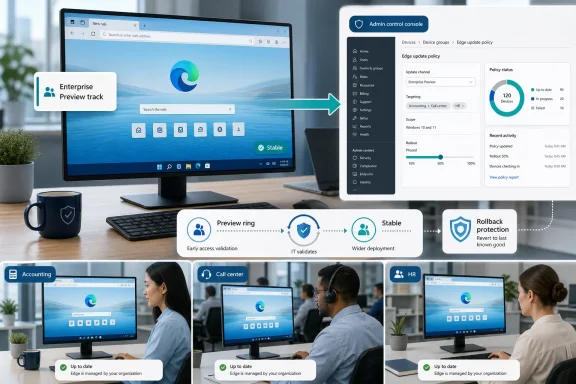
Enterprise Preview is not a new browser so much as a new route into the Edge release pipeline. Instead of telling a pilot group to install Edge Beta or Edge Dev alongside Stable, admins can target users so that pre-release builds arrive inside the familiar Stable Edge application. The user’s browser still looks like the browser they use every day; the difference is the build track behind it.
That matters because the old model asked too much of ordinary users. Separate Insider installations work well for enthusiasts, developers, and a few power users in IT. They work poorly for the accounting department, the call-center floor, or the executive assistant whose day is already a parade of line-of-business portals, identity prompts, and compliance pop-ups.
Microsoft’s pitch is straightforward: if admins want useful compatibility signals, they need more than a handful of volunteers. Enterprise Preview tries to solve the participation problem by removing the separate-app tax. Users do not need to know the difference between Stable, Beta, Dev, Canary, or whatever other release-train jargon the browser world has normalized.
The tradeoff is that Microsoft is bringing pre-release code closer to production habits. That is the point, of course. A preview build tested by people who never use the real corporate workflows is not much of a preview.
That timing gives the feature more significance than its short roadmap description suggests. Microsoft has also been signaling a faster Edge release rhythm, with Edge moving toward a two-week release cycle beginning with Edge 152 later in 2026. Faster releases increase the value of early validation because the window between “this broke something” and “this is everywhere” gets narrower.
For admins, that is the heart of the matter. Browser updates are no longer occasional desktop events. They are continuous service changes delivered into the most important application on the endpoint.
The browser is where identity, SaaS, internal apps, AI assistants, document viewers, security controls, and legacy compatibility all collide. If Edge changes behavior in a way that affects authentication, PDF rendering, web app navigation, extension policy, or data protection controls, the blast radius can be broad even when the bug itself is narrow.
The usual pattern is familiar. IT asks for pilot users. A few technically friendly employees agree. Maybe some admins run Beta on their own machines. Then the preview group quietly becomes too small, too technical, and too unlike the real user population to catch the problems that matter.
Enterprise Preview is designed to attack that failure mode. Microsoft recommends pilot populations based on total device count, with a minimum suggested pre-release audience of 20 devices. Smaller organizations are pushed toward a larger percentage, while very large tenants can use a fraction of a percent and still generate thousands of signals.
The practical implication is that Microsoft wants preview validation to become statistically useful. A pilot group of five IT staffers can catch obvious browser crashes. It will not necessarily catch the weird SSO issue that only appears in a claims-heavy HR app, the rendering glitch in an old procurement portal, or the PDF workflow bug that matters only to legal operations.
By putting the preview track inside Stable Edge, Microsoft is trying to make the pilot group larger without making the support burden proportionally larger. That is the optimistic reading. The more skeptical reading is that Microsoft is also preparing customers for a release cadence where not having a real pilot ring becomes harder to defend.
That distinction matters. A preview program that traps users on a bad build is not a pilot; it is a support incident waiting for a ticket number. Microsoft’s new Edge Preview Enrollment Type policy gives admins a choice between making preview participation required or allowing users to move back to Stable.
The opt-out model is useful because it acknowledges reality. If a pre-release build breaks a user’s essential workflow, waiting for IT to diagnose, reassign, and remediate the device is friction the business will not tolerate. A visible rollback path gives users and help desks a faster escape hatch.
But this does not remove the need for governance. If every preview user opts out the moment anything looks odd, the pilot pool evaporates. If no one is allowed to opt out, IT owns every productivity hit caused by pre-release code. The right answer will depend on the population: developers and IT-adjacent users may tolerate required enrollment, while revenue-facing teams probably need the safety valve.
Enterprise Preview therefore gives admins a sharper tool, not an excuse to stop thinking. The policy decision is not merely technical. It is a contract with users about how much instability the organization is willing to absorb in exchange for earlier warning.
That is strategically tidy. The modern enterprise browser is deeply tied to Microsoft 365 identity, Copilot experiences, data loss prevention, extension governance, security baselines, and cloud policy. Centralizing management in the admin center makes sense for organizations already living in Entra ID, Intune, Defender, and Microsoft 365 service health dashboards.
It also raises the usual Microsoft cloud-management concern: another meaningful control plane moves into the tenant. Traditional group policy is still part of the Edge management story, but Microsoft’s center of gravity is clearly cloud-first. That is convenient for distributed workforces and less convenient for organizations that prefer hard local boundaries, slower change, or minimal dependency on web consoles.
The upside is visibility. Admins who previously struggled to know whether their pilot ring was big enough can now see the population more directly and compare it against Microsoft’s recommendations. The downside is that visibility can become pressure. Once the admin center tells you your pilot group is too small, the absence of a proper preview ring becomes a measurable gap rather than an informal weakness.
For admins, that demands precise communication. A user may say they are “on Stable” because the app is Stable Edge. IT may know the underlying build is Beta or Dev. Help desk scripts, troubleshooting instructions, and asset inventory need to reflect that distinction or the organization will confuse itself during incidents.
This is not unprecedented. Enterprise software has long separated branding from servicing channels. Microsoft 365 Apps, Windows Insider for Business, and various cloud release rings already ask admins to think in terms of channel policy rather than product icons.
Still, browsers are special because users interact with them constantly and because many web apps perform browser checks, version checks, and policy checks. When the Edge icon says one thing and the underlying build train says another, documentation and support tooling must be explicit.
The worst outcome would be a preview deployment that is invisible to everyone except the update service. Enterprise Preview should be low-friction, not opaque. If admins cannot quickly tell who is on a pre-release build, why they are there, and how they get back, the feature will create the very confusion it is meant to reduce.
Browsers are among the most aggressively attacked pieces of client software. They parse hostile content from the open web, host extensions, broker identity sessions, and increasingly handle sensitive document and AI-assisted workflows. A sluggish browser update strategy can become a security liability very quickly.
Microsoft’s Extended Stable option exists for organizations that need a longer major-release cycle, but even that is not a substitute for testing. It buys time; it does not remove change. Security fixes, policy updates, web platform changes, and service-side Microsoft 365 behavior can still alter the user experience.
Enterprise Preview sits in the tension between speed and control. It does not promise fewer changes. It promises earlier exposure to them. That is a more honest bargain than pretending the enterprise can freeze the web.
The organizations that benefit most will be those that already understand ring-based deployment. A preview ring is not a dumping ground for unlucky users. It is an instrumented early-warning system, ideally composed of people whose workflows represent the business rather than just IT’s comfort zone.
Enterprise Preview reinforces that positioning. Chrome may remain the default mental model for many web developers and employees, but Microsoft is betting that admins value integration. If Edge can be managed, monitored, flighted, rolled back, branded, secured, and connected to Microsoft 365 from the same administrative estate, it becomes harder to dismiss as merely another Chromium build.
The risk is that Microsoft’s enterprise story can feel heavy. Every new management capability adds value for some admins and another dashboard, policy, or exception path for others. Edge’s strength in the enterprise is also its burden: it is becoming a browser wrapped in a management philosophy.
That philosophy is increasingly explicit. The browser is no longer a passive client. It is a policy enforcement point, a productivity surface, a security boundary, and an AI entry point. Microsoft wants organizations to treat it accordingly.
A good browser pilot ring should include the messy parts of the company. It should have people who use old intranet apps, not just cloud-native tools. It should include departments with heavy PDF workflows, complex authentication paths, browser extensions, web conferencing tools, customer portals, and industry-specific SaaS applications.
It should also include users who will actually report problems. Silent failure is the enemy of preview programs. A user who quietly opts out, switches browsers, or works around an issue without telling anyone has generated no useful signal.
That means Enterprise Preview needs a communications plan. Users should know they are in an early-validation group, understand how to identify and report browser issues, and know when opting out is appropriate. Without that framing, the feature becomes an invisible experiment performed on people who did not agree to help.
There is a cultural dimension here that admins should not ignore. Enterprises often treat pilot users as disposable shock absorbers for change. The better model is to treat them as participants in operational resilience. That means feedback loops, responsiveness, and enough respect not to leave them stranded on broken builds.
Microsoft’s documentation indicates that when preview policies are removed, affected devices may continue receiving patch updates to their pre-release version until an equal or higher Stable version is available, at which point they return to Stable. That is a sensible servicing rule, but it also means channel transitions are governed by version arithmetic, not just admin intent.
Admins should therefore avoid treating Enterprise Preview like a light switch. It belongs in the same change-management conversation as update rings, endpoint groups, application owners, and support readiness. The ability to roll back reduces the severity of a bad preview build; it does not eliminate the need to know what changed.
Extensions deserve special attention. Many organizations rely on browser extensions for password management, security inspection, meeting tools, productivity add-ins, or legacy app compatibility. A preview Edge build that changes extension behavior can create problems that are not immediately recognized as browser-channel issues.
The same is true for PDF workflows. Edge is often the default PDF handler in Windows environments, and browser updates can affect viewing, annotation, printing, and embedded document behavior. A preview ring that excludes document-heavy teams may miss precisely the regressions that generate the loudest production complaints.
That model can frustrate admins who remember slower release cycles with more obvious boundaries. But the alternative is not a return to boxed software. The alternative is unmanaged change, where updates arrive anyway and the organization has fewer tools to see them coming.
The best case for Enterprise Preview is not that it makes Edge safer by itself. It is that it gives IT a practical way to make change visible earlier. A browser pilot group that reflects the business can turn vague anxiety about updates into specific evidence: this app works, that extension fails, this policy needs adjustment, this department should wait.
The danger is performative governance. A tenant can enable Enterprise Preview, assign a group, and declare victory while ignoring feedback quality, support paths, and application-owner involvement. That would make the feature another checkbox in the admin center rather than a real operating practice.
Microsoft’s recommendations are useful, but they are not a substitute for institutional knowledge. A 1 percent pilot group in a large company may be numerically impressive and still useless if it misses the one manufacturing app that depends on a brittle browser behavior. Enterprises need representative risk, not just representative math.
The concrete lessons are more practical than flashy:
 Microsoft Moves Browser Testing Into the Browser People Already Use
Enterprise Preview is not a new browser so much as a new route into the Edge release pipeline. Instead of telling a pilot group to install Edge Beta or Edge Dev alongside Stable, admins can target users so that pre-release builds arrive inside the familiar Stable Edge application. The user’s browser still looks like the browser they use every day; the difference is the build track behind it.That matters because the old model asked too much of ordinary users. Separate Insider installations work well for enthusiasts, developers, and a few power users in IT. They work poorly for the accounting department, the call-center floor, or the executive assistant whose day is already a parade of line-of-business portals, identity prompts, and compliance pop-ups.
Microsoft’s pitch is straightforward: if admins want useful compatibility signals, they need more than a handful of volunteers. Enterprise Preview tries to solve the participation problem by removing the separate-app tax. Users do not need to know the difference between Stable, Beta, Dev, Canary, or whatever other release-train jargon the browser world has normalized.
The tradeoff is that Microsoft is bringing pre-release code closer to production habits. That is the point, of course. A preview build tested by people who never use the real corporate workflows is not much of a preview.
The Roadmap Entry Is Small, but the Timing Is Not
The Microsoft 365 Roadmap entry for ID 557185 lists Enterprise Preview as launched, with preview availability in February 2026 and general availability in June 2026. It applies to Microsoft Edge on the web platform in the Worldwide standard multi-tenant cloud, with both Preview and General Availability release phases attached. The listing was created on February 13, 2026, and updated on June 22, 2026, which places the launch squarely in Microsoft’s mid-2026 enterprise management push.That timing gives the feature more significance than its short roadmap description suggests. Microsoft has also been signaling a faster Edge release rhythm, with Edge moving toward a two-week release cycle beginning with Edge 152 later in 2026. Faster releases increase the value of early validation because the window between “this broke something” and “this is everywhere” gets narrower.
For admins, that is the heart of the matter. Browser updates are no longer occasional desktop events. They are continuous service changes delivered into the most important application on the endpoint.
The browser is where identity, SaaS, internal apps, AI assistants, document viewers, security controls, and legacy compatibility all collide. If Edge changes behavior in a way that affects authentication, PDF rendering, web app navigation, extension policy, or data protection controls, the blast radius can be broad even when the bug itself is narrow.
Microsoft’s Real Target Is the Empty Pilot Ring
Every enterprise has a testing strategy on paper. Fewer have a meaningful browser flighting population in practice.The usual pattern is familiar. IT asks for pilot users. A few technically friendly employees agree. Maybe some admins run Beta on their own machines. Then the preview group quietly becomes too small, too technical, and too unlike the real user population to catch the problems that matter.
Enterprise Preview is designed to attack that failure mode. Microsoft recommends pilot populations based on total device count, with a minimum suggested pre-release audience of 20 devices. Smaller organizations are pushed toward a larger percentage, while very large tenants can use a fraction of a percent and still generate thousands of signals.
The practical implication is that Microsoft wants preview validation to become statistically useful. A pilot group of five IT staffers can catch obvious browser crashes. It will not necessarily catch the weird SSO issue that only appears in a claims-heavy HR app, the rendering glitch in an old procurement portal, or the PDF workflow bug that matters only to legal operations.
By putting the preview track inside Stable Edge, Microsoft is trying to make the pilot group larger without making the support burden proportionally larger. That is the optimistic reading. The more skeptical reading is that Microsoft is also preparing customers for a release cadence where not having a real pilot ring becomes harder to defend.
The Opt-Out Toggle Is a Safety Valve, Not a Governance Model
The most politically important part of Enterprise Preview may be the built-in rollback experience. Admins can configure the feature so users are allowed to opt out, switching between the targeted pre-release channel and Stable from inside Edge. In that mode, the preview experience is less coercive and more survivable.That distinction matters. A preview program that traps users on a bad build is not a pilot; it is a support incident waiting for a ticket number. Microsoft’s new Edge Preview Enrollment Type policy gives admins a choice between making preview participation required or allowing users to move back to Stable.
The opt-out model is useful because it acknowledges reality. If a pre-release build breaks a user’s essential workflow, waiting for IT to diagnose, reassign, and remediate the device is friction the business will not tolerate. A visible rollback path gives users and help desks a faster escape hatch.
But this does not remove the need for governance. If every preview user opts out the moment anything looks odd, the pilot pool evaporates. If no one is allowed to opt out, IT owns every productivity hit caused by pre-release code. The right answer will depend on the population: developers and IT-adjacent users may tolerate required enrollment, while revenue-facing teams probably need the safety valve.
Enterprise Preview therefore gives admins a sharper tool, not an excuse to stop thinking. The policy decision is not merely technical. It is a contract with users about how much instability the organization is willing to absorb in exchange for earlier warning.
The Microsoft 365 Admin Center Becomes the Browser Control Tower
Enterprise Preview also pushes more Edge management into the Microsoft 365 admin center and the Edge management service. Admins can configure the feature, view the flighting population, and receive personalized recommendations from one place. This is part of Microsoft’s broader effort to make Edge feel like a managed Microsoft 365 workload rather than a standalone browser deployed on Windows.That is strategically tidy. The modern enterprise browser is deeply tied to Microsoft 365 identity, Copilot experiences, data loss prevention, extension governance, security baselines, and cloud policy. Centralizing management in the admin center makes sense for organizations already living in Entra ID, Intune, Defender, and Microsoft 365 service health dashboards.
It also raises the usual Microsoft cloud-management concern: another meaningful control plane moves into the tenant. Traditional group policy is still part of the Edge management story, but Microsoft’s center of gravity is clearly cloud-first. That is convenient for distributed workforces and less convenient for organizations that prefer hard local boundaries, slower change, or minimal dependency on web consoles.
The upside is visibility. Admins who previously struggled to know whether their pilot ring was big enough can now see the population more directly and compare it against Microsoft’s recommendations. The downside is that visibility can become pressure. Once the admin center tells you your pilot group is too small, the absence of a proper preview ring becomes a measurable gap rather than an informal weakness.
Stable Edge Is Becoming a Shell for Multiple Release Realities
The cleverness of Enterprise Preview is also what makes it conceptually messy. Users receive pre-release builds inside the Stable Edge application, which means the visible product identity and the update channel are no longer as tightly aligned as many people assume.For admins, that demands precise communication. A user may say they are “on Stable” because the app is Stable Edge. IT may know the underlying build is Beta or Dev. Help desk scripts, troubleshooting instructions, and asset inventory need to reflect that distinction or the organization will confuse itself during incidents.
This is not unprecedented. Enterprise software has long separated branding from servicing channels. Microsoft 365 Apps, Windows Insider for Business, and various cloud release rings already ask admins to think in terms of channel policy rather than product icons.
Still, browsers are special because users interact with them constantly and because many web apps perform browser checks, version checks, and policy checks. When the Edge icon says one thing and the underlying build train says another, documentation and support tooling must be explicit.
The worst outcome would be a preview deployment that is invisible to everyone except the update service. Enterprise Preview should be low-friction, not opaque. If admins cannot quickly tell who is on a pre-release build, why they are there, and how they get back, the feature will create the very confusion it is meant to reduce.
Faster Browser Cadence Changes the Risk Calculation
The old enterprise instinct was to slow everything down. Defer updates, test internally, push later, and keep the business steady. That instinct still has value, especially in regulated or operationally sensitive environments, but it is increasingly mismatched to browser security reality.Browsers are among the most aggressively attacked pieces of client software. They parse hostile content from the open web, host extensions, broker identity sessions, and increasingly handle sensitive document and AI-assisted workflows. A sluggish browser update strategy can become a security liability very quickly.
Microsoft’s Extended Stable option exists for organizations that need a longer major-release cycle, but even that is not a substitute for testing. It buys time; it does not remove change. Security fixes, policy updates, web platform changes, and service-side Microsoft 365 behavior can still alter the user experience.
Enterprise Preview sits in the tension between speed and control. It does not promise fewer changes. It promises earlier exposure to them. That is a more honest bargain than pretending the enterprise can freeze the web.
The organizations that benefit most will be those that already understand ring-based deployment. A preview ring is not a dumping ground for unlucky users. It is an instrumented early-warning system, ideally composed of people whose workflows represent the business rather than just IT’s comfort zone.
The Feature Is Also an Admission About Edge’s Enterprise Ambition
Microsoft Edge has spent the Chromium era trying to be more than “the browser Windows ships with.” Edge for Business, IE mode, enterprise sync, policy depth, PDF handling, Copilot integration, and management service features all point toward the same goal: make Edge the browser that Microsoft-centric organizations can govern most completely.Enterprise Preview reinforces that positioning. Chrome may remain the default mental model for many web developers and employees, but Microsoft is betting that admins value integration. If Edge can be managed, monitored, flighted, rolled back, branded, secured, and connected to Microsoft 365 from the same administrative estate, it becomes harder to dismiss as merely another Chromium build.
The risk is that Microsoft’s enterprise story can feel heavy. Every new management capability adds value for some admins and another dashboard, policy, or exception path for others. Edge’s strength in the enterprise is also its burden: it is becoming a browser wrapped in a management philosophy.
That philosophy is increasingly explicit. The browser is no longer a passive client. It is a policy enforcement point, a productivity surface, a security boundary, and an AI entry point. Microsoft wants organizations to treat it accordingly.
Preview Builds Are Useful Only When the Business Is Represented
The feature’s success will depend less on the policy names than on the quality of the pilot population. Microsoft can recommend percentages, but admins still have to choose the people and devices. That choice determines whether Enterprise Preview catches real issues or simply produces a comforting dashboard.A good browser pilot ring should include the messy parts of the company. It should have people who use old intranet apps, not just cloud-native tools. It should include departments with heavy PDF workflows, complex authentication paths, browser extensions, web conferencing tools, customer portals, and industry-specific SaaS applications.
It should also include users who will actually report problems. Silent failure is the enemy of preview programs. A user who quietly opts out, switches browsers, or works around an issue without telling anyone has generated no useful signal.
That means Enterprise Preview needs a communications plan. Users should know they are in an early-validation group, understand how to identify and report browser issues, and know when opting out is appropriate. Without that framing, the feature becomes an invisible experiment performed on people who did not agree to help.
There is a cultural dimension here that admins should not ignore. Enterprises often treat pilot users as disposable shock absorbers for change. The better model is to treat them as participants in operational resilience. That means feedback loops, responsiveness, and enough respect not to leave them stranded on broken builds.
Rollback Does Not Magically Solve Data, Policy, or Extension Drift
The built-in switch back to Stable is valuable, but rollback is not the same thing as undo. A browser channel change may interact with profile data, extensions, cached app state, policies, or service-side feature flags in ways that are not always cleanly reversible from a user’s point of view.Microsoft’s documentation indicates that when preview policies are removed, affected devices may continue receiving patch updates to their pre-release version until an equal or higher Stable version is available, at which point they return to Stable. That is a sensible servicing rule, but it also means channel transitions are governed by version arithmetic, not just admin intent.
Admins should therefore avoid treating Enterprise Preview like a light switch. It belongs in the same change-management conversation as update rings, endpoint groups, application owners, and support readiness. The ability to roll back reduces the severity of a bad preview build; it does not eliminate the need to know what changed.
Extensions deserve special attention. Many organizations rely on browser extensions for password management, security inspection, meeting tools, productivity add-ins, or legacy app compatibility. A preview Edge build that changes extension behavior can create problems that are not immediately recognized as browser-channel issues.
The same is true for PDF workflows. Edge is often the default PDF handler in Windows environments, and browser updates can affect viewing, annotation, printing, and embedded document behavior. A preview ring that excludes document-heavy teams may miss precisely the regressions that generate the loudest production complaints.
Microsoft Is Nudging Admins From Reactive Support to Managed Experimentation
Enterprise Preview is part of a larger shift in Microsoft’s enterprise software model. The company increasingly assumes that customers will participate in continuous validation rather than wait for neatly packaged releases. Windows, Microsoft 365 Apps, Teams, Edge, Defender, and Copilot all move through rings, previews, targeted releases, and service-side changes.That model can frustrate admins who remember slower release cycles with more obvious boundaries. But the alternative is not a return to boxed software. The alternative is unmanaged change, where updates arrive anyway and the organization has fewer tools to see them coming.
The best case for Enterprise Preview is not that it makes Edge safer by itself. It is that it gives IT a practical way to make change visible earlier. A browser pilot group that reflects the business can turn vague anxiety about updates into specific evidence: this app works, that extension fails, this policy needs adjustment, this department should wait.
The danger is performative governance. A tenant can enable Enterprise Preview, assign a group, and declare victory while ignoring feedback quality, support paths, and application-owner involvement. That would make the feature another checkbox in the admin center rather than a real operating practice.
Microsoft’s recommendations are useful, but they are not a substitute for institutional knowledge. A 1 percent pilot group in a large company may be numerically impressive and still useless if it misses the one manufacturing app that depends on a brittle browser behavior. Enterprises need representative risk, not just representative math.
Edge’s Preview Push Gives IT a Better Warning System, If IT Does the Work
Enterprise Preview deserves attention because it addresses a real operational problem: most organizations do not test browsers well enough for how important browsers have become. The feature is not dramatic, and users may never notice it when everything works. That quietness is part of the design.The concrete lessons are more practical than flashy:
- Enterprise Preview lets admins deliver Edge Beta or Dev experiences through the Stable Edge application, reducing the friction of separate browser installations.
- The feature reached general availability in June 2026 after preview availability began in February 2026.
- Admins can choose whether preview enrollment is required or whether users may opt out and return to Stable through the built-in rollback experience.
- Microsoft 365 admin center and Edge management service integration give IT a central place to configure flighting, view the pilot population, and compare it with Microsoft’s recommended sizing.
- The feature becomes more important as Edge moves toward faster release cycles, because organizations will have less time to discover regressions after changes reach Stable.
- The quality of the pilot group matters more than the existence of the policy, because only representative users can expose the compatibility problems that actually hurt the business.
References
- Primary source: Microsoft 365 Roadmap
Published: 2026-06-22T23:00:47.0315291Z
Microsoft 365 Roadmap | Microsoft 365
The Microsoft 365 Roadmap lists updates that are currently planned for applicable subscribers. Check here for more information on the status of new features and updates.www.microsoft.com
- Official source: learn.microsoft.com
Get started with Enterprise Preview in Microsoft Edge | Microsoft Learn
Learn how to flight prerelease versions of Microsoft Edge to end users using Enterprise Preview.learn.microsoft.com - Related coverage: blog-en.topedia.com
Edge Enterprise Preview: A simpler way to switch between Microsoft Edge Stable and Beta channels | Topedia Blog
Edge Enterprise Preview makes it easier to switch between Stable and Beta channels in Edge for Business, but switching back from Beta to Stable can trigger an unexpected browser reset.blog-en.topedia.com - Official source: blogs.windows.com
Faster updates, enterprise-friendly schedule: the new Microsoft Edge release cycle
Microsoft Edge is moving to a two-week release cycle, bringing new features and improvements to users and organizations faster than ever. This is great news for teams that thrive on innovation: instead of waiting a full month for the next update, youblogs.windows.com - Related coverage: windowsreport.com
Microsoft Adds Enterprise Preview Channel to Edge for Easier Rollouts
Microsoft launches Enterprise Preview channel for Edge, giving IT teams better control over Dev and Beta testing. windowsreport.com
- Official source: download.microsoft.com
- Official source: cdn-dynmedia-1.microsoft.com
- Related coverage: techriver.com
