

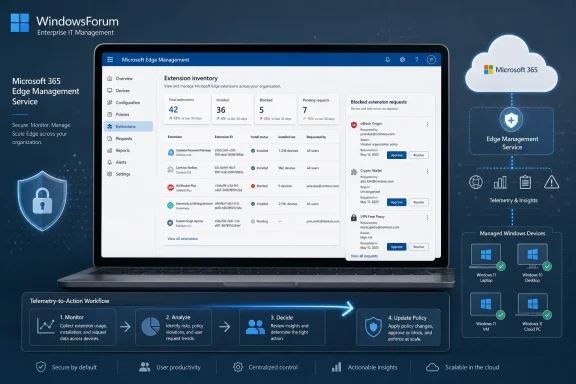
Microsoft launched extensions monitoring for the Microsoft Edge management service in June 2026, giving admins a web-based view of extensions installed across managed Edge users and a workflow for reviewing user requests for blocked extensions. The feature, listed as Microsoft 365 Roadmap ID 552597, arrived after a February 2026 preview and is now generally available for worldwide standard multi-tenant customers. Its importance is not that Edge can finally block extensions; enterprises have had that for years. The shift is that Microsoft is trying to turn browser extension control from a policy-writing chore into an operational dashboard.
For years, enterprise browser management has treated extensions as something to be allowed, blocked, or force-installed through policy. That model was tidy on paper and messy in practice. A help desk could set an allowlist, a security team could block risky permissions, and an endpoint team could force-install a password manager, but nobody enjoyed answering the deceptively simple question: What is actually installed out there?
Microsoft’s new extensions monitoring page is aimed squarely at that gap. In the Edge management service, admins can now see aggregated details about extensions running in managed browsers, including what users have installed and where requests for blocked extensions are accumulating. That moves extension governance closer to the place where modern IT work increasingly happens: not in a registry key, not in a Group Policy editor, but in a cloud console that tries to combine configuration, reporting, and response.
This is a small feature with a large subtext. Browser extensions have become a shadow software supply chain inside the browser, often sitting closer to sensitive user activity than traditional desktop apps. They can read pages, modify content, capture browsing behavior, inject scripts, and update on their own cadence. If the browser is now the workplace, extensions are the plug-ins running inside the workplace.
Microsoft is not alone in recognizing that risk, but Edge has a particular enterprise story to tell. Microsoft wants Edge for Business to be the managed, identity-aware browser for Microsoft 365 estates, and that pitch depends on giving administrators more than a set of knobs. It depends on giving them evidence.
The problem was never a total lack of enforcement. The problem was feedback.
A policy can say that a given extension is blocked, but that does not automatically tell an admin how many users wanted it, which departments tried to install it, whether a sanctioned extension is actually present, or whether a supposedly harmless add-on has quietly become common across the company. The gap between desired state and observed state is where real administration lives.
That gap matters because extension risk is not binary. A grammar checker may be harmless in one environment and unacceptable in another if it can read text entered into sensitive internal sites. A screenshot tool may be tolerable for marketing and risky for legal. A developer helper may be essential for engineering and an unnecessary attack surface everywhere else. Without inventory, extension policy becomes a mix of guesswork, exception tickets, and stale assumptions.
Microsoft’s monitoring feature does not eliminate that judgment call. It gives administrators a better place to make it.
When a blocked extension request is enabled and users ask for access, those requests can appear in the extensions monitoring experience. Admins can see active requests, inspect where the extension sits within configuration policy, and update the installation setting inside individual policies. Requests can also be marked as resolved or cleared.
That sounds mundane, but it reflects a useful administrative pattern. The user’s attempt to install something becomes a structured event rather than a help desk anecdote. The admin can respond by approving, blocking, or forcing a clearer policy decision. Over time, repeated requests for the same extension can reveal whether the organization is blocking a legitimate productivity tool or whether users are converging on a risky convenience.
This matters because extension governance often breaks down at the edges. A strict allowlist is clean until executives, developers, accessibility users, or business units start asking for exceptions. A broad allow-by-default posture is easy until security discovers that popular add-ons have sweeping host permissions. The best model is usually not “never allow anything” or “trust users completely.” It is a controlled exception process with enough telemetry to distinguish one-off curiosity from operational need.
The Edge management service is becoming the place where Microsoft wants that process to live. That is convenient for Microsoft 365 administrators, though it also means another piece of browser administration is being pulled into Microsoft’s cloud management orbit.
That opt-in design is not just a privacy nicety. It is the key administrative decision behind the feature.
Inventory requires telemetry. Telemetry requires trust, policy review, and usually some internal explanation. A security team may see extension reporting as overdue visibility. A privacy officer may ask exactly what is collected, who can view it, how long it persists, and whether it includes user-identifiable behavior. A works council or compliance function may care about whether extension inventory can be used to infer employee workflows.
Microsoft frames the data as necessary to keep the browser secure, up to date, and performing as expected. That is a reasonable enterprise argument, but organizations should still treat the toggle as a governance control rather than a casual convenience. Turning on monitoring changes the relationship between the browser and the management plane.
There are also practical limits. Microsoft says extensions data is currently available only for Windows devices. That caveat matters in mixed fleets, especially in organizations where macOS is common among developers, designers, executives, or technical teams. If Edge is deployed cross-platform but reporting is Windows-only, the dashboard is useful but not complete.
The same caution applies to identity matching and device behavior. Microsoft says data is received from user profiles whose identity tenant matches the tenant managing the browser, and that if a user signs in on multiple devices, the report is received from the most recently signed-in device. That is a sensible constraint, but it means admins should avoid treating the dashboard as a perfect forensic source. It is an operational visibility tool, not a complete endpoint inventory system.
A browser extension can be more sensitive than a traditional desktop utility because of where it lives. It can observe pages as users interact with SaaS applications, intranets, ticketing systems, CRM tools, email, code repositories, and admin portals. Depending on permissions, an extension may read or modify site data, interact with cookies, inject content scripts, or communicate with external services.
That does not make all extensions dangerous. Password managers, accessibility tools, endpoint security plug-ins, developer utilities, citation managers, translation tools, and meeting helpers can all be legitimate. The problem is that legitimacy is contextual, and browser stores were not designed around each enterprise’s risk model.
The extension ecosystem also changes quickly. An extension can be sold, abandoned, updated, compromised, or expanded with new permissions. An organization that approved an add-on two years ago may not have revisited whether it still behaves the same way. That is exactly the kind of slow-drift risk that inventory systems are supposed to expose.
In this sense, Microsoft’s dashboard is a recognition that extension management belongs alongside software inventory, vulnerability management, and SaaS governance. The browser has become too central for extension control to be relegated to a forgotten policy buried in an administrative template.
That direction is logical. The typical Microsoft 365 shop already lives in cloud admin portals. Identity, device compliance, app protection, conditional access, Defender signals, and productivity controls all increasingly flow through web consoles. Edge is the front door to much of that world, so Microsoft wants browser policy to sit closer to the rest of the estate.
The benefit is obvious: admins get a more approachable interface, policy objects that map more naturally to business decisions, and a management surface that can evolve without waiting for everyone to become a Group Policy specialist. For smaller IT teams, that can be the difference between having a browser management posture and having a wiki page that says “we should configure this someday.”
The trade-off is also obvious. Cloud management creates dependencies on Microsoft’s portal design, licensing assumptions, reporting pipelines, and service availability. It can also create split-brain administration if some settings live in Intune, some in Group Policy, some in the Edge management service, and some in legacy scripts. Browser governance gets easier only if organizations deliberately simplify the model.
Extensions monitoring is therefore both helpful and slightly revealing. Microsoft is not just giving admins another report. It is nudging them toward a world where Edge policy, telemetry, and user-request workflows are mediated through Microsoft’s service layer.
Without inventory, extension debates tend to become abstract. Security says extensions can be risky. Users say they need them. IT says the policy is already configured. Nobody has a clean view of what is popular, what is blocked, and what users are actively requesting. The monitoring page gives those conversations a starting point.
A sensible security review can now begin with the most common installed extensions, the most frequently requested blocked extensions, and the policies that govern them. That is better than beginning with a theoretical list of all possible malicious add-ons. It lets teams prioritize the extensions that are actually present in the environment.
It also helps distinguish enforcement failures from demand signals. If a blocked extension keeps appearing in requests, that may indicate a business need, a training problem, or a gap in approved tooling. If an allowed extension shows broad adoption but asks for aggressive permissions, that may trigger a reassessment. If an extension is installed only in a small group with a legitimate workflow, the right answer may be a targeted policy rather than a tenant-wide decision.
The best use of this feature will be iterative. Admins should not expect the dashboard to produce a one-time cleanup project and then fade into the background. Extension governance is ongoing because the browser ecosystem is ongoing.
That distinction matters. If users are blocked without a clear request path, they route around the process. They ask a manager, file a vague ticket, use another browser, install something on an unmanaged device, or simply give up on a workflow that might have been legitimate. A request workflow inside Edge’s management model gives IT a cleaner way to absorb demand.
It also gives help desks a stronger answer. Instead of manually collecting extension names, store links, screenshots, browser versions, and policy guesses, the request can be visible where policy is managed. That does not make approval automatic, but it reduces the administrative drag around each exception.
The subtle benefit is cultural. Users are more likely to accept restrictions when there is an intelligible path to review. IT is more likely to maintain strict controls when exceptions do not require heroic manual tracking. Security is more likely to approve nuanced policies when it can see evidence instead of anecdotes.
The danger is that request queues become junk drawers. If organizations enable requests but do not assign ownership, set review expectations, or define approval criteria, the new page becomes another unattended inbox. Microsoft can surface the requests; it cannot decide who in the organization is accountable for acting on them.
Developers may run macOS or Linux workstations. Executives may use a mix of devices. Contractors may operate outside the cleanest management boundaries. Bring-your-own-device policies can complicate browser visibility further. If extension monitoring covers only Windows devices, the dashboard can still be valuable, but it should not be mistaken for a universal truth.
That matters most in risk analysis. The users most likely to need unusual extensions may also be the users least likely to sit on standard Windows endpoints. Engineering teams, data analysts, designers, and security researchers often have legitimate reasons to customize browsers more heavily. If those populations are underrepresented in reporting, the organization may have a blind spot exactly where extension diversity is greatest.
This does not make the feature weak. It makes it bounded. Good admins understand the boundary and document it.
Microsoft may expand the capability over time, especially because Edge itself is cross-platform and the related policy for blocked-extension feedback supports more than Windows in some contexts. But as launched for this monitoring experience, the Windows limitation should shape expectations. Treat it as a major improvement for managed Windows estates, not a replacement for cross-platform browser security tooling.
An inventory can tell you that an extension is installed. It can tell you that users are requesting something blocked. It can place those facts near policy controls. But it does not, by itself, answer whether an extension’s publisher is trustworthy, whether the permissions are proportionate, whether its update history is suspicious, or whether it sends data to services your organization permits.
That work still belongs to the enterprise. Security teams may need to review publisher reputation, store listings, permission scopes, privacy statements, network behavior, version history, and business justification. Regulated organizations may need to document approvals. Some companies may use dedicated browser extension security products that provide risk scoring and automated analysis across multiple browsers.
Microsoft’s choice here is conservative. Rather than presenting a black-box risk score, the Edge management service appears focused on visibility and policy action. For many admins, that is the right first step. Bad risk scores can create false confidence, while no inventory guarantees ignorance.
Still, the direction is clear. Once Microsoft has extension inventory and request data in a central service, the next logical layer is richer assessment. That could mean deeper integration with Defender, policy recommendations based on permissions, alerts for newly risky extensions, or tenant-level comparisons. Whether Microsoft builds that or leaves room for third-party tools will say a lot about how ambitious its browser-management strategy becomes.
Visibility will expose some of that entropy. That is a feature, not a problem.
A mature extension program should start with a default posture. Some organizations will block all extensions and allow only approved ones. Others will permit broad installation but block dangerous permissions, untrusted stores, or specific categories. The right answer depends on risk tolerance, regulatory exposure, user needs, and administrative capacity.
What matters is that the policy be explicit. If the organization blocks all extensions, users need an approval path. If it allows most extensions, security needs a review process for high-risk permissions and popular add-ons. If it force-installs required tools, admins should verify that those tools are actually deployed and current.
The new monitoring page gives teams a way to test whether the written policy resembles lived reality. That is where the feature becomes valuable. It is not merely another console; it is a mirror.
Microsoft’s Edge work reflects that reality. The company is not treating the browser as a passive window onto Microsoft 365. It is treating it as a policy enforcement point, a telemetry source, and a productivity shell. Extensions monitoring fits that model neatly.
This will not be universally welcomed. Some admins prefer browser management to remain as close to local policy as possible. Some users will view extension inventory as one more step toward workplace surveillance. Some organizations will resist enabling yet another reporting stream unless Microsoft provides exceptionally clear data-handling guarantees.
Those concerns are not frivolous. The browser is intimate software. It is where people search, read, write, authenticate, and work. Enterprise monitoring in that space must be justified, bounded, and governed.
But the opposite approach is not privacy-preserving by default; it can simply be negligent. If an organization manages corporate browsers but has no idea which extensions are running inside them, it has outsourced trust to extension stores, user judgment, and luck. That is not a serious posture for high-value environments.
In the Edge management service model, Microsoft is trying to collapse that loop. See the installed extensions. See the blocked-extension requests. Locate the relevant configuration policy. Update the installation setting. Mark the request resolved. That is the kind of mundane workflow improvement that rarely gets a keynote demo but changes how manageable a platform feels.
The risk is that Microsoft over-centralizes the experience without making it transparent enough. Admins need to understand which policy is being changed, how it interacts with existing Intune or Group Policy settings, how long reporting takes, and why a given user or device does or does not appear in the data. If the dashboard becomes a pretty layer over confusing policy precedence, frustration will follow.
Still, the feature lands at the right moment. Extension sprawl, browser-based work, SaaS risk, and AI-era data sensitivity are all pushing organizations to care more about what runs inside the browser. Edge is strongest in enterprises that already buy into Microsoft’s identity and management stack, and extensions monitoring gives those customers one more reason to keep browser governance inside that stack.
 Microsoft Turns Browser Extensions Into an Inventory Problem
For years, enterprise browser management has treated extensions as something to be allowed, blocked, or force-installed through policy. That model was tidy on paper and messy in practice. A help desk could set an allowlist, a security team could block risky permissions, and an endpoint team could force-install a password manager, but nobody enjoyed answering the deceptively simple question: What is actually installed out there?Microsoft’s new extensions monitoring page is aimed squarely at that gap. In the Edge management service, admins can now see aggregated details about extensions running in managed browsers, including what users have installed and where requests for blocked extensions are accumulating. That moves extension governance closer to the place where modern IT work increasingly happens: not in a registry key, not in a Group Policy editor, but in a cloud console that tries to combine configuration, reporting, and response.
This is a small feature with a large subtext. Browser extensions have become a shadow software supply chain inside the browser, often sitting closer to sensitive user activity than traditional desktop apps. They can read pages, modify content, capture browsing behavior, inject scripts, and update on their own cadence. If the browser is now the workplace, extensions are the plug-ins running inside the workplace.
Microsoft is not alone in recognizing that risk, but Edge has a particular enterprise story to tell. Microsoft wants Edge for Business to be the managed, identity-aware browser for Microsoft 365 estates, and that pitch depends on giving administrators more than a set of knobs. It depends on giving them evidence.
The Old Controls Were Powerful but Blind
Edge has long supported extension controls through policies such as blocklists, allowlists, force-install lists, minimum versions, host restrictions, and permission-based blocking. Administrators could prevent all extensions except approved ones, block extensions from a particular store or update URL, force-install sanctioned extensions, or disable extensions that requested permissions the organization considered unacceptable. Those controls remain central to any serious Edge deployment.The problem was never a total lack of enforcement. The problem was feedback.
A policy can say that a given extension is blocked, but that does not automatically tell an admin how many users wanted it, which departments tried to install it, whether a sanctioned extension is actually present, or whether a supposedly harmless add-on has quietly become common across the company. The gap between desired state and observed state is where real administration lives.
That gap matters because extension risk is not binary. A grammar checker may be harmless in one environment and unacceptable in another if it can read text entered into sensitive internal sites. A screenshot tool may be tolerable for marketing and risky for legal. A developer helper may be essential for engineering and an unnecessary attack surface everywhere else. Without inventory, extension policy becomes a mix of guesswork, exception tickets, and stale assumptions.
Microsoft’s monitoring feature does not eliminate that judgment call. It gives administrators a better place to make it.
The Dashboard Is Also a Governance Workflow
The new page is not merely a spreadsheet-like inventory of extension IDs. Microsoft is also tying it to user requests for blocked extensions, which is where the feature becomes more operationally interesting.When a blocked extension request is enabled and users ask for access, those requests can appear in the extensions monitoring experience. Admins can see active requests, inspect where the extension sits within configuration policy, and update the installation setting inside individual policies. Requests can also be marked as resolved or cleared.
That sounds mundane, but it reflects a useful administrative pattern. The user’s attempt to install something becomes a structured event rather than a help desk anecdote. The admin can respond by approving, blocking, or forcing a clearer policy decision. Over time, repeated requests for the same extension can reveal whether the organization is blocking a legitimate productivity tool or whether users are converging on a risky convenience.
This matters because extension governance often breaks down at the edges. A strict allowlist is clean until executives, developers, accessibility users, or business units start asking for exceptions. A broad allow-by-default posture is easy until security discovers that popular add-ons have sweeping host permissions. The best model is usually not “never allow anything” or “trust users completely.” It is a controlled exception process with enough telemetry to distinguish one-off curiosity from operational need.
The Edge management service is becoming the place where Microsoft wants that process to live. That is convenient for Microsoft 365 administrators, though it also means another piece of browser administration is being pulled into Microsoft’s cloud management orbit.
The Opt-In Toggle Is the Real Policy Decision
Microsoft’s documentation makes clear that extensions monitoring is opt-in. Admins must first enable the monitoring dashboard and then enable extensions monitoring, which configures the relevant cloud profile reporting setting across the tenant in a configuration policy. Once enabled, managed browsers send data that can populate the dashboard.That opt-in design is not just a privacy nicety. It is the key administrative decision behind the feature.
Inventory requires telemetry. Telemetry requires trust, policy review, and usually some internal explanation. A security team may see extension reporting as overdue visibility. A privacy officer may ask exactly what is collected, who can view it, how long it persists, and whether it includes user-identifiable behavior. A works council or compliance function may care about whether extension inventory can be used to infer employee workflows.
Microsoft frames the data as necessary to keep the browser secure, up to date, and performing as expected. That is a reasonable enterprise argument, but organizations should still treat the toggle as a governance control rather than a casual convenience. Turning on monitoring changes the relationship between the browser and the management plane.
There are also practical limits. Microsoft says extensions data is currently available only for Windows devices. That caveat matters in mixed fleets, especially in organizations where macOS is common among developers, designers, executives, or technical teams. If Edge is deployed cross-platform but reporting is Windows-only, the dashboard is useful but not complete.
The same caution applies to identity matching and device behavior. Microsoft says data is received from user profiles whose identity tenant matches the tenant managing the browser, and that if a user signs in on multiple devices, the report is received from the most recently signed-in device. That is a sensible constraint, but it means admins should avoid treating the dashboard as a perfect forensic source. It is an operational visibility tool, not a complete endpoint inventory system.
Extension Risk Has Outgrown the Add-On Mentality
The reason this feature deserves attention is that browser extensions are no longer cute add-ons orbiting the real work. In many organizations, the browser is the application platform, and extensions are code running in privileged proximity to the workday.A browser extension can be more sensitive than a traditional desktop utility because of where it lives. It can observe pages as users interact with SaaS applications, intranets, ticketing systems, CRM tools, email, code repositories, and admin portals. Depending on permissions, an extension may read or modify site data, interact with cookies, inject content scripts, or communicate with external services.
That does not make all extensions dangerous. Password managers, accessibility tools, endpoint security plug-ins, developer utilities, citation managers, translation tools, and meeting helpers can all be legitimate. The problem is that legitimacy is contextual, and browser stores were not designed around each enterprise’s risk model.
The extension ecosystem also changes quickly. An extension can be sold, abandoned, updated, compromised, or expanded with new permissions. An organization that approved an add-on two years ago may not have revisited whether it still behaves the same way. That is exactly the kind of slow-drift risk that inventory systems are supposed to expose.
In this sense, Microsoft’s dashboard is a recognition that extension management belongs alongside software inventory, vulnerability management, and SaaS governance. The browser has become too central for extension control to be relegated to a forgotten policy buried in an administrative template.
Edge for Business Keeps Moving Toward the Admin Center
The Microsoft Edge management service is part of Microsoft’s broader effort to make Edge for Business feel like a first-class Microsoft 365 citizen. Rather than forcing admins to manage Edge only through classic Group Policy, local registry settings, or scattered Intune profiles, Microsoft has been building a more centralized browser management experience.That direction is logical. The typical Microsoft 365 shop already lives in cloud admin portals. Identity, device compliance, app protection, conditional access, Defender signals, and productivity controls all increasingly flow through web consoles. Edge is the front door to much of that world, so Microsoft wants browser policy to sit closer to the rest of the estate.
The benefit is obvious: admins get a more approachable interface, policy objects that map more naturally to business decisions, and a management surface that can evolve without waiting for everyone to become a Group Policy specialist. For smaller IT teams, that can be the difference between having a browser management posture and having a wiki page that says “we should configure this someday.”
The trade-off is also obvious. Cloud management creates dependencies on Microsoft’s portal design, licensing assumptions, reporting pipelines, and service availability. It can also create split-brain administration if some settings live in Intune, some in Group Policy, some in the Edge management service, and some in legacy scripts. Browser governance gets easier only if organizations deliberately simplify the model.
Extensions monitoring is therefore both helpful and slightly revealing. Microsoft is not just giving admins another report. It is nudging them toward a world where Edge policy, telemetry, and user-request workflows are mediated through Microsoft’s service layer.
Security Teams Get a Better Conversation Starter
For security teams, the immediate value is not that the new page magically ranks extensions by risk. The value is that it creates a shared artifact around which risk discussions can happen.Without inventory, extension debates tend to become abstract. Security says extensions can be risky. Users say they need them. IT says the policy is already configured. Nobody has a clean view of what is popular, what is blocked, and what users are actively requesting. The monitoring page gives those conversations a starting point.
A sensible security review can now begin with the most common installed extensions, the most frequently requested blocked extensions, and the policies that govern them. That is better than beginning with a theoretical list of all possible malicious add-ons. It lets teams prioritize the extensions that are actually present in the environment.
It also helps distinguish enforcement failures from demand signals. If a blocked extension keeps appearing in requests, that may indicate a business need, a training problem, or a gap in approved tooling. If an allowed extension shows broad adoption but asks for aggressive permissions, that may trigger a reassessment. If an extension is installed only in a small group with a legitimate workflow, the right answer may be a targeted policy rather than a tenant-wide decision.
The best use of this feature will be iterative. Admins should not expect the dashboard to produce a one-time cleanup project and then fade into the background. Extension governance is ongoing because the browser ecosystem is ongoing.
Help Desks May Feel the Change Before CISOs Do
The most visible day-one impact may land not with the chief information security officer but with the teams handling user friction. A blocked extension is rarely experienced by the user as “a control worked.” It is experienced as “my tool is broken.”That distinction matters. If users are blocked without a clear request path, they route around the process. They ask a manager, file a vague ticket, use another browser, install something on an unmanaged device, or simply give up on a workflow that might have been legitimate. A request workflow inside Edge’s management model gives IT a cleaner way to absorb demand.
It also gives help desks a stronger answer. Instead of manually collecting extension names, store links, screenshots, browser versions, and policy guesses, the request can be visible where policy is managed. That does not make approval automatic, but it reduces the administrative drag around each exception.
The subtle benefit is cultural. Users are more likely to accept restrictions when there is an intelligible path to review. IT is more likely to maintain strict controls when exceptions do not require heroic manual tracking. Security is more likely to approve nuanced policies when it can see evidence instead of anecdotes.
The danger is that request queues become junk drawers. If organizations enable requests but do not assign ownership, set review expectations, or define approval criteria, the new page becomes another unattended inbox. Microsoft can surface the requests; it cannot decide who in the organization is accountable for acting on them.
The Windows-Only Caveat Is More Than a Footnote
Microsoft’s current Windows-only limitation for extension data deserves more attention than it will probably get. Many Edge deployments are Windows-heavy, especially in classic Microsoft 365 environments, but the browser market inside enterprises is not always that tidy.Developers may run macOS or Linux workstations. Executives may use a mix of devices. Contractors may operate outside the cleanest management boundaries. Bring-your-own-device policies can complicate browser visibility further. If extension monitoring covers only Windows devices, the dashboard can still be valuable, but it should not be mistaken for a universal truth.
That matters most in risk analysis. The users most likely to need unusual extensions may also be the users least likely to sit on standard Windows endpoints. Engineering teams, data analysts, designers, and security researchers often have legitimate reasons to customize browsers more heavily. If those populations are underrepresented in reporting, the organization may have a blind spot exactly where extension diversity is greatest.
This does not make the feature weak. It makes it bounded. Good admins understand the boundary and document it.
Microsoft may expand the capability over time, especially because Edge itself is cross-platform and the related policy for blocked-extension feedback supports more than Windows in some contexts. But as launched for this monitoring experience, the Windows limitation should shape expectations. Treat it as a major improvement for managed Windows estates, not a replacement for cross-platform browser security tooling.
Inventory Without Risk Scoring Still Leaves Work to Do
One thing Microsoft has not solved here is the hardest part of extension governance: deciding what is safe enough.An inventory can tell you that an extension is installed. It can tell you that users are requesting something blocked. It can place those facts near policy controls. But it does not, by itself, answer whether an extension’s publisher is trustworthy, whether the permissions are proportionate, whether its update history is suspicious, or whether it sends data to services your organization permits.
That work still belongs to the enterprise. Security teams may need to review publisher reputation, store listings, permission scopes, privacy statements, network behavior, version history, and business justification. Regulated organizations may need to document approvals. Some companies may use dedicated browser extension security products that provide risk scoring and automated analysis across multiple browsers.
Microsoft’s choice here is conservative. Rather than presenting a black-box risk score, the Edge management service appears focused on visibility and policy action. For many admins, that is the right first step. Bad risk scores can create false confidence, while no inventory guarantees ignorance.
Still, the direction is clear. Once Microsoft has extension inventory and request data in a central service, the next logical layer is richer assessment. That could mean deeper integration with Defender, policy recommendations based on permissions, alerts for newly risky extensions, or tenant-level comparisons. Whether Microsoft builds that or leaves room for third-party tools will say a lot about how ambitious its browser-management strategy becomes.
Administrators Should Treat This as a Policy Reset Moment
The launch of extensions monitoring is a good excuse for organizations to revisit Edge extension policy from first principles. Many environments have accumulated settings over years: a blocklist added after an incident, a force-installed extension for a retired project, an allowlist exception for a team that no longer exists, and a half-documented JSON policy nobody wants to touch.Visibility will expose some of that entropy. That is a feature, not a problem.
A mature extension program should start with a default posture. Some organizations will block all extensions and allow only approved ones. Others will permit broad installation but block dangerous permissions, untrusted stores, or specific categories. The right answer depends on risk tolerance, regulatory exposure, user needs, and administrative capacity.
What matters is that the policy be explicit. If the organization blocks all extensions, users need an approval path. If it allows most extensions, security needs a review process for high-risk permissions and popular add-ons. If it force-installs required tools, admins should verify that those tools are actually deployed and current.
The new monitoring page gives teams a way to test whether the written policy resembles lived reality. That is where the feature becomes valuable. It is not merely another console; it is a mirror.
The Browser Is Becoming an Endpoint Again
There is a cyclical quality to enterprise computing. The industry moved from thick clients to web apps, celebrated the browser as a simpler and safer runtime, then gradually rebuilt complexity inside it. Extensions, progressive web apps, identity brokers, cloud storage integrations, password managers, AI assistants, and security plug-ins have turned the browser into a managed endpoint of its own.Microsoft’s Edge work reflects that reality. The company is not treating the browser as a passive window onto Microsoft 365. It is treating it as a policy enforcement point, a telemetry source, and a productivity shell. Extensions monitoring fits that model neatly.
This will not be universally welcomed. Some admins prefer browser management to remain as close to local policy as possible. Some users will view extension inventory as one more step toward workplace surveillance. Some organizations will resist enabling yet another reporting stream unless Microsoft provides exceptionally clear data-handling guarantees.
Those concerns are not frivolous. The browser is intimate software. It is where people search, read, write, authenticate, and work. Enterprise monitoring in that space must be justified, bounded, and governed.
But the opposite approach is not privacy-preserving by default; it can simply be negligent. If an organization manages corporate browsers but has no idea which extensions are running inside them, it has outsourced trust to extension stores, user judgment, and luck. That is not a serious posture for high-value environments.
The Real Win Is Reducing the Distance Between Signal and Action
The most promising part of Microsoft’s launch is the reduction in distance between observing a problem and changing a policy. Traditional extension management often required admins to jump between browser behavior, user reports, policy documentation, device configuration, and deployment channels. Each jump created delay and ambiguity.In the Edge management service model, Microsoft is trying to collapse that loop. See the installed extensions. See the blocked-extension requests. Locate the relevant configuration policy. Update the installation setting. Mark the request resolved. That is the kind of mundane workflow improvement that rarely gets a keynote demo but changes how manageable a platform feels.
The risk is that Microsoft over-centralizes the experience without making it transparent enough. Admins need to understand which policy is being changed, how it interacts with existing Intune or Group Policy settings, how long reporting takes, and why a given user or device does or does not appear in the data. If the dashboard becomes a pretty layer over confusing policy precedence, frustration will follow.
Still, the feature lands at the right moment. Extension sprawl, browser-based work, SaaS risk, and AI-era data sensitivity are all pushing organizations to care more about what runs inside the browser. Edge is strongest in enterprises that already buy into Microsoft’s identity and management stack, and extensions monitoring gives those customers one more reason to keep browser governance inside that stack.
The June Launch Gives Edge Admins a New Baseline
The practical lesson from Roadmap ID 552597 is straightforward: Edge extension administration should no longer stop at writing policies. The June 2026 general availability milestone gives Microsoft 365 tenants a new baseline for visibility, even if the first version has limits.- Admins can now use the Edge management service to view extension activity across managed Edge environments where the required monitoring settings are enabled.
- The feature includes a workflow for reviewing user requests for blocked extensions and updating related configuration policies.
- Extensions monitoring is opt-in, so organizations should treat enablement as a governance decision involving security, privacy, and administration teams.
- Microsoft currently limits extension data availability to Windows devices, which means mixed-platform environments should not treat the dashboard as complete coverage.
- Existing extension controls such as allow, block, force-install, host access, permission restrictions, and minimum version requirements remain central to the policy model.
- The feature is most valuable when paired with a defined review process, because visibility without ownership quickly becomes another neglected queue.
References
- Primary source: Microsoft 365 Roadmap
Published: 2026-06-22T23:00:47.0315291Z
Microsoft 365 Roadmap | Microsoft 365
The Microsoft 365 Roadmap lists updates that are currently planned for applicable subscribers. Check here for more information on the status of new features and updates.www.microsoft.com
- Official source: learn.microsoft.com
Extensions management | Microsoft Learn
Provides steps for managing extensions for Microsoft Edge management service.learn.microsoft.com - Related coverage: m365admin.handsontek.net
Microsoft Edge: Extensions monitoring in the Edge management service - M365 Admin
The Microsoft Edge management service now allows admins to gain visibility into extensions installed across their managed users. From the extensions monitoring page, admins can see which extensions have been installed as well as manage user requests for blocked extensions. Product Microsoft Edge...m365admin.handsontek.net - Official source: support.microsoft.com
Change site access permissions for extensions in Microsoft Edge | Microsoft Support
How to change site access permissions for extensions on Microsoft Edge.support.microsoft.com - Related coverage: scudra.ca

