

Microsoft has begun enforcing tighter email access controls that will block Exchange Online sign‑ins from mobile clients and devices that aren’t prepared for the change — a move IT departments must treat as an operational deadline if they want to avoid sudden user outages and helpdesk chaos.
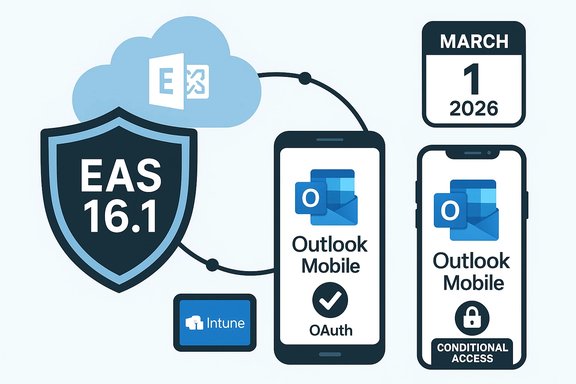
Microsoft is rolling out a policy that prevents devices using legacy Exchange ActiveSync (EAS) protocol versions lower than 16.1 from connecting to Exchange Online, with enforcement beginning on March 1, 2026. The aim is straightforward: remove legacy protocol surface area that lacks modern authentication, telemetry, and device management hooks, and steer organizations toward managed, modern clients such as Outlook Mobile, or to updated native clients that implement EAS 16.1 or newer.
This change affects the interaction between Exchange Online and mobile email clients that use EAS — which includes many built‑in mail apps on Android and some vendor mail apps — but it does not affect Outlook Mobile because Outlook Mobile uses a modern API stack and OAuth rather than EAS. The change applies only to Exchange Online and does not change on‑premises Exchange Server behavior.
The enforcement is being delivered as a tenant‑level change and Microsoft has provided administrative tooling — including a PowerShell query — to help organizations inventory affected devices. Where organizations already enforce device enrollment and compliance via Microsoft Intune and Conditional Access, the operational impact should be manageable. Where organizations rely on unmanaged clients (BYOD scenarios), or where a substantial population still uses vendor mail apps that haven’t adopted EAS 16.1, there is a real risk of wide user disruption starting in early March.
For organizations that already require Intune enrollment or block unmanaged clients with Conditional Access, this enforcement largely formalizes existing recommendations. For others — especially environments that allow unmanaged, native mail apps on mobile devices — the change can mean many users suddenly cannot send or receive work email until the device or its mail app is updated or the user migrates to an approved client.
Note: Always test scripts in a lab or on a small set of mailboxes before running tenant‑wide.
However, operational tradeoffs exist:
Administrators should treat the March 1, 2026 date as an operational deadline: inventory devices now, communicate early and clearly, prioritize remediation for critical users, and set helpdesk expectations. Where vendor updates are uncertain, the safest path for user continuity is to require Outlook Mobile or enforce device management and app‑based protections.
This change is manageable with well‑executed planning; it becomes painful when organizations wait until tickets start arriving. The best defense is preparation: inventory, communicate, remediate, and monitor.
Conclusion
Microsoft’s move to block Exchange Online access for clients using EAS versions older than 16.1 is a predictable step in modernizing mailbox access and closing legacy protocol gaps. The security benefits are real, but the operational cost of inaction is high. Treat the enforcement date as a firm milestone, run the recommended inventories and pilots now, and make the migration or enrollment options clear to users so that email access remains uninterrupted and secure.
Source: Neowin https://www.neowin.net/news/microsoft-begins-blocking-work-email-access-for-unprepared-intune-users/
 Overview
Microsoft is rolling out a policy that prevents devices using legacy Exchange ActiveSync (EAS) protocol versions lower than 16.1 from connecting to Exchange Online, with enforcement beginning on March 1, 2026. The aim is straightforward: remove legacy protocol surface area that lacks modern authentication, telemetry, and device management hooks, and steer organizations toward managed, modern clients such as Outlook Mobile, or to updated native clients that implement EAS 16.1 or newer.This change affects the interaction between Exchange Online and mobile email clients that use EAS — which includes many built‑in mail apps on Android and some vendor mail apps — but it does not affect Outlook Mobile because Outlook Mobile uses a modern API stack and OAuth rather than EAS. The change applies only to Exchange Online and does not change on‑premises Exchange Server behavior.
The enforcement is being delivered as a tenant‑level change and Microsoft has provided administrative tooling — including a PowerShell query — to help organizations inventory affected devices. Where organizations already enforce device enrollment and compliance via Microsoft Intune and Conditional Access, the operational impact should be manageable. Where organizations rely on unmanaged clients (BYOD scenarios), or where a substantial population still uses vendor mail apps that haven’t adopted EAS 16.1, there is a real risk of wide user disruption starting in early March.
Background: why Microsoft is doing this
Legacy email protocols and client versions present two related problems for modern enterprise security:- They often lack modern authentication (OAuth/Microsoft Authentication Library), which reduces the capability to enforce multifactor authentication and modern conditional access controls.
- They offer limited telemetry and management hooks, making it hard for IT to detect compromise or apply targeted restrictions to risky clients.
For organizations that already require Intune enrollment or block unmanaged clients with Conditional Access, this enforcement largely formalizes existing recommendations. For others — especially environments that allow unmanaged, native mail apps on mobile devices — the change can mean many users suddenly cannot send or receive work email until the device or its mail app is updated or the user migrates to an approved client.
What exactly is changing
- Effective enforcement date: March 1, 2026.
- Scope: Exchange Online only. On‑premises Exchange Server installations are unaffected by this change.
- What will be blocked: Mobile devices and mail clients that connect using Exchange ActiveSync (EAS) versions lower than 16.1.
- What’s not affected: Outlook Mobile on iOS and Android — it does not rely on EAS in the same way and continues to work.
- Admin tools: Microsoft published a PowerShell command admins can run to list mobile devices using older EAS client versions so they can identify which users/devices will be affected.
Who is most likely to be affected
- Users who rely on the native Android mail app or other built‑in vendor email clients that have not been updated to use EAS 16.1.
- Organizations that permit unmanaged personal devices (BYOD) to access Exchange Online without app protection policies or device enrollment.
- Admins who have not audited mobile clients connecting via EAS to Exchange Online.
- Enterprises that have historically allowed EAS usage without requiring modern authentication or Intune enrollment.
Immediate actions for IT teams (recommended checklist)
The clock to March 1, 2026 is short from an operational planning perspective. The following checklist is designed to guide IT teams through triage, remediation, testing, and communication.- Inventory affected devices
- Run the PowerShell query Microsoft published to list devices with ClientVersion < 16.1 (or equivalent reporting from Exchange/Intune).
- Categorize devices by vendor, OS, and whether they are personal or corporate managed.
- Communicate to stakeholders
- Tell helpdesk teams and service owners about the enforcement date, expected user impact, and escalation process.
- Notify end users who are likely to be affected with clear instructions and timelines.
- Prioritize remediation
- Contact users with corporate devices or critical roles first and schedule updates or migrations to supported clients.
- For BYOD, push communications and self‑help guidance; consider exceptions where necessary.
- Configure Conditional Access and App protection
- If not already in place, implement Conditional Access policies that require app‑based protection or managed apps to access Exchange Online.
- Enforce use of approved apps (e.g., Outlook Mobile) where reasonable.
- Prepare helpdesk playbooks
- Provide step‑by‑step recovery paths: update OS/app, switch to Outlook Mobile, or enroll device in Intune depending on policy.
- Prepare account unlock, MFA reset, and device enrollment workflows to handle spikes in support calls.
- Test in a pilot group
- Select representative devices (iOS/Android vendors and firmware/app versions) and confirm behavior post‑enforcement.
- Remediate any unexpected failures in the test group before broad rollout.
- Monitor and iterate
- After March 1 enforcement, monitor device connectivity errors, helpdesk tickets, and Conditional Access logs to identify remaining gaps.
How to find the affected devices (PowerShell example)
Administrators should run the tenant‑side reporting Microsoft provided to locate devices that will be blocked. A typical PowerShell approach looks like this:- Query mobile devices and filter for EAS client versions below 16.1.
- Export results and map to user contact info for outreach.
Note: Always test scripts in a lab or on a small set of mailboxes before running tenant‑wide.
Mitigation options for end users
- Update the device OS and the native mail app if the vendor has an update that includes EAS 16.1 support.
- Install and use Outlook Mobile for iOS and Android — Outlook Mobile is not impacted by EAS 16.1 enforcement and supports modern auth and Conditional Access.
- Enroll the device in Microsoft Intune if corporate policy allows enrollment; after enrollment and marking the device compliant, Conditional Access policies can restore access.
- For locked down environments, use web access (Outlook on the web) as a fallback until the device/app is updated — web access uses modern authentication and is not affected by EAS version checks.
Practical implications for BYOD and mobile fleets
BYOD environments that permit unmanaged native mail apps will be hardest hit. Many organizations historically relied on EAS because it is widespread and simple for end users. The change forces a choice:- Require users to move to a supported client (Outlook Mobile) or to enroll their device under Intune device management policies.
- Allow exceptions temporarily while working with device/app vendors to provide updates.
- Accept higher helpdesk burden and proactively campaign to upgrade devices.
Conditional Access and Intune: how this ties in
This enforcement complements existing Microsoft Entra Conditional Access and Intune controls in two ways:- It reduces reliance on EAS as an access vector, pushing more workloads into app protection and managed client scenarios.
- Administrators can combine Conditional Access policies with Intune compliance rules to allow only enrolled and compliant devices to access Exchange Online, which is an established best practice.
User experience and helpdesk expectations
When the block fires for an affected device, common end‑user outcomes include:- Email clients showing authentication failures or error messages when attempting to sync.
- Users receiving a quarantine or block notification in their mailbox (in some configurations) with steps to remediate.
- Helpdesk tickets for "unable to receive work email" surging — expect an initial spike as users transition.
Vendor coordination and app updates: what’s uncertain
Microsoft’s enforcement depends in part on mail app vendors shipping EAS 16.1 support in a timely manner. Major vendors (for example, Google and Samsung for their mail apps) have historically updated apps, but timelines and device coverage can vary by region and by Android vendor.- Do not assume all Android or vendor mail apps on users’ devices will be updated before March 1.
- Expect fragmentation on older Android devices or heavily customized OEM builds — these could fall behind and remain affected.
- Where vendor updates are uncertain or unavailable, migrating users to Outlook Mobile or enforcing Intune enrollment is the most reliable path.
Risk analysis: security benefits vs operational costs
This enforcement is defensible from a security standpoint: reducing brute legacy protocol attack surfaces and encouraging use of modern authentication and device management improves the enterprise posture.However, operational tradeoffs exist:
- Short‑notice enforcement risks user disruption, especially in organizations with distributed or contractor workforces.
- Helpdesk load and lost productivity can be substantial if a large user base relies on unsupported clients.
- BYOD policies and privacy expectations complicate blanket enrollment mandates; some users will resist managed device requirements.
Recommended communication plan for IT leaders
A short, focused communications campaign will significantly reduce friction:- Week 1 (ASAP): Announce the upcoming change to technical stakeholders and helpdesk leadership. Provide timeline and escalation contacts.
- Week 2–3: Deploy targeted messages to users identified by the PowerShell inventory. Include specific instructions for their device/app.
- Two weeks before enforcement: Broad reminder to all users with links to self‑help articles and FAQs.
- Day before enforcement: Short reminder to affected users and helpdesk stand‑by schedule.
- Post‑enforcement: Publish a status page and update helpdesk SOPs based on observed issues.
- Explain the reason in one sentence (security and modern authentication).
- Tell users whether they need to update apps, switch to Outlook Mobile, or enroll in Intune.
- Provide links to step‑by‑step remediation and expected timelines for helpdesk response.
Troubleshooting common failure modes
If a user reports the inability to access Exchange Online after enforcement:- Confirm whether the client is using EAS and check the reported ClientVersion.
- If ClientVersion < 16.1:
- Ask the user to update their mail app and OS.
- If an update isn’t available, advise switching to Outlook Mobile or using Outlook on the web.
- If the device is managed but noncompliant:
- Check Intune compliance policies and remediation flow.
- Guide the user through enrollment or fix the compliance issue.
- Monitor Conditional Access logs to see specific grant or block decisions and any related signaling such as device state or app ID.
Longer‑term strategic considerations
- Use this enforcement as a trigger to clean up legacy access policies and tighten Conditional Access stance.
- Move toward app protection (MAM) and least privilege access for email and SharePoint data rather than allowing EAS as a path for unmanaged clients.
- Build an ongoing inventory and alerting mechanism for client protocol versions to avoid surprise deadlines in the future.
- Consider user experience and privacy tradeoffs when expanding device enrollment; employ selective enrollment and app protection where full MDM isn’t acceptable.
What to watch for after March 1, 2026
- Spike in service desk tickets for Android and non‑Outlook mail app users.
- Vendor announcements for app updates; track major vendors for fixes.
- Microsoft guidance updates or Message Center notices that might extend, refine, or alter enforcement mechanics.
- Any unexpected collateral impact on hybrid setups or third‑party sync services — test integrations thoroughly.
Final assessment
This enforcement is a clear security win in principle: it encourages better authentication, richer telemetry, and consolidates access onto clients that administrators can manage and secure. For organizations that have already invested in Conditional Access and Intune, the change formalizes a safer baseline. For others, especially those with BYOD and unmanaged native mail apps, the enforcement is a catalyst that demands immediate action.Administrators should treat the March 1, 2026 date as an operational deadline: inventory devices now, communicate early and clearly, prioritize remediation for critical users, and set helpdesk expectations. Where vendor updates are uncertain, the safest path for user continuity is to require Outlook Mobile or enforce device management and app‑based protections.
This change is manageable with well‑executed planning; it becomes painful when organizations wait until tickets start arriving. The best defense is preparation: inventory, communicate, remediate, and monitor.
Conclusion
Microsoft’s move to block Exchange Online access for clients using EAS versions older than 16.1 is a predictable step in modernizing mailbox access and closing legacy protocol gaps. The security benefits are real, but the operational cost of inaction is high. Treat the enforcement date as a firm milestone, run the recommended inventories and pilots now, and make the migration or enrollment options clear to users so that email access remains uninterrupted and secure.
Source: Neowin https://www.neowin.net/news/microsoft-begins-blocking-work-email-access-for-unprepared-intune-users/
