

Microsoft and its partners are pitching “frontier firms” as organizations that have moved beyond AI pilots and are now redesigning workflows around Microsoft Copilot, Azure AI, Dragon Copilot, GitHub Copilot, Copilot Studio, and agentic AI systems across daily work, customer engagement, healthcare, software development, collaboration, and business operations. The argument, detailed by Technology Record in an interview with Microsoft’s Kees Hertogh and supported by Microsoft’s Work Trend Index research, is that AI value is no longer mainly about giving employees a chatbot. It is about changing the operating model so people, agents, data, and governance work together. That is a much bigger promise — and a much harder one to deliver.
The first phase of enterprise AI was easy to understand: buy licenses, enable Copilot, encourage employees to summarize meetings, draft emails, search documents, and generate presentations faster. That phase still matters, but it is no longer where Microsoft wants the conversation to stay. In the company’s current framing, the real prize is not an AI assistant sitting beside the old workflow; it is a rebuilt workflow where the assistant becomes part of how the work is routed, checked, completed, and improved.
That shift is visible in Microsoft’s “frontier firm” language. The company’s 2025 Work Trend Index described frontier firms as organizations with broad AI deployment, active agent use, and a willingness to rebuild around what Microsoft calls human-agent teams. Microsoft’s 2026 Work Trend Index sharpened the point: workers may be using AI, but organizations often have not yet redesigned their systems to absorb the gains.
Technology Record’s interview with Kees Hertogh, Microsoft’s vice president of global industry marketing, fits neatly into that larger campaign. Hertogh argues that frontier firms are enriching employee experiences, reinventing customer engagement, reshaping business processes, and accelerating innovation. In plain English: Microsoft is saying the companies that win with AI will be the ones that stop treating it as a productivity add-on and start treating it as an operating layer.
That is both persuasive and self-serving. Microsoft sells the platforms, models, cloud infrastructure, security tools, productivity apps, developer tools, and partner ecosystem required to make that operating layer real. But the claim also has a practical truth behind it. If an organization merely drops AI into broken processes, it may get faster broken processes. If it uses AI to rethink who does what, when humans intervene, and how decisions are made, the technology can start changing the shape of work itself.
A marketer no longer needs to spend as much time collecting background material before planning a campaign. A clinician can have AI draft notes during a patient visit rather than after a shift. A customer service team can use AI to understand intent and route the next best action. A developer can use GitHub Copilot and agentic workflows to modernize code, port software, and connect assistance to repositories and documentation.
The common thread is not “AI writes text.” The common thread is that AI moves into the flow of work. It is present when the meeting happens, when the patient visit happens, when the customer asks for help, when the developer opens the codebase, and when the employee starts a request in Teams.
That distinction matters for WindowsForum readers because it explains why Microsoft’s AI push has expanded beyond Bing-style chat and into Microsoft 365, Teams, Windows, Azure, GitHub, Dynamics, security, endpoint management, and partner-built vertical tools. The company is not trying to win one AI app category. It is trying to make Microsoft’s stack the place where work is observed, interpreted, assisted, governed, and completed.
The upside is obvious. Work becomes less dependent on employees remembering where information lives, which system owns which process, and what administrative steps must be completed after the real work is done. The downside is equally obvious. Once AI is embedded in the workflow, mistakes, permissions, hallucinations, and governance gaps are no longer confined to a side panel. They become part of business execution.
Microsoft says Cooper clinicians are saving just over four minutes per patient, adding up to roughly an hour per day. That is not a trivial productivity claim. In healthcare, documentation burden is not just an administrative annoyance; it contributes to burnout, reduces time with patients, and turns clinical expertise into after-hours clerical labor.
But the reason the example works is not that AI replaces the clinician. It is that the workflow changes while human authority remains intact. Documentation moves into the visit. The AI drafts. The clinician reviews. The final clinical judgment remains with the professional.
That is the model Microsoft wants enterprises to generalize: let AI absorb repeatable administrative work, but keep humans responsible where risk, judgment, and accountability matter. It is a sensible dividing line, though it will be tested constantly in practice. In low-risk summarization, light oversight may be enough. In clinical, financial, safety, compliance, or legal workflows, the cost of overtrusting automation can be far higher than the cost of inefficiency.
The uncomfortable truth is that “human in the loop” can mean many things. It can mean careful review by an accountable expert. It can also mean a rushed employee rubber-stamping machine output because the system has made speed the new default. Frontier firms will need to prove that their oversight models are real operating controls, not comforting diagrams in a governance deck.
The important part is not that an AI can recommend clothes. Retail sites have recommended products for years. The shift is that the interface becomes conversational, contextual, and more like asking a store associate for help than filtering a catalog by color, size, and price.
Hertogh frames Ask Ralph as a way to improve conversion and engagement while reducing friction for the customer. That is exactly how retailers should look at it. The AI does not need to replace the brand’s taste; it needs to express the brand’s taste at scale. Ralph Lauren still defines the style rules, product universe, presentation, and customer experience. The AI becomes a front-end interpreter.
This distinction is crucial. Generative AI can quickly become brand dilution if it produces generic recommendations, awkward language, or experiences that feel detached from the company’s identity. In retail, personalization is only useful if it remains recognizably on-brand. Ask Ralph works as a case study because the AI is positioned as a controlled stylist, not an improvising salesperson with unlimited freedom.
The same lesson applies to enterprise IT. AI should not be bolted onto customer-facing systems simply because the technology is available. It needs a defined role, a governed data foundation, escalation paths, and a clear sense of what the business is willing to let the model decide.
That is a useful warning because enterprise AI inherits the same problem at larger scale. If Copilot, an agent, or a workplace assistant cannot retrieve the right policy, distinguish current information from obsolete files, respect permissions, or produce answers that employees can verify, people will route around it. Worse, they may use it inconsistently: trusting it when they should not and ignoring it when it could help.
Microsoft’s answer is governance, Microsoft Graph grounding, Purview, Entra, compliance controls, and partner-built experiences that shape how AI appears inside the organization. That is the right answer architecturally, but the practical burden is heavy. Many companies still have fragmented data estates, stale SharePoint sites, inconsistent permissions, legacy line-of-business systems, and undocumented tribal processes.
Agentic AI does not magically fix those foundations. It exposes them. A chatbot that cannot find a document is annoying. An agent that acts on incomplete, outdated, or wrongly permissioned information can create operational risk.
That is why the partner ecosystem matters in Microsoft’s story. Companies such as ServiceNow, TeamViewer, Intermedia, Conga, Coretek, Velosio, and others are not merely reselling AI enthusiasm. They are trying to connect AI to the messy machinery of actual business: HR workflows, finance approvals, remote support, customer contact centers, contract processes, onboarding, collaboration rooms, and endpoint management.
They run on accumulated systems, custom integrations, regulatory obligations, departmental exceptions, and processes nobody has diagrammed since the last reorganization. That is where partners become the difference between a demo and a deployment.
ServiceNow’s example is instructive. Chad Scheller describes a future where an employee starts a request in Microsoft Teams and the work is completed across ServiceNow without the usual handoffs and waiting. That is not just a nicer chatbot. It is a cross-platform workflow where Teams becomes the conversational entry point and ServiceNow remains the system of action.
TeamViewer’s Stefan Prestele describes a support loop where remote support sessions generate reusable knowledge, which then improves Tia, the TeamViewer Intelligent Agent, and connects back into Microsoft 365 Copilot. That moves AI from reactive assistance toward institutional memory. The system learns not simply from documents, but from how problems were actually solved.
Intermedia’s Bojan Dusevic points to Teams as a communications hub enriched by calling, contact center, routing, summaries, and performance visibility. Shure and Barco focus on meeting rooms, where audio quality, capture, recap, and facilitator agents become part of collaboration. Crestron’s Joel Mulpeter notes a practical adoption issue: employees who use Copilot or Facilitator at their desks will increasingly expect those tools in physical meeting rooms too.
This is how Microsoft’s AI layer spreads. It does not arrive only as a new app. It arrives through the tools employees already use, the meeting rooms they walk into, the service tickets they file, the calls they answer, the code they maintain, and the documents they must produce.
Arm’s Kevin Ryan describes using Microsoft Copilot for everyday coordination and GitHub Copilot for software development, modernization, and cross-platform porting. The more interesting detail is the mention of Model Context Protocol integrations, which can connect AI assistance to tools, repositories, documentation, and enterprise workflows. That is where coding assistants stop being autocomplete and start becoming development collaborators.
This does not eliminate the need for engineering discipline. In some ways, it raises the bar. Developers must review generated code, understand architecture, validate security assumptions, and prevent agents from creating plausible but brittle changes. But it also changes the economics of maintenance work that teams often postpone because it is tedious or under-resourced.
Code modernization is a good example. Enterprises have vast amounts of code that is not glamorous enough to rewrite but important enough to keep alive. If AI can reduce the friction of understanding old code, proposing changes, generating tests, and porting across platforms, it can unlock work that has sat in backlog purgatory for years.
The Windows ecosystem should pay attention here. As Microsoft pushes AI deeper into Windows, Azure, GitHub, and developer tooling, the platform story becomes increasingly unified: build on Microsoft’s cloud, manage with Microsoft’s identity and security tools, develop with GitHub, collaborate in Teams, and expose AI through Copilot. That integration is powerful. It also makes vendor lock-in a strategic question, not just a procurement complaint.
That is the optimistic version. Facilitator agents guide discussion, take notes, identify decisions, and turn insights into tasks. High-quality audio improves transcription accuracy and inclusion. Meeting recaps reduce the burden on people who missed the conversation or need to follow up later.
But again, the operational design matters. A meeting room that captures everything can also chill conversation if employees do not understand what is being recorded, summarized, stored, or shared. Sensitive discussions, personnel issues, legal strategy, security incidents, and early-stage brainstorming all require different levels of confidentiality and retention.
For IT administrators, the meeting room is no longer just AV equipment plus Teams Rooms. It is part of the AI data pipeline. Microphones, cameras, room systems, identity, compliance policies, retention settings, Copilot access, and transcript governance all become one system.
The organizations that get this right will make meetings less wasteful. The organizations that get it wrong will create either surveillance anxiety or a compliance mess. The technology can make collaboration smarter, but only if the rules around capture and use are just as carefully designed as the room hardware.
That should be printed on every enterprise AI rollout plan. The temptation in 2026 is to make AI universal by default: every workflow gets an agent, every department gets a Copilot prompt library, every process gets automation. But indiscriminate deployment can create more coordination work, not less.
The real work is classification. Which tasks are repetitive enough to automate? Which require human judgment? Which require human approval only at the end? Which require human involvement throughout? Which should not use generative AI at all because the risk, data sensitivity, or ambiguity is too high?
This is where Deloitte’s point, cited in the Technology Record article, becomes central: deploying tools is the easy part. Redesigning work is the transformation. It means changing incentives, job design, management practices, training, governance, measurement, and sometimes organizational structure.
It also means telling employees the truth. AI adoption framed only as “freeing people for higher-value work” will be met with skepticism if workers suspect the real goal is headcount reduction or surveillance. Frontier firms will need to build trust not just in outputs, but in management’s use of the technology.
Those forms of trust are related but not identical. A system can be secure and still produce poor answers. It can be useful and still create compliance risk. It can improve productivity while making employees feel monitored. It can delight customers until it gives one irresponsible answer in a regulated domain.
That is why frontier firms need more than enthusiasm and license utilization charts. They need monitoring, evaluation, red-teaming, permission hygiene, data lifecycle management, user training, and escalation processes. They need to know when AI is assisting, when it is deciding, and when it is merely producing something that looks finished.
Microsoft’s advantage is that it can offer a relatively coherent stack for this: identity, productivity, endpoint management, cloud, security, compliance, developer tooling, and partner integration. Its challenge is that coherence does not guarantee simplicity. Enterprise Microsoft environments are already complex. Adding agents, grounded AI, and automated workflows can deepen that complexity unless administrators are given clear controls and realistic deployment patterns.
For WindowsForum’s IT pro audience, the message is blunt: AI governance is becoming part of everyday systems administration. It is not a policy appendix. It is identity, access, data classification, retention, endpoint readiness, application integration, logging, user education, and incident response.
That may sound futuristic, but many partner examples are grounded in ordinary frustrations. Employees cannot find information. Meetings create follow-up work. Clinicians drown in notes. Developers lose time to repetitive modernization tasks. Support teams solve the same problems again and again. HR onboarding takes too long. Customers do not want to navigate a catalog or a phone tree.
AI becomes compelling when it attacks those frictions directly. Velosio’s Robbie Morrison makes that point well by describing an internal deployment that started with tasks employees disliked, delayed, or passed to someone else. That is a pragmatic adoption strategy. If AI makes the annoying parts of work less annoying, people notice.
The danger is that “redesigning work” can become a euphemism for extracting more output from the same workers without fixing overload. Microsoft’s own Work Trend Index research has repeatedly described overwhelmed employees, fragmented attention, and digital debt. AI can reduce some of that burden, but it can also increase the pace of work if every saved minute is immediately filled with another demand.
Frontier firms, if the term is to mean anything beyond Microsoft branding, will need to measure quality of work as well as quantity of output. Faster summaries, more tickets closed, shorter onboarding cycles, and more generated code are useful metrics. But so are error rates, employee burnout, customer satisfaction, rework, security incidents, and whether decisions are actually improving.
That is why Windows 11, Copilot+ PCs, Teams Rooms, Microsoft 365 Copilot, Endpoint Manager, Defender, Entra, and Azure are increasingly part of the same conversation. The endpoint is where employees experience AI, but it is also where organizations enforce policy, protect data, and connect local work to cloud intelligence.
For administrators, this means AI readiness will increasingly overlap with device readiness. Hardware capabilities, OS version support, app compatibility, identity configuration, data protection, network access, and user training all shape whether AI feels seamless or brittle. The best model in the world will not help much if employees are stuck in poorly governed file shares, underpowered devices, or meeting rooms that cannot capture usable audio.
For users, it means the line between operating system, productivity suite, and AI assistant will continue to blur. That will bring convenience and irritation in equal measure. Windows enthusiasts have already shown skepticism toward AI features that feel imposed, especially when they appear tied to cloud accounts, telemetry, or hardware upgrade pressure. Microsoft will need to show that AI in Windows and Microsoft 365 is controllable, useful, and respectful of enterprise boundaries.
The frontier firm story therefore has a Windows story inside it. If Microsoft wants AI to redesign work, Windows cannot merely host AI features. It has to become a trusted surface for them.
That difference should guide how organizations judge their own AI maturity. The point is not to chase every new agentic feature. The point is to identify where work is slow, repetitive, fragmented, or poorly matched to human attention, then decide whether AI can safely and measurably improve it.
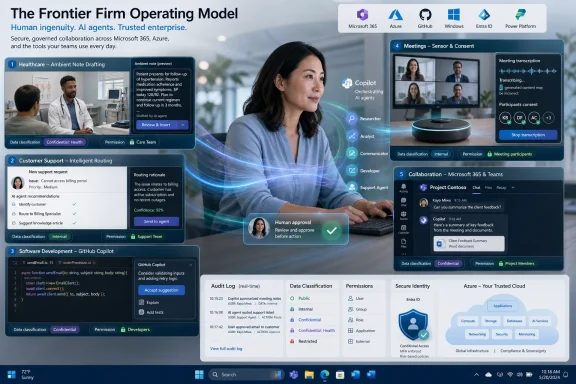 Microsoft’s AI Story Has Moved From Adoption to Reorganization
The first phase of enterprise AI was easy to understand: buy licenses, enable Copilot, encourage employees to summarize meetings, draft emails, search documents, and generate presentations faster. That phase still matters, but it is no longer where Microsoft wants the conversation to stay. In the company’s current framing, the real prize is not an AI assistant sitting beside the old workflow; it is a rebuilt workflow where the assistant becomes part of how the work is routed, checked, completed, and improved.That shift is visible in Microsoft’s “frontier firm” language. The company’s 2025 Work Trend Index described frontier firms as organizations with broad AI deployment, active agent use, and a willingness to rebuild around what Microsoft calls human-agent teams. Microsoft’s 2026 Work Trend Index sharpened the point: workers may be using AI, but organizations often have not yet redesigned their systems to absorb the gains.
Technology Record’s interview with Kees Hertogh, Microsoft’s vice president of global industry marketing, fits neatly into that larger campaign. Hertogh argues that frontier firms are enriching employee experiences, reinventing customer engagement, reshaping business processes, and accelerating innovation. In plain English: Microsoft is saying the companies that win with AI will be the ones that stop treating it as a productivity add-on and start treating it as an operating layer.
That is both persuasive and self-serving. Microsoft sells the platforms, models, cloud infrastructure, security tools, productivity apps, developer tools, and partner ecosystem required to make that operating layer real. But the claim also has a practical truth behind it. If an organization merely drops AI into broken processes, it may get faster broken processes. If it uses AI to rethink who does what, when humans intervene, and how decisions are made, the technology can start changing the shape of work itself.
The “Assistant” Is Becoming a Workflow Participant
Hertogh’s most important claim is not that AI makes work faster. It is that AI changes the relationship people have with work. That sounds like marketing language until you look at the examples Microsoft and its partners are now emphasizing.A marketer no longer needs to spend as much time collecting background material before planning a campaign. A clinician can have AI draft notes during a patient visit rather than after a shift. A customer service team can use AI to understand intent and route the next best action. A developer can use GitHub Copilot and agentic workflows to modernize code, port software, and connect assistance to repositories and documentation.
The common thread is not “AI writes text.” The common thread is that AI moves into the flow of work. It is present when the meeting happens, when the patient visit happens, when the customer asks for help, when the developer opens the codebase, and when the employee starts a request in Teams.
That distinction matters for WindowsForum readers because it explains why Microsoft’s AI push has expanded beyond Bing-style chat and into Microsoft 365, Teams, Windows, Azure, GitHub, Dynamics, security, endpoint management, and partner-built vertical tools. The company is not trying to win one AI app category. It is trying to make Microsoft’s stack the place where work is observed, interpreted, assisted, governed, and completed.
The upside is obvious. Work becomes less dependent on employees remembering where information lives, which system owns which process, and what administrative steps must be completed after the real work is done. The downside is equally obvious. Once AI is embedded in the workflow, mistakes, permissions, hallucinations, and governance gaps are no longer confined to a side panel. They become part of business execution.
Healthcare Shows the Promise — and the Boundary Line
The Cooper University Health Care example is one of the cleaner demonstrations of what Microsoft means by redesigning work. According to Microsoft’s customer story and Hertogh’s description in Technology Record, Cooper clinicians had been spending one to two hours after shifts finishing documentation. With Microsoft Dragon Copilot, ambient AI listens during patient visits and creates draft clinical notes for clinician review.Microsoft says Cooper clinicians are saving just over four minutes per patient, adding up to roughly an hour per day. That is not a trivial productivity claim. In healthcare, documentation burden is not just an administrative annoyance; it contributes to burnout, reduces time with patients, and turns clinical expertise into after-hours clerical labor.
But the reason the example works is not that AI replaces the clinician. It is that the workflow changes while human authority remains intact. Documentation moves into the visit. The AI drafts. The clinician reviews. The final clinical judgment remains with the professional.
That is the model Microsoft wants enterprises to generalize: let AI absorb repeatable administrative work, but keep humans responsible where risk, judgment, and accountability matter. It is a sensible dividing line, though it will be tested constantly in practice. In low-risk summarization, light oversight may be enough. In clinical, financial, safety, compliance, or legal workflows, the cost of overtrusting automation can be far higher than the cost of inefficiency.
The uncomfortable truth is that “human in the loop” can mean many things. It can mean careful review by an accountable expert. It can also mean a rushed employee rubber-stamping machine output because the system has made speed the new default. Frontier firms will need to prove that their oversight models are real operating controls, not comforting diagrams in a governance deck.
Ask Ralph Is Retail AI With a Human Brand Still in Charge
Ralph Lauren’s Ask Ralph provides the consumer-facing version of the same thesis. The tool, introduced with Microsoft technology and powered by Azure OpenAI, acts like a conversational digital stylist. A shopper can describe what they want, and the system recommends outfits that match their preferences.The important part is not that an AI can recommend clothes. Retail sites have recommended products for years. The shift is that the interface becomes conversational, contextual, and more like asking a store associate for help than filtering a catalog by color, size, and price.
Hertogh frames Ask Ralph as a way to improve conversion and engagement while reducing friction for the customer. That is exactly how retailers should look at it. The AI does not need to replace the brand’s taste; it needs to express the brand’s taste at scale. Ralph Lauren still defines the style rules, product universe, presentation, and customer experience. The AI becomes a front-end interpreter.
This distinction is crucial. Generative AI can quickly become brand dilution if it produces generic recommendations, awkward language, or experiences that feel detached from the company’s identity. In retail, personalization is only useful if it remains recognizably on-brand. Ask Ralph works as a case study because the AI is positioned as a controlled stylist, not an improvising salesperson with unlimited freedom.
The same lesson applies to enterprise IT. AI should not be bolted onto customer-facing systems simply because the technology is available. It needs a defined role, a governed data foundation, escalation paths, and a clear sense of what the business is willing to let the model decide.
Agents Turn the Intranet Problem Into the Enterprise Problem
One of the sharper partner comments in Technology Record comes from Akumina’s Ed Rogers, who compares AI adoption to intranet search. Employees use an intranet because they need to find things. They stop using it when search fails. Once trust is lost, adoption collapses.That is a useful warning because enterprise AI inherits the same problem at larger scale. If Copilot, an agent, or a workplace assistant cannot retrieve the right policy, distinguish current information from obsolete files, respect permissions, or produce answers that employees can verify, people will route around it. Worse, they may use it inconsistently: trusting it when they should not and ignoring it when it could help.
Microsoft’s answer is governance, Microsoft Graph grounding, Purview, Entra, compliance controls, and partner-built experiences that shape how AI appears inside the organization. That is the right answer architecturally, but the practical burden is heavy. Many companies still have fragmented data estates, stale SharePoint sites, inconsistent permissions, legacy line-of-business systems, and undocumented tribal processes.
Agentic AI does not magically fix those foundations. It exposes them. A chatbot that cannot find a document is annoying. An agent that acts on incomplete, outdated, or wrongly permissioned information can create operational risk.
That is why the partner ecosystem matters in Microsoft’s story. Companies such as ServiceNow, TeamViewer, Intermedia, Conga, Coretek, Velosio, and others are not merely reselling AI enthusiasm. They are trying to connect AI to the messy machinery of actual business: HR workflows, finance approvals, remote support, customer contact centers, contract processes, onboarding, collaboration rooms, and endpoint management.
The Partner Ecosystem Is Microsoft’s AI Deployment Engine
Microsoft’s platform strategy has always depended on partners, but AI makes that dependency more explicit. Copilot can provide the common interface. Azure can provide the infrastructure. GitHub can provide developer acceleration. But most organizations do not run on clean Microsoft-only workflows.They run on accumulated systems, custom integrations, regulatory obligations, departmental exceptions, and processes nobody has diagrammed since the last reorganization. That is where partners become the difference between a demo and a deployment.
ServiceNow’s example is instructive. Chad Scheller describes a future where an employee starts a request in Microsoft Teams and the work is completed across ServiceNow without the usual handoffs and waiting. That is not just a nicer chatbot. It is a cross-platform workflow where Teams becomes the conversational entry point and ServiceNow remains the system of action.
TeamViewer’s Stefan Prestele describes a support loop where remote support sessions generate reusable knowledge, which then improves Tia, the TeamViewer Intelligent Agent, and connects back into Microsoft 365 Copilot. That moves AI from reactive assistance toward institutional memory. The system learns not simply from documents, but from how problems were actually solved.
Intermedia’s Bojan Dusevic points to Teams as a communications hub enriched by calling, contact center, routing, summaries, and performance visibility. Shure and Barco focus on meeting rooms, where audio quality, capture, recap, and facilitator agents become part of collaboration. Crestron’s Joel Mulpeter notes a practical adoption issue: employees who use Copilot or Facilitator at their desks will increasingly expect those tools in physical meeting rooms too.
This is how Microsoft’s AI layer spreads. It does not arrive only as a new app. It arrives through the tools employees already use, the meeting rooms they walk into, the service tickets they file, the calls they answer, the code they maintain, and the documents they must produce.
Developers Are Already Living in the Agentic Future
For software teams, the frontier firm argument is less theoretical. GitHub Copilot has already changed expectations around coding assistance, and the next step is clearly more agentic: code modernization, porting, test generation, documentation lookup, repository-aware suggestions, and workflow automation.Arm’s Kevin Ryan describes using Microsoft Copilot for everyday coordination and GitHub Copilot for software development, modernization, and cross-platform porting. The more interesting detail is the mention of Model Context Protocol integrations, which can connect AI assistance to tools, repositories, documentation, and enterprise workflows. That is where coding assistants stop being autocomplete and start becoming development collaborators.
This does not eliminate the need for engineering discipline. In some ways, it raises the bar. Developers must review generated code, understand architecture, validate security assumptions, and prevent agents from creating plausible but brittle changes. But it also changes the economics of maintenance work that teams often postpone because it is tedious or under-resourced.
Code modernization is a good example. Enterprises have vast amounts of code that is not glamorous enough to rewrite but important enough to keep alive. If AI can reduce the friction of understanding old code, proposing changes, generating tests, and porting across platforms, it can unlock work that has sat in backlog purgatory for years.
The Windows ecosystem should pay attention here. As Microsoft pushes AI deeper into Windows, Azure, GitHub, and developer tooling, the platform story becomes increasingly unified: build on Microsoft’s cloud, manage with Microsoft’s identity and security tools, develop with GitHub, collaborate in Teams, and expose AI through Copilot. That integration is powerful. It also makes vendor lock-in a strategic question, not just a procurement complaint.
The Meeting Room Becomes a Sensor
The partner perspectives around Barco ClickShare, Crestron, and Shure point to a quieter but important frontier: the meeting room. Microsoft’s AI story often begins with individual productivity, but meetings are where decisions, ambiguity, politics, and institutional memory collide. If AI can capture, structure, summarize, and assign work from those conversations, the meeting becomes less of a time sink and more of a data source.That is the optimistic version. Facilitator agents guide discussion, take notes, identify decisions, and turn insights into tasks. High-quality audio improves transcription accuracy and inclusion. Meeting recaps reduce the burden on people who missed the conversation or need to follow up later.
But again, the operational design matters. A meeting room that captures everything can also chill conversation if employees do not understand what is being recorded, summarized, stored, or shared. Sensitive discussions, personnel issues, legal strategy, security incidents, and early-stage brainstorming all require different levels of confidentiality and retention.
For IT administrators, the meeting room is no longer just AV equipment plus Teams Rooms. It is part of the AI data pipeline. Microphones, cameras, room systems, identity, compliance policies, retention settings, Copilot access, and transcript governance all become one system.
The organizations that get this right will make meetings less wasteful. The organizations that get it wrong will create either surveillance anxiety or a compliance mess. The technology can make collaboration smarter, but only if the rules around capture and use are just as carefully designed as the room hardware.
The Hard Part Is Not the Model, It Is the Operating Model
Hertogh’s strongest point is that the organizations moving fastest will not be the ones that deploy AI everywhere. They will be the ones that know where AI adds value and match the right work to the right mode of human-AI collaboration.That should be printed on every enterprise AI rollout plan. The temptation in 2026 is to make AI universal by default: every workflow gets an agent, every department gets a Copilot prompt library, every process gets automation. But indiscriminate deployment can create more coordination work, not less.
The real work is classification. Which tasks are repetitive enough to automate? Which require human judgment? Which require human approval only at the end? Which require human involvement throughout? Which should not use generative AI at all because the risk, data sensitivity, or ambiguity is too high?
This is where Deloitte’s point, cited in the Technology Record article, becomes central: deploying tools is the easy part. Redesigning work is the transformation. It means changing incentives, job design, management practices, training, governance, measurement, and sometimes organizational structure.
It also means telling employees the truth. AI adoption framed only as “freeing people for higher-value work” will be met with skepticism if workers suspect the real goal is headcount reduction or surveillance. Frontier firms will need to build trust not just in outputs, but in management’s use of the technology.
Trust Is the Real Deployment Metric
Microsoft and its partners repeatedly return to trust because they know adoption depends on it. Employees must trust that AI is accurate enough to use. Administrators must trust that data remains secure and governed. Executives must trust that AI investment produces measurable value. Customers must trust that personalized service is helpful rather than creepy or wrong.Those forms of trust are related but not identical. A system can be secure and still produce poor answers. It can be useful and still create compliance risk. It can improve productivity while making employees feel monitored. It can delight customers until it gives one irresponsible answer in a regulated domain.
That is why frontier firms need more than enthusiasm and license utilization charts. They need monitoring, evaluation, red-teaming, permission hygiene, data lifecycle management, user training, and escalation processes. They need to know when AI is assisting, when it is deciding, and when it is merely producing something that looks finished.
Microsoft’s advantage is that it can offer a relatively coherent stack for this: identity, productivity, endpoint management, cloud, security, compliance, developer tooling, and partner integration. Its challenge is that coherence does not guarantee simplicity. Enterprise Microsoft environments are already complex. Adding agents, grounded AI, and automated workflows can deepen that complexity unless administrators are given clear controls and realistic deployment patterns.
For WindowsForum’s IT pro audience, the message is blunt: AI governance is becoming part of everyday systems administration. It is not a policy appendix. It is identity, access, data classification, retention, endpoint readiness, application integration, logging, user education, and incident response.
The Frontier Firm Is a Management Theory Wearing a Copilot Badge
The most revealing part of Microsoft’s frontier firm language is that it is not really a product category. It is a management theory. Microsoft is describing a company where intelligence is available on demand, agents perform pieces of work, employees supervise and improve outputs, and the operating model decides how human and machine labor combine.That may sound futuristic, but many partner examples are grounded in ordinary frustrations. Employees cannot find information. Meetings create follow-up work. Clinicians drown in notes. Developers lose time to repetitive modernization tasks. Support teams solve the same problems again and again. HR onboarding takes too long. Customers do not want to navigate a catalog or a phone tree.
AI becomes compelling when it attacks those frictions directly. Velosio’s Robbie Morrison makes that point well by describing an internal deployment that started with tasks employees disliked, delayed, or passed to someone else. That is a pragmatic adoption strategy. If AI makes the annoying parts of work less annoying, people notice.
The danger is that “redesigning work” can become a euphemism for extracting more output from the same workers without fixing overload. Microsoft’s own Work Trend Index research has repeatedly described overwhelmed employees, fragmented attention, and digital debt. AI can reduce some of that burden, but it can also increase the pace of work if every saved minute is immediately filled with another demand.
Frontier firms, if the term is to mean anything beyond Microsoft branding, will need to measure quality of work as well as quantity of output. Faster summaries, more tickets closed, shorter onboarding cycles, and more generated code are useful metrics. But so are error rates, employee burnout, customer satisfaction, rework, security incidents, and whether decisions are actually improving.
Windows Is the Edge of Microsoft’s Workplace AI Ambition
Although the Technology Record article is mostly about business transformation rather than Windows itself, the implications for Windows are hard to miss. Microsoft’s workplace AI vision depends on the endpoint becoming an intelligent access point to organizational data, agents, meetings, workflows, and security controls.That is why Windows 11, Copilot+ PCs, Teams Rooms, Microsoft 365 Copilot, Endpoint Manager, Defender, Entra, and Azure are increasingly part of the same conversation. The endpoint is where employees experience AI, but it is also where organizations enforce policy, protect data, and connect local work to cloud intelligence.
For administrators, this means AI readiness will increasingly overlap with device readiness. Hardware capabilities, OS version support, app compatibility, identity configuration, data protection, network access, and user training all shape whether AI feels seamless or brittle. The best model in the world will not help much if employees are stuck in poorly governed file shares, underpowered devices, or meeting rooms that cannot capture usable audio.
For users, it means the line between operating system, productivity suite, and AI assistant will continue to blur. That will bring convenience and irritation in equal measure. Windows enthusiasts have already shown skepticism toward AI features that feel imposed, especially when they appear tied to cloud accounts, telemetry, or hardware upgrade pressure. Microsoft will need to show that AI in Windows and Microsoft 365 is controllable, useful, and respectful of enterprise boundaries.
The frontier firm story therefore has a Windows story inside it. If Microsoft wants AI to redesign work, Windows cannot merely host AI features. It has to become a trusted surface for them.
The Companies Winning With Microsoft AI Are Rewriting the Job Description
The practical lesson from Technology Record’s reporting is that frontier firms are not distinguished by how many AI tools they own. They are distinguished by whether those tools change the distribution of work. A company that uses Copilot to draft emails is adopting AI. A company that redesigns clinical documentation, customer styling, software modernization, onboarding, support, and meeting follow-up around governed human-agent teams is doing something more consequential.That difference should guide how organizations judge their own AI maturity. The point is not to chase every new agentic feature. The point is to identify where work is slow, repetitive, fragmented, or poorly matched to human attention, then decide whether AI can safely and measurably improve it.
- Frontier firms use AI to redesign workflows, not merely to accelerate existing tasks.
- Human oversight must increase as the risk of the workflow increases.
- Trusted data, clean permissions, governance, and monitoring are prerequisites for scaling agentic AI safely.
- Microsoft’s partner ecosystem is essential because most business transformation happens inside messy industry-specific workflows.
- The strongest early use cases are often mundane tasks that employees dislike, delay, or perform after the real work is done.
- IT teams should treat AI deployment as an operating model change that touches identity, endpoints, compliance, training, and support.
References
- Primary source: Technology Record
Published: 2026-07-06T11:42:07.613922
How frontier firms are using Microsoft AI tools to...
Business transformation is AI’s great promise, but according to Deloitte, deploying new tools is the easy part. To define and achieve true...www.technologyrecord.com
- Official source: news.microsoft.com
Microsoft’s 2025 Work Trend Index Report reveals the rise of the Frontier Firm, marking a new era of workforce dynamics - CEE Multi-Country News Center
The report underscores how intelligence on demand, hybrid human-AI agent teams, and evolving workplace structures are reshaping business operations and talent strategies. As organizations worldwide navigate the next wave of workplace transformation, Microsoft’s fifth annual Work Trend Index...news.microsoft.com - Official source: microsoft.com
Cooper University Health Care enhances patient care with Microsoft Dragon Copilot | Microsoft Customer Stories
Cooper University Health Care uses Microsoft Dragon Copilot to reduce burnout, improve documentation, and restore human connection in patient care.www.microsoft.com
- Official source: blogs.microsoft.com
How Frontier Firms are rebuilding the operating model for the age of AI - The Official Microsoft Blog
Updated May 11, 2026: The post was updated to reflect that third-party plugins will be available starting May 12, 2026. Spend time with any software engineering team right now and you’ll see something worth paying attention to. Over the last few years, the way software gets built has moved...blogs.microsoft.com - Official source: azure.microsoft.com
Building the Frontier Firm with Microsoft Azure: The business case for cloud and AI modernization | Microsoft Azure Blog
Learn how Frontier Firms are moving beyond experimentation and into scaled transformation, powered by human-agent teams. azure.microsoft.com
- Official source: cdn-dynmedia-1.microsoft.com
- Related coverage: befrontierfirm.com

Frontier Firm — The Pioneer Enterprise Concept by Microsoft
Discover the Frontier Firm concept: the enterprise that embeds AI as a strategic lever. Criteria, maturity phases and case studies.
www.befrontierfirm.com
- Official source: techcommunity.microsoft.com
- Related coverage: techradar.com
'Every business leader knows the world is changing, but far fewer have a clear picture of what to do about it': Microsoft flags the changing world of AI at work, and why "Frontier Firms" are leading the way | TechRadar
Microsoft digs deep into how businesses are using AIwww.techradar.com - Related coverage: windowscentral.com
This is Microsoft's new "Copilot Cowork": An experiment with Anthropic's Claude AI models that plans and delegates your work | Windows Central
Microsoft ships Copilot Cowork to its Frontier program.www.windowscentral.com - Related coverage: time.com
At TIME100 Impact Dinner, Leaders Discuss AI and the Future of Fashion
Panelists discussed a collaboration between Ralph Lauren and Microsoft and how tech can enhance a customer’s experience.time.com - Related coverage: tomshardware.com
Top Microsoft exec's boast about Windows 'evolving into an agentic OS' provokes furious backlash over AI — users fed up with forced AI and cloud features | Tom's Hardware
The post's comments section quickly turned into a ravenous pool of AI- and cloud-hating piranhas.www.tomshardware.com - Related coverage: axios.com
Microsoft bets on superintelligence race after OpenAI deal reset
"Humanist Superintelligence" is an effort to build safer models.www.axios.com
- Official source: adoption.microsoft.com
- Related coverage: cps.co.uk
- Official source: marketingassets.microsoft.com
- Related coverage: assets-c4akfrf5b4d3f4b7.z01.azurefd.net
Microsoft 2026 Work Trend Index Annual Report
Agents, human agency, and the opportunity for every organizationassets-c4akfrf5b4d3f4b7.z01.azurefd.net
