

Microsoft Graph’s browser-native Web Push preview should not replace webhooks across Windows and Microsoft 365 administration. It is a meaningful new option for an interactive admin portal that needs to alert a signed-in operator in a specific browser, but webhook and Azure Event Hubs delivery remain the right foundations for durable backend automation, high-volume processing, and recovery from missed events.
Microsoft listed the capability as a preview feature in July 2026, exposing browser delivery through the Microsoft Graph beta subscription resource. For teams building dashboards around Microsoft 365 administration, Windows update data, identity activity, or service operations, the appeal is immediate: a browser application can subscribe to Graph change notifications through the W3C Push API without standing up a publicly reachable webhook endpoint.
That is a real simplification, not merely a transport swap. But it changes where a notification lands, not the operational guarantees an admin tool must provide.
The preview adds three browser-push properties to the Graph beta subscription resource:
In practical terms, a Microsoft 365 or Windows-focused web portal can ask a user’s browser to permit notifications, acquire a browser push subscription through the W3C Push API, and register the necessary values with Microsoft Graph. Instead of Graph posting a change notification to an internet-facing endpoint controlled by the application, the browser receives an alert directly.
That can remove a frustrating piece of plumbing from a narrowly scoped tool. A small IT team building an internal portal no longer has to treat every “notify the person watching this page” scenario as a webhook-hosting project with public DNS, TLS management, endpoint validation, and a backend receiver. The browser becomes the immediate destination for a prompt such as “a monitored Microsoft 365 object changed” or “an administrator’s review queue has new activity.”
Microsoft’s documentation is explicit about the status, however: this work appears only under Microsoft Graph beta, and beta APIs may change and are unsupported for production applications. That makes the feature a preview to evaluate, prototype, and design around—not a production migration mandate.
The dividing line is simple: browser push is a user attention mechanism. Webhooks and Event Hubs are application integration mechanisms.
A browser-delivered Graph event can make an admin experience feel more immediate. A portal can surface a native browser notification and direct the operator to the relevant screen, where the application can retrieve current data from Graph and present the actual record, state, or action. That pattern matters because a change notification is not a substitute for the portal’s own authorization and data-refresh logic.
WindowsForum readers following Microsoft Graph’s expanding Windows API story will recognize the broader trajectory. Microsoft has been pushing more administrative and service data toward programmatic access, including Windows updates scenarios and the ongoing move from Exchange Web Services usage toward Graph-centered management. Browser push offers a new front-end delivery choice within that ecosystem; it does not change the need to build dependable administrative workflows behind the screen.
For an internal Microsoft 365 operations console, the preview is worth considering when all of the following are true:
The key risk is confusing delivery convenience with reliability. A browser is inherently tied to user behavior: permissions can be declined, subscriptions can change, the device can be offline, and the user may not be available to see the alert. Those are normal characteristics of a user-facing notification channel. They are unacceptable assumptions for a workflow that must complete.
For webhook-based Graph subscriptions, the receiving service remains under the organization’s control. That comes with deployment and security obligations, but it also creates a durable processing point. The service can log incoming notifications, queue follow-up work, maintain audit trails, and use retries or reconciliation logic appropriate to the application.
The more consequential the result of a Graph event, the less sensible it is to make a browser its only destination. An alert about a queue item can be browser-native. A process that changes access, creates a ticket, or affects compliance evidence should remain backend-driven.
Event Hubs is not a prettier webhook. It is a different operating model, aimed at applications that need to consume streams and process events beyond a single request-response cycle. The browser-push preview should not be positioned as an alternative for that class of workload.
A useful architecture may use both. An Event Hubs or webhook receiver can preserve the authoritative operational path, while a separate browser-push subscription improves the operator experience for a selected set of low-friction alerts. The two channels have different jobs:
Start with the browser side. Confirm that the portal can request notification permission appropriately, obtain a W3C Push API subscription, and handle the user declining or later revoking permission without degrading the core application. Notification permission should be an enhancement, not an access requirement for administrative work.
Next, register a beta Graph subscription using the new VAPID public key and browser encryption values. Keep the preview-specific integration isolated in code and configuration so it can be changed or removed if Microsoft modifies the beta contract. Do not let beta resource assumptions leak throughout the portal.
Then test the operational reality rather than only the happy path. Verify that the browser alert is useful when the portal is not in the foreground, that it takes the user to a meaningful review screen, and that the portal refreshes data after the alert arrives. Test the same workflow with permissions denied, the browser closed, and the operator unavailable; the intended administrative outcome should still be clear.
Finally, decide whether the event needs a durable counterpart. If a missed alert would mean lost work, a broken audit trail, or an action that never occurs, retain or add webhook or Event Hubs delivery. The browser should improve awareness, not carry the sole responsibility for completion.
There is also a product-lifecycle risk. Microsoft says Graph beta APIs are subject to change and are unsupported for production applications. Administrators should therefore avoid committing business-critical portals to this transport until Microsoft publishes a supported production version and its behavior, limits, and lifecycle rules are clear.
The supplied Microsoft documentation for Azure Notification Hubs illustrates the broader browser-push model, including VAPID credentials and browser subscription data. Graph’s preview is notable because it applies browser push directly to Graph change notifications, reducing the amount of custom relay infrastructure required for a browser-first experience. It does not turn Graph into a general-purpose replacement for a durable event-processing platform.
Microsoft’s July 2026 preview is best read as a new UI-oriented lane for Graph notifications, not the end of webhooks. If it graduates beyond beta, the winning design will be the one that uses browser push to make administrators faster while leaving durable automation where it belongs: in a backend service or event pipeline.
Microsoft listed the capability as a preview feature in July 2026, exposing browser delivery through the Microsoft Graph beta subscription resource. For teams building dashboards around Microsoft 365 administration, Windows update data, identity activity, or service operations, the appeal is immediate: a browser application can subscribe to Graph change notifications through the W3C Push API without standing up a publicly reachable webhook endpoint.
That is a real simplification, not merely a transport swap. But it changes where a notification lands, not the operational guarantees an admin tool must provide.
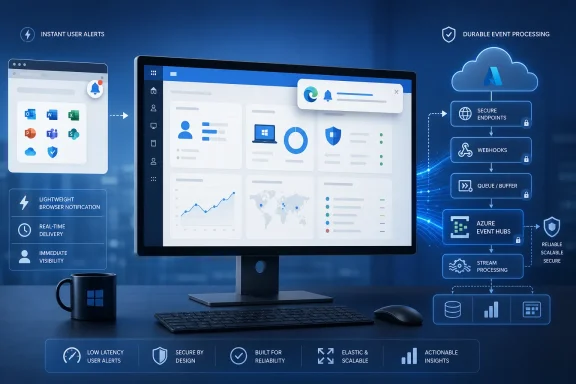 A Browser Can Now Be the Delivery Endpoint
The preview adds three browser-push properties to the Graph beta subscription resource: vapidPublicKey, webPushEncryptionP256dhPublicKey, and webPushEncryptionSecret. Those fields represent the browser’s push subscription details and the encryption material needed for the service to deliver a notification through browser push infrastructure.In practical terms, a Microsoft 365 or Windows-focused web portal can ask a user’s browser to permit notifications, acquire a browser push subscription through the W3C Push API, and register the necessary values with Microsoft Graph. Instead of Graph posting a change notification to an internet-facing endpoint controlled by the application, the browser receives an alert directly.
That can remove a frustrating piece of plumbing from a narrowly scoped tool. A small IT team building an internal portal no longer has to treat every “notify the person watching this page” scenario as a webhook-hosting project with public DNS, TLS management, endpoint validation, and a backend receiver. The browser becomes the immediate destination for a prompt such as “a monitored Microsoft 365 object changed” or “an administrator’s review queue has new activity.”
Microsoft’s documentation is explicit about the status, however: this work appears only under Microsoft Graph beta, and beta APIs may change and are unsupported for production applications. That makes the feature a preview to evaluate, prototype, and design around—not a production migration mandate.
The Best Fit Is an Interactive Admin Console
Browser push is strongest where the notification’s job is to bring a human back to a browser-based workflow. Think of an IT operator who has a Microsoft 365 administration portal open, steps away from the tab, and needs a lightweight signal that something worth reviewing has appeared.The dividing line is simple: browser push is a user attention mechanism. Webhooks and Event Hubs are application integration mechanisms.
A browser-delivered Graph event can make an admin experience feel more immediate. A portal can surface a native browser notification and direct the operator to the relevant screen, where the application can retrieve current data from Graph and present the actual record, state, or action. That pattern matters because a change notification is not a substitute for the portal’s own authorization and data-refresh logic.
WindowsForum readers following Microsoft Graph’s expanding Windows API story will recognize the broader trajectory. Microsoft has been pushing more administrative and service data toward programmatic access, including Windows updates scenarios and the ongoing move from Exchange Web Services usage toward Graph-centered management. Browser push offers a new front-end delivery choice within that ecosystem; it does not change the need to build dependable administrative workflows behind the screen.
For an internal Microsoft 365 operations console, the preview is worth considering when all of the following are true:
- The event is useful primarily because a currently active human should notice it quickly.
- The application can safely treat the browser notification as a prompt to fetch current state rather than as the authoritative business record.
- The solution’s value falls sharply if it must run with no browser open, no signed-in user, or no notification permission.
- The team can tolerate a beta-only integration during evaluation and avoid calling it production-ready.
Webhooks Still Own Durable Automation
Webhooks continue to make sense when Graph events must reach an application service, where code can validate, enrich, route, persist, and act on them independently of any user’s device. A browser notification cannot replace an automation worker that must create an incident, update a configuration database, launch an approval process, or trigger a downstream integration whether or not an administrator has a dashboard open.The key risk is confusing delivery convenience with reliability. A browser is inherently tied to user behavior: permissions can be declined, subscriptions can change, the device can be offline, and the user may not be available to see the alert. Those are normal characteristics of a user-facing notification channel. They are unacceptable assumptions for a workflow that must complete.
For webhook-based Graph subscriptions, the receiving service remains under the organization’s control. That comes with deployment and security obligations, but it also creates a durable processing point. The service can log incoming notifications, queue follow-up work, maintain audit trails, and use retries or reconciliation logic appropriate to the application.
The more consequential the result of a Graph event, the less sensible it is to make a browser its only destination. An alert about a queue item can be browser-native. A process that changes access, creates a ticket, or affects compliance evidence should remain backend-driven.
Event Hubs Remains the Scale Path
Microsoft Graph also continues to support delivery through Azure Event Hubs. That option is the clearer fit for backend listeners, throughput, and resilience—especially when an organization wants multiple consumers, centralized event handling, or a pipeline that is designed to keep processing after individual dashboards and users have disappeared.Event Hubs is not a prettier webhook. It is a different operating model, aimed at applications that need to consume streams and process events beyond a single request-response cycle. The browser-push preview should not be positioned as an alternative for that class of workload.
A useful architecture may use both. An Event Hubs or webhook receiver can preserve the authoritative operational path, while a separate browser-push subscription improves the operator experience for a selected set of low-friction alerts. The two channels have different jobs:
- A backend path records and processes the event even when no administrator is at a console.
- A browser-push path tells an available administrator that a portal view deserves attention.
- The portal retrieves fresh, authorized Graph data before showing details or offering an action.
A Practical Evaluation Plan Before Anyone Migrates
Because Microsoft has placed browser push only in Graph beta, the sensible next step is a contained proof of concept. Build it around a non-critical workflow and decide whether it improves an operator’s experience enough to justify maintaining a second notification path.Start with the browser side. Confirm that the portal can request notification permission appropriately, obtain a W3C Push API subscription, and handle the user declining or later revoking permission without degrading the core application. Notification permission should be an enhancement, not an access requirement for administrative work.
Next, register a beta Graph subscription using the new VAPID public key and browser encryption values. Keep the preview-specific integration isolated in code and configuration so it can be changed or removed if Microsoft modifies the beta contract. Do not let beta resource assumptions leak throughout the portal.
Then test the operational reality rather than only the happy path. Verify that the browser alert is useful when the portal is not in the foreground, that it takes the user to a meaningful review screen, and that the portal refreshes data after the alert arrives. Test the same workflow with permissions denied, the browser closed, and the operator unavailable; the intended administrative outcome should still be clear.
Finally, decide whether the event needs a durable counterpart. If a missed alert would mean lost work, a broken audit trail, or an action that never occurs, retain or add webhook or Event Hubs delivery. The browser should improve awareness, not carry the sole responsibility for completion.
Preview Status Is the Main Constraint
The absence of a public webhook is attractive, but it does not make the integration operationally free. The portal still needs browser permission handling, push subscription lifecycle management, secure treatment of subscription material, user-session design, and a plan for events that do not reach or are not acted upon by a person.There is also a product-lifecycle risk. Microsoft says Graph beta APIs are subject to change and are unsupported for production applications. Administrators should therefore avoid committing business-critical portals to this transport until Microsoft publishes a supported production version and its behavior, limits, and lifecycle rules are clear.
The supplied Microsoft documentation for Azure Notification Hubs illustrates the broader browser-push model, including VAPID credentials and browser subscription data. Graph’s preview is notable because it applies browser push directly to Graph change notifications, reducing the amount of custom relay infrastructure required for a browser-first experience. It does not turn Graph into a general-purpose replacement for a durable event-processing platform.
Frequently Asked Questions
Is Microsoft Graph browser push available for production admin portals?
No. Microsoft documents the feature under Microsoft Graph beta and says beta APIs may change and are unsupported for production applications. Treat it as a preview evaluation feature.Does browser push eliminate the need for a public webhook?
It can for a narrow browser-only alert scenario. It does not replace a public webhook or other backend path when an event must be processed, stored, or acted on without a specific user’s browser being available.When should an organization use Azure Event Hubs instead?
Use Event Hubs when the priority is backend listeners, throughput, resilience, or event processing that may involve multiple consumers. It is better suited to durable operational pipelines than a per-browser alert experience.What do the new Graph subscription fields represent?
They provide the VAPID public key and browser push encryption values required to target and protect delivery to a browser push subscription through the W3C Push API.Microsoft’s July 2026 preview is best read as a new UI-oriented lane for Graph notifications, not the end of webhooks. If it graduates beyond beta, the winning design will be the one that uses browser push to make administrators faster while leaving durable automation where it belongs: in a backend service or event pipeline.
References
- Primary source: learn.microsoft.com
Send browser (web push) notifications with Azure Notification Hubs | Microsoft Learn
Learn about support for browser push notifications in Azure Notification Hubs.learn.microsoft.com - Independent coverage: developer.apple.com
Sending web push notifications in web apps and browsers | Apple Developer Documentation
Update your web server and website to send push notifications that work in Safari, other browsers, and web apps, following cross-browser standards.developer.apple.com
- Primary source: WindowsForum
Enhancing Windows Access: Microsoft Graph API and Its Latest Features | Windows Forum
Microsoft has made strides in enhancing Windows API integration, notably through the Microsoft Graph application. This tool offers programmatic access to...windowsforum.com
