

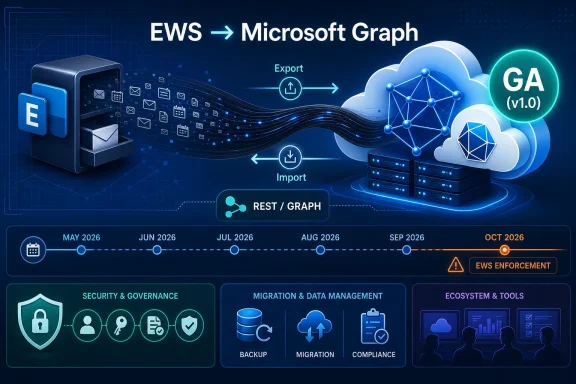
Microsoft has made its Mailbox Import and Export APIs for Microsoft Graph generally available in May 2026, giving Exchange Online developers a production-supported replacement path for a major Exchange Web Services workload before EWS enforcement begins later this year. The timing is not accidental. This is Microsoft closing one of the most painful parity gaps in Graph just as administrators, vendors, and in-house developers are being told that the old Exchange programmability model is entering its final stretch. The headline is not merely that another API reached GA; it is that the migration away from EWS is becoming less theoretical and more operationally unavoidable.
For years, “move from EWS to Graph” has been the kind of Microsoft 365 advice that sounded correct in principle and maddening in practice. Exchange Web Services was old, SOAP-based, and increasingly out of step with Microsoft’s cloud security architecture, but it also did things that real production systems depended on. Backup products, migration tools, journaling-adjacent workflows, mailbox copy utilities, compliance exports, and homegrown administrative scripts did not care whether EWS looked modern. They cared that it worked.
The general availability of Mailbox Import and Export APIs changes that argument in a narrow but important way. Microsoft can now point developers toward a Graph-based, production-supported route for exporting Exchange Online mailbox items in full fidelity and importing them back into the same or another mailbox. That matters because mailbox movement and content preservation were among the most uncomfortable areas in the EWS retirement plan.
The API does not make the EWS transition painless. It does, however, make it harder for software vendors to argue that Microsoft has provided no viable path forward for a large class of mailbox-content workflows. The migration clock has always been ticking; now one of the larger missing gears has been installed.
That distinction is central to the design. Many ordinary Microsoft Graph mail APIs are excellent for reading messages, creating drafts, listing events, or building user-facing productivity integrations. They are less suitable when the goal is to preserve an Exchange item exactly enough that it can be rehydrated later without the application understanding every bit of Exchange’s internal item model.
Mailbox import and export lives in a different category. It is not designed to be a prettier way to parse email. It is designed to let applications move mailbox items while avoiding the trap of reconstructing complex Exchange metadata by hand.
That will disappoint developers who want an easy extraction format for downstream processing. It will reassure developers who need mailbox-copy semantics more than analytics semantics. Microsoft is effectively saying: if you want to preserve and restore an Exchange item, let Exchange remain the authority on the item’s internal shape.
The Mailbox Import and Export APIs are aimed at scenarios such as moving items, copying content between mailboxes, and enabling migration-style workflows. They can export items and import them back. But Microsoft is not positioning them as a general-purpose replacement for Microsoft 365 backup platforms, retention architecture, or point-in-time recovery systems.
That distinction will matter to every backup vendor now updating a product roadmap. A vendor can use Graph where appropriate, but Microsoft’s message is that backup and restore should be handled through Microsoft 365 Backup and associated backup storage APIs rather than by treating mailbox import/export as a do-it-yourself recovery framework. Whether customers like that answer is another matter. The technical and commercial direction is clear enough.
For IT departments, the practical takeaway is that “we can export mailbox items through Graph” should not be confused with “we have solved Microsoft 365 backup.” Those are related sentences, not equivalent ones.
But the EWS retirement problem has never been only about primary mailboxes. Organizations that have lived with Exchange for years often have public folders, Microsoft 365 Groups, shared mailboxes with odd permission histories, archive policies, compliance tooling, and third-party products that use EWS in ways nobody has inventoried recently. Microsoft’s own roadmap has acknowledged remaining parity gaps around areas such as public folders, Microsoft 365 Groups, archive scenarios, recurring-event delta behavior, user configuration, and administration APIs.
That means GA is progress, not absolution. If your application’s EWS dependency is “export selected mailbox items and import them elsewhere,” the path is much better today than it was during the preview period. If your dependency sits in public folders or group mailbox behavior, the answer may still be more complicated.
This is where administrators should be wary of sweeping vendor claims. “We support Graph” is no longer specific enough. The real question is which Graph APIs, for which Exchange workloads, with which mailbox types, and under which permission model.
The GA announcement lands directly inside that runway. It gives developers a production-supported API before the October 2026 milestone, while still leaving only months for serious testing, vendor qualification, tenant approvals, and change management. For large organizations, that is not a generous timeline. It is a compressed implementation window.
The hardest part will not be rewriting a single script. It will be discovering every dependency. EWS has been embedded in line-of-business applications, ticketing integrations, migration appliances, security tools, archive products, room-resource workflows, and one-off PowerShell jobs written by administrators who have since moved to other roles. Some of those systems will be obvious. Others will show up only when Microsoft’s tenant-level usage reporting or an enforcement event exposes them.
That is why the GA milestone should trigger action even for organizations that do not write code. If a vendor product touches Exchange Online mailbox content, now is the time to demand specific answers about EWS removal, Graph API coverage, testing status, and support dates.
EWS was born in a different Exchange era, when the service model, security assumptions, and application ecosystem were less centralized around Entra ID consent, scoped permissions, conditional access, and unified auditability. Microsoft Graph fits the modern Microsoft 365 control plane more naturally. It is where Microsoft wants permission management, throttling, telemetry, and future feature exposure to live.
Security is the public rationale that lands most easily. Microsoft has cited legacy attack surface concerns and the changing risk profile of old Exchange interfaces. That argument gained urgency after high-profile incidents involving Microsoft cloud identity and messaging infrastructure. Even when EWS is not the sole villain, a broad API with decades of compatibility baggage is an obvious target for reduction.
But there is also a platform argument. Microsoft does not want Exchange Online to remain programmable through a separate legacy universe forever. It wants Microsoft 365 development to happen through Graph, because Graph is the strategic aggregation layer across Exchange, Teams, SharePoint, Entra, Intune, and the rest of the cloud estate. Developers can dislike that consolidation, but they cannot realistically ignore it.
EWS-era applications often grew up in a world of broad service accounts, impersonation, and operational habit. Graph pushes the conversation into Entra application registrations, admin consent, least-privileged permissions, and sometimes application access policies or related scoping mechanisms. That is healthier from a governance standpoint, but it is not automatically simpler.
Security teams will rightly be cautious. An application that can export mailbox items at scale is powerful. An application that can import or update mailbox items is also powerful. Even if the API is designed for legitimate migration and integration work, the permission set deserves scrutiny because mailbox data remains among the most sensitive data in most organizations.
The result is that EWS migration should not be treated as a developer-only project. It belongs in the same room as identity administrators, Exchange administrators, security operations, compliance officers, and vendor-management teams. If the first serious conversation about Graph permissions happens during a production cutover, the project is already late.
That is probably intentional. Microsoft is not offering a universal mailbox deconstruction kit. It is offering a way to move mailbox items with Exchange preserving the parts that matter for re-import. If your application needs to inspect message content, headers, attachments, calendar fields, or contacts for business logic, other Graph APIs may still be the better fit.
The design also narrows the blast radius of format interpretation. Once developers start parsing undocumented internal representations, compatibility becomes a trap. A stream that is opaque by contract discourages that behavior. The API says, in effect: carry this safely, but do not pretend you own its internals.
That tradeoff is defensible, but it will require architectural discipline. Some products will need a hybrid approach, using ordinary Graph mail APIs for inspection and the import/export APIs for preservation. Others will need to split migration workflows from reporting workflows rather than trying to make one endpoint serve both purposes.
The useful vendor conversation is no longer “Do you plan to support Graph?” It is “Which EWS-dependent features have already moved to Graph, which are using the mailbox import/export APIs in v1.0, which remain blocked by Microsoft parity gaps, and what happens in our tenant after October 1, 2026?” That wording forces specificity.
Some vendors will be ready. Others will be partly ready and will depend on Microsoft’s remaining roadmap. A few will discover that their product architecture assumed EWS behaviors that Graph does not replicate cleanly. Customers should expect uneven answers, especially from older products that built Exchange support long before Microsoft 365 became the dominant deployment model.
The uncomfortable truth is that EWS retirement is also a market cleanup event. Products that have not invested in Microsoft 365 modernization will be exposed. Customers may tolerate that for niche tools, but they should not tolerate vague assurances for anything tied to compliance, backup, migration, legal discovery, or business-critical mail workflows.
The better inventory starts with observed behavior. Which service principals, user accounts, and client IDs are calling EWS? Which mailboxes are being accessed? Are the calls tied to known tools, or do they look like forgotten automation? Does the workload need read access, item export, item creation, calendar manipulation, folder permissions, or something else?
That last question matters because Graph parity is workload-specific. An application that only reads messages may have a straightforward path. An application that copies full-fidelity items between mailboxes may now have a stronger path because of this GA release. An application that depends on public folder import/export or obscure configuration behavior may still need special handling.
Microsoft’s Message Center notices and tenant-specific EWS usage summaries should help, but administrators should not wait passively for a report to become a plan. The organizations that handle this smoothly will be the ones that map dependencies before enforcement pressure starts.
Still, porting from EWS to Graph is not a mechanical translation. EWS concepts, authentication patterns, throttling behavior, error models, and object handling do not map one-to-one. Developers will need to redesign workflows around Graph resource paths, permissions, paging, delta patterns where relevant, and the import/export session model.
The exportItems API can export up to 20 items in a single request, according to Microsoft’s documentation. That sounds like an implementation detail, but details like that shape throughput design. Migration tools and high-volume utilities must plan batching, retry behavior, throttling backoff, and failure recovery rather than assuming that one old EWS workflow can be wrapped in a new endpoint.
The import side has its own operational character. Creating an import session returns a preauthenticated import URL for uploading items, and that URL has an expiration. That model is manageable, but it demands careful handling because preauthenticated URLs are sensitive objects. Good implementations will treat them as secrets, keep them short-lived, and avoid logging them casually.
Public folders are the obvious flashpoint. Many younger cloud-native organizations have never used them, but older Exchange environments often contain years of business process sediment in public folder hierarchies. Microsoft 365 Groups present a different kind of challenge because group conversations, mailboxes, and collaboration data do not behave exactly like traditional user mailboxes.
Administration APIs are another area to watch. EWS was not merely a user-content API in real-world use; it became part of the broader Exchange automation landscape. As Microsoft moves more administrative capability toward REST and Graph-adjacent surfaces, sysadmins will need to track which tasks belong in Graph, which belong in Exchange Online PowerShell, and which are still awaiting a modern replacement.
This is why the best reading of the GA announcement is not “the migration is solved.” It is “one of the largest blockers has moved from preview to production, and the remaining blockers are now easier to isolate.”
A broken mailbox integration can halt onboarding, disrupt legal workflows, impair case management, or silently stop archiving messages that a business assumes are being captured. A rushed Graph migration can over-permission an application in the name of getting it working before a deadline. A vendor that misses the cutover can leave administrators choosing between delaying a business process and accepting unsupported behavior.
The GA of Mailbox Import and Export APIs reduces one class of risk by making a production API available. It also increases accountability. When a replacement exists, organizations have less room to defer the planning work.
That is the core tension of this moment. Microsoft has improved the migration path, but by doing so it has also strengthened the case for enforcing the retirement schedule.
Source: Microsoft Exchange Team Blog General Availability of Mailbox Import and Export Microsoft Graph APIs | Microsoft Community Hub
 Microsoft Moves the EWS Deadline From Strategy to Engineering Reality
For years, “move from EWS to Graph” has been the kind of Microsoft 365 advice that sounded correct in principle and maddening in practice. Exchange Web Services was old, SOAP-based, and increasingly out of step with Microsoft’s cloud security architecture, but it also did things that real production systems depended on. Backup products, migration tools, journaling-adjacent workflows, mailbox copy utilities, compliance exports, and homegrown administrative scripts did not care whether EWS looked modern. They cared that it worked.The general availability of Mailbox Import and Export APIs changes that argument in a narrow but important way. Microsoft can now point developers toward a Graph-based, production-supported route for exporting Exchange Online mailbox items in full fidelity and importing them back into the same or another mailbox. That matters because mailbox movement and content preservation were among the most uncomfortable areas in the EWS retirement plan.
The API does not make the EWS transition painless. It does, however, make it harder for software vendors to argue that Microsoft has provided no viable path forward for a large class of mailbox-content workflows. The migration clock has always been ticking; now one of the larger missing gears has been installed.
Full Fidelity Is the Feature That Makes This More Than Another Graph Endpoint
The essential promise of the new APIs is full-fidelity export and import. In plain terms, an application can export mailbox items as an opaque stream and later import that stream back into Exchange Online with the expectation that Exchange can recreate the item without losing the underlying Exchange-specific structure. Developers do not get a friendly, editable JSON representation of every field. They get a transportable blob that Exchange understands.That distinction is central to the design. Many ordinary Microsoft Graph mail APIs are excellent for reading messages, creating drafts, listing events, or building user-facing productivity integrations. They are less suitable when the goal is to preserve an Exchange item exactly enough that it can be rehydrated later without the application understanding every bit of Exchange’s internal item model.
Mailbox import and export lives in a different category. It is not designed to be a prettier way to parse email. It is designed to let applications move mailbox items while avoiding the trap of reconstructing complex Exchange metadata by hand.
That will disappoint developers who want an easy extraction format for downstream processing. It will reassure developers who need mailbox-copy semantics more than analytics semantics. Microsoft is effectively saying: if you want to preserve and restore an Exchange item, let Exchange remain the authority on the item’s internal shape.
This Is a Migration API, Not a Backup Strategy
The most important caveat is also the easiest one for organizations to miss: Microsoft says these APIs are not designed for mailbox backup and restore. That warning is not a footnote; it is a boundary line between two different product strategies.The Mailbox Import and Export APIs are aimed at scenarios such as moving items, copying content between mailboxes, and enabling migration-style workflows. They can export items and import them back. But Microsoft is not positioning them as a general-purpose replacement for Microsoft 365 backup platforms, retention architecture, or point-in-time recovery systems.
That distinction will matter to every backup vendor now updating a product roadmap. A vendor can use Graph where appropriate, but Microsoft’s message is that backup and restore should be handled through Microsoft 365 Backup and associated backup storage APIs rather than by treating mailbox import/export as a do-it-yourself recovery framework. Whether customers like that answer is another matter. The technical and commercial direction is clear enough.
For IT departments, the practical takeaway is that “we can export mailbox items through Graph” should not be confused with “we have solved Microsoft 365 backup.” Those are related sentences, not equivalent ones.
The Scope Is Useful, But It Still Leaves Awkward Corners
The GA documentation places the API in the Exchange Online world, supporting access to mailbox data through Microsoft Graph. The supported scenarios include user primary mailboxes and shared mailboxes, with documentation also describing archive mailbox support in the broader conceptual overview. Items can be imported into the same mailbox or a different mailbox, which covers many migration and content-copying needs.But the EWS retirement problem has never been only about primary mailboxes. Organizations that have lived with Exchange for years often have public folders, Microsoft 365 Groups, shared mailboxes with odd permission histories, archive policies, compliance tooling, and third-party products that use EWS in ways nobody has inventoried recently. Microsoft’s own roadmap has acknowledged remaining parity gaps around areas such as public folders, Microsoft 365 Groups, archive scenarios, recurring-event delta behavior, user configuration, and administration APIs.
That means GA is progress, not absolution. If your application’s EWS dependency is “export selected mailbox items and import them elsewhere,” the path is much better today than it was during the preview period. If your dependency sits in public folders or group mailbox behavior, the answer may still be more complicated.
This is where administrators should be wary of sweeping vendor claims. “We support Graph” is no longer specific enough. The real question is which Graph APIs, for which Exchange workloads, with which mailbox types, and under which permission model.
The October 2026 Date Now Looks Less Like a Warning Shot
Microsoft’s EWS retirement schedule has become more concrete. EWS in Exchange Online is being pushed toward disablement, with October 2026 serving as the beginning of enforcement pressure and April 2027 standing as the final shutdown date for Exchange Online. On-premises Exchange Server is a separate case, but for Microsoft 365 tenants the direction is unmistakable.The GA announcement lands directly inside that runway. It gives developers a production-supported API before the October 2026 milestone, while still leaving only months for serious testing, vendor qualification, tenant approvals, and change management. For large organizations, that is not a generous timeline. It is a compressed implementation window.
The hardest part will not be rewriting a single script. It will be discovering every dependency. EWS has been embedded in line-of-business applications, ticketing integrations, migration appliances, security tools, archive products, room-resource workflows, and one-off PowerShell jobs written by administrators who have since moved to other roles. Some of those systems will be obvious. Others will show up only when Microsoft’s tenant-level usage reporting or an enforcement event exposes them.
That is why the GA milestone should trigger action even for organizations that do not write code. If a vendor product touches Exchange Online mailbox content, now is the time to demand specific answers about EWS removal, Graph API coverage, testing status, and support dates.
Graph Is Winning Because Microsoft Controls the Cloud Boundary
There is a temptation to frame the EWS-to-Graph migration as a simple modernization story: old SOAP API out, new REST API in. That is true but incomplete. The deeper issue is control of the cloud boundary.EWS was born in a different Exchange era, when the service model, security assumptions, and application ecosystem were less centralized around Entra ID consent, scoped permissions, conditional access, and unified auditability. Microsoft Graph fits the modern Microsoft 365 control plane more naturally. It is where Microsoft wants permission management, throttling, telemetry, and future feature exposure to live.
Security is the public rationale that lands most easily. Microsoft has cited legacy attack surface concerns and the changing risk profile of old Exchange interfaces. That argument gained urgency after high-profile incidents involving Microsoft cloud identity and messaging infrastructure. Even when EWS is not the sole villain, a broad API with decades of compatibility baggage is an obvious target for reduction.
But there is also a platform argument. Microsoft does not want Exchange Online to remain programmable through a separate legacy universe forever. It wants Microsoft 365 development to happen through Graph, because Graph is the strategic aggregation layer across Exchange, Teams, SharePoint, Entra, Intune, and the rest of the cloud estate. Developers can dislike that consolidation, but they cannot realistically ignore it.
The Permissions Model Will Be Where Many Migrations Get Stuck
The coding changes will get the attention, but the permissions model may produce the longest meetings. The new mailbox import and export endpoints introduce permissions such as MailboxItem.Export, MailboxItem.ImportExport, and their application-level equivalents. That means organizations need to think carefully about who can grant those permissions, which applications should receive them, and how mailbox access is limited.EWS-era applications often grew up in a world of broad service accounts, impersonation, and operational habit. Graph pushes the conversation into Entra application registrations, admin consent, least-privileged permissions, and sometimes application access policies or related scoping mechanisms. That is healthier from a governance standpoint, but it is not automatically simpler.
Security teams will rightly be cautious. An application that can export mailbox items at scale is powerful. An application that can import or update mailbox items is also powerful. Even if the API is designed for legitimate migration and integration work, the permission set deserves scrutiny because mailbox data remains among the most sensitive data in most organizations.
The result is that EWS migration should not be treated as a developer-only project. It belongs in the same room as identity administrators, Exchange administrators, security operations, compliance officers, and vendor-management teams. If the first serious conversation about Graph permissions happens during a production cutover, the project is already late.
Opaque Streams Are a Security Feature and a Developer Frustration
The API’s use of opaque export streams is likely to divide developers. On one hand, it avoids the impossible task of exposing every Exchange item detail as a stable, editable schema. On the other hand, it limits what applications can do with exported content outside Exchange.That is probably intentional. Microsoft is not offering a universal mailbox deconstruction kit. It is offering a way to move mailbox items with Exchange preserving the parts that matter for re-import. If your application needs to inspect message content, headers, attachments, calendar fields, or contacts for business logic, other Graph APIs may still be the better fit.
The design also narrows the blast radius of format interpretation. Once developers start parsing undocumented internal representations, compatibility becomes a trap. A stream that is opaque by contract discourages that behavior. The API says, in effect: carry this safely, but do not pretend you own its internals.
That tradeoff is defensible, but it will require architectural discipline. Some products will need a hybrid approach, using ordinary Graph mail APIs for inspection and the import/export APIs for preservation. Others will need to split migration workflows from reporting workflows rather than trying to make one endpoint serve both purposes.
Vendors Are Running Out of Ambiguity
Third-party vendors have had years of notice that EWS was living on borrowed time, but deadlines have a way of becoming real only when customers start asking procurement questions. This GA announcement gives customers a sharper instrument.The useful vendor conversation is no longer “Do you plan to support Graph?” It is “Which EWS-dependent features have already moved to Graph, which are using the mailbox import/export APIs in v1.0, which remain blocked by Microsoft parity gaps, and what happens in our tenant after October 1, 2026?” That wording forces specificity.
Some vendors will be ready. Others will be partly ready and will depend on Microsoft’s remaining roadmap. A few will discover that their product architecture assumed EWS behaviors that Graph does not replicate cleanly. Customers should expect uneven answers, especially from older products that built Exchange support long before Microsoft 365 became the dominant deployment model.
The uncomfortable truth is that EWS retirement is also a market cleanup event. Products that have not invested in Microsoft 365 modernization will be exposed. Customers may tolerate that for niche tools, but they should not tolerate vague assurances for anything tied to compliance, backup, migration, legal discovery, or business-critical mail workflows.
Administrators Should Inventory Behavior, Not Just Applications
Most organizations will begin with an application inventory, and that is sensible. But EWS risk is not always neatly attached to an application name. It may be attached to a feature inside an application, a connector enabled years ago, a scheduled task, a migration account, or an integration maintained by a department outside central IT.The better inventory starts with observed behavior. Which service principals, user accounts, and client IDs are calling EWS? Which mailboxes are being accessed? Are the calls tied to known tools, or do they look like forgotten automation? Does the workload need read access, item export, item creation, calendar manipulation, folder permissions, or something else?
That last question matters because Graph parity is workload-specific. An application that only reads messages may have a straightforward path. An application that copies full-fidelity items between mailboxes may now have a stronger path because of this GA release. An application that depends on public folder import/export or obscure configuration behavior may still need special handling.
Microsoft’s Message Center notices and tenant-specific EWS usage summaries should help, but administrators should not wait passively for a report to become a plan. The organizations that handle this smoothly will be the ones that map dependencies before enforcement pressure starts.
Developers Get a Cleaner Contract, But Not a Free Port
From a developer standpoint, the GA milestone means the APIs are now suitable for production use in a way beta endpoints were not. That is a real threshold. Enterprises are often unwilling to build critical migration or compliance processes on preview APIs, especially when the API surface can change.Still, porting from EWS to Graph is not a mechanical translation. EWS concepts, authentication patterns, throttling behavior, error models, and object handling do not map one-to-one. Developers will need to redesign workflows around Graph resource paths, permissions, paging, delta patterns where relevant, and the import/export session model.
The exportItems API can export up to 20 items in a single request, according to Microsoft’s documentation. That sounds like an implementation detail, but details like that shape throughput design. Migration tools and high-volume utilities must plan batching, retry behavior, throttling backoff, and failure recovery rather than assuming that one old EWS workflow can be wrapped in a new endpoint.
The import side has its own operational character. Creating an import session returns a preauthenticated import URL for uploading items, and that URL has an expiration. That model is manageable, but it demands careful handling because preauthenticated URLs are sensitive objects. Good implementations will treat them as secrets, keep them short-lived, and avoid logging them casually.
Microsoft’s Own Parity List Is a Warning Label
The strongest evidence that this transition remains unfinished is Microsoft’s own roadmap. The company has been candid that Graph has had parity gaps with EWS, and the list of priority areas still matters. Mailbox import and export reaching GA removes one major item from the anxiety column, but it does not erase the rest.Public folders are the obvious flashpoint. Many younger cloud-native organizations have never used them, but older Exchange environments often contain years of business process sediment in public folder hierarchies. Microsoft 365 Groups present a different kind of challenge because group conversations, mailboxes, and collaboration data do not behave exactly like traditional user mailboxes.
Administration APIs are another area to watch. EWS was not merely a user-content API in real-world use; it became part of the broader Exchange automation landscape. As Microsoft moves more administrative capability toward REST and Graph-adjacent surfaces, sysadmins will need to track which tasks belong in Graph, which belong in Exchange Online PowerShell, and which are still awaiting a modern replacement.
This is why the best reading of the GA announcement is not “the migration is solved.” It is “one of the largest blockers has moved from preview to production, and the remaining blockers are now easier to isolate.”
The Real Audience Is the Person Who Owns the Risk Register
Microsoft’s announcement is addressed to developers, but the people who should care most may be risk owners. EWS retirement is a continuity issue, a security issue, and a vendor-management issue before it is a code-style issue.A broken mailbox integration can halt onboarding, disrupt legal workflows, impair case management, or silently stop archiving messages that a business assumes are being captured. A rushed Graph migration can over-permission an application in the name of getting it working before a deadline. A vendor that misses the cutover can leave administrators choosing between delaying a business process and accepting unsupported behavior.
The GA of Mailbox Import and Export APIs reduces one class of risk by making a production API available. It also increases accountability. When a replacement exists, organizations have less room to defer the planning work.
That is the core tension of this moment. Microsoft has improved the migration path, but by doing so it has also strengthened the case for enforcing the retirement schedule.
The New Mailbox APIs Turn EWS Planning Into a 2026 Deliverable
The practical response to this announcement is not panic, and it is not complacency. It is a focused review of the places where Exchange Online mailbox content is moved, copied, exported, restored, or synchronized by software.- Organizations should identify every EWS caller in their tenant and map each one to a business owner, vendor, mailbox scope, and workload type.
- Developers should test the v1.0 Mailbox Import and Export APIs now if their applications perform mailbox copy, migration, or full-fidelity item movement.
- Backup and recovery teams should not assume these APIs replace a Microsoft 365 backup strategy, because Microsoft is explicitly drawing that line elsewhere.
- Security teams should review Graph permissions for mailbox export and import with the same seriousness they apply to broad mailbox read access.
- Procurement and vendor-management teams should require dated, feature-specific EWS retirement plans from any product that integrates with Exchange Online.
- Administrators should pay special attention to public folders, Microsoft 365 Groups, archives, and administrative automation because those areas may not be solved by this GA release alone.
Source: Microsoft Exchange Team Blog General Availability of Mailbox Import and Export Microsoft Graph APIs | Microsoft Community Hub
