

Microsoft Publisher will reach end of life in October 2026, ending Microsoft’s long-running Windows desktop publishing app after roughly 35 years and forcing schools, churches, small businesses, nonprofits, and enterprise teams to move their brochures, newsletters, flyers, and
Publisher occupied an odd place in Microsoft Office. It was not Word, because it cared more about objects on a page than paragraphs in a document. It was not PowerPoint, because its default output was paper rather than a projector or Teams meeting. It was not Adobe InDesign, because nobody bought it to win design awards or manage a 200-page magazine.
That middle position was exactly the point. Publisher gave ordinary Windows users permission to make things that looked “designed” without forcing them to become designers. A volunteer could make a church bulletin, a teacher could build a classroom newsletter, a real estate office could assemble a flyer, and an office manager could produce a folded brochure without asking IT for a Creative Cloud license.
Its great strength was also its ceiling. Publisher was approachable because it did not insist on the full discipline of professional layout: rigorous style sheets, prepress workflows, deep typography, collaboration controls, or clean handoff into modern content systems. It was a good enough design tool for a world where “good enough” was often exactly what the job required.
That is why its retirement lands differently from the death of some forgotten utility. Publisher may not be fashionable, but it is embedded in the institutional memory of small organizations. The risk is not that users cannot create a flyer in 2026. The risk is that years of templates, archived newsletters, event programs, labels, calendars, and mailers are sitting in a format many organizations have not inventoried.
That sounds like a normal lifecycle notice, but the practical meaning is sharper. Publisher is not merely losing feature updates. Users need to think about whether they will still be able to open, edit, and reliably convert
Microsoft’s recommended path also says plenty about the company’s priorities. Instead of unveiling “Publisher Next,” Microsoft points users toward Word, PowerPoint, and Designer. That is a telling trio: one document app, one presentation app, and one AI-assisted design app. None is a true one-for-one replacement, and Microsoft knows it.
The company is effectively saying that the old desktop publishing category has split. Basic documents belong in Word. Visual one-pagers and templates can live in PowerPoint. Fast, prompt-driven creative work belongs in Designer. More serious print and layout jobs belong somewhere outside the traditional Office comfort zone.
That taxonomy is more helpful than simply asking which app “replaces” Publisher. The uncomfortable answer is that no single app does. Publisher was a low-friction desktop publishing tool for non-designers who wanted local control, printable output, and familiar Office-era behavior. Most modern alternatives optimize for only part of that equation.
PowerPoint, for example, is a surprisingly plausible substitute for many Publisher jobs. Change the slide size to letter or A4, use master layouts, lock down templates, and suddenly it becomes a competent page-composition tool. This sounds like a hack until you realize how many corporate one-pagers, handouts, certificates, signs, and internal posters are already built in PowerPoint because everyone knows where the buttons are.
Google Docs is useful for a different reason. It is not a design application, and pretending otherwise leads to frustration. But for newsletters, simple flyers, handouts, and collaborative documents that end as PDFs, it is often enough. Its strength is not precision; it is accessibility, version history, and the fact that nobody needs to ask where the file lives.
Canva and Adobe Express better reflect the market Publisher might have evolved into if Microsoft had cared more about it. They are template-first, asset-rich, collaborative, and friendly to non-designers. Canva in particular has become the default answer for users who do not want software so much as a guided design environment. Adobe Express brings more of Adobe’s visual polish without demanding that every user learn InDesign.
Microsoft Designer is the most strategic recommendation, but also the least like Publisher. It begins with prompts and AI-generated suggestions, not blank-page layout discipline. That makes it useful for quick iterations, social graphics, invitations, lightweight marketing assets, and ideation. It is less reassuring for organizations that need repeatable brand controls, exact print specifications, or predictable long-term file ownership.
For IT departments, PowerPoint has a simple advantage: it is already deployed. Users know how to insert images, drag text boxes, change colors, export PDFs, and send files around. Admins already manage its updates, policies, and licensing. Training burden matters, especially in organizations where Publisher use is scattered across departments rather than concentrated in a design team.
PowerPoint also has layout features that many casual users underestimate. Master slides can function like parent pages. Custom slide sizes can mimic print pages. Guides, alignment tools, shape formatting, image cropping, and font controls cover a large portion of the Publisher use cases that never needed professional prepress in the first place.
The compromise is that PowerPoint thinks in slides, not publications. Multi-page print jobs, linked text flows, precise bleed settings, and complex long-form layouts remain awkward. If an organization has been using Publisher for a two-sided flyer or a single-page handout, PowerPoint may be fine. If it has been using Publisher as a lightweight magazine tool, PowerPoint will quickly show its limits.
Still, this may be where many migrations land. Not because PowerPoint is ideal, but because migrations are rarely decided by ideal tools. They are decided by licensing, familiarity, risk, and how much disruption a department can tolerate before the next board meeting, fundraiser, open house, or quarterly sales push.
That shift explains why Canva, Adobe Express, and Microsoft Designer are credible replacements even when they lack Publisher’s old desktop feel. They solve a different problem: they reduce the blank-page anxiety that made amateur design hard. Instead of giving users a canvas and a pile of tools, they give users a near-finished artifact and invite them to customize it.
For many organizations, that is a better fit than Publisher ever was. A PTA flyer, an Instagram graphic, a volunteer recruitment poster, and an email header can share a visual system without anyone managing local template files. Collaboration is built in. Exports are easy. The design surface is less about page geometry and more about fast production.
But the cloud-first model carries tradeoffs that WindowsForum readers will recognize immediately. Files live in someone else’s service. Features and pricing can change. Brand assets may be spread across accounts. Export quality and print readiness vary. Long-term archival confidence is not the same as keeping a local
This is where Microsoft’s move feels both rational and incomplete. The market really has moved away from Publisher’s original center of gravity. But Microsoft’s replacement story is fragmented: Designer for AI-led creation, PowerPoint for familiar layout, Word for document output, and third-party tools for everything more demanding. That may be commercially sensible, but it leaves users to do the product management themselves.
InDesign remains the professional standard for a reason. It integrates with the broader Adobe ecosystem, handles complex documents, supports advanced typography, and fits print and publishing workflows that Publisher was never built to address. If a team works with outside designers, commercial printers, or brand agencies, InDesign is often the language everyone already speaks.
Affinity is appealing because it gives users a more modern professional design environment without the same subscription gravity as Adobe’s ecosystem. It is not “Publisher with nicer buttons,” but it can be a reasonable step up for users who need precision and are willing to learn a more capable tool. The learning curve is real, though. A nonprofit treasurer who only edits the annual gala program once a year may not thank anyone for moving them into pro-grade software.
Scribus is the philosophical heir to the old desktop publishing idea in one important sense: it is a real page layout application that users can download and run without buying into a large commercial platform. It has color management, PDF export, frame-based layout, and print-oriented features. It also has the rougher edges that often come with powerful open-source tools. For technically confident users and budget-constrained organizations, it is worth testing. For casual users expecting Office-like polish, it may feel like too much too fast.
The mistake would be to treat professional capability as an automatic upgrade. Publisher’s audience often valued approachability over precision. Replacing it with a stronger tool can still be a failed migration if the new tool makes occasional users avoid the work entirely.
The Real Job Is Finding the Forgotten
The first migration task is not choosing Canva or PowerPoint. It is finding the files.
Publisher’s long life means
Organizations should resist the temptation to convert everything blindly. A better approach is triage. Identify files that are actively used, files that must be retained for historical or legal reasons, and files that can be abandoned. Then export or rebuild the important ones in formats that match future use.
PDF is the obvious archival target, but it is not an editing format. Saving Publisher files as PDFs preserves appearance and printability, not workflow. If an item will need future edits, it may need to be rebuilt in PowerPoint, Word, Canva, InDesign, Affinity, Scribus, or another system. That is slower than conversion, but cleaner than pretending a PDF is a living template.
This is where IT and business owners need to talk to each other. IT can locate file types and manage software deployment, but it cannot always know which holiday bazaar flyer, safety notice, service brochure, or newsletter template matters to a department. The people who own the process must help decide what survives.
There is truth in that bet. A prompt-first design tool can help non-designers get unstuck. It can produce variations quickly. It can make small organizations look more polished with less effort. For users who only need a social post, flyer concept, or event invitation, this is a meaningful improvement over dragging clip art around a page.
But Publisher users were not all asking for creative brainstorming. Many were maintaining known artifacts: the same newsletter, the same church bulletin, the same coupon sheet, the same product flyer, the same local ad format. For those jobs, consistency matters more than novelty. AI-generated variety can be a distraction when the task is to change the date, swap a photo, and preserve the layout.
That is the desktop-shaped hole in Microsoft’s story. Publisher let users own a stable, local, repeatable design process. Designer points toward a more fluid and cloud-mediated process. Both have value, but they are not interchangeable.
For simple office-adjacent layouts, PowerPoint may be the pragmatic default. For text-heavy documents, Word or Google Docs will be more sustainable. For fast visual communication, Canva, Adobe Express, or Designer may be better than anything in the old Office model. For professional publishing, InDesign, Affinity, or Scribus belongs in the conversation.
The key is to avoid emotional migration. Some users will want the app that looks most like Publisher. Others will want the trendiest cloud design platform. Neither instinct is enough. The replacement should be selected based on output requirements, collaboration needs, archive strategy, accessibility, print quality, licensing, and the skill level of the people who will actually maintain the files.
This also means some organizations will need more than one replacement. That is not failure. It is recognition that Publisher was a single bucket for several kinds of work that the modern software market has split into separate categories.
The sensible move is to treat the next update cycle as the migration cycle. When the annual fundraiser brochure, summer program flyer, holiday mailer, or quarterly newsletter comes due, rebuild it in the future tool rather than touching it one more time in Publisher. That turns migration from a separate emergency project into a series of normal production decisions.
There is also a training angle. Users who have lived in Publisher for years may not need a weeklong design course, but they do need new habits. PowerPoint page sizing, Canva brand kits, PDF export settings, shared template libraries, and file naming conventions are small details that become support tickets when nobody standardizes them.
For enterprise admins, the retirement should be folded into software inventory and data governance. Find Publisher installations. Search for
That does not make the retirement malicious. It does make it disruptive. Long-lived software becomes infrastructure precisely because people stop thinking about it. Publisher was the kind of app that sat quietly on a Start menu until the day someone urgently needed a trifold brochure.
PCMag’s list of alternatives is therefore more than a buying guide. It is a map of the world after Publisher: familiar Office workarounds, collaborative web design platforms, AI-assisted generation, professional layout suites, and open-source holdouts. The right choice depends on whether users want continuity, speed, precision, control, or cost savings.
The worst choice is denial. Every
.pub archives elsewhere. PCMag’s alternatives list is useful not because it proves Publisher was obsolete, but because it exposes the bigger truth: Microsoft is not replacing Publisher with one product. It is dissolving Publisher’s job across PowerPoint, Word, Designer, and the broader design-software market. That makes this less a simple app retirement than a small but revealing case study in how Microsoft 365 now treats older desktop workflows.
 Publisher Was Never Glamorous, Which Is Why It Survived
Publisher occupied an odd place in Microsoft Office. It was not Word, because it cared more about objects on a page than paragraphs in a document. It was not PowerPoint, because its default output was paper rather than a projector or Teams meeting. It was not Adobe InDesign, because nobody bought it to win design awards or manage a 200-page magazine.That middle position was exactly the point. Publisher gave ordinary Windows users permission to make things that looked “designed” without forcing them to become designers. A volunteer could make a church bulletin, a teacher could build a classroom newsletter, a real estate office could assemble a flyer, and an office manager could produce a folded brochure without asking IT for a Creative Cloud license.
Its great strength was also its ceiling. Publisher was approachable because it did not insist on the full discipline of professional layout: rigorous style sheets, prepress workflows, deep typography, collaboration controls, or clean handoff into modern content systems. It was a good enough design tool for a world where “good enough” was often exactly what the job required.
That is why its retirement lands differently from the death of some forgotten utility. Publisher may not be fashionable, but it is embedded in the institutional memory of small organizations. The risk is not that users cannot create a flyer in 2026. The risk is that years of templates, archived newsletters, event programs, labels, calendars, and mailers are sitting in a format many organizations have not inventoried.
Microsoft Is Retiring the Workflow, Not Just the Icon
Microsoft’s official position is straightforward: Publisher support ends after October 2026, and Microsoft recommends saving existing Publisher files in other formats before then. For Microsoft 365 subscribers, Publisher will no longer be available for installation or download after retirement. Perpetual Office users face their own support deadlines, with Publisher tied to older Office lifecycle realities rather than a future roadmap.That sounds like a normal lifecycle notice, but the practical meaning is sharper. Publisher is not merely losing feature updates. Users need to think about whether they will still be able to open, edit, and reliably convert
.pub material once the deadline passes. For anyone with a decade of institutional files on a shared drive, “export your files” is not a suggestion. It is a migration project.Microsoft’s recommended path also says plenty about the company’s priorities. Instead of unveiling “Publisher Next,” Microsoft points users toward Word, PowerPoint, and Designer. That is a telling trio: one document app, one presentation app, and one AI-assisted design app. None is a true one-for-one replacement, and Microsoft knows it.
The company is effectively saying that the old desktop publishing category has split. Basic documents belong in Word. Visual one-pagers and templates can live in PowerPoint. Fast, prompt-driven creative work belongs in Designer. More serious print and layout jobs belong somewhere outside the traditional Office comfort zone.
PCMag’s List Gets the Migration Problem Mostly Right
PCMag’s roundup of eight Publisher alternatives divides the field in a way that reflects how users actually work. If you want the least painful transition, it points to PowerPoint and Google Docs. If you want easy modern design, it suggests Adobe Express, Canva, and Microsoft Designer. If you need professional control, it moves to Affinity and Adobe InDesign. If you want open source, Scribus gets the nod.That taxonomy is more helpful than simply asking which app “replaces” Publisher. The uncomfortable answer is that no single app does. Publisher was a low-friction desktop publishing tool for non-designers who wanted local control, printable output, and familiar Office-era behavior. Most modern alternatives optimize for only part of that equation.
PowerPoint, for example, is a surprisingly plausible substitute for many Publisher jobs. Change the slide size to letter or A4, use master layouts, lock down templates, and suddenly it becomes a competent page-composition tool. This sounds like a hack until you realize how many corporate one-pagers, handouts, certificates, signs, and internal posters are already built in PowerPoint because everyone knows where the buttons are.
Google Docs is useful for a different reason. It is not a design application, and pretending otherwise leads to frustration. But for newsletters, simple flyers, handouts, and collaborative documents that end as PDFs, it is often enough. Its strength is not precision; it is accessibility, version history, and the fact that nobody needs to ask where the file lives.
Canva and Adobe Express better reflect the market Publisher might have evolved into if Microsoft had cared more about it. They are template-first, asset-rich, collaborative, and friendly to non-designers. Canva in particular has become the default answer for users who do not want software so much as a guided design environment. Adobe Express brings more of Adobe’s visual polish without demanding that every user learn InDesign.
Microsoft Designer is the most strategic recommendation, but also the least like Publisher. It begins with prompts and AI-generated suggestions, not blank-page layout discipline. That makes it useful for quick iterations, social graphics, invitations, lightweight marketing assets, and ideation. It is less reassuring for organizations that need repeatable brand controls, exact print specifications, or predictable long-term file ownership.
PowerPoint Becomes the Accidental Heir
The most interesting alternative is not the most powerful one. It is PowerPoint, because it is the one Microsoft 365 customers are most likely to have, understand, and support.For IT departments, PowerPoint has a simple advantage: it is already deployed. Users know how to insert images, drag text boxes, change colors, export PDFs, and send files around. Admins already manage its updates, policies, and licensing. Training burden matters, especially in organizations where Publisher use is scattered across departments rather than concentrated in a design team.
PowerPoint also has layout features that many casual users underestimate. Master slides can function like parent pages. Custom slide sizes can mimic print pages. Guides, alignment tools, shape formatting, image cropping, and font controls cover a large portion of the Publisher use cases that never needed professional prepress in the first place.
The compromise is that PowerPoint thinks in slides, not publications. Multi-page print jobs, linked text flows, precise bleed settings, and complex long-form layouts remain awkward. If an organization has been using Publisher for a two-sided flyer or a single-page handout, PowerPoint may be fine. If it has been using Publisher as a lightweight magazine tool, PowerPoint will quickly show its limits.
Still, this may be where many migrations land. Not because PowerPoint is ideal, but because migrations are rarely decided by ideal tools. They are decided by licensing, familiarity, risk, and how much disruption a department can tolerate before the next board meeting, fundraiser, open house, or quarterly sales push.
The Canva Era Changes What “Desktop Publishing” Means
Publisher was born in an era when the desktop mattered most. You installed software, opened local files, printed locally, and emailed attachments if you had to. Today’s design work is much more likely to start from a browser tab, a template gallery, a brand kit, a stock image library, or an AI prompt.That shift explains why Canva, Adobe Express, and Microsoft Designer are credible replacements even when they lack Publisher’s old desktop feel. They solve a different problem: they reduce the blank-page anxiety that made amateur design hard. Instead of giving users a canvas and a pile of tools, they give users a near-finished artifact and invite them to customize it.
For many organizations, that is a better fit than Publisher ever was. A PTA flyer, an Instagram graphic, a volunteer recruitment poster, and an email header can share a visual system without anyone managing local template files. Collaboration is built in. Exports are easy. The design surface is less about page geometry and more about fast production.
But the cloud-first model carries tradeoffs that WindowsForum readers will recognize immediately. Files live in someone else’s service. Features and pricing can change. Brand assets may be spread across accounts. Export quality and print readiness vary. Long-term archival confidence is not the same as keeping a local
.pub file, even if that local file now has its own looming support problem.This is where Microsoft’s move feels both rational and incomplete. The market really has moved away from Publisher’s original center of gravity. But Microsoft’s replacement story is fragmented: Designer for AI-led creation, PowerPoint for familiar layout, Word for document output, and third-party tools for everything more demanding. That may be commercially sensible, but it leaves users to do the product management themselves.
Professional Tools Are Better, But They Are Not Gentle
For users who have stretched Publisher beyond its natural range, the retirement may be a blessing in disguise. Adobe InDesign, Affinity, and Scribus all offer more serious layout capabilities than Publisher ever did. They are better suited to magazines, books, print campaigns, packaging-adjacent work, complex brochures, and typography-sensitive documents.InDesign remains the professional standard for a reason. It integrates with the broader Adobe ecosystem, handles complex documents, supports advanced typography, and fits print and publishing workflows that Publisher was never built to address. If a team works with outside designers, commercial printers, or brand agencies, InDesign is often the language everyone already speaks.
Affinity is appealing because it gives users a more modern professional design environment without the same subscription gravity as Adobe’s ecosystem. It is not “Publisher with nicer buttons,” but it can be a reasonable step up for users who need precision and are willing to learn a more capable tool. The learning curve is real, though. A nonprofit treasurer who only edits the annual gala program once a year may not thank anyone for moving them into pro-grade software.
Scribus is the philosophical heir to the old desktop publishing idea in one important sense: it is a real page layout application that users can download and run without buying into a large commercial platform. It has color management, PDF export, frame-based layout, and print-oriented features. It also has the rougher edges that often come with powerful open-source tools. For technically confident users and budget-constrained organizations, it is worth testing. For casual users expecting Office-like polish, it may feel like too much too fast.
The mistake would be to treat professional capability as an automatic upgrade. Publisher’s audience often valued approachability over precision. Replacing it with a stronger tool can still be a failed migration if the new tool makes occasional users avoid the work entirely.
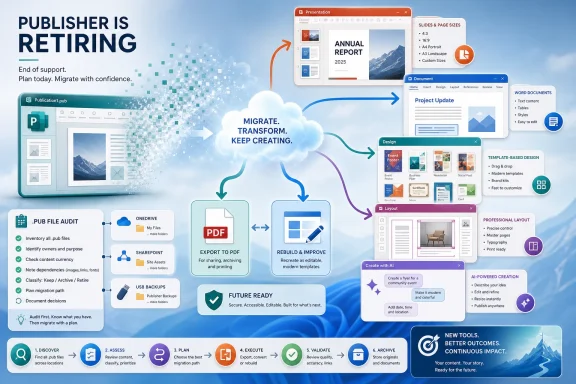
The Real Job Is Finding the Forgotten .pub Files
The first migration task is not choosing Canva or PowerPoint. It is finding the files.Publisher’s long life means
.pub files may be scattered across file shares, SharePoint libraries, OneDrive folders, old desktops, USB backups, departmental archives, and personal storage. Many of those files may not matter. Some will matter a lot: annual event templates, compliance notices, forms, labels, historical newsletters, donor materials, or customer-facing documents that someone still updates once a year.Organizations should resist the temptation to convert everything blindly. A better approach is triage. Identify files that are actively used, files that must be retained for historical or legal reasons, and files that can be abandoned. Then export or rebuild the important ones in formats that match future use.
PDF is the obvious archival target, but it is not an editing format. Saving Publisher files as PDFs preserves appearance and printability, not workflow. If an item will need future edits, it may need to be rebuilt in PowerPoint, Word, Canva, InDesign, Affinity, Scribus, or another system. That is slower than conversion, but cleaner than pretending a PDF is a living template.
This is where IT and business owners need to talk to each other. IT can locate file types and manage software deployment, but it cannot always know which holiday bazaar flyer, safety notice, service brochure, or newsletter template matters to a department. The people who own the process must help decide what survives.
Microsoft’s AI Bet Leaves a Desktop-Shaped Hole
The Publisher retirement fits a broader pattern in Microsoft 365: mature desktop workflows are being nudged toward cloud services, collaborative canvases, and AI-assisted creation. Designer is not merely another app in the list. It represents Microsoft’s belief that many users would rather describe what they want than construct it manually.There is truth in that bet. A prompt-first design tool can help non-designers get unstuck. It can produce variations quickly. It can make small organizations look more polished with less effort. For users who only need a social post, flyer concept, or event invitation, this is a meaningful improvement over dragging clip art around a page.
But Publisher users were not all asking for creative brainstorming. Many were maintaining known artifacts: the same newsletter, the same church bulletin, the same coupon sheet, the same product flyer, the same local ad format. For those jobs, consistency matters more than novelty. AI-generated variety can be a distraction when the task is to change the date, swap a photo, and preserve the layout.
That is the desktop-shaped hole in Microsoft’s story. Publisher let users own a stable, local, repeatable design process. Designer points toward a more fluid and cloud-mediated process. Both have value, but they are not interchangeable.
The Migration Winners Will Be the Ones Who Choose by Use Case
The best replacement depends less on feature comparison than on the job being done. A school newsletter, a restaurant menu, a quarterly report, a business card, a social media campaign, and a 64-page catalog should not all be forced into the same app just because Publisher once absorbed them.For simple office-adjacent layouts, PowerPoint may be the pragmatic default. For text-heavy documents, Word or Google Docs will be more sustainable. For fast visual communication, Canva, Adobe Express, or Designer may be better than anything in the old Office model. For professional publishing, InDesign, Affinity, or Scribus belongs in the conversation.
The key is to avoid emotional migration. Some users will want the app that looks most like Publisher. Others will want the trendiest cloud design platform. Neither instinct is enough. The replacement should be selected based on output requirements, collaboration needs, archive strategy, accessibility, print quality, licensing, and the skill level of the people who will actually maintain the files.
This also means some organizations will need more than one replacement. That is not failure. It is recognition that Publisher was a single bucket for several kinds of work that the modern software market has split into separate categories.
The Calendar Is Shorter Than It Looks
October 2026 may sound comfortably distant, but desktop publishing artifacts tend to be seasonal. If an organization updates a major Publisher file once a year, it may have only one more normal cycle before the retirement deadline. That matters for schools, religious organizations, local governments, clubs, and small businesses whose templates come out of hibernation on a schedule.The sensible move is to treat the next update cycle as the migration cycle. When the annual fundraiser brochure, summer program flyer, holiday mailer, or quarterly newsletter comes due, rebuild it in the future tool rather than touching it one more time in Publisher. That turns migration from a separate emergency project into a series of normal production decisions.
There is also a training angle. Users who have lived in Publisher for years may not need a weeklong design course, but they do need new habits. PowerPoint page sizing, Canva brand kits, PDF export settings, shared template libraries, and file naming conventions are small details that become support tickets when nobody standardizes them.
For enterprise admins, the retirement should be folded into software inventory and data governance. Find Publisher installations. Search for
.pub files. Decide whether Publisher should remain available until the deadline or be phased out earlier. Communicate before users discover the change while trying to print tomorrow’s event program.The Old Publisher Bargain Is Gone
Publisher’s bargain was simple: Microsoft gave Windows users a modest layout tool inside the familiar Office orbit, and users accepted its limits because it was inexpensive, approachable, and local. That bargain no longer fits Microsoft’s product strategy. The company would rather invest in Microsoft 365 subscriptions, browser-connected creation, Copilot-adjacent workflows, and apps that scale across devices and services.That does not make the retirement malicious. It does make it disruptive. Long-lived software becomes infrastructure precisely because people stop thinking about it. Publisher was the kind of app that sat quietly on a Start menu until the day someone urgently needed a trifold brochure.
PCMag’s list of alternatives is therefore more than a buying guide. It is a map of the world after Publisher: familiar Office workarounds, collaborative web design platforms, AI-assisted generation, professional layout suites, and open-source holdouts. The right choice depends on whether users want continuity, speed, precision, control, or cost savings.
The worst choice is denial. Every
.pub file that matters should have a plan before the deadline, and every team that still relies on Publisher should know where its next template will live.The Publisher Exit Plan Is a File Audit in Disguise
The most useful response to Publisher’s retirement is not nostalgia; it is inventory. Before picking a replacement, organizations should identify what Publisher has actually been doing for them and which files still carry operational value.- Organizations should search shared storage, OneDrive, SharePoint, and old local machines for active
.pubfiles before choosing a replacement app. - PowerPoint is likely to be the easiest landing zone for simple flyers, handouts, signs, and one-page office layouts.
- Canva, Adobe Express, and Microsoft Designer are better fits for teams that prioritize templates, collaboration, quick visual output, and web-era design workflows.
- Adobe InDesign, Affinity, and Scribus are more appropriate when print precision, long documents, advanced typography, or professional publishing workflows matter.
- PDFs are useful for preserving appearance, but important reusable Publisher templates should be rebuilt in an editable future format.
- The next annual or seasonal update cycle should be treated as the migration moment, not as one last excuse to postpone the work.
References
- Primary source: PCMag
Published: Thu, 04 Jun 2026 17:52:46 GMT
Microsoft Is Pulling the Plug on Publisher This Fall. These 8 Alternatives Prove You Don't Need It | PCMag
Before Microsoft Publisher disappears forever, you should move your current and future creative projects to a new platform. These are the best alternatives I've tested, whether you just need basic design tools or a full-on creative suite.www.pcmag.com - Official source: support.microsoft.com
Microsoft Publisher will no longer be supported after October 2026 | Microsoft Support
Microsoft Publisher will no longer be supported after October 2026support.microsoft.com - Related coverage: windowslatest.com
Microsoft Publisher: You won't be able to access Publisher or open files (.pub) in October 2026
Microsoft Publisher is retiring this year in October, and the Microsoft is issuing new warnings about the upcoming dismissal. www.windowslatest.com
- Official source: microsoft.com
Your request has been blocked. This could be due to several reasons.
www.microsoft.com
- Official source: learn.microsoft.com
Publisher wont be supported by Microsoft after the 1st of October 2026. - Microsoft Q&A
Can Microsoft extend the use of Publisher for an extra year for subscribers? Please. I have been using Publisher for more than 12 years. That is the only program compatible with the sports memorabilia product we sell. Photoshop is too complex. Publisher…learn.microsoft.com - Related coverage: support.formpipe.com
- Related coverage: as.com
Adiós a uno de los programas más míticos de Microsoft: carpetazo tras 35 años luchando por ser el software alternativo - Meristation
Un programa de maquetación y diseño gráfico que salió al mercado en 1991 y dirá adiós definitivamente en 2026.as.com
