

Microsoft Purview’s Data Security Triage Agent for Data Loss Prevention now gives security teams a more inspectable way to prioritize DLP alerts: it ranks alerts using content risk, exfiltration risk, and policy risk, then emits a rationale that administrators and analysts can review inside the alert workflow. The practical change is simple: DLP triage is no longer just a queue-ordering problem. It becomes a governed decision point where teams should verify why an alert was categorized as “Needs attention,” “Less urgent,” or not triaged at all.
Microsoft has documented the core behavior: the DLP triage agent works against supported Microsoft Purview DLP alerts, prioritizes them by risk factors, and provides a comprehensive explanation for the logic behind categorization. What Microsoft has not established in the material available here is a July 2026 general-availability date, nor a documented DLP confidence score. Treat the agent’s documented rationale as the confirmed explainability feature. Treat any comparison to confidence-style patterns in adjacent Purview experiences as analysis, not as confirmed DLP behavior.
For WindowsForum readers, that distinction matters. Recent WindowsForum coverage of Purview DLP for Microsoft 365 Copilot, broader Purview governance enhancements, unified eDiscovery, DSPM, Claude visibility, plaintext AI prompt review, information protection, and even vulnerability response all points to the same operational reality: Microsoft is moving more data-security decisions into AI-assisted workflows. The question for admins is not whether AI will appear in Purview. It already has. The question is whether your tenant’s policies, permissions, evidence collection, and analyst practices are ready for AI-assisted prioritization without turning it into an unreviewed black box.
Purview DLP has always lived in a difficult middle ground. The alerts are important enough to demand attention, but often numerous enough that teams cannot review everything with the same urgency. One alert might represent a real leak of sensitive information. Another might be a policy false positive. A third might be a legitimate business process that looks suspicious because the policy lacks context.
The DLP triage agent is designed to sit inside that problem. Microsoft describes it as part of Security Copilot agents in Purview, with a managed alert queue where higher-risk activities are identified and prioritized. In DLP specifically, the agent evaluates alerts using content risk, exfiltration risk, and policy risk. Those inputs map closely to the questions analysts already ask:
The administrative consequence is that teams should stop thinking of DLP triage as a passive list. Once the agent is enabled, the queue itself becomes an interpreted surface. An analyst is no longer just asking, “What alert came next?” The analyst is asking, “Why did Purview place this alert here, and does that reasoning match our policy intent?”
Documented by Microsoft: Purview offers a Data Security Triage Agent in DLP. The agent prioritizes DLP alerts using risk factors including content risk, exfiltration risk, and policy risk. It provides an explanation for the logic behind categorization. It works in Microsoft Purview and Microsoft Defender XDR alert experiences. It supports alerts from Exchange, Teams, OneDrive, SharePoint, and devices/Endpoint locations, with device scenarios requiring evidence collection for file activities on devices.
Also documented by Microsoft: The DLP triage agent only supports alerts from DLP policies in active mode. It does not triage alerts from policies running in simulation mode. It can review alerts generated up to 30 days before enablement if the tenant has sufficient Security Compute Units. Alerts older than that are out of scope. Agents triage files up to 2 MB in size. Not all alerts will be triaged, and admins should manually analyze alerts that the agent does not evaluate.
Analysis, not confirmed DLP behavior: Microsoft’s broader Purview and Security Copilot direction suggests a product pattern of AI-generated summaries, reasoning, and assistive investigation workflows. That does not mean every explainability feature in one Purview area automatically exists in DLP. Unless Microsoft explicitly documents confidence scoring for the DLP triage agent, admins should not build procedures that depend on a DLP confidence score. Build procedures around the documented rationale, category, alert details, supported workloads, policy eligibility, and analyst review.
This distinction keeps the operational guidance grounded. It is reasonable to expect Microsoft to continue expanding explainability across Purview, but it is not responsible to present unannounced dates, version promises, or DLP confidence scoring as fact.
If the agent categorizes an alert as “Needs attention,” the admin should inspect the explanation and compare it against the actual event. Was the risky content a Microsoft-provided sensitive information type, a trainable classifier, or a sensitivity label? Was the file shared outside the organization? Did the policy action reflect a high-impact rule, or did a broad monitoring policy create noise?
If the agent categorizes an alert as “Less urgent,” the same discipline applies. Less urgent does not mean irrelevant. It means the agent evaluated the alert as lower risk relative to the selected risk factors. In a regulated environment, a lower-priority event involving certain data types may still require sampling, documentation, or escalation.
If the alert is not categorized, Microsoft’s documentation already gives admins a reason to care. Not categorized can reflect several conditions, including errors, in-process review, unsupported activity, or other failures. That category should not become a dumping ground. It should be reviewed as a separate operational bucket.
This is where WindowsForum’s user reports provide useful context. Forum coverage of Purview DLP for Microsoft 365 Copilot has repeatedly emphasized that AI-era data security is not just about blocking a single email or attachment. It is about controlling what sensitive material AI tools can retrieve, summarize, expose, or move. WindowsForum discussions of broader Purview enhancements and Microsoft 365 Copilot security have also highlighted the growing pressure on administrators to govern labels, permissions, DLP policies, AI prompts, and compliance workflows together rather than as isolated controls.
The DLP triage agent fits that pattern. It helps prioritize risk, but the organization still owns the policy logic, exception model, and evidence trail.
Start in the Microsoft Purview portal. From the left navigation, go to Agents, then Explore agents, then open the card for the Triage agent in Data Loss Prevention. Microsoft’s setup flow allows the agent to be deployed from Purview, and the agent can also surface through Defender XDR, but management, editing, deactivation, and removal are handled from the Microsoft Purview portal.
Confirm that your tenant is ready for the prerequisites:
Do not skip the identity decision. Microsoft notes that agents can use an agent identity or be set up using the identity of the user configuring the agent, and recommends migration to agent identity where applicable. That matters for auditability. If the agent is going to examine alerts, summarize content, or participate in remediation workflows, admins should be clear about which identity is performing those actions and how that identity is reviewed.
This is the first place to avoid a common rollout mistake. “All policies” may be convenient, but it may not be the safest starting point. If your DLP estate contains noisy legacy policies, experimental rules, or policies that were never tuned after deployment, those alerts can affect analyst perception of the triage view.
A better approach is to review policy scope before enabling the agent broadly:
In the Microsoft Purview portal, use the DLP alerts experience and switch from the standard alerts view to the Triage Agent view when available. Microsoft’s documentation describes a toggle in the alerts page that lets teams move between the standard view and the agent-triaged view. The triaged view groups alerts into categories such as All, Needs attention, Less urgent, and alerts that were not successfully categorized.
In Microsoft Defender XDR, go to Investigation & response, then Incidents & alerts, then Alerts. DLP alert summaries and agent-provided risk factors can be viewed there for alerts triaged by the agent. This matters for organizations that use Defender XDR as the main security operations console while Purview owns the data-security policy configuration.
For setup, Microsoft documents a Purview path: Microsoft Purview portal → Agents → Explore agents → Triage agent in Data Loss Prevention → View details → Setup. During setup, admins can choose automatic running, alert timeframe, policy scope, and optional remediation reminders. There is also a Defender XDR deployment path where a banner inside a DLP alert can prompt deployment if the agent is not already deployed.
For editing after deployment, return to Microsoft Purview portal → Agents → Explore agents → Go to agent → Edit agent. From there, admins can edit the agent configuration, including trigger behavior, alert timeframe, remediation reminder settings, reminder duration, policy scope, and custom instructions where available.
That last item deserves caution. Microsoft describes custom instructions for the DLP triage agent as a preview capability that can raise or lower priority based on tenant-specific instructions. Admins should test those instructions carefully. Natural-language configuration can be powerful, but it can also encode vague business assumptions. If you instruct the agent to prioritize executive data, merger-related documents, source code, payroll, or customer records, make the instruction specific enough for later review.
For Needs attention alerts:
This can be useful, but it should not be enabled casually. A user-facing reminder is not just an analyst convenience; it is a direct communication to an employee about a data-security issue. Before enabling it, admins should decide:
That means the rationale should be preserved in analyst notes for high-impact events. If an analyst closes a “Needs attention” alert as benign, the closure note should explain why the agent’s rationale did not justify escalation. If an analyst escalates a “Less urgent” alert, the note should explain what context the agent ranking did not fully capture.
This is also how teams find policy problems. If analysts repeatedly disagree with the agent because a sensitive information type is overmatching, tune the classifier or rule. If alerts are not triaged because policies are in simulation mode, decide whether the policy should be moved to active mode or excluded from triage expectations. If device alerts are missing because evidence collection is not configured, fix the endpoint prerequisite before blaming the agent.
The goal is not to prove the agent right. The goal is to make the triage process reviewable.
The report on Purview DLP extending protections around Microsoft 365 Copilot framed the issue as a watershed moment because Copilot can surface sensitive emails and documents if controls are not aligned. Coverage of broader Purview enhancements described Microsoft’s push toward a more unified standard for data security and AI governance. The Microsoft 365 Copilot and Purview DLP discussion emphasized the tension between generative AI productivity and organizational risk. The unified eDiscovery article pointed to the compliance side of the same shift: data review, investigation, and governance are becoming more consolidated.
More recent WindowsForum coverage of Microsoft’s May 2026 security update wave tied Purview visibility for Anthropic Claude, data security posture management, data investigations, Entra recovery, and Windows 365 agent-related security into the same broader movement. The plaintext AI prompt review discussion raised a trust issue that applies here as well: organizations may want more evidence for AI-related events, but exposing that evidence requires careful role scoping and reviewer governance. Even the forum’s Purview vulnerability and information-protection articles reinforce the same lesson: Purview is becoming a central control plane, and central control planes need disciplined administration.
The DLP triage agent is one piece of that larger story. It does not solve labeling, oversharing, endpoint evidence, Copilot governance, or eDiscovery by itself. It helps prioritize DLP alerts so teams can focus attention where Microsoft’s documented risk factors suggest the greatest concern. That is valuable, but only if administrators treat the rationale as something to inspect.
That does not mean every future capability is known, dated, or guaranteed. It means admins should design their governance model for a world where more Purview actions are assisted by AI agents and more audit questions will ask not only what happened, but how the system recommended responding.
For DLP specifically, the durable practice is straightforward: keep policy ownership human, keep triage rationale reviewable, and keep exceptions documented. AI can prioritize the queue. It should not become the unexamined reason an organization ignores a risky data movement.
Microsoft has documented the core behavior: the DLP triage agent works against supported Microsoft Purview DLP alerts, prioritizes them by risk factors, and provides a comprehensive explanation for the logic behind categorization. What Microsoft has not established in the material available here is a July 2026 general-availability date, nor a documented DLP confidence score. Treat the agent’s documented rationale as the confirmed explainability feature. Treat any comparison to confidence-style patterns in adjacent Purview experiences as analysis, not as confirmed DLP behavior.
For WindowsForum readers, that distinction matters. Recent WindowsForum coverage of Purview DLP for Microsoft 365 Copilot, broader Purview governance enhancements, unified eDiscovery, DSPM, Claude visibility, plaintext AI prompt review, information protection, and even vulnerability response all points to the same operational reality: Microsoft is moving more data-security decisions into AI-assisted workflows. The question for admins is not whether AI will appear in Purview. It already has. The question is whether your tenant’s policies, permissions, evidence collection, and analyst practices are ready for AI-assisted prioritization without turning it into an unreviewed black box.
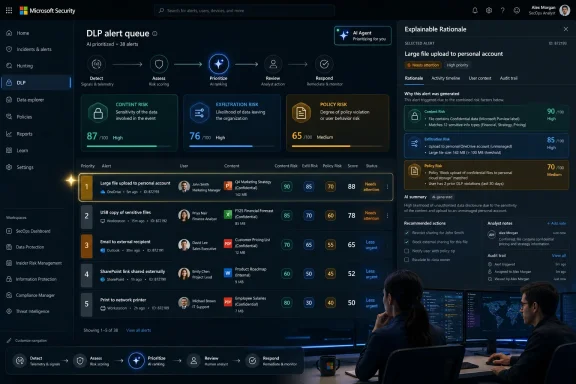 Microsoft Is Turning DLP Triage From Sorting Into Reviewable Prioritization
Purview DLP has always lived in a difficult middle ground. The alerts are important enough to demand attention, but often numerous enough that teams cannot review everything with the same urgency. One alert might represent a real leak of sensitive information. Another might be a policy false positive. A third might be a legitimate business process that looks suspicious because the policy lacks context.The DLP triage agent is designed to sit inside that problem. Microsoft describes it as part of Security Copilot agents in Purview, with a managed alert queue where higher-risk activities are identified and prioritized. In DLP specifically, the agent evaluates alerts using content risk, exfiltration risk, and policy risk. Those inputs map closely to the questions analysts already ask:
- Content risk: What sensitive information, classifiers, or labels are involved?
- Exfiltration risk: Is sensitive data being shared externally or otherwise moving in a risky way?
- Policy risk: Which DLP policy and rule behavior triggered the alert, and how consequential are the configured actions?
The administrative consequence is that teams should stop thinking of DLP triage as a passive list. Once the agent is enabled, the queue itself becomes an interpreted surface. An analyst is no longer just asking, “What alert came next?” The analyst is asking, “Why did Purview place this alert here, and does that reasoning match our policy intent?”
What Microsoft Has Documented — and What Is Analysis
It is useful to separate three layers.Documented by Microsoft: Purview offers a Data Security Triage Agent in DLP. The agent prioritizes DLP alerts using risk factors including content risk, exfiltration risk, and policy risk. It provides an explanation for the logic behind categorization. It works in Microsoft Purview and Microsoft Defender XDR alert experiences. It supports alerts from Exchange, Teams, OneDrive, SharePoint, and devices/Endpoint locations, with device scenarios requiring evidence collection for file activities on devices.
Also documented by Microsoft: The DLP triage agent only supports alerts from DLP policies in active mode. It does not triage alerts from policies running in simulation mode. It can review alerts generated up to 30 days before enablement if the tenant has sufficient Security Compute Units. Alerts older than that are out of scope. Agents triage files up to 2 MB in size. Not all alerts will be triaged, and admins should manually analyze alerts that the agent does not evaluate.
Analysis, not confirmed DLP behavior: Microsoft’s broader Purview and Security Copilot direction suggests a product pattern of AI-generated summaries, reasoning, and assistive investigation workflows. That does not mean every explainability feature in one Purview area automatically exists in DLP. Unless Microsoft explicitly documents confidence scoring for the DLP triage agent, admins should not build procedures that depend on a DLP confidence score. Build procedures around the documented rationale, category, alert details, supported workloads, policy eligibility, and analyst review.
This distinction keeps the operational guidance grounded. It is reasonable to expect Microsoft to continue expanding explainability across Purview, but it is not responsible to present unannounced dates, version promises, or DLP confidence scoring as fact.
Why the Rationale Matters More Than the Category Label
The category is useful because it tells analysts where to start. The rationale is more important because it tells them what to challenge.If the agent categorizes an alert as “Needs attention,” the admin should inspect the explanation and compare it against the actual event. Was the risky content a Microsoft-provided sensitive information type, a trainable classifier, or a sensitivity label? Was the file shared outside the organization? Did the policy action reflect a high-impact rule, or did a broad monitoring policy create noise?
If the agent categorizes an alert as “Less urgent,” the same discipline applies. Less urgent does not mean irrelevant. It means the agent evaluated the alert as lower risk relative to the selected risk factors. In a regulated environment, a lower-priority event involving certain data types may still require sampling, documentation, or escalation.
If the alert is not categorized, Microsoft’s documentation already gives admins a reason to care. Not categorized can reflect several conditions, including errors, in-process review, unsupported activity, or other failures. That category should not become a dumping ground. It should be reviewed as a separate operational bucket.
This is where WindowsForum’s user reports provide useful context. Forum coverage of Purview DLP for Microsoft 365 Copilot has repeatedly emphasized that AI-era data security is not just about blocking a single email or attachment. It is about controlling what sensitive material AI tools can retrieve, summarize, expose, or move. WindowsForum discussions of broader Purview enhancements and Microsoft 365 Copilot security have also highlighted the growing pressure on administrators to govern labels, permissions, DLP policies, AI prompts, and compliance workflows together rather than as isolated controls.
The DLP triage agent fits that pattern. It helps prioritize risk, but the organization still owns the policy logic, exception model, and evidence trail.
Concrete Admin Guidance: Check the Tenant Before You Trust the Queue
Before enabling or relying on the DLP triage agent, admins should verify the current Purview configuration rather than treating the feature as a standalone toggle.Start in the Microsoft Purview portal. From the left navigation, go to Agents, then Explore agents, then open the card for the Triage agent in Data Loss Prevention. Microsoft’s setup flow allows the agent to be deployed from Purview, and the agent can also surface through Defender XDR, but management, editing, deactivation, and removal are handled from the Microsoft Purview portal.
Confirm that your tenant is ready for the prerequisites:
- The organization must be licensed for Microsoft Purview DLP.
- The agent runs on Microsoft Security Copilot and consumes Security Compute Units as it processes alerts.
- The tenant must be onboarded to Microsoft Security Copilot.
- Microsoft 365 data sharing in Security Copilot must be enabled.
- The Microsoft Purview plug-in/source in Security Copilot must be enabled.
- If device/Endpoint DLP alerts need triage, evidence collection for file activities on devices must be enabled.
- If remediation reminders through Microsoft Teams are used, Teams must allow the Data Security Triage Agent app to send messages.
Do not skip the identity decision. Microsoft notes that agents can use an agent identity or be set up using the identity of the user configuring the agent, and recommends migration to agent identity where applicable. That matters for auditability. If the agent is going to examine alerts, summarize content, or participate in remediation workflows, admins should be clear about which identity is performing those actions and how that identity is reviewed.
Configure Scope Deliberately, Not by Habit
During setup, the DLP triage agent can run automatically on a schedule or be run manually. Microsoft sets the automatic schedule; organizations do not configure that schedule themselves. Admins can choose the alert timeframe and policy scope.This is the first place to avoid a common rollout mistake. “All policies” may be convenient, but it may not be the safest starting point. If your DLP estate contains noisy legacy policies, experimental rules, or policies that were never tuned after deployment, those alerts can affect analyst perception of the triage view.
A better approach is to review policy scope before enabling the agent broadly:
- Go to the DLP policy list and identify which policies are in active mode. Simulation-mode policies are not triaged by the DLP agent.
- Confirm which policies cover supported workloads: Exchange, Teams, OneDrive, SharePoint, and devices/Endpoint.
- For Endpoint/device policies, verify that evidence collection for file activities is enabled where needed.
- Review the eligibility status once the agent is enabled. Microsoft notes that the policy list can show eligibility, and that limited eligibility may mean only some alerts from a policy can be triaged.
- Select an alert timeframe intentionally. Options include only new alerts or lookback windows up to 30 days, subject to Microsoft’s documented limits and sufficient SCUs.
- Decide whether the first run should cover all in-scope policies or only the policies most important to validate.
Use the Current Purview and Defender XDR Paths
Administrators have two main places to work with the DLP triage agent output.In the Microsoft Purview portal, use the DLP alerts experience and switch from the standard alerts view to the Triage Agent view when available. Microsoft’s documentation describes a toggle in the alerts page that lets teams move between the standard view and the agent-triaged view. The triaged view groups alerts into categories such as All, Needs attention, Less urgent, and alerts that were not successfully categorized.
In Microsoft Defender XDR, go to Investigation & response, then Incidents & alerts, then Alerts. DLP alert summaries and agent-provided risk factors can be viewed there for alerts triaged by the agent. This matters for organizations that use Defender XDR as the main security operations console while Purview owns the data-security policy configuration.
For setup, Microsoft documents a Purview path: Microsoft Purview portal → Agents → Explore agents → Triage agent in Data Loss Prevention → View details → Setup. During setup, admins can choose automatic running, alert timeframe, policy scope, and optional remediation reminders. There is also a Defender XDR deployment path where a banner inside a DLP alert can prompt deployment if the agent is not already deployed.
For editing after deployment, return to Microsoft Purview portal → Agents → Explore agents → Go to agent → Edit agent. From there, admins can edit the agent configuration, including trigger behavior, alert timeframe, remediation reminder settings, reminder duration, policy scope, and custom instructions where available.
That last item deserves caution. Microsoft describes custom instructions for the DLP triage agent as a preview capability that can raise or lower priority based on tenant-specific instructions. Admins should test those instructions carefully. Natural-language configuration can be powerful, but it can also encode vague business assumptions. If you instruct the agent to prioritize executive data, merger-related documents, source code, payroll, or customer records, make the instruction specific enough for later review.
Build Review Rules Around Documented Categories
The safest runbook is not “trust the agent.” It is “use the agent to decide where human attention starts, then document how human review validates or overrides the result.”For Needs attention alerts:
- Require analysts to open the alert details and review the agent rationale.
- Confirm which content risk factor applied: sensitive information type, trainable classifier, sensitivity label, or other supported indicator.
- Confirm the exfiltration path: external sharing, workload involved, recipient context, device activity, or other available event details.
- Confirm whether the DLP policy and rule action reflect the intended severity.
- Escalate if the rationale indicates sensitive content and external exposure involving regulated, executive, financial, source-code, legal, or customer data.
- Do not allow automatic closure without sampling.
- Define a sampling rate based on policy sensitivity.
- Review lower-priority alerts involving high-value labels or known sensitive business units.
- Compare less-urgent categorizations against incidents later found to be serious.
- Create a separate queue or filter.
- Track whether the reason is unsupported activity, policy eligibility, missing evidence collection, processing state, or error.
- Manually analyze alerts that the agent did not evaluate.
- Use recurring unsupported patterns to decide whether policy design, workload coverage, or evidence collection needs adjustment.
- Use manual triage when a specific alert needs agent evaluation after conditions changed or where the analyst wants an updated view.
- Do not use manual runs as a substitute for fixing policy eligibility problems.
Remediation Reminders Need Their Own Controls
Microsoft documents remediation reminders through Teams as a preview capability. For SharePoint and OneDrive alerts categorized as “Needs attention,” the agent can send a Teams chat to the last modified user of the file asking them to remove the sensitive information related to the alert. Microsoft also notes that Teams app settings must allow the agent app, and that reminders depend on the configured reminder duration.This can be useful, but it should not be enabled casually. A user-facing reminder is not just an analyst convenience; it is a direct communication to an employee about a data-security issue. Before enabling it, admins should decide:
- Which DLP policies are eligible for user remediation reminders.
- Whether legal, compliance, HR, or security teams need to approve reminder wording.
- Whether certain policies should never trigger direct user reminders.
- How reminders are documented in the case record.
- What happens if the user does not remediate the file.
- Whether the last modified user is always the right person to contact.
Treat Agent Output as Evidence, Not Verdict
The DLP triage agent should influence work order. It should not silently replace investigation.That means the rationale should be preserved in analyst notes for high-impact events. If an analyst closes a “Needs attention” alert as benign, the closure note should explain why the agent’s rationale did not justify escalation. If an analyst escalates a “Less urgent” alert, the note should explain what context the agent ranking did not fully capture.
This is also how teams find policy problems. If analysts repeatedly disagree with the agent because a sensitive information type is overmatching, tune the classifier or rule. If alerts are not triaged because policies are in simulation mode, decide whether the policy should be moved to active mode or excluded from triage expectations. If device alerts are missing because evidence collection is not configured, fix the endpoint prerequisite before blaming the agent.
The goal is not to prove the agent right. The goal is to make the triage process reviewable.
WindowsForum Readers Have Seen the Larger Pattern
WindowsForum’s Purview discussions have increasingly centered on one theme: Microsoft is adapting data security for an AI-heavy enterprise faster than many organizations are adapting their governance habits.The report on Purview DLP extending protections around Microsoft 365 Copilot framed the issue as a watershed moment because Copilot can surface sensitive emails and documents if controls are not aligned. Coverage of broader Purview enhancements described Microsoft’s push toward a more unified standard for data security and AI governance. The Microsoft 365 Copilot and Purview DLP discussion emphasized the tension between generative AI productivity and organizational risk. The unified eDiscovery article pointed to the compliance side of the same shift: data review, investigation, and governance are becoming more consolidated.
More recent WindowsForum coverage of Microsoft’s May 2026 security update wave tied Purview visibility for Anthropic Claude, data security posture management, data investigations, Entra recovery, and Windows 365 agent-related security into the same broader movement. The plaintext AI prompt review discussion raised a trust issue that applies here as well: organizations may want more evidence for AI-related events, but exposing that evidence requires careful role scoping and reviewer governance. Even the forum’s Purview vulnerability and information-protection articles reinforce the same lesson: Purview is becoming a central control plane, and central control planes need disciplined administration.
The DLP triage agent is one piece of that larger story. It does not solve labeling, oversharing, endpoint evidence, Copilot governance, or eDiscovery by itself. It helps prioritize DLP alerts so teams can focus attention where Microsoft’s documented risk factors suggest the greatest concern. That is valuable, but only if administrators treat the rationale as something to inspect.
What Administrators Should Do Now
Use the rollout as a policy and operations review, not just a feature activation.- Inventory active DLP policies. The agent does not triage simulation-mode policies, so identify which policies are active and which are still being tested.
- Review workload coverage. Confirm whether your important DLP alerts come from Exchange, Teams, SharePoint, OneDrive, or devices/Endpoint, and verify prerequisites for device alerts.
- Check Security Copilot readiness. Confirm onboarding, SCU availability, Microsoft 365 data sharing, and the Purview source/plugin configuration.
- Validate roles. Separate who can deploy the agent, who can edit it, who can view results, and who can manage Purview and Security Copilot access.
- Prefer agent identity where appropriate. Review Microsoft’s agent identity guidance and avoid tying long-running agent behavior unnecessarily to a single admin’s user identity.
- Scope policies deliberately. Start with high-value, well-tuned DLP policies before expanding to noisy or legacy rules.
- Define category handling. “Needs attention,” “Less urgent,” and “Not categorized” should each map to a clear analyst action.
- Sample lower-priority alerts. Less urgent alerts should still be sampled, especially where regulated data, executive users, or sensitive projects are involved.
- Track disagreement. Repeated analyst overrides are evidence that policy logic, classifier behavior, or triage assumptions need review.
- Be cautious with Teams remediation reminders. User-facing reminders need communications, legal, compliance, and escalation planning.
- Document agent rationale in important cases. If the rationale influenced the decision, preserve it in the case notes according to your organization’s recordkeeping rules.
Forward-Looking Analysis: Where This Is Likely Heading
As analysis, not confirmed product commitment, the DLP triage agent looks like part of a broader Microsoft pattern: Purview is becoming more agentic, more embedded in analyst workflows, and more dependent on explainable AI output. The same direction is visible across Purview data security posture, data investigations, Copilot governance, communication compliance, eDiscovery, and insider-risk workflows.That does not mean every future capability is known, dated, or guaranteed. It means admins should design their governance model for a world where more Purview actions are assisted by AI agents and more audit questions will ask not only what happened, but how the system recommended responding.
For DLP specifically, the durable practice is straightforward: keep policy ownership human, keep triage rationale reviewable, and keep exceptions documented. AI can prioritize the queue. It should not become the unexamined reason an organization ignores a risky data movement.
Frequently Asked Questions
Does the Purview DLP triage agent have a documented July 2026 general-availability date?
Not in the provided source material. Any claim that the DLP triage agent is moving to general availability in July 2026 should be removed or treated as unsupported unless Microsoft publishes a source that states that date.Does the DLP triage agent provide confidence scoring?
The verified DLP-specific material supports transparent rationale and prioritized alert categories. It does not support a claim that the DLP triage agent provides confidence scoring. Admins should build workflows around the documented rationale, risk factors, categories, policy eligibility, and alert details rather than a confidence score.Which risk factors does the DLP triage agent use?
Microsoft documents content risk, exfiltration risk, and policy risk for DLP triage. Content risk relates to sensitive content such as sensitive information types, trainable classifiers, and sensitivity labels. Exfiltration risk concerns sensitive data shared externally. Policy risk concerns the policy mode and rule actions that affect alert priority.Which workloads are supported?
Microsoft documents DLP triage support for alerts from Exchange, Teams, OneDrive, SharePoint, and devices/Endpoint locations. Device alert triage requires evidence collection for file activities on devices.Does the agent triage simulation-mode DLP policies?
No. Microsoft documents that the DLP triage agent supports alerts from policies in active mode and does not triage alerts from DLP policies running in simulation mode.How far back can the agent review alerts?
Microsoft documents that the agent can review alerts generated up to 30 days before enablement if the tenant has sufficient Security Compute Units. Alerts generated more than 30 days before enablement are out of scope.Where do admins enable or manage the agent?
Use the Microsoft Purview portal: Agents → Explore agents → Triage agent in Data Loss Prevention. The agent can also be deployed from Defender XDR through a DLP alert banner, but Microsoft documents that management, editing, deactivation, and removal are handled from the Microsoft Purview portal.Where can analysts see triaged alerts?
Triaged DLP alerts can be reviewed in Microsoft Purview and Microsoft Defender XDR. In Purview, analysts can use the DLP alerts page and switch to the Triage Agent view where available. In Defender XDR, analysts can go to Investigation & response → Incidents & alerts → Alerts and review DLP alerts with agent-provided summaries and risk factors.Should organizations enable remediation reminders?
Only after review. Remediation reminders through Teams are useful for certain SharePoint and OneDrive “Needs attention” alerts, but they are user-facing messages. Admins should confirm Teams app prerequisites, decide which policies are eligible, and align the workflow with compliance, legal, HR, and security expectations.What is the safest adoption model?
Treat the DLP triage agent as an analyst-assist system. Use it to prioritize work, inspect the rationale, document decisions, sample lower-priority alerts, manually review unsupported or uncategorized alerts, and tune policies when analysts repeatedly disagree with the agent’s categorization.References
- Primary source: learn.microsoft.com
Use Microsoft Purview to manage data security & compliance for AI agents | Microsoft Learn
Use Microsoft Purview to help you protect and manage data security and compliance protections for AI agents.learn.microsoft.com - Independent coverage: marketplace.microsoft.com
Data Security Triage Agent in Data Loss Prevention
The Data Security Triage Agent streamlines alert triage by identifying & prioritizing data loss riskmarketplace.microsoft.com
- Independent coverage: techcommunity.microsoft.com
Introducing Microsoft Purview Alert Triage Agents for Data Loss Prevention & Insider Risk Management
Surface the highest-risk alerts across your environment, no matter their default severity, and take action. Customize how your agents reason, teach them what... techcommunity.microsoft.com
- Primary source: WindowsForum
Microsoft Purview DLP Enhances AI Data Security for Microsoft 365 Copilot in 2025 | Windows Forum
Microsoft’s latest advancement in data protection, the extension of Purview Data Loss Prevention (DLP) to limit Microsoft 365 Copilot’s access to sensitive...windowsforum.com
