

Microsoft has launched a Microsoft Purview Insider Risk Management update in June 2026 that lets organizations choose which AI applications are used when detecting risky prompts and sensitive AI responses across Copilot and enterprise generative AI apps. This is not the loudest Copilot governance feature Microsoft will ship this year, but it may be one of the more revealing. The company is acknowledging, in product form, that “AI risk” is no longer a single bucket called Copilot. It is a messy, multi-app behavior pattern that security teams now have to govern with far more precision.
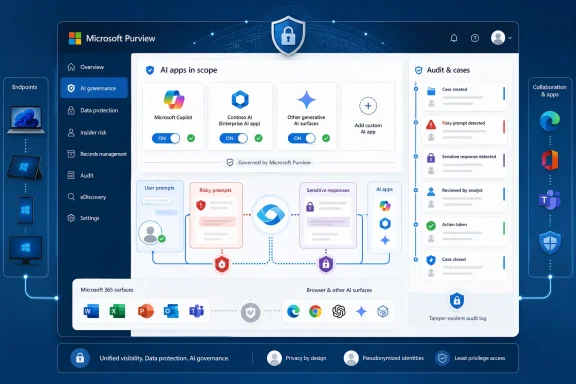
The new roadmap item, Microsoft 365 Roadmap ID 559992, sounds almost administrative: customers can precisely choose which AI app should be used to detect several Generative AI apps indicators. The indicators include entering risky prompts in Copilot, receiving sensitive responses from Copilot, entering risky prompts in enterprise AI apps, and receiving sensitive responses from enterprise AI apps.
That wording matters. Microsoft is not merely adding another detector to Purview; it is giving administrators a way to scope detection around specific AI applications. In the old enterprise software rhythm, this would be a filtering improvement. In the AI era, it is closer to a governance boundary.
The feature reached preview in May 2026 and general availability in June 2026 for Microsoft Purview on the web in the Worldwide standard multi-tenant cloud. The roadmap entry was created on April 17, 2026, and updated on June 22, 2026, which places it squarely in Microsoft’s accelerating campaign to make Purview the administrative control plane for Copilot, agents, and non-Microsoft AI tools.
The timing is not accidental. Organizations have spent the last two years hearing that generative AI can safely live inside existing identity, compliance, and data protection frameworks. Now the practical question has arrived: which AI app, which prompt, which response, which policy, and which analyst should be allowed to see it?
A user can paste a customer list into an AI assistant to “clean it up.” A developer can ask a model to explain proprietary source code. A finance employee can request a summary of confidential M&A documents. None of these actions necessarily looks like classic exfiltration at the moment it occurs, but each can become part of a data leakage chain.
Microsoft’s Purview framing reflects that shift. Insider Risk Management already correlates signals to identify potential malicious or inadvertent insider risks, including intellectual property theft, data leakage, and security violations. The AI-specific indicators now bring prompts and responses into that same universe of correlated risk.
The response side is just as important as the prompt side. If an AI tool returns sensitive information to a user, that response may expose over-permissive data access, weak labeling, excessive search reach, or poor app governance. In other words, the AI output can become evidence of a broader data hygiene problem.
That is why this feature is more interesting than its modest roadmap language suggests. Microsoft is treating AI interactions as first-class compliance artifacts, not ephemeral chat bubbles. Once prompts and responses become policy indicators, they become auditable, searchable, scored, and, in some cases, escalated.
They have Microsoft 365 Copilot, Copilot Chat, Security Copilot, Copilot Studio agents, Azure or Foundry-built apps, ChatGPT Enterprise, browser-accessed AI services, departmental tools, and homegrown assistants connected through Entra or other enterprise plumbing. Some are sanctioned. Some are tolerated. Some are discovered only after a data protection alert makes them visible.
Microsoft’s distinction between Copilot indicators and enterprise AI app indicators is therefore not cosmetic. It reflects a market reality: administrators need to know whether risky behavior happened in Microsoft’s own assistant, a registered enterprise AI app, or another AI surface entirely.
That distinction can affect response. A risky prompt in Copilot may point to permissions, sensitivity labels, or user training. A risky prompt in an Entra-registered AI app may point to collection policies, connector configuration, or app approval workflows. A risky interaction in an unsanctioned browser AI tool may belong in endpoint DLP, network controls, or access governance.
By letting customers select which AI apps are in scope for these indicators, Microsoft is making Purview less of a generic AI alarm panel and more of an operational console. The move does not solve AI governance by itself, but it reduces one of the most common enterprise problems: noisy controls that cannot distinguish between business-approved AI and shadow experimentation.
AI makes that problem worse. Prompts are numerous, ambiguous, and context-dependent. A phrase that looks reckless in one department may be routine in another. A sensitive response might be appropriate for a legal investigator but alarming for a contractor. A blocked paste into a public chatbot is easy to understand; a “risky prompt” inside a sanctioned enterprise AI app is more nuanced.
This is where app selection becomes practically valuable. If a policy is intended to monitor high-risk Copilot interactions, it should not necessarily drown analysts in every enterprise AI app. If a regulated business unit is piloting a custom AI assistant, administrators may want a tightly scoped policy for that app alone. If a company is testing ChatGPT Enterprise or another registered AI service, it may want different risk thresholds than it uses for Microsoft 365 Copilot.
Purview’s Insider Risk Management model depends on correlation. It is not supposed to fire on a single isolated signal and declare guilt. It weighs activities against policies, governance requirements, and organizational context. The more precisely administrators can define the AI app universe, the less likely the system is to create a compliance fog.
That precision also helps politically. Insider risk programs are sensitive even when they have nothing to do with AI. Adding prompt inspection raises immediate questions from employees, works councils, legal teams, and privacy officers. A narrowly scoped policy is easier to defend than a sweeping “we monitor all AI” posture.
Prompts can contain more than corporate data. They can contain health details, employment anxieties, legal concerns, personal names, credentials, trade secrets, source code, customer records, or internal politics. They may reveal intent, confusion, frustration, or mistakes in a way that a file copy event does not.
That makes AI monitoring unusually invasive if implemented carelessly. A governance team may have legitimate reasons to detect whether sensitive data is being entered into an AI assistant, but that does not mean every security analyst should be able to browse raw prompt history. The difference between risk detection and workplace surveillance will come down to permissions, process, and restraint.
Pseudonymization is one guardrail, not a magic eraser. At some point, serious investigations may require re-identification. That should be rare, logged, role-limited, and tied to a clear case workflow. Otherwise, the organization risks turning an AI governance program into an employee trust problem.
This is the paradox Microsoft now has to navigate. The company is selling tools that can inspect AI interactions because enterprises need that capability. But the safer and more powerful those tools become, the more customers must prove that they are using them proportionately.
That sounds obvious, but it is often the weakest link. Many companies have an AI policy written by legal, a Copilot rollout plan written by IT, a procurement exception for one business unit, a developer experiment in Azure, and a dozen browser tools quietly used by marketing, sales, engineering, and support. Purview can help discover and govern parts of that sprawl, but it cannot replace executive decisions about what is approved.
AI app selection in Insider Risk Management becomes powerful when it maps to a real app inventory. Administrators can scope indicators around approved Copilot experiences, enterprise AI apps registered through Entra, or other governed AI surfaces. They can separate pilots from production deployments. They can tune detection for business units with different risk profiles.
Without that inventory, the feature still works, but its value is blunted. App selection becomes another configuration choice in a tenant that does not know what it is trying to control. That is the broader lesson of AI governance in 2026: tooling is moving faster than organizational discipline.
Microsoft’s own Purview ecosystem increasingly assumes that customers will connect identity, data classification, endpoint onboarding, DLP, eDiscovery, communication compliance, Data Security Posture Management for AI, and Insider Risk Management into a coherent operating model. That is a reasonable architecture for mature enterprises. It is a heavy lift for everyone else.
Generative AI changes the user interface to enterprise data. It compresses search, summarization, synthesis, and rewriting into a conversational workflow. A user who would never manually locate ten sensitive documents may ask a model for “everything we know about Project Orion and the customer objections.” A model that does not break permissions can still make overexposed permissions painfully visible.
Insider Risk Management’s AI indicators move the conversation toward behavior. What are users asking AI systems to do? Are they entering sensitive data into prompts? Are AI systems returning sensitive responses? Are risky patterns concentrated around certain apps, departments, or moments in the employee lifecycle?
That behavioral lens is uncomfortable but necessary. Data governance cannot stop at “the model respected permissions.” If the permissions are sloppy, the labels inconsistent, and the user behavior risky, the organization still has a problem. Copilot did not create that problem, but it can make the blast radius more obvious.
The new app selection capability helps because behavior differs by AI surface. A sanctioned Copilot workflow embedded in Microsoft 365 has different assumptions than a departmental assistant connected to a narrow data set. A custom enterprise AI app built for customer support should not be evaluated exactly like a general-purpose productivity chatbot.
Copilot may summarize meetings and draft documents, but the highest-value AI work often happens in custom workflows: claims processing, contract analysis, engineering support, call-center knowledge retrieval, software development, finance research, or internal operations. Those apps may touch sensitive data by design. They may also be closer to revenue and regulatory exposure than a general productivity assistant.
By extending Insider Risk Management indicators to enterprise AI apps and then allowing app-level selection, Microsoft is pushing those systems into the same governance conversation as Microsoft 365. That is a sensible move. If an AI app is important enough to connect to enterprise data, it is important enough to monitor.
There is also a platform strategy here. Microsoft wants Entra, Purview, Defender, and Microsoft 365 to form the rails on which enterprise AI runs. The more governance features depend on registered apps, collection policies, and Microsoft’s compliance stack, the more customers have a reason to bring AI experiments into Microsoft’s management plane rather than leaving them scattered across SaaS consoles.
That strategy will appeal to many CIOs and CISOs. It may irritate teams that prefer best-of-breed AI tools or open-source stacks. But the compliance argument is potent: unmanaged AI may be faster to adopt, while governed AI is easier to defend after something goes wrong.
If a user enters a risky prompt, detection may help create a risk score or trigger investigation. It may feed Adaptive Protection or inform follow-up controls. But the existence of an indicator does not necessarily mean the action was blocked in real time. For blocking, warning, or restricting certain AI interactions, organizations often need DLP policies, endpoint controls, app-specific enforcement, or network-layer integrations.
This is not a flaw so much as an architectural reality. Some AI risks are best prevented at the point of action, such as pasting regulated data into a public AI site. Others are best detected as part of a pattern, such as repeated attempts to extract sensitive information through prompts. Still others require governance remediation, such as fixing overshared SharePoint permissions or revising sensitivity label policies.
The danger is that executives may hear “Purview monitors risky AI usage” and assume the organization is protected. IT pros should be more precise. Purview can provide visibility, detection, investigation workflows, and policy signals. Whether that becomes prevention depends on how the broader Microsoft security and compliance stack is configured.
That is why this roadmap item should prompt a configuration review, not applause from a distance. Administrators should ask which AI apps are selected, which indicators are enabled, what data is captured, who can review it, how alerts are triaged, and what enforcement actions follow.
That matters because AI governance often arrives after the AI rollout. A business unit buys or builds an assistant, employees start using it, and only then does the security team ask how prompts and responses are retained, inspected, or governed. At that point, the answer may require new licenses, new connectors, new policies, or new budget approvals.
The app selection feature makes this tension more visible. If organizations can choose which AI apps feed certain indicators, they must also understand which apps are technically eligible, which require collection policies, and which may incur additional costs. The governance architecture becomes a budget architecture.
For large enterprises, this may be manageable. For mid-sized organizations, it may create a split between AI tools that are approved because they fit the Microsoft governance model and AI tools that are blocked because nobody wants to fund the compliance wrapper. That is not necessarily bad security policy, but it is a real constraint.
Microsoft is betting that customers will prefer the integrated path. In many regulated environments, that bet is probably right. But administrators should resist the idea that checking the Purview box is the same as completing the governance job.
Microsoft Purview endpoint DLP can warn or block certain risky interactions, including attempts to share sensitive information with third-party generative AI sites through a browser on onboarded Windows devices. That makes Windows not just a productivity platform but a sensor and enforcement point in the AI control chain.
For Windows administrators, this is familiar territory with a new vocabulary. The same old questions apply: Are devices onboarded? Are extensions deployed? Are users in the right groups? Are policies in audit, warn, or block mode? Are exceptions documented? Are BYOD and unmanaged devices creating blind spots?
Generative AI raises the stakes because the user action can be small and the data implication large. A single paste into a chatbot may be more consequential than a file copy that older controls were built to catch. Endpoint controls therefore need to be tested against realistic AI workflows, not just compliance templates.
The app selection feature in Insider Risk Management does not replace endpoint governance. It makes the signal layer more precise. The endpoint remains where many of those signals begin.
The first practical task is policy mapping. Organizations should identify which Insider Risk Management policies use the four relevant indicators and decide whether each should apply to Copilot, specific enterprise AI apps, or a broader set of generative AI surfaces. This should not be left to default settings unless the defaults match the organization’s risk model.
The second task is role review. AI prompt and response visibility should be treated as sensitive investigative access. Administrators should confirm that role-based access controls, audit logs, case workflows, and escalation paths match legal and privacy expectations. If prompt review is possible, then prompt review must be governed.
The third task is signal testing. A policy that looks elegant in the portal can behave differently in production. Security teams should test representative prompts, sensitive information types, app scopes, and response scenarios. False positives and false negatives are not theoretical problems when analysts are asked to interpret human language at scale.
The final task is communication. Employees do not need a terrifying surveillance memo, but they do need clear rules about approved AI apps, sensitive data handling, and the difference between business AI and consumer AI. If the first time a worker hears about AI monitoring is during an investigation, the governance program has already failed.
 Microsoft Turns AI Governance From a Blanket Into a Selector
The new roadmap item, Microsoft 365 Roadmap ID 559992, sounds almost administrative: customers can precisely choose which AI app should be used to detect several Generative AI apps indicators. The indicators include entering risky prompts in Copilot, receiving sensitive responses from Copilot, entering risky prompts in enterprise AI apps, and receiving sensitive responses from enterprise AI apps.That wording matters. Microsoft is not merely adding another detector to Purview; it is giving administrators a way to scope detection around specific AI applications. In the old enterprise software rhythm, this would be a filtering improvement. In the AI era, it is closer to a governance boundary.
The feature reached preview in May 2026 and general availability in June 2026 for Microsoft Purview on the web in the Worldwide standard multi-tenant cloud. The roadmap entry was created on April 17, 2026, and updated on June 22, 2026, which places it squarely in Microsoft’s accelerating campaign to make Purview the administrative control plane for Copilot, agents, and non-Microsoft AI tools.
The timing is not accidental. Organizations have spent the last two years hearing that generative AI can safely live inside existing identity, compliance, and data protection frameworks. Now the practical question has arrived: which AI app, which prompt, which response, which policy, and which analyst should be allowed to see it?
The Prompt Has Become a Security Event
For decades, enterprise data security revolved around files, emails, database rows, USB transfers, cloud shares, and endpoint copy operations. Generative AI complicates that model because the risky act is often neither a file transfer nor a conventional message. It is a prompt.A user can paste a customer list into an AI assistant to “clean it up.” A developer can ask a model to explain proprietary source code. A finance employee can request a summary of confidential M&A documents. None of these actions necessarily looks like classic exfiltration at the moment it occurs, but each can become part of a data leakage chain.
Microsoft’s Purview framing reflects that shift. Insider Risk Management already correlates signals to identify potential malicious or inadvertent insider risks, including intellectual property theft, data leakage, and security violations. The AI-specific indicators now bring prompts and responses into that same universe of correlated risk.
The response side is just as important as the prompt side. If an AI tool returns sensitive information to a user, that response may expose over-permissive data access, weak labeling, excessive search reach, or poor app governance. In other words, the AI output can become evidence of a broader data hygiene problem.
That is why this feature is more interesting than its modest roadmap language suggests. Microsoft is treating AI interactions as first-class compliance artifacts, not ephemeral chat bubbles. Once prompts and responses become policy indicators, they become auditable, searchable, scored, and, in some cases, escalated.
Copilot Is No Longer the Whole Story
The first wave of enterprise AI governance was inevitably Copilot-centered. Microsoft 365 Copilot sits inside the productivity suite, inherits Microsoft 365 permissions, and has become the reference case for AI data exposure fears. But most real organizations do not live in a single-assistant world.They have Microsoft 365 Copilot, Copilot Chat, Security Copilot, Copilot Studio agents, Azure or Foundry-built apps, ChatGPT Enterprise, browser-accessed AI services, departmental tools, and homegrown assistants connected through Entra or other enterprise plumbing. Some are sanctioned. Some are tolerated. Some are discovered only after a data protection alert makes them visible.
Microsoft’s distinction between Copilot indicators and enterprise AI app indicators is therefore not cosmetic. It reflects a market reality: administrators need to know whether risky behavior happened in Microsoft’s own assistant, a registered enterprise AI app, or another AI surface entirely.
That distinction can affect response. A risky prompt in Copilot may point to permissions, sensitivity labels, or user training. A risky prompt in an Entra-registered AI app may point to collection policies, connector configuration, or app approval workflows. A risky interaction in an unsanctioned browser AI tool may belong in endpoint DLP, network controls, or access governance.
By letting customers select which AI apps are in scope for these indicators, Microsoft is making Purview less of a generic AI alarm panel and more of an operational console. The move does not solve AI governance by itself, but it reduces one of the most common enterprise problems: noisy controls that cannot distinguish between business-approved AI and shadow experimentation.
Precision Is Microsoft’s Answer to Alert Fatigue
Security products love to promise visibility. Administrators often discover that visibility at scale means another queue, another dashboard, and another set of alerts that must be triaged by people who already have too much to do.AI makes that problem worse. Prompts are numerous, ambiguous, and context-dependent. A phrase that looks reckless in one department may be routine in another. A sensitive response might be appropriate for a legal investigator but alarming for a contractor. A blocked paste into a public chatbot is easy to understand; a “risky prompt” inside a sanctioned enterprise AI app is more nuanced.
This is where app selection becomes practically valuable. If a policy is intended to monitor high-risk Copilot interactions, it should not necessarily drown analysts in every enterprise AI app. If a regulated business unit is piloting a custom AI assistant, administrators may want a tightly scoped policy for that app alone. If a company is testing ChatGPT Enterprise or another registered AI service, it may want different risk thresholds than it uses for Microsoft 365 Copilot.
Purview’s Insider Risk Management model depends on correlation. It is not supposed to fire on a single isolated signal and declare guilt. It weighs activities against policies, governance requirements, and organizational context. The more precisely administrators can define the AI app universe, the less likely the system is to create a compliance fog.
That precision also helps politically. Insider risk programs are sensitive even when they have nothing to do with AI. Adding prompt inspection raises immediate questions from employees, works councils, legal teams, and privacy officers. A narrowly scoped policy is easier to defend than a sweeping “we monitor all AI” posture.
Privacy by Design Is Doing More Work Than Usual
Microsoft’s standard language around Insider Risk Management emphasizes privacy by design: users are pseudonymized by default, role-based access controls are in place, and audit logs help govern who can do what. In a conventional insider risk context, that is important. In an AI prompt context, it is essential.Prompts can contain more than corporate data. They can contain health details, employment anxieties, legal concerns, personal names, credentials, trade secrets, source code, customer records, or internal politics. They may reveal intent, confusion, frustration, or mistakes in a way that a file copy event does not.
That makes AI monitoring unusually invasive if implemented carelessly. A governance team may have legitimate reasons to detect whether sensitive data is being entered into an AI assistant, but that does not mean every security analyst should be able to browse raw prompt history. The difference between risk detection and workplace surveillance will come down to permissions, process, and restraint.
Pseudonymization is one guardrail, not a magic eraser. At some point, serious investigations may require re-identification. That should be rare, logged, role-limited, and tied to a clear case workflow. Otherwise, the organization risks turning an AI governance program into an employee trust problem.
This is the paradox Microsoft now has to navigate. The company is selling tools that can inspect AI interactions because enterprises need that capability. But the safer and more powerful those tools become, the more customers must prove that they are using them proportionately.
The Feature Quietly Rewards Better App Governance
The organizations that will benefit most from this update are not necessarily the ones with the largest Microsoft licensing footprint. They are the ones that already know which AI apps their employees are supposed to use.That sounds obvious, but it is often the weakest link. Many companies have an AI policy written by legal, a Copilot rollout plan written by IT, a procurement exception for one business unit, a developer experiment in Azure, and a dozen browser tools quietly used by marketing, sales, engineering, and support. Purview can help discover and govern parts of that sprawl, but it cannot replace executive decisions about what is approved.
AI app selection in Insider Risk Management becomes powerful when it maps to a real app inventory. Administrators can scope indicators around approved Copilot experiences, enterprise AI apps registered through Entra, or other governed AI surfaces. They can separate pilots from production deployments. They can tune detection for business units with different risk profiles.
Without that inventory, the feature still works, but its value is blunted. App selection becomes another configuration choice in a tenant that does not know what it is trying to control. That is the broader lesson of AI governance in 2026: tooling is moving faster than organizational discipline.
Microsoft’s own Purview ecosystem increasingly assumes that customers will connect identity, data classification, endpoint onboarding, DLP, eDiscovery, communication compliance, Data Security Posture Management for AI, and Insider Risk Management into a coherent operating model. That is a reasonable architecture for mature enterprises. It is a heavy lift for everyone else.
The Copilot Security Debate Moves From Access to Behavior
The early Copilot risk conversation often centered on permissions. If Copilot can only see what the user can see, the argument went, then the security problem is really an access control problem. That was true as far as it went, but it was never the whole story.Generative AI changes the user interface to enterprise data. It compresses search, summarization, synthesis, and rewriting into a conversational workflow. A user who would never manually locate ten sensitive documents may ask a model for “everything we know about Project Orion and the customer objections.” A model that does not break permissions can still make overexposed permissions painfully visible.
Insider Risk Management’s AI indicators move the conversation toward behavior. What are users asking AI systems to do? Are they entering sensitive data into prompts? Are AI systems returning sensitive responses? Are risky patterns concentrated around certain apps, departments, or moments in the employee lifecycle?
That behavioral lens is uncomfortable but necessary. Data governance cannot stop at “the model respected permissions.” If the permissions are sloppy, the labels inconsistent, and the user behavior risky, the organization still has a problem. Copilot did not create that problem, but it can make the blast radius more obvious.
The new app selection capability helps because behavior differs by AI surface. A sanctioned Copilot workflow embedded in Microsoft 365 has different assumptions than a departmental assistant connected to a narrow data set. A custom enterprise AI app built for customer support should not be evaluated exactly like a general-purpose productivity chatbot.
Enterprise AI Apps Become First-Class Compliance Citizens
The phrase “enterprise AI apps” is doing a lot of work in Microsoft’s documentation. These are non-Copilot AI applications connected using enterprise identity and Microsoft governance plumbing, including Entra registration and Purview-related connectors. That category matters because it is where many organizations will build their most business-specific AI systems.Copilot may summarize meetings and draft documents, but the highest-value AI work often happens in custom workflows: claims processing, contract analysis, engineering support, call-center knowledge retrieval, software development, finance research, or internal operations. Those apps may touch sensitive data by design. They may also be closer to revenue and regulatory exposure than a general productivity assistant.
By extending Insider Risk Management indicators to enterprise AI apps and then allowing app-level selection, Microsoft is pushing those systems into the same governance conversation as Microsoft 365. That is a sensible move. If an AI app is important enough to connect to enterprise data, it is important enough to monitor.
There is also a platform strategy here. Microsoft wants Entra, Purview, Defender, and Microsoft 365 to form the rails on which enterprise AI runs. The more governance features depend on registered apps, collection policies, and Microsoft’s compliance stack, the more customers have a reason to bring AI experiments into Microsoft’s management plane rather than leaving them scattered across SaaS consoles.
That strategy will appeal to many CIOs and CISOs. It may irritate teams that prefer best-of-breed AI tools or open-source stacks. But the compliance argument is potent: unmanaged AI may be faster to adopt, while governed AI is easier to defend after something goes wrong.
Detection Is Not Prevention, and That Distinction Still Matters
Insider Risk Management is primarily about detecting, investigating, and mitigating risk. It is not the same thing as a hard preventive control. That distinction can get lost in AI governance marketing, where every dashboard starts to sound like a shield.If a user enters a risky prompt, detection may help create a risk score or trigger investigation. It may feed Adaptive Protection or inform follow-up controls. But the existence of an indicator does not necessarily mean the action was blocked in real time. For blocking, warning, or restricting certain AI interactions, organizations often need DLP policies, endpoint controls, app-specific enforcement, or network-layer integrations.
This is not a flaw so much as an architectural reality. Some AI risks are best prevented at the point of action, such as pasting regulated data into a public AI site. Others are best detected as part of a pattern, such as repeated attempts to extract sensitive information through prompts. Still others require governance remediation, such as fixing overshared SharePoint permissions or revising sensitivity label policies.
The danger is that executives may hear “Purview monitors risky AI usage” and assume the organization is protected. IT pros should be more precise. Purview can provide visibility, detection, investigation workflows, and policy signals. Whether that becomes prevention depends on how the broader Microsoft security and compliance stack is configured.
That is why this roadmap item should prompt a configuration review, not applause from a distance. Administrators should ask which AI apps are selected, which indicators are enabled, what data is captured, who can review it, how alerts are triaged, and what enforcement actions follow.
Licensing and Cost Are Part of the Governance Story
Microsoft’s AI governance stack is increasingly capable, but it is not frictionless. Purview Insider Risk Management, advanced compliance capabilities, endpoint onboarding, AI interaction capture, and certain non-Microsoft or non-Microsoft 365 AI data scenarios can involve licensing, configuration, or pay-as-you-go considerations.That matters because AI governance often arrives after the AI rollout. A business unit buys or builds an assistant, employees start using it, and only then does the security team ask how prompts and responses are retained, inspected, or governed. At that point, the answer may require new licenses, new connectors, new policies, or new budget approvals.
The app selection feature makes this tension more visible. If organizations can choose which AI apps feed certain indicators, they must also understand which apps are technically eligible, which require collection policies, and which may incur additional costs. The governance architecture becomes a budget architecture.
For large enterprises, this may be manageable. For mid-sized organizations, it may create a split between AI tools that are approved because they fit the Microsoft governance model and AI tools that are blocked because nobody wants to fund the compliance wrapper. That is not necessarily bad security policy, but it is a real constraint.
Microsoft is betting that customers will prefer the integrated path. In many regulated environments, that bet is probably right. But administrators should resist the idea that checking the Purview box is the same as completing the governance job.
Windows Endpoints Remain the Awkward Front Line
Although this roadmap item is listed for Microsoft Purview on the web, Windows endpoints are still central to the AI governance picture. Employees encounter AI through browsers, desktop apps, Office clients, Teams, Edge, Chrome, and increasingly through embedded assistants. The endpoint is where sanctioned and unsanctioned usage collide.Microsoft Purview endpoint DLP can warn or block certain risky interactions, including attempts to share sensitive information with third-party generative AI sites through a browser on onboarded Windows devices. That makes Windows not just a productivity platform but a sensor and enforcement point in the AI control chain.
For Windows administrators, this is familiar territory with a new vocabulary. The same old questions apply: Are devices onboarded? Are extensions deployed? Are users in the right groups? Are policies in audit, warn, or block mode? Are exceptions documented? Are BYOD and unmanaged devices creating blind spots?
Generative AI raises the stakes because the user action can be small and the data implication large. A single paste into a chatbot may be more consequential than a file copy that older controls were built to catch. Endpoint controls therefore need to be tested against realistic AI workflows, not just compliance templates.
The app selection feature in Insider Risk Management does not replace endpoint governance. It makes the signal layer more precise. The endpoint remains where many of those signals begin.
The Admin’s Real Work Starts After the Roadmap Turns Green
A launched roadmap item is not an implemented control. Microsoft can ship the feature; customers still have to make it useful.The first practical task is policy mapping. Organizations should identify which Insider Risk Management policies use the four relevant indicators and decide whether each should apply to Copilot, specific enterprise AI apps, or a broader set of generative AI surfaces. This should not be left to default settings unless the defaults match the organization’s risk model.
The second task is role review. AI prompt and response visibility should be treated as sensitive investigative access. Administrators should confirm that role-based access controls, audit logs, case workflows, and escalation paths match legal and privacy expectations. If prompt review is possible, then prompt review must be governed.
The third task is signal testing. A policy that looks elegant in the portal can behave differently in production. Security teams should test representative prompts, sensitive information types, app scopes, and response scenarios. False positives and false negatives are not theoretical problems when analysts are asked to interpret human language at scale.
The final task is communication. Employees do not need a terrifying surveillance memo, but they do need clear rules about approved AI apps, sensitive data handling, and the difference between business AI and consumer AI. If the first time a worker hears about AI monitoring is during an investigation, the governance program has already failed.
Microsoft’s Small Selector Exposes the Big AI Governance Gap
The most concrete lesson from Roadmap ID 559992 is that AI governance has moved past slogans. Organizations now need to define which apps are in scope, which interactions are risky, which responses are sensitive, and which controls are detective rather than preventive.- Organizations can now select specific AI apps for Insider Risk Management detection across the relevant Copilot and enterprise AI indicators.
- The feature reached preview in May 2026 and general availability in June 2026 for Microsoft Purview on the web in the Worldwide standard multi-tenant cloud.
- The affected indicators cover risky prompts and sensitive responses in both Copilot and enterprise AI app contexts.
- The update is most useful for tenants that already maintain a clear inventory of sanctioned AI applications and mapped governance policies.
- Insider Risk Management should be treated as part of a broader control stack that includes DLP, endpoint onboarding, sensitivity labels, eDiscovery, communication compliance, and employee-facing AI policy.
- Prompt and response inspection requires careful privacy governance because AI interactions can expose personal, sensitive, and highly contextual information.
References
- Primary source: Microsoft 365 Roadmap
Published: 2026-06-22T23:00:47.0315291Z
Microsoft 365 Roadmap | Microsoft 365
The Microsoft 365 Roadmap lists updates that are currently planned for applicable subscribers. Check here for more information on the status of new features and updates.www.microsoft.com
- Official source: learn.microsoft.com
Configure policy indicators in Insider Risk Management | Microsoft Learn
Configure policy indicators in Microsoft Purview Insider Risk Management to define the type of risk activities that you want to detect and investigate.learn.microsoft.com - Official source: directionsonmicrosoft.com
Purview Insider Risk Management Roadmap - Directions on Microsoft
Purview Insider Risk Management helps ensure employee activity remains compliant with existing regulations and policies. Insider Risk Management reports on “signals” from potentially risky activities such as insider trading or harmful content. Insider Risk Management features are available to...www.directionsonmicrosoft.com - Official source: microsoft.github.io
Deploy Risky AI and Risky Agents Policies | Microsoft Zero Trust
Implementation Effort: Low – One-click deployment available from DSPM for AI, or manual configuration through Insider Risk Management.microsoft.github.io - Related coverage: info.lighthouseglobal.com
Microsoft Purview Data Security & Governance Foundations for Copilot for Microsoft 365 April Transcript
PDF documentinfo.lighthouseglobal.com
- Official source: marketingassets.microsoft.com
Slide 1: Data security as a foundation for secure AI adoption
PDF documentmarketingassets.microsoft.com
- Related coverage: rsmus.com
Webcast slides - AI governance unveiled: Leveraging AI effectively and responsibly
Webcast slides - AI governance unveiled: Leveraging AI effectively and responsiblyrsmus.com
