

Microsoft has quietly reversed course on one of the more contentious UI experiments in Windows Update: after removing the long‑standing year‑and‑month prefix from update titles, the company says it will restore the YYYY‑MM date token to the visible update names in Settings and Update history.
For decades Microsoft’s visible update titles in Settings → Windows Update and Update history included a verbose, catalog‑style string that gave immediate operational context — most notably a leading YYYY‑MM prefix (for example, 2025‑10) and descriptors such as Cumulative Update or the target OS version. That format made it easy at a glance to map an installed package to Patch Tuesday windows, optional previews, or emergency fixes.
In late October Microsoft announced a deliberate simplification of visible update titles: a compact, three‑part pattern that foregrounds a short classification (Security Update / Preview Update / Driver Update), the canonical KB identifier, and — where relevant — a compact build or component token. The stated aim was to reduce UI clutter and improve readability for everyday users while preserving authoritative identifiers programmatically.
That simplification was server‑side and immediate in client UIs, but it removed the visible date prefix (YYYY‑MM) and sometimes the explicit “Cumulative” wording that many admins and help‑desk teams rely on for quick triage. The removal triggered sharp operational feedback from enterprise administrators, managed service teams, and support desks, which led Microsoft to publicly acknowledge the feedback and commit to restoring the month/year display in update titles.
Caveat: the public statements and early reporting describe the policy change, but Microsoft’s rollout timeline (how quickly the date token will reappear across all languages, channels and SKUs) was not exhaustively documented at the time of publication. Organizations should treat the commitment as real but expect a staggered, server‑side rollout and verify behavior in their management estate.
Immediate checklist (high priority):
In October Microsoft issued emergency out‑of‑band (OOB) updates to address a critical WSUS vulnerability (CVE‑2025‑59287). During the emergency deployment an incorrect package briefly impacted a subset of Hotpatch‑enrolled servers; Microsoft documented the incident and published corrective guidance and a proper package for Hotpatch systems. Key KBs and timeline described in community reporting include KB5070881 (the OOB package that was briefly offered to Hotpatch devices), and KB5070893 (the corrected package Hotpatch‑enrolled systems should apply on top of the October baseline KB5066835 to remain on Hotpatch cadence). The underlying WSUS defect is an unsafe deserialization RCE that was actively exploited, which is why Microsoft pushed OOB fixes under emergency timelines.
Important operational takeaways from the WSUS incident:
At the same time, this episode is a useful reminder for administrators: UI strings can change unexpectedly. The safest posture is to anchor automation and compliance on canonical identifiers (KB numbers, package GUIDs, builds) and to ingest catalog metadata through programmatic channels. Doing so will make your tooling resilient to future UI experiments while preserving the benefits of a cleaner experience for your end users.
Finally, the WSUS hotpatch episode that ran in parallel underscores the fragility of servicing channels in emergency scenarios and the importance of hardening distribution infrastructure. Treat the presence (or absence) of a date token in a headline as a user‑experience concern; treat your update pipeline and WSUS servers as security‑critical assets that demand inventory, segmentation, and quick, authoritative remediation when advisories appear.
Source: Windows Report New Windows Update Titles to Keep Year & Month Format Intact, Microsoft Confirms
 Background
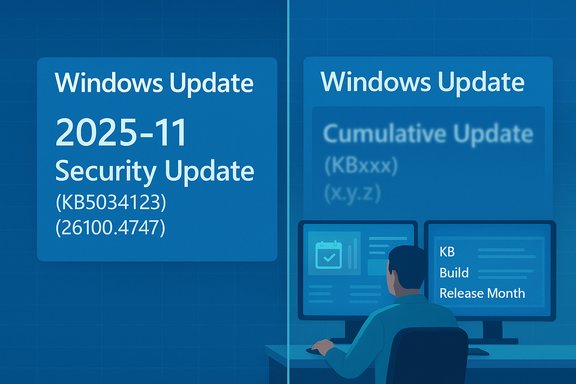
For decades Microsoft’s visible update titles in Settings → Windows Update and Update history included a verbose, catalog‑style string that gave immediate operational context — most notably a leading YYYY‑MM prefix (for example, 2025‑10) and descriptors such as Cumulative Update or the target OS version. That format made it easy at a glance to map an installed package to Patch Tuesday windows, optional previews, or emergency fixes.In late October Microsoft announced a deliberate simplification of visible update titles: a compact, three‑part pattern that foregrounds a short classification (Security Update / Preview Update / Driver Update), the canonical KB identifier, and — where relevant — a compact build or component token. The stated aim was to reduce UI clutter and improve readability for everyday users while preserving authoritative identifiers programmatically.
That simplification was server‑side and immediate in client UIs, but it removed the visible date prefix (YYYY‑MM) and sometimes the explicit “Cumulative” wording that many admins and help‑desk teams rely on for quick triage. The removal triggered sharp operational feedback from enterprise administrators, managed service teams, and support desks, which led Microsoft to publicly acknowledge the feedback and commit to restoring the month/year display in update titles.
What changed — the visible vs. catalog split
The simplified UI titles Microsoft rolled out
- New client‑facing pattern: Classification (KBxxxxxxx) (build), for example Security Update (KB5034123) (26100.4747).
- Target surfaces: Settings → Windows Update and Settings → Windows Update → Update history, plus end‑user Facing pages such as Release Health.
- What did not change (initially): Microsoft Update Catalog and WSUS / other enterprise catalog surfaces retained verbose, machine‑oriented titles to preserve distribution and automation compatibility.
Why Microsoft made the original change
Microsoft’s explanation emphasized readability, accessibility, and the use of back‑end structured metadata (Update for Business catalog, Microsoft Graph) so the UI could be a concise, human‑friendly view while metadata remained authoritative for tooling. In short: foreground the KB and classification for users, keep the catalog details for automation.Why the date prefix matters to admins (and why the reversal matters)
The YYYY‑MM prefix is more than cosmetic for many organizations — it is a fast, glanceable signal that ties a recorded update to a calendar release (Patch Tuesday vs. late‑month preview vs. an out‑of‑band emergency fix). Removing that token introduced several operational costs:- Loss of immediate chronological context for triage and incident reports, increasing time‑to‑resolution.
- Breakage or added fragility for teams that relied on visible title parsing in runbooks, dashboards, and ad‑hoc triage (smaller IT shops and ad‑hoc support teams often lack programmatic metadata ingestion).
- Confusion between different kinds of “Preview” labels (optional preview vs. Insider Preview), raising ticket volume and misclassification risk.
The official position and the limits of the fix
Microsoft told the community it will “ensure that the date (month and year) remain present on update titles,” acknowledging the operational feedback from admins and support staff. That commitment appears targeted: date tokens will be brought back to client‑visible titles, but the company has not restored every previous element of the verbose catalog string. In particular, Microsoft has not yet agreed to restore the explicit Cumulative Update token or reinstate full OS version text in every UI title — those remain under review and dependent on further feedback.Caveat: the public statements and early reporting describe the policy change, but Microsoft’s rollout timeline (how quickly the date token will reappear across all languages, channels and SKUs) was not exhaustively documented at the time of publication. Organizations should treat the commitment as real but expect a staggered, server‑side rollout and verify behavior in their management estate.
Operational guidance — what IT teams should do now
Microsoft’s UI experiment exposed a simple truth: end‑user presentation and enterprise automation often have different needs. Regardless of how Microsoft proceeds, organizations must make their tooling resilient to client UI changes.Immediate checklist (high priority):
- Stop parsing visible UI titles as a canonical source. Use the KB number or package GUID as the canonical key for automation and audit.
- Update monitoring and compliance rules to match on KB IDs, package GUIDs, or build tokens, not free‑text title fragments.
- Ensure SIEM and inventory systems ingest full update metadata — KB, package GUID, file hashes, target product list — in addition to any display title.
- Train help‑desk staff and update runbooks to show where to copy a KB from Settings → Update history (or to map KB → YYYY‑MM using Release Health / Update Catalog).
- Integrate Microsoft Graph / Windows Update for Business catalog ingestion into patch dashboards so classification, cadence and release month are first‑class fields programmatically.
- Build an internal mapping table (KB → YYYY‑MM → update type → build) and expose it to dashboards and triage pages to reconstruct familiar verbose titles where needed.
- Move to API‑driven metadata ingestion across all automation and reporting. Treat display strings as purely user‑facing and ephemeral.
Strengths and risks: a balanced assessment
Strengths of Microsoft’s approach
- Readability and accessibility: Shorter labels reduce line wrapping and help users and screen readers parse Update history more quickly.
- Focus on canonical identifiers: The KB number remains visible and is the correct, authoritative key for lookup and automation.
- Catalog-first model: By investing in richer structured metadata (Windows Update for Business catalog, Microsoft Graph), Microsoft enables a clean UI while preserving machine‑readable details for enterprise tooling.
Risks and tradeoffs
- Operational friction for small teams and service desks: Not every organization has the time or tooling to move to API ingestion quickly; those teams often relied on the visible date token and descriptive labels. The initial removal increased support load.
- Parsing fragility in third‑party tools: Some vendors and in‑house scripts that parsed visible strings will need updates. Failure to update leads to false positives/negatives in compliance dashboards.
- Ambiguity introduced by shared words like “Preview”: The short Preview label collides with Insider Preview nomenclature, requiring extra checks by help‑desk staff.
Hotpatching, WSUS emergency updates, and a cautionary parallel
While the titling story dominated UI conversations, an adjacent, higher‑risk servicing incident underscores why precise update metadata and predictable distribution channels matter.In October Microsoft issued emergency out‑of‑band (OOB) updates to address a critical WSUS vulnerability (CVE‑2025‑59287). During the emergency deployment an incorrect package briefly impacted a subset of Hotpatch‑enrolled servers; Microsoft documented the incident and published corrective guidance and a proper package for Hotpatch systems. Key KBs and timeline described in community reporting include KB5070881 (the OOB package that was briefly offered to Hotpatch devices), and KB5070893 (the corrected package Hotpatch‑enrolled systems should apply on top of the October baseline KB5066835 to remain on Hotpatch cadence). The underlying WSUS defect is an unsafe deserialization RCE that was actively exploited, which is why Microsoft pushed OOB fixes under emergency timelines.
Important operational takeaways from the WSUS incident:
- Emergency OOB fixes can produce unintended side effects if distribution targeting is imperfect; the incident briefly removed hotpatch eligibility from a “very limited number” of Hotpatch‑enrolled machines. Microsoft described the count as “very limited,” but did not publish a precise global tally. Treat that phrasing conservatively: assume local verification is required.
- For Hotpatch‑enrolled hosts contacted by the mis‑targeted update, Microsoft’s guidance was to apply KB5070893 on top of the October baseline (KB5066835) where appropriate, or accept that affected hosts would need to accept normal restart‑required LCUs for a short period until re‑enrollment.
- WSUS servers are high‑value attack targets; this incident reiterates the need to treat WSUS as crown‑jewel infrastructure — segment, harden, monitor and inventory aggressively.
Practical examples and quick wins
- If a support ticket arrives quoting a short UI title — Preview Update (KB5062660) — teach agents to: (a) copy the KB and (b) consult the Release Health or Update Catalog to map KB → YYYY‑MM → update type. This reduces misclassification and unnecessary escalation.
- For compliance dashboards currently flagging devices by visible title text, switch to a short, machine‑readable pipeline: ingest the Microsoft Update Catalog / Microsoft Graph, normalize on KB, build, and a release month field, then render displayname only as a convenience.
- For WSUS owners: inventory WSUS servers, verify ports 8530/8531 are not exposed to untrusted networks, and apply any emergency OOB packages relevant to your SKU immediately when advisories call for it. Preserve IIS and SoftwareDistribution logs for potential forensic work if your WSUS catalog was reachable externally.
What Microsoft could do next (recommendations)
- Offer an administrative verbose mode toggle in Settings → Windows Update → Advanced that allows corporate devices (or devices under an Intune policy) to show the full, catalog‑style title (YYYY‑MM + Cumulative + OS version) while keeping simplified titles for consumer devices. This approach gives end users a clean experience while preserving operational context for admins.
- Add a clickable expansion on Update history entries that reveals structured metadata (release month, cumulative flag, OS target, KB link) so users and admins can get the full context without re‑navigating to the KB article.
- Publish a machine‑readable monthly mapping file (KB → YYYY‑MM → build → cumulative flag) that enterprises can ingest automatically to reconstruct historical verbose titles for reporting and audits.
Conclusion
Microsoft’s swift commitment to restore the YYYY‑MM date prefix in Windows Update titles is a welcome, pragmatic response to clear operational feedback. The company’s design goals — cleaner, more readable titles for most users and preservation of authoritative KB identifiers — remain sensible. The partial reversal recognizes that a single visual token (month/year) has outsized value for triage, compliance and human workflows.At the same time, this episode is a useful reminder for administrators: UI strings can change unexpectedly. The safest posture is to anchor automation and compliance on canonical identifiers (KB numbers, package GUIDs, builds) and to ingest catalog metadata through programmatic channels. Doing so will make your tooling resilient to future UI experiments while preserving the benefits of a cleaner experience for your end users.
Finally, the WSUS hotpatch episode that ran in parallel underscores the fragility of servicing channels in emergency scenarios and the importance of hardening distribution infrastructure. Treat the presence (or absence) of a date token in a headline as a user‑experience concern; treat your update pipeline and WSUS servers as security‑critical assets that demand inventory, segmentation, and quick, authoritative remediation when advisories appear.
Source: Windows Report New Windows Update Titles to Keep Year & Month Format Intact, Microsoft Confirms
