

Microsoft Research published a United States recruitment notice on June 17, 2026, seeking adults with chronic illness who do computer-based work from home to help study “small, tangible devices” for supporting fluctuating health, attention, and work needs. The announcement is modest in form: a survey, an interview, some workspace photos, and a $100 gift card. But its implications are larger than the listing suggests. Microsoft is probing a question that mainstream productivity software has mostly avoided: what if the next accessibility breakthrough is not another dashboard, but a physical object designed around the uneven reality of disabled and chronically ill work?
The study sits in Microsoft Research’s Inclusive Futures orbit, and that framing matters. This is not a Surface launch, a Windows feature preview, or a Copilot roadmap item dressed up as user research. It is earlier-stage human-computer interaction work, the kind of research that usually looks mundane until years later, when a concept reappears as a product category, an accessibility pattern, or a design constraint that quietly reshapes the platform.
The recruitment criteria are narrow by design. Microsoft is looking for people who are at least 18, live in the United States, have a chronic illness, do primarily computer-based work, and work from home at least part time. That filters out a broad population of disabled users and focuses instead on a group that has become central to post-pandemic work: knowledge workers whose homes are also offices, recovery spaces, symptom-management zones, and sometimes medical environments.
That choice is telling. For decades, productivity technology has imagined the worker as a mostly stable input machine: awake, seated, focused, able to type, able to click, able to make a hundred tiny decisions before lunch. Chronic illness breaks that fiction. Energy varies, pain flares, cognition fogs, mobility changes, sensory tolerance shifts, and the same workstation that feels usable at 9 a.m. may be hostile by 3 p.m.
Microsoft’s study language repeatedly returns to fluctuation. The goal is to understand “needs and gaps” in existing technology and to inform tangible devices that better align with changing needs, preferences, and capacities. That is a more radical premise than it sounds. It treats accessibility not as a static accommodation for a fixed impairment, but as an ongoing negotiation between body, environment, device, task, and time.
Microsoft’s proposed direction points somewhere different. “Tangibles” in human-computer interaction usually refers to physical artifacts that act as controls, cues, companions, or interfaces. Instead of asking a user to open another app, interpret another notification, or maintain another self-tracking routine, a tangible device can sit in the workspace and make a state, reminder, boundary, or action physically present.
That distinction matters for chronic illness because cognitive load is not a side issue. Many chronic conditions bring fatigue, brain fog, pain, sensory sensitivity, or executive-function strain. A tool that demands constant attention may be technically accessible and practically unusable. The study explicitly mentions the potential to reduce cognitive load and increase self-efficacy, which suggests Microsoft is looking at support devices that do more than collect data.
The best version of this research would resist the Silicon Valley reflex to make illness legible mainly to software. A physical device can be lower-friction, more ambient, and less punitive than an app. It can remind without nagging, signal without exposing, and adapt to a user’s routine without turning the home office into a compliance dashboard.
For chronically ill workers, remote work can be liberating and unforgiving at the same time. It can remove commuting, allow rest breaks, and let people manage symptoms privately. It can also blur boundaries so thoroughly that recovery time becomes invisible, availability becomes assumed, and the burden of accommodation shifts from employer systems to individual improvisation.
That is where tangible devices become interesting. A small object on a desk might support pacing, posture changes, medication timing, sensory transitions, meeting boundaries, or energy-aware work routines. It might be a control surface for accessibility settings, a private signal for break state, a tactile reminder to change position, or a low-effort way to log capacity without opening yet another screen.
The danger, of course, is that employers and platforms turn support into surveillance. Any device that knows when a worker is fatigued, away, symptomatic, or cognitively overloaded also knows something sensitive. Microsoft’s study says data will not be shared outside the company, that records will be coded rather than directly identified, and that results may be published only in anonymized form. Those are important research safeguards, but the product-world version of this idea would need a much harder privacy line.
That variability is why Microsoft’s study is aimed at people’s “fluctuating needs, preferences, and capacities.” The phrasing is careful and refreshingly accurate. It avoids the common mistake of treating disability as a fixed device compatibility problem. The issue is not merely whether someone can operate a keyboard, mouse, webcam, or Teams window; it is whether the system around those tools can respond when the user’s capacity changes.
Windows already contains a deepening stack of accessibility features: dictation, captions, focus controls, screen magnification, contrast modes, voice access, eye control, and compatibility with adaptive hardware. Microsoft has also invested heavily in inclusive hardware ideas through products such as the Xbox Adaptive Controller and adaptive accessories. But operating-system settings are still mostly designed as configurations, not living companions.
A tangible device for chronic illness could become a bridge between static settings and lived variability. Imagine a physical control that changes input modes, reduces notification intensity, shifts display settings, starts a rest timer, updates availability, and launches a simplified work surface with one deliberate gesture. The individual components already exist in many ecosystems. The missing piece is often orchestration that does not require the user to spend scarce energy managing the tools meant to save energy.
A desk photo can reveal what a survey cannot. It can show whether a user works from a bed, couch, dining table, recliner, standing desk, or carefully engineered ergonomic setup. It can reveal reachable zones, cable clutter, medication nearby, heating pads, braces, alternate keyboards, notebooks, water bottles, pill organizers, lighting hacks, and the small personal systems people invent because commercial technology does not quite fit.
This is the kind of evidence that good HCI research needs and bad product design often ignores. The trouble with many accessibility products is that they are designed for an abstract user in an abstract environment. The real user has a flare-up, a deadline, a cat on the keyboard, a Teams call in four minutes, and a body that no longer agrees with the posture assumed by the laptop industrial designer.
By asking for workspace photos, Microsoft is acknowledging that tangible devices cannot be designed only in Figma or a lab. They have to occupy space, survive clutter, respect privacy, avoid stigma, and fit into the rituals people already use to get through a workday. A device that looks elegant in a press photo may fail if it requires reaching, charging, pairing, cleaning, explaining, or remembering at exactly the wrong moment.
The chronic illness study appears to push that logic into a subtler territory. Adaptive input devices often solve a direct access problem: pressing, pointing, clicking, typing. Chronic illness support may require devices that help regulate the relationship between work and capacity. That could mean input, but it could also mean pacing, context switching, energy budgeting, environmental cueing, or friction reduction.
That is a harder category to productize. A switch button has an obvious function. A fatigue-aware desk object does not. It must avoid becoming infantilizing, medicalized, intrusive, or gimmicky. It has to serve people whose conditions and preferences differ dramatically, and it must not imply that chronic illness can be solved by better gadgets.
Still, Microsoft has reason to investigate this space. Windows remains the default work platform for enormous numbers of knowledge workers, including disabled and chronically ill workers whose accommodations depend on a mix of operating-system features, Microsoft 365, Teams, peripherals, and employer policy. If Microsoft can learn how physical objects help users manage fluctuating capacity, it may find design patterns that improve not only specialized devices but also mainstream Windows workflows.
Participants may share health-related experiences, work habits, home workspace images, and potentially details about symptom management. Microsoft says information will be labeled with a code instead of a direct identifier, that the key will be stored separately and destroyed after the study ends, approximately 18 months later, and that data collected during the study will not be shared outside Microsoft. It also says anonymized results may appear in papers or conference presentations, and de-identified information may be used in future Microsoft research.
That is a standard research posture, but it highlights a larger issue facing any future product in this area. Health-adjacent workplace technology lives in a trust minefield. Even if a device is designed for self-support, the surrounding ecosystem may involve employer accounts, Microsoft 365 identity, Teams presence, telemetry settings, enterprise compliance tools, and cloud services.
For a consumer gadget, “help me manage my energy” is intimate. For a work-connected device, it can become dangerous if the wrong party can infer illness patterns, productivity dips, accommodation use, or availability constraints. Microsoft’s research team may handle this responsibly; the product and enterprise layers would need to prove the same discipline at scale.
A tangible device designed with chronically ill workers could help someone protect their health while staying employed. It could make breaks easier to take, reduce the friction of changing input methods, or help the user communicate boundaries without disclosing medical details. In that model, the device serves the person first and the workplace second.
But enterprise software has a habit of absorbing humane ideas into management metrics. A tool that starts as energy pacing can become availability scoring. A rest cue can become a compliance signal. A private capacity setting can become a workflow optimization input. The moment chronic illness support becomes another layer in the productivity stack, users will have reason to distrust it.
Microsoft’s study text leans toward the right side of the line. It says there is no direct benefit to participants, frames the work as inclusive technology research, and emphasizes alignment with users’ fluctuating needs. But readers should keep the distinction in mind. The value of this research will depend not just on what Microsoft can build, but on who controls it.
For this population, a successful device may be almost boring. It should not demand frequent charging, complex setup, precise gestures, or constant app attention. It should work when the user is tired, in pain, distracted, or trying not to look at another screen. It should accommodate one-handed use, low-light use, low-dexterity use, and days when the user wants fewer stimuli, not more.
The strongest opportunity may be in tangible shortcuts to existing digital complexity. Windows and Microsoft 365 already contain dozens of features that can reduce friction, but they are scattered across settings, apps, menus, policies, and shortcuts. A physical object that makes the right configuration available at the right moment could be more valuable than an entirely new class of sensor.
That does not mean Microsoft should avoid sensing altogether. Context awareness can be useful when handled locally and transparently. But the burden of proof is high. Chronically ill users do not need another black box making assumptions about their bodies; they need tools that respond to their choices and reduce the cost of making those choices.
That is a design failure hiding in plain sight. Modern operating systems already understand context when it benefits the machine: power plans, focus sessions, dark mode schedules, device posture, location, and network state. They are less elegant at context when the changing variable is the human body.
A tangible device could expose that missing layer. It might let a user shift into a lower-cognitive-load profile with a single press. It might pair with Windows focus settings, Teams presence, input preferences, screen warmth, audio routing, captioning, and notification rules. It might help users make adaptive computing a routine rather than a troubleshooting exercise.
For sysadmins, this would raise new management questions. Which settings should be user-owned and unavailable to employer override? How should assistive profiles roam across devices? Can organizations deploy support without collecting sensitive health inferences? How do help desks troubleshoot a device whose purpose is deeply personal and context-dependent?
That matters because chronic illness is an area where technology companies often overpromise. The market is full of devices that imply better self-knowledge will produce better health, while underplaying structural problems like workload, health care access, disability stigma, and employer inflexibility. A serious research study cannot solve those problems, but it can avoid designing as if they do not exist.
The semi-structured interview format is also appropriate. Chronic illness does not fit neatly into multiple-choice boxes, and neither does home work. Interviews allow researchers to ask how people adapt on bad days, what tools they abandon, what rituals they invent, and what trade-offs they accept because no good alternative exists.
The study’s explicit statement that participants will receive no direct benefit is also important. It keeps expectations grounded. This is not a clinical intervention or a product beta. It is foundational research, and the responsible interpretation is that Microsoft is still trying to understand the problem before claiming a solution.
That expansion creates both opportunity and risk. If Microsoft treats chronic illness as a first-class design context, Windows could become better at adapting to human variability. If it treats chronic illness as another signal to optimize work output, the result could be alienating at best and discriminatory at worst.
This is also a reminder that accessibility innovation often starts with communities whose needs appear specialized but later benefit everyone. Captions help deaf and hard-of-hearing users, but they also help people in noisy rooms. Voice input helps users with mobility limitations, but it also helps people whose hands are occupied. Energy-aware, low-friction, tangible controls for chronically ill workers could eventually help anyone who has experienced burnout, injury, overload, or the simple fact that human attention is not an infinite resource.
The key is to preserve the origin of the design. Features born from disability research should not be sanded down into generic productivity widgets that forget the people who made them necessary. Microsoft’s study has the right language; the challenge is whether any eventual product keeps that language’s moral center.
Windows has spent years becoming more cloud-connected and AI-assisted. The dominant interface trend has been abstraction: commands become prompts, files become semantic search results, meetings become summaries, and applications become services. Tangibles pull in the opposite direction. They say the body and the room still matter.
For chronically ill workers, that may be exactly the point. The problem is not merely that software fails to understand them; it is that software often asks them to meet it on software’s terms. A small physical device, if designed well, can reverse that relationship. It can let the user shape the computing environment from the place where they actually live and work.
That is why this study is worth watching even if no product emerges quickly. Microsoft is asking about the texture of daily work for people whose needs change over time. In an industry still addicted to the myth of the frictionless power user, that is a useful disturbance.
 Microsoft Moves the Future of Work Off the Screen
The study sits in Microsoft Research’s Inclusive Futures orbit, and that framing matters. This is not a Surface launch, a Windows feature preview, or a Copilot roadmap item dressed up as user research. It is earlier-stage human-computer interaction work, the kind of research that usually looks mundane until years later, when a concept reappears as a product category, an accessibility pattern, or a design constraint that quietly reshapes the platform.The recruitment criteria are narrow by design. Microsoft is looking for people who are at least 18, live in the United States, have a chronic illness, do primarily computer-based work, and work from home at least part time. That filters out a broad population of disabled users and focuses instead on a group that has become central to post-pandemic work: knowledge workers whose homes are also offices, recovery spaces, symptom-management zones, and sometimes medical environments.
That choice is telling. For decades, productivity technology has imagined the worker as a mostly stable input machine: awake, seated, focused, able to type, able to click, able to make a hundred tiny decisions before lunch. Chronic illness breaks that fiction. Energy varies, pain flares, cognition fogs, mobility changes, sensory tolerance shifts, and the same workstation that feels usable at 9 a.m. may be hostile by 3 p.m.
Microsoft’s study language repeatedly returns to fluctuation. The goal is to understand “needs and gaps” in existing technology and to inform tangible devices that better align with changing needs, preferences, and capacities. That is a more radical premise than it sounds. It treats accessibility not as a static accommodation for a fixed impairment, but as an ongoing negotiation between body, environment, device, task, and time.
The Dashboard Was Never Enough
The technology industry loves to turn health into data. Wearables count steps, watches detect heart rhythms, apps ask users to log mood and pain, and workplace platforms increasingly quantify attention through meetings, messages, and calendar blocks. The result is a world where people living with chronic illness can be surrounded by metrics and still unsupported in the moments when they actually need help.Microsoft’s proposed direction points somewhere different. “Tangibles” in human-computer interaction usually refers to physical artifacts that act as controls, cues, companions, or interfaces. Instead of asking a user to open another app, interpret another notification, or maintain another self-tracking routine, a tangible device can sit in the workspace and make a state, reminder, boundary, or action physically present.
That distinction matters for chronic illness because cognitive load is not a side issue. Many chronic conditions bring fatigue, brain fog, pain, sensory sensitivity, or executive-function strain. A tool that demands constant attention may be technically accessible and practically unusable. The study explicitly mentions the potential to reduce cognitive load and increase self-efficacy, which suggests Microsoft is looking at support devices that do more than collect data.
The best version of this research would resist the Silicon Valley reflex to make illness legible mainly to software. A physical device can be lower-friction, more ambient, and less punitive than an app. It can remind without nagging, signal without exposing, and adapt to a user’s routine without turning the home office into a compliance dashboard.
Chronic Illness Is a Workplace Design Problem Now
The study’s work-from-home requirement is not just a logistical convenience for remote interviews. It recognizes that the home workspace has become the real frontier of occupational accessibility. The office had facilities teams, standardized desks, procurement policies, and at least the theory of formal accommodations. The home office has improvised ergonomics, consumer-grade hardware, shared rooms, caregiving interruptions, pets, medication schedules, and the private reality of illness.For chronically ill workers, remote work can be liberating and unforgiving at the same time. It can remove commuting, allow rest breaks, and let people manage symptoms privately. It can also blur boundaries so thoroughly that recovery time becomes invisible, availability becomes assumed, and the burden of accommodation shifts from employer systems to individual improvisation.
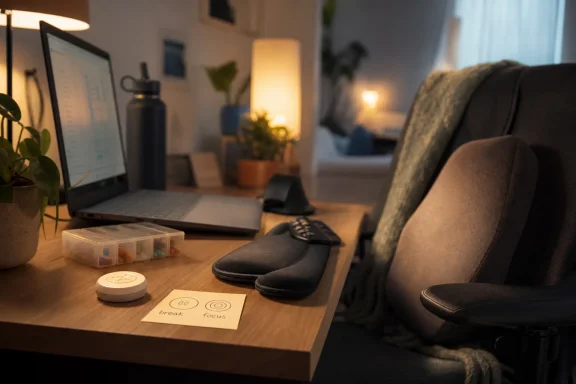
That is where tangible devices become interesting. A small object on a desk might support pacing, posture changes, medication timing, sensory transitions, meeting boundaries, or energy-aware work routines. It might be a control surface for accessibility settings, a private signal for break state, a tactile reminder to change position, or a low-effort way to log capacity without opening yet another screen.
The danger, of course, is that employers and platforms turn support into surveillance. Any device that knows when a worker is fatigued, away, symptomatic, or cognitively overloaded also knows something sensitive. Microsoft’s study says data will not be shared outside the company, that records will be coded rather than directly identified, and that results may be published only in anonymized form. Those are important research safeguards, but the product-world version of this idea would need a much harder privacy line.
The Important Design Constraint Is Variability
Most accessibility design starts with a category: blind users, deaf users, wheelchair users, users with limited mobility, users with low vision. Those categories are useful, but chronic illness often refuses neat classification. A person may be able to type normally on Monday and need dictation on Tuesday. A lighting setup may be fine until migraine symptoms begin. A meeting-heavy day may be survivable only if the worker can manage pacing before the crash.That variability is why Microsoft’s study is aimed at people’s “fluctuating needs, preferences, and capacities.” The phrasing is careful and refreshingly accurate. It avoids the common mistake of treating disability as a fixed device compatibility problem. The issue is not merely whether someone can operate a keyboard, mouse, webcam, or Teams window; it is whether the system around those tools can respond when the user’s capacity changes.
Windows already contains a deepening stack of accessibility features: dictation, captions, focus controls, screen magnification, contrast modes, voice access, eye control, and compatibility with adaptive hardware. Microsoft has also invested heavily in inclusive hardware ideas through products such as the Xbox Adaptive Controller and adaptive accessories. But operating-system settings are still mostly designed as configurations, not living companions.
A tangible device for chronic illness could become a bridge between static settings and lived variability. Imagine a physical control that changes input modes, reduces notification intensity, shifts display settings, starts a rest timer, updates availability, and launches a simplified work surface with one deliberate gesture. The individual components already exist in many ecosystems. The missing piece is often orchestration that does not require the user to spend scarce energy managing the tools meant to save energy.
The Home Workspace Photo Is the Most Revealing Part
Participants who pass screening may be asked to send photos of their home workspace before joining a semi-structured interview. That detail is easy to skim past, but it may be the most important methodological clue in the study. Microsoft does not just want opinions about technology; it wants to see the physical ecology where work and illness meet.A desk photo can reveal what a survey cannot. It can show whether a user works from a bed, couch, dining table, recliner, standing desk, or carefully engineered ergonomic setup. It can reveal reachable zones, cable clutter, medication nearby, heating pads, braces, alternate keyboards, notebooks, water bottles, pill organizers, lighting hacks, and the small personal systems people invent because commercial technology does not quite fit.
This is the kind of evidence that good HCI research needs and bad product design often ignores. The trouble with many accessibility products is that they are designed for an abstract user in an abstract environment. The real user has a flare-up, a deadline, a cat on the keyboard, a Teams call in four minutes, and a body that no longer agrees with the posture assumed by the laptop industrial designer.
By asking for workspace photos, Microsoft is acknowledging that tangible devices cannot be designed only in Figma or a lab. They have to occupy space, survive clutter, respect privacy, avoid stigma, and fit into the rituals people already use to get through a workday. A device that looks elegant in a press photo may fail if it requires reaching, charging, pairing, cleaning, explaining, or remembering at exactly the wrong moment.
Microsoft’s Accessibility Bet Has Been Moving Toward Hardware
This study also fits a broader Microsoft pattern: accessibility has gradually moved from software settings into hardware ecosystems. The Xbox Adaptive Controller was the clearest consumer example, because it reframed the controller not as a single ideal object but as a hub for many bodies and many inputs. Microsoft’s adaptive accessories extended the same logic to PC use, offering modular mice, buttons, and mounts for users who need different physical arrangements.The chronic illness study appears to push that logic into a subtler territory. Adaptive input devices often solve a direct access problem: pressing, pointing, clicking, typing. Chronic illness support may require devices that help regulate the relationship between work and capacity. That could mean input, but it could also mean pacing, context switching, energy budgeting, environmental cueing, or friction reduction.
That is a harder category to productize. A switch button has an obvious function. A fatigue-aware desk object does not. It must avoid becoming infantilizing, medicalized, intrusive, or gimmicky. It has to serve people whose conditions and preferences differ dramatically, and it must not imply that chronic illness can be solved by better gadgets.
Still, Microsoft has reason to investigate this space. Windows remains the default work platform for enormous numbers of knowledge workers, including disabled and chronically ill workers whose accommodations depend on a mix of operating-system features, Microsoft 365, Teams, peripherals, and employer policy. If Microsoft can learn how physical objects help users manage fluctuating capacity, it may find design patterns that improve not only specialized devices but also mainstream Windows workflows.
The Privacy Clause Deserves More Attention Than the Gift Card
The study offers $100 in the form of an online Tango gift card for completing the full process, which Microsoft estimates at about 90 minutes. That is fair enough as research compensation, and the screening language makes clear that responses will be reviewed before payment. But the compensation is not the sensitive part. The data is.Participants may share health-related experiences, work habits, home workspace images, and potentially details about symptom management. Microsoft says information will be labeled with a code instead of a direct identifier, that the key will be stored separately and destroyed after the study ends, approximately 18 months later, and that data collected during the study will not be shared outside Microsoft. It also says anonymized results may appear in papers or conference presentations, and de-identified information may be used in future Microsoft research.
That is a standard research posture, but it highlights a larger issue facing any future product in this area. Health-adjacent workplace technology lives in a trust minefield. Even if a device is designed for self-support, the surrounding ecosystem may involve employer accounts, Microsoft 365 identity, Teams presence, telemetry settings, enterprise compliance tools, and cloud services.
For a consumer gadget, “help me manage my energy” is intimate. For a work-connected device, it can become dangerous if the wrong party can infer illness patterns, productivity dips, accommodation use, or availability constraints. Microsoft’s research team may handle this responsibly; the product and enterprise layers would need to prove the same discipline at scale.
The Line Between Support and Optimization Is Thin
The most promising phrase in Microsoft’s study is “quality of life.” The most dangerous possible interpretation is “productivity recovery.” The difference between those two goals is everything.A tangible device designed with chronically ill workers could help someone protect their health while staying employed. It could make breaks easier to take, reduce the friction of changing input methods, or help the user communicate boundaries without disclosing medical details. In that model, the device serves the person first and the workplace second.
But enterprise software has a habit of absorbing humane ideas into management metrics. A tool that starts as energy pacing can become availability scoring. A rest cue can become a compliance signal. A private capacity setting can become a workflow optimization input. The moment chronic illness support becomes another layer in the productivity stack, users will have reason to distrust it.
Microsoft’s study text leans toward the right side of the line. It says there is no direct benefit to participants, frames the work as inclusive technology research, and emphasizes alignment with users’ fluctuating needs. But readers should keep the distinction in mind. The value of this research will depend not just on what Microsoft can build, but on who controls it.
The Best Device May Be the One That Disappears Into Routine
The word “tangible” can conjure novelty: glowing cubes, desk toys, haptic widgets, smart buttons, or ambient displays that look like design-school prototypes. Some of those may be useful. Many will not survive contact with chronic illness, where reliability, simplicity, and low maintenance matter more than charm.For this population, a successful device may be almost boring. It should not demand frequent charging, complex setup, precise gestures, or constant app attention. It should work when the user is tired, in pain, distracted, or trying not to look at another screen. It should accommodate one-handed use, low-light use, low-dexterity use, and days when the user wants fewer stimuli, not more.
The strongest opportunity may be in tangible shortcuts to existing digital complexity. Windows and Microsoft 365 already contain dozens of features that can reduce friction, but they are scattered across settings, apps, menus, policies, and shortcuts. A physical object that makes the right configuration available at the right moment could be more valuable than an entirely new class of sensor.
That does not mean Microsoft should avoid sensing altogether. Context awareness can be useful when handled locally and transparently. But the burden of proof is high. Chronically ill users do not need another black box making assumptions about their bodies; they need tools that respond to their choices and reduce the cost of making those choices.
Windows Needs Accessibility That Changes State as Easily as Wi-Fi
One practical lesson for the Windows ecosystem is that accessibility profiles still feel too static. A user can change settings, bind shortcuts, configure assistive technology, and use peripheral hardware. But moving between “normal work,” “low energy,” “pain flare,” “migraine risk,” “meeting mode,” and “recovery mode” is not as fluid as switching networks or toggling battery saver.That is a design failure hiding in plain sight. Modern operating systems already understand context when it benefits the machine: power plans, focus sessions, dark mode schedules, device posture, location, and network state. They are less elegant at context when the changing variable is the human body.
A tangible device could expose that missing layer. It might let a user shift into a lower-cognitive-load profile with a single press. It might pair with Windows focus settings, Teams presence, input preferences, screen warmth, audio routing, captioning, and notification rules. It might help users make adaptive computing a routine rather than a troubleshooting exercise.
For sysadmins, this would raise new management questions. Which settings should be user-owned and unavailable to employer override? How should assistive profiles roam across devices? Can organizations deploy support without collecting sensitive health inferences? How do help desks troubleshoot a device whose purpose is deeply personal and context-dependent?
The Research Team Signals This Is Serious HCI, Not a Wellness Gimmick
The named Microsoft Research team includes Maia Stiber, Ann Paradiso, John Tang, Martez Mott, and Ed Cutrell, all associated with Microsoft Research Redmond. That roster suggests the study is rooted in human-computer interaction and inclusive design rather than corporate wellness marketing. Tang and Cutrell, in particular, have long histories in collaboration, accessibility, and computing for real-world contexts.That matters because chronic illness is an area where technology companies often overpromise. The market is full of devices that imply better self-knowledge will produce better health, while underplaying structural problems like workload, health care access, disability stigma, and employer inflexibility. A serious research study cannot solve those problems, but it can avoid designing as if they do not exist.
The semi-structured interview format is also appropriate. Chronic illness does not fit neatly into multiple-choice boxes, and neither does home work. Interviews allow researchers to ask how people adapt on bad days, what tools they abandon, what rituals they invent, and what trade-offs they accept because no good alternative exists.
The study’s explicit statement that participants will receive no direct benefit is also important. It keeps expectations grounded. This is not a clinical intervention or a product beta. It is foundational research, and the responsible interpretation is that Microsoft is still trying to understand the problem before claiming a solution.
The Forum Angle Is Bigger Than Microsoft Research
For WindowsForum readers, the immediate news is simple: eligible participants in the United States can apply for a Microsoft Research study about tangible devices for chronically ill knowledge workers, with a possible 90-minute process and $100 compensation. But the broader story is about where Windows accessibility may be heading. The PC is no longer just a screen, keyboard, and mouse; it is a workspace environment, a collaboration endpoint, an identity hub, and increasingly an AI-mediated productivity surface.That expansion creates both opportunity and risk. If Microsoft treats chronic illness as a first-class design context, Windows could become better at adapting to human variability. If it treats chronic illness as another signal to optimize work output, the result could be alienating at best and discriminatory at worst.
This is also a reminder that accessibility innovation often starts with communities whose needs appear specialized but later benefit everyone. Captions help deaf and hard-of-hearing users, but they also help people in noisy rooms. Voice input helps users with mobility limitations, but it also helps people whose hands are occupied. Energy-aware, low-friction, tangible controls for chronically ill workers could eventually help anyone who has experienced burnout, injury, overload, or the simple fact that human attention is not an infinite resource.
The key is to preserve the origin of the design. Features born from disability research should not be sanded down into generic productivity widgets that forget the people who made them necessary. Microsoft’s study has the right language; the challenge is whether any eventual product keeps that language’s moral center.
The Small Device on the Desk Could Become a Platform Argument
The study’s most consequential idea is not that Microsoft might build a gadget. It is that the interface between people and computers may need to become more physical, more situated, and more respectful of bodily limits. That is a platform argument, not a peripheral argument.Windows has spent years becoming more cloud-connected and AI-assisted. The dominant interface trend has been abstraction: commands become prompts, files become semantic search results, meetings become summaries, and applications become services. Tangibles pull in the opposite direction. They say the body and the room still matter.
For chronically ill workers, that may be exactly the point. The problem is not merely that software fails to understand them; it is that software often asks them to meet it on software’s terms. A small physical device, if designed well, can reverse that relationship. It can let the user shape the computing environment from the place where they actually live and work.
That is why this study is worth watching even if no product emerges quickly. Microsoft is asking about the texture of daily work for people whose needs change over time. In an industry still addicted to the myth of the frictionless power user, that is a useful disturbance.
The Signal Hidden Inside Microsoft’s Recruitment Notice
Microsoft’s study is not a product announcement, and that restraint is part of why it matters. The concrete details are limited, but they point to several practical conclusions.- Microsoft Research is recruiting U.S.-based adults with chronic illness who do computer-based knowledge work from home at least part time.
- The study involves a screening survey, possible workspace photos, and an online semi-structured interview, with total participation estimated at about 90 minutes.
- Participants who complete the full study and pass screening requirements are offered $100 in online Tango gift card compensation.
- The research is focused on gaps in existing technology and on future tangible devices that better fit fluctuating needs, preferences, and capacities.
- Microsoft says study data will not be shared outside the company, though anonymized results may be published and de-identified data may be used in future research.
- The most important long-term issue is whether future devices remain user-controlled supports rather than becoming workplace measurement tools.
References
- Primary source: Microsoft
Published: Wed, 17 Jun 2026 21:14:03 GMT
Study: Developing tangibles with and for people living with chronic illness - Microsoft Research
The study is a part of a larger goal of improving quality of life for people living with chronic illnesses through the use of small, tangible devices. The purpose of this study is to explore and understand the current needs and gaps in existing technology that people living with chronic illness...www.microsoft.com - Official source: learn.microsoft.com
Chronic pain - Surface | Microsoft Learn
Pain that persists or progresses over a long period of timelearn.microsoft.com - Official source: news.microsoft.com
Behind the breakthroughs: A day in the life at Microsoft Research | Microsoft Signal Blog | Microsoft
Five Microsoft researchers shared their stories with Forward Future, a daily AI newsletter, about the big problems they’re tackling and the trends shaping their work in the middle of an ever-changing AI era.news.microsoft.com
