

Microsoft has formally retired Microsoft Easy Fix, the downloadable repair-button system formerly known as Microsoft Fix it, and now directs Windows 10 and Windows 11 users toward built-in troubleshooters, the Get Help app, Windows Update, and cloud-connected support flows. The change is not simply a missing download page; it is another marker in Microsoft’s long migration away from standalone repair utilities and toward a Windows model where diagnosis, remediation, telemetry, and support are increasingly tied to the operating system itself. For home users, that may mean fewer mysterious
Easy Fix was never glamorous. It belonged to an older Microsoft support era: knowledge-base articles, downloadable wizards, and small repair packages that promised to reset a broken component without asking the user to understand the registry, COM registrations, Windows Installer, networking stacks, or update plumbing underneath.
That era produced a distinct kind of Windows ritual. A user searched for an error, landed on a Microsoft Support page, clicked a Fix it or Easy Fix button, downloaded a small tool, and hoped the wizard knew the incantation. Sometimes it reset Windows Update. Sometimes it repaired file associations. Sometimes it changed security settings or deleted stale configuration state that would have taken a technician half an hour to locate manually.
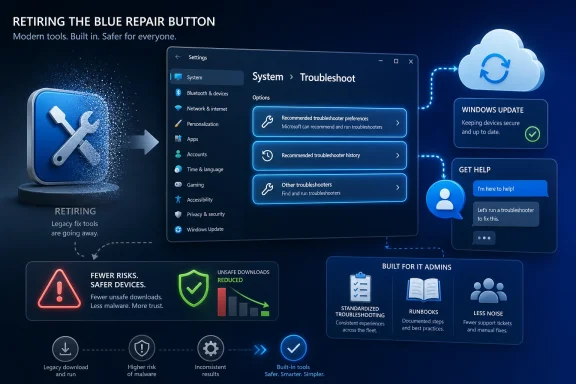
Microsoft’s replacement language is cleaner and more modern. Windows now provides built-in and cloud-connected troubleshooting experiences. In Windows 11, Microsoft points users to Settings under System > Troubleshoot > Other troubleshooters, and to the Get Help app, where users describe a problem in natural language and are walked through guided fixes.
That description is accurate, but it softens the significance of the shift. Easy Fix represented a support model where Microsoft shipped a discrete repair artifact for a discrete problem. The modern model assumes the repair mechanism should live inside Windows, be updated through Windows, and increasingly route the user through a service-backed experience rather than a static download.
The Fix it concept was Microsoft admitting, in a user-friendly way, that many common Windows repairs were too brittle or too obscure for the average user to perform by hand. It wrapped the “open an elevated command prompt, run these five commands, reboot twice, and pray” school of troubleshooting in a branded wizard.
That was useful not because it was magical, but because it encoded institutional knowledge. A Fix it package could take a known support recipe and execute it consistently. In a world where support forums were full of registry scripts and batch files copied from strangers, an official Microsoft button had real value.
Easy Fix, the later name, was a branding clean-up rather than a philosophical reboot. The idea remained the same: make a downloadable repair action available from a support article. The user did not need to browse Settings, understand diagnostic categories, or interact with a conversational support app. The fix was attached to the problem page.
That integration has obvious advantages. Microsoft does not need users to find an old download link, run an outdated package, or trust a local copy passed around on a forum. A cloud-assisted support flow can be revised quickly when a bad driver, botched update, or account-side outage changes the recommended remediation. It can also collect signals that help Microsoft understand whether a fix worked.
But integration changes the trust bargain. A downloadable Easy Fix package was not necessarily transparent to non-experts, but it was at least a specific object. It had a file, a support article, and usually a narrow purpose. The Get Help app is more fluid. It is part troubleshooter, part search interface, part escalation path, and part cloud support surface.
That fluidity is convenient when it works. It is frustrating when the user wants the old thing: a concrete repair tool for a known failure mode, ideally something that can be saved, documented, tested, and rerun without a consumer-support conversation wrapped around it.
In Settings, the user still sees familiar categories: audio, network, printer, Windows Update, Bluetooth, camera, and related problem areas. The interface is less like a toolbox and more like a guided remediation menu. The Get Help app pushes further, asking the user to describe the problem and then offering steps, automated fixes, or support options.
This is not inherently sinister. Many users do not want a toolbox. They want the PC to tell them why audio failed after a driver update or why Wi-Fi disappeared after sleep. A guided support flow can be more humane than an error code and a list of PowerShell commands.
The risk is that Windows troubleshooting becomes less legible to the people who keep Windows fleets alive. IT professionals want repeatability. They want to know what changed, when it changed, whether it can be scripted, whether it requires internet access, and whether it respects enterprise policy. The more troubleshooting moves into opaque app-driven flows, the more those questions matter.
Built-in troubleshooters are still local in important ways, but Microsoft’s own replacement language emphasizes cloud-connected troubleshooting and the Get Help app. That implies a support path designed around a working Windows shell, a functional app stack, and at least intermittent connectivity. Those assumptions are often true on consumer PCs. They are not guaranteed during the failures that send people hunting for repair tools.
This distinction is not nostalgia. It is operational. If DNS is broken, a cloud help flow may be unreachable. If Store app infrastructure is damaged, Get Help may be less useful. If a device is isolated by policy, compliance, or incident response, a cloud-connected troubleshooting path may be unavailable by design.
The old Fix it model was not a full rescue environment. It did not replace WinRE, DISM, SFC, Event Viewer, or a competent admin. But it did sit in a useful middle ground between “click a Settings troubleshooter” and “manually reconstruct a damaged subsystem.” That middle ground is thinner now.
There is also a security argument. Users trained to download “fix” executables are users who can be tricked into downloading malware dressed as support. Microsoft has spent years trying to narrow the gap between official support and phishing bait. Moving troubleshooting into Settings and signed inbox apps reduces the need for users to run random repair binaries.
The deeper reason, though, is control. When troubleshooting is part of Windows and Microsoft’s service layer, Microsoft can change it quickly, measure it, retire it, localize it, and connect it to support channels. That gives the company a better feedback loop than static tools ever could.
For consumers, that feedback loop may produce better outcomes. For administrators, it can feel like yet another Windows behavior that changes on Microsoft’s schedule. The same mechanism that keeps support guidance current can also make it harder to preserve a known-good troubleshooting procedure across months, builds, tenants, and device classes.
Still, the retirement points at a familiar enterprise complaint: Microsoft’s consumer support model and enterprise operations model are drifting farther apart. The Get Help app may be fine for a single laptop. It is less compelling as the primary diagnostic story for a fleet where problems must be triaged, reproduced, and remediated at scale.
IT teams need answers that map to controls. Did a troubleshooter change a service startup type? Did it reset a network stack? Did it modify registry keys? Did it remove a driver? Did it clear update cache state? Did it run only locally, or did it consult Microsoft services? Those questions determine whether a fix can be approved, audited, and automated.
Microsoft does publish deeper troubleshooting guidance for many Windows components, and the official Learn ecosystem is stronger than the old support article maze in many respects. But the front door matters. If Microsoft’s consumer-facing support pages increasingly say “open Get Help,” admins will often have to translate that into the real remediation steps themselves.
This is the modern Windows bargain. The system is always being serviced, so the next cumulative update may fix a known issue more safely than a one-off tool would. Release health pages document known problems. Safeguard holds block some feature updates. Known Issue Rollback can unwind certain non-security regressions. Drivers can arrive through Windows Update. The operating system’s maintenance channel has become its repair channel.
The catch is obvious to anyone who has watched Windows Update fail. If the servicing stack is healthy, updates are a powerful repair mechanism. If the servicing stack is the thing that is broken, telling users to rely on updates can sound circular.
That is why the old Windows Update Fix it tools became so widely passed around in the first place. They addressed the uncomfortable reality that the machine responsible for repairing Windows can itself become unhealthy. Microsoft has improved the servicing stack substantially over the years, but no update architecture is immune to corruption, bad state, third-party interference, or environmental damage.
A modern Windows user should be suspicious of any website offering a “Microsoft fix tool” download. The retirement of Easy Fix makes that advice simpler. If a support page tells users that Easy Fix is no longer available, then third-party pages hosting old copies or lookalikes deserve extra skepticism.
The usability case is more mixed. Settings troubleshooters are discoverable enough for common problems, and Get Help can reduce friction for users who do not know the name of the failing component. But the old support-page model had one major strength: proximity. The fix lived next to the explanation of the problem. The user did not need to reinterpret the issue through a generic support interface.
Microsoft’s modern model bets that a dynamic, guided experience is better than a static button. Sometimes it will be. Sometimes it will turn a precise support path into a chatbot-like maze where the user has to persuade the system that the problem they already identified is the problem they want fixed.
Some of that evolution is overdue. Windows has carried too many duplicate interfaces, legacy configuration panels, and half-documented repair paths. A cleaner troubleshooting surface is not a bad goal.
Yet Windows’ strength has always been partly in its inspectability. Users could dig. Admins could script. Technicians could collect tools. Communities could compare fixes. The platform’s messiness was also its resilience, because there was usually another path into the machine when the official one failed.
Easy Fix was not the soul of that older Windows, but it belonged to it. Its disappearance is another small narrowing of the space between user and vendor.
Imagine a Windows troubleshooter that offered a standard “view actions” pane before and after execution. It could show which services it inspected, which logs it queried, which registry paths it changed, which commands it ran, and whether it contacted Microsoft services. It could export a remediation transcript for help desks. It could provide a PowerShell equivalent where safe and supported.
That would preserve the consumer-friendly path without treating transparency as an expert-only luxury. It would also reduce the temptation to hunt for old Fix it packages, unofficial repair scripts, or registry hacks from a decade-old forum thread.
Microsoft already has many of the ingredients. Windows records troubleshooting history. Enterprise tools collect device health signals. Support pages increasingly route to official apps. The missing piece is a consistent contract: if Windows fixes itself, the user should be able to learn what changed.
For technicians, the change is a reminder to update internal runbooks. If a procedure still says “download Microsoft Fix it,” it is stale. Replace it with a documented Settings path, a Microsoft Learn procedure, a PowerShell remediation, or a vendor-supported tool.
For community forums, including this one, the retirement raises the burden of clarity. Advice that once pointed to an official repair button now needs to explain the supported modern path. That is more work, but it is also a chance to move users away from mystery downloads and toward repeatable troubleshooting.
.diagcab files and one-click repair packages. For administrators and power users, it means one less offline, inspectable tool in the troubleshooting drawer.
 Microsoft Retires the Little Blue Repair Button
Easy Fix was never glamorous. It belonged to an older Microsoft support era: knowledge-base articles, downloadable wizards, and small repair packages that promised to reset a broken component without asking the user to understand the registry, COM registrations, Windows Installer, networking stacks, or update plumbing underneath.That era produced a distinct kind of Windows ritual. A user searched for an error, landed on a Microsoft Support page, clicked a Fix it or Easy Fix button, downloaded a small tool, and hoped the wizard knew the incantation. Sometimes it reset Windows Update. Sometimes it repaired file associations. Sometimes it changed security settings or deleted stale configuration state that would have taken a technician half an hour to locate manually.
Microsoft’s replacement language is cleaner and more modern. Windows now provides built-in and cloud-connected troubleshooting experiences. In Windows 11, Microsoft points users to Settings under System > Troubleshoot > Other troubleshooters, and to the Get Help app, where users describe a problem in natural language and are walked through guided fixes.
That description is accurate, but it softens the significance of the shift. Easy Fix represented a support model where Microsoft shipped a discrete repair artifact for a discrete problem. The modern model assumes the repair mechanism should live inside Windows, be updated through Windows, and increasingly route the user through a service-backed experience rather than a static download.
Fix It Was Built for a Messier, More Manual Windows
To understand why some users still remember Fix it fondly, it helps to remember the Windows it served. Windows XP, Vista, Windows 7, and even early Windows 10 were full of subsystem-specific failure modes that ordinary users could not reasonably diagnose. Windows Update could get wedged. Internet Explorer settings could be mangled. MSI installers could break. Registry permissions could drift. Networking configuration could become a swamp of stale adapters, cached DNS state, proxy settings, and half-removed VPN clients.The Fix it concept was Microsoft admitting, in a user-friendly way, that many common Windows repairs were too brittle or too obscure for the average user to perform by hand. It wrapped the “open an elevated command prompt, run these five commands, reboot twice, and pray” school of troubleshooting in a branded wizard.
That was useful not because it was magical, but because it encoded institutional knowledge. A Fix it package could take a known support recipe and execute it consistently. In a world where support forums were full of registry scripts and batch files copied from strangers, an official Microsoft button had real value.
Easy Fix, the later name, was a branding clean-up rather than a philosophical reboot. The idea remained the same: make a downloadable repair action available from a support article. The user did not need to browse Settings, understand diagnostic categories, or interact with a conversational support app. The fix was attached to the problem page.
The Replacement Is More Integrated, and Less Portable
The modern Windows troubleshooting stack is better integrated than Easy Fix ever was. Troubleshooters now live where users expect operating-system maintenance to live: inside Settings, Windows Update, and Microsoft’s support apps. Recommended troubleshooting can run automatically for certain issues. Windows release health pages can route users to Get Help. Support flows can be updated server-side as Microsoft learns more about emerging problems.That integration has obvious advantages. Microsoft does not need users to find an old download link, run an outdated package, or trust a local copy passed around on a forum. A cloud-assisted support flow can be revised quickly when a bad driver, botched update, or account-side outage changes the recommended remediation. It can also collect signals that help Microsoft understand whether a fix worked.
But integration changes the trust bargain. A downloadable Easy Fix package was not necessarily transparent to non-experts, but it was at least a specific object. It had a file, a support article, and usually a narrow purpose. The Get Help app is more fluid. It is part troubleshooter, part search interface, part escalation path, and part cloud support surface.
That fluidity is convenient when it works. It is frustrating when the user wants the old thing: a concrete repair tool for a known failure mode, ideally something that can be saved, documented, tested, and rerun without a consumer-support conversation wrapped around it.
Windows 11 Makes Troubleshooting a Service Experience
Windows 11’s troubleshooting design reflects Microsoft’s broader operating-system strategy. The company has been pulling more Windows functions into service-connected surfaces: account setup, backup prompts, device health, driver delivery, feature discovery, search, widgets, Copilot experiences, and support. Troubleshooting is part of that same trajectory.In Settings, the user still sees familiar categories: audio, network, printer, Windows Update, Bluetooth, camera, and related problem areas. The interface is less like a toolbox and more like a guided remediation menu. The Get Help app pushes further, asking the user to describe the problem and then offering steps, automated fixes, or support options.
This is not inherently sinister. Many users do not want a toolbox. They want the PC to tell them why audio failed after a driver update or why Wi-Fi disappeared after sleep. A guided support flow can be more humane than an error code and a list of PowerShell commands.
The risk is that Windows troubleshooting becomes less legible to the people who keep Windows fleets alive. IT professionals want repeatability. They want to know what changed, when it changed, whether it can be scripted, whether it requires internet access, and whether it respects enterprise policy. The more troubleshooting moves into opaque app-driven flows, the more those questions matter.
The Offline Repair Story Gets Weaker
The quiet casualty of Easy Fix’s retirement is offline repair. A downloadable Microsoft repair package could be stored in a technician’s kit, copied to a machine with a broken browser, or run in an environment where internet access was restricted. That mattered in small businesses, schools, labs, kiosks, and homes where the failing machine was also the only machine.Built-in troubleshooters are still local in important ways, but Microsoft’s own replacement language emphasizes cloud-connected troubleshooting and the Get Help app. That implies a support path designed around a working Windows shell, a functional app stack, and at least intermittent connectivity. Those assumptions are often true on consumer PCs. They are not guaranteed during the failures that send people hunting for repair tools.
This distinction is not nostalgia. It is operational. If DNS is broken, a cloud help flow may be unreachable. If Store app infrastructure is damaged, Get Help may be less useful. If a device is isolated by policy, compliance, or incident response, a cloud-connected troubleshooting path may be unavailable by design.
The old Fix it model was not a full rescue environment. It did not replace WinRE, DISM, SFC, Event Viewer, or a competent admin. But it did sit in a useful middle ground between “click a Settings troubleshooter” and “manually reconstruct a damaged subsystem.” That middle ground is thinner now.
Microsoft Gains Control, and That Is the Point
From Microsoft’s perspective, retiring Easy Fix is rational. Static repair downloads age badly. They can target components that have changed, apply assumptions that no longer hold, or become security risks if copied from unofficial mirrors. A support article that points to a current Windows feature is easier to maintain than a zoo of old packages with uncertain applicability.There is also a security argument. Users trained to download “fix” executables are users who can be tricked into downloading malware dressed as support. Microsoft has spent years trying to narrow the gap between official support and phishing bait. Moving troubleshooting into Settings and signed inbox apps reduces the need for users to run random repair binaries.
The deeper reason, though, is control. When troubleshooting is part of Windows and Microsoft’s service layer, Microsoft can change it quickly, measure it, retire it, localize it, and connect it to support channels. That gives the company a better feedback loop than static tools ever could.
For consumers, that feedback loop may produce better outcomes. For administrators, it can feel like yet another Windows behavior that changes on Microsoft’s schedule. The same mechanism that keeps support guidance current can also make it harder to preserve a known-good troubleshooting procedure across months, builds, tenants, and device classes.
The Enterprise Problem Is Not the Missing Wizard
No serious administrator is running a modern Windows estate on memories of Fix it. Enterprise troubleshooting already depends on logs, management platforms, update rings, configuration baselines, PowerShell, Intune, Group Policy, Defender telemetry, and vendor-specific diagnostics. The disappearance of Easy Fix will not break the help desk.Still, the retirement points at a familiar enterprise complaint: Microsoft’s consumer support model and enterprise operations model are drifting farther apart. The Get Help app may be fine for a single laptop. It is less compelling as the primary diagnostic story for a fleet where problems must be triaged, reproduced, and remediated at scale.
IT teams need answers that map to controls. Did a troubleshooter change a service startup type? Did it reset a network stack? Did it modify registry keys? Did it remove a driver? Did it clear update cache state? Did it run only locally, or did it consult Microsoft services? Those questions determine whether a fix can be approved, audited, and automated.
Microsoft does publish deeper troubleshooting guidance for many Windows components, and the official Learn ecosystem is stronger than the old support article maze in many respects. But the front door matters. If Microsoft’s consumer-facing support pages increasingly say “open Get Help,” admins will often have to translate that into the real remediation steps themselves.
Windows Update Is Now Both the Problem and the Cure
One of Microsoft’s stated replacements for Easy Fix is regular Windows updates, which include fixes and improvements. That is true in the narrow sense and revealing in the larger one. Microsoft increasingly treats Windows servicing as the primary mechanism not only for adding features and closing vulnerabilities, but also for repairing the platform’s own behavior.This is the modern Windows bargain. The system is always being serviced, so the next cumulative update may fix a known issue more safely than a one-off tool would. Release health pages document known problems. Safeguard holds block some feature updates. Known Issue Rollback can unwind certain non-security regressions. Drivers can arrive through Windows Update. The operating system’s maintenance channel has become its repair channel.
The catch is obvious to anyone who has watched Windows Update fail. If the servicing stack is healthy, updates are a powerful repair mechanism. If the servicing stack is the thing that is broken, telling users to rely on updates can sound circular.
That is why the old Windows Update Fix it tools became so widely passed around in the first place. They addressed the uncomfortable reality that the machine responsible for repairing Windows can itself become unhealthy. Microsoft has improved the servicing stack substantially over the years, but no update architecture is immune to corruption, bad state, third-party interference, or environmental damage.
The Security Case Is Stronger Than the Usability Case
The best argument for retiring Easy Fix is security. Downloadable repair utilities occupy a dangerous psychological category: users are encouraged to run them precisely when they are frustrated, under pressure, and searching the web for answers. That is fertile ground for impersonation.A modern Windows user should be suspicious of any website offering a “Microsoft fix tool” download. The retirement of Easy Fix makes that advice simpler. If a support page tells users that Easy Fix is no longer available, then third-party pages hosting old copies or lookalikes deserve extra skepticism.
The usability case is more mixed. Settings troubleshooters are discoverable enough for common problems, and Get Help can reduce friction for users who do not know the name of the failing component. But the old support-page model had one major strength: proximity. The fix lived next to the explanation of the problem. The user did not need to reinterpret the issue through a generic support interface.
Microsoft’s modern model bets that a dynamic, guided experience is better than a static button. Sometimes it will be. Sometimes it will turn a precise support path into a chatbot-like maze where the user has to persuade the system that the problem they already identified is the problem they want fixed.
Power Users Lose a Small but Symbolic Tool
For Windows enthusiasts, Easy Fix’s retirement will land less as a crisis than as a symbol. The platform has been moving away from the old power-user contract for years. Control Panel gives way to Settings. Local accounts are de-emphasized in consumer setup. Built-in apps become service-connected. Troubleshooting becomes guided. Repair becomes part of the operating system’s managed experience rather than a bag of separately downloadable utilities.Some of that evolution is overdue. Windows has carried too many duplicate interfaces, legacy configuration panels, and half-documented repair paths. A cleaner troubleshooting surface is not a bad goal.
Yet Windows’ strength has always been partly in its inspectability. Users could dig. Admins could script. Technicians could collect tools. Communities could compare fixes. The platform’s messiness was also its resilience, because there was usually another path into the machine when the official one failed.
Easy Fix was not the soul of that older Windows, but it belonged to it. Its disappearance is another small narrowing of the space between user and vendor.
The Better Replacement Would Expose the Recipe
Microsoft does not need to bring back Easy Fix to satisfy the people who will miss it. A better modern replacement would keep the integrated troubleshooting experience while exposing what it is doing. The problem is not that Windows has built-in troubleshooters. The problem is that users and admins often cannot easily see the repair recipe behind the button.Imagine a Windows troubleshooter that offered a standard “view actions” pane before and after execution. It could show which services it inspected, which logs it queried, which registry paths it changed, which commands it ran, and whether it contacted Microsoft services. It could export a remediation transcript for help desks. It could provide a PowerShell equivalent where safe and supported.
That would preserve the consumer-friendly path without treating transparency as an expert-only luxury. It would also reduce the temptation to hunt for old Fix it packages, unofficial repair scripts, or registry hacks from a decade-old forum thread.
Microsoft already has many of the ingredients. Windows records troubleshooting history. Enterprise tools collect device health signals. Support pages increasingly route to official apps. The missing piece is a consistent contract: if Windows fixes itself, the user should be able to learn what changed.
The Old Button Is Gone, but the Habits Remain
The immediate practical advice is simple: do not go looking for Easy Fix downloads. Microsoft says they are no longer available, and that should make any mirror or third-party “Fix it” installer suspect by default. Use Windows’ built-in troubleshooters, Get Help, official support pages, Windows Update, and documented administrative tools instead.For technicians, the change is a reminder to update internal runbooks. If a procedure still says “download Microsoft Fix it,” it is stale. Replace it with a documented Settings path, a Microsoft Learn procedure, a PowerShell remediation, or a vendor-supported tool.
For community forums, including this one, the retirement raises the burden of clarity. Advice that once pointed to an official repair button now needs to explain the supported modern path. That is more work, but it is also a chance to move users away from mystery downloads and toward repeatable troubleshooting.
The Repair Era Leaves a Few Instructions Behind
Microsoft’s retirement notice is short, but the consequences are concrete enough for anyone who supports Windows machines to act on now.- Microsoft Easy Fix and the older Microsoft Fix it repair packages should be treated as discontinued, not merely hard to find.
- Windows 11 users are now expected to start with Settings under System > Troubleshoot, then use Other troubleshooters or the Get Help app when guided repair is needed.
- Windows 10 users still have built-in troubleshooters, but the operating system is already in a late-life posture compared with Windows 11, making current documentation and update status especially important.
- Administrators should remove Fix it or Easy Fix references from support scripts, help-desk macros, wiki pages, and user-facing documentation.
- Any third-party site offering replacement Easy Fix downloads deserves skepticism, because Microsoft’s official support position no longer depends on those packages.
- The most durable replacement for old one-click tools is not another wizard, but a documented remediation path that can be audited, repeated, and updated.
References
- Primary source: Microsoft Support
Published: Tue, 26 May 2026 06:30:07 Z
Windows help and learning
Find help and how-to articles for Windows operating systems. Get support for Windows and learn about installation, updates, privacy, security and more.support.microsoft.com
