

Microsoft quietly reversed part of a contentious UI experiment for Windows Update after administrators and power users pushed back: the company introduced a simplified naming scheme for Windows 11 updates that removed date prefixes and other contextual tokens, then announced it would listen to feedback and restore the month/year date prefix to update titles to aid triage and patch management.
For years Microsoft’s servicing titles have followed a verbose, catalog-style convention that bundled calendar context, product targets, architecture, KB identifiers, and build numbers into a single line that made it straightforward to connect a given update to a Patch Tuesday release or a specific OS branch. That long-form approach was clunky in the Settings UI but reliable for administrators, auditors, and help‑desk staff who relied on quick visual cues like the YYYY‑MM prefix and the literal words “Cumulative Update.” Last month Microsoft published a support advisory describing a move to a simplified, standardized titling system for a range of updates delivered through Windows Update. The stated goal was to improve readability in the Settings → Windows Update and Update history surfaces by prioritizing a short classification (for example, Security Update or Driver Update), the KB number, and a compact build/version token, while omitting elements Microsoft judged “unnecessary,” such as platform architecture and long date prefixes. Microsoft also said catalog and enterprise surfaces like the Microsoft Update Catalog and WSUS would generally retain their verbose names.
For Windows enthusiasts, IT pros, and vendor partners, the immediate priorities are simple: update your runbooks, validate your tooling against canonical IDs, and monitor the staged rollout. For Microsoft, the lesson is urgent but manageable: evolve the UI, but do so with the people who run Windows at scale in the loop from the start.
Source: Windows Central Microsoft responds to push back from users — will listen to feedback regarding new simplified naming scheme for Windows 11 updates
 Background
For years Microsoft’s servicing titles have followed a verbose, catalog-style convention that bundled calendar context, product targets, architecture, KB identifiers, and build numbers into a single line that made it straightforward to connect a given update to a Patch Tuesday release or a specific OS branch. That long-form approach was clunky in the Settings UI but reliable for administrators, auditors, and help‑desk staff who relied on quick visual cues like the YYYY‑MM prefix and the literal words “Cumulative Update.” Last month Microsoft published a support advisory describing a move to a simplified, standardized titling system for a range of updates delivered through Windows Update. The stated goal was to improve readability in the Settings → Windows Update and Update history surfaces by prioritizing a short classification (for example, Security Update or Driver Update), the KB number, and a compact build/version token, while omitting elements Microsoft judged “unnecessary,” such as platform architecture and long date prefixes. Microsoft also said catalog and enterprise surfaces like the Microsoft Update Catalog and WSUS would generally retain their verbose names. What Microsoft changed — the new naming scheme, explained
The simplified title format
Under the new scheme the visible title in the Settings UI now prioritizes three things:- A short human-friendly classification: Security Update, Preview Update, Driver Update, .NET Framework Security Update, and similar.
- The canonical KB number (when applicable).
- A compact build or component version token if relevant.
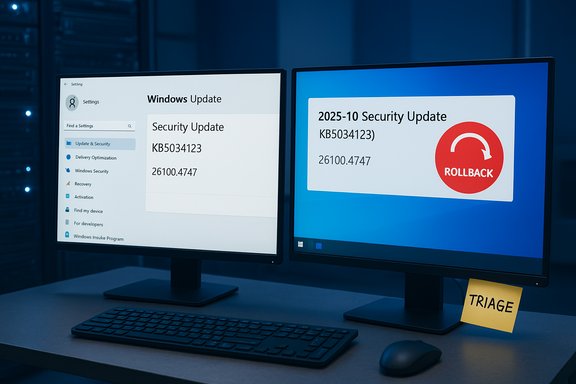
- Security Update (KB5034123) (26100.4747)
- Preview Update (KB5062660) (26100.4770)
- .NET Framework Security Update (KB5056579)
- Logitech Driver Update (123.331.1.0)
- Phi Silica AI Component Update (KB5064650) (1.2507.793.0)
Where the change appears and where it doesn’t
Microsoft limited the simplified titles to end‑user surfaces: Settings → Windows Update and Settings → Windows Update → Update history. Importantly, the Microsoft Update Catalog, WSUS, and other enterprise distribution tooling were noted as largely unchanged so that programmatic and catalog-oriented scenarios keep full descriptive names for packaging, filtering, and automation. Microsoft framed this split as balancing everyday user clarity with enterprise fidelity.Rollout details and control
The name change is a server-side change: Windows client UIs display titles Microsoft publishes, and there is no local toggle for end users to revert to the legacy long-form labels. That design decision meant the new labels began appearing automatically for many users, without an in-place option to switch back.Why the change triggered a backlash
Operational dependency on dates and descriptors
To a consumer the month/year token might appear cosmetic, but for administrators and frontline support teams the YYYY‑MM prefix and explicit descriptors like “Cumulative Update” are vital. They provide an immediate, glanceable mapping to the servicing calendar: Patch Tuesday cycles, preview windows, and out‑of‑band fixes. Removing that context forced many teams to look up KB numbers or dig into logs during triage, which increased mean time to resolution and ticket handling friction. Multiple community threads and industry outlets documented fast, widespread pushback from sysadmins and help‑desk operators.Broken assumptions and brittle tooling
Many smaller IT teams — and some legacy scripts — relied on parsing visible update titles for quick categorization. When Microsoft removed predictable tokens, those brittle parsing routines failed or returned ambiguous results. Even where robust tooling existed, the mixed appearance between client UIs and enterprise consoles created transient confusion: a help‑desk agent might see a short label in Settings while WSUS or the Microsoft Update Catalog showed the full catalog title, producing mismatches in communications and escalation steps.The human factor
Help desks frequently operate through visual checks and short verbal confirmation steps with end users. Seeing “2025‑10 Cumulative Update…” instantly situates an operator; a stripped-down “Security Update (KBXXXXX)” forces more cognitive load and an extra lookup. That small cost multiplied across thousands of daily support interactions, which is why the feedback rapidly coalesced into audible discontent.Microsoft listens — what the company has said and what it will change
Microsoft publicly acknowledged the feedback and updated its support note to reflect that the company was actively listening to user and admin input. In short order the company committed to restore the month/year date prefix to update titles shown in Settings and Update history, while continuing to weigh other simplifications. The change was described as a refinement rather than a wholesale rollback: Microsoft aims to keep the interface cleaner for everyday users but recognized the operational importance of visible date context for administrators. This response is notable for three reasons:- Microsoft accepted the operational concerns and acknowledged the need for a compromise between usability and administrative transparency.
- The restoration is a server‑side adjustment and will be phased through Microsoft’s normal rollout channels; timing across devices, languages, and release rings may vary. That means organizations should expect a staged arrival of the fix rather than an immediate global flip.
- Microsoft left the door open on which specific tokens will return permanently; some strings (for example, whether the explicit phrase “Cumulative Update” reappears universally) may remain under consideration while the company monitors feedback. Treat those elements as unresolved until Microsoft publishes definitive guidance.
Technical analysis: benefits, tradeoffs, and risks
Benefits of the simplified approach (what Microsoft was trying to solve)
- Improved readability: Shorter labels reduce line wrapping and visual clutter in the Settings UI, making the list easier to scan for non‑technical users.
- Predictability: A single, consistent pattern (classification + KB + compact token) helps OEMs and partners integrate support flows and documentation more easily.
- Accessibility: Concise headings are easier for screen readers and assistive technologies to present consistently, improving the accessibility of update information.
- Modern catalog plumbing: By relying on richer structured metadata in the Windows Update for Business catalog and Graph APIs, the UI can offer cleanliness without losing programmatic fidelity. That model encourages tools to consume canonical metadata instead of parsing free text.
Tradeoffs and risks (what went wrong in practice)
- Loss of glanceable context: Administrators lost an immediate visual link to the release month, which slowed triage and auditing tasks. This was the principal operational problem that prompted the rollback.
- Mixed-surface confusion: Different titles between client UIs and enterprise consoles produced short-term friction and miscommunication during support calls.
- Legacy automation fragility: Tools and scripts that relied on visible tokens rather than canonical identifiers can break silently, creating compliance blind spots and reporting inaccuracies.
- Staged rollouts create transient variability: Server-side rollouts commonly produce mixed experiences across devices and regions during propagation. That transient variability is a nuisance for administrators managing large estates.
Where Microsoft was right — and where it missed the mark
Microsoft’s intent to reduce UI clutter and improve accessibility is valid: many users never need the full catalog title and benefit from a cleaner presentation. The problem was the one-size-fits-all exposure of that simplification without an obvious fallback for operational use. The lesson is that display strings are not merely cosmetic; they are operational affordances in enterprise contexts and must be handled as such.Practical recommendations for IT teams and power users
The naming experiment — and the partial reversal — should prompt immediate action to reduce future risk and friction.- Stop parsing UI labels. Rely on canonical identifiers (KB numbers, package GUIDs, package hashes) and ingestion of Microsoft’s catalog metadata via APIs for automation and reporting.
- Integrate Windows Update for Business catalog/Graph APIs. Use Microsoft Graph or Update for Business APIs to fetch machine-readable fields (classification, cadence, release date, package ID) rather than scraping UI text.
- Update runbooks and KBs. Teach help-desk staff how to find the KB number and build token in Update history and how to reference the Microsoft Update Catalog quickly. Include copy-paste guidance to reduce transcription errors.
- Validate patch-management connectors. Ensure WSUS/ConfigMgr/Intune connectors and third-party patch tools match on KB/package GUID and don’t rely on display strings.
- Monitor rollout behavior. Expect a staged return of the date token and watch for mixed states. Test on a pilot group and validate uninstall and detection behaviors during the transition window.
Implications for developers, OEMs, and tool vendors
- Tool vendors should prioritize canonical identifiers in APIs and dashboards. If a product still relies on title parsing, it needs a roadmap to migrate to KB/package GUID lookups.
- OEMs and partners gain from predictable user‑friendly names, but must also ensure their support documentation maps those short names back to canonical KBs and release dates to avoid customer confusion.
- Microsoft’s catalog-first approach signals a broader push to modernize update plumbing. Vendors that build tooling on top of Microsoft’s catalog and Graph APIs will be better positioned for future changes than those that scrape UI strings.
What remains unclear — flagged items and cautionary notes
- The exact timing and scope of the restored date token across all SKUs, languages, and release rings are not exhaustively documented. Microsoft’s server-side rollouts are typically phased, and that means administrators should expect a non‑uniform experience until propagation completes. Treat any specific “all-devices” timing claims with caution until verified in your estate.
- It is not yet public whether Microsoft will restore every previous descriptor (for example, the literal phrase “Cumulative Update” across all update types). Early statements indicate the month/year prefix will return, but other labels may be handled on a case-by-case basis depending on ongoing feedback. This is a provisional area to monitor.
- Any claims that the UI change signals deeper servicing behavior changes (for example, changes to reboot behavior, installation ordering, or the underlying orchestration platform) are unverified unless Microsoft publishes detailed engineering notes. Do not conflate a titling adjustment with servicing or installation semantics without direct confirmation. Flag such inferences as speculative.
Longer‑term takeaways for Microsoft and the Windows ecosystem
- User experience and enterprise utility must be designed together. Small UI changes can have outsized operational consequences when admins and help desks use those displays as signals. Future UX experiments should include structured enterprise impact assessments and a pilot phase with Insiders or enterprise customers before server-wide rollouts.
- Catalog-first modernization is the right architectural direction. A robust, machine-readable catalog means the UI can safely be human-friendly if the tooling and documentation make canonical keys easy to obtain. The friction arises when tooling and operational practices haven’t caught up — an integration gap Microsoft and partners should close.
- Communication and rollback mechanics matter. Microsoft’s quick acknowledgement and partial reversal demonstrate the value of listening, but the incident also underlines that server-side changes require clearer advance notice and migration guidance for organizations that operate at scale.
Conclusion
The simplified Windows Update naming experiment exposed a long-standing fault line between consumer usability and enterprise operational needs. Microsoft’s decision to listen to feedback and restore date prefixes is the pragmatic outcome: a cleaner UI for most users without stripping away the glanceable context administrators need. The incident is a reminder that seemingly cosmetic UI strings carry real operational weight, and it underlines the imperative for organizations to stop relying on fragile display text — instead, adopt canonical identifiers, leverage Microsoft’s catalog and Graph APIs, and harden tooling against UI churn.For Windows enthusiasts, IT pros, and vendor partners, the immediate priorities are simple: update your runbooks, validate your tooling against canonical IDs, and monitor the staged rollout. For Microsoft, the lesson is urgent but manageable: evolve the UI, but do so with the people who run Windows at scale in the loop from the start.
Source: Windows Central Microsoft responds to push back from users — will listen to feedback regarding new simplified naming scheme for Windows 11 updates
