

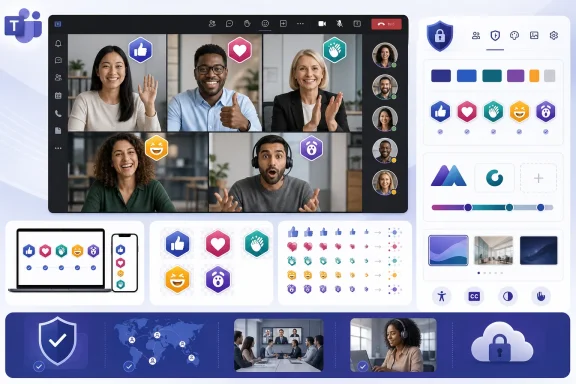
Microsoft Teams has turned one of its smallest meeting controls into a new piece of corporate real estate. Branded meeting reactions are now launched for Teams desktop users in the worldwide standard commercial cloud, allowing IT administrators to replace the familiar Like, Heart, Applause, Laugh, and Surprised graphics with approved icons tied to an organization, business unit, campaign, or event. The feature reached general availability in May 2026 under Microsoft 365 Roadmap ID 541830, and Microsoft’s July 21 roadmap update confirms the rollout as launched across both General Availability and Targeted Release channels.
Live reactions became important during the rapid expansion of hybrid work because they gave participants a low-friction way to respond without interrupting a speaker. A thumbs-up could communicate agreement, applause could acknowledge a result, and the raised-hand control could restore some meeting order when dozens of people were connected remotely.
Microsoft gradually developed these lightweight signals into a standard part of the Teams meeting experience. Reactions appear briefly over a participant’s video or profile image and can also rise from the bottom of the meeting stage when content is being shared.
Until now, however, the visual vocabulary belonged almost entirely to Microsoft. Organizations could control whether reactions were available, but the core Like, Heart, Applause, Laugh, and Surprised designs remained part of the standard Teams interface.
Branded meeting reactions change that relationship. They let an organization preserve the meaning of those five controls while replacing Microsoft’s default graphics with imagery drawn from its own visual identity.
Teams administrators can also distribute organizational meeting backgrounds and create customization policies for different groups. Branded reactions fill a previously untouched space: the active participation layer of the meeting itself.
That distinction matters. A lobby logo is visible while someone waits, but a reaction is deliberately selected and sent by a participant. The brand is no longer merely displayed around the conversation; it becomes part of how people communicate within it.
Microsoft’s administrator documentation describes branded reactions as replacements for the five principal live-reaction categories:
Instead, this is a controlled reskinning of an established interaction model. A company mascot might clap for the Applause reaction, for example, while a recognizable brand symbol might animate for Like.
This approach limits flexibility, but it also protects usability. Participants can continue relying on the familiar positions and meanings of the reaction controls even when the illustrations differ from Microsoft’s defaults.
The listed deployment scope is:
Administrators manage these assets through meeting customization policies in the Teams admin center. A policy can be assigned to selected users or groups, allowing the tenant to maintain different sets for departments, subsidiaries, customer-facing teams, or major events.
Microsoft’s recommended technical specifications are unusually precise:
It also gives administrators a deterministic result. The animation does not depend on a browser interpreting a third-party format, nor does it require executable content embedded in the reaction.
From a security perspective, restricting the feature to carefully structured PNG files is sensible. From a design perspective, however, it creates a strict production template that brand teams must follow exactly.
A customization policy can contain up to five meeting themes. This allows organizers covered by that policy to choose appropriate branding for different meeting types rather than applying one corporate design indiscriminately.
Administrators can also allow organizers to disable meeting themes for individual meetings. If enabled, that control lets an organizer revert a meeting to the standard Teams appearance through Meeting options.
The organizer override is useful when corporate branding would be inappropriate, distracting, or confusing. Examples include sensitive employee conversations, cross-company working groups, legal proceedings, accessibility accommodations, and meetings in which another organization is clearly acting as host.
Participants do not all need Teams Premium simply to see the theme. Internal users without the add-on, guests, external participants, and anonymous attendees can view supported branding when they join an eligible meeting.
However, administrators should verify the end-to-end entitlement rather than reading the roadmap entry as evidence that every Microsoft 365 customer receives full authoring rights. A feature can be globally launched while still requiring an additional license for the people who create or organize qualifying meetings.
Licensing strategy should therefore follow usage. Giving Teams Premium only to a few centralized event producers may work for a tightly managed company, while a large consulting or sales organization may need a much broader assignment.
That does not necessarily mean a mobile participant will be unable to participate in every themed meeting, but it does mean administrators must test the exact reaction experience rather than assuming visual parity. A campaign that depends on every attendee seeing a distinctive mascot animation could lose impact when some participants join from unsupported or differently implemented clients.
Organizations should test at least the following:
A detailed corporate logo that looks excellent in a presentation header may turn into an indistinct patch at 100 pixels. Text-heavy designs are especially risky because the reaction may disappear before viewers can read them.
For instance, an Applause reaction could use a mascot whose hands clap visibly, while a Like reaction could show a brand symbol moving upward in a gesture associated with approval. Merely flashing a corporate logo five times would technically create motion but would do little to reinforce the intended meaning.
The 51-frame structure also requires discipline. Designers have enough frames to create a smooth effect, but too much movement can become distracting when several attendees react simultaneously.
Testing should therefore include multiple contrast conditions. Designers may need outlines, carefully chosen shadows, or simplified shapes to keep the reaction legible without making it look oversized.
Microsoft may also adjust a theme’s chosen colors to preserve accessibility. Brand owners should be warned that the exact on-screen result may differ from an original color specification when Teams calculates a more accessible output.
That creates an opportunity to make virtual events feel less generic. It also creates the risk that branding will intrude into areas where people expect neutral, universal controls.
Organizations could also build temporary themes around annual conferences, product launches, employee-recognition programs, volunteer campaigns, or company anniversaries. Because policies can carry multiple themes, the same tenant can support both permanent corporate artwork and short-lived event designs.
Yet branded reactions should not become a substitute for meaningful recognition. An animated icon may make an announcement more engaging, but it cannot replace compensation, feedback, career development, or direct acknowledgment from leadership.
A branded Applause animation during a product demonstration can make the environment feel deliberately produced. For high-value customer events, that consistency may help Teams compete with specialized webinar and virtual-event platforms.
The danger is overproduction. Customers attend meetings for information and access, not to be surrounded by constant advertising. The best designs will behave like subtle environmental branding rather than animated promotional banners.
Large organizations will need governance that explains who can request a theme, who approves the artwork, how long event-specific assets remain active, and which groups receive each policy.
Teams customization policies can help separate those identities. Administrators can create a policy for each approved brand and assign it to the relevant licensed organizer population.
This is useful after an acquisition, when immediately forcing everyone into the parent company’s visual identity may be undesirable. A subsidiary can retain customer recognition while the back-end Microsoft 365 environment is consolidated.
Policy design still needs care. An incorrectly assigned theme could cause a user to host a customer meeting under the wrong brand, potentially creating confusion about which legal entity, product, or service is represented.
IT teams should avoid accepting files through informal chat messages and uploading them directly into production. A lightweight request and approval process will reduce errors and make it possible to trace why an asset was authorized.
Enterprises may also want a staging policy assigned to a small validation group. That gives communications and accessibility reviewers a controlled environment in which to test the full animation before customers or the wider workforce sees it.
For small businesses with Teams Premium, however, branded reactions may be easier to deploy than many enterprise-oriented features. A small design agency, training provider, or event company can create one polished theme and apply it to its primary meeting organizers without building a complicated policy hierarchy.
A company that primarily conducts internal calls may gain little from commissioning five animated sprite sheets. In that case, standard reactions are already familiar, inclusive, and maintenance-free.
Small organizations should therefore start with a single use case rather than customizing everything. A major virtual event or recurring customer onboarding session offers a clearer test than an immediate company-wide rollout.
The replacement image must still make sense to participants with different cultural backgrounds, levels of familiarity with the brand, and cognitive or visual needs. An obscure internal symbol may delight long-serving employees while leaving guests completely confused.
One response is to use abstract symbols, mascots, objects, or neutral graphical forms rather than human skin. Another is to create inclusive imagery that does not imply one default physical appearance represents the entire organization.
This is not simply a public-relations concern. Reactions are supposed to lower barriers to participation, and a design that excludes or confuses part of the audience works against the feature’s basic purpose.
The brand experience will therefore never be perfectly identical for every participant. Accessibility and comprehensibility should take priority over visual uniformity.
A good implementation accepts graceful fallback. The meeting must remain functional and understandable even when custom assets are unavailable, disabled, or replaced by standard controls.
That places responsibility on the customer. Administrators must ensure that uploaded content is licensed, approved, and appropriate for the audiences that may see it.
Participants should not treat a branded lobby or reaction set as proof of identity. The meeting invitation, organizer account, tenant relationship, and established communication channel remain more reliable signals.
Organizations should educate employees to verify unexpected meetings even when the visual experience appears legitimate. Branding can increase confidence, but attackers may attempt to exploit that confidence.
Confidential campaign artwork, unreleased product branding, internal code names, and restricted event imagery should not be placed into an active public-facing theme without a deliberate review.
Deleting or retiring a theme should also be part of incident response. If an asset is uploaded incorrectly, administrators need to remove it from the relevant customization policy rather than assuming that disabling a local file will erase the meeting-facing copy.
Teams already has an advantage because meeting branding can be connected to Microsoft 365 identities, groups, policies, licensing, and administrative roles. Branded reactions deepen that integration without requiring a separate event platform.
Branded reactions alone are unlikely to justify an upgrade. Their value comes from being combined with meeting themes, custom backgrounds, templates, webinars, town halls, and other premium features.
This packaging may appeal to enterprises that already standardize on Teams. Rather than licensing a separate branded-events product, they can extend an existing platform and administrative model.
Microsoft has limited that risk by preserving the five familiar reaction categories. Even so, aggressive animation or unclear artwork can make meetings feel busier.
The competitive advantage will depend less on whether Teams supports custom reactions and more on whether Microsoft keeps them predictable, performant, accessible, and easy to govern.
Administrators should also watch for changes to licensing, sovereign-cloud availability, asset specifications, and policy controls. The July 21 roadmap update confirms the feature as launched for worldwide standard multi-tenant customers, but it does not promise availability in every Microsoft cloud or on every client.
A safer expansion would involve optional categories with standardized meanings. Microsoft could define additional semantic slots, such as Celebrate or Agree, while letting administrators supply the artwork.
Motion-reduction support will be important as well. Participants who prefer reduced animation should be able to receive a static equivalent without losing the communicative meaning of the reaction.
Usage analytics could help organizations determine whether participants actually use the custom reactions. Such reporting would need careful privacy boundaries, particularly if reaction activity could be attributed to individuals.
The most useful analytics would focus on aggregate adoption and technical reliability rather than turning lightweight expressions into another form of employee monitoring.
A unified brand center for meeting invitations, themes, backgrounds, reactions, webinars, and town halls would reduce duplication. It would also make it easier to revoke an outdated logo across every Teams surface from one location.
Microsoft Teams branded meeting reactions are a small feature with surprisingly broad implications. They give organizations a new way to make digital meetings feel intentional, culturally specific, and visually coherent, but they also move corporate branding into an area of direct human expression. The organizations that gain the most will not be those that replace every emoji as quickly as possible; they will be those that combine careful design, limited scope, accessibility testing, licensing discipline, and clear governance to make reactions more engaging without making meetings less understandable.
 Background
Live reactions became important during the rapid expansion of hybrid work because they gave participants a low-friction way to respond without interrupting a speaker. A thumbs-up could communicate agreement, applause could acknowledge a result, and the raised-hand control could restore some meeting order when dozens of people were connected remotely.Microsoft gradually developed these lightweight signals into a standard part of the Teams meeting experience. Reactions appear briefly over a participant’s video or profile image and can also rise from the bottom of the meeting stage when content is being shared.
Until now, however, the visual vocabulary belonged almost entirely to Microsoft. Organizations could control whether reactions were available, but the core Like, Heart, Applause, Laugh, and Surprised designs remained part of the standard Teams interface.
Branded meeting reactions change that relationship. They let an organization preserve the meaning of those five controls while replacing Microsoft’s default graphics with imagery drawn from its own visual identity.
Part of the broader branded-meetings strategy
This feature is not an isolated cosmetic experiment. It extends the meeting-theme system already used to apply corporate colors, logos, and imagery to surfaces such as the meeting invitation, join launcher, pre-join experience, and lobby.Teams administrators can also distribute organizational meeting backgrounds and create customization policies for different groups. Branded reactions fill a previously untouched space: the active participation layer of the meeting itself.
That distinction matters. A lobby logo is visible while someone waits, but a reaction is deliberately selected and sent by a participant. The brand is no longer merely displayed around the conversation; it becomes part of how people communicate within it.
What Microsoft Is Launching
According to the updated roadmap entry, administrators can upload custom reaction icons that reflect company branding or an event theme. Those assets then become available to participants in meetings using the associated theme and policy.Microsoft’s administrator documentation describes branded reactions as replacements for the five principal live-reaction categories:
- Like remains the basic signal for approval or agreement.
- Heart remains an expression of support, appreciation, or enthusiasm.
- Applause continues to recognize a speaker, announcement, or achievement.
- Laugh provides a lightweight response to humor.
- Surprised communicates astonishment or an unexpected result.
Why the fixed meanings are important
Teams is not opening an unrestricted custom-emoji marketplace inside meetings. An administrator cannot simply add dozens of arbitrary controls to the reaction tray or redefine a button so thoroughly that participants cannot predict what it means.Instead, this is a controlled reskinning of an established interaction model. A company mascot might clap for the Applause reaction, for example, while a recognizable brand symbol might animate for Like.
This approach limits flexibility, but it also protects usability. Participants can continue relying on the familiar positions and meanings of the reaction controls even when the illustrations differ from Microsoft’s defaults.
Roadmap and release details
Microsoft created Roadmap ID 541830 on December 16, 2025. General availability was scheduled for May 2026, and the listing now carries a Launched status following its July 21, 2026 update.The listed deployment scope is:
- Microsoft Teams is the affected product.
- Desktop is the currently specified platform.
- General Availability and Targeted Release are the named release rings.
- Worldwide standard multi-tenant customers are included.
- Government and sovereign cloud instances are not listed in the roadmap entry.
- General availability began in May 2026.
How Branded Reactions Work
Branded reactions live inside a Teams meeting theme rather than operating as a completely separate tenant-wide emoji library. The theme can combine reactions with an organizational logo, custom image, and brand color, creating a coordinated package for meetings and events.Administrators manage these assets through meeting customization policies in the Teams admin center. A policy can be assigned to selected users or groups, allowing the tenant to maintain different sets for departments, subsidiaries, customer-facing teams, or major events.
Static and animated assets
Each customized reaction can use two related PNG assets. The first is a static icon, while the second is a vertical sprite sheet containing the frames Teams uses to display the animation.Microsoft’s recommended technical specifications are unusually precise:
- The static reaction should be a transparent PNG measuring 100 by 100 pixels.
- Each animation frame should also measure 100 by 100 pixels.
- The animated asset should be a vertical PNG sprite sheet.
- The sprite should contain 51 frames with no gaps between them.
- The completed sprite sheet should measure 100 by 5,100 pixels.
- Playback is designed around 24 frames per second.
- The key visual moment should occur around frame 23.
- Microsoft reserves transition frames for fade-in and fade-out behavior.
Why Microsoft chose a sprite sheet
A sprite sheet packages every animation frame into one image rather than requiring the client to retrieve dozens of individual files. The Teams client can move through the vertical frames in a predictable sequence, reducing asset-management complexity and helping Microsoft control timing.It also gives administrators a deterministic result. The animation does not depend on a browser interpreting a third-party format, nor does it require executable content embedded in the reaction.
From a security perspective, restricting the feature to carefully structured PNG files is sensible. From a design perspective, however, it creates a strict production template that brand teams must follow exactly.
Administrative Setup
The setup process begins in the Teams admin center under the Meetings area. Microsoft recommends using Customization policies, even though administrators may encounter access points to meeting visuals elsewhere in the policy interface.A customization policy can contain up to five meeting themes. This allows organizers covered by that policy to choose appropriate branding for different meeting types rather than applying one corporate design indiscriminately.
A practical deployment sequence
A controlled implementation should follow a deliberate order:- Identify the meeting scenarios. Decide whether branded reactions will be used globally, by a department, for customer meetings, or for a specific event.
- Secure approved source artwork. Obtain logos, mascots, characters, colors, and iconography from the organization’s authorized brand owner.
- Map each design to a reaction meaning. Ensure that Like, Heart, Applause, Laugh, and Surprised remain immediately understandable.
- Produce the static PNG files. Create transparent 100-by-100-pixel icons and test them at normal Teams display sizes.
- Build the animated sprite sheets. Export 51 correctly aligned frames for each animated reaction.
- Upload and preview the assets. Use the custom-reactions preview to inspect static appearance, timing, transparency, and clipping.
- Activate the theme. Apply the finished theme and switch its active status on.
- Assign the customization policy. Target a pilot group before expanding deployment to additional users.
- Schedule representative test meetings. Include internal users, guests, anonymous attendees, and participants using different devices.
- Collect feedback and revise. Correct any ambiguity, distracting animation, inaccessible design, or unwanted brand exposure before broad adoption.
Policy scope and organizer control
Customization policies can be assigned to users or groups. A multinational company could maintain separate themes for regional brands, while a holding company could provide distinct visual packages to each subsidiary without creating separate Teams tenants.Administrators can also allow organizers to disable meeting themes for individual meetings. If enabled, that control lets an organizer revert a meeting to the standard Teams appearance through Meeting options.
The organizer override is useful when corporate branding would be inappropriate, distracting, or confusing. Examples include sensitive employee conversations, cross-company working groups, legal proceedings, accessibility accommodations, and meetings in which another organization is clearly acting as host.
Licensing and Availability
Although the roadmap entry focuses on the rollout of branded reactions, Microsoft places the capability within the broader meeting-themes framework. The organizer creating a meeting or event with a branded theme needs a Teams Premium license and an assigned customization policy.Participants do not all need Teams Premium simply to see the theme. Internal users without the add-on, guests, external participants, and anonymous attendees can view supported branding when they join an eligible meeting.
The organizer-based licensing model
This model resembles other premium meeting capabilities in which the organizer’s license unlocks a richer experience for attendees. It can make targeted licensing practical because an organization may only need Teams Premium for employees who routinely host customer briefings, executive events, training sessions, webinars, or branded presentations.However, administrators should verify the end-to-end entitlement rather than reading the roadmap entry as evidence that every Microsoft 365 customer receives full authoring rights. A feature can be globally launched while still requiring an additional license for the people who create or organize qualifying meetings.
Licensing strategy should therefore follow usage. Giving Teams Premium only to a few centralized event producers may work for a tightly managed company, while a large consulting or sales organization may need a much broader assignment.
Desktop-first limitations
The roadmap identifies Desktop as the supported platform for this release. Microsoft’s documentation for meeting-theme assets also warns that some images are not visible on mobile clients.That does not necessarily mean a mobile participant will be unable to participate in every themed meeting, but it does mean administrators must test the exact reaction experience rather than assuming visual parity. A campaign that depends on every attendee seeing a distinctive mascot animation could lose impact when some participants join from unsupported or differently implemented clients.
Organizations should test at least the following:
- The current Teams desktop client on Windows.
- Teams desktop on macOS if it is used within the organization.
- Teams on the web, where live-reaction support can differ.
- Teams for iOS and Android.
- Teams Rooms and shared meeting devices.
- Guest and anonymous join scenarios.
- Meetings with content sharing, video effects, and breakout rooms.
The Technical Design Challenge
The upload process may be simple from the administrator’s perspective, but producing good reaction artwork is not. A reaction has to remain readable when shown briefly, over video, against changing content, and at a relatively small size.A detailed corporate logo that looks excellent in a presentation header may turn into an indistinct patch at 100 pixels. Text-heavy designs are especially risky because the reaction may disappear before viewers can read them.
Designing for motion and scale
Good reaction artwork should use a strong silhouette, limited detail, high contrast, and one obvious focal movement. The animation must communicate its meaning almost immediately because participants will not pause the meeting to study it.For instance, an Applause reaction could use a mascot whose hands clap visibly, while a Like reaction could show a brand symbol moving upward in a gesture associated with approval. Merely flashing a corporate logo five times would technically create motion but would do little to reinforce the intended meaning.
The 51-frame structure also requires discipline. Designers have enough frames to create a smooth effect, but too much movement can become distracting when several attendees react simultaneously.
Transparency and visual backgrounds
Transparent PNG assets will appear over a wide range of backgrounds: light slides, dark desktop shares, blurred camera feeds, and multicolored video. Edges that look clean on a white design canvas can disappear or produce halos in a live meeting.Testing should therefore include multiple contrast conditions. Designers may need outlines, carefully chosen shadows, or simplified shapes to keep the reaction legible without making it look oversized.
Microsoft may also adjust a theme’s chosen colors to preserve accessibility. Brand owners should be warned that the exact on-screen result may differ from an original color specification when Teams calculates a more accessible output.
Branding Moves Into Participant Expression
The strategic significance of the feature is larger than the artwork itself. Microsoft is giving organizations control over a form of expression that employees and guests actively choose during a meeting.That creates an opportunity to make virtual events feel less generic. It also creates the risk that branding will intrude into areas where people expect neutral, universal controls.
Internal culture and recognition
For internal meetings, branded reactions could reinforce a shared culture when used sparingly. A company mascot applauding a project milestone may feel warmer and more specific than a generic pair of clapping hands.Organizations could also build temporary themes around annual conferences, product launches, employee-recognition programs, volunteer campaigns, or company anniversaries. Because policies can carry multiple themes, the same tenant can support both permanent corporate artwork and short-lived event designs.
Yet branded reactions should not become a substitute for meaningful recognition. An animated icon may make an announcement more engaging, but it cannot replace compensation, feedback, career development, or direct acknowledgment from leadership.
Customer-facing meetings
External meetings present a clearer commercial opportunity. Consulting companies, financial institutions, universities, nonprofits, and professional-services firms can create a more cohesive visual journey from invitation to lobby to meeting interaction.A branded Applause animation during a product demonstration can make the environment feel deliberately produced. For high-value customer events, that consistency may help Teams compete with specialized webinar and virtual-event platforms.
The danger is overproduction. Customers attend meetings for information and access, not to be surrounded by constant advertising. The best designs will behave like subtle environmental branding rather than animated promotional banners.
Enterprise Impact
For enterprises, the feature introduces a new asset class that sits between collaboration administration and brand management. IT owns the upload and policy mechanisms, but it should not automatically own the visual decisions.Large organizations will need governance that explains who can request a theme, who approves the artwork, how long event-specific assets remain active, and which groups receive each policy.
Multiple brands in one tenant
Many enterprises operate more than one recognizable identity. Subsidiaries, acquired companies, regional operations, and consumer product divisions may share a Microsoft 365 tenant while maintaining different customer-facing brands.Teams customization policies can help separate those identities. Administrators can create a policy for each approved brand and assign it to the relevant licensed organizer population.
This is useful after an acquisition, when immediately forcing everyone into the parent company’s visual identity may be undesirable. A subsidiary can retain customer recognition while the back-end Microsoft 365 environment is consolidated.
Policy design still needs care. An incorrectly assigned theme could cause a user to host a customer meeting under the wrong brand, potentially creating confusion about which legal entity, product, or service is represented.
Change control and operational ownership
Reaction assets should enter the same lifecycle used for other managed corporate materials. Each file should have an owner, approval date, version, intended audience, and retirement plan.IT teams should avoid accepting files through informal chat messages and uploading them directly into production. A lightweight request and approval process will reduce errors and make it possible to trace why an asset was authorized.
Enterprises may also want a staging policy assigned to a small validation group. That gives communications and accessibility reviewers a controlled environment in which to test the full animation before customers or the wider workforce sees it.
Consumer and Small-Business Impact
The immediate audience is organizational Teams administration rather than individual consumers. Personal Teams users cannot simply upload a favorite set of reactions into every meeting they attend.For small businesses with Teams Premium, however, branded reactions may be easier to deploy than many enterprise-oriented features. A small design agency, training provider, or event company can create one polished theme and apply it to its primary meeting organizers without building a complicated policy hierarchy.
Value depends on meeting volume
The return on effort will vary sharply. A business that hosts frequent customer workshops could reuse the same assets hundreds of times, making the design cost relatively minor.A company that primarily conducts internal calls may gain little from commissioning five animated sprite sheets. In that case, standard reactions are already familiar, inclusive, and maintenance-free.
Small organizations should therefore start with a single use case rather than customizing everything. A major virtual event or recurring customer onboarding session offers a clearer test than an immediate company-wide rollout.
Accessibility and Inclusion
Microsoft says custom reactions should be recognizable, inclusive, and representative of the organization’s brand. That guidance is essential because a reaction is a communication control, not merely decoration.The replacement image must still make sense to participants with different cultural backgrounds, levels of familiarity with the brand, and cognitive or visual needs. An obscure internal symbol may delight long-serving employees while leaving guests completely confused.
Skin-tone support remains a limitation
Microsoft’s current documentation notes that branded meeting reactions do not yet support participants’ selected skin-tone preferences. That limitation deserves consideration whenever a custom design depicts hands or people.One response is to use abstract symbols, mascots, objects, or neutral graphical forms rather than human skin. Another is to create inclusive imagery that does not imply one default physical appearance represents the entire organization.
This is not simply a public-relations concern. Reactions are supposed to lower barriers to participation, and a design that excludes or confuses part of the audience works against the feature’s basic purpose.
High-contrast experiences
Users who enable high-contrast device settings may continue to see the default Teams experience rather than the meeting branding. Administrators and organizers should regard that as expected accessibility behavior, not a defect to work around.The brand experience will therefore never be perfectly identical for every participant. Accessibility and comprehensibility should take priority over visual uniformity.
A good implementation accepts graceful fallback. The meeting must remain functional and understandable even when custom assets are unavailable, disabled, or replaced by standard controls.
Security, Privacy, and Authenticity
Custom reaction files may look harmless, but anything displayed to external participants requires governance. Microsoft does not validate whether an organization owns the logos or images uploaded into its meeting themes.That places responsibility on the customer. Administrators must ensure that uploaded content is licensed, approved, and appropriate for the audiences that may see it.
Brand impersonation
The absence of Microsoft-side ownership validation creates an authenticity problem. A tenant could theoretically upload imagery associated with another organization, making a meeting appear more official than it is.Participants should not treat a branded lobby or reaction set as proof of identity. The meeting invitation, organizer account, tenant relationship, and established communication channel remain more reliable signals.
Organizations should educate employees to verify unexpected meetings even when the visual experience appears legitimate. Branding can increase confidence, but attackers may attempt to exploit that confidence.
External visibility of assets
Microsoft warns that theme images and associated image locations may be visible to meeting participants, including guests, unverified users, anonymous users, and anyone possessing the meeting link. Organizations should therefore upload only material suitable for external disclosure.Confidential campaign artwork, unreleased product branding, internal code names, and restricted event imagery should not be placed into an active public-facing theme without a deliberate review.
Deleting or retiring a theme should also be part of incident response. If an asset is uploaded incorrectly, administrators need to remove it from the relevant customization policy rather than assuming that disabling a local file will erase the meeting-facing copy.
Competitive Implications
Microsoft is following a broader collaboration-market shift from generic videoconferencing toward managed digital venues. Enterprise customers increasingly expect virtual meetings to carry the same visual discipline as physical conference rooms, reception areas, and customer events.Teams already has an advantage because meeting branding can be connected to Microsoft 365 identities, groups, policies, licensing, and administrative roles. Branded reactions deepen that integration without requiring a separate event platform.
A premium differentiation strategy
The feature also supports Microsoft’s strategy of using Teams Premium to package advanced meeting personalization, protection, and intelligence. Core meetings remain widely available, while organizations pay more for controlled themes, templates, richer event experiences, and other specialized capabilities.Branded reactions alone are unlikely to justify an upgrade. Their value comes from being combined with meeting themes, custom backgrounds, templates, webinars, town halls, and other premium features.
This packaging may appeal to enterprises that already standardize on Teams. Rather than licensing a separate branded-events product, they can extend an existing platform and administrative model.
The risk of feature clutter
Every added meeting control competes for attention in an interface already managing cameras, microphones, screen sharing, chat, hand raising, apps, Copilot features, notes, recordings, and participant controls.Microsoft has limited that risk by preserving the five familiar reaction categories. Even so, aggressive animation or unclear artwork can make meetings feel busier.
The competitive advantage will depend less on whether Teams supports custom reactions and more on whether Microsoft keeps them predictable, performant, accessible, and easy to govern.
Strengths and Opportunities
Branded meeting reactions offer several practical advantages when deployed for a clearly defined purpose.- They extend branding into active participation. Participants engage with the organization’s visual language rather than only seeing it in a lobby or background.
- They support event-specific experiences. Conferences, product launches, training programs, and recognition events can use temporary reaction sets.
- They preserve familiar interaction meanings. The five established categories reduce the learning curve compared with a completely custom reaction system.
- They enable policy-based segmentation. Different departments, subsidiaries, or organizer groups can receive distinct themes within one tenant.
- They can improve production consistency. Invitations, pre-join screens, lobbies, colors, logos, backgrounds, and reactions can form a coordinated experience.
- They can strengthen customer-facing meetings. Sales, consulting, education, and professional-services teams can present a more deliberate digital venue.
- They use controlled image formats. Static PNGs and sprite sheets provide a constrained asset model rather than introducing executable custom content.
- They offer broad attendee visibility. A licensed organizer can expose the supported theme to many participants who do not themselves have Teams Premium.
Risks and Concerns
The feature also introduces operational and experience risks that should not be dismissed as minor cosmetic issues.- Unclear designs can damage communication. A reaction that no longer resembles Like, Laugh, or Applause may confuse attendees at precisely the moment it should communicate quickly.
- Animations can become distracting. Several participants sending visually intense reactions at once could obscure content or reduce the professionalism of a meeting.
- Platform support may be inconsistent. The roadmap’s desktop focus means mobile, web, and room-system behavior must be tested separately.
- Licensing may limit adoption. Organizers need the appropriate Teams Premium entitlement and policy assignment to create themed meetings.
- Skin-tone preferences are not supported. Human or hand-based artwork requires particular care to avoid exclusion.
- Brand ownership is not validated by Microsoft. Customers must prevent unauthorized, infringing, or deceptive imagery from entering production.
- External participants can see the assets. Internal or confidential artwork could be exposed if administrators upload it without review.
- Policy mistakes can apply the wrong identity. Users may receive branding intended for another department, subsidiary, or customer scenario.
- Temporary themes can become permanent clutter. Event assets need expiry dates and retirement procedures.
- Branding can overwhelm the meeting. The collaboration itself should remain more important than the graphics surrounding it.
What to Watch Next
Microsoft’s first release is intentionally constrained, but several areas could develop as customer use expands. Platform parity will be the most immediate issue, especially if organizations expect consistent behavior across desktop, mobile, web, and Teams Rooms.Administrators should also watch for changes to licensing, sovereign-cloud availability, asset specifications, and policy controls. The July 21 roadmap update confirms the feature as launched for worldwide standard multi-tenant customers, but it does not promise availability in every Microsoft cloud or on every client.
Broader reaction libraries
Microsoft may eventually allow more than five custom categories, although doing so would create substantial usability and moderation challenges. A larger library could support event voting, training feedback, or organization-specific acknowledgments, but it would also make the reaction tray less predictable.A safer expansion would involve optional categories with standardized meanings. Microsoft could define additional semantic slots, such as Celebrate or Agree, while letting administrators supply the artwork.
Better accessibility options
Skin-tone preference support is an obvious area for improvement. Microsoft could also provide automated checks for contrast, transparency, motion intensity, and semantic clarity before an administrator activates a reaction set.Motion-reduction support will be important as well. Participants who prefer reduced animation should be able to receive a static equivalent without losing the communicative meaning of the reaction.
Lifecycle and analytics controls
Enterprises may request scheduled activation and expiration for event themes. An administrator could prepare branding in advance, activate it for a conference, and have it retire automatically afterward.Usage analytics could help organizations determine whether participants actually use the custom reactions. Such reporting would need careful privacy boundaries, particularly if reaction activity could be attributed to individuals.
The most useful analytics would focus on aggregate adoption and technical reliability rather than turning lightweight expressions into another form of employee monitoring.
Governance templates
Microsoft could simplify deployment by providing built-in approval states, brand-owner roles, or asset libraries shared across Teams customization features. Today, organizations must create much of that operational process themselves.A unified brand center for meeting invitations, themes, backgrounds, reactions, webinars, and town halls would reduce duplication. It would also make it easier to revoke an outdated logo across every Teams surface from one location.
Microsoft Teams branded meeting reactions are a small feature with surprisingly broad implications. They give organizations a new way to make digital meetings feel intentional, culturally specific, and visually coherent, but they also move corporate branding into an area of direct human expression. The organizations that gain the most will not be those that replace every emoji as quickly as possible; they will be those that combine careful design, limited scope, accessibility testing, licensing discipline, and clear governance to make reactions more engaging without making meetings less understandable.
References
- Primary source: Microsoft 365 Roadmap
Published: 2026-07-21T22:37:32.0478671Z
Microsoft 365 Roadmap | Microsoft 365
The Microsoft 365 Roadmap lists updates that are currently planned for applicable subscribers. Check here for more information on the status of new features and updates.www.microsoft.com
- Official source: learn.microsoft.com
Manage reactions in Teams meetings and events - Microsoft Teams | Microsoft Learn
Learn to manage meeting reactions in Teams meetings and events.learn.microsoft.com - Official source: support.microsoft.com
Express yourself in Microsoft Teams meetings with live reactions | Microsoft Support
See how to express yourself visually during a meeting in Microsoft Teams by using like, love, applause, laugh, and surprise emoticons in real time.support.microsoft.com - Official source: techcommunity.microsoft.com
- Official source: adoption.microsoft.com
