

Microsoft Teams has quietly removed one of the most repetitive parts of running webinars, town halls, and other structured online events: rebuilding the configuration every time. With Microsoft 365 Roadmap item 561915 now marked Launched, organizers can save an existing event as a reusable template in the Teams Events app, preserving its setup while leaving the date and time open for the next session. The feature reached general availability in June 2026 for the Teams desktop client in Microsoft’s worldwide standard multi-tenant cloud, and it represents a small but strategically important step toward turning Teams events into repeatable business workflows rather than isolated calendar entries.
Microsoft Teams began primarily as a collaboration and meeting platform, but its role expanded rapidly as organizations moved training, corporate communications, customer engagement, and public presentations online. That expansion created demand for event formats with more structure than an ordinary meeting, including registration, presenter controls, branding, moderated audience participation, and support for larger attendance.
Microsoft responded with several overlapping experiences. Teams meetings handled interactive collaboration, webinars added registration and audience-management features, town halls focused on one-to-many broadcasts, and Teams live events served organizations with large-scale production requirements.
The newer Events app is intended to consolidate much of that work. It provides a central Teams experience for creating, customizing, publishing, and managing webinars, town halls, large meetings, and related event formats.
Events created through the app and supported events created through the Teams calendar can appear in the same management view. Microsoft nevertheless warns that the configuration experience may differ when an event originates in the calendar rather than directly in the Events app, an important distinction for organizations documenting their scheduling procedures.
Re-entering those choices for every recurring webinar creates three predictable problems:
Microsoft lists Roadmap ID 561915 as launched, with general availability beginning in June 2026. The roadmap entry applies to Teams on desktop and covers both General Availability and Targeted Release deployments in the worldwide standard multi-tenant Microsoft 365 environment.
Depending on the source event and the options available to the organizer, the reusable configuration may include event details, people or groups associated with the setup, branding choices, and behavioral settings. The exact fields visible in a generated event can still depend on event type, licensing, organizational policy, and changes Microsoft makes to the Events app.
A saved event template should therefore be treated as a configuration baseline, not as an immutable event package. Organizers remain responsible for checking the audience, presenters, scheduling information, communications, and compliance-sensitive settings before publishing.
The worldwide standard multi-tenant designation is also significant. It does not automatically confirm simultaneous availability in every sovereign, government, education-specific, or specialized Microsoft cloud environment.
Naming discipline will become important as that library grows. A label such as “Webinar Template” provides little operational value when an organizer eventually has a dozen similar entries.
A more useful convention might combine purpose, audience, and control level:
This is useful for an immediate repeat. If a product team held a webinar on Tuesday and needs a nearly identical follow-up on Thursday, duplication may be the fastest route.
However, the duplicated event remains conceptually tied to a specific earlier occurrence. Its title, participants, descriptions, or historical assumptions may need more cleanup, and organizers must find the correct source event before they can reproduce it.
That distinction matters for long-running programs. A quarterly earnings briefing, monthly employee update, weekly training class, and annual partner summit should not depend on someone remembering which old event was considered the “good” version.
The practical division is straightforward:
A mature baseline should answer several questions:
A practical review should verify:
That distinction shapes both the benefits and the limitations of Roadmap ID 561915.
Similarly, an executive communications specialist can preserve the settings used for recurring leadership broadcasts. The organizer no longer needs to reconstruct the event from memory or depend on a checklist for every switch in the interface.
Organizations seeking centralized consistency will still need procedural controls. These may include reference documentation, approved screenshots, naming rules, designated template owners, periodic reviews, and a controlled method for distributing changes.
Microsoft already uses templates elsewhere in Teams, including administrator-managed templates for creating teams and shared structures. Event templates could eventually move toward a similar governance model, but the currently documented save-as-template workflow should not be mistaken for a full administrative event-template service.
That simplicity is welcome, but it also means IT departments may discover organically created template libraries before they have established guidance for them.
If an administrator changes a policy after a template is saved, the resulting event must operate within the policy effective at scheduling or execution time. An old template cannot reliably preserve a capability that the tenant no longer permits.
This relationship makes templates safer than completely detached configuration files, but it can also confuse organizers. A template may appear to contain a preferred choice while the newly created event reflects a newer organizational restriction.
For those users, eliminating repeated configuration can have a disproportionate effect.
The feature does not reduce the creative work of preparing each event, but it reduces the administrative friction surrounding that work. Reusability effectively turns a successful event into an operational asset.
A personal template tied to one organizer is not a substitute for business continuity planning. If a critical event series depends on an employee’s account, the organization should maintain co-organizers, documentation, approved assets, and a recovery procedure rather than assuming the template will remain available indefinitely.
Small organizations should be particularly cautious about copied presenters and groups. A template created for one customer, class, or partner could expose names or invite the wrong participants if reused without review.
Saved templates create an opportunity to make the audience experience more predictable.
Consistency also builds trust. An attendee who recognizes the same presentation style, registration flow, and engagement model is less likely to question whether an invitation is legitimate or whether they joined the correct event.
However, persistent branding creates a maintenance obligation. Logos, campaign designs, legal notices, speaker descriptions, and organizational names can change. A template that saves time in July 2026 may look obsolete or contain inaccurate information by July 2027.
These are not cosmetic distinctions. They determine staffing requirements, moderation workload, accessibility planning, and the likelihood of disruption.
A useful template description should therefore explain the intended attendee experience. Organizers should know whether a template creates a broadcast-oriented event, a registration-led webinar, or a highly interactive session before they select it.
The difference lies in validation and ownership.
For recurring regulated training or internal briefings, a carefully reviewed template can help ensure that the same baseline protections appear each time.
Particular attention should be paid to:
The importance lies in Microsoft integrating these capabilities directly into the collaboration environment many organizations already use.
Templates strengthen that model by introducing persistence. The Events app is no longer only where an event is scheduled; it is where an organization’s recurring event patterns can begin to accumulate.
This approach may appeal to Microsoft 365 customers that do not want a separate virtual-event product for every internal briefing or customer webinar. Teams already provides identity integration, policy enforcement, calendars, collaboration, and familiar desktop access.
Microsoft’s template feature does not erase those differences. Instead, it raises the baseline for routine events and makes a separate platform harder to justify when an organization primarily needs repeatable webinars, town halls, training sessions, and internal broadcasts.
The competitive question is therefore not whether Teams can replace every event platform. It is whether Microsoft can make the common corporate event workflow sufficiently integrated and reliable that customers reserve specialized tools for only their most complex programs.
Integration with Copilot could eventually help organizers compare a template with the requirements of a new event. For example, Teams might identify that a public template is being applied to a confidential internal briefing or that a saved presenter list contains inactive accounts.
Those possibilities are forward-looking rather than part of Roadmap ID 561915, but the template object creates the foundation for richer automation.
Organizations should encourage deletion or retirement of obsolete templates. A smaller set of clearly named, recently reviewed configurations is more useful than a large archive of uncertain provenance.
Templates should also include revision context where possible. A naming suffix such as “Reviewed 2026-07” is not a substitute for formal version management, but it can help an organizer distinguish a current baseline from an older experiment.
The next phase will reveal whether Microsoft treats personal saved templates as the final design or as the first layer of a larger event-governance system.
Such a system could support ownership, revision history, expiration dates, mandatory settings, and policy validation. It could also prevent users from modifying critical controls while allowing them to customize titles, speakers, and content.
Microsoft could also add warnings when a template references deleted accounts, expired groups, unavailable branding assets, or settings no longer permitted by tenant policy.
A consistent template picker across supported scheduling experiences would make the capability easier to adopt. Until then, organizations should specify the Events app in the desktop client as the preferred creation route when reusable templates are required.
Windows users should expect the desktop client to remain a central testing ground for those improvements. The Events app may increasingly function as a production console layered on top of Teams identity, policy, communications, and media services.
Microsoft’s save-as-template feature succeeds because it addresses an ordinary frustration with an uncomplicated tool: organizers can preserve a working event configuration, name it, and reuse it without reconstructing every setting. Its real value, however, will depend on discipline. Teams event templates can become reliable building blocks for training, communications, marketing, and executive engagement, but only if organizations review what they contain, keep them current, and recognize that reuse is not the same as approval. As Microsoft expands the Events app, Roadmap ID 561915 may prove to be less about saving a few clicks and more about establishing reusable event operations as a standard part of the Teams platform.
 Background
Microsoft Teams began primarily as a collaboration and meeting platform, but its role expanded rapidly as organizations moved training, corporate communications, customer engagement, and public presentations online. That expansion created demand for event formats with more structure than an ordinary meeting, including registration, presenter controls, branding, moderated audience participation, and support for larger attendance.Microsoft responded with several overlapping experiences. Teams meetings handled interactive collaboration, webinars added registration and audience-management features, town halls focused on one-to-many broadcasts, and Teams live events served organizations with large-scale production requirements.
From separate event types to a unified Events app
The accumulation of formats gave customers flexibility, but it also introduced fragmentation. Organizers had to know which event type to select, where to schedule it, which policies applied, and which options were available under their organization’s Microsoft 365 licensing and Teams configuration.The newer Events app is intended to consolidate much of that work. It provides a central Teams experience for creating, customizing, publishing, and managing webinars, town halls, large meetings, and related event formats.
Events created through the app and supported events created through the Teams calendar can appear in the same management view. Microsoft nevertheless warns that the configuration experience may differ when an event originates in the calendar rather than directly in the Events app, an important distinction for organizations documenting their scheduling procedures.
Why reusable configurations matter
A well-produced Teams event contains much more than a title and calendar invitation. An organizer may need to configure the audience, capacity, co-organizers, presenters, attendee permissions, engagement controls, registration experience, branding, communications, recording behavior, and production options.Re-entering those choices for every recurring webinar creates three predictable problems:
- Setup consumes time that could be spent preparing content, rehearsing presenters, or improving attendee communications.
- Manual recreation introduces inconsistencies, particularly when different organizers run installments of the same event series.
- Important safeguards can be missed, such as disabling attendee microphones, limiting access, assigning the correct presenters, or applying approved visual branding.
What Microsoft Has Launched
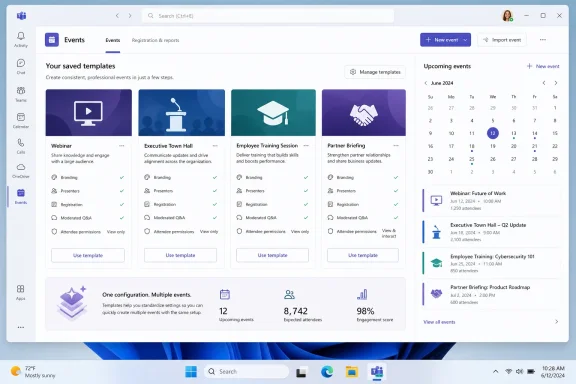
The new capability allows an organizer to take the configuration of a Teams event and save it as a named template. That template then appears under Your saved templates when the organizer creates a future event in the Events app.Microsoft lists Roadmap ID 561915 as launched, with general availability beginning in June 2026. The roadmap entry applies to Teams on desktop and covers both General Availability and Targeted Release deployments in the worldwide standard multi-tenant Microsoft 365 environment.
What the template preserves
Microsoft’s support documentation states that saved templates carry over the event settings while excluding the original date and time. That design is sensible: the configuration remains reusable, but the organizer must deliberately schedule each new occurrence.Depending on the source event and the options available to the organizer, the reusable configuration may include event details, people or groups associated with the setup, branding choices, and behavioral settings. The exact fields visible in a generated event can still depend on event type, licensing, organizational policy, and changes Microsoft makes to the Events app.
A saved event template should therefore be treated as a configuration baseline, not as an immutable event package. Organizers remain responsible for checking the audience, presenters, scheduling information, communications, and compliance-sensitive settings before publishing.
Availability boundaries
The roadmap entry identifies the desktop platform rather than promising identical functionality across every Teams client. Organizations should not assume that users scheduling from the web, mobile Teams client, Outlook, or another calendar surface will immediately see the same template-management experience.The worldwide standard multi-tenant designation is also significant. It does not automatically confirm simultaneous availability in every sovereign, government, education-specific, or specialized Microsoft cloud environment.
How Saving an Event Template Works
The workflow is designed around an event that already exists in the Events app. An organizer selects the event, saves its configuration, and gives the resulting template a recognizable name and description.The organizer workflow
Microsoft’s documented process can be summarized as follows:- Open the Events app from the left side of the Teams desktop client.
- Select Manage to view events available to the organizer.
- Find and open the event whose configuration should become the baseline.
- Open the event’s additional options and select Save as template.
- Enter a template name and a description that explain its intended use.
- Save the template and confirm that it appears under Your saved templates when creating another event.
- Create a test event from the template and verify every carried-over field before adopting it operationally.
Managing saved templates
Saved templates can be used as starting points for new events and can be edited, scheduled, or deleted from the saved-template area. This gives individual organizers a lightweight library of proven configurations rather than forcing them to search through old calendar entries.Naming discipline will become important as that library grows. A label such as “Webinar Template” provides little operational value when an organizer eventually has a dozen similar entries.
A more useful convention might combine purpose, audience, and control level:
- “Customer Webinar — Public Registration — Moderated Q&A” identifies an externally facing marketing format.
- “Employee Town Hall — Company Only — Executive Broadcast” distinguishes internal leadership communications.
- “Partner Training — Invited Guests — Recording Enabled” communicates both audience and post-event expectations.
- “Compliance Briefing — Restricted — No Attendee Chat” highlights controls that should not be casually changed.
Templates Versus Duplicating an Event
Teams already supports duplicating certain events, so organizers may reasonably ask what the new template capability adds. The two functions overlap, but they encourage different working models.Duplication is event-centric
Duplicating an event creates a new event based directly on an existing one. Microsoft indicates that event details, associated people and groups, and settings can be copied, after which the organizer updates the name, date, time, and other relevant information.This is useful for an immediate repeat. If a product team held a webinar on Tuesday and needs a nearly identical follow-up on Thursday, duplication may be the fastest route.
However, the duplicated event remains conceptually tied to a specific earlier occurrence. Its title, participants, descriptions, or historical assumptions may need more cleanup, and organizers must find the correct source event before they can reproduce it.
Templates are configuration-centric
A template separates the reusable design from the historical event. It gives the configuration its own name, description, and place in the event-creation experience.That distinction matters for long-running programs. A quarterly earnings briefing, monthly employee update, weekly training class, and annual partner summit should not depend on someone remembering which old event was considered the “good” version.
The practical division is straightforward:
- Use Duplicate when producing a near-term copy of one particular event.
- Use Save as template when establishing a repeatable format intended for ongoing use.
- Use Create from scratch when the event’s audience, risk profile, or production model differs substantially from existing configurations.
Building a Repeatable Event Workflow
The greatest value will come from treating templates as one component of a documented event-production process. Merely saving a configuration does not standardize presenter preparation, content approval, rehearsal, accessibility review, or post-event handling.Start with a controlled reference event
Organizations should build the initial event carefully rather than converting the first available webinar into a template. The reference event should represent the desired configuration after policy, communications, security, and production stakeholders have reviewed it.A mature baseline should answer several questions:
- Who is permitted to attend, and is the event internal, external, public, or invitation-only?
- Which roles are assigned to organizers, co-organizers, presenters, producers, and moderators?
- Which attendee interactions are enabled, including chat, reactions, microphones, cameras, and Q&A?
- Will registration be required, and what information will be collected?
- Will the event be recorded or transcribed, and how will participants be notified?
- Which branding assets and descriptions are approved for repeated use?
- What post-event materials, recordings, reports, or communications must be retained?
Add an event-specific review gate
Every event created from a template should pass through a short prepublication review. Templates reduce repetitive work, but the fields they preserve can become liabilities when circumstances change.A practical review should verify:
- The new date, time, time zone, title, and description are correct.
- The expected presenters and support personnel are still appropriate.
- Any copied groups or individuals should remain associated with the event.
- Registration fields and privacy notices match the new event’s purpose.
- Branding is current and approved.
- Attendee permissions align with the audience and subject matter.
- Recording, transcription, and content-retention choices remain acceptable.
- Links and communications refer to the new event rather than the original session.
Standardization Without Central Template Administration
The new feature can improve consistency, but its initial model appears primarily organizer-driven. An organizer saves an event for later personal use rather than an administrator necessarily publishing an authoritative template catalog to the whole organization.That distinction shapes both the benefits and the limitations of Roadmap ID 561915.
Personal productivity comes first
For frequent event organizers, personal templates solve an immediate problem. A training coordinator can keep configurations for public courses, private customer sessions, and internal workshops without asking IT to build a dedicated scheduling system.Similarly, an executive communications specialist can preserve the settings used for recurring leadership broadcasts. The organizer no longer needs to reconstruct the event from memory or depend on a checklist for every switch in the interface.
Organization-wide consistency remains a process challenge
Personal template libraries do not automatically create enterprise standards. Ten organizers may save ten slightly different versions of what the company calls its standard customer webinar.Organizations seeking centralized consistency will still need procedural controls. These may include reference documentation, approved screenshots, naming rules, designated template owners, periodic reviews, and a controlled method for distributing changes.
Microsoft already uses templates elsewhere in Teams, including administrator-managed templates for creating teams and shared structures. Event templates could eventually move toward a similar governance model, but the currently documented save-as-template workflow should not be mistaken for a full administrative event-template service.
Enterprise and IT Administration Impact
Microsoft says the feature does not require a separate administrator setup, reducing deployment friction. Once the capability reaches an eligible desktop client and tenant, organizers can begin using it within the policies and permissions already governing Teams events.That simplicity is welcome, but it also means IT departments may discover organically created template libraries before they have established guidance for them.
Existing policies still take precedence
A saved template cannot be expected to bypass Teams event policy. Microsoft’s event controls determine who can schedule and attend supported formats, while webinar and town hall settings can govern audience access and event behavior.If an administrator changes a policy after a template is saved, the resulting event must operate within the policy effective at scheduling or execution time. An old template cannot reliably preserve a capability that the tenant no longer permits.
This relationship makes templates safer than completely detached configuration files, but it can also confuse organizers. A template may appear to contain a preferred choice while the newly created event reflects a newer organizational restriction.
Recommended administrative response
Teams administrators do not need to enable a dedicated template switch, but they should consider several low-cost actions:- Inform event organizers that reusable templates are available and explain where the feature appears.
- Document supported scheduling surfaces, especially if the desktop Events app provides options not yet visible elsewhere.
- Review Teams events policies before encouraging widespread template creation.
- Publish naming and ownership guidance for business-critical event formats.
- Identify high-risk use cases, including external events, executive broadcasts, regulated training, and sessions involving sensitive information.
- Establish a template-refresh cycle so organizers do not keep using outdated configurations indefinitely.
- Provide a reporting route for cases in which a template carries unexpected settings or fails to match current policy.
Consumer, Small-Business, and Departmental Impact
The most immediate beneficiaries may be teams without dedicated broadcast-production staff. Small businesses, nonprofit organizations, schools, consultants, and departmental communications groups often rely on one person to coordinate content, scheduling, attendee communications, and technical delivery.For those users, eliminating repeated configuration can have a disproportionate effect.
Lower operational overhead
A consultant who runs the same client onboarding session every month can preserve the proven meeting structure. A school department can create repeatable parent information sessions, while a nonprofit can standardize volunteer orientations and donor briefings.The feature does not reduce the creative work of preparing each event, but it reduces the administrative friction surrounding that work. Reusability effectively turns a successful event into an operational asset.
Easier delegation, with caveats
Templates can also make it easier for occasional organizers to reproduce a format established by someone more experienced, provided the template is accessible to them through the relevant workflow. However, organizations should verify how ownership and availability behave when responsibilities move between accounts.A personal template tied to one organizer is not a substitute for business continuity planning. If a critical event series depends on an employee’s account, the organization should maintain co-organizers, documentation, approved assets, and a recovery procedure rather than assuming the template will remain available indefinitely.
Small organizations should be particularly cautious about copied presenters and groups. A template created for one customer, class, or partner could expose names or invite the wrong participants if reused without review.
Branding and Audience Experience
Repeated events are not judged only by their technical stability. Attendees notice inconsistent logos, descriptions, registration forms, speaker information, and engagement rules, particularly when an organization presents the sessions as one series.Saved templates create an opportunity to make the audience experience more predictable.
Consistent event identity
Branding choices can be embedded in a proven setup rather than reconstructed for each session. This can help ensure that recurring customer webinars use approved imagery and that internal events display the correct organizational identity.Consistency also builds trust. An attendee who recognizes the same presentation style, registration flow, and engagement model is less likely to question whether an invitation is legitimate or whether they joined the correct event.
However, persistent branding creates a maintenance obligation. Logos, campaign designs, legal notices, speaker descriptions, and organizational names can change. A template that saves time in July 2026 may look obsolete or contain inaccurate information by July 2027.
Predictable interaction design
Templates can preserve an event’s interaction model as well as its appearance. A structured executive town hall may use moderated Q&A while a training workshop may require microphones, cameras, and more direct participation.These are not cosmetic distinctions. They determine staffing requirements, moderation workload, accessibility planning, and the likelihood of disruption.
A useful template description should therefore explain the intended attendee experience. Organizers should know whether a template creates a broadcast-oriented event, a registration-led webinar, or a highly interactive session before they select it.
Security, Privacy, and Compliance Considerations
Configuration reuse can improve security when the source event is well designed. It can also reproduce security mistakes at scale when the source event is not.The difference lies in validation and ownership.
Reusable controls can reduce human error
An approved template can preserve restrictive attendee permissions, designated presenter roles, registration requirements, and an established recording posture. That is safer than asking every organizer to remember dozens of choices independently.For recurring regulated training or internal briefings, a carefully reviewed template can help ensure that the same baseline protections appear each time.
Stale configurations can spread risk
The danger is that organizers may interpret “template” as “automatically approved.” A saved configuration reflects the event at one point in time, not necessarily the organization’s current policy, privacy requirements, or audience.Particular attention should be paid to:
- Copied names, groups, or presenter assignments that no longer belong.
- External-access settings that are too permissive for a new topic.
- Registration questions collecting unnecessary personal information.
- Recording or transcription choices that conflict with updated policy.
- Old privacy language, brand assets, or contact details.
- Engagement options inappropriate for a sensitive or high-profile session.
- Templates retained after the responsible owner changes roles or leaves.
Competitive and Strategic Implications
Reusable event configurations are not a dramatic standalone innovation. Dedicated webinar and virtual-event platforms have long offered cloning, presets, templates, series management, and repeatable production workflows.The importance lies in Microsoft integrating these capabilities directly into the collaboration environment many organizations already use.
Teams is becoming an event operations hub
The Events app signals a move away from treating webinars and town halls as specialized variations of calendar meetings. Microsoft is building a management layer where organizers can select formats, prepare events, reuse configurations, manage drafts, duplicate sessions, and coordinate production from one place.Templates strengthen that model by introducing persistence. The Events app is no longer only where an event is scheduled; it is where an organization’s recurring event patterns can begin to accumulate.
This approach may appeal to Microsoft 365 customers that do not want a separate virtual-event product for every internal briefing or customer webinar. Teams already provides identity integration, policy enforcement, calendars, collaboration, and familiar desktop access.
Specialized platforms still have advantages
Dedicated event platforms may offer deeper capabilities in areas such as campaign management, ticketing, sponsor experiences, advanced attendee analytics, multitrack conferences, production automation, and customer relationship management integration.Microsoft’s template feature does not erase those differences. Instead, it raises the baseline for routine events and makes a separate platform harder to justify when an organization primarily needs repeatable webinars, town halls, training sessions, and internal broadcasts.
The competitive question is therefore not whether Teams can replace every event platform. It is whether Microsoft can make the common corporate event workflow sufficiently integrated and reliable that customers reserve specialized tools for only their most complex programs.
Strengths and Opportunities
The feature’s appeal comes from its simplicity. It targets a recognizable pain point without requiring a new licensing project, administrator console, or complex migration.Practical advantages
- Templates reduce repetitive setup for recurring webinars, town halls, training sessions, and large meetings.
- Configuration consistency improves when organizers start from a known baseline rather than memory.
- Branding can become more reliable across event series and business units.
- New events remain deliberate because the original date and time are not carried over automatically.
- Template names and descriptions create context that raw duplication cannot provide as cleanly.
- The Events app gains long-term value as a workspace for managing event programs rather than individual sessions.
- Small teams benefit without dedicated production staff, potentially saving significant administrative time.
- Approved baselines can support safer defaults when security, privacy, and attendee controls have been reviewed.
Opportunities for Microsoft
Microsoft could build on this release by adding shared organizational template galleries, administrator-approved templates, version control, ownership transfer, usage analytics, and policy-compliance warnings.Integration with Copilot could eventually help organizers compare a template with the requirements of a new event. For example, Teams might identify that a public template is being applied to a confidential internal briefing or that a saved presenter list contains inactive accounts.
Those possibilities are forward-looking rather than part of Roadmap ID 561915, but the template object creates the foundation for richer automation.
Risks and Concerns
The main risks are not technical complexity but misplaced confidence and weak lifecycle management. Saving an event is easy; ensuring that the saved configuration remains appropriate is harder.Operational concerns
- Templates can preserve mistakes just as efficiently as they preserve good practices.
- Copied people and groups require scrutiny before a new event is published.
- Personal template libraries may fragment standards across departments.
- Desktop-only availability may create inconsistent workflows for organizers using other scheduling surfaces.
- Policy changes can alter the behavior of events created from older templates.
- Outdated branding and privacy language may persist long after the original event.
- Template ownership may become a continuity problem when employees change roles or leave.
- The feature may be mistaken for centralized governance, even though organizer-created templates do not automatically constitute an approved corporate catalog.
The danger of template sprawl
As organizers save more variations, the template picker can become another source of confusion. Entries with similar names may differ in subtle but important ways, such as external access, recording, or attendee interaction.Organizations should encourage deletion or retirement of obsolete templates. A smaller set of clearly named, recently reviewed configurations is more useful than a large archive of uncertain provenance.
Templates should also include revision context where possible. A naming suffix such as “Reviewed 2026-07” is not a substitute for formal version management, but it can help an organizer distinguish a current baseline from an older experiment.
What to Watch Next
The roadmap entry is marked launched, but real-world availability can still vary as Microsoft completes service deployment, clients update, and tenants receive the current Events app experience. Organizers who do not see the option should first confirm that they are using an up-to-date Teams desktop client and the expected event-management surface.The next phase will reveal whether Microsoft treats personal saved templates as the final design or as the first layer of a larger event-governance system.
Shared and administrator-managed templates
The clearest missing capability is a centrally curated gallery. Enterprises will likely want communications, legal, security, and IT teams to approve event formats and publish them to specific organizer populations.Such a system could support ownership, revision history, expiration dates, mandatory settings, and policy validation. It could also prevent users from modifying critical controls while allowing them to customize titles, speakers, and content.
Better lifecycle and auditing tools
Organizations may eventually need to know which templates are being used, who owns them, when they were last reviewed, and which events were created from them. Those questions become more important as templates shift from personal convenience to operational infrastructure.Microsoft could also add warnings when a template references deleted accounts, expired groups, unavailable branding assets, or settings no longer permitted by tenant policy.
Cross-client consistency
Another area to monitor is availability outside the Teams desktop client. Event organizers frequently move between Teams, Outlook, browsers, and mobile devices, and a feature limited to one surface can complicate training.A consistent template picker across supported scheduling experiences would make the capability easier to adopt. Until then, organizations should specify the Events app in the desktop client as the preferred creation route when reusable templates are required.
Evolution of the Events app
The broader direction of Teams events matters as much as this individual roadmap item. Microsoft is consolidating scheduling, management, duplication, templates, large-audience optimization, and specialized experiences into a more coherent application model.Windows users should expect the desktop client to remain a central testing ground for those improvements. The Events app may increasingly function as a production console layered on top of Teams identity, policy, communications, and media services.
Microsoft’s save-as-template feature succeeds because it addresses an ordinary frustration with an uncomplicated tool: organizers can preserve a working event configuration, name it, and reuse it without reconstructing every setting. Its real value, however, will depend on discipline. Teams event templates can become reliable building blocks for training, communications, marketing, and executive engagement, but only if organizations review what they contain, keep them current, and recognize that reuse is not the same as approval. As Microsoft expands the Events app, Roadmap ID 561915 may prove to be less about saving a few clicks and more about establishing reusable event operations as a standard part of the Teams platform.
References
- Primary source: Microsoft 365 Roadmap
Published: 2026-07-20T22:37:15.9046041Z
Microsoft 365 Roadmap | Microsoft 365
The Microsoft 365 Roadmap lists updates that are currently planned for applicable subscribers. Check here for more information on the status of new features and updates.www.microsoft.com
- Official source: support.microsoft.com
Create an event in the Microsoft Teams Events app | Microsoft Support
Learn how to create an event in the Microsoft Teams Events app to build, customize, and manage events from one place.support.microsoft.com - Official source: learn.microsoft.com
Create a custom team template in Microsoft Teams - Microsoft Teams | Microsoft Learn
Learn how to create a custom team template in Microsoft Teams.learn.microsoft.com
