

Verdict: stop treating pre-scheduled Teams Live Events as the default. Keep a legacy event only when it is already scheduled for June 30, 2026 or earlier and rebuilding it would create disproportionate operational risk; move recurring, strategic, externally promoted, or post-cutoff events to Teams town halls or another appropriate format now.
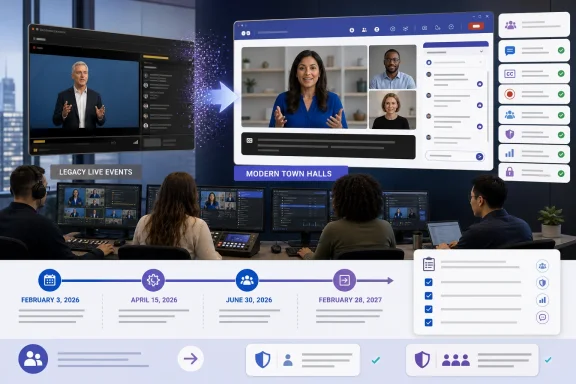
The decisive date was not a vague “July 2026” retirement window. As detailed in Microsoft Learn, Microsoft stopped organizations on February 3, 2026 from scheduling a Teams Live Event for any date after June 30, 2026. The service and its associated Microsoft Graph APIs then retired on June 30, although qualifying events already on the calendar can still be managed and run through February 28, 2027.
IT teams should begin with the tenant’s existing event calendar, not the retirement announcement. The immediate job is to identify every scheduled Live Event, establish whether it qualifies for the extended operating window, and assign an owner to decide its fate.
Use this procedure:
Viva Engage and Dynamics 365 require particular attention. Viva Engage stopped creating new Live Event instances on April 15, 2026, while Dynamics 365 scheduling is constrained by the June 30 cutoff. Those integrations can therefore expose events and workflows that a Teams-only calendar review misses.
An event is a reasonable grandfathering candidate when it has already been scheduled, its date falls within Microsoft’s extended operating window, and invitations or external campaigns are already in circulation. It may also make sense where production teams have completed rehearsals, encoder configuration, accessibility preparation, or executive approvals around the existing event.
Even then, IT should document why the exception exists. The event owner needs confirmation that producers remain available, recordings and reports have known owners, joining information has not been accidentally replaced, and the support desk understands that the event uses a retiring platform.
Do not grandfather an event merely because someone reserved a placeholder before the lock. Scheduling a backlog of legacy events was never a migration strategy: it preserves technical objects without preserving staff knowledge, tested workflows, integrations, licensing, or operational confidence.
The longer a grandfathered event remains on the calendar, the greater the chance that its organizer, producer, support contact, or communications plan changes. Microsoft may continue to run that event through February 28, 2027, but the enterprise must still maintain the human and procedural machinery around it.
Administrators should first open the Teams admin center and go to Meetings > Events policies. Select or create the applicable policy, turn on town hall scheduling for the required organizers, review who can attend, and save the policy. Changes should be tested with the actual organizer accounts rather than assumed from the global policy.
For each migrated event, the project team should then:
Microsoft has also added operational safeguards to the newer format, including a town hall restart capability for supported desktop and Mac clients. That improvement is useful, but it does not eliminate the need for rehearsal, backup presenters, escalation contacts, and a communication plan for interrupted broadcasts.
Events above standard capacity thresholds may require an Attendee Capacity Pack. Procurement and Teams administration therefore need to review peak expected attendance, not merely the number of invitations sent. The license must be aligned with the organizer who will actually host the event.
This is an important distinction for organizations that previously treated Live Events capacity as part of a familiar production template. Under the newer event model, the choice of event format, interaction level, organizer licensing, and expected audience scale must be evaluated together.
IT should also avoid purchasing capacity solely from an optimistic registration forecast. Use attendance history from comparable events, account for simultaneous participation, and document who is responsible for checking licensing before a major broadcast is announced.
For events that do not need broadcast-style production, a webinar or standard meeting may be a better replacement. A smaller interactive session should not become a town hall simply because Live Events is retiring. Conversely, a high-profile broadcast should not be forced into a familiar meeting format when attendee controls and production discipline are more important than open participation.
Every migrated event needs a URL replacement plan. Search corporate websites, campaign platforms, intranet pages, calendar templates, automated emails, QR codes, presentation decks, and service-desk documentation for the legacy joining information. Assign one owner to approve the final attendee link and another to verify it from outside the tenant.
Reporting continuity deserves the same treatment. Before moving an event, record which Live Events artifacts the business currently uses and why. Then conduct a town hall pilot and verify that the replacement output satisfies audit, compliance, communications, training, and audience-analysis requirements.
Do not assume that “a report exists” answers the requirement. The business may depend on particular identities, timestamps, attendance fields, caption files, recordings, or retention processes. If a required output cannot be reproduced, the migration decision must identify an alternative process rather than leaving the discrepancy for event day.
Maintain a register of grandfathered events through February 28, 2027. Each entry should have an accountable organizer, technical owner, rehearsal date, support plan, recording destination, and retirement date for any associated documentation or automation.
At the same time, remove Live Events from internal event request forms, production playbooks, training materials, and architecture diagrams. Update help-desk scripts so staff do not advise users to create or copy a Live Event, and review applications that previously created or managed these events through Microsoft Graph.
Microsoft’s broad “July 2026” wording may remain visible in some Learn pages, but administrators should plan around the exact sequence: scheduling restrictions began February 3, Viva Engage creation ended April 15, and Teams Live Events plus the associated Graph APIs retired June 30. Existing scheduled events receive a runway only through February 28, 2027.
That runway should protect unavoidable commitments—not postpone the work. By the time the last grandfathered event runs, town hall policies, licensing, production roles, support procedures, attendee communications, recordings, and reporting should already be routine rather than experimental.
The decisive date was not a vague “July 2026” retirement window. As detailed in Microsoft Learn, Microsoft stopped organizations on February 3, 2026 from scheduling a Teams Live Event for any date after June 30, 2026. The service and its associated Microsoft Graph APIs then retired on June 30, although qualifying events already on the calendar can still be managed and run through February 28, 2027.
 Run the Event Inventory Before Making Exceptions
IT teams should begin with the tenant’s existing event calendar, not the retirement announcement. The immediate job is to identify every scheduled Live Event, establish whether it qualifies for the extended operating window, and assign an owner to decide its fate.Use this procedure:
- Export or compile all Teams Live Events scheduled by the organization, including events created through connected systems such as Dynamics 365.
- Record the event date, organizer, producers, presenters, expected audience, external-attendee requirements, registration or invitation process, recording destination, captions, reporting needs, and any automation.
- Mark events dated after June 30, 2026 as grandfathered candidates only if they were successfully scheduled before the scheduling lock.
- Identify recurring series, copied production templates, Graph-based workflows, and events whose public materials reuse a standard joining URL.
- Classify each event as keep, rebuild, or replace.
- Create a town hall pilot for every event pattern the organization expects to use after retirement.
- Disable new internal reliance on Live Events even where an existing event remains technically runnable.
Viva Engage and Dynamics 365 require particular attention. Viva Engage stopped creating new Live Event instances on April 15, 2026, while Dynamics 365 scheduling is constrained by the June 30 cutoff. Those integrations can therefore expose events and workflows that a Teams-only calendar review misses.
Grandfather Only the Events That Are Safer Left Alone
A grandfathered Live Event is a temporary exception, not proof that migration can wait. Microsoft’s support-through-February-2027 window is useful for protecting commitments already made, but it should be reserved for events where changing the platform introduces more risk than keeping the retiring one.An event is a reasonable grandfathering candidate when it has already been scheduled, its date falls within Microsoft’s extended operating window, and invitations or external campaigns are already in circulation. It may also make sense where production teams have completed rehearsals, encoder configuration, accessibility preparation, or executive approvals around the existing event.
Even then, IT should document why the exception exists. The event owner needs confirmation that producers remain available, recordings and reports have known owners, joining information has not been accidentally replaced, and the support desk understands that the event uses a retiring platform.
Do not grandfather an event merely because someone reserved a placeholder before the lock. Scheduling a backlog of legacy events was never a migration strategy: it preserves technical objects without preserving staff knowledge, tested workflows, integrations, licensing, or operational confidence.
The longer a grandfathered event remains on the calendar, the greater the chance that its organizer, producer, support contact, or communications plan changes. Microsoft may continue to run that event through February 28, 2027, but the enterprise must still maintain the human and procedural machinery around it.
Town Hall Migration Is a Rebuild, Not a Rename
Recurring programs and business-critical broadcasts should be rebuilt as town halls. That means creating a new event, validating tenant policies, assigning the correct organizers and production roles, testing attendee access, and replacing invitations and documentation.Administrators should first open the Teams admin center and go to Meetings > Events policies. Select or create the applicable policy, turn on town hall scheduling for the required organizers, review who can attend, and save the policy. Changes should be tested with the actual organizer accounts rather than assumed from the global policy.
For each migrated event, the project team should then:
- Create a new town hall rather than attempting to preserve the Live Event object.
- Reassign organizers, co-organizers, presenters, producers, and support contacts according to the new production workflow.
- Reconfirm whether attendees are internal, guests, anonymous external users, or a mixture.
- Test Q&A, moderation, captions, recordings, presenter transitions, and attendee joining.
- Replace every Live Event URL in invitations, websites, intranet pages, email campaigns, calendar items, and support articles.
- Run a rehearsal using managed Windows devices, external attendee accounts, and the same network conditions expected on event day.
- Define where recordings, attendance information, and other event records will be retained.
- Close or clearly label the legacy event so users cannot promote the wrong link.
Microsoft has also added operational safeguards to the newer format, including a town hall restart capability for supported desktop and Mac clients. That improvement is useful, but it does not eliminate the need for rehearsal, backup presenters, escalation contacts, and a communication plan for interrupted broadcasts.
Capacity Is Now a Licensing Decision
The April 1, 2026 Teams Enterprise licensing changes made town hall and webinar capabilities more broadly available. That reduces one barrier to migration, but it does not mean every organizer can automatically reproduce every large-event scenario.Events above standard capacity thresholds may require an Attendee Capacity Pack. Procurement and Teams administration therefore need to review peak expected attendance, not merely the number of invitations sent. The license must be aligned with the organizer who will actually host the event.
This is an important distinction for organizations that previously treated Live Events capacity as part of a familiar production template. Under the newer event model, the choice of event format, interaction level, organizer licensing, and expected audience scale must be evaluated together.
IT should also avoid purchasing capacity solely from an optimistic registration forecast. Use attendance history from comparable events, account for simultaneous participation, and document who is responsible for checking licensing before a major broadcast is announced.
For events that do not need broadcast-style production, a webinar or standard meeting may be a better replacement. A smaller interactive session should not become a town hall simply because Live Events is retiring. Conversely, a high-profile broadcast should not be forced into a familiar meeting format when attendee controls and production discipline are more important than open participation.
URLs and Reporting Are the Hidden Migration Work
The most visible failure will not necessarily occur during video production. It may happen days earlier when thousands of attendees receive an obsolete Live Event link, or weeks later when a business owner discovers that the expected recording or attendance report is not where the old process said it would be.Every migrated event needs a URL replacement plan. Search corporate websites, campaign platforms, intranet pages, calendar templates, automated emails, QR codes, presentation decks, and service-desk documentation for the legacy joining information. Assign one owner to approve the final attendee link and another to verify it from outside the tenant.
Reporting continuity deserves the same treatment. Before moving an event, record which Live Events artifacts the business currently uses and why. Then conduct a town hall pilot and verify that the replacement output satisfies audit, compliance, communications, training, and audience-analysis requirements.
Do not assume that “a report exists” answers the requirement. The business may depend on particular identities, timestamps, attendance fields, caption files, recordings, or retention processes. If a required output cannot be reproduced, the migration decision must identify an alternative process rather than leaving the discrepancy for event day.
Post-Retirement Governance Starts With Saying No
After June 30, the exception process should become simpler because new Live Events can no longer be scheduled. The remaining risk is organizational drift around previously scheduled events and undocumented integrations that still expect the retired Graph APIs.Maintain a register of grandfathered events through February 28, 2027. Each entry should have an accountable organizer, technical owner, rehearsal date, support plan, recording destination, and retirement date for any associated documentation or automation.
At the same time, remove Live Events from internal event request forms, production playbooks, training materials, and architecture diagrams. Update help-desk scripts so staff do not advise users to create or copy a Live Event, and review applications that previously created or managed these events through Microsoft Graph.
Microsoft’s broad “July 2026” wording may remain visible in some Learn pages, but administrators should plan around the exact sequence: scheduling restrictions began February 3, Viva Engage creation ended April 15, and Teams Live Events plus the associated Graph APIs retired June 30. Existing scheduled events receive a runway only through February 28, 2027.
That runway should protect unavoidable commitments—not postpone the work. By the time the last grandfathered event runs, town hall policies, licensing, production roles, support procedures, attendee communications, recordings, and reporting should already be routine rather than experimental.
References
- Primary source: learn.microsoft.com
Plan for live events in Microsoft Teams - Microsoft Teams | Microsoft Learn
In this article, learn about the factors to consider before you set up live events in Microsoft Teams.learn.microsoft.com - Independent coverage: support.microsoft.com
Produce a live event in Microsoft Teams | Microsoft Support
If you were designated as a producer in the Microsoft Teams live event scheduled with the basic video production method, you will join as a producer in the Teams Meeting.support.microsoft.com - Primary source: WindowsForum
Microsoft Teams Retires Together Mode in June 2026: What IT & Users Should Do | Windows Forum
Microsoft will retire Together Mode in Microsoft Teams meetings worldwide during June 2026, removing the shared-scene meeting layout, custom Together Mode...windowsforum.com
