

Microsoft has launched a Teams town hall restart capability for desktop and Mac clients across commercial and government clouds, allowing organizers, producers, and production-enabled presenters to restart an active town hall when technical problems disrupt the live event. The feature sounds modest, but it closes one of the most painful gaps in Microsoft’s replacement strategy for Teams Live Events. In the old model, a failed broadcast often became a scheduling crisis; in the new one, Microsoft is trying to make failure survivable inside the same event shell.
The most important thing about the new restart control is not that it exists. It is that Microsoft is acknowledging, in product design rather than support prose, that large virtual events fail in ways ordinary meetings do not.
A town hall is not just a meeting with more people watching. It is a staged production with presenters, producers, Q&A, recordings, attendance data, external guests, executive expectations, and sometimes a communications department hovering in the background. When the stream stalls, the screen share breaks, attendees cannot join, or the event becomes unresponsive, the problem is not merely technical. It is organizational.
Until now, one of the common failure modes in Teams town halls was brutally simple: end the broken event, create or send people somewhere else, and hope the audience understood. That may be tolerable for a project meeting with eight people. It is far less tolerable for an all-hands with thousands of employees, a public briefing, a government session, or a customer-facing launch.
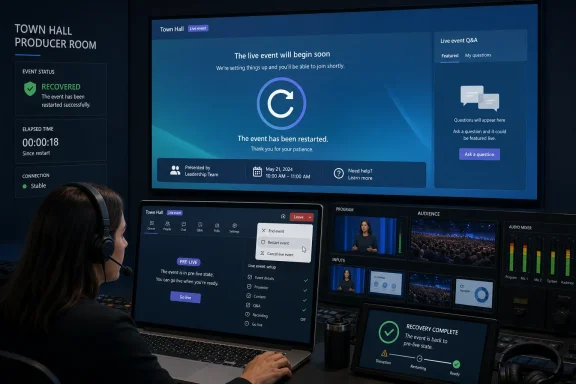
The restart feature gives the event team a sanctioned middle path. Instead of abandoning the scheduled town hall, they can restart the active instance, push attendees back to the join screen, regroup presenters in the green room, and start again. The event still has a scar. But it no longer has to become a different event.
Those details matter because town halls are often the sort of feature where the difference between “available somewhere” and “usable in your tenant” decides whether IT can write a runbook. A restart button that works in commercial Teams but not in government clouds would be interesting. A restart button that works across the mainstream and sovereign-adjacent Microsoft 365 environments becomes part of the standard operating model.
The timing is also notable. Microsoft created the roadmap item in late October 2025 and updated it on June 29, 2026, with the feature listed as launched. That places the capability inside Microsoft’s longer campaign to make Teams town halls the credible successor to Teams Live Events, not merely the modern-looking alternative.
For years, Microsoft has pushed customers toward town halls as the future of large-scale events in Teams. The company has also had to slow the final retirement of Live Events after customer feedback made clear that the migration was not simply a matter of changing labels. Town halls needed more of the production affordances, predictability, and operational confidence that Live Events users had built habits around. Restart is one of those boring features that becomes important precisely because nobody wants to use it.
A town hall does not have that symmetry. Attendees are largely spectators. Presenters and producers are operating with roles and permissions. The green room separates preparation from broadcast. Recordings, attendance reports, chat, and Q&A all become artifacts that may matter after the event.
That is why the ability to restart the event is more than a convenience. It preserves the scheduled context while resetting the live execution layer. Attendees are told the event is restarting and are returned to a join state. Presenters and producers return to the green room, where the event team can restart the show with a little more composure.
The distinction between restart and reschedule is the heart of the feature. Rescheduling tells an audience that the production failed badly enough to break the event contract. Restarting says the event is still happening, but the live session needs a reset. That sounds like messaging spin, but in corporate communications and public events, messaging is part of the incident response.
Teams town halls are not a full broadcast studio. They are a cloud collaboration product trying to absorb some broadcast discipline without requiring broadcast staff. That is why Microsoft’s implementation is deliberately simple: use the dropdown next to Leave, select Restart event, and put the show back into a known pre-live state.
The simplicity is both welcome and risky. It means a producer can act quickly under pressure. It also means organizations need to be explicit about who is allowed to press the button and when. A restart during a live executive event is not a casual troubleshooting step; it is an incident declaration.
The restart action also has consequences after the fact. Microsoft’s support documentation says recordings and attendance reports are separated before and after restarts, while Q&A and event chat continue across the restart. That is a sensible split, but it is still a split. Compliance teams, communications teams, and admins need to know that a restarted town hall may leave behind multiple recording and reporting segments rather than one clean artifact.
With restart, the green room gains a second role. It becomes the recovery room.
That matters because most live-event failures are not solved by one technical action. The producer may need to confirm that the presenter can share again. The executive’s microphone may need to be reselected. The network route may need to stabilize. A backup presenter may need to take over. Someone may need to decide whether to acknowledge the interruption or simply continue from the last completed section.
Returning the production group to the green room creates a controlled pause. It lets the event team decide whether the restart actually fixed the issue before putting the audience back into the live program. In theory, that should reduce the dreaded second failure: the moment when an event restarts, everyone rejoins, and the same broken content or audio problem immediately reappears.
The attendee experience is also cleaner than the old ad hoc alternatives. Instead of receiving a frantic message with a new link, an audience member sees that the event is restarting and returns to the join screen. That does not make the interruption invisible. It does make it legible.
The first runbook question is authorization. Microsoft says organizers, producers, and presenters assigned production capabilities can restart a town hall. That is a practical default, but it may be broader than some organizations want for high-stakes events. If a presenter has production capability for rehearsal convenience, do they also understand the consequences of restarting a live event? If not, role assignment becomes part of risk management.
The second question is communication. Restarting an event solves the technical continuity problem only if attendees understand what is happening. A polished organization will have prepared language for the moderator, the event chat, and any parallel communications channel. A less prepared one will let the Teams notification do all the work and hope nobody panics.
The third question is evidence. Separate recordings and attendance reports mean post-event analysis needs to account for segments. If an HR town hall, public hearing, training session, or regulated communications event depends on proof of attendance or a complete recording, the restart creates an archival wrinkle. It is not a blocker, but it is not nothing.
Finally, there is the question of rehearsal. Organizations love to say they will rehearse large events, then skip the ugly parts. The restart button should be rehearsed exactly because it is uncomfortable. Producers should know what attendees see, what presenters see, what happens to recordings, and how long the restart takes in their tenant and network conditions.
A public-sector town hall can involve elected officials, agency leadership, emergency communications, union meetings, public health briefings, or workforce announcements. A restart option does not magically make Teams resilient enough for every mission-critical broadcast. But it does make the platform less brittle in the face of predictable failures.
It also narrows a familiar Microsoft 365 gap. Too often, cloud features arrive first in commercial tenants and then slowly work their way into government environments, leaving admins with split documentation and uneven expectations. Here, Microsoft is at least positioning restart as part of the broader Teams town hall baseline, not as a commercial-only nicety.
That does not eliminate deployment caution. Government tenants often have slower change management, stricter client update policies, and more conservative training cycles. A launched roadmap item is not the same thing as every producer in every agency seeing the control tomorrow. But the cross-cloud commitment gives IT planners something firmer to build around.
A presenter experiences a broken town hall as embarrassment. A producer experiences it as a decision tree. Is the issue local to one presenter or global to attendees? Is the event still recording? Can attendees hear but not see? Is Q&A working? Is the stream delayed, frozen, or dead? Should the team continue, pause, or abort?
The restart feature gives producers an official escalation step between “try random fixes live” and “create a new event.” That is valuable because live troubleshooting can make a failing event worse. Screen sharing gets toggled repeatedly. Presenters talk over one another. Attendees flood the Q&A with “no audio.” Someone suggests using a different link. The production loses authority in public.
A restart restores hierarchy. It says the event team is taking control, resetting the session, and returning to a known state. That is not merely technical recovery; it is reputational recovery.
When Microsoft introduced town halls, it pitched them as a more integrated way to handle internal and external large-scale events. That integration was both the selling point and the source of skepticism. Customers gained a more modern Teams-native experience, but some feared losing the production separation and reliability patterns they had learned to trust.
The delayed retirement path for Live Events showed that Microsoft heard at least some of that resistance. Customers were not just being stubborn. They were protecting workflows around executive communications, external events, moderated Q&A, reporting, and predictable attendee behavior. A replacement product has to match the operational reality, not just the feature checklist.
Restart is one answer to that critique. It does not prove town halls are now superior to Live Events for every scenario. It does show Microsoft filling in the practical gaps that matter when the CEO is live, the attendee count is high, and the fallback plan cannot be “let’s send another invite.”
A restart button is a recovery tool, not a substitute for reliability. If town halls regularly require restarts, the product has failed at a deeper level. Microsoft still needs to keep improving event stability, diagnostics, presenter controls, attendee join reliability, and real-time visibility for producers. The best restart is the one nobody has to press.
The feature also does not solve every failure mode. If the presenter’s local network is collapsing, restarting the event may not help. If an organization’s firewall, VPN, device policy, or client version is the real culprit, a restart may simply reproduce the same failure. If the problem is confusion among presenters rather than a platform issue, restarting may buy time but not competence.
That is why organizations should treat restart as part of an incident plan rather than a magic lever. The decision to restart should be tied to observable symptoms: widespread attendee join failures, broken audio or video across the audience, unrecoverable content sharing, or an unresponsive event. For isolated presenter issues, a backup presenter, alternate machine, or handoff may still be the better answer.
The danger is that a visible control becomes an attractive nuisance. Under pressure, people press buttons. The job of IT and event operations is to make sure the right people press this one for the right reasons.
For a casual internal town hall, multiple recording files are an inconvenience. Someone needs to publish the right segments, explain any gap, and perhaps stitch together a cleaner version for on-demand viewing. For a training or compliance-related event, multiple attendance reports can become a reconciliation task. For public meetings or formal briefings, the archival record may need annotation.
Microsoft’s choice to preserve Q&A and chat across the restart is smart. Those channels often contain the audience’s continuity of experience. If they vanished at restart, the feature would feel less like a reset and more like a rupture. Keeping communications intact helps the event retain its narrative thread even as the media pipeline restarts.
Still, admins should not bury the recording caveat in a footnote. Producers need to know before the event that pressing restart changes the artifact model. Communications teams need to know after the event that “the recording” may actually mean “the recordings.” Compliance teams need to decide whether that segmentation is acceptable for their use cases.
This is the classic Microsoft 365 bargain: the cloud service makes a hard thing easier, but the organization still owns the governance.
But the platform boundary is still worth noting. Teams is everywhere: Windows, macOS, web, mobile, rooms, and embedded meeting experiences. When Microsoft ships an event control to desktop and Mac, it is implicitly saying this is a producer workstation feature, not a general attendee affordance.
That should shape training. The restart procedure belongs in producer documentation for the Teams desktop clients that the event team will actually use. It should not be buried in generic attendee guidance, nor should organizations assume that every Teams endpoint exposes the same controls.
The Mac inclusion is important because communications and production teams often contain a mixed fleet. It is common to find Windows-heavy enterprise IT supporting event staff, designers, communications leads, or executives using Macs. A restart feature that excluded macOS would have created needless friction in exactly the teams likely to manage polished events.
For WindowsForum readers, the practical angle is less about platform rivalry and more about endpoint discipline. If a town hall matters, producers should use supported, updated clients on known-good devices. The restart button is not an excuse to run the show from whatever machine happens to be nearby.
The restart feature makes that denial harder to justify. Microsoft has now given event teams an official recovery path. If an organization does not train producers on it, test it, and include it in its event plan, the failure is no longer just a platform failure. It is a process failure.
That is especially true for recurring executive town halls. These events tend to accumulate ritual: same host, same opening slides, same Q&A format, same nervous prep call 30 minutes before go-live. Adding a restart drill to that ritual is not overengineering. It is the live-event equivalent of knowing where the fire exits are.
The organizations that benefit most will not be the ones that proudly restart events in public. They will be the ones that use the existence of restart to improve readiness: clearer roles, better rehearsals, backup devices, redundant presenters, tested media, and a shared threshold for when the show must be reset.
In that sense, the feature’s value begins before anyone clicks it.
 Microsoft Turns the Panic Button Into a Product Feature
The most important thing about the new restart control is not that it exists. It is that Microsoft is acknowledging, in product design rather than support prose, that large virtual events fail in ways ordinary meetings do not.A town hall is not just a meeting with more people watching. It is a staged production with presenters, producers, Q&A, recordings, attendance data, external guests, executive expectations, and sometimes a communications department hovering in the background. When the stream stalls, the screen share breaks, attendees cannot join, or the event becomes unresponsive, the problem is not merely technical. It is organizational.
Until now, one of the common failure modes in Teams town halls was brutally simple: end the broken event, create or send people somewhere else, and hope the audience understood. That may be tolerable for a project meeting with eight people. It is far less tolerable for an all-hands with thousands of employees, a public briefing, a government session, or a customer-facing launch.
The restart feature gives the event team a sanctioned middle path. Instead of abandoning the scheduled town hall, they can restart the active instance, push attendees back to the join screen, regroup presenters in the green room, and start again. The event still has a scar. But it no longer has to become a different event.
The Roadmap Entry Is Small Because the Operational Shift Is Not
Microsoft’s roadmap listing for “Restart your Town hall event” identifies the feature as launched, with general availability marked for January 2026 and support across Worldwide, GCC, GCC High, and DoD tenants. The supported platforms are desktop and Mac, and the release rings include General Availability and Targeted Release.Those details matter because town halls are often the sort of feature where the difference between “available somewhere” and “usable in your tenant” decides whether IT can write a runbook. A restart button that works in commercial Teams but not in government clouds would be interesting. A restart button that works across the mainstream and sovereign-adjacent Microsoft 365 environments becomes part of the standard operating model.
The timing is also notable. Microsoft created the roadmap item in late October 2025 and updated it on June 29, 2026, with the feature listed as launched. That places the capability inside Microsoft’s longer campaign to make Teams town halls the credible successor to Teams Live Events, not merely the modern-looking alternative.
For years, Microsoft has pushed customers toward town halls as the future of large-scale events in Teams. The company has also had to slow the final retirement of Live Events after customer feedback made clear that the migration was not simply a matter of changing labels. Town halls needed more of the production affordances, predictability, and operational confidence that Live Events users had built habits around. Restart is one of those boring features that becomes important precisely because nobody wants to use it.
A Live Event Failure Is Different From a Meeting Glitch
When a normal Teams meeting goes sideways, the fix is usually social before it is technical. Someone drops and rejoins. Someone switches audio devices. Someone says, “Can you see my screen now?” The group tolerates a certain amount of friction because everyone is in roughly the same interaction model.A town hall does not have that symmetry. Attendees are largely spectators. Presenters and producers are operating with roles and permissions. The green room separates preparation from broadcast. Recordings, attendance reports, chat, and Q&A all become artifacts that may matter after the event.
That is why the ability to restart the event is more than a convenience. It preserves the scheduled context while resetting the live execution layer. Attendees are told the event is restarting and are returned to a join state. Presenters and producers return to the green room, where the event team can restart the show with a little more composure.
The distinction between restart and reschedule is the heart of the feature. Rescheduling tells an audience that the production failed badly enough to break the event contract. Restarting says the event is still happening, but the live session needs a reset. That sounds like messaging spin, but in corporate communications and public events, messaging is part of the incident response.
Microsoft Is Borrowing From Broadcast Logic, Not Meeting Logic
The best way to understand this feature is to stop thinking about Teams as a meeting app and start thinking about town halls as lightweight broadcast infrastructure. In broadcast operations, failure handling is part of the product. There are standby feeds, control rooms, slates, rollbacks, and escalation paths. The audience may never know the details, but the production team knows what lever to pull.Teams town halls are not a full broadcast studio. They are a cloud collaboration product trying to absorb some broadcast discipline without requiring broadcast staff. That is why Microsoft’s implementation is deliberately simple: use the dropdown next to Leave, select Restart event, and put the show back into a known pre-live state.
The simplicity is both welcome and risky. It means a producer can act quickly under pressure. It also means organizations need to be explicit about who is allowed to press the button and when. A restart during a live executive event is not a casual troubleshooting step; it is an incident declaration.
The restart action also has consequences after the fact. Microsoft’s support documentation says recordings and attendance reports are separated before and after restarts, while Q&A and event chat continue across the restart. That is a sensible split, but it is still a split. Compliance teams, communications teams, and admins need to know that a restarted town hall may leave behind multiple recording and reporting segments rather than one clean artifact.
The Green Room Becomes the Recovery Room
The green room has always been one of the most important differences between a staged Teams event and a standard meeting. It gives presenters and producers a place to prepare before going live, coordinate privately, and avoid dumping backstage chaos into the attendee experience.With restart, the green room gains a second role. It becomes the recovery room.
That matters because most live-event failures are not solved by one technical action. The producer may need to confirm that the presenter can share again. The executive’s microphone may need to be reselected. The network route may need to stabilize. A backup presenter may need to take over. Someone may need to decide whether to acknowledge the interruption or simply continue from the last completed section.
Returning the production group to the green room creates a controlled pause. It lets the event team decide whether the restart actually fixed the issue before putting the audience back into the live program. In theory, that should reduce the dreaded second failure: the moment when an event restarts, everyone rejoins, and the same broken content or audio problem immediately reappears.
The attendee experience is also cleaner than the old ad hoc alternatives. Instead of receiving a frantic message with a new link, an audience member sees that the event is restarting and returns to the join screen. That does not make the interruption invisible. It does make it legible.
The Feature Solves One Kind of Chaos While Creating New Runbook Work
For IT administrators and Teams owners, this is not simply a feature to announce. It is a feature to operationalize.The first runbook question is authorization. Microsoft says organizers, producers, and presenters assigned production capabilities can restart a town hall. That is a practical default, but it may be broader than some organizations want for high-stakes events. If a presenter has production capability for rehearsal convenience, do they also understand the consequences of restarting a live event? If not, role assignment becomes part of risk management.
The second question is communication. Restarting an event solves the technical continuity problem only if attendees understand what is happening. A polished organization will have prepared language for the moderator, the event chat, and any parallel communications channel. A less prepared one will let the Teams notification do all the work and hope nobody panics.
The third question is evidence. Separate recordings and attendance reports mean post-event analysis needs to account for segments. If an HR town hall, public hearing, training session, or regulated communications event depends on proof of attendance or a complete recording, the restart creates an archival wrinkle. It is not a blocker, but it is not nothing.
Finally, there is the question of rehearsal. Organizations love to say they will rehearse large events, then skip the ugly parts. The restart button should be rehearsed exactly because it is uncomfortable. Producers should know what attendees see, what presenters see, what happens to recordings, and how long the restart takes in their tenant and network conditions.
Government Cloud Support Changes the Stakes
The inclusion of GCC, GCC High, and DoD in the roadmap details is not a throwaway line. Government and regulated customers are among the organizations most likely to care about continuity, auditability, and event control. They are also among the customers least able to improvise with consumer streaming tools when an official event goes wrong.A public-sector town hall can involve elected officials, agency leadership, emergency communications, union meetings, public health briefings, or workforce announcements. A restart option does not magically make Teams resilient enough for every mission-critical broadcast. But it does make the platform less brittle in the face of predictable failures.
It also narrows a familiar Microsoft 365 gap. Too often, cloud features arrive first in commercial tenants and then slowly work their way into government environments, leaving admins with split documentation and uneven expectations. Here, Microsoft is at least positioning restart as part of the broader Teams town hall baseline, not as a commercial-only nicety.
That does not eliminate deployment caution. Government tenants often have slower change management, stricter client update policies, and more conservative training cycles. A launched roadmap item is not the same thing as every producer in every agency seeing the control tomorrow. But the cross-cloud commitment gives IT planners something firmer to build around.
The Hidden Winner Is the Producer, Not the Presenter
Microsoft’s wording emphasizes those “managing the event,” and that is the right audience. Presenters may be the visible people in a town hall, but producers carry the failure burden.A presenter experiences a broken town hall as embarrassment. A producer experiences it as a decision tree. Is the issue local to one presenter or global to attendees? Is the event still recording? Can attendees hear but not see? Is Q&A working? Is the stream delayed, frozen, or dead? Should the team continue, pause, or abort?
The restart feature gives producers an official escalation step between “try random fixes live” and “create a new event.” That is valuable because live troubleshooting can make a failing event worse. Screen sharing gets toggled repeatedly. Presenters talk over one another. Attendees flood the Q&A with “no audio.” Someone suggests using a different link. The production loses authority in public.
A restart restores hierarchy. It says the event team is taking control, resetting the session, and returning to a known state. That is not merely technical recovery; it is reputational recovery.
Microsoft Still Has to Earn Trust From Live Events Holdouts
The restart feature arrives against the shadow of Teams Live Events, which many organizations used for years despite its own limitations. Live Events had a distinct production model and a reputation, fair or not, for being more purpose-built for one-to-many broadcasts than ordinary Teams meetings.When Microsoft introduced town halls, it pitched them as a more integrated way to handle internal and external large-scale events. That integration was both the selling point and the source of skepticism. Customers gained a more modern Teams-native experience, but some feared losing the production separation and reliability patterns they had learned to trust.
The delayed retirement path for Live Events showed that Microsoft heard at least some of that resistance. Customers were not just being stubborn. They were protecting workflows around executive communications, external events, moderated Q&A, reporting, and predictable attendee behavior. A replacement product has to match the operational reality, not just the feature checklist.
Restart is one answer to that critique. It does not prove town halls are now superior to Live Events for every scenario. It does show Microsoft filling in the practical gaps that matter when the CEO is live, the attendee count is high, and the fallback plan cannot be “let’s send another invite.”
A Restart Button Is Not a Reliability Strategy
There is a temptation to overpraise this feature because it solves a vivid problem. That would be a mistake.A restart button is a recovery tool, not a substitute for reliability. If town halls regularly require restarts, the product has failed at a deeper level. Microsoft still needs to keep improving event stability, diagnostics, presenter controls, attendee join reliability, and real-time visibility for producers. The best restart is the one nobody has to press.
The feature also does not solve every failure mode. If the presenter’s local network is collapsing, restarting the event may not help. If an organization’s firewall, VPN, device policy, or client version is the real culprit, a restart may simply reproduce the same failure. If the problem is confusion among presenters rather than a platform issue, restarting may buy time but not competence.
That is why organizations should treat restart as part of an incident plan rather than a magic lever. The decision to restart should be tied to observable symptoms: widespread attendee join failures, broken audio or video across the audience, unrecoverable content sharing, or an unresponsive event. For isolated presenter issues, a backup presenter, alternate machine, or handoff may still be the better answer.
The danger is that a visible control becomes an attractive nuisance. Under pressure, people press buttons. The job of IT and event operations is to make sure the right people press this one for the right reasons.
Recordings and Reports Reveal the Real Trade-Off
The most operationally important caveat may be the least glamorous: recordings and attendance reports are separated across restart segments. That is exactly what one might expect from a technical reset, but it changes the post-event workflow.For a casual internal town hall, multiple recording files are an inconvenience. Someone needs to publish the right segments, explain any gap, and perhaps stitch together a cleaner version for on-demand viewing. For a training or compliance-related event, multiple attendance reports can become a reconciliation task. For public meetings or formal briefings, the archival record may need annotation.
Microsoft’s choice to preserve Q&A and chat across the restart is smart. Those channels often contain the audience’s continuity of experience. If they vanished at restart, the feature would feel less like a reset and more like a rupture. Keeping communications intact helps the event retain its narrative thread even as the media pipeline restarts.
Still, admins should not bury the recording caveat in a footnote. Producers need to know before the event that pressing restart changes the artifact model. Communications teams need to know after the event that “the recording” may actually mean “the recordings.” Compliance teams need to decide whether that segmentation is acceptable for their use cases.
This is the classic Microsoft 365 bargain: the cloud service makes a hard thing easier, but the organization still owns the governance.
The Desktop and Mac Boundary Leaves a Familiar Question
The roadmap lists Desktop and Mac as the supported platforms. That makes sense for production work. Serious town hall producers are unlikely to run a major executive event from a phone unless something has gone very wrong.But the platform boundary is still worth noting. Teams is everywhere: Windows, macOS, web, mobile, rooms, and embedded meeting experiences. When Microsoft ships an event control to desktop and Mac, it is implicitly saying this is a producer workstation feature, not a general attendee affordance.
That should shape training. The restart procedure belongs in producer documentation for the Teams desktop clients that the event team will actually use. It should not be buried in generic attendee guidance, nor should organizations assume that every Teams endpoint exposes the same controls.
The Mac inclusion is important because communications and production teams often contain a mixed fleet. It is common to find Windows-heavy enterprise IT supporting event staff, designers, communications leads, or executives using Macs. A restart feature that excluded macOS would have created needless friction in exactly the teams likely to manage polished events.
For WindowsForum readers, the practical angle is less about platform rivalry and more about endpoint discipline. If a town hall matters, producers should use supported, updated clients on known-good devices. The restart button is not an excuse to run the show from whatever machine happens to be nearby.
The Feature’s Real Audience Is the Organization That Cannot Admit Failure
Every large organization has a strange relationship with live events. Everyone knows failures happen. Nobody wants to plan visibly for them because planning for failure can be mistaken for expecting failure.The restart feature makes that denial harder to justify. Microsoft has now given event teams an official recovery path. If an organization does not train producers on it, test it, and include it in its event plan, the failure is no longer just a platform failure. It is a process failure.
That is especially true for recurring executive town halls. These events tend to accumulate ritual: same host, same opening slides, same Q&A format, same nervous prep call 30 minutes before go-live. Adding a restart drill to that ritual is not overengineering. It is the live-event equivalent of knowing where the fire exits are.
The organizations that benefit most will not be the ones that proudly restart events in public. They will be the ones that use the existence of restart to improve readiness: clearer roles, better rehearsals, backup devices, redundant presenters, tested media, and a shared threshold for when the show must be reset.
In that sense, the feature’s value begins before anyone clicks it.
The New Runbook for a Broken Teams Town Hall
Microsoft’s restart option gives town hall teams a cleaner recovery path, but it also raises the bar for preparation. The practical lesson is that every serious Teams town hall should now have a restart plan, not merely a meeting invite and a rehearsal slot.- Organizations should define in advance which producer or organizer has authority to restart a live town hall.
- Event teams should rehearse the restart flow so presenters understand the green room return, attendee rejoin behavior, and timing.
- Communications staff should prepare short attendee-facing language for interruptions rather than improvising during the outage.
- IT administrators should account for separate recordings and attendance reports when documenting post-event retention and reporting workflows.
- Producers should treat restart as an escalation step for broad event failure, not as a first response to every isolated presenter issue.
- High-stakes events should still have backup presenters, backup devices, and a non-Teams communication channel for the production team.
References
- Primary source: Microsoft 365 Roadmap
Published: 2026-06-29T23:02:39.0286478Z
Microsoft 365 Roadmap | Microsoft 365
The Microsoft 365 Roadmap lists updates that are currently planned for applicable subscribers. Check here for more information on the status of new features and updates.www.microsoft.com
- Official source: support.microsoft.com
Een informele bijeenkomst hosten in Microsoft Teams | Microsoft Support
Presenteren, inhoud delen en anderen beheren wanneer u een gemeentehuis host in Microsoft Teams.support.microsoft.com - Official source: techcommunity.microsoft.com
- Related coverage: d365hub.com
- Official source: directionsonmicrosoft.com
Teams Meetings and Events - Directions on Microsoft
Microsoft Teams is commonly used for audio and video meetings and large-scale broadcast events. Although meetings and 1:1 calls are often the first capabilities leveraged by organizations, the product also supports hosting webinars and streaming video broadcasts called town halls, which can...www.directionsonmicrosoft.com - Official source: cdn-dynmedia-1.microsoft.com
- Related coverage: office365.delaware.gov
- Official source: adoption.microsoft.com
- Related coverage: texasrecyclestvs.org
- Related coverage: techriver.com
