

Microsoft Teams administrators should treat the retirement of the old CAPTCHA policy as a workflow-design deadline, not a cosmetic policy cleanup: any unattended third-party meeting assistant that is detected as an external bot can now be held in the lobby until a person admits it. Before the PowerShell control is removed in late July 2026, identify automated joins that can tolerate human approval, exempt only the workflows that are outside this detection path, and replace the rest with authenticated or Teams-native approaches.
Microsoft’s MC1262588 retirement notice says the legacy CAPTCHA policy was locked in early May 2026, will be removed from PowerShell in late July, and will disappear from the Teams admin center in late August. The replacement is not a new CAPTCHA switch. It is a Teams meeting-policy setting that governs how Teams handles detected external bots in meetings hosted by organizers covered by that policy.
That distinction changes the operational question. A bot’s ability to reach a meeting URL is no longer the whole test; the critical test is whether the meeting can proceed when the bot is waiting in the lobby for an organizer, co-organizer, or another permitted participant to make a conscious admission decision.
Microsoft’s external-bot policy offers two choices: RequireApprovalWhenDetected, the default, and AllowBots. Under the default, Teams detects and marks suspected external bots, routes them to the lobby regardless of the meeting’s normal lobby-bypass configuration, and requires someone to explicitly admit them.
In practical terms, a meeting configured to let external attendees bypass the lobby does not guarantee that a detected note-taking, transcription, recording, or meeting-assistant bot will enter automatically. The bot may still wait for approval. Microsoft’s published guidance also makes clear that the setting applies through Teams meeting policies, including the organization-wide default policy or targeted policies assigned to users or groups.
For a closer look at the security rationale, WindowsForum’s related coverage of Teams external-bot lobby approval explains why Microsoft is placing organizer awareness ahead of frictionless third-party assistant access. The important next step for IT is to map that security control to each automation use case before the old CAPTCHA-era assumptions disappear.
Instead, inventory every workflow that causes an external process to join a Teams meeting. Include third-party AI note takers, transcription services, compliance capture tools, automated support agents, meeting-room integrations, and any internally sponsored service that joins through an external participant identity.
For each workflow, record four facts:
Microsoft explicitly acknowledges that detection is not perfect. An undetected bot may enter under the meeting’s ordinary join and lobby rules, so “it joined successfully” is not evidence that it is approved, trusted, or permanently outside the control.
That sounds simple, but it is a major design change for operations built around zero-touch automation. A support-recording bot joining a staffed service review may work well with approval; an overnight unattended session, recurring executive meeting, or large event with rotating presenters may not. The workflow owner needs a named approver, a runbook for missed approvals, and a clear expectation that the bot could remain outside the meeting until admitted.
Teams’ normal lobby settings should be reviewed at the same time. The external-bot control overrides normal bypass behavior for a detected bot, but it does not replace broader lobby governance. WindowsForum’s earlier look at Teams bot checks, approval, and privacy controls is useful context for organizations that need to align bot approval with their existing organizer training and data-handling rules.
The key is to evaluate the actual requirement. If the goal is notes, recording, transcript access, or post-meeting workflow automation, an external bot joining live may be only one implementation—not the requirement itself. Reframing the requirement can avoid building an exception process around every organizer’s lobby.
The false-positive path matters, particularly for meetings with external customers, contractors, or guests using unfamiliar client configurations. After admitting a person who was incorrectly marked, Teams provides a “This is not a bot” action that changes that participant’s representation for that specific meeting. It is a correction mechanism, not a tenant-wide identity exemption.
Likewise, admins should not design around an assumed granular exception list. Microsoft’s currently published choices are simply
This is where a narrow pilot is more defensible than a tenant-wide rollback. Apply a targeted policy only to the organizers whose workflows have been tested and formally accepted, while leaving the default approval requirement in place elsewhere. That keeps the exception tied to accountable hosts rather than silently opening the door for any bot that happens to enter their meetings.
The late-July PowerShell retirement is the immediate deadline, but the more consequential date is the first meeting in which an unattended assistant waits in the lobby with nobody authorized to approve it. Organizations that test those workflows now can preserve automation where it is appropriate, introduce human approval where it is necessary, and avoid turning a security-policy modernization into a calendar full of failed joins.
Microsoft’s MC1262588 retirement notice says the legacy CAPTCHA policy was locked in early May 2026, will be removed from PowerShell in late July, and will disappear from the Teams admin center in late August. The replacement is not a new CAPTCHA switch. It is a Teams meeting-policy setting that governs how Teams handles detected external bots in meetings hosted by organizers covered by that policy.
That distinction changes the operational question. A bot’s ability to reach a meeting URL is no longer the whole test; the critical test is whether the meeting can proceed when the bot is waiting in the lobby for an organizer, co-organizer, or another permitted participant to make a conscious admission decision.
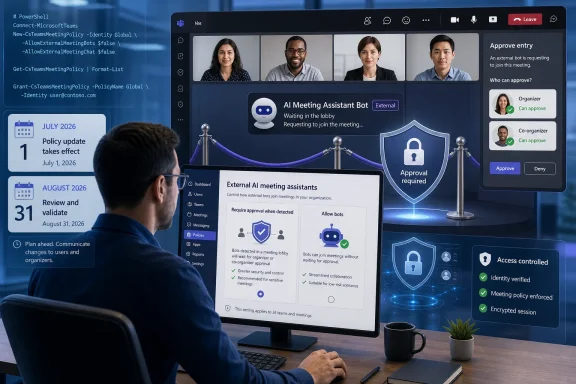 The new default turns unattended joins into a lobby workflow
Microsoft’s external-bot policy offers two choices: RequireApprovalWhenDetected, the default, and AllowBots. Under the default, Teams detects and marks suspected external bots, routes them to the lobby regardless of the meeting’s normal lobby-bypass configuration, and requires someone to explicitly admit them.In practical terms, a meeting configured to let external attendees bypass the lobby does not guarantee that a detected note-taking, transcription, recording, or meeting-assistant bot will enter automatically. The bot may still wait for approval. Microsoft’s published guidance also makes clear that the setting applies through Teams meeting policies, including the organization-wide default policy or targeted policies assigned to users or groups.
For a closer look at the security rationale, WindowsForum’s related coverage of Teams external-bot lobby approval explains why Microsoft is placing organizer awareness ahead of frictionless third-party assistant access. The important next step for IT is to map that security control to each automation use case before the old CAPTCHA-era assumptions disappear.
Start with a short inventory, then make one of three decisions
Admins should not begin by globally switching toAllowBots just because a few executive-assistant or support workflows rely on unattended joins. That restores seamless behavior, but it also removes detection and bot-specific lobby enforcement for everyone governed by that policy.Instead, inventory every workflow that causes an external process to join a Teams meeting. Include third-party AI note takers, transcription services, compliance capture tools, automated support agents, meeting-room integrations, and any internally sponsored service that joins through an external participant identity.
For each workflow, record four facts:
- Identify the meeting organizer population covered by the current Teams meeting policy. The policy is attached to meeting hosts, so the same bot can face different behavior depending on who organized the meeting.
- Determine whether the workflow is genuinely unattended. A bot scheduled to join a routine call without an organizer present is fundamentally different from one used in a meeting where a co-organizer is always available.
- Test whether the service is detected as an external bot in a representative meeting. Detection is not a vendor allowlist system, and Microsoft says some bots can be missed.
- Confirm who is allowed to admit lobby participants. Microsoft recommends configuring meetings so only organizers and co-organizers can admit people from the lobby, which can prevent a presenter from approving a bot without the intended scrutiny.
Retain unattended joins only where the workflow is not subject to this path
Some workflows may not encounter external-bot detection, either because they do not join as an external bot or because the service uses an authenticated, supported integration model rather than a third-party participant joining the meeting. Do not assume that historical success proves this classification. Test it, document the result, and retest after meaningful changes to the service or Teams policy.Microsoft explicitly acknowledges that detection is not perfect. An undetected bot may enter under the meeting’s ordinary join and lobby rules, so “it joined successfully” is not evidence that it is approved, trusted, or permanently outside the control.
Redesign the workflow around deliberate organizer or co-organizer admission
This is the correct outcome for many legitimate assistant scenarios. A human owner can schedule the meeting, ensure that an organizer or co-organizer is present at join time, and admit the detected bot after confirming that it belongs in the call.That sounds simple, but it is a major design change for operations built around zero-touch automation. A support-recording bot joining a staffed service review may work well with approval; an overnight unattended session, recurring executive meeting, or large event with rotating presenters may not. The workflow owner needs a named approver, a runbook for missed approvals, and a clear expectation that the bot could remain outside the meeting until admitted.
Teams’ normal lobby settings should be reviewed at the same time. The external-bot control overrides normal bypass behavior for a detected bot, but it does not replace broader lobby governance. WindowsForum’s earlier look at Teams bot checks, approval, and privacy controls is useful context for organizations that need to align bot approval with their existing organizer training and data-handling rules.
Replace the workflow with an authenticated or Teams-native alternative
If a business process cannot tolerate a human approval checkpoint, it should not depend on an external attendee-style bot that may be detected and held in the lobby. The replacement may be a Teams-native capability, an authenticated integration that does not rely on an external meeting participant, or a redesigned process that gathers the required data without joining the meeting at all.The key is to evaluate the actual requirement. If the goal is notes, recording, transcript access, or post-meeting workflow automation, an external bot joining live may be only one implementation—not the requirement itself. Reframing the requirement can avoid building an exception process around every organizer’s lobby.
Where to set the replacement policy before the legacy controls vanish
Microsoft documents the new control in the Teams admin center under the meeting-policy experience. Administrators should make the change in a test or targeted policy before altering the organization-wide default.- Open the Teams admin center and go to Meetings > Meeting policies.
- Select the policy assigned to the organizer group being evaluated, or create or modify a targeted policy for a defined pilot group.
- In Meeting Join and Lobby, locate Manage external bots and their access to meetings.
- Select When detected, require approval before joining to use
RequireApprovalWhenDetected, or select Do not detect bots to useAllowBots. - Assign the policy to the relevant users or groups, then run representative meetings with the actual automation service and a designated organizer or co-organizer.
ExternalBotAccessMode. Because Microsoft’s published management documentation has contained inconsistent cmdlet references in this area, administrators should validate the currently installed Teams PowerShell module and Microsoft’s live documentation before automating changes. The policy intent is the durable point: configure ExternalBotAccessMode to RequireApprovalWhenDetected or AllowBots through the supported meeting-policy management path.Do not mistake detection for a security boundary or an allowlist
The policy is valuable because it introduces a visible human gate for detected bots, but it is not a complete bot-identification system. Microsoft says its detection uses signals collected during the meeting join process and that some external bots may not be detected. It also says human participants can occasionally be misclassified.The false-positive path matters, particularly for meetings with external customers, contractors, or guests using unfamiliar client configurations. After admitting a person who was incorrectly marked, Teams provides a “This is not a bot” action that changes that participant’s representation for that specific meeting. It is a correction mechanism, not a tenant-wide identity exemption.
Likewise, admins should not design around an assumed granular exception list. Microsoft’s currently published choices are simply
RequireApprovalWhenDetected and AllowBots; there is no documented per-bot allowlist for third-party meeting assistants. A targeted meeting policy can limit who receives less restrictive behavior, but it is not the same as approving one named vendor while retaining detection for every other external bot.This is where a narrow pilot is more defensible than a tenant-wide rollback. Apply a targeted policy only to the organizers whose workflows have been tested and formally accepted, while leaving the default approval requirement in place elsewhere. That keeps the exception tied to accountable hosts rather than silently opening the door for any bot that happens to enter their meetings.
Frequently Asked Questions
Does a detected bot bypass the lobby if the meeting normally allows external attendees in?
No. WithRequireApprovalWhenDetected, Microsoft says detected external bots are placed in the lobby regardless of the meeting’s ordinary lobby-bypass configuration and must be explicitly admitted.Can admins allow one trusted third-party assistant while blocking all other bots?
Microsoft’s published policy options areRequireApprovalWhenDetected and AllowBots. Administrators should not assume a granular third-party bot allowlist or per-bot exception exists today.Who should be allowed to approve a detected bot?
Microsoft recommends limiting lobby admission to organizers and co-organizers. That makes the approval step an intentional governance decision rather than a task any presenter can perform.What happens if Teams incorrectly identifies a human as a bot?
The participant can be admitted and marked with “This is not a bot” for that meeting. Microsoft notes that this correction applies to the specific meeting, not as a permanent identity classification.The late-July PowerShell retirement is the immediate deadline, but the more consequential date is the first meeting in which an unattended assistant waits in the lobby with nobody authorized to approve it. Organizations that test those workflows now can preserve automation where it is appropriate, introduce human approval where it is necessary, and avoid turning a security-policy modernization into a calendar full of failed joins.
References
- Primary source: learn.microsoft.com
Manage external bots and their access to meetings hosted in your organization - Microsoft Teams | Microsoft Learn
Learn how to configure the access that external bots get to Teams meetings hosted in your organizationlearn.microsoft.com - Independent coverage: techcommunity.microsoft.com
Loading…
techcommunity.microsoft.com - Primary source: WindowsForum
Microsoft Teams 2026 Bot Detection: Lobby Approval as AI Assistant Governance | Windows Forum
Microsoft Teams is rolling out an admin-controlled external bot detection system in 2026 that routes suspected third-party meeting bots into the lobby...windowsforum.com