

Microsoft plans to add an August 2026 Teams Facilitator feature that detects unanswered questions during meetings and offers to search the web for an answer across Teams desktop, web, Mac, iOS, and Android clients. The feature, listed as Microsoft 365 Roadmap ID 558341, is still in development and aimed at worldwide standard multi-tenant customers. The small product change says something much larger about Microsoft’s meeting strategy: Copilot is moving from a tool users invoke to an agent that watches for conversational gaps and proposes its own intervention.
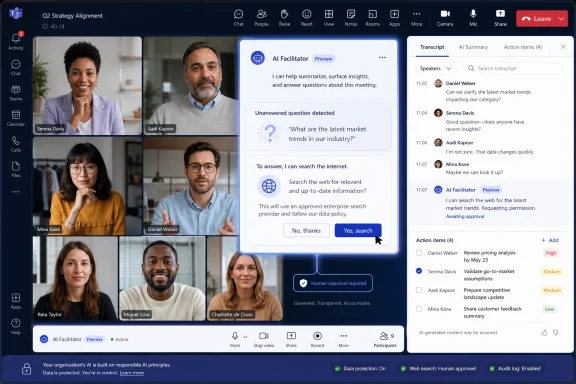
The new Facilitator behavior is almost comically ordinary at first glance. Someone in a Teams meeting asks, “What is an LLM?” The room keeps moving, nobody answers, and the agent posts a prompt offering to find an answer with web search.
That is not a new category of artificial intelligence. It is not even a new kind of search. What matters is where Microsoft is placing it: inside the meeting flow, at the exact moment when knowledge work usually depends on someone admitting they do not know something, opening a browser, and risking the social cost of derailing the conversation.
This is Microsoft’s Copilot strategy in miniature. The company is not merely bolting a chatbot onto Teams; it is training Teams to treat meetings as live, structured, machine-readable events. Facilitator already summarizes decisions, captures tasks, works with agendas, and answers meeting-related questions. Now it is being positioned as a participant that notices silence and offers to fill it.
That makes the feature both useful and slightly unsettling. Meetings are full of abandoned questions for good reasons: sometimes nobody knows the answer, sometimes the answer is outside the meeting’s scope, and sometimes the question is politically inconvenient. Microsoft is betting that enough of those silences are just friction that an agent can productively remove.
Facilitator’s unanswered-question detection edges Teams into a different mode. The agent observes the meeting, determines that a participant has raised an open question, infers that nobody has answered it, and then suggests an action. The human still has to approve the web search by selecting “Yes,” but the initiative has shifted.
That distinction matters. In enterprise software, the first move is often the most important one. A tool that waits is a utility; a tool that prompts is a workflow designer.
Microsoft has been moving steadily in this direction with Copilot agents across Microsoft 365. The company’s pitch is that AI should not just answer prompts but participate in work: preparing agendas, watching time, drafting documents, syncing tasks to Planner, and surfacing insights from conversation. Facilitator is the meeting-room version of that ambition.
The unanswered-question feature is especially revealing because it does not require a complex business process to show value. It targets a universal irritation. Every meeting contains moments when a factual question gets waved away because the cost of answering it in real time feels higher than the benefit.
The product bet is that Teams can lower that cost to a single click.
By letting Facilitator offer a web search, Microsoft is trying to make external knowledge feel native to the meeting. Teams is no longer just the place where people talk about work; it becomes the place where a question can be detected, researched, and answered without leaving the conversation.
That is strategically consistent with Microsoft’s broader Copilot packaging. Teams has become one of the company’s most important surfaces for Microsoft 365 Copilot because it sits where documents, calendars, chats, calls, transcripts, and organizational context collide. If Copilot can be made useful in Teams meetings, Microsoft gets a daily reminder of value in one of the most visible parts of the workday.
But web search in a meeting is also a different trust proposition from summarizing a transcript. A summary is grounded in something the attendees just said. A web answer reaches outside the tenant, outside the meeting, and potentially outside the set of sources an organization would normally bless.
That does not make the feature reckless. Participants must approve the search, and the roadmap description indicates the agent offers to help rather than silently injecting answers. Still, administrators should not treat this as a novelty. The meeting room is becoming another endpoint for internet-grounded AI responses.
Microsoft’s Facilitator documentation already positions the agent as something that can take notes, summarize decisions, answer questions, help with agendas, and manage tasks. Those functions intersect with transcription, meeting options, Copilot availability, and the organization’s policies around recording and AI access. The new unanswered-question workflow adds another operational variable: when a meeting contains a question, Teams may now encourage participants to bring in web-derived content.
That may be harmless in a project stand-up. It may be more complicated in legal, security, HR, finance, healthcare, or public-sector contexts. If someone asks about a vulnerability, a competitor, a customer incident, a medical term, or an internal code name, a web-search prompt could create confusion about what information is safe to seek, share, and retain.
The feature’s “Yes” step is important because it keeps a human in the loop. But human approval is not the same thing as organizational governance. A participant may not know whether the question, the answer, the resulting chat message, or any generated notes are subject to retention, discovery, sensitivity labels, or meeting policy restrictions.
This is where Microsoft’s agentic workplace vision meets the reality of tenant administration. The more proactive Copilot becomes, the more important it is for admins to know which features are enabled, which licenses are required, how meeting options interact with Copilot and Facilitator, and what gets stored after the call ends.
That shift is subtle but profound. A meeting transcript is no longer just a record. It becomes input for real-time decision support, task extraction, agenda management, document drafting, and now question detection.
From a productivity standpoint, this is exactly what many users want. The average meeting is a lossy medium. Decisions vanish, action items blur, definitions get assumed, and junior participants often hesitate to interrupt. A competent agent that captures open questions and offers answers could make meetings more inclusive and less dependent on the loudest or most experienced person in the room.
But the same mechanism can flatten nuance. Not every open question is a request for a quick factual answer. Some questions are rhetorical. Some are strategic. Some are meant to expose uncertainty rather than resolve it. An agent that treats silence as a service opportunity may occasionally misread the room.
Microsoft appears to understand at least part of that risk by making the agent offer assistance rather than answer automatically. That keeps the social contract visible. The meeting participants, not the software, decide whether the interruption is useful.
Even so, the feature pushes Teams toward a world where meeting software is not passive infrastructure. It listens, categorizes, and proposes next steps. That will be welcomed by users drowning in meetings and watched carefully by those responsible for compliance and security.
The worst version is not science fiction; it is familiar enterprise software behavior. The agent interrupts too often, answers questions nobody wanted answered, injects generic web content into specialized discussions, or gives participants false confidence that a quick search has resolved a complex issue.
This is not a Teams-only problem. It is the core tension of AI assistants in knowledge work. They are most useful when they remove friction from low-stakes tasks, but they are most dangerous when the same fluency is mistaken for authority in high-stakes contexts.
Microsoft can reduce that risk through good interface design. The answer should be visibly attributed as web-based, scoped to the question, and easy to ignore. It should not masquerade as internal policy, legal advice, security guidance, or customer-specific truth unless it is grounded in approved tenant data and labeled accordingly.
The roadmap description is brief, so we should not overread the implementation. But the deployment target — General Availability in August 2026, across major Teams clients and worldwide standard multi-tenant cloud instances — suggests Microsoft sees this as a mainstream productivity feature, not a niche experiment.
That means admins should start thinking about it now, not when users notice Facilitator prompting them during a live call.
When a meeting question goes unanswered today, one of three things usually happens. Someone searches the web privately, someone says they will follow up later, or the question disappears. Microsoft wants Teams to capture that moment before it leaks out of the workflow.
That is a classic Microsoft 365 move. The company does not need to own every answer on the internet. It needs to keep the user inside Microsoft’s collaboration surface while the answer is found, discussed, and potentially turned into a note, task, or document.
For Microsoft, this compounds the value of Teams. For users, it may simply feel convenient. For administrators, it means Teams continues to absorb functions that used to be distributed across browsers, note-taking apps, search engines, meeting assistants, and task tools.
The feature also reveals why Copilot is increasingly difficult to evaluate as a single product. A chatbot benchmark does not tell you whether an agent that notices unanswered questions will save time in a meeting. The value depends on timing, restraint, context, policy, and whether the answer arrives before the conversation has moved on.
That is why Facilitator may matter more than its humble example suggests. “What is an LLM?” is a toy query. The workflow around it is not.
The first job is discovery. Admins need to know who has Microsoft 365 Copilot licenses, where Facilitator is already available, which meeting policies allow Copilot and Facilitator, and how those policies differ across executives, regulated teams, frontline workers, and external collaboration scenarios.
The second job is expectation-setting. Users will see a helpful prompt and may reasonably assume that if Teams offers a web answer, the organization approves of using it. That assumption may be fine for ordinary meetings and wrong for sensitive ones.
The third job is classification. Some meetings are ideal for proactive AI help: training sessions, planning calls, product discussions, internal workshops, and recurring project reviews. Others may need stricter controls, especially where confidentiality, privilege, procurement rules, incident response, or personal data are involved.
Microsoft’s challenge is to give admins enough knobs without making the feature impossible to deploy. Enterprise customers want productivity, but they also want predictable behavior. A meeting agent that behaves differently depending on client, license, policy, organizer role, or meeting template can quickly become a help-desk magnet.
The safest rollout strategy is likely a phased one. Let enthusiastic teams use Facilitator broadly, watch the chat artifacts it creates, review retention and compliance implications, and then decide whether web-assisted unanswered-question detection belongs in all meetings or only some.
The less obvious reaction is that Microsoft is normalizing agentic intervention in the everyday rhythms of office work. That does not mean the software is autonomous in the dramatic sense. It means the software is learning when to raise its hand.
That is a bigger behavioral change than another Copilot button. A proactive meeting agent alters who controls the agenda, how interruptions happen, and what kinds of knowledge get privileged in conversation. It can make meetings smarter, but it can also make them more dependent on whatever the agent recognizes as answerable.
There is also a cultural dimension. In some organizations, a Facilitator prompt may help junior employees get basic definitions without embarrassment. In others, it may encourage people to outsource shared understanding to the machine rather than pause and explain concepts to colleagues. Productivity tools always shape behavior; AI tools do it faster because they speak in the flow of work.
The feature’s success will depend less on model sophistication than on restraint. The agent should be useful enough to save a meeting from ignorance, but quiet enough not to become the meeting.
The practical reading is equally simple: this is not just a convenience feature. It is another step toward Teams meetings becoming live AI-managed workspaces.
 Microsoft Turns the Unanswered Question Into a Product Surface
The new Facilitator behavior is almost comically ordinary at first glance. Someone in a Teams meeting asks, “What is an LLM?” The room keeps moving, nobody answers, and the agent posts a prompt offering to find an answer with web search.That is not a new category of artificial intelligence. It is not even a new kind of search. What matters is where Microsoft is placing it: inside the meeting flow, at the exact moment when knowledge work usually depends on someone admitting they do not know something, opening a browser, and risking the social cost of derailing the conversation.
This is Microsoft’s Copilot strategy in miniature. The company is not merely bolting a chatbot onto Teams; it is training Teams to treat meetings as live, structured, machine-readable events. Facilitator already summarizes decisions, captures tasks, works with agendas, and answers meeting-related questions. Now it is being positioned as a participant that notices silence and offers to fill it.
That makes the feature both useful and slightly unsettling. Meetings are full of abandoned questions for good reasons: sometimes nobody knows the answer, sometimes the answer is outside the meeting’s scope, and sometimes the question is politically inconvenient. Microsoft is betting that enough of those silences are just friction that an agent can productively remove.
The Agent Is No Longer Waiting for the Magic Word
The current Copilot pattern in Microsoft 365 still leans heavily on explicit invocation. Users ask Copilot for a summary, mention an agent in chat, or open a side pane and type a prompt. That model has been relatively easy for administrators and workers to understand: the AI does something when someone asks it to do something.Facilitator’s unanswered-question detection edges Teams into a different mode. The agent observes the meeting, determines that a participant has raised an open question, infers that nobody has answered it, and then suggests an action. The human still has to approve the web search by selecting “Yes,” but the initiative has shifted.
That distinction matters. In enterprise software, the first move is often the most important one. A tool that waits is a utility; a tool that prompts is a workflow designer.
Microsoft has been moving steadily in this direction with Copilot agents across Microsoft 365. The company’s pitch is that AI should not just answer prompts but participate in work: preparing agendas, watching time, drafting documents, syncing tasks to Planner, and surfacing insights from conversation. Facilitator is the meeting-room version of that ambition.
The unanswered-question feature is especially revealing because it does not require a complex business process to show value. It targets a universal irritation. Every meeting contains moments when a factual question gets waved away because the cost of answering it in real time feels higher than the benefit.
The product bet is that Teams can lower that cost to a single click.
Web Search Enters the Meeting Room by Default
There is a reason Microsoft’s example uses a basic general-knowledge question. “What is an LLM?” is exactly the sort of query a participant could answer in five seconds with a browser tab, but in a meeting those five seconds become awkward. The person searching stops listening, the conversation drifts, and the answer may arrive after the group has moved on.By letting Facilitator offer a web search, Microsoft is trying to make external knowledge feel native to the meeting. Teams is no longer just the place where people talk about work; it becomes the place where a question can be detected, researched, and answered without leaving the conversation.
That is strategically consistent with Microsoft’s broader Copilot packaging. Teams has become one of the company’s most important surfaces for Microsoft 365 Copilot because it sits where documents, calendars, chats, calls, transcripts, and organizational context collide. If Copilot can be made useful in Teams meetings, Microsoft gets a daily reminder of value in one of the most visible parts of the workday.
But web search in a meeting is also a different trust proposition from summarizing a transcript. A summary is grounded in something the attendees just said. A web answer reaches outside the tenant, outside the meeting, and potentially outside the set of sources an organization would normally bless.
That does not make the feature reckless. Participants must approve the search, and the roadmap description indicates the agent offers to help rather than silently injecting answers. Still, administrators should not treat this as a novelty. The meeting room is becoming another endpoint for internet-grounded AI responses.
The Convenience Layer Carries a Governance Bill
For WindowsForum’s IT-pro audience, the interesting question is not whether the feature can explain a term. It is how it behaves under real enterprise conditions: regulated meetings, sensitive discussions, mixed internal and external attendees, retention policies, Copilot license boundaries, and tenant controls that often look simple in a demo and complicated in production.Microsoft’s Facilitator documentation already positions the agent as something that can take notes, summarize decisions, answer questions, help with agendas, and manage tasks. Those functions intersect with transcription, meeting options, Copilot availability, and the organization’s policies around recording and AI access. The new unanswered-question workflow adds another operational variable: when a meeting contains a question, Teams may now encourage participants to bring in web-derived content.
That may be harmless in a project stand-up. It may be more complicated in legal, security, HR, finance, healthcare, or public-sector contexts. If someone asks about a vulnerability, a competitor, a customer incident, a medical term, or an internal code name, a web-search prompt could create confusion about what information is safe to seek, share, and retain.
The feature’s “Yes” step is important because it keeps a human in the loop. But human approval is not the same thing as organizational governance. A participant may not know whether the question, the answer, the resulting chat message, or any generated notes are subject to retention, discovery, sensitivity labels, or meeting policy restrictions.
This is where Microsoft’s agentic workplace vision meets the reality of tenant administration. The more proactive Copilot becomes, the more important it is for admins to know which features are enabled, which licenses are required, how meeting options interact with Copilot and Facilitator, and what gets stored after the call ends.
The Meeting Transcript Becomes an Operating Environment
Teams meetings used to be ephemeral unless someone recorded them or took notes. Then transcription made meetings searchable. Copilot made transcripts conversational. Facilitator goes further: it treats the meeting as an environment in which an agent can act.That shift is subtle but profound. A meeting transcript is no longer just a record. It becomes input for real-time decision support, task extraction, agenda management, document drafting, and now question detection.
From a productivity standpoint, this is exactly what many users want. The average meeting is a lossy medium. Decisions vanish, action items blur, definitions get assumed, and junior participants often hesitate to interrupt. A competent agent that captures open questions and offers answers could make meetings more inclusive and less dependent on the loudest or most experienced person in the room.
But the same mechanism can flatten nuance. Not every open question is a request for a quick factual answer. Some questions are rhetorical. Some are strategic. Some are meant to expose uncertainty rather than resolve it. An agent that treats silence as a service opportunity may occasionally misread the room.
Microsoft appears to understand at least part of that risk by making the agent offer assistance rather than answer automatically. That keeps the social contract visible. The meeting participants, not the software, decide whether the interruption is useful.
Even so, the feature pushes Teams toward a world where meeting software is not passive infrastructure. It listens, categorizes, and proposes next steps. That will be welcomed by users drowning in meetings and watched carefully by those responsible for compliance and security.
The Best Version Saves Time Without Pretending to Be an Expert
The most productive version of this feature is modest. Facilitator detects a straightforward unanswered question, asks permission to search, returns a concise answer, and makes clear that the information came from web search rather than from the organization’s internal knowledge. That would be genuinely helpful.The worst version is not science fiction; it is familiar enterprise software behavior. The agent interrupts too often, answers questions nobody wanted answered, injects generic web content into specialized discussions, or gives participants false confidence that a quick search has resolved a complex issue.
This is not a Teams-only problem. It is the core tension of AI assistants in knowledge work. They are most useful when they remove friction from low-stakes tasks, but they are most dangerous when the same fluency is mistaken for authority in high-stakes contexts.
Microsoft can reduce that risk through good interface design. The answer should be visibly attributed as web-based, scoped to the question, and easy to ignore. It should not masquerade as internal policy, legal advice, security guidance, or customer-specific truth unless it is grounded in approved tenant data and labeled accordingly.
The roadmap description is brief, so we should not overread the implementation. But the deployment target — General Availability in August 2026, across major Teams clients and worldwide standard multi-tenant cloud instances — suggests Microsoft sees this as a mainstream productivity feature, not a niche experiment.
That means admins should start thinking about it now, not when users notice Facilitator prompting them during a live call.
Microsoft’s Real Competitor Is the Browser Tab
It is tempting to frame every Copilot feature as Microsoft trying to beat Google, OpenAI, or another AI vendor. In this case, the more immediate competitor is the browser tab.When a meeting question goes unanswered today, one of three things usually happens. Someone searches the web privately, someone says they will follow up later, or the question disappears. Microsoft wants Teams to capture that moment before it leaks out of the workflow.
That is a classic Microsoft 365 move. The company does not need to own every answer on the internet. It needs to keep the user inside Microsoft’s collaboration surface while the answer is found, discussed, and potentially turned into a note, task, or document.
For Microsoft, this compounds the value of Teams. For users, it may simply feel convenient. For administrators, it means Teams continues to absorb functions that used to be distributed across browsers, note-taking apps, search engines, meeting assistants, and task tools.
The feature also reveals why Copilot is increasingly difficult to evaluate as a single product. A chatbot benchmark does not tell you whether an agent that notices unanswered questions will save time in a meeting. The value depends on timing, restraint, context, policy, and whether the answer arrives before the conversation has moved on.
That is why Facilitator may matter more than its humble example suggests. “What is an LLM?” is a toy query. The workflow around it is not.
Admins Should Treat August as a Policy Deadline, Not a Calendar Note
Because the roadmap item is still in development, organizations should assume details can change before General Availability. Microsoft 365 roadmap dates are planning signals, not contracts. Even so, August 2026 is close enough that IT teams should begin mapping the controls and communications they will need.The first job is discovery. Admins need to know who has Microsoft 365 Copilot licenses, where Facilitator is already available, which meeting policies allow Copilot and Facilitator, and how those policies differ across executives, regulated teams, frontline workers, and external collaboration scenarios.
The second job is expectation-setting. Users will see a helpful prompt and may reasonably assume that if Teams offers a web answer, the organization approves of using it. That assumption may be fine for ordinary meetings and wrong for sensitive ones.
The third job is classification. Some meetings are ideal for proactive AI help: training sessions, planning calls, product discussions, internal workshops, and recurring project reviews. Others may need stricter controls, especially where confidentiality, privilege, procurement rules, incident response, or personal data are involved.
Microsoft’s challenge is to give admins enough knobs without making the feature impossible to deploy. Enterprise customers want productivity, but they also want predictable behavior. A meeting agent that behaves differently depending on client, license, policy, organizer role, or meeting template can quickly become a help-desk magnet.
The safest rollout strategy is likely a phased one. Let enthusiastic teams use Facilitator broadly, watch the chat artifacts it creates, review retention and compliance implications, and then decide whether web-assisted unanswered-question detection belongs in all meetings or only some.
The Useful Feature Is Also the Warning Shot
The obvious reaction to this roadmap item is positive. Meetings waste huge amounts of time, and unanswered questions are one of the small frictions that compound into bad decisions. If Facilitator can catch a question, ask permission, and provide a quick, reasonably accurate answer, many users will like it.The less obvious reaction is that Microsoft is normalizing agentic intervention in the everyday rhythms of office work. That does not mean the software is autonomous in the dramatic sense. It means the software is learning when to raise its hand.
That is a bigger behavioral change than another Copilot button. A proactive meeting agent alters who controls the agenda, how interruptions happen, and what kinds of knowledge get privileged in conversation. It can make meetings smarter, but it can also make them more dependent on whatever the agent recognizes as answerable.
There is also a cultural dimension. In some organizations, a Facilitator prompt may help junior employees get basic definitions without embarrassment. In others, it may encourage people to outsource shared understanding to the machine rather than pause and explain concepts to colleagues. Productivity tools always shape behavior; AI tools do it faster because they speak in the flow of work.
The feature’s success will depend less on model sophistication than on restraint. The agent should be useful enough to save a meeting from ignorance, but quiet enough not to become the meeting.
The August Rollout Gives IT a Narrow but Real Window
The concrete facts are simple: Roadmap ID 558341 is in development, tied to Microsoft Teams and Microsoft 365 Copilot, targeted for General Availability and Targeted Release, and listed for August 2026 across Android, desktop, iOS, Mac, and web in worldwide standard multi-tenant cloud environments. That is enough for planning, even if the final user experience changes before release.The practical reading is equally simple: this is not just a convenience feature. It is another step toward Teams meetings becoming live AI-managed workspaces.
- Organizations should review Teams meeting policies and Copilot availability before the August 2026 rollout window arrives.
- Facilitator’s web-search answers should be treated differently from answers grounded in meeting context or approved internal content.
- Sensitive meeting categories may need stricter guidance before users encounter proactive prompts in the chat.
- Help-desk and adoption teams should prepare plain-language messaging that explains what Facilitator can do and what it should not be trusted to decide.
- Pilot groups should evaluate not only answer accuracy but also interruption frequency, user trust, and the compliance footprint of AI-generated meeting chat content.
References
- Primary source: Microsoft 365 Roadmap
Published: 2026-06-24T23:15:55.6812517Z
Microsoft 365 Roadmap | Microsoft 365
The Microsoft 365 Roadmap lists updates that are currently planned for applicable subscribers. Check here for more information on the status of new features and updates.www.microsoft.com
- Official source: support.microsoft.com
Facilitator in Microsoft Teams meetings | Microsoft Support
AI-generated notes automate note-taking during Teams meetings to capture the discussion in real-time with action items and follow-up tasks.support.microsoft.com - Related coverage: zarioh-ds.nl
Teams Facilitator June 2026: set up the AI meeting agent | Zarioh | Zarioh Digital Solutions
Teams Facilitator is broadly available from June 2026. The AI agent creates shared notes, detects unanswered questions and looks them up via web search. Read how to configure it.zarioh-ds.nl - Official source: learn.microsoft.com
Set up Facilitator in Microsoft Teams - Microsoft Teams | Microsoft Learn
Learn about how Facilitator in Microsoft Teams enables group collaboration powered by Copilot.learn.microsoft.com - Official source: techcommunity.microsoft.com
Keep meetings focused and productive with Facilitator in Teams
Facilitator in Microsoft Teams keeps your meetings organized by surfacing the agenda, tracking progress, and capturing key highlights in real time. techcommunity.microsoft.com
- Official source: download.microsoft.com
- Official source: cdn.techcommunity.microsoft.com
Microsoft Planner FAQ
</rdf:Alt> </dc:description> <dc:creator> <rdf:Seq> <rdf:li>Microsoftcdn.techcommunity.microsoft.com
- Official source: adoption.microsoft.com
- Related coverage: content.focusgroup.co.uk
