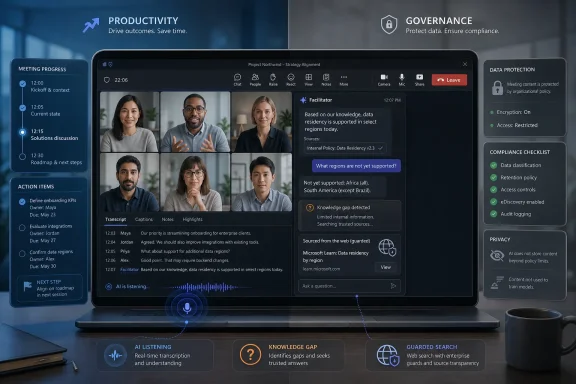
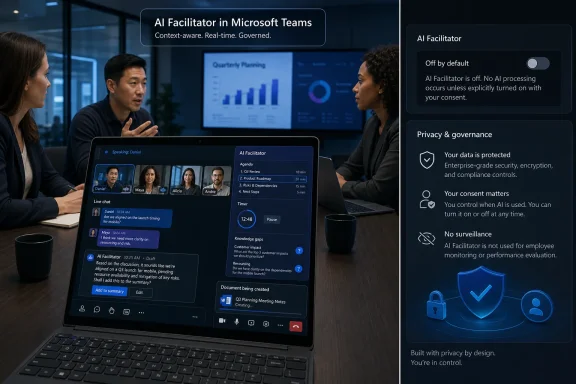
Microsoft is preparing to make Teams Facilitator detect knowledge gaps during live meetings and post web-grounded explanations into meeting chat, with general availability expected by late August 2026 for organizations using Microsoft 365 Copilot licensing and permitting Copilot web search. The feature is framed as a small intervention: fewer awkward interruptions, fewer derailed meetings, fewer moments where someone silently loses the thread. But the real story is larger than a clever meeting helper. Microsoft is moving Teams from a place where AI answers questions into a place where AI decides that a question exists.
That distinction matters. A bot that responds when summoned is a tool; a bot that listens for uncertainty is closer to an observer with editorial judgment. In the abstract, that sounds useful. In the actual enterprise, where Teams meetings contain budgets, personnel issues, product roadmaps, customer incidents, legal exposure, and office politics, it also sounds like the next governance fight arriving ahead of schedule.
The new Facilitator capability is easy to describe because it maps to a familiar annoyance. Someone in a meeting says “model alignment,” “zero trust,” “RAG pipeline,” “qualified lead,” or “retention hold,” and half the room nods while one participant quietly falls behind. In Microsoft’s ideal version of this scene, Teams notices the confusion, searches the web, and drops a contextual explanation in chat before the meeting slows down.
That is the magic-trick version. The more interesting version is that the meeting has become an ambient prompt. Participants no longer need to type a question to trigger an answer; their tone, phrasing, and conversational context may be enough for the system to infer that an answer is needed.
Microsoft is reportedly limiting the feature to the meeting’s agenda and conversation, which is a sensible guardrail. It is also the kind of guardrail that sounds stronger in a product description than it feels in a real meeting. Agendas are often vague, stale, aspirational, or missing entirely. Conversations drift, especially in the meetings where a facilitator is most useful.
The result is a feature that lives in a gray zone between assistance and interpretation. Facilitator is not just taking notes, not just summarizing decisions, and not merely answering a direct chat prompt. It is listening for knowledge gaps, deciding whether those gaps are relevant, and deciding whether a public answer belongs in the meeting chat.
That makes it one of the more revealing Teams features Microsoft has shipped in the Copilot era. The company is no longer content to place AI beside the workflow. It wants AI to read the room.
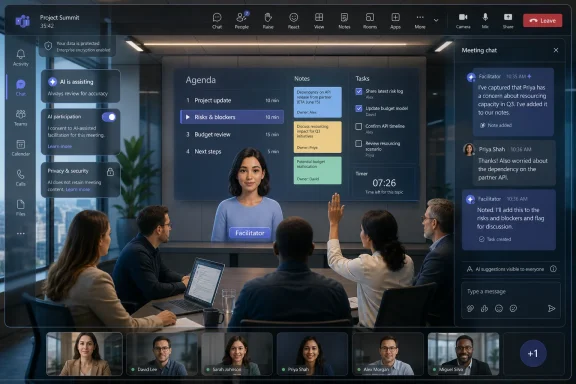
Facilitator began as an AI meeting helper: notes, agendas, decisions, open questions, timers, action items, and follow-up work. That alone was a major shift because Teams meetings historically produced artifacts only when humans made them: recordings, transcripts, minutes, chat logs, Planner tasks, and shared documents. Facilitator turns the meeting into something that constantly emits structured work product.
The knowledge-gap feature pushes that logic one step further. Instead of waiting for a human to say, “Can someone explain that?” the system tries to detect the need. If the earlier phase of Copilot in Teams was about summarizing what happened, this phase is about intervening while it happens.
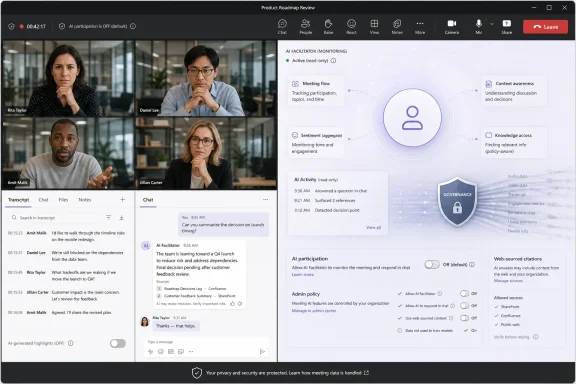
Microsoft’s positioning is careful. The company says the feature is not enabled by default, that a participant can add or remove Facilitator, that admins can disable it at the tenant level, and that it depends on Copilot web search being allowed. It also says the agent will likely produce fewer than one response per meeting on average.
That last claim is meant to calm fears of a chatty bot constantly interrupting serious work. But it also reveals how narrow Microsoft wants the first public version to feel. The safest way to introduce an ambient AI observer is to make it appear almost shy.
The more precise concern is that Facilitator may listen with a new purpose. Transcription captures what was said. Notes summarize what mattered. A knowledge-gap detector tries to infer what people understood, misunderstood, hesitated over, or needed help with.
That is a different category of signal. “Alice asked what an LLM is” is one thing. “Alice sounded uncertain when LLMs came up” is another. The first is a statement in the meeting record. The second is an inference about a person’s comprehension, confidence, or preparedness.
Microsoft can insist that the system is designed to help, and that may be true. The trouble is that enterprise software does not remain confined to its friendliest use case. A feature built to preserve meeting flow can also become evidence of who seemed confused, who needed remedial explanation, which team repeatedly lacks context, or which customer conversation triggered AI intervention.
The company will almost certainly argue that the feature does not create a performance dossier and that its output is constrained. Those arguments matter, but they do not erase the cultural effect. Once employees know that meeting software is not only recording words but detecting uncertainty, they may behave differently in the room.
Tone is harder. Humans misread tone constantly, and software has a long history of presenting probabilistic inference as polished confidence. Accents, speech patterns, neurodivergence, second-language use, cultural communication norms, microphone quality, and fatigue can all affect how “uncertainty” appears.
In a consumer product, a false positive might be annoying. In a business meeting, a false positive can be socially loaded. If Facilitator posts a basic explanation after a senior engineer speaks, does that imply the engineer did not understand the term? If it posts an answer during a customer briefing, does it signal that the customer sounded uninformed? If it intervenes after a junior employee asks a careful clarifying question, does it help that person or spotlight them?
Microsoft’s claim that responses will be rare is therefore important but insufficient. The problem is not only frequency. It is the meaning of the intervention when it happens.
The best version of the feature would make its reasoning invisible enough not to embarrass anyone while making its explanation useful enough to justify appearing. That is a narrow product-design target. Miss it, and Facilitator becomes another bot that everyone politely tolerates while secretly resenting.
In a meeting about broad AI strategy, a web-sourced explanation of large language models is probably harmless. In a meeting about legal obligations, security incident response, medical policy, export controls, procurement rules, or customer commitments, a casually inserted web answer could become dangerous.
The risk is not that Microsoft’s AI will necessarily hallucinate every time. The risk is that meeting chat gives AI output a social authority it may not deserve. A response posted into Teams during a live business discussion can be treated as part of the conversation’s record, especially by people who join late or skim the chat afterward.
Admins who already disable Copilot web search will have a clear lever, because this capability reportedly depends on that setting. But many organizations have taken a more permissive stance toward web grounding because it makes Copilot more useful. Facilitator forces them to revisit that bargain in a more sensitive context.
There is a difference between an employee asking Copilot a web-grounded question in a private chat and an AI agent posting a web-grounded explanation into a live meeting. One is user-directed research. The other is system-initiated participation in group work.
This is not a feature designed for casual Teams users who want prettier chat bubbles. It is aimed at organizations already buying into Microsoft’s premium AI layer. Those customers have accepted, at least contractually and administratively, that Copilot belongs inside their work graph, meetings, documents, and collaboration surfaces.
That does not mean they have accepted every possible AI behavior. In fact, customers paying for Copilot are often the ones with the strongest governance questions because they are deploying it at scale. They have security teams, privacy officers, works councils, compliance committees, executive sponsors, and skeptical employees to satisfy.
Microsoft’s strategic challenge is that Copilot value increases as the system becomes more proactive, but customer comfort often decreases for the same reason. A meeting agent that waits for a prompt is easier to explain in a policy document. A meeting agent that detects uncertainty is harder to describe without sounding invasive.
The premium license also creates a strange asymmetry. One licensed user may enable a capability that affects the experience of everyone in the meeting. That may be normal for meeting recording and transcription, but organizations have had years to build norms around those features. AI interpretation of knowledge gaps is newer social territory.
Those controls are important. They give IT a way to pause adoption, run pilots, separate high-trust internal meetings from sensitive external ones, and create policy before the feature becomes part of workplace muscle memory. They also give Microsoft a familiar answer to privacy objections: if you do not want it, turn it off.
But admin controls are not the same thing as organizational consent. In large companies, many employees do not know which AI features are enabled, which data is retained, which settings apply to a particular meeting, or what happens when an external participant joins from another tenant. The meeting interface becomes the disclosure layer, and the interface is rarely where governance is fully understood.
There is also the problem of defaults over time. A feature can launch as optional, limited, and quiet, then expand across clients, meeting types, and licensing bundles once Microsoft has telemetry showing that customers tolerate it. This is not a conspiracy theory; it is modern SaaS product development.
IT departments should therefore judge the feature less by its first release and more by the precedent it sets. If Teams can infer a knowledge gap today, what else will Teams be invited to infer tomorrow?
A vendor might be comfortable with Facilitator. A customer might not be. A consulting firm might want AI notes and live clarifications for efficiency. A regulated client might view the same behavior as unacceptable monitoring. A startup might treat the meeting chat as disposable collaboration. A bank might treat it as a discoverable record.
The fact that the feature will not apply to calls, town halls, or webinars narrows the blast radius, but ordinary Teams meetings are exactly where sensitive work often happens. Sales negotiations, roadmap reviews, incident briefings, executive updates, HR discussions, legal strategy sessions, and customer escalations all routinely occur as “just a meeting.”
Cross-tenant use will make disclosure and etiquette more important than the technical setting alone. It should be obvious to all participants when Facilitator is active, what it can do, and who turned it on. If the social norm becomes “the host decides,” Microsoft may find that the backlash comes less from IT admins and more from customers who feel surprised.
This is where Teams inherits the broader meeting-bot controversy. External AI note-takers have already made many organizations uncomfortable because they appear as participants but behave as data capture systems. Microsoft’s version has the advantage of being native, governed, and integrated. It also has the disadvantage of being harder to mentally separate from Teams itself.
That sensitivity is not irrational. Hybrid work turned calendar status, presence indicators, meeting attendance, chat responsiveness, and collaboration telemetry into proxies for productivity. Even when vendors design features for coordination, employers may interpret them through management dashboards.
Facilitator’s knowledge-gap detection touches a related nerve. The feature may be intended to help people who are lost, but employees may wonder whether it also marks them as the person who got lost. They may ask whether the AI output is retained, whether managers can search it, whether compliance can review it, and whether it becomes part of the meeting record.
Microsoft’s documentation around Copilot, transcripts, meeting artifacts, and AI archives is increasingly detailed, but user trust is not built from admin documentation alone. It is built from repeated experiences where software behaves predictably and does not surprise people in vulnerable moments.
A live meeting is a vulnerable moment. People are performing competence, negotiating status, testing ideas, and sometimes admitting what they do not know. That is precisely why an AI helper could be valuable. It is also why the helper must be restrained.
A good Facilitator intervention could make meetings more inclusive. It could help new hires, non-native speakers, cross-functional teams, and people entering a specialized discussion without years of domain context. It could reduce the social cost of asking “obvious” questions and preserve meeting flow without sacrificing comprehension.
In some organizations, that is a meaningful gain. The hidden tax of meetings is not only time spent talking; it is time spent pretending that everyone understood the same thing. If Teams can reduce that pretense, the feature has value.
The hard part is that the same mechanism that helps the least-informed participant can feel like surveillance of that participant. Inclusion and monitoring can look uncomfortably similar when implemented through enterprise software.
Microsoft has to convince customers that Facilitator is a shared-room assistant, not a comprehension detector. That will depend on product behavior more than marketing. If the agent posts neutral, agenda-relevant explanations that do not attribute confusion to a person, users may accept it. If it feels like it is calling people out, it will be muted, banned, or quietly avoided.
The first decision is whether the organization wants web-grounded AI interventions in meetings at all. That decision should not be left solely to individual enthusiasm, especially in legal, healthcare, finance, government, defense, education, and customer-facing environments. A general-purpose explanation engine is not automatically appropriate in every business conversation.
The second decision is which meetings are eligible. Internal training sessions, onboarding meetings, engineering explainers, and product education calls may be good candidates. Board meetings, HR investigations, privileged legal discussions, security incidents, acquisition talks, and sensitive customer escalations probably are not.
The third decision is how disclosure should work. If Facilitator is active, participants should not have to infer that from a stray chat message. They should know at the start of the meeting that an AI agent may generate notes, answer questions, or provide explanations.
The fourth decision is retention. If the AI answer lands in chat or notes, it may become part of the record. That means it can affect discovery, audits, investigations, and later business decisions. Governance must cover not only the input to the AI system, but also the artifacts the system creates.
Finally, admins should test the feature with real internal scenarios, not sanitized demos. The question is not whether Facilitator can define “LLM.” The question is how it behaves when the meeting is messy, jargon-heavy, politically sensitive, or full of half-formed ideas.
That is the vision Microsoft has been selling since Copilot moved from novelty to platform. Work is fragmented, context is scattered, meetings are inefficient, and employees spend too much time translating conversation into action. AI, in Microsoft’s telling, is the connective tissue.
The issue is that connective tissue touches everything. Once AI becomes ambient, the old user model breaks down. People cannot evaluate each discrete prompt because there may not be a prompt. They cannot always separate private use from group use because the workspace is shared. They cannot assume silence means inactivity because the system may be listening for a trigger.
This is why small Teams features now carry big implications. Microsoft does not need to announce a grand workplace surveillance product to change the feel of work. It only needs to ship a sequence of useful AI features that expand what software notices.
The company’s defenders will say this is exactly what enterprise customers asked for: smarter meetings, fewer manual tasks, better knowledge flow. Its critics will say Microsoft is normalizing observation as a prerequisite for productivity. Both can be true.
Facilitator is not human, but it may behave socially. It can speak into chat, summarize decisions, suggest actions, answer questions, and soon detect missing context. That makes it part of the meeting dynamic even if it has no face, no calendar invite, and no political stake.
For IT, the danger is treating this as a licensing issue rather than a workplace behavior issue. The license decides who can turn it on. The policy decides whether it is allowed. But the culture decides whether people trust the room once it is active.
For users, the danger is assuming that “AI in Teams” means one thing. Copilot in a private chat, Copilot over a retained transcript, Facilitator generating Loop notes, and Facilitator posting web explanations during a live meeting are different experiences with different risk profiles.
For Microsoft, the danger is overplaying the assistant metaphor. Assistants help when asked. Observers interpret. Facilitator is now edging toward both.
A cautious rollout does not have to mean rejecting the feature. It means acknowledging that live AI participation is a meaningful change to meeting norms, not just another checkbox in the Teams admin center.
That adds a practical wrinkle for admins: Facilitator is not just becoming a live-meeting chat assistant, but part of Microsoft’s broader effort to make AI-generated meeting artifacts available even when the meeting happens outside a Teams call. For organizations already reviewing transcript, recap, and Copilot retention policies, in-room mobile capture should be treated as part of the same governance conversation.
Techbuild also says Facilitator is currently available in public preview and remains disabled by default, with Microsoft 365 Copilot licensing required. That does not change the late-August general availability expectation covered earlier, but it underscores that customers can begin testing the broader Facilitator experience before wider rollout.
That distinction matters. A bot that responds when summoned is a tool; a bot that listens for uncertainty is closer to an observer with editorial judgment. In the abstract, that sounds useful. In the actual enterprise, where Teams meetings contain budgets, personnel issues, product roadmaps, customer incidents, legal exposure, and office politics, it also sounds like the next governance fight arriving ahead of schedule.
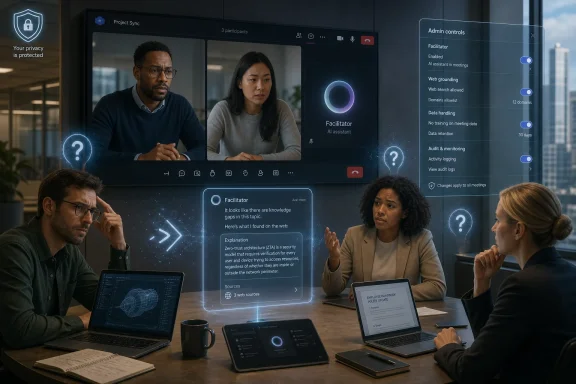 Microsoft Is Turning the Meeting Itself Into the Prompt
The new Facilitator capability is easy to describe because it maps to a familiar annoyance. Someone in a meeting says “model alignment,” “zero trust,” “RAG pipeline,” “qualified lead,” or “retention hold,” and half the room nods while one participant quietly falls behind. In Microsoft’s ideal version of this scene, Teams notices the confusion, searches the web, and drops a contextual explanation in chat before the meeting slows down.That is the magic-trick version. The more interesting version is that the meeting has become an ambient prompt. Participants no longer need to type a question to trigger an answer; their tone, phrasing, and conversational context may be enough for the system to infer that an answer is needed.
Microsoft is reportedly limiting the feature to the meeting’s agenda and conversation, which is a sensible guardrail. It is also the kind of guardrail that sounds stronger in a product description than it feels in a real meeting. Agendas are often vague, stale, aspirational, or missing entirely. Conversations drift, especially in the meetings where a facilitator is most useful.
The result is a feature that lives in a gray zone between assistance and interpretation. Facilitator is not just taking notes, not just summarizing decisions, and not merely answering a direct chat prompt. It is listening for knowledge gaps, deciding whether those gaps are relevant, and deciding whether a public answer belongs in the meeting chat.
That makes it one of the more revealing Teams features Microsoft has shipped in the Copilot era. The company is no longer content to place AI beside the workflow. It wants AI to read the room.
The Feature Sounds Small Because Microsoft Has Learned to Package Big Changes Quietly
Microsoft Teams receives so many monthly updates that even admins who follow the roadmap closely can miss the pattern. One feature improves notes. Another improves recaps. Another adds agents. Another tweaks how Copilot behaves in meetings. Taken separately, each looks like incremental software maintenance. Taken together, they describe a strategic rebuild of Teams around machine-readable collaboration.Facilitator began as an AI meeting helper: notes, agendas, decisions, open questions, timers, action items, and follow-up work. That alone was a major shift because Teams meetings historically produced artifacts only when humans made them: recordings, transcripts, minutes, chat logs, Planner tasks, and shared documents. Facilitator turns the meeting into something that constantly emits structured work product.
The knowledge-gap feature pushes that logic one step further. Instead of waiting for a human to say, “Can someone explain that?” the system tries to detect the need. If the earlier phase of Copilot in Teams was about summarizing what happened, this phase is about intervening while it happens.
Microsoft’s positioning is careful. The company says the feature is not enabled by default, that a participant can add or remove Facilitator, that admins can disable it at the tenant level, and that it depends on Copilot web search being allowed. It also says the agent will likely produce fewer than one response per meeting on average.
That last claim is meant to calm fears of a chatty bot constantly interrupting serious work. But it also reveals how narrow Microsoft wants the first public version to feel. The safest way to introduce an ambient AI observer is to make it appear almost shy.
The Privacy Problem Is Not Just That Teams Is Listening
It is tempting to reduce the privacy concern to a simple complaint: Teams is listening to meetings. But Teams meetings are already often recorded, transcribed, summarized, searched, retained, e-discovered, and governed. For many organizations, especially regulated ones, the meeting has not been ephemeral for years.The more precise concern is that Facilitator may listen with a new purpose. Transcription captures what was said. Notes summarize what mattered. A knowledge-gap detector tries to infer what people understood, misunderstood, hesitated over, or needed help with.
That is a different category of signal. “Alice asked what an LLM is” is one thing. “Alice sounded uncertain when LLMs came up” is another. The first is a statement in the meeting record. The second is an inference about a person’s comprehension, confidence, or preparedness.
Microsoft can insist that the system is designed to help, and that may be true. The trouble is that enterprise software does not remain confined to its friendliest use case. A feature built to preserve meeting flow can also become evidence of who seemed confused, who needed remedial explanation, which team repeatedly lacks context, or which customer conversation triggered AI intervention.
The company will almost certainly argue that the feature does not create a performance dossier and that its output is constrained. Those arguments matter, but they do not erase the cultural effect. Once employees know that meeting software is not only recording words but detecting uncertainty, they may behave differently in the room.
Tone Detection Is Where the Comfort Level Drops
The Neowin report describes Microsoft’s agent as detecting uncertainty in tones and questions. The questions part is easy to defend. If someone asks, “What does that acronym mean?” an AI explanation in chat is functionally similar to a helpful colleague pasting a definition.Tone is harder. Humans misread tone constantly, and software has a long history of presenting probabilistic inference as polished confidence. Accents, speech patterns, neurodivergence, second-language use, cultural communication norms, microphone quality, and fatigue can all affect how “uncertainty” appears.
In a consumer product, a false positive might be annoying. In a business meeting, a false positive can be socially loaded. If Facilitator posts a basic explanation after a senior engineer speaks, does that imply the engineer did not understand the term? If it posts an answer during a customer briefing, does it signal that the customer sounded uninformed? If it intervenes after a junior employee asks a careful clarifying question, does it help that person or spotlight them?
Microsoft’s claim that responses will be rare is therefore important but insufficient. The problem is not only frequency. It is the meaning of the intervention when it happens.
The best version of the feature would make its reasoning invisible enough not to embarrass anyone while making its explanation useful enough to justify appearing. That is a narrow product-design target. Miss it, and Facilitator becomes another bot that everyone politely tolerates while secretly resenting.
Web Search Inside Meetings Raises a Different Risk Than Copilot Over Work Data
Facilitator’s proposed answers are web-grounded, which is both the feature’s strength and its governance headache. Web search helps with general concepts, industry terms, breaking context, and public facts. It also introduces the familiar problems of source quality, freshness, regional variance, and overconfident synthesis.In a meeting about broad AI strategy, a web-sourced explanation of large language models is probably harmless. In a meeting about legal obligations, security incident response, medical policy, export controls, procurement rules, or customer commitments, a casually inserted web answer could become dangerous.
The risk is not that Microsoft’s AI will necessarily hallucinate every time. The risk is that meeting chat gives AI output a social authority it may not deserve. A response posted into Teams during a live business discussion can be treated as part of the conversation’s record, especially by people who join late or skim the chat afterward.
Admins who already disable Copilot web search will have a clear lever, because this capability reportedly depends on that setting. But many organizations have taken a more permissive stance toward web grounding because it makes Copilot more useful. Facilitator forces them to revisit that bargain in a more sensitive context.
There is a difference between an employee asking Copilot a web-grounded question in a private chat and an AI agent posting a web-grounded explanation into a live meeting. One is user-directed research. The other is system-initiated participation in group work.
Licensing Makes This an Enterprise Trust Feature, Not a Mass-Market Convenience
The feature is not free. It requires a Microsoft 365 Copilot-related license for the participant who enables it, though not necessarily for every attendee. That licensing detail may limit adoption, but it also tells us which customers Microsoft is targeting first.This is not a feature designed for casual Teams users who want prettier chat bubbles. It is aimed at organizations already buying into Microsoft’s premium AI layer. Those customers have accepted, at least contractually and administratively, that Copilot belongs inside their work graph, meetings, documents, and collaboration surfaces.
That does not mean they have accepted every possible AI behavior. In fact, customers paying for Copilot are often the ones with the strongest governance questions because they are deploying it at scale. They have security teams, privacy officers, works councils, compliance committees, executive sponsors, and skeptical employees to satisfy.
Microsoft’s strategic challenge is that Copilot value increases as the system becomes more proactive, but customer comfort often decreases for the same reason. A meeting agent that waits for a prompt is easier to explain in a policy document. A meeting agent that detects uncertainty is harder to describe without sounding invasive.
The premium license also creates a strange asymmetry. One licensed user may enable a capability that affects the experience of everyone in the meeting. That may be normal for meeting recording and transcription, but organizations have had years to build norms around those features. AI interpretation of knowledge gaps is newer social territory.
The Admin Controls Are Necessary, but They Will Not Settle the Debate
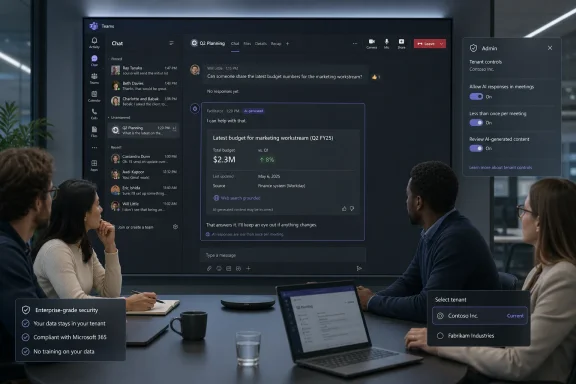
Microsoft has learned from earlier Teams controversies that enterprise AI features need admin switches. According to the reported details, Facilitator can be disabled at the tenant level, is not on by default for this capability, can be removed from a meeting, and will not function if Copilot web search is disabled.Those controls are important. They give IT a way to pause adoption, run pilots, separate high-trust internal meetings from sensitive external ones, and create policy before the feature becomes part of workplace muscle memory. They also give Microsoft a familiar answer to privacy objections: if you do not want it, turn it off.
But admin controls are not the same thing as organizational consent. In large companies, many employees do not know which AI features are enabled, which data is retained, which settings apply to a particular meeting, or what happens when an external participant joins from another tenant. The meeting interface becomes the disclosure layer, and the interface is rarely where governance is fully understood.
There is also the problem of defaults over time. A feature can launch as optional, limited, and quiet, then expand across clients, meeting types, and licensing bundles once Microsoft has telemetry showing that customers tolerate it. This is not a conspiracy theory; it is modern SaaS product development.
IT departments should therefore judge the feature less by its first release and more by the precedent it sets. If Teams can infer a knowledge gap today, what else will Teams be invited to infer tomorrow?
Cross-Tenant Meetings Are Where the Trust Boundary Gets Messy
The reported support for internal and cross-tenant meetings is notable. Internal meetings are hard enough to govern, but cross-tenant meetings introduce multiple organizations’ policies, expectations, and risk appetites into the same call.A vendor might be comfortable with Facilitator. A customer might not be. A consulting firm might want AI notes and live clarifications for efficiency. A regulated client might view the same behavior as unacceptable monitoring. A startup might treat the meeting chat as disposable collaboration. A bank might treat it as a discoverable record.
The fact that the feature will not apply to calls, town halls, or webinars narrows the blast radius, but ordinary Teams meetings are exactly where sensitive work often happens. Sales negotiations, roadmap reviews, incident briefings, executive updates, HR discussions, legal strategy sessions, and customer escalations all routinely occur as “just a meeting.”
Cross-tenant use will make disclosure and etiquette more important than the technical setting alone. It should be obvious to all participants when Facilitator is active, what it can do, and who turned it on. If the social norm becomes “the host decides,” Microsoft may find that the backlash comes less from IT admins and more from customers who feel surprised.
This is where Teams inherits the broader meeting-bot controversy. External AI note-takers have already made many organizations uncomfortable because they appear as participants but behave as data capture systems. Microsoft’s version has the advantage of being native, governed, and integrated. It also has the disadvantage of being harder to mentally separate from Teams itself.
The Location-Tracking Backdrop Makes Privacy Fears Easier to Ignite
Neowin rightly places this feature next to another current Teams controversy: Microsoft’s workplace location capability, which has drawn criticism from users who fear it could enable employee tracking. The details of that separate feature matter, but the broader mood matters more. Microsoft is adding intelligence to collaboration software at a time when workers are already sensitive to surveillance.That sensitivity is not irrational. Hybrid work turned calendar status, presence indicators, meeting attendance, chat responsiveness, and collaboration telemetry into proxies for productivity. Even when vendors design features for coordination, employers may interpret them through management dashboards.
Facilitator’s knowledge-gap detection touches a related nerve. The feature may be intended to help people who are lost, but employees may wonder whether it also marks them as the person who got lost. They may ask whether the AI output is retained, whether managers can search it, whether compliance can review it, and whether it becomes part of the meeting record.
Microsoft’s documentation around Copilot, transcripts, meeting artifacts, and AI archives is increasingly detailed, but user trust is not built from admin documentation alone. It is built from repeated experiences where software behaves predictably and does not surprise people in vulnerable moments.
A live meeting is a vulnerable moment. People are performing competence, negotiating status, testing ideas, and sometimes admitting what they do not know. That is precisely why an AI helper could be valuable. It is also why the helper must be restrained.
The Productivity Case Is Real, Which Is Why the Privacy Fight Will Be Hard
It would be too easy to dismiss the feature as creepy and move on. The productivity case is legitimate. Meetings fail constantly because people lack shared context, hesitate to ask basic questions, or spend five minutes explaining background that could have been handled in one paragraph.A good Facilitator intervention could make meetings more inclusive. It could help new hires, non-native speakers, cross-functional teams, and people entering a specialized discussion without years of domain context. It could reduce the social cost of asking “obvious” questions and preserve meeting flow without sacrificing comprehension.
In some organizations, that is a meaningful gain. The hidden tax of meetings is not only time spent talking; it is time spent pretending that everyone understood the same thing. If Teams can reduce that pretense, the feature has value.
The hard part is that the same mechanism that helps the least-informed participant can feel like surveillance of that participant. Inclusion and monitoring can look uncomfortably similar when implemented through enterprise software.
Microsoft has to convince customers that Facilitator is a shared-room assistant, not a comprehension detector. That will depend on product behavior more than marketing. If the agent posts neutral, agenda-relevant explanations that do not attribute confusion to a person, users may accept it. If it feels like it is calling people out, it will be muted, banned, or quietly avoided.
The Best Governance Will Happen Before the August Rollout
Organizations that wait until late August to think about this feature will be doing policy in the middle of user confusion. The better approach is to treat Facilitator’s knowledge-gap detection as a new meeting mode that deserves explicit rules.The first decision is whether the organization wants web-grounded AI interventions in meetings at all. That decision should not be left solely to individual enthusiasm, especially in legal, healthcare, finance, government, defense, education, and customer-facing environments. A general-purpose explanation engine is not automatically appropriate in every business conversation.
The second decision is which meetings are eligible. Internal training sessions, onboarding meetings, engineering explainers, and product education calls may be good candidates. Board meetings, HR investigations, privileged legal discussions, security incidents, acquisition talks, and sensitive customer escalations probably are not.
The third decision is how disclosure should work. If Facilitator is active, participants should not have to infer that from a stray chat message. They should know at the start of the meeting that an AI agent may generate notes, answer questions, or provide explanations.
The fourth decision is retention. If the AI answer lands in chat or notes, it may become part of the record. That means it can affect discovery, audits, investigations, and later business decisions. Governance must cover not only the input to the AI system, but also the artifacts the system creates.
Finally, admins should test the feature with real internal scenarios, not sanitized demos. The question is not whether Facilitator can define “LLM.” The question is how it behaves when the meeting is messy, jargon-heavy, politically sensitive, or full of half-formed ideas.
Microsoft’s AI Strategy Is Becoming Ambient by Design
Facilitator’s new capability fits a broader Microsoft pattern: Copilot is becoming less like a button and more like a layer. It sits in Word, Excel, Outlook, Teams, Windows, Edge, SharePoint, and the Microsoft 365 app. It summarizes, rewrites, searches, drafts, remembers, and increasingly acts.That is the vision Microsoft has been selling since Copilot moved from novelty to platform. Work is fragmented, context is scattered, meetings are inefficient, and employees spend too much time translating conversation into action. AI, in Microsoft’s telling, is the connective tissue.
The issue is that connective tissue touches everything. Once AI becomes ambient, the old user model breaks down. People cannot evaluate each discrete prompt because there may not be a prompt. They cannot always separate private use from group use because the workspace is shared. They cannot assume silence means inactivity because the system may be listening for a trigger.
This is why small Teams features now carry big implications. Microsoft does not need to announce a grand workplace surveillance product to change the feel of work. It only needs to ship a sequence of useful AI features that expand what software notices.
The company’s defenders will say this is exactly what enterprise customers asked for: smarter meetings, fewer manual tasks, better knowledge flow. Its critics will say Microsoft is normalizing observation as a prerequisite for productivity. Both can be true.
The Meeting Room Now Has a Third Participant
The practical lesson for WindowsForum readers is not that every organization should panic or that every admin should disable the feature on sight. It is that Teams meetings are entering a new phase, and the old distinction between meeting tools and meeting participants is eroding.Facilitator is not human, but it may behave socially. It can speak into chat, summarize decisions, suggest actions, answer questions, and soon detect missing context. That makes it part of the meeting dynamic even if it has no face, no calendar invite, and no political stake.
For IT, the danger is treating this as a licensing issue rather than a workplace behavior issue. The license decides who can turn it on. The policy decides whether it is allowed. But the culture decides whether people trust the room once it is active.
For users, the danger is assuming that “AI in Teams” means one thing. Copilot in a private chat, Copilot over a retained transcript, Facilitator generating Loop notes, and Facilitator posting web explanations during a live meeting are different experiences with different risk profiles.
For Microsoft, the danger is overplaying the assistant metaphor. Assistants help when asked. Observers interpret. Facilitator is now edging toward both.
The August Test Is Really About Permission
By the time this feature becomes generally available, the technical novelty may matter less than the permission model around it. The organizations that succeed with Facilitator will be the ones that decide where it belongs before users discover it by accident.A cautious rollout does not have to mean rejecting the feature. It means acknowledging that live AI participation is a meaningful change to meeting norms, not just another checkbox in the Teams admin center.
- Organizations should decide whether web-grounded AI answers belong in live meetings before the late-August general availability window.
- Admins should review tenant-level Facilitator controls and Copilot web search settings together, because the new behavior depends on both.
- Sensitive meetings should have explicit rules that distinguish AI notes, AI summaries, transcripts, and live AI-generated chat responses.
- Meeting organizers should disclose when Facilitator is active rather than relying on participants to notice after it posts.
- Pilot programs should test awkward edge cases, including cross-tenant meetings and jargon-heavy discussions, instead of relying on polished demo scenarios.
Update: Facilitator Preview Also Extends AI Meeting Support to In-Person Discussions (July 7, 2026)
Techbuild now reports that Microsoft’s Teams Facilitator push is not limited to online Teams meetings. The feature set is also being extended to in-person meetings, where participants can use a mobile device to record the conversation, identify speakers, transcribe discussion, and receive an organized recap afterward.That adds a practical wrinkle for admins: Facilitator is not just becoming a live-meeting chat assistant, but part of Microsoft’s broader effort to make AI-generated meeting artifacts available even when the meeting happens outside a Teams call. For organizations already reviewing transcript, recap, and Copilot retention policies, in-room mobile capture should be treated as part of the same governance conversation.
Techbuild also says Facilitator is currently available in public preview and remains disabled by default, with Microsoft 365 Copilot licensing required. That does not change the late-August general availability expectation covered earlier, but it underscores that customers can begin testing the broader Facilitator experience before wider rollout.
References
- Primary source: Neowin
Published: Wed, 01 Jul 2026 18:10:00 GMT
Microsoft Teams getting an AI feature that sounds like magic, but may trigger privacy alarms - Neowin
Your next Teams meeting may know you're confused before anyone else does. Microsoft's latest AI upgrade is bound to spark debate. www.neowin.net
- Official source: support.microsoft.com
Facilitador en las reuniones de Microsoft Teams | Microsoft Support
Las notas generadas por IA automatizan la toma de notas durante las reuniones de Teams para capturar la discusión en tiempo real con elementos de acción y tareas de seguimiento.support.microsoft.com - Official source: learn.microsoft.com
AI Archives for Microsoft Teams Meetings - Microsoft Teams | Microsoft Learn
AI Archives for Teams Meetings are AI-generated artifacts that condense the essential knowledge from a meeting’s discussion and metadata.learn.microsoft.com - Official source: microsoft.com
Microsoft 365 Roadmap | Microsoft 365
The Microsoft 365 Roadmap lists updates that are currently planned for applicable subscribers. Check here for more information on the status of new features and updates.www.microsoft.com
- Related coverage: windowsforum.com
Microsoft Teams Facilitator (Aug 2026): Answers Unanswered Questions with Web Search | Windows Forum
Microsoft plans to add an August 2026 Teams Facilitator feature that detects unanswered questions during meetings and offers to search the web for an answer...windowsforum.com - Official source: techcommunity.microsoft.com
Microsoft Teams Licensing Updates April 2026 Customer FAQ 1
PDF documenttechcommunity.microsoft.com
- Related coverage: nubis365.com
</rdf:Alt> </dc:title> <dc:description> <rdf:Alt> <rdf:li xml:lang="x-default"/> </rdf:Alt> </dc:description> <dc:creator> <rdf:Seq> <rdf:li>Mike Wi
</rdf:Alt> </dc:description> <dc:creator> <rdf:Seq> <rdf:li>Mike Windsornubis365.com
- Related coverage: davyntt.com
- Official source: cdn-dynmedia-1.microsoft.com
- Official source: news.microsoft.com
Last edited: