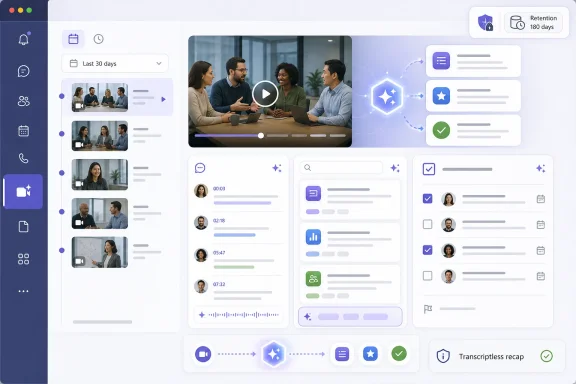
Microsoft is rolling out a dedicated Meeting Recap app for Microsoft Teams desktop and web users in June 2026, putting recent meeting summaries, recordings, transcript-driven notes, audio recaps, and new Copilot-powered video summaries into one left-rail destination instead of scattering them across Teams surfaces. The change is less about inventing recap than about making recap unavoidable. For users, that means Teams is turning the after-meeting trail into a first-class workspace. For administrators, it means recording policy, transcript retention, Copilot licensing, and user expectations are about to collide in a more visible place.
Teams has long had a recap problem hiding inside a recap feature. The information was there, at least when recording, transcription, licensing, and policy all lined up, but it lived where users remembered to look: the calendar item, the meeting chat, the recording, the Recap tab, Stream, or sometimes a link passed around by a colleague who knew the maze better than everyone else.
The new Meeting Recap app is Microsoft’s attempt to turn that maze into a destination. It gathers recaps from the previous 30 days and gives users filters for meeting type, date, and participants. Audio recap is available directly from the app, and Microsoft has expanded its language support beyond the original English-only experience to include languages such as Spanish, French, German, Italian, Japanese, Chinese, Portuguese, and others.
That sounds like a tidy user-interface improvement, and in one sense it is. But in Teams, surfaces matter. The moment Microsoft pins a workflow to the left rail, it is not merely making something easier to find; it is making a statement about what kind of work Teams believes people should do there.
Meeting recap is no longer a tab you visit when you remember a meeting happened. It is becoming a queue.
The less obvious story is that Microsoft is centralizing the evidence trail of modern office work. Meeting summaries are not just productivity artifacts. They can contain commitments, HR-sensitive remarks, customer information, regulated data, security discussions, pricing decisions, product roadmaps, and informal comments that nobody expected to become neatly packaged intelligence.
Until now, fragmented discovery provided a kind of accidental friction. Users had to know where to look, and in some organizations they simply did not bother. A dedicated app lowers that friction, which is good for productivity and awkward for governance.
IT teams therefore should not treat the rollout as another icon appearing in Teams. The app does not create content out of nothing, but it changes the prominence of content that already exists. If your tenant has a muddled patchwork of recording, transcription, retention, external sharing, and Teams Premium or Copilot entitlements, the Meeting Recap app will make that muddle visible.
The problem was never that recap lacked features. The problem was that recap lacked a home. The more Microsoft added, the stranger it became that users still had to navigate through a meeting instance to get to the thing that was supposed to help them recover from meetings they did not attend.
The new app fixes that product contradiction. A recap feature hidden inside a meeting is reactive. A recap app is proactive. It implies that catching up is not a one-off task but a recurring work mode.
That distinction matters because Teams is now less a conferencing client than a memory system for the organization. Chat preserved the side conversation. Recordings preserved the meeting. Transcripts preserved the searchable record. Intelligent Recap extracted the structure. The dedicated app is the front door Microsoft forgot to build the first time.
That is an important escalation. Text summaries are useful, but they flatten meetings into bullet-shaped abstractions. Video carries tone, presentation context, facial reaction, slide flow, and the awkward pause before a decision. For sales reviews, engineering design debates, training sessions, and executive updates, those cues can matter.
The licensing line is also unambiguous. Video Recap is a Microsoft 365 Copilot feature, not merely a Teams Premium feature. Teams Premium buys the established intelligent recap capabilities; Copilot adds the narrated video layer on top. In mixed-license estates, that means two users looking at the same meeting may have very different expectations of what “recap” means.
Microsoft’s choice here is commercially rational. Video Recap is exactly the kind of tangible, easy-to-demonstrate AI feature that helps justify Copilot’s price tag to business stakeholders. A CIO can explain narrated meeting highlights more easily than semantic grounding, orchestration, or retrieval-augmented generation.
But it also sharpens the internal politics of AI licensing. If executives receive slick video digests while most employees get notes and tasks, the feature becomes a visible class marker inside Teams. That is not necessarily a reason to avoid it, but it is a reason to communicate clearly before the help desk becomes the licensing explainer of last resort.
For regulated organizations, that is not a minor feature. Many companies have avoided or constrained AI meeting recap because the prerequisite content — especially transcripts — creates retention, discovery, and data residency concerns. A transcript is not merely an input to AI. It is a record.
The transcript-free model changes the risk equation, though it does not eliminate risk. The summary itself is still content, and content can still be sensitive. A generated recap may omit nuance, misstate emphasis, or transform an exploratory discussion into what looks like a formal decision record. Compliance teams will rightly ask what is stored, where it is stored, who can access it, and how long it lives.
Still, the feature gives Microsoft a cleaner answer to a common enterprise objection. Organizations that previously had to choose between AI recap and transcript retention can now consider a middle path. That is a meaningful concession to the reality that not every meeting should become a permanent searchable artifact.
The interesting strategic move is that Microsoft is not backing away from AI in sensitive meetings. It is trying to repackage AI as compatible with stricter meeting hygiene. That may prove more important for adoption than another clever summary format.
A tenant-level switch can decide whether the app appears. It cannot decide whether users understand why some meetings have rich recaps and others do not. It cannot reconcile inconsistent transcription settings between departments. It cannot explain why one user sees Video Recap and another sees only notes. It cannot determine whether a summary should be considered an official business record.
The same applies to the transcript-free AI recap controls. A tenant-level AI setting and meeting-level organizer choices create flexibility, but flexibility without guidance often becomes randomness. One organizer enables AI for a confidential meeting; another disables it for a routine status call; a third assumes the default is safe because the button was there.
The right administrative posture is not panic. It is classification. Organizations should decide which meeting categories benefit from recap, which require transcripts, which forbid recordings, which allow transcript-free summaries, and which should remain deliberately ephemeral. Teams can enforce some of that with policy, but the policy has to be written first.
But the 30-day window also creates expectation management issues. Users may assume the app is “where recaps live,” then discover that older material has moved, expired, or disappeared depending on retention policies. In organizations with retention periods shorter than 30 days, the app may show gaps. In organizations with longer retention, the app may become only the visible tip of a much larger storage and discovery iceberg.
This is where Microsoft’s product language and enterprise reality diverge. To the user, recap is a convenience. To records managers, it is derived content created from meeting data, stored in Microsoft 365 services, and subject to organizational policy. Those are not contradictory views, but they are not the same view.
The danger is that users treat the 30-day app as a personal productivity buffer while legal and compliance teams treat the underlying artifacts as records. If those expectations are not aligned, the conflict will not show up during rollout. It will show up during an investigation, a discovery request, or an executive review of why a sensitive discussion became searchable.
For IT buyers, this is no longer an abstract debate about whether generative AI is useful. It is a spreadsheet with human behavior attached. Which workers need full video summaries? Which need text recap? Which departments are allowed to use AI in meetings? Which meetings create enough follow-up overhead to justify the cost?
The worst answer is to buy a small number of licenses for executives and hope the rest of the organization does not notice. Teams is a collaborative environment; uneven feature availability is immediately visible when people compare experiences. A manager may ask a direct report to “watch the video recap” only to learn the employee does not have the license to see it.
That does not mean every user needs Copilot. It means licensing has to map to workflow, not hierarchy. Project managers, support leads, legal operations staff, sales engineers, product owners, and executive assistants may derive more daily value from recap automation than some senior leaders. The Meeting Recap app makes that value easier to observe, and therefore harder to allocate by instinct.
Many of those questions will not be bugs. They will be policy outcomes. A meeting without recording or transcription may not produce the same recap experience as one with both. A user without Copilot may not see Video Recap. A retention policy may remove content earlier than expected. A cloud environment outside worldwide commercial availability may follow a different rollout timeline.
That is why user communications matter more than the feature announcement. Microsoft can document the capability, but each organization has to explain its own version of reality. A short internal note saying “Meeting Recap is coming” is not enough if half the organization is on Teams Premium, a smaller group is on Copilot, and certain departments restrict recording by default.
The better communication is scenario-based. Tell users what they will see after a recorded meeting, after a transcribed meeting, after a meeting using transcript-free AI recap, and after a meeting where policy blocks recap inputs. The goal is not to make everyone an admin. It is to prevent normal policy behavior from looking like product failure.
This is where the collaboration conversation moves beyond software procurement. If organizations want AI to make meetings more useful afterward, the meeting itself has to be captured cleanly. Bad microphones, unidentified room speakers, side conversations, and screen-sharing habits all become inputs to the recap system.
Video Recap makes this especially visible. A text summary can hide some capture problems by smoothing over the transcript. A narrated highlight clip cannot fully disguise bad framing, muffled speech, or a presenter who never shared the deck properly. The quality of the recap becomes a judgment on the quality of the meeting environment.
That may be uncomfortable, but it is also useful. For years, room systems were justified in terms of joining meetings more reliably. The next justification is whether they produce usable meeting intelligence. The room is no longer just where the call happens; it is where the organizational memory is recorded, filtered, and packaged.
Microsoft’s answer is pragmatic. If people cannot attend everything, give them a digest. If they cannot watch the recording, give them highlights. If they cannot store transcripts, give them a live-generated summary. If they cannot find the recap, put it in the left rail.
That may be the right product answer, but it is not the same as an organizational cure. AI recap can help people recover from meeting sprawl, yet it can also make sprawl more tolerable and therefore more persistent. If every meeting generates a neat summary, teams may feel less pressure to reduce unnecessary meetings in the first place.
The most disciplined organizations will use recap data to improve meeting culture, not merely survive it. Which meetings are regularly watched after the fact? Which generate action items but no decisions? Which recurring meetings are mostly consumed as recaps rather than attended live? Those patterns can expose where collaboration is working and where the calendar is simply laundering indecision.
That strategy depends on a delicate bargain. Users want convenience. Administrators want control. Executives want measurable productivity gains. Compliance teams want defensible boundaries. Microsoft wants more of the workday to flow through services where Copilot can add value.
The dedicated Recap app advances all of those aims, but not equally. It clearly improves discoverability. It gives Copilot another visible place to prove itself. It gives Microsoft a stronger story against rival meeting platforms and AI note-taking tools. It also increases the need for organizations to decide what kind of meeting memory they are comfortable creating.
That is the tension at the heart of enterprise AI. The more useful the assistant becomes, the more it needs access to consequential work. The more consequential the work, the more careful organizations must be about what is captured, retained, summarized, and redistributed.
This is also the moment to revisit who owns meeting intelligence. In many organizations, Teams administration sits with collaboration or endpoint teams, retention with compliance, Copilot adoption with digital workplace leaders, and room systems with AV or facilities. Meeting Recap cuts across all of them. If no one owns the complete experience, users will inherit the gaps.
The feature should also force a more honest conversation about default recording and transcription. Some organizations have avoided broad transcription because it felt like an optional enhancement. Once recap becomes a central Teams surface, transcription policy becomes a productivity design decision as much as a compliance decision.
That does not mean enabling everything everywhere. It means being intentional. A tenant where every meeting is captured may create unnecessary exposure. A tenant where almost nothing is captured may make the Recap app look pointless. The best answer will vary by industry, geography, department, and meeting type.
Microsoft’s June 2026 Meeting Recap push is best understood as a promotion: recap is moving from a meeting accessory to a Teams workspace in its own right. That will make hybrid work easier for people who live under stacked calendars, and it will give Copilot a more visible role in the rhythm of daily collaboration. But the organizations that benefit most will be the ones that recognize the trade: Microsoft is making meeting memory easier to consume, and in return IT has to become much more deliberate about what the organization chooses to remember.
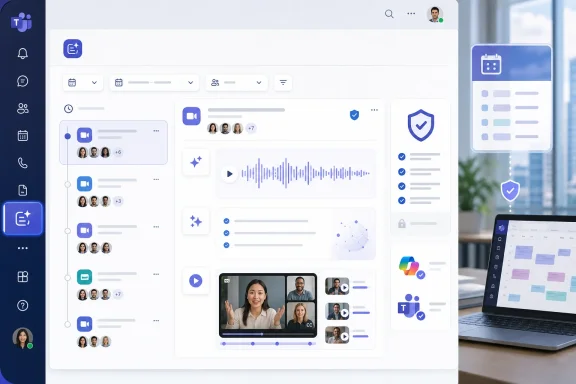 Microsoft Moves the Meeting Afterlife Into the Left Rail
Teams has long had a recap problem hiding inside a recap feature. The information was there, at least when recording, transcription, licensing, and policy all lined up, but it lived where users remembered to look: the calendar item, the meeting chat, the recording, the Recap tab, Stream, or sometimes a link passed around by a colleague who knew the maze better than everyone else.The new Meeting Recap app is Microsoft’s attempt to turn that maze into a destination. It gathers recaps from the previous 30 days and gives users filters for meeting type, date, and participants. Audio recap is available directly from the app, and Microsoft has expanded its language support beyond the original English-only experience to include languages such as Spanish, French, German, Italian, Japanese, Chinese, Portuguese, and others.
That sounds like a tidy user-interface improvement, and in one sense it is. But in Teams, surfaces matter. The moment Microsoft pins a workflow to the left rail, it is not merely making something easier to find; it is making a statement about what kind of work Teams believes people should do there.
Meeting recap is no longer a tab you visit when you remember a meeting happened. It is becoming a queue.
The Small UI Change Carries a Big Governance Shadow
The obvious story is convenience. A worker misses three meetings, opens the Recap app, listens to a short audio digest, scans AI notes, watches a highlight clip if licensed, and gets back to work without spelunking through chat. That is the sales pitch, and for many users it will be genuinely useful.The less obvious story is that Microsoft is centralizing the evidence trail of modern office work. Meeting summaries are not just productivity artifacts. They can contain commitments, HR-sensitive remarks, customer information, regulated data, security discussions, pricing decisions, product roadmaps, and informal comments that nobody expected to become neatly packaged intelligence.
Until now, fragmented discovery provided a kind of accidental friction. Users had to know where to look, and in some organizations they simply did not bother. A dedicated app lowers that friction, which is good for productivity and awkward for governance.
IT teams therefore should not treat the rollout as another icon appearing in Teams. The app does not create content out of nothing, but it changes the prominence of content that already exists. If your tenant has a muddled patchwork of recording, transcription, retention, external sharing, and Teams Premium or Copilot entitlements, the Meeting Recap app will make that muddle visible.
Intelligent Recap Was the Foundation; Discoverability Was the Missing Product
Microsoft launched Intelligent Recap in 2023 as part of the Teams Premium push, giving users AI-generated notes, recommended tasks, timeline markers, speaker markers, chapters, topics, and other shortcuts through meeting content. In product terms, it was a classic Microsoft 365 move: add intelligence to a familiar workflow, then use licensing to separate ordinary collaboration from premium collaboration.The problem was never that recap lacked features. The problem was that recap lacked a home. The more Microsoft added, the stranger it became that users still had to navigate through a meeting instance to get to the thing that was supposed to help them recover from meetings they did not attend.
The new app fixes that product contradiction. A recap feature hidden inside a meeting is reactive. A recap app is proactive. It implies that catching up is not a one-off task but a recurring work mode.
That distinction matters because Teams is now less a conferencing client than a memory system for the organization. Chat preserved the side conversation. Recordings preserved the meeting. Transcripts preserved the searchable record. Intelligent Recap extracted the structure. The dedicated app is the front door Microsoft forgot to build the first time.
Video Recap Turns Meeting Catch-Up Into a Copilot Showcase
The flashier companion feature is Video Recap, which creates narrated highlight videos from recorded Teams meetings. Copilot analyzes the transcript, selects short clips from the recording, and generates an AI voiceover to frame the key moments. Instead of watching an hour-long recording or reading a transcript, the user gets a compressed visual narrative of what happened.That is an important escalation. Text summaries are useful, but they flatten meetings into bullet-shaped abstractions. Video carries tone, presentation context, facial reaction, slide flow, and the awkward pause before a decision. For sales reviews, engineering design debates, training sessions, and executive updates, those cues can matter.
The licensing line is also unambiguous. Video Recap is a Microsoft 365 Copilot feature, not merely a Teams Premium feature. Teams Premium buys the established intelligent recap capabilities; Copilot adds the narrated video layer on top. In mixed-license estates, that means two users looking at the same meeting may have very different expectations of what “recap” means.
Microsoft’s choice here is commercially rational. Video Recap is exactly the kind of tangible, easy-to-demonstrate AI feature that helps justify Copilot’s price tag to business stakeholders. A CIO can explain narrated meeting highlights more easily than semantic grounding, orchestration, or retrieval-augmented generation.
But it also sharpens the internal politics of AI licensing. If executives receive slick video digests while most employees get notes and tasks, the feature becomes a visible class marker inside Teams. That is not necessarily a reason to avoid it, but it is a reason to communicate clearly before the help desk becomes the licensing explainer of last resort.
The Transcript-Free Recap Is the Real Compliance Story
The most consequential change may not be the new app or the narrated clips. It is Microsoft’s AI recap without transcript capability, designed for organizations that want meeting intelligence without retaining a recording or transcript. The idea is simple: Copilot uses live meeting context to generate a summary, then provides that output after the meeting without storing the underlying transcript or recording.For regulated organizations, that is not a minor feature. Many companies have avoided or constrained AI meeting recap because the prerequisite content — especially transcripts — creates retention, discovery, and data residency concerns. A transcript is not merely an input to AI. It is a record.
The transcript-free model changes the risk equation, though it does not eliminate risk. The summary itself is still content, and content can still be sensitive. A generated recap may omit nuance, misstate emphasis, or transform an exploratory discussion into what looks like a formal decision record. Compliance teams will rightly ask what is stored, where it is stored, who can access it, and how long it lives.
Still, the feature gives Microsoft a cleaner answer to a common enterprise objection. Organizations that previously had to choose between AI recap and transcript retention can now consider a middle path. That is a meaningful concession to the reality that not every meeting should become a permanent searchable artifact.
The interesting strategic move is that Microsoft is not backing away from AI in sensitive meetings. It is trying to repackage AI as compatible with stricter meeting hygiene. That may prove more important for adoption than another clever summary format.
The Admin Toggle Is Not a Governance Strategy
Microsoft expects the Meeting Recap app to be enabled by default for eligible users, with administrators able to disable it through the Teams admin center. That is normal Microsoft 365 behavior, but it also invites a familiar enterprise mistake: confusing the presence of a toggle with the existence of a policy.A tenant-level switch can decide whether the app appears. It cannot decide whether users understand why some meetings have rich recaps and others do not. It cannot reconcile inconsistent transcription settings between departments. It cannot explain why one user sees Video Recap and another sees only notes. It cannot determine whether a summary should be considered an official business record.
The same applies to the transcript-free AI recap controls. A tenant-level AI setting and meeting-level organizer choices create flexibility, but flexibility without guidance often becomes randomness. One organizer enables AI for a confidential meeting; another disables it for a routine status call; a third assumes the default is safe because the button was there.
The right administrative posture is not panic. It is classification. Organizations should decide which meeting categories benefit from recap, which require transcripts, which forbid recordings, which allow transcript-free summaries, and which should remain deliberately ephemeral. Teams can enforce some of that with policy, but the policy has to be written first.
Thirty Days Is a Product Choice, Not an Archive Promise
The Meeting Recap app focuses on the past 30 days. That is sensible from a productivity standpoint. Most meeting catch-up happens shortly after the meeting, and a recent-work hub should not pretend to be a compliance archive.But the 30-day window also creates expectation management issues. Users may assume the app is “where recaps live,” then discover that older material has moved, expired, or disappeared depending on retention policies. In organizations with retention periods shorter than 30 days, the app may show gaps. In organizations with longer retention, the app may become only the visible tip of a much larger storage and discovery iceberg.
This is where Microsoft’s product language and enterprise reality diverge. To the user, recap is a convenience. To records managers, it is derived content created from meeting data, stored in Microsoft 365 services, and subject to organizational policy. Those are not contradictory views, but they are not the same view.
The danger is that users treat the 30-day app as a personal productivity buffer while legal and compliance teams treat the underlying artifacts as records. If those expectations are not aligned, the conflict will not show up during rollout. It will show up during an investigation, a discovery request, or an executive review of why a sensitive discussion became searchable.
Teams Premium and Copilot Are Now Meeting Productivity Tiers
The Meeting Recap app also arrives at a moment when Microsoft’s collaboration licensing story is becoming more stratified. Teams Premium provides the established intelligent meeting capabilities, including AI notes, tasks, chapters, topics, timeline markers, and related recap features. Microsoft 365 Copilot adds broader AI assistance and, in this case, Video Recap and transcript-free AI recap capabilities.For IT buyers, this is no longer an abstract debate about whether generative AI is useful. It is a spreadsheet with human behavior attached. Which workers need full video summaries? Which need text recap? Which departments are allowed to use AI in meetings? Which meetings create enough follow-up overhead to justify the cost?
The worst answer is to buy a small number of licenses for executives and hope the rest of the organization does not notice. Teams is a collaborative environment; uneven feature availability is immediately visible when people compare experiences. A manager may ask a direct report to “watch the video recap” only to learn the employee does not have the license to see it.
That does not mean every user needs Copilot. It means licensing has to map to workflow, not hierarchy. Project managers, support leads, legal operations staff, sales engineers, product owners, and executive assistants may derive more daily value from recap automation than some senior leaders. The Meeting Recap app makes that value easier to observe, and therefore harder to allocate by instinct.
The Help Desk Will Hear the Product Confusion First
When Microsoft introduces a default-on Teams surface, the first line of feedback rarely goes to strategy teams. It goes to the help desk. The predictable questions are already obvious: Why do I have the app? Why is it empty? Why does my colleague have video recap? Why is there no transcript? Why did this meeting produce notes but not chapters? Why can’t I find a recap from last quarter?Many of those questions will not be bugs. They will be policy outcomes. A meeting without recording or transcription may not produce the same recap experience as one with both. A user without Copilot may not see Video Recap. A retention policy may remove content earlier than expected. A cloud environment outside worldwide commercial availability may follow a different rollout timeline.
That is why user communications matter more than the feature announcement. Microsoft can document the capability, but each organization has to explain its own version of reality. A short internal note saying “Meeting Recap is coming” is not enough if half the organization is on Teams Premium, a smaller group is on Copilot, and certain departments restrict recording by default.
The better communication is scenario-based. Tell users what they will see after a recorded meeting, after a transcribed meeting, after a meeting using transcript-free AI recap, and after a meeting where policy blocks recap inputs. The goal is not to make everyone an admin. It is to prevent normal policy behavior from looking like product failure.
The Meeting Room Becomes Part of the Data Pipeline
The new recap model also has implications for physical meeting rooms. Teams Rooms, shared devices, speaker attribution, camera feeds, microphones, and room participation all affect the quality of what AI can summarize. A beautifully licensed Copilot deployment can still produce mediocre recap output if the meeting room captures poor audio or cannot distinguish speakers accurately.This is where the collaboration conversation moves beyond software procurement. If organizations want AI to make meetings more useful afterward, the meeting itself has to be captured cleanly. Bad microphones, unidentified room speakers, side conversations, and screen-sharing habits all become inputs to the recap system.
Video Recap makes this especially visible. A text summary can hide some capture problems by smoothing over the transcript. A narrated highlight clip cannot fully disguise bad framing, muffled speech, or a presenter who never shared the deck properly. The quality of the recap becomes a judgment on the quality of the meeting environment.
That may be uncomfortable, but it is also useful. For years, room systems were justified in terms of joining meetings more reliably. The next justification is whether they produce usable meeting intelligence. The room is no longer just where the call happens; it is where the organizational memory is recorded, filtered, and packaged.
AI Summaries Are Useful Because Meetings Are Broken
There is an uncomfortable truth under Microsoft’s recap push: these features are useful partly because meetings have become too numerous, too overlapping, and too poorly documented. The Meeting Recap app is a productivity tool, but it is also a symptom of calendar overload.Microsoft’s answer is pragmatic. If people cannot attend everything, give them a digest. If they cannot watch the recording, give them highlights. If they cannot store transcripts, give them a live-generated summary. If they cannot find the recap, put it in the left rail.
That may be the right product answer, but it is not the same as an organizational cure. AI recap can help people recover from meeting sprawl, yet it can also make sprawl more tolerable and therefore more persistent. If every meeting generates a neat summary, teams may feel less pressure to reduce unnecessary meetings in the first place.
The most disciplined organizations will use recap data to improve meeting culture, not merely survive it. Which meetings are regularly watched after the fact? Which generate action items but no decisions? Which recurring meetings are mostly consumed as recaps rather than attended live? Those patterns can expose where collaboration is working and where the calendar is simply laundering indecision.
Microsoft Is Packaging Memory as a Daily Workflow
Seen in isolation, the Meeting Recap app is a Teams feature. Seen in context, it is part of Microsoft’s larger attempt to make Microsoft 365 the workplace memory layer. Emails, chats, meetings, files, calendars, Loop pages, and Copilot interactions all become retrievable context for future work.That strategy depends on a delicate bargain. Users want convenience. Administrators want control. Executives want measurable productivity gains. Compliance teams want defensible boundaries. Microsoft wants more of the workday to flow through services where Copilot can add value.
The dedicated Recap app advances all of those aims, but not equally. It clearly improves discoverability. It gives Copilot another visible place to prove itself. It gives Microsoft a stronger story against rival meeting platforms and AI note-taking tools. It also increases the need for organizations to decide what kind of meeting memory they are comfortable creating.
That is the tension at the heart of enterprise AI. The more useful the assistant becomes, the more it needs access to consequential work. The more consequential the work, the more careful organizations must be about what is captured, retained, summarized, and redistributed.
The Practical Test Comes Before Users Click the New Icon
The right preparation is not a 40-page governance treatise delivered after rollout. It is a focused review of the few controls that determine whether the app feels helpful, confusing, or risky. Admins should start with the policies that govern recording and transcription, then work outward to retention, licensing, communications, and support readiness.This is also the moment to revisit who owns meeting intelligence. In many organizations, Teams administration sits with collaboration or endpoint teams, retention with compliance, Copilot adoption with digital workplace leaders, and room systems with AV or facilities. Meeting Recap cuts across all of them. If no one owns the complete experience, users will inherit the gaps.
The feature should also force a more honest conversation about default recording and transcription. Some organizations have avoided broad transcription because it felt like an optional enhancement. Once recap becomes a central Teams surface, transcription policy becomes a productivity design decision as much as a compliance decision.
That does not mean enabling everything everywhere. It means being intentional. A tenant where every meeting is captured may create unnecessary exposure. A tenant where almost nothing is captured may make the Recap app look pointless. The best answer will vary by industry, geography, department, and meeting type.
The Recap App Will Reward the Tenants That Did Their Homework
The concrete work is not glamorous, but it is where the success or failure of this rollout will be decided. Organizations that prepare will experience the Meeting Recap app as a useful consolidation of existing intelligence. Organizations that do not will experience it as yet another Teams mystery.- Administrators should review recording and transcription policies before rollout because the new app can only surface rich recap content when the required meeting inputs exist.
- Compliance and records teams should decide whether AI summaries, transcripts, recordings, and generated notes are treated differently under retention and discovery rules.
- Licensing owners should explain the difference between Teams Premium recap features and Microsoft 365 Copilot-only capabilities such as Video Recap before users compare screens.
- Help desk teams should be briefed on expected questions about empty recaps, missing video highlights, language availability, mobile support, and cloud-environment timing.
- Meeting organizers should receive plain-language guidance on when to use ordinary recap, when to use transcript-free AI recap, and when not to generate AI meeting artifacts at all.
Microsoft’s June 2026 Meeting Recap push is best understood as a promotion: recap is moving from a meeting accessory to a Teams workspace in its own right. That will make hybrid work easier for people who live under stacked calendars, and it will give Copilot a more visible role in the rhythm of daily collaboration. But the organizations that benefit most will be the ones that recognize the trade: Microsoft is making meeting memory easier to consume, and in return IT has to become much more deliberate about what the organization chooses to remember.
References
- Primary source: UC Today
Published: Mon, 15 Jun 2026 09:32:30 GMT
Microsoft Teams Meeting Recap App June 2026 - UC Today
Teams gets a dedicated Meeting Recap app this month alongside Video Recap and AI recap without transcript. Here's what IT teams need to review before it rolls out.www.uctoday.com - Official source: techcommunity.microsoft.com
Microsoft Teams Video Recap with Copilot 🤖 | New AI Meeting Highlights Explained | Microsoft Community Hub
Microsoft Teams just introduced a powerful new Copilot feature: Video Recap 🎥🤖    With AI-powered highlights, automatic key moments,... techcommunity.microsoft.com
- Related coverage: supersimple365.com
New option to delete Teams meeting recap content - Super Simple 365
Short VersionMeeting organisers can delete most Microsoft Teams recap content (recordings, transcripts, AI summaries, and notes) with just a couple of clicks. Due late May to early June 2026. DetailsThe new Delete recap content option will appear in the More (…) menu on the meeting recap page... supersimple365.com
- Official source: microsoft.com
Microsoft 365 Roadmap | Microsoft 365
The Microsoft 365 Roadmap lists updates that are currently planned for applicable subscribers. Check here for more information on the status of new features and updates.www.microsoft.com
- Related coverage: windowscentral.com
Microsoft Teams is adding branded reactions to video meetings | Windows Central
Microsoft will soon allow companies to add their own "visual identity" in video meetings with branded emoji reactions.www.windowscentral.com - Related coverage: techradar.com
Microsoft Teams wants to make it easier to forget all your embarrassing meeting mistakes | TechRadar
Delete Microsoft Teams meeting content and pretend it never happenedwww.techradar.com
- Related coverage: techriver.com
- Official source: cdn-dynmedia-1.microsoft.com
</rdf:Alt> </dc:title> <dc:creator> <rdf:Seq> <rdf:li>Ryan Fowles
PDF documentcdn-dynmedia-1.microsoft.com