

Microsoft is developing a redesigned sharing panel for Microsoft Teams meetings on Windows desktop and Mac, with Roadmap ID 502520 listing general availability for August 2026 across Worldwide, GCC, GCC High, and DoD cloud environments. The change sounds modest because it lives behind the familiar Share button, but that is precisely why it matters. Teams meetings have become the front door to work, and the sharing panel has become the moment where confidence either holds or collapses. Microsoft is not just polishing a menu; it is trying to make the most anxious click in the modern meeting feel less like a gamble.
Every collaboration product has a place where its ambitions meet the user’s nerves. In Teams, that place is the sharing panel. You can talk for an hour without touching advanced meeting controls, but the instant you share a window, a file, a deck, or a desktop, the room is watching.
That is why Microsoft’s language around “content discoverability” is more revealing than it first appears. The company is acknowledging that the panel is not merely a transport mechanism for pixels. It is a decision surface, and in a live meeting, decision surfaces need to be brutally clear.
The current Teams sharing experience has accumulated the usual sediment of enterprise software: screen sharing, window sharing, PowerPoint, whiteboards, files, and other meeting-adjacent options all competing for attention. None of these features is useless. The problem is that usefulness at scale often becomes clutter at the point of action.
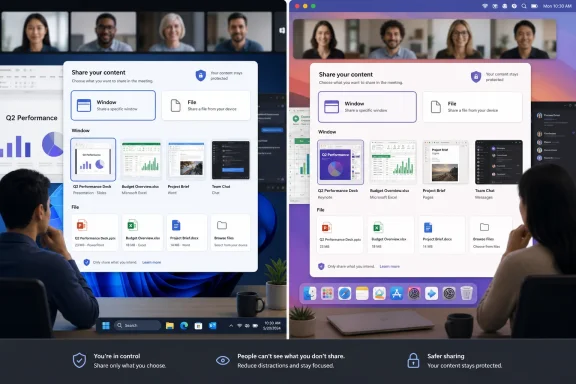
The new panel is Microsoft’s attempt to restore hierarchy. Window sharing is called out as a default task that should be simpler, while file sharing is described as something that needs to be easier to discover. That pairing tells us the design target: reduce panic for the common action, and increase visibility for the option Microsoft thinks too many users miss.
A user sees a panel. Microsoft sees a funnel. If people share the wrong thing, the meeting experience feels risky. If they cannot find the right thing, Microsoft 365 feels fragmented. If they default to desktop sharing because window sharing is too buried or confusing, every notification, browser tab, and stray document becomes part of the meeting’s threat model.
This is the quiet tension inside the roadmap item. Microsoft wants Teams to be a richer meeting environment, but richness makes the panel harder to scan. A redesigned sharing panel is the concession that features do not count unless ordinary users can find them under pressure.
That pressure is not theoretical. Anyone who has hosted a customer call, board meeting, classroom session, or incident bridge knows the awkward pause before screen sharing begins. The host is not only asking “what do I want to show?” but also “what might I accidentally show?” Better UI cannot solve every governance problem, but bad UI can turn governance into theater.
For years, the desktop share has survived because it is obvious. It also happens to be the riskiest option. It exposes the full workspace, including notifications, personal apps, unrelated documents, browser chrome, and the messy context that lives around the thing being presented.
Window sharing is the more disciplined choice, but it has to be easy enough that users choose it reflexively. If finding the right window takes too long, users fall back to full-screen sharing. If the preview is unclear, they hesitate. If the panel buries the option beneath competing tiles and icons, the safer path becomes the less convenient path.
That is where UI becomes policy in practice. Security teams can write guidance telling employees not to share entire desktops. Admins can configure meeting policies and sensitivity labels. But in the live moment, a user under social pressure will pick the option that feels fastest and least confusing.
Microsoft’s redesign appears aimed at closing that gap. The company is not promising some spectacular new security boundary here. It is doing something more mundane and potentially more useful: trying to make the better sharing choice feel like the default sharing choice.
In Teams meetings, files often travel through awkward side channels. Someone drops a deck into chat. Someone else shares a OneDrive link. A presenter screenshares PowerPoint because uploading or presenting the file through Teams feels less obvious than broadcasting the display. The meeting becomes less a structured collaboration space than a pile of parallel artifacts.
A better sharing panel gives Microsoft a chance to pull those artifacts into the center of the meeting experience. If users can more easily discover file sharing at the moment they are about to present, Microsoft can nudge them away from crude screen broadcast and toward richer, more controllable forms of collaboration.
That matters for attendees as much as presenters. A shared file can be reviewed, opened, referenced, retained, and governed differently from a transient screen share. It can live in Microsoft 365’s permission model rather than in the blurry memory of a call. For organizations trying to make meetings more auditable and less ephemeral, the distinction matters.
There is also a Copilot-shaped shadow here, even if the roadmap item does not need to say so. Microsoft’s AI story depends on work artifacts being available as structured content, not just as pixels flashing across a meeting window. The more meetings route through files rather than raw screen shares, the more useful the rest of Microsoft 365’s intelligence layer becomes.
That does not mean every tenant will see it on the same day in August 2026. Microsoft roadmap dates are estimates, and Teams rollouts often move through rings, tenant targeting, client updates, and policy dependencies. But the cloud-instance list says Microsoft expects this to become part of the baseline Teams meeting experience, not an optional flourish for early adopters.
For admins, that changes the preparation model. A niche feature can be ignored until a champion asks for it. A default sharing panel redesign cannot. Anything that changes the meeting surface changes support scripts, training screenshots, helpdesk macros, and the muscle memory of users who present every day.
The inclusion of Targeted Release alongside General Availability also means some organizations will likely see the change before the broad August 2026 window. That is an opportunity, but also a trap. Targeted Release tenants should treat this less as a preview toy and more as a user-behavior test bed.
The right question for IT is not “does the new panel look nicer?” It is “do users share the intended content more often, with fewer mistakes, and fewer meeting interruptions?” A modernized UI is only successful if it changes outcomes.
Meetings now include chat, reactions, transcription, recording, breakout rooms, apps, whiteboards, PowerPoint Live, webinar controls, town hall features, meeting notes, Copilot experiences, participant management, device controls, and policy-driven warnings. Each addition is defensible on its own. Together, they produce the familiar enterprise paradox: the more complete the tool becomes, the less obvious it feels.
The sharing panel suffers from this more than many other parts of Teams because it sits at the intersection of presentation and collaboration. It must serve the executive sharing a quarterly deck, the teacher showing a browser tab, the engineer walking through logs, the support technician demonstrating a fix, and the project manager distributing a file. Those are not the same workflow.
Microsoft’s challenge is therefore not just visual simplification. It is prioritization. A good panel should not present every sharing mode as equally likely or equally safe. It should understand that the most common action needs speed, the riskiest action needs clarity, and the least discovered useful action needs a visible path.
That is a hard design problem because enterprise software users punish both extremes. Hide too much and power users complain that Microsoft has “dumbed down” the client. Show too much and everyone else complains that Teams has become a cockpit. The new panel will be judged by whether it can create a hierarchy without feeling condescending.
On Windows and macOS, the sharing surface has access to richer windowing concepts, multiple displays, local files, and desktop applications. On mobile, sharing is constrained by operating-system permissions, smaller screens, and different meeting behaviors. Microsoft is starting where the pain is most acute and where the payoff is highest.
The Mac inclusion is worth noting because macOS screen sharing has its own platform-specific constraints and permission prompts. Apple’s privacy model has steadily made screen capture more explicit, which is good for users but can be confusing in managed environments. A clearer Teams sharing panel cannot remove every macOS permission hurdle, but it can reduce the feeling that Teams itself is the confusing part.
For Windows users, the redesign will land in a different context. Windows remains the native home turf for Teams, Office, and enterprise desktop workflows. But it is also where users are most likely to have sprawling multi-window workspaces, legacy apps, remote sessions, and notification-heavy desktops.
In both cases, the panel has to respect the operating system rather than pretend it does not exist. The best Teams sharing experience is one that makes the boundary between Teams, the OS, and Microsoft 365 feel coherent. The worst version would be a prettier panel that still leaves users guessing which window, monitor, file, or permission state they are actually about to expose.
A sharing panel redesign may sound harmless, but the meeting UI is where sensitive work often becomes visible. Legal teams review documents. Public-sector agencies discuss cases. Contractors present controlled information. Healthcare and education users share material that may be governed by strict privacy rules.
The panel itself is not a compliance product. But it can either support or undermine compliant behavior. If it makes it easier to share a specific file or window instead of the entire desktop, it may reduce accidental exposure. If it changes familiar workflows without enough warning, it may create a burst of confusion exactly where organizations can least afford it.
Government tenants also tend to be more conservative about change. They often receive features later than commercial tenants, and with good reason. The roadmap listing indicates intent, not a guarantee of simultaneous rollout, and admins should expect the usual variability.
That variability is not a defect; it is part of Microsoft 365 operations. The practical lesson is to watch the Message Center, validate the client experience in representative environments, and update training before users discover the new panel while presenting to an audience that cannot be kept waiting.
Microsoft 365 roadmap dates have always occupied a strange space. They are specific enough to guide planning, but not contractual enough to build a hard launch calendar around. Features can slip, split, change scope, appear first in preview, or arrive tenant-by-tenant across weeks.
That is frustrating, but it is also the reality of cloud software at Microsoft’s scale. Teams is not shipped like a boxed product. It is coordinated across client versions, service capabilities, admin policies, cloud boundaries, and telemetry-driven deployment rings.
For IT teams, the correct posture is neither panic nor indifference. August 2026 should be treated as the earliest broad planning window. Training teams can prepare language, pilot users can be identified, and support organizations can start watching for screenshots and early reports from Targeted Release.
The worst outcome would be for helpdesks to learn about the redesign from confused users mid-meeting. The second-worst outcome would be for organizations to over-document today’s interface in July and immediately obsolete their own guidance in August. Timing matters because user training has a half-life.
Support teams should expect questions that sound basic but are operationally important. Where did window sharing go? How do I share a PowerPoint file? Why does the panel look different from the training video? Why does my Mac prompt me before sharing? Why can my colleague see an option I cannot?
Those questions do not indicate failure. They indicate that meeting UI is infrastructure. A change to that infrastructure deserves the same respect as a change to VPN prompts, authentication flows, or document-sharing defaults.
The mitigation is straightforward but often skipped. Organizations should capture screenshots once the redesigned panel appears in their tenant, update internal knowledge-base articles, and notify frequent presenters before broad rollout. Executives, trainers, sales teams, support engineers, and incident commanders are the user groups most likely to care.
Admins should also pay attention to policy interactions. Meeting policies, app permissions, external sharing controls, file-sharing defaults, sensitivity labels, and recording policies may all shape what users can do once they discover a sharing option. A clearer panel may expose configuration inconsistencies that were previously hidden by poor discoverability.
Meeting software fails in public. A slow app can be cursed privately. A confusing settings page can be revisited later. But a botched screen share happens in front of colleagues, customers, students, vendors, or regulators. The embarrassment is part of the product experience.
Teams has improved enormously since its early pandemic-era scaling pains, but it still carries the burden of being the place where work happens under observation. Every unnecessary click in that context feels heavier than it would in a document editor. Every ambiguous thumbnail or hidden option becomes a moment of doubt.
A redesigned sharing panel therefore competes not just with Zoom, Google Meet, or Webex. It competes with the user’s fear of looking unprepared. The best collaboration tools fade away at the point of performance. The worst ones make the presenter narrate the tool instead of the work.
Microsoft’s modernization push should be measured against that standard. If the new panel makes presenters think less about Teams and more about the content they meant to share, it will be a meaningful improvement even if the release notes look minor.
A good pilot group should include frequent presenters across Windows and Mac, users with multiple monitors, employees in regulated roles, and people who regularly share Office files rather than only screens. The goal is to see how the panel behaves across real workflows, not to admire the UI in a lab meeting.
Training should focus on decision-making rather than button memorization. Users do not need a 12-page guide to every panel tile. They need to know when to share a window, when to share a file, when desktop sharing is appropriate, and how to confirm what the audience can see.
That last point is crucial. The safest sharing experience is one where the presenter has confidence before the audience sees anything. Previews, labels, window names, and ordering all matter because they help users build that confidence. If Microsoft has done its job, training can become simpler rather than longer.
Security teams should resist the temptation to treat the redesign as a substitute for policy. UI can encourage safer choices, but it cannot classify data, prevent every accidental disclosure, or replace a culture of careful presentation. The panel is a nudge. Governance still needs guardrails.
The risk is familiar. Microsoft sometimes redesigns surfaces in ways that look cleaner but scatter previously obvious controls into new places. Users then experience simplification as displacement. A cleaner room is not easier to use if someone moved the light switch behind a cabinet.
Teams has to avoid that trap. The sharing panel should reduce ambiguity without making veteran users relearn the entire meeting flow. It should make the common path more obvious while keeping advanced options reachable. It should not replace visible clutter with hidden clutter.
The file-sharing piece will be especially telling. If Microsoft simply makes the file option larger, the improvement may be cosmetic. If it helps users understand which file they are sharing, who will have access, and how the shared content behaves in the meeting, the redesign could have deeper value.
This is where enterprise UX differs from consumer UX. In consumer software, discoverability often means delight. In Teams, discoverability means confidence, permission awareness, and fewer awkward pauses. Microsoft’s design language must serve that reality.
That does not require a grand project. It requires treating the meeting experience as a managed surface. Screenshots, short internal notices, presenter tips, and pilot feedback will go a long way.
The highest-value preparation may be a simple internal recommendation: prefer window or file sharing when possible, and use full desktop sharing only when the workflow truly requires it. The new panel can reinforce that behavior, but users need to hear the principle before the moment of pressure.
Organizations should also revisit old training content. Teams screenshots age quickly, and nothing undermines user trust like official guidance that no longer resembles the product. If the sharing panel changes, every “how to present in Teams” page becomes suspect.
This is the unglamorous maintenance burden of cloud productivity. The software keeps moving because Microsoft is trying to improve it. The institution has to keep its guidance moving too, or the gap between product and practice becomes a source of friction.
The user’s job is to move one thing across that boundary without dragging the rest of the workspace with it. That sounds simple until it is done live. The sharing panel is the checkpoint.
A better checkpoint should make the safe path plain. It should make risky actions legible. It should surface richer collaboration options without overwhelming the user who just needs to show a spreadsheet. That balance is harder than most interface critiques admit.
Microsoft’s roadmap language suggests the company understands the panel’s role has expanded. It is now the default place for content discoverability and sharing. That phrase is almost bureaucratic, but it captures the truth: Teams meetings are not just conversations anymore. They are content-routing sessions.
Once you see the panel that way, the redesign looks less like a visual refresh and more like a correction to Teams’ center of gravity. The meeting is where work becomes visible, and the sharing panel decides how.
 Microsoft Is Redesigning the Moment Everyone Notices
Every collaboration product has a place where its ambitions meet the user’s nerves. In Teams, that place is the sharing panel. You can talk for an hour without touching advanced meeting controls, but the instant you share a window, a file, a deck, or a desktop, the room is watching.That is why Microsoft’s language around “content discoverability” is more revealing than it first appears. The company is acknowledging that the panel is not merely a transport mechanism for pixels. It is a decision surface, and in a live meeting, decision surfaces need to be brutally clear.
The current Teams sharing experience has accumulated the usual sediment of enterprise software: screen sharing, window sharing, PowerPoint, whiteboards, files, and other meeting-adjacent options all competing for attention. None of these features is useless. The problem is that usefulness at scale often becomes clutter at the point of action.
The new panel is Microsoft’s attempt to restore hierarchy. Window sharing is called out as a default task that should be simpler, while file sharing is described as something that needs to be easier to discover. That pairing tells us the design target: reduce panic for the common action, and increase visibility for the option Microsoft thinks too many users miss.
The Share Button Became a Product Strategy
Teams was once sold as a chat-and-meetings hub. It is now closer to an operating layer for Microsoft 365 work. That evolution explains why a sharing panel redesign can deserve attention: in Microsoft’s world, meetings are no longer isolated calls but live interfaces into files, apps, identity, policy, compliance, and increasingly Copilot.A user sees a panel. Microsoft sees a funnel. If people share the wrong thing, the meeting experience feels risky. If they cannot find the right thing, Microsoft 365 feels fragmented. If they default to desktop sharing because window sharing is too buried or confusing, every notification, browser tab, and stray document becomes part of the meeting’s threat model.
This is the quiet tension inside the roadmap item. Microsoft wants Teams to be a richer meeting environment, but richness makes the panel harder to scan. A redesigned sharing panel is the concession that features do not count unless ordinary users can find them under pressure.
That pressure is not theoretical. Anyone who has hosted a customer call, board meeting, classroom session, or incident bridge knows the awkward pause before screen sharing begins. The host is not only asking “what do I want to show?” but also “what might I accidentally show?” Better UI cannot solve every governance problem, but bad UI can turn governance into theater.
Window Sharing Is the Real Privacy Feature
The roadmap text specifically mentions simplifying default tasks such as window sharing. That is the tell. Window sharing is not just a convenience feature; it is the safer middle ground between showing nothing and showing everything.For years, the desktop share has survived because it is obvious. It also happens to be the riskiest option. It exposes the full workspace, including notifications, personal apps, unrelated documents, browser chrome, and the messy context that lives around the thing being presented.
Window sharing is the more disciplined choice, but it has to be easy enough that users choose it reflexively. If finding the right window takes too long, users fall back to full-screen sharing. If the preview is unclear, they hesitate. If the panel buries the option beneath competing tiles and icons, the safer path becomes the less convenient path.
That is where UI becomes policy in practice. Security teams can write guidance telling employees not to share entire desktops. Admins can configure meeting policies and sensitivity labels. But in the live moment, a user under social pressure will pick the option that feels fastest and least confusing.
Microsoft’s redesign appears aimed at closing that gap. The company is not promising some spectacular new security boundary here. It is doing something more mundane and potentially more useful: trying to make the better sharing choice feel like the default sharing choice.
File Sharing Wants to Escape the Chat Sidebar
The roadmap also calls out more discoverable file sharing. That is a small phrase with a large Microsoft 365 agenda behind it.In Teams meetings, files often travel through awkward side channels. Someone drops a deck into chat. Someone else shares a OneDrive link. A presenter screenshares PowerPoint because uploading or presenting the file through Teams feels less obvious than broadcasting the display. The meeting becomes less a structured collaboration space than a pile of parallel artifacts.
A better sharing panel gives Microsoft a chance to pull those artifacts into the center of the meeting experience. If users can more easily discover file sharing at the moment they are about to present, Microsoft can nudge them away from crude screen broadcast and toward richer, more controllable forms of collaboration.
That matters for attendees as much as presenters. A shared file can be reviewed, opened, referenced, retained, and governed differently from a transient screen share. It can live in Microsoft 365’s permission model rather than in the blurry memory of a call. For organizations trying to make meetings more auditable and less ephemeral, the distinction matters.
There is also a Copilot-shaped shadow here, even if the roadmap item does not need to say so. Microsoft’s AI story depends on work artifacts being available as structured content, not just as pixels flashing across a meeting window. The more meetings route through files rather than raw screen shares, the more useful the rest of Microsoft 365’s intelligence layer becomes.
The Enterprise Rollout Says This Is Not a Consumer Experiment
The planned availability across Worldwide, GCC, GCC High, and DoD clouds is important. Microsoft is not framing this as a playful Teams refresh for commercial tenants only. It is putting the feature on a path for regulated and government environments too.That does not mean every tenant will see it on the same day in August 2026. Microsoft roadmap dates are estimates, and Teams rollouts often move through rings, tenant targeting, client updates, and policy dependencies. But the cloud-instance list says Microsoft expects this to become part of the baseline Teams meeting experience, not an optional flourish for early adopters.
For admins, that changes the preparation model. A niche feature can be ignored until a champion asks for it. A default sharing panel redesign cannot. Anything that changes the meeting surface changes support scripts, training screenshots, helpdesk macros, and the muscle memory of users who present every day.
The inclusion of Targeted Release alongside General Availability also means some organizations will likely see the change before the broad August 2026 window. That is an opportunity, but also a trap. Targeted Release tenants should treat this less as a preview toy and more as a user-behavior test bed.
The right question for IT is not “does the new panel look nicer?” It is “do users share the intended content more often, with fewer mistakes, and fewer meeting interruptions?” A modernized UI is only successful if it changes outcomes.
Teams Has a Clutter Problem Because Teams Won
It is fashionable to complain that Teams has too many buttons, but that complaint undersells the real issue. Teams has too many buttons because Microsoft has successfully moved too much work into it.Meetings now include chat, reactions, transcription, recording, breakout rooms, apps, whiteboards, PowerPoint Live, webinar controls, town hall features, meeting notes, Copilot experiences, participant management, device controls, and policy-driven warnings. Each addition is defensible on its own. Together, they produce the familiar enterprise paradox: the more complete the tool becomes, the less obvious it feels.
The sharing panel suffers from this more than many other parts of Teams because it sits at the intersection of presentation and collaboration. It must serve the executive sharing a quarterly deck, the teacher showing a browser tab, the engineer walking through logs, the support technician demonstrating a fix, and the project manager distributing a file. Those are not the same workflow.
Microsoft’s challenge is therefore not just visual simplification. It is prioritization. A good panel should not present every sharing mode as equally likely or equally safe. It should understand that the most common action needs speed, the riskiest action needs clarity, and the least discovered useful action needs a visible path.
That is a hard design problem because enterprise software users punish both extremes. Hide too much and power users complain that Microsoft has “dumbed down” the client. Show too much and everyone else complains that Teams has become a cockpit. The new panel will be judged by whether it can create a hierarchy without feeling condescending.
The Mac and Desktop Scope Leaves Mobile Out of the Story
The listed platforms are Desktop and Mac. That is sensible, because serious content sharing still happens primarily from full desktop environments. It is also a reminder that Teams is not one product experience so much as a family of related clients.On Windows and macOS, the sharing surface has access to richer windowing concepts, multiple displays, local files, and desktop applications. On mobile, sharing is constrained by operating-system permissions, smaller screens, and different meeting behaviors. Microsoft is starting where the pain is most acute and where the payoff is highest.
The Mac inclusion is worth noting because macOS screen sharing has its own platform-specific constraints and permission prompts. Apple’s privacy model has steadily made screen capture more explicit, which is good for users but can be confusing in managed environments. A clearer Teams sharing panel cannot remove every macOS permission hurdle, but it can reduce the feeling that Teams itself is the confusing part.
For Windows users, the redesign will land in a different context. Windows remains the native home turf for Teams, Office, and enterprise desktop workflows. But it is also where users are most likely to have sprawling multi-window workspaces, legacy apps, remote sessions, and notification-heavy desktops.
In both cases, the panel has to respect the operating system rather than pretend it does not exist. The best Teams sharing experience is one that makes the boundary between Teams, the OS, and Microsoft 365 feel coherent. The worst version would be a prettier panel that still leaves users guessing which window, monitor, file, or permission state they are actually about to expose.
Government Clouds Raise the Stakes for Predictability
The presence of GCC, GCC High, and DoD in the roadmap entry should draw attention from administrators who normally tune out UI news. In regulated environments, meeting behavior is not a matter of mere preference. It touches records management, data handling, insider risk, procurement constraints, and user training obligations.A sharing panel redesign may sound harmless, but the meeting UI is where sensitive work often becomes visible. Legal teams review documents. Public-sector agencies discuss cases. Contractors present controlled information. Healthcare and education users share material that may be governed by strict privacy rules.
The panel itself is not a compliance product. But it can either support or undermine compliant behavior. If it makes it easier to share a specific file or window instead of the entire desktop, it may reduce accidental exposure. If it changes familiar workflows without enough warning, it may create a burst of confusion exactly where organizations can least afford it.
Government tenants also tend to be more conservative about change. They often receive features later than commercial tenants, and with good reason. The roadmap listing indicates intent, not a guarantee of simultaneous rollout, and admins should expect the usual variability.
That variability is not a defect; it is part of Microsoft 365 operations. The practical lesson is to watch the Message Center, validate the client experience in representative environments, and update training before users discover the new panel while presenting to an audience that cannot be kept waiting.
The Roadmap Date Is a Planning Signal, Not a Promise
The general availability date is listed as August 2026, with the item created in late October 2025 and updated on July 1, 2026. Those dates make this a live roadmap item, not an abandoned entry. They also make it something admins should track now rather than rediscover during rollout.Microsoft 365 roadmap dates have always occupied a strange space. They are specific enough to guide planning, but not contractual enough to build a hard launch calendar around. Features can slip, split, change scope, appear first in preview, or arrive tenant-by-tenant across weeks.
That is frustrating, but it is also the reality of cloud software at Microsoft’s scale. Teams is not shipped like a boxed product. It is coordinated across client versions, service capabilities, admin policies, cloud boundaries, and telemetry-driven deployment rings.
For IT teams, the correct posture is neither panic nor indifference. August 2026 should be treated as the earliest broad planning window. Training teams can prepare language, pilot users can be identified, and support organizations can start watching for screenshots and early reports from Targeted Release.
The worst outcome would be for helpdesks to learn about the redesign from confused users mid-meeting. The second-worst outcome would be for organizations to over-document today’s interface in July and immediately obsolete their own guidance in August. Timing matters because user training has a half-life.
Small UI Changes Create Large Support Ripples
A new sharing panel is exactly the kind of change that generates disproportionate support noise. It touches many users, it appears during live events, and it alters a workflow people execute from memory. Even a better design can feel worse for the first week if users are surprised.Support teams should expect questions that sound basic but are operationally important. Where did window sharing go? How do I share a PowerPoint file? Why does the panel look different from the training video? Why does my Mac prompt me before sharing? Why can my colleague see an option I cannot?
Those questions do not indicate failure. They indicate that meeting UI is infrastructure. A change to that infrastructure deserves the same respect as a change to VPN prompts, authentication flows, or document-sharing defaults.
The mitigation is straightforward but often skipped. Organizations should capture screenshots once the redesigned panel appears in their tenant, update internal knowledge-base articles, and notify frequent presenters before broad rollout. Executives, trainers, sales teams, support engineers, and incident commanders are the user groups most likely to care.
Admins should also pay attention to policy interactions. Meeting policies, app permissions, external sharing controls, file-sharing defaults, sensitivity labels, and recording policies may all shape what users can do once they discover a sharing option. A clearer panel may expose configuration inconsistencies that were previously hidden by poor discoverability.
Microsoft’s Real Opponent Is Meeting Anxiety
The most interesting thing about the roadmap item is that it does not promise a new content type or a dramatic productivity breakthrough. It promises ease. That is more meaningful than it sounds.Meeting software fails in public. A slow app can be cursed privately. A confusing settings page can be revisited later. But a botched screen share happens in front of colleagues, customers, students, vendors, or regulators. The embarrassment is part of the product experience.
Teams has improved enormously since its early pandemic-era scaling pains, but it still carries the burden of being the place where work happens under observation. Every unnecessary click in that context feels heavier than it would in a document editor. Every ambiguous thumbnail or hidden option becomes a moment of doubt.
A redesigned sharing panel therefore competes not just with Zoom, Google Meet, or Webex. It competes with the user’s fear of looking unprepared. The best collaboration tools fade away at the point of performance. The worst ones make the presenter narrate the tool instead of the work.
Microsoft’s modernization push should be measured against that standard. If the new panel makes presenters think less about Teams and more about the content they meant to share, it will be a meaningful improvement even if the release notes look minor.
The Admin Playbook Starts Before the Button Moves
The practical work begins well before August 2026. Organizations that use Targeted Release should decide whether they want early visibility into the new panel and who should receive it. A random early rollout to unprepared VIPs is not a pilot; it is a support incident waiting to happen.A good pilot group should include frequent presenters across Windows and Mac, users with multiple monitors, employees in regulated roles, and people who regularly share Office files rather than only screens. The goal is to see how the panel behaves across real workflows, not to admire the UI in a lab meeting.
Training should focus on decision-making rather than button memorization. Users do not need a 12-page guide to every panel tile. They need to know when to share a window, when to share a file, when desktop sharing is appropriate, and how to confirm what the audience can see.
That last point is crucial. The safest sharing experience is one where the presenter has confidence before the audience sees anything. Previews, labels, window names, and ordering all matter because they help users build that confidence. If Microsoft has done its job, training can become simpler rather than longer.
Security teams should resist the temptation to treat the redesign as a substitute for policy. UI can encourage safer choices, but it cannot classify data, prevent every accidental disclosure, or replace a culture of careful presentation. The panel is a nudge. Governance still needs guardrails.
The New Panel Will Test Microsoft’s “New Teams” Discipline
Microsoft spent years moving customers to the new Teams client with promises of better performance, cleaner architecture, and a more responsive experience. A sharing panel redesign is a useful test of that discipline. Modernization is not only about making the app faster; it is about proving that a faster app can also be easier to use.The risk is familiar. Microsoft sometimes redesigns surfaces in ways that look cleaner but scatter previously obvious controls into new places. Users then experience simplification as displacement. A cleaner room is not easier to use if someone moved the light switch behind a cabinet.
Teams has to avoid that trap. The sharing panel should reduce ambiguity without making veteran users relearn the entire meeting flow. It should make the common path more obvious while keeping advanced options reachable. It should not replace visible clutter with hidden clutter.
The file-sharing piece will be especially telling. If Microsoft simply makes the file option larger, the improvement may be cosmetic. If it helps users understand which file they are sharing, who will have access, and how the shared content behaves in the meeting, the redesign could have deeper value.
This is where enterprise UX differs from consumer UX. In consumer software, discoverability often means delight. In Teams, discoverability means confidence, permission awareness, and fewer awkward pauses. Microsoft’s design language must serve that reality.
The August Window Gives IT a Rare Chance to Get Ahead
Many Microsoft 365 changes arrive as small shocks: a Message Center post, a phased rollout, a surprised user, a hurried helpdesk update. This one has enough runway to do better. The roadmap item has been visible since 2025 and was refreshed on July 1, 2026, giving organizations time to plan.That does not require a grand project. It requires treating the meeting experience as a managed surface. Screenshots, short internal notices, presenter tips, and pilot feedback will go a long way.
The highest-value preparation may be a simple internal recommendation: prefer window or file sharing when possible, and use full desktop sharing only when the workflow truly requires it. The new panel can reinforce that behavior, but users need to hear the principle before the moment of pressure.
Organizations should also revisit old training content. Teams screenshots age quickly, and nothing undermines user trust like official guidance that no longer resembles the product. If the sharing panel changes, every “how to present in Teams” page becomes suspect.
This is the unglamorous maintenance burden of cloud productivity. The software keeps moving because Microsoft is trying to improve it. The institution has to keep its guidance moving too, or the gap between product and practice becomes a source of friction.
The Sharing Panel Becomes the Meeting’s Trust Boundary
The redesigned panel should be understood as a trust boundary, not just a content picker. On one side is the private workspace: messy, contextual, full of unrelated material. On the other side is the meeting: public, recorded perhaps, attended by people with different permissions and roles.The user’s job is to move one thing across that boundary without dragging the rest of the workspace with it. That sounds simple until it is done live. The sharing panel is the checkpoint.
A better checkpoint should make the safe path plain. It should make risky actions legible. It should surface richer collaboration options without overwhelming the user who just needs to show a spreadsheet. That balance is harder than most interface critiques admit.
Microsoft’s roadmap language suggests the company understands the panel’s role has expanded. It is now the default place for content discoverability and sharing. That phrase is almost bureaucratic, but it captures the truth: Teams meetings are not just conversations anymore. They are content-routing sessions.
Once you see the panel that way, the redesign looks less like a visual refresh and more like a correction to Teams’ center of gravity. The meeting is where work becomes visible, and the sharing panel decides how.
The August 2026 Change Is Small Enough to Miss and Broad Enough to Matter
Microsoft’s new Teams sharing panel is not the kind of feature that will dominate a keynote, but it is exactly the kind of change users will feel every week. The important details are concrete, and they point to a broader shift in how Microsoft wants meetings to handle content.- Microsoft lists Roadmap ID 502520 as in development, with general availability currently planned for August 2026.
- The redesigned panel is planned for Teams on desktop and Mac, not mobile clients.
- The rollout scope includes Worldwide, GCC, GCC High, and DoD cloud environments, making this relevant to commercial and government tenants alike.
- The stated goal is to modernize and simplify common sharing tasks, especially window sharing.
- Microsoft is also trying to make file sharing more discoverable from inside the meeting flow.
- Administrators should treat the change as a user-training and support event, even though it is packaged as a UI improvement.
References
- Primary source: Microsoft 365 Roadmap
Published: 2026-07-01T23:03:18.2442931Z
Microsoft 365 Roadmap | Microsoft 365
The Microsoft 365 Roadmap lists updates that are currently planned for applicable subscribers. Check here for more information on the status of new features and updates.www.microsoft.com
- Related coverage: m365admin.handsontek.net
Microsoft Teams: New sharing panel in meetings - improved content discovery and ease of sharing - M365 Admin
The sharing panel in today’s meetings is the default place for content discoverability and sharing. New sharing panel UI is crafted with intent of modernising and simplifying default tasks such as window sharing, but also for easier discovery of sharing options and more discoverable file...m365admin.handsontek.net - Related coverage: kbworks.eu
New Teams Meeting Controls: A Smarter Share Panel
Teams meeting controls just got redesigned. Microsoft is moving to center-aligned controls with a smarter share panel and two-step share confirmation.kbworks.eu - Related coverage: sharepointstuff.com
Microsoft roadmap roundup – 03 November 2025 - SharePoint Stuff
This week's edition of the Microsoft 365 roadmap roundup, has 34 new releases across SharePoint, Teams, Purview, and Copilot... sharepointstuff.com
- Related coverage: windowscentral.com
Teams’ macOS screen sharing improves — one feature removed | Windows Central
Microsoft is rolling out an opt-in feature to allow Mac users to use native macOS screen sharing in Teams, gaining security and UI polish but losing a critical collaboration feature.www.windowscentral.com - Related coverage: techradar.com
Microsoft Teams thinks it might have solved your collaboration problems at work - but I'm not so sure | TechRadar
Chat Notes look to try and make Microsoft Teams useful for collaboratingwww.techradar.com
- Official source: cdn-dynmedia-1.microsoft.com
- Related coverage: office365.delaware.gov
</rdf:Alt> </dc:title> <dc:description> <rdf:Alt> <rdf:li xml:lang="x-default"/> </rdf:Alt> </dc:description> <dc:creator> <rdf:Seq> <rdf:li>Galli,
</rdf:Alt> </dc:description> <dc:creator> <rdf:Seq> <rdf:li>Galli, Tara E. (DTI)office365.delaware.gov
