

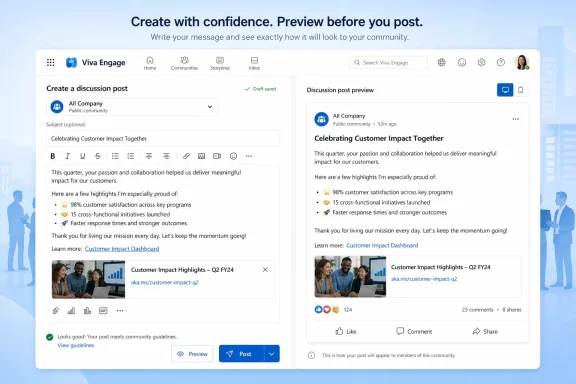
Microsoft added “Discussion post previews” for Microsoft Viva to the Microsoft 365 Roadmap on June 26, 2026, listing the web feature as in development for worldwide standard multi-tenant customers with general availability planned for July 2026. The feature is simple: users will be able to see how a Viva discussion post will look before publishing it. The larger story is that Microsoft is still sanding down the everyday friction in Viva Engage, one small communication safeguard at a time. In an enterprise social network, the preview button is not glamour software; it is a quiet admission that formatting mistakes, awkward embeds, and half-tested announcements matter when the audience is your company.
The new Viva feature does not arrive with the drama of a Copilot launch or the architectural weight of a Teams platform change. It is a preview pane for discussion posts, and Microsoft’s roadmap language is almost aggressively practical: users can review how their posts will appear before publishing, catch formatting issues, validate content, and post with greater confidence.
That phrasing matters because Viva Engage has never really been about the post box alone. It is Microsoft’s workplace community layer: the place where leaders publish updates, employees ask questions, internal communities organize around projects or interests, and conversations can spill into Teams, Outlook, and the broader Microsoft 365 fabric. The humble act of pressing “Post” can therefore have more blast radius than it appears to have.
A preview function is a small product investment aimed at a large behavioral problem. People hesitate when they cannot predict the result of an action, especially in tools where an accidental post can be seen by executives, peers, or thousands of colleagues. Microsoft is not just improving formatting fidelity; it is trying to lower the social risk of participating.
That is the understated thesis of this roadmap item. Viva’s adoption problem is not only whether Microsoft can pack more features into the suite. It is whether employees trust the software enough to use it naturally, without treating every post as a mini change-management exercise.
That means discussion posts do not live in a vacuum. They sit alongside communities, storyline posts, leadership communications, Q&A, announcements, events, and content that may be surfaced across Microsoft 365 experiences. A poorly formatted post is not merely ugly; it can undermine the credibility of an internal message.
The web platform designation is also telling. The browser is still the place where many corporate communicators, community managers, HR teams, and department leads compose longer-form posts. Mobile is where employees may react and skim; the web is where many official or semi-official messages are drafted, reviewed, and shipped.
Previewing is therefore especially relevant to the people most likely to care about layout, attachments, links, images, mentions, and readability. Those users are not always professional communicators. In many organizations, they are IT managers, employee-resource-group leaders, product owners, support leads, or local champions who have inherited the work of keeping a community alive.
Microsoft’s roadmap does not say whether previews will include every supported element, and it does not spell out whether the experience will differ by post type. That uncertainty matters. A preview that faithfully reflects rich text, embedded media, topics, link cards, and attachments is a useful guardrail. A preview that only approximates the final rendering is better than nothing, but it will not fully solve the confidence problem Microsoft is describing.
That is especially true in workplace social platforms, where the audience is bounded but still politically complicated. A Slack message can be corrected in the flow of a channel. A Teams chat can be informal by design. A Viva discussion post, depending on the community, can feel closer to a public memo than a casual note.
Previewing gives the user a moment of rehearsal. It lets them see whether line breaks survive, whether a link unfurls as expected, whether an image dominates the post, whether a list reads properly, or whether a copied block of text has carried over odd formatting. These are not exotic problems. They are the small paper cuts that make users distrust rich-text editors.
The feature also recognizes that “post and edit later” is not good enough in every workplace. In regulated industries, heavily managed internal communities, or executive-facing channels, the first published version may be the version people screenshot, forward, or react to. Editing after publication can fix the artifact, but it cannot always erase the moment.
Microsoft has spent years trying to make Microsoft 365 feel more fluid and socially connected. But fluidity can become anxiety when publishing controls lag behind consumption features. A preview step is a modest but necessary counterweight: a way to make participation feel safer without introducing formal approval workflows for every message.
That timing suggests a narrow, targeted release rather than a sprawling rework of the Viva Engage publishing model. Customers should not read this as evidence that Microsoft is about to ship a full editorial workflow system, approval routing, role-based drafting, or newsroom-grade collaboration around posts. The roadmap item says preview, and the platform says web.
The release ring is General Availability, not preview, and the cloud instance is Worldwide standard multi-tenant. In Microsoft 365 roadmap terms, that positions the feature as a broad commercial rollout rather than a limited experiment aimed at a niche environment. There is no indication in the submitted roadmap details of a government cloud release, a sovereign cloud release, or a separate staged preview program.
As always, roadmap dates are planning signals rather than immutable contracts. Microsoft’s own roadmap machinery is designed to communicate intent, not guarantee a precise tenant-by-tenant switch-on date. Admins should treat July 2026 as the target month and watch the Microsoft 365 admin center and message center for operational details.
The short lead time also means IT teams may not need a major readiness plan. This is not a migration, a security model change, or a licensing overhaul. But communications teams and Viva community managers should still know it is coming, because they are the ones most likely to turn a small feature into a visible improvement in posting quality.
Formatting issues are the obvious case. Rich text editors often behave differently depending on pasted source material, browser, content type, and embedded media. Anyone who has copied from Word into a web editor knows the resulting post may carry hidden cruft, strange spacing, or inconsistent styling.
Content validation is the broader claim. A preview can help the author see whether the message reads as intended in context. It can reveal that the first paragraph is too long, that the call to action is buried, that a link title is confusing, or that an image changes the tone of the message.
Confidence is the adoption claim. Microsoft wants employees to participate more readily, and it knows that small uncertainties can suppress contribution. In a workplace community, lurkers often outnumber contributors; anything that moves cautious employees from “I’ll just not post” to “this looks fine” has value.
There is a governance angle here as well, though Microsoft does not spell it out. Better previews may reduce accidental posts that require deletion, moderator intervention, or follow-up clarification. They may also reduce support requests from community owners who spend time explaining why a post appeared differently than expected.
That contrast is healthy. A workplace platform cannot live on generative AI alone. Before users ask an assistant to draft, summarize, classify, or analyze their communications, they still need the publishing surface to feel reliable.
Previewing is a kind of anti-magic feature. It does not infer intent. It does not summarize sentiment. It does not promise productivity transformation. It simply gives the author a way to inspect the artifact before it becomes part of the organization’s conversational record.
For IT pros, that may be the most encouraging part of the announcement. Microsoft 365 customers often complain that the company races toward headline features while leaving rough edges in everyday workflows. Discussion post previews are exactly the sort of unglamorous polish that large platforms need more of.
That does not mean Microsoft deserves a parade for adding a feature many publishing systems have offered for years. It means Viva is maturing into a product where the small mechanics of communication are finally being treated as product-worthy. In enterprise software, that is often how a tool crosses from “available” to “usable.”
The operational impact will instead show up in training, community management, and internal communications guidance. If an organization already maintains Viva Engage posting best practices, the preview feature should become part of that guidance as soon as it lands. Users who post announcements, leadership updates, community prompts, or policy-related discussions should be encouraged to preview before publishing.
There may also be accessibility implications, depending on implementation. A useful preview should help authors notice whether a post is visually overwhelming, poorly structured, or dependent on layout tricks that do not translate well across surfaces. It will not replace accessibility checking, but it can make authors more aware of how a post is actually presented.
IT teams should also pay attention to browser support and rendering consistency. Because the roadmap entry identifies the platform as web, the first question after rollout will be whether the preview matches the final published post across the web experience and the places where Viva content may later appear. A preview that is accurate only in the initial web context could still leave surprises elsewhere.
The other administrative concern is user expectation. Once people have a preview button, they assume it tells the truth. If preview and published rendering diverge, trust erodes quickly. Microsoft’s challenge is not merely to ship the button; it is to make the preview authoritative enough that users believe it.
But the feature should not be mistaken for a full publishing workflow. The roadmap item does not mention drafts, approvals, scheduled posts, version comparison, brand templates, or multi-author review. Previewing is a last-mile check, not a content operations system.
That distinction matters because Viva Engage increasingly sits near formal internal communications. Leadership posts, AMAs, campaign updates, and community announcements can be consequential. A preview helps one author avoid embarrassment, but it does not resolve the broader governance question of who should be allowed to publish what, where, and with what review.
Organizations that need strict controls will still need policy, training, and moderation. They may need communications calendars, delegated posting models, or approval practices outside the product. Preview reduces accidental friction; it does not substitute for editorial judgment.
Still, many communication failures are not policy failures. They are tiny presentation failures that make a message look rushed or careless. For those, a preview function is a practical fix.
Every bit of uncertainty pushes those users back into silence. Will the pasted link look strange? Will the paragraph spacing break? Did the image attach correctly? Will the post look too long? These questions may sound trivial to power users, but they are real blockers for occasional contributors.
A preview gives users permission to be less perfect in the drafting stage because they know they can inspect the result before publishing. That can make the composer feel less like a trap and more like a tool. For community health, that difference is substantial.
It is also aligned with the broader trend in workplace software toward reducing performative risk. Employees are increasingly asked to communicate in semi-public digital spaces, often across hierarchy and geography. Tools that make those spaces feel safer can increase participation without forcing engagement through mandates.
Microsoft will not solve workplace culture with a preview pane. But product design can either amplify anxiety or soften it. This feature softens it.
 Microsoft Turns a Tiny Composer Feature Into a Trust Feature
The new Viva feature does not arrive with the drama of a Copilot launch or the architectural weight of a Teams platform change. It is a preview pane for discussion posts, and Microsoft’s roadmap language is almost aggressively practical: users can review how their posts will appear before publishing, catch formatting issues, validate content, and post with greater confidence.That phrasing matters because Viva Engage has never really been about the post box alone. It is Microsoft’s workplace community layer: the place where leaders publish updates, employees ask questions, internal communities organize around projects or interests, and conversations can spill into Teams, Outlook, and the broader Microsoft 365 fabric. The humble act of pressing “Post” can therefore have more blast radius than it appears to have.
A preview function is a small product investment aimed at a large behavioral problem. People hesitate when they cannot predict the result of an action, especially in tools where an accidental post can be seen by executives, peers, or thousands of colleagues. Microsoft is not just improving formatting fidelity; it is trying to lower the social risk of participating.
That is the understated thesis of this roadmap item. Viva’s adoption problem is not only whether Microsoft can pack more features into the suite. It is whether employees trust the software enough to use it naturally, without treating every post as a mini change-management exercise.
Viva Engage Has Become the Office Bulletin Board Microsoft Always Wanted Yammer to Be
To understand why post previews are more meaningful than they look, it helps to remember what Viva Engage is now expected to carry. Microsoft’s employee-experience branding has shifted over the years, but Engage remains the social and community spine of the Viva suite, inherited from Yammer and refitted for a Microsoft 365 world where Teams is the daily workspace.That means discussion posts do not live in a vacuum. They sit alongside communities, storyline posts, leadership communications, Q&A, announcements, events, and content that may be surfaced across Microsoft 365 experiences. A poorly formatted post is not merely ugly; it can undermine the credibility of an internal message.
The web platform designation is also telling. The browser is still the place where many corporate communicators, community managers, HR teams, and department leads compose longer-form posts. Mobile is where employees may react and skim; the web is where many official or semi-official messages are drafted, reviewed, and shipped.
Previewing is therefore especially relevant to the people most likely to care about layout, attachments, links, images, mentions, and readability. Those users are not always professional communicators. In many organizations, they are IT managers, employee-resource-group leaders, product owners, support leads, or local champions who have inherited the work of keeping a community alive.
Microsoft’s roadmap does not say whether previews will include every supported element, and it does not spell out whether the experience will differ by post type. That uncertainty matters. A preview that faithfully reflects rich text, embedded media, topics, link cards, and attachments is a useful guardrail. A preview that only approximates the final rendering is better than nothing, but it will not fully solve the confidence problem Microsoft is describing.
The Composer Is Where Enterprise Social Networks Win or Lose
Enterprise software companies often obsess over feeds, dashboards, analytics, and governance because those are easier to sell upward. The composer, by contrast, is where adoption is won downward. If creating a post feels brittle, unpredictable, or too easy to get wrong, employees simply post less.That is especially true in workplace social platforms, where the audience is bounded but still politically complicated. A Slack message can be corrected in the flow of a channel. A Teams chat can be informal by design. A Viva discussion post, depending on the community, can feel closer to a public memo than a casual note.
Previewing gives the user a moment of rehearsal. It lets them see whether line breaks survive, whether a link unfurls as expected, whether an image dominates the post, whether a list reads properly, or whether a copied block of text has carried over odd formatting. These are not exotic problems. They are the small paper cuts that make users distrust rich-text editors.
The feature also recognizes that “post and edit later” is not good enough in every workplace. In regulated industries, heavily managed internal communities, or executive-facing channels, the first published version may be the version people screenshot, forward, or react to. Editing after publication can fix the artifact, but it cannot always erase the moment.
Microsoft has spent years trying to make Microsoft 365 feel more fluid and socially connected. But fluidity can become anxiety when publishing controls lag behind consumption features. A preview step is a modest but necessary counterweight: a way to make participation feel safer without introducing formal approval workflows for every message.
The July 2026 Date Is Fast, Which Means Expectations Should Stay Modest
The roadmap entry was created and last updated on June 26, 2026, with general availability planned for July 2026. That is an unusually short visible runway, at least from the customer’s point of view. The feature may have been in internal development for some time, but publicly it appears as a near-term addition rather than a long campaign.That timing suggests a narrow, targeted release rather than a sprawling rework of the Viva Engage publishing model. Customers should not read this as evidence that Microsoft is about to ship a full editorial workflow system, approval routing, role-based drafting, or newsroom-grade collaboration around posts. The roadmap item says preview, and the platform says web.
The release ring is General Availability, not preview, and the cloud instance is Worldwide standard multi-tenant. In Microsoft 365 roadmap terms, that positions the feature as a broad commercial rollout rather than a limited experiment aimed at a niche environment. There is no indication in the submitted roadmap details of a government cloud release, a sovereign cloud release, or a separate staged preview program.
As always, roadmap dates are planning signals rather than immutable contracts. Microsoft’s own roadmap machinery is designed to communicate intent, not guarantee a precise tenant-by-tenant switch-on date. Admins should treat July 2026 as the target month and watch the Microsoft 365 admin center and message center for operational details.
The short lead time also means IT teams may not need a major readiness plan. This is not a migration, a security model change, or a licensing overhaul. But communications teams and Viva community managers should still know it is coming, because they are the ones most likely to turn a small feature into a visible improvement in posting quality.
Microsoft Is Fixing the Fear of the Misfire, Not Just the Look of the Post
The roadmap description emphasizes formatting issues, content validation, and confidence. That triad is more revealing than it first appears. Microsoft is framing the preview not as decoration, but as a checkpoint before publication.Formatting issues are the obvious case. Rich text editors often behave differently depending on pasted source material, browser, content type, and embedded media. Anyone who has copied from Word into a web editor knows the resulting post may carry hidden cruft, strange spacing, or inconsistent styling.
Content validation is the broader claim. A preview can help the author see whether the message reads as intended in context. It can reveal that the first paragraph is too long, that the call to action is buried, that a link title is confusing, or that an image changes the tone of the message.
Confidence is the adoption claim. Microsoft wants employees to participate more readily, and it knows that small uncertainties can suppress contribution. In a workplace community, lurkers often outnumber contributors; anything that moves cautious employees from “I’ll just not post” to “this looks fine” has value.
There is a governance angle here as well, though Microsoft does not spell it out. Better previews may reduce accidental posts that require deletion, moderator intervention, or follow-up clarification. They may also reduce support requests from community owners who spend time explaining why a post appeared differently than expected.
The Feature Also Shows the Limits of Microsoft’s AI-First Product Story
The timing is interesting because Microsoft’s public Microsoft 365 narrative is now dominated by Copilot, agents, and AI-assisted work. Yet here is a new Viva feature that does something far more basic: it shows the user what they are about to publish.That contrast is healthy. A workplace platform cannot live on generative AI alone. Before users ask an assistant to draft, summarize, classify, or analyze their communications, they still need the publishing surface to feel reliable.
Previewing is a kind of anti-magic feature. It does not infer intent. It does not summarize sentiment. It does not promise productivity transformation. It simply gives the author a way to inspect the artifact before it becomes part of the organization’s conversational record.
For IT pros, that may be the most encouraging part of the announcement. Microsoft 365 customers often complain that the company races toward headline features while leaving rough edges in everyday workflows. Discussion post previews are exactly the sort of unglamorous polish that large platforms need more of.
That does not mean Microsoft deserves a parade for adding a feature many publishing systems have offered for years. It means Viva is maturing into a product where the small mechanics of communication are finally being treated as product-worthy. In enterprise software, that is often how a tool crosses from “available” to “usable.”
Where Admins Should Look for the Real Impact
For tenant administrators, this feature is unlikely to create a new control plane. The roadmap details do not mention admin toggles, policy settings, audit changes, or compliance configuration. It appears to be a user-facing web experience addition.The operational impact will instead show up in training, community management, and internal communications guidance. If an organization already maintains Viva Engage posting best practices, the preview feature should become part of that guidance as soon as it lands. Users who post announcements, leadership updates, community prompts, or policy-related discussions should be encouraged to preview before publishing.
There may also be accessibility implications, depending on implementation. A useful preview should help authors notice whether a post is visually overwhelming, poorly structured, or dependent on layout tricks that do not translate well across surfaces. It will not replace accessibility checking, but it can make authors more aware of how a post is actually presented.
IT teams should also pay attention to browser support and rendering consistency. Because the roadmap entry identifies the platform as web, the first question after rollout will be whether the preview matches the final published post across the web experience and the places where Viva content may later appear. A preview that is accurate only in the initial web context could still leave surprises elsewhere.
The other administrative concern is user expectation. Once people have a preview button, they assume it tells the truth. If preview and published rendering diverge, trust erodes quickly. Microsoft’s challenge is not merely to ship the button; it is to make the preview authoritative enough that users believe it.
Communicators Get a Small Safety Net, Not an Editorial Workflow
Corporate communications teams will probably appreciate this feature first. They are the users most likely to care about how a post looks before it reaches a large internal audience. They are also the users most likely to have experienced the minor panic of publishing a carefully prepared update only to discover the link card, spacing, or media placement looks wrong.But the feature should not be mistaken for a full publishing workflow. The roadmap item does not mention drafts, approvals, scheduled posts, version comparison, brand templates, or multi-author review. Previewing is a last-mile check, not a content operations system.
That distinction matters because Viva Engage increasingly sits near formal internal communications. Leadership posts, AMAs, campaign updates, and community announcements can be consequential. A preview helps one author avoid embarrassment, but it does not resolve the broader governance question of who should be allowed to publish what, where, and with what review.
Organizations that need strict controls will still need policy, training, and moderation. They may need communications calendars, delegated posting models, or approval practices outside the product. Preview reduces accidental friction; it does not substitute for editorial judgment.
Still, many communication failures are not policy failures. They are tiny presentation failures that make a message look rushed or careless. For those, a preview function is a practical fix.
Employees Need Fewer Reasons to Stay Silent
The employee side of the feature is easy to underestimate. Most people in a company do not wake up eager to publish to an enterprise social platform. They post when they need help, want to share knowledge, respond to a prompt, or participate in a community that feels worth their time.Every bit of uncertainty pushes those users back into silence. Will the pasted link look strange? Will the paragraph spacing break? Did the image attach correctly? Will the post look too long? These questions may sound trivial to power users, but they are real blockers for occasional contributors.
A preview gives users permission to be less perfect in the drafting stage because they know they can inspect the result before publishing. That can make the composer feel less like a trap and more like a tool. For community health, that difference is substantial.
It is also aligned with the broader trend in workplace software toward reducing performative risk. Employees are increasingly asked to communicate in semi-public digital spaces, often across hierarchy and geography. Tools that make those spaces feel safer can increase participation without forcing engagement through mandates.
Microsoft will not solve workplace culture with a preview pane. But product design can either amplify anxiety or soften it. This feature softens it.
The Preview Button Carries More Weight Than Its Size
The concrete facts are straightforward: this is a Microsoft Viva web feature, Roadmap ID 566699, in development, aimed at worldwide standard multi-tenant customers, and scheduled for general availability in July 2026. The interpretation is more interesting: Microsoft is acknowledging that enterprise conversation tools need publishing confidence as much as they need feeds and notifications.- Discussion post previews are intended to let Viva users inspect how a post will appear before they publish it.
- The feature was added to the Microsoft 365 Roadmap on June 26, 2026, with general availability planned for July 2026.
- The initial roadmap scope lists Microsoft Viva on the web for Worldwide standard multi-tenant cloud customers.
- The feature should help users catch formatting problems, validate content presentation, and reduce hesitation before posting.
- Admins should not expect a major governance change from the roadmap language, but community managers should update posting guidance when the feature arrives.
- The real test will be whether the preview accurately reflects the final published post across the surfaces where Viva content appears.
References
- Primary source: Microsoft 365 Roadmap
Published: 2026-06-26T22:01:51.0909953Z
Microsoft 365 Roadmap | Microsoft 365
The Microsoft 365 Roadmap lists updates that are currently planned for applicable subscribers. Check here for more information on the status of new features and updates.www.microsoft.com
- Related coverage: m365admin.handsontek.net
Microsoft 365 Copilot | Viva Engage discussion posts added to grounding sources - M365 Admin
Microsoft 365 Copilot now includes Viva Engage discussion posts from public communities and Storylines as grounding sources, enhancing contextually relevant responses. This feature, rolling out from June to August 2025, requires no admin action and does not include private content. Review Viva...m365admin.handsontek.net - Official source: techcommunity.microsoft.com
Using the Microsoft 365 Roadmap | Microsoft Community Hub
This guide helps you navigate the Microsoft 365 roadmap including filter definitions and information on how to share, follow and download. techcommunity.microsoft.com
- Related coverage: d365hub.com
