

Minecraft players reported login and multiplayer problems on Saturday morning, July 18, with Downdetector reports rising from about 10:48 a.m. Eastern. The issue appeared to affect Mojang’s authentication services rather than the game client itself, leaving some Java Edition players unable to sign in, join servers, or verify ownership through the launcher.
As reported by International Business Times Australia, neither Mojang Studios nor Microsoft had posted a public incident notice when the reports began. Community posts on Reddit described failures across the official launcher and third-party launchers, along with problems reaching Realms and Minecraft account pages.
Minecraft’s online systems depend on Microsoft-account authentication and Mojang backend services for sign-in, multiplayer session validation, skins, Marketplace access, and Realms. When that chain breaks, a PC can have a perfectly healthy network connection while the launcher reports that it cannot connect to Minecraft services.
Reported symptoms included:
For Windows players, the practical point is to avoid unnecessary reinstalls, account resets, or launcher configuration changes while an authentication outage is suspected. Those steps rarely resolve a server-side login problem and can create a separate local issue.
Players who still cannot sign in should first check whether the official Minecraft launcher and account website work, then retry after a short interval. Offline single-player worlds may remain usable if the local installation has already authenticated successfully, but Realms and online servers will require the relevant account and session services to be available.
If problems continue after services stabilize, restart the launcher, confirm the Windows date and time are correct, sign out and back in once, and check Microsoft account status before changing mods, firewall rules, or server settings.
As reported by International Business Times Australia, neither Mojang Studios nor Microsoft had posted a public incident notice when the reports began. Community posts on Reddit described failures across the official launcher and third-party launchers, along with problems reaching Realms and Minecraft account pages.
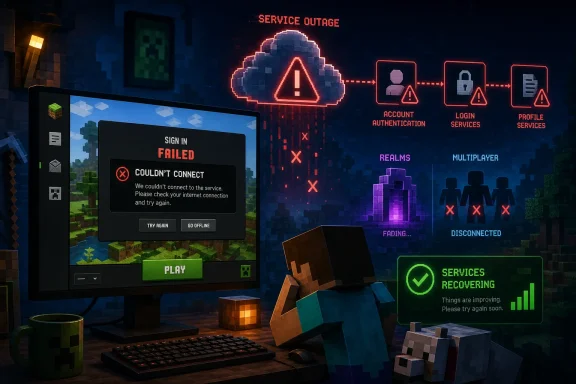 Authentication Appears to Be the Common Failure Point
Minecraft’s online systems depend on Microsoft-account authentication and Mojang backend services for sign-in, multiplayer session validation, skins, Marketplace access, and Realms. When that chain breaks, a PC can have a perfectly healthy network connection while the launcher reports that it cannot connect to Minecraft services.Reported symptoms included:
- Launcher sign-in failures or repeated authentication prompts
- “Couldn’t connect” errors when joining multiplayer servers
- Realms tabs failing to load
- Accounts appearing not to own Minecraft after a session token could not be verified
- Login failures in third-party launchers such as Prism Launcher
Signs Point to Recovery
By early afternoon Eastern time, Downdetector’s Canadian Minecraft status page showed no current broad problem, while other live-status monitors also indicated normal or near-normal report volumes. That suggests the disruption may have been brief or intermittent, though Mojang and Microsoft had not publicly confirmed the cause or timeline at the time of writing.For Windows players, the practical point is to avoid unnecessary reinstalls, account resets, or launcher configuration changes while an authentication outage is suspected. Those steps rarely resolve a server-side login problem and can create a separate local issue.
Players who still cannot sign in should first check whether the official Minecraft launcher and account website work, then retry after a short interval. Offline single-player worlds may remain usable if the local installation has already authenticated successfully, but Realms and online servers will require the relevant account and session services to be available.
If problems continue after services stabilize, restart the launcher, confirm the Windows date and time are correct, sign out and back in once, and check Microsoft account status before changing mods, firewall rules, or server settings.
References
- Primary source: International Business Times Australia
Published: 2026-07-18T15:33:46+00:00
Minecraft Down Now? Users Report Nationwide Outage Saturday Morning as Downdetector Complaints Begin to Climb
Minecraft players reported widespread access issues, with authentication and server connections affected. Frustration grows over Mojang's communication delays during outages, highlighting ongoingwww.ibtimes.com.au - Related coverage: outage.report

Is Mojang Down? Live Status, Outage Map & Reports
Mojang is working normally — 2 user reports in the past 24 hours, a typical level. Live outage map, status, and incident history.
outage.report
- Related coverage: downdetector.ca
Minecraft down? Current status and problems - CA
Real-time overview of problems with Minecraft. Is the website down, can't play or download the game? We'll tell you what is going on.downdetector.ca - Related coverage: minecraftserver.buzz
Are Minecraft Servers Down? Check Auth, Session & Multiplayer Status (Live) | MinecraftServer.Buzz
Are Minecraft servers down? Is mc down? Check Mojang-style service reachability, mc servers down symptoms, and run a Java Minecraft server tester for any hostname. FAQ covers authentication, Realms, and Microsoft account issues. minecraftserver.buzz
- Related coverage: tomsguide.com
Microsoft was down — LIVE updates on outage that took down Azure, Xbox, 365 and more | Tom's Guide
Multiple Microsoft services sufferingwww.tomsguide.com - Related coverage: techradar.com
Microsoft down? Services recover after major outage hits Azure, 365 and more - and even Minecraft and Xbox were affected | TechRadar
A major Microsoft outage hit users across the worldwww.techradar.com
