

Minisforum has unveiled the M2 Pro mini PC in June 2026 with Intel Panther Lake-H processors, integrated Xe3 graphics, up to 128GB of LPDDR5X memory, triple M.2 storage, USB4, OCuLink, and dual high-speed Ethernet. The spec sheet reads less like a living-room NUC and more like a compact argument about where the Windows workstation is heading. Minisforum is betting that the next serious desktop does not need a tower, provided Intel’s new silicon can finally make integrated CPU, GPU, and NPU performance feel cohesive instead of merely fashionable. The result is a tiny PC that says as much about the AI-PC arms race as it does about Minisforum’s own ambitions.
The M2 Pro lands at a moment when the mini PC market has stopped being cute. For years, small-form-factor Windows boxes were treated as secondary machines: good for signage, office desktops, home labs, light emulation, or the back of a monitor. Minisforum, Beelink, GMKtec, Asus, Lenovo, and others have gradually pushed that category upward, but the M2 Pro is notable because it does not merely chase laptop-class performance in a desktop shell.
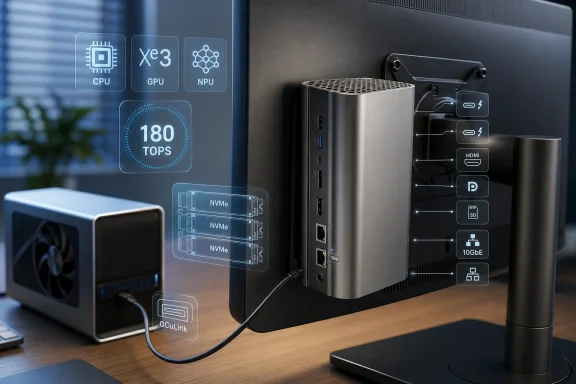
Its pitch is workstation-adjacent. The machine combines Panther Lake-H silicon, up to 128GB of LPDDR5X memory, three PCIe 4.0 M.2 slots, 10GbE and 2.5GbE networking, USB4, OCuLink, HDMI, DisplayPort, an SD card reader, and a metal chassis that can still disappear behind a display. That is the sort of I/O mix that usually appears when a vendor is trying to appeal simultaneously to developers, creators, home-lab users, and the odd enthusiast who refuses to buy a full tower unless physics leaves no alternative.
The workstation comparison should not be taken too literally. A mini PC using mobile silicon and shared memory is not about to replace a Threadripper tower with ECC memory and multiple full-length GPUs. But the more interesting question is not whether the M2 Pro can win every benchmark against a traditional workstation. It is whether the center of gravity for many professional Windows workloads has shifted enough that a palm-sized machine can plausibly do the job.
That is where Minisforum’s announcement becomes more than another spec dump. The company is selling a box that assumes local AI, high-speed networking, external GPU expansion, and dense solid-state storage are no longer exotic requirements. They are becoming the new language of the power desktop.
Panther Lake is also symbolically important for Intel. The company has spent years trying to regain process leadership credibility while fending off AMD in CPUs, Apple in efficiency, Qualcomm in Windows-on-Arm, and Nvidia in AI acceleration. A mini PC from Minisforum will not settle any of those fights. But devices like the M2 Pro are where silicon narratives meet buyers who care less about corporate roadmaps than about whether their next small box can compile code, run models, drive displays, saturate a network link, and stay quiet.
The reported Panther Lake-H configuration gives Minisforum a stronger foundation than earlier mini PCs built around lower-wattage laptop parts. Panther Lake brings a hybrid CPU design, integrated Xe3 graphics, and Intel’s NPU 5. In Intel’s own positioning, the platform can reach up to 180 total platform TOPS when CPU, GPU, and NPU contributions are counted together. That number is now central to the AI-PC marketing cycle, even if real-world usefulness depends heavily on software support, memory bandwidth, model size, quantization, and whether applications actually target the right accelerator.
The important distinction is that Minisforum is not just listing an NPU because Microsoft and Intel say every 2026 PC must have one. The M2 Pro is being presented as a local AI workstation in miniature. That means the NPU is part of the story, but not the whole story. The CPU and GPU matter as much as the neural block, and in many local AI workflows they may matter more.
Still, it would be too easy to dismiss the number entirely. The move from older Windows laptops with weak or absent NPUs to systems with meaningful local acceleration does change what developers and users can expect from client hardware. Background effects, transcription, image processing, semantic search, local assistants, and smaller language models all become more plausible when there is dedicated hardware available and enough memory to keep workloads local.
Minisforum’s claim that the M2 Pro can run models such as DeepSeek-R1 locally should be read with the usual caveats. “DeepSeek-R1” can mean very different things depending on the parameter count, distilled variant, quantization method, context length, runtime, and whether the workload is landing on the NPU, GPU, CPU, or some combination. A compact PC with 128GB of memory is much more credible for local experimentation than a thin laptop with 16GB, but buyers should not confuse local inference capability with data-center-class throughput.
That said, the M2 Pro’s memory ceiling is what makes the AI pitch more credible than it would otherwise be. Many AI-PC announcements lean too heavily on an NPU number while shipping with memory configurations that quickly become the real constraint. A 128GB LPDDR5X ceiling changes the conversation. It gives developers, researchers, and hobbyists enough room to run heavier local workflows, multiple virtual machines, or containerized services without immediately paging themselves into misery.
The catch is that LPDDR5X is typically soldered, so configuration choice matters. If Minisforum sells lower-memory variants, buyers may have to decide at purchase time how seriously they take the workstation and AI claims. A 32GB model may be a capable mini desktop. A 128GB model is a different category of machine.
Integrated graphics have historically carried a stigma among Windows enthusiasts, especially those who grew up treating “real PC” as shorthand for discrete GPU. That stigma has been weakening. AMD’s APUs, Apple’s unified-memory Macs, handheld gaming PCs, and Intel’s own Arc-era improvements have made integrated graphics more credible. Panther Lake’s Xe3 architecture continues that trend by treating the iGPU as a serious compute and media engine, not just a display adapter.
For the M2 Pro, that matters because there is no room for a conventional internal desktop GPU. The integrated GPU must carry the machine for display output, media acceleration, light-to-moderate creative work, GPU compute experiments, and casual gaming. If Intel’s drivers and application support hold up, Xe3 could make the machine feel dramatically less constrained than earlier mini PCs that offered strong CPUs but mediocre graphics.
The graphics story is also tangled with AI. Many local inference stacks are still more comfortable using GPUs than NPUs, especially when developers are experimenting outside carefully optimized vendor demos. If the M2 Pro’s integrated graphics can deliver meaningful acceleration through supported runtimes, the GPU becomes a practical AI engine as well as a graphics component. That is why the total platform TOPS figure is not just a marketing flourish; it reflects a world in which different parts of the chip will be asked to handle different slices of the same workload.
The risk, as always with Intel graphics, is software. Intel has improved its graphics drivers substantially since the roughest early Arc days, but professional trust is earned slowly. The M2 Pro’s hardware can look impressive on paper and still live or die by driver maturity, application compatibility, and the boring reliability of resume, display hot-plugging, multi-monitor behavior, and accelerated workloads that run for hours without drama.
The port turns the M2 Pro into a modular desktop idea. On a normal workday, the mini PC can sit quietly behind a monitor, drawing modest power and using integrated graphics. When a heavier GPU workload appears, an external graphics dock can enter the picture. That model will not appeal to everyone, but it fits a growing class of users who want flexibility rather than a single giant tower idling under a desk.
There are trade-offs. OCuLink is not as consumer-friendly as USB-C. It is less familiar, less hot-plug casual, and often tied to niche docks and enthusiast setups. Cable quality, enclosure choice, PCIe lane allocation, firmware behavior, and operating-system quirks can all matter. This is not the same as snapping a USB-C hub onto a laptop.
But the presence of OCuLink is still important because it acknowledges that integrated graphics, however improved, have limits. Minisforum is not pretending the M2 Pro can be all things to all users on its own. It is giving buyers a way to extend the machine when the iGPU stops being enough. That is a more honest design choice than stuffing the product page with impossible workstation comparisons.
The networking is more interesting. A 10GbE port alongside 2.5GbE makes the M2 Pro unusually well-suited to home labs, NAS-heavy setups, small studios, and edge deployments. Many mini PCs stop at dual 2.5GbE, which is useful but not transformative. Adding 10GbE changes what the machine can do with fast network storage, virtualization clusters, backup workflows, and high-bitrate media environments.
For WindowsForum readers, this may be the most persuasive part of the machine. A compact Windows box with 10GbE, multiple internal NVMe slots, and high memory capacity can be more than a desktop. It can be a Hyper-V host, a Proxmox node if the buyer goes off the Windows path, a development server, a media ingest station, a lab domain controller, a small AI inference endpoint, or a high-speed workstation tied to a NAS.
The three M.2 PCIe 4.0 slots are similarly practical. Storage expansion is often where mini PCs reveal their compromises, forcing buyers into one or two drives and a tangle of external SSDs. Three internal slots give the M2 Pro room for separation: an OS drive, a project drive, and a scratch or dataset drive. For anyone working with video, virtual machines, local models, or large codebases, that layout is not luxury; it is sanity.
The open question is thermals. Three NVMe drives, a high-performance mobile processor, USB4 devices, and 10GbE networking inside a small metal chassis can generate a lot of heat. Minisforum has produced impressively dense machines before, but the difference between “benchmark fast” and “reliably fast under sustained mixed I/O” is where compact workstations either earn loyalty or become forum troubleshooting threads.
The Copilot key has become a symbol of Microsoft’s push to make AI feel native to Windows hardware. On laptops, that shift has been visible on keyboards. On a mini PC, the idea is slightly stranger. A desktop box does not naturally invite the same one-button assistant behavior unless the vendor builds it into the chassis and assumes the machine may sit within reach or be used in a kiosk, office, or voice-controlled setup.
The microphone array is part of that bet. Voice control on a desktop has always been an awkward half-reality, useful in accessibility contexts and niche workflows but rarely central to everyday PC use. AI assistants could change that if they become reliable enough, private enough, and context-aware enough to justify speaking to a box on your desk. That remains a big “if.”
For administrators, the Copilot hardware push also raises familiar questions. Enterprises do not adopt new input pathways merely because vendors are excited about them. They ask where the data goes, what can be disabled, which policies apply, how microphones are managed, and whether local AI features behave predictably across fleets. The M2 Pro may be sold as an enthusiast machine, but its AI-facing hardware intersects with the same governance concerns that larger organizations are already wrestling with.
The memory ceiling is impressive, but the cost of a 128GB LPDDR5X configuration may push the machine into territory where buyers start asking uncomfortable questions. If the fully loaded M2 Pro approaches the price of a capable desktop with a discrete GPU, the argument becomes less straightforward. The mini PC must then justify itself through space savings, power efficiency, integrated networking, and expansion flexibility rather than raw performance per dollar.
There is also the issue of repairability and longevity. Traditional workstations are large partly because they are serviceable. DIMMs can be replaced, GPUs can be swapped, fans can be changed, power supplies can be sourced, and storage can be expanded without tweezers and prayers. Mini PCs compress those advantages. Even when storage is accessible, memory may not be. Cooling systems may be custom. Motherboards are often effectively the product.
That does not make the M2 Pro a bad deal. It simply means the buyer must be clear-eyed. A compact AI workstation is a different ownership proposition from a tower. It is elegant when it fits the workload and frustrating when one component becomes the limiting factor. The smaller the machine, the more important it is to buy the right configuration on day one.
Minisforum’s recent track record gives the company credibility among mini PC enthusiasts, but it also operates in a market where BIOS updates, driver packages, and regional support can vary. For Windows users who want appliance-like reliability, those details matter. A mini workstation is only as good as the vendor’s willingness to keep the platform stable after launch.
For developers, this means a desk setup can be smaller without becoming toy-like. Local containers, virtual machines, build environments, test databases, and AI coding tools all benefit from memory and fast storage. For creators, the combination of USB4, SD, high-speed networking, and stronger integrated media hardware could make the M2 Pro a practical ingest and editing station, depending on codec support and sustained cooling.
For home-lab users, the appeal is obvious. A low-footprint node with 10GbE and 128GB memory can consolidate services that once required a repurposed tower. It can sit in an office rather than a rack. It can be quiet enough for daily proximity while still serious enough for experimentation.
For gamers, the answer is more conditional. Xe3 may make integrated gaming better, and OCuLink opens the door to external GPUs, but anyone primarily buying a gaming PC will still need to compare the full platform cost against a conventional desktop. The M2 Pro looks more compelling as a flexible Windows power box that can game than as a pure gaming machine.
The 10GbE implementation also deserves scrutiny. A fast Ethernet port can be transformative, but not if it overheats, drops under load, or uses drivers that create headaches in Windows. The same applies to the SD reader, display outputs, sleep behavior, and multi-monitor resume. The higher Minisforum positions this machine, the less tolerance buyers will have for rough edges.
Pricing and availability are the other missing pieces. “Officially unveiled” is not the same as broadly purchasable, configurable, and supported in every region. Mini PC launches often arrive in stages, with Chinese-market announcements preceding global listings and final SKU details. Buyers should wait for exact processor options, RAM configurations, SSD bundles, warranty terms, and barebones availability before treating the M2 Pro as a known quantity.
There is also a naming wrinkle to watch. Minisforum’s M2 and M2 Pro branding may sit close enough to confuse buyers, especially as different regions and retailers describe Panther Lake configurations in slightly different ways. The difference between a 32GB midrange Panther Lake mini PC and a 128GB flagship with OCuLink and 10GbE is not cosmetic. It is the difference between a compact desktop and the workstation story Minisforum is trying to tell.
 Minisforum Turns the Mini PC Into a Workstation Argument
The M2 Pro lands at a moment when the mini PC market has stopped being cute. For years, small-form-factor Windows boxes were treated as secondary machines: good for signage, office desktops, home labs, light emulation, or the back of a monitor. Minisforum, Beelink, GMKtec, Asus, Lenovo, and others have gradually pushed that category upward, but the M2 Pro is notable because it does not merely chase laptop-class performance in a desktop shell.Its pitch is workstation-adjacent. The machine combines Panther Lake-H silicon, up to 128GB of LPDDR5X memory, three PCIe 4.0 M.2 slots, 10GbE and 2.5GbE networking, USB4, OCuLink, HDMI, DisplayPort, an SD card reader, and a metal chassis that can still disappear behind a display. That is the sort of I/O mix that usually appears when a vendor is trying to appeal simultaneously to developers, creators, home-lab users, and the odd enthusiast who refuses to buy a full tower unless physics leaves no alternative.
The workstation comparison should not be taken too literally. A mini PC using mobile silicon and shared memory is not about to replace a Threadripper tower with ECC memory and multiple full-length GPUs. But the more interesting question is not whether the M2 Pro can win every benchmark against a traditional workstation. It is whether the center of gravity for many professional Windows workloads has shifted enough that a palm-sized machine can plausibly do the job.
That is where Minisforum’s announcement becomes more than another spec dump. The company is selling a box that assumes local AI, high-speed networking, external GPU expansion, and dense solid-state storage are no longer exotic requirements. They are becoming the new language of the power desktop.
Panther Lake Gives the Box Its Real Political Weight
The reason the M2 Pro matters is Panther Lake. Intel’s Core Ultra Series 3 generation is the company’s attempt to make good on several promises at once: a more advanced manufacturing story, better integrated graphics, a stronger neural processing unit, and a mobile architecture that can scale from laptops into compact desktops without seeming compromised.Panther Lake is also symbolically important for Intel. The company has spent years trying to regain process leadership credibility while fending off AMD in CPUs, Apple in efficiency, Qualcomm in Windows-on-Arm, and Nvidia in AI acceleration. A mini PC from Minisforum will not settle any of those fights. But devices like the M2 Pro are where silicon narratives meet buyers who care less about corporate roadmaps than about whether their next small box can compile code, run models, drive displays, saturate a network link, and stay quiet.
The reported Panther Lake-H configuration gives Minisforum a stronger foundation than earlier mini PCs built around lower-wattage laptop parts. Panther Lake brings a hybrid CPU design, integrated Xe3 graphics, and Intel’s NPU 5. In Intel’s own positioning, the platform can reach up to 180 total platform TOPS when CPU, GPU, and NPU contributions are counted together. That number is now central to the AI-PC marketing cycle, even if real-world usefulness depends heavily on software support, memory bandwidth, model size, quantization, and whether applications actually target the right accelerator.
The important distinction is that Minisforum is not just listing an NPU because Microsoft and Intel say every 2026 PC must have one. The M2 Pro is being presented as a local AI workstation in miniature. That means the NPU is part of the story, but not the whole story. The CPU and GPU matter as much as the neural block, and in many local AI workflows they may matter more.
The 180 TOPS Claim Is Marketing, but Not Meaningless
The headline figure attached to the M2 Pro is 180 TOPS of combined AI performance. That is a large number, and like most large platform-level AI numbers, it needs careful handling. TOPS is a measure of low-precision operations per second, usually under ideal conditions, and it does not translate cleanly into “this PC runs every AI model well.”Still, it would be too easy to dismiss the number entirely. The move from older Windows laptops with weak or absent NPUs to systems with meaningful local acceleration does change what developers and users can expect from client hardware. Background effects, transcription, image processing, semantic search, local assistants, and smaller language models all become more plausible when there is dedicated hardware available and enough memory to keep workloads local.
Minisforum’s claim that the M2 Pro can run models such as DeepSeek-R1 locally should be read with the usual caveats. “DeepSeek-R1” can mean very different things depending on the parameter count, distilled variant, quantization method, context length, runtime, and whether the workload is landing on the NPU, GPU, CPU, or some combination. A compact PC with 128GB of memory is much more credible for local experimentation than a thin laptop with 16GB, but buyers should not confuse local inference capability with data-center-class throughput.
That said, the M2 Pro’s memory ceiling is what makes the AI pitch more credible than it would otherwise be. Many AI-PC announcements lean too heavily on an NPU number while shipping with memory configurations that quickly become the real constraint. A 128GB LPDDR5X ceiling changes the conversation. It gives developers, researchers, and hobbyists enough room to run heavier local workflows, multiple virtual machines, or containerized services without immediately paging themselves into misery.
The catch is that LPDDR5X is typically soldered, so configuration choice matters. If Minisforum sells lower-memory variants, buyers may have to decide at purchase time how seriously they take the workstation and AI claims. A 32GB model may be a capable mini desktop. A 128GB model is a different category of machine.
Xe3 Is the Quiet Center of the Product
The integrated Xe3 graphics block may be the most practically important part of the M2 Pro. Minisforum says graphics performance is nearly 50 percent higher than the Lunar Lake generation, and that claim fits the broader direction Intel has been promoting for Panther Lake’s top graphics configurations. For a mini PC, stronger integrated graphics changes both the gaming and professional sides of the equation.Integrated graphics have historically carried a stigma among Windows enthusiasts, especially those who grew up treating “real PC” as shorthand for discrete GPU. That stigma has been weakening. AMD’s APUs, Apple’s unified-memory Macs, handheld gaming PCs, and Intel’s own Arc-era improvements have made integrated graphics more credible. Panther Lake’s Xe3 architecture continues that trend by treating the iGPU as a serious compute and media engine, not just a display adapter.
For the M2 Pro, that matters because there is no room for a conventional internal desktop GPU. The integrated GPU must carry the machine for display output, media acceleration, light-to-moderate creative work, GPU compute experiments, and casual gaming. If Intel’s drivers and application support hold up, Xe3 could make the machine feel dramatically less constrained than earlier mini PCs that offered strong CPUs but mediocre graphics.
The graphics story is also tangled with AI. Many local inference stacks are still more comfortable using GPUs than NPUs, especially when developers are experimenting outside carefully optimized vendor demos. If the M2 Pro’s integrated graphics can deliver meaningful acceleration through supported runtimes, the GPU becomes a practical AI engine as well as a graphics component. That is why the total platform TOPS figure is not just a marketing flourish; it reflects a world in which different parts of the chip will be asked to handle different slices of the same workload.
The risk, as always with Intel graphics, is software. Intel has improved its graphics drivers substantially since the roughest early Arc days, but professional trust is earned slowly. The M2 Pro’s hardware can look impressive on paper and still live or die by driver maturity, application compatibility, and the boring reliability of resume, display hot-plugging, multi-monitor behavior, and accelerated workloads that run for hours without drama.
OCuLink Is the Enthusiast Escape Hatch
Minisforum’s inclusion of OCuLink is one of the clearest signals that this machine is aimed at enthusiasts and professionals who understand bottlenecks. USB4 is versatile, but external GPUs over Thunderbolt-style links have long carried overhead, enclosure costs, and performance compromises. OCuLink offers a more direct PCIe-style path for external graphics, making it attractive to users who want a compact host machine but are not ready to surrender discrete GPU power.The port turns the M2 Pro into a modular desktop idea. On a normal workday, the mini PC can sit quietly behind a monitor, drawing modest power and using integrated graphics. When a heavier GPU workload appears, an external graphics dock can enter the picture. That model will not appeal to everyone, but it fits a growing class of users who want flexibility rather than a single giant tower idling under a desk.
There are trade-offs. OCuLink is not as consumer-friendly as USB-C. It is less familiar, less hot-plug casual, and often tied to niche docks and enthusiast setups. Cable quality, enclosure choice, PCIe lane allocation, firmware behavior, and operating-system quirks can all matter. This is not the same as snapping a USB-C hub onto a laptop.
But the presence of OCuLink is still important because it acknowledges that integrated graphics, however improved, have limits. Minisforum is not pretending the M2 Pro can be all things to all users on its own. It is giving buyers a way to extend the machine when the iGPU stops being enough. That is a more honest design choice than stuffing the product page with impossible workstation comparisons.
The I/O Loadout Is Built for Home Labs as Much as Desks
The M2 Pro’s ports tell a story that the processor alone does not. Three USB-A ports keep older peripherals alive. Three USB4 ports make the machine viable for modern docks, fast storage, displays, and capture devices. HDMI and DisplayPort provide conventional monitor connectivity. The SD card slot nods toward creators and field workflows. The 3.5mm jack remains useful because, despite years of vendor enthusiasm for wireless everything, wired audio still solves problems Bluetooth creates.The networking is more interesting. A 10GbE port alongside 2.5GbE makes the M2 Pro unusually well-suited to home labs, NAS-heavy setups, small studios, and edge deployments. Many mini PCs stop at dual 2.5GbE, which is useful but not transformative. Adding 10GbE changes what the machine can do with fast network storage, virtualization clusters, backup workflows, and high-bitrate media environments.
For WindowsForum readers, this may be the most persuasive part of the machine. A compact Windows box with 10GbE, multiple internal NVMe slots, and high memory capacity can be more than a desktop. It can be a Hyper-V host, a Proxmox node if the buyer goes off the Windows path, a development server, a media ingest station, a lab domain controller, a small AI inference endpoint, or a high-speed workstation tied to a NAS.
The three M.2 PCIe 4.0 slots are similarly practical. Storage expansion is often where mini PCs reveal their compromises, forcing buyers into one or two drives and a tangle of external SSDs. Three internal slots give the M2 Pro room for separation: an OS drive, a project drive, and a scratch or dataset drive. For anyone working with video, virtual machines, local models, or large codebases, that layout is not luxury; it is sanity.
The open question is thermals. Three NVMe drives, a high-performance mobile processor, USB4 devices, and 10GbE networking inside a small metal chassis can generate a lot of heat. Minisforum has produced impressively dense machines before, but the difference between “benchmark fast” and “reliably fast under sustained mixed I/O” is where compact workstations either earn loyalty or become forum troubleshooting threads.
The Copilot Button Shows Who This Machine Is Also For
The dedicated Microsoft Copilot button and built-in microphone array may feel like the least enthusiast-oriented features on the M2 Pro, but they reveal another layer of the product strategy. This is not just a box for people who want ports. It is also a Windows AI PC designed to fit Microsoft’s preferred interaction model: voice, assistant, local acceleration, and operating-system-level AI affordances.The Copilot key has become a symbol of Microsoft’s push to make AI feel native to Windows hardware. On laptops, that shift has been visible on keyboards. On a mini PC, the idea is slightly stranger. A desktop box does not naturally invite the same one-button assistant behavior unless the vendor builds it into the chassis and assumes the machine may sit within reach or be used in a kiosk, office, or voice-controlled setup.
The microphone array is part of that bet. Voice control on a desktop has always been an awkward half-reality, useful in accessibility contexts and niche workflows but rarely central to everyday PC use. AI assistants could change that if they become reliable enough, private enough, and context-aware enough to justify speaking to a box on your desk. That remains a big “if.”
For administrators, the Copilot hardware push also raises familiar questions. Enterprises do not adopt new input pathways merely because vendors are excited about them. They ask where the data goes, what can be disabled, which policies apply, how microphones are managed, and whether local AI features behave predictably across fleets. The M2 Pro may be sold as an enthusiast machine, but its AI-facing hardware intersects with the same governance concerns that larger organizations are already wrestling with.
The Metal Box Still Has to Beat the Spreadsheet
Mini PCs live and die by value. A machine like the M2 Pro can look spectacular in isolation, but buyers will compare it against gaming desktops, used workstations, high-end laptops, Mac minis, NUC-style systems, and DIY small-form-factor builds. Minisforum must therefore win not only on size and specifications but on the total package: price, thermals, noise, firmware quality, warranty support, memory configurations, and availability.The memory ceiling is impressive, but the cost of a 128GB LPDDR5X configuration may push the machine into territory where buyers start asking uncomfortable questions. If the fully loaded M2 Pro approaches the price of a capable desktop with a discrete GPU, the argument becomes less straightforward. The mini PC must then justify itself through space savings, power efficiency, integrated networking, and expansion flexibility rather than raw performance per dollar.
There is also the issue of repairability and longevity. Traditional workstations are large partly because they are serviceable. DIMMs can be replaced, GPUs can be swapped, fans can be changed, power supplies can be sourced, and storage can be expanded without tweezers and prayers. Mini PCs compress those advantages. Even when storage is accessible, memory may not be. Cooling systems may be custom. Motherboards are often effectively the product.
That does not make the M2 Pro a bad deal. It simply means the buyer must be clear-eyed. A compact AI workstation is a different ownership proposition from a tower. It is elegant when it fits the workload and frustrating when one component becomes the limiting factor. The smaller the machine, the more important it is to buy the right configuration on day one.
Minisforum’s recent track record gives the company credibility among mini PC enthusiasts, but it also operates in a market where BIOS updates, driver packages, and regional support can vary. For Windows users who want appliance-like reliability, those details matter. A mini workstation is only as good as the vendor’s willingness to keep the platform stable after launch.
Windows Enthusiasts Should Read This as a Directional Signal
The M2 Pro is not important only because of its own feature list. It is important because it shows where high-end client Windows hardware is drifting. The old distinction between desktop, workstation, thin client, and edge server is getting blurrier. A single compact machine can now plausibly wear several hats, especially when paired with fast networking and enough memory.For developers, this means a desk setup can be smaller without becoming toy-like. Local containers, virtual machines, build environments, test databases, and AI coding tools all benefit from memory and fast storage. For creators, the combination of USB4, SD, high-speed networking, and stronger integrated media hardware could make the M2 Pro a practical ingest and editing station, depending on codec support and sustained cooling.
For home-lab users, the appeal is obvious. A low-footprint node with 10GbE and 128GB memory can consolidate services that once required a repurposed tower. It can sit in an office rather than a rack. It can be quiet enough for daily proximity while still serious enough for experimentation.
For gamers, the answer is more conditional. Xe3 may make integrated gaming better, and OCuLink opens the door to external GPUs, but anyone primarily buying a gaming PC will still need to compare the full platform cost against a conventional desktop. The M2 Pro looks more compelling as a flexible Windows power box that can game than as a pure gaming machine.
The Fine Print Will Decide Whether the Promise Survives Contact
The M2 Pro’s most important unknowns are the ones that rarely dominate launch coverage. Sustained power limits will determine how much Panther Lake-H performance the chassis can actually hold. Fan noise will determine whether users want the machine on a desk. BIOS options will matter for virtualization, memory behavior, boot control, and power tuning. USB4 and OCuLink reliability will matter more than their presence on a spec sheet.The 10GbE implementation also deserves scrutiny. A fast Ethernet port can be transformative, but not if it overheats, drops under load, or uses drivers that create headaches in Windows. The same applies to the SD reader, display outputs, sleep behavior, and multi-monitor resume. The higher Minisforum positions this machine, the less tolerance buyers will have for rough edges.
Pricing and availability are the other missing pieces. “Officially unveiled” is not the same as broadly purchasable, configurable, and supported in every region. Mini PC launches often arrive in stages, with Chinese-market announcements preceding global listings and final SKU details. Buyers should wait for exact processor options, RAM configurations, SSD bundles, warranty terms, and barebones availability before treating the M2 Pro as a known quantity.
There is also a naming wrinkle to watch. Minisforum’s M2 and M2 Pro branding may sit close enough to confuse buyers, especially as different regions and retailers describe Panther Lake configurations in slightly different ways. The difference between a 32GB midrange Panther Lake mini PC and a 128GB flagship with OCuLink and 10GbE is not cosmetic. It is the difference between a compact desktop and the workstation story Minisforum is trying to tell.
The M2 Pro’s Real Test Is Whether It Can Stay Small Without Thinking Small
The concrete case for the M2 Pro is strong, but it depends on execution rather than slogans. The machine brings together several trends that Windows enthusiasts have been tracking separately: AI PCs, stronger integrated graphics, external GPU links, high-speed home networking, dense NVMe storage, and miniaturized workstation design. The risk is that combining all of them in one compact chassis creates as many compromises as it solves.- The M2 Pro’s 128GB LPDDR5X ceiling is the feature that most clearly separates it from ordinary mini PCs.
- Panther Lake’s NPU matters, but the CPU, Xe3 GPU, memory capacity, and software stack will determine real local AI usefulness.
- OCuLink gives the machine a credible expansion path for users who outgrow integrated graphics.
- Dual networking with 10GbE and 2.5GbE makes the box unusually attractive for home labs, NAS-heavy workflows, and edge deployments.
- The final verdict should wait for pricing, regional availability, sustained thermal testing, firmware quality, and real-world driver behavior.
References
- Primary source: zamin.uz
Published: 2026-06-07T13:50:06.883561

Minisforum M2 Pro: Mini PC with 128 GB RAM and Panther Lake Processor
Minisforum has officially unveiled the new M2 Pro mini PC, equipped with Intel's Panther Lake generation processors. The device is powered by the Intel…zamin.uz
- Related coverage: gizmochina.com

Minisforum launches Panther Lake-powered M2 Pro and MS-03 mini PCs with up to 180 TOPS for local AI - Gizmochina
Minisforum launches Panther Lake-powered M2 Pro and MS-03 mini PCs with 10GbE, built-in PSUs, WiFi 7, and up to 180 TOPS for local AI workloads. www.gizmochina.com
- Related coverage: techradar.com

Minisforum’s affordable M2 mini PC arrives carrying serious AI ambitions
The Minisforum M2 shrinks powerful AI hardware into a tiny box, while the flagship Pro model is still missing in actionwww.techradar.com
- Related coverage: notebookcheck.net
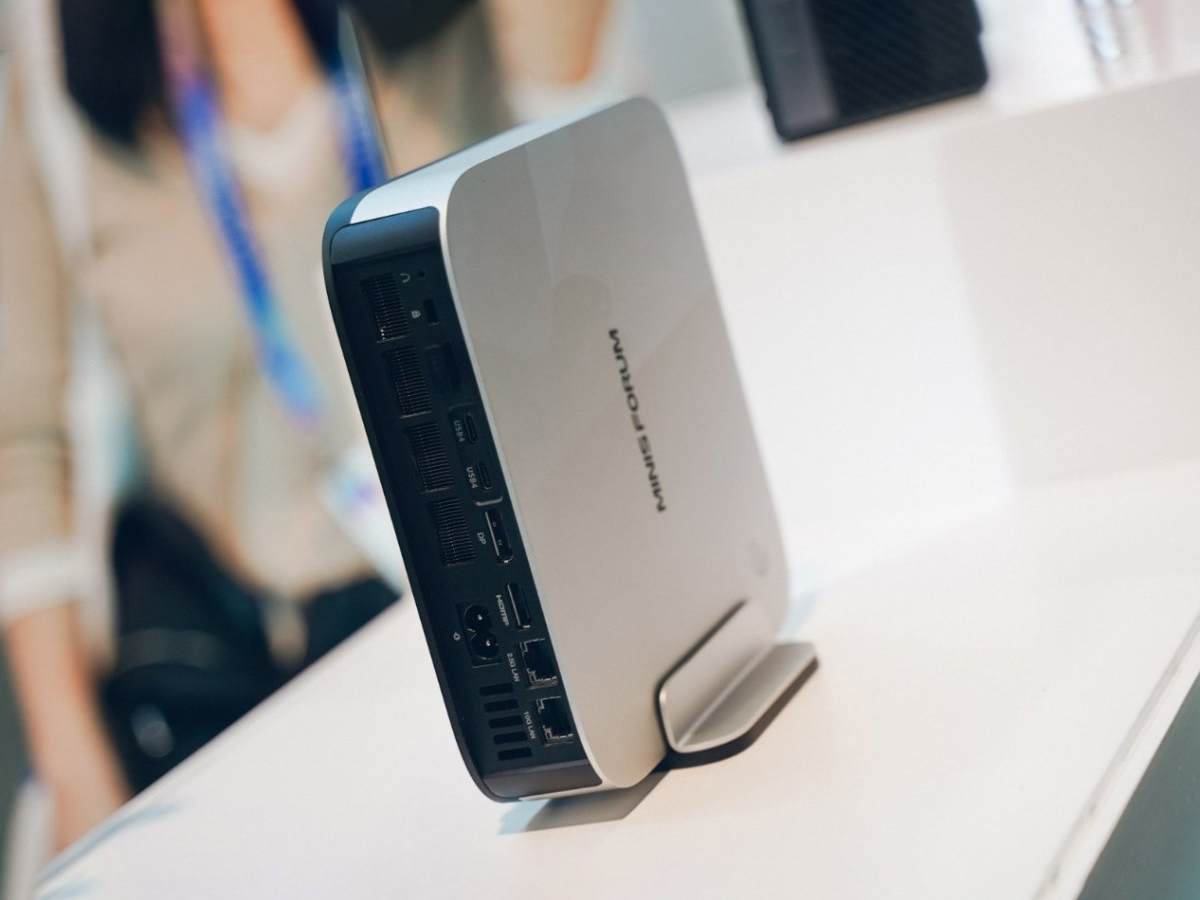
Minisforum intros EliteMini M2 Pro as new Panther Lake mini PC with capable Arc B390 iGPU
The Minisforum EliteMini M2 Pro was quietly unveiled at CES 2026, now over, and it's one of the first mini PCs powered by the Panther Lake SoC series. It can be equipped with up to an Intel Core Ultra X9 388H, which brings the capable Arc B390 iGPU. www.notebookcheck.net
- Related coverage: notebookcheck.com
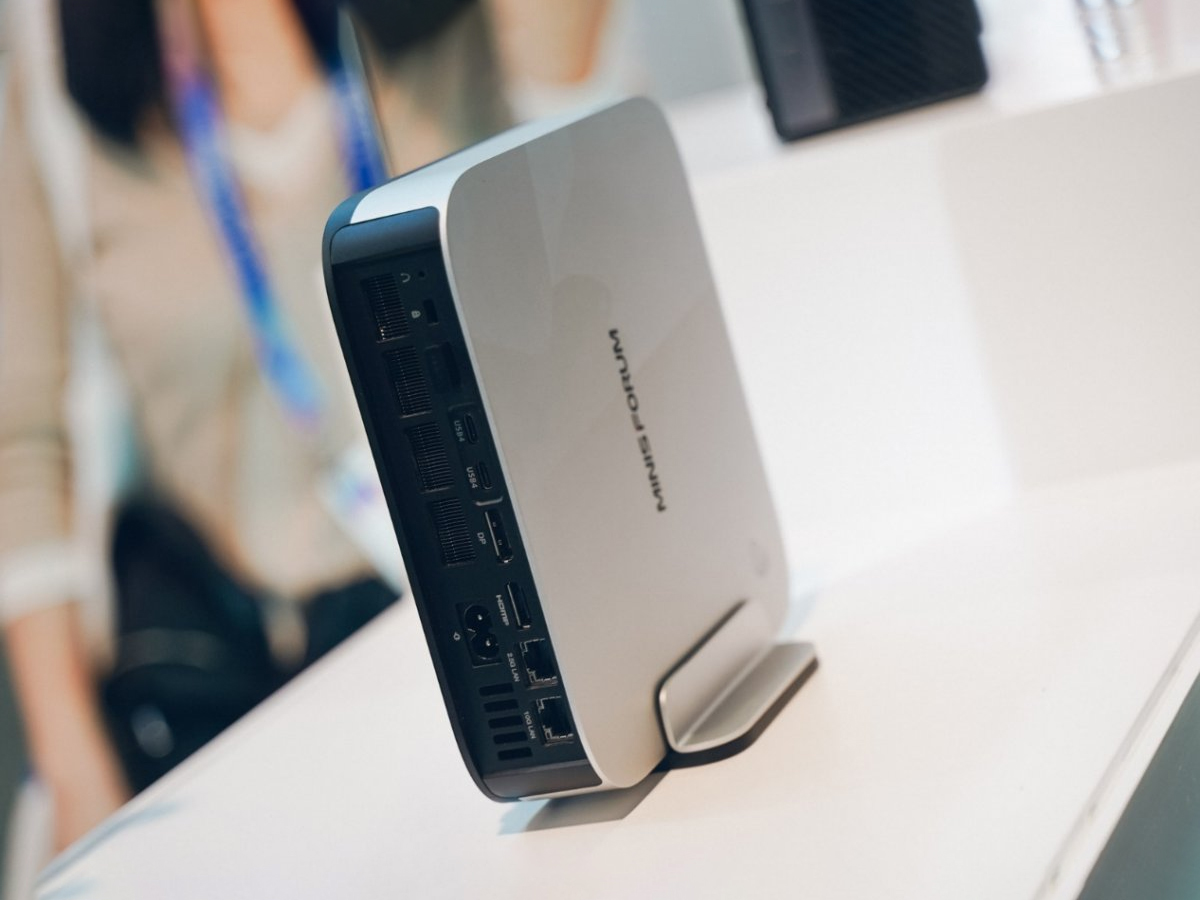
Minisforum stellt EliteMini M2 Pro vor: Neuer Panther-Lake-Mini-PC mit leistungsfähiger Arc-B390-iGPU
Der Minisforum EliteMini M2 Pro wurde eher still und leise auf der inzwischen beendeten CES 2026 vorgestellt. Er zählt zu den ersten Mini-PCs mit Prozessoren aus der Panther-Lake-SoC-Reihe. Optional lässt sich das System mit anderen SoCs wie dem Intel Core Ultra X9 388H ausstatten, der die... www.notebookcheck.com
- Related coverage: tomshardware.com
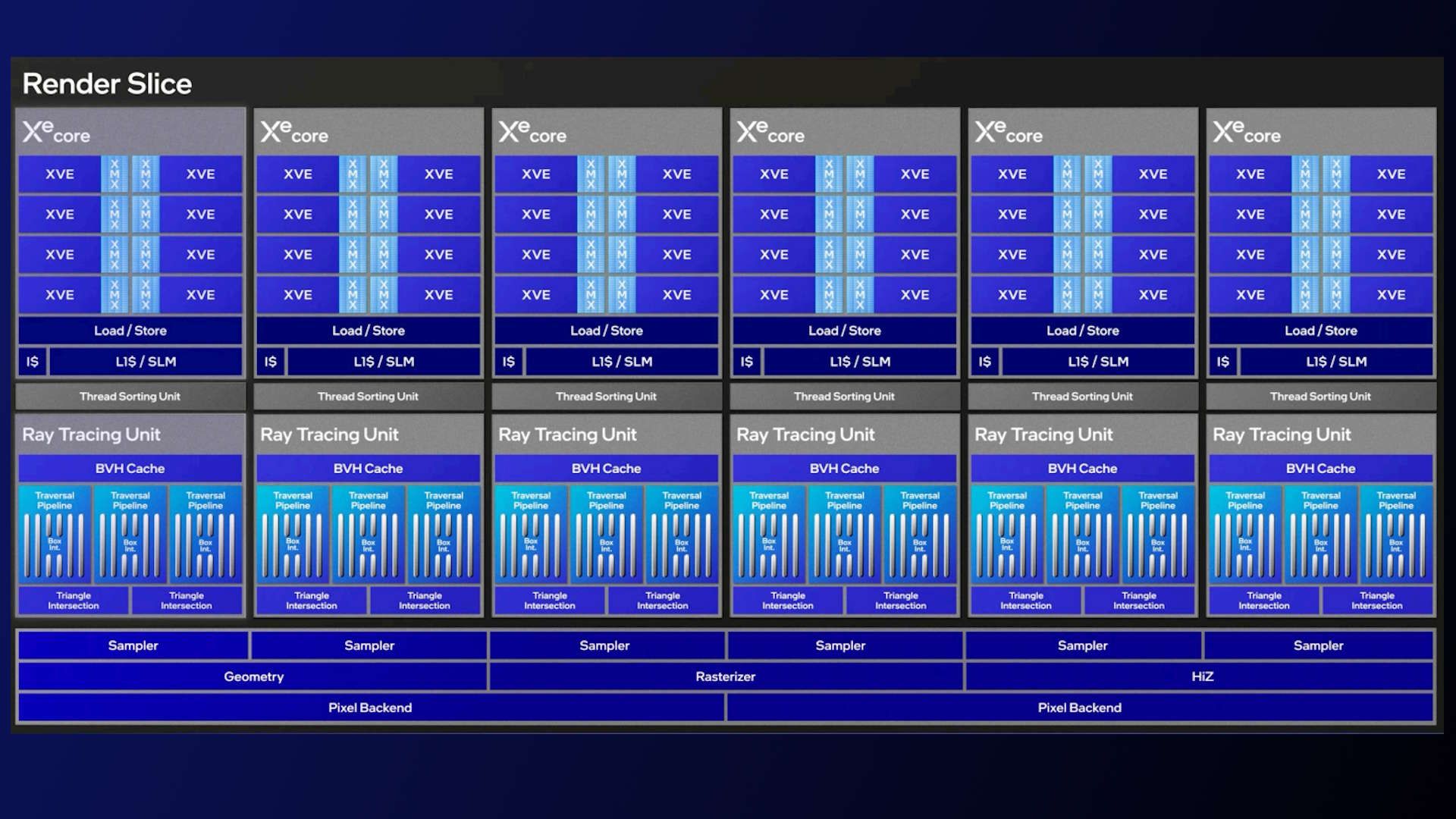
Intel's Xe3 graphics architecture breaks cover — Panther Lake's 12 Xe Core iGPU promises 50+% better performance than Lunar Lake
Just don't call it Celestialwww.tomshardware.com
- Related coverage: notebookcheck.org

Minisforum lanza un nuevo mini PC con Intel Panther Lake y 32 GB de RAM
Minisforum ha lanzado un nuevo mini-PC a nivel mundial. Disponible con el Intel Core Ultra 7 356H y 32 GB de RAM, el Minisforum M2 puede adquirirse por menos de 600 dólares como unidad barebones. www.notebookcheck.org
- Related coverage: windowscentral.com
- Related coverage: tweakers.net
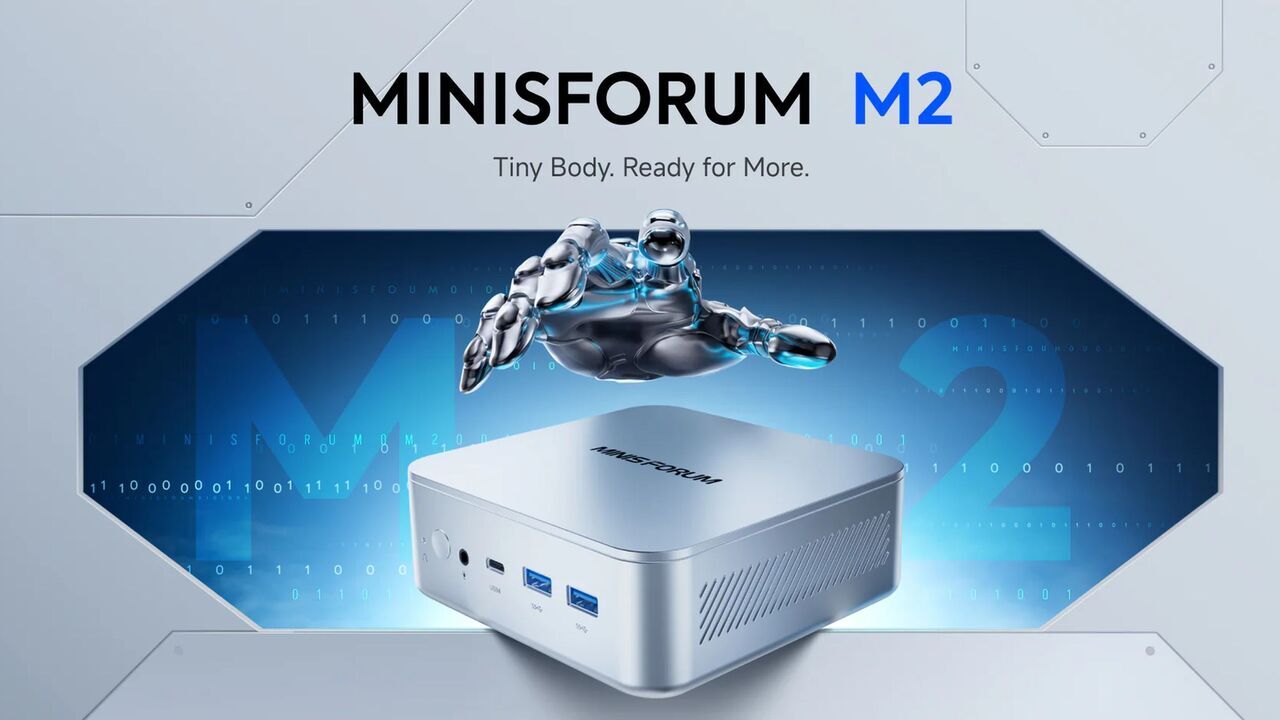
Minisforum toont zijn eerste mini-pc met Intel Panther Lake-cpu voor 749 euro
Minisforum onthult zijn eerste mini-pc met een nieuwe Intel Panther Lake-cpu, specifiek de Core Ultra 7 356H. De pc heet M2 en heeft een adviesprijs van 749 euro. Het systeem wordt naar verwachting vanaf begin juni geleverd.tweakers.net
- Related coverage: pcworld.com

Panther Lake unveiled: A deep dive into Intel's next-gen laptop CPU
Intel's Panther Lake chip for laptops includes more cores and powerful new AI technologies for graphics and wireless as it readies its flagship processor for early 2026. This is a deep dive on what the next Core Ultra chip contains. www.pcworld.com
- Related coverage: pcgamer.com
- Related coverage: download.intel.com
