

Microsoft says missing Microsoft Teams meeting recordings and transcripts are often not gone at all but have expired and been moved by OneDrive or SharePoint into the recycle bin, where users generally have a limited recovery window. The fix is deceptively simple: understand where Teams stores the files, check the right recycle bin, and adjust the Teams admin policy that controls automatic expiration. That answer is useful, but it also exposes a deeper design problem in Microsoft 365: Teams is the front door, while the actual evidence trail lives somewhere else. For users, the result feels like disappearance; for administrators, it is another reminder that collaboration data is now governed by a web of storage, retention, compliance, and licensing rules.
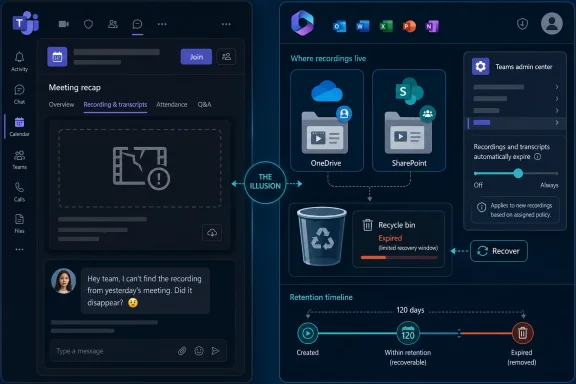
The most important thing Microsoft is trying to make clear is that a Teams recording is not primarily a Teams object. It appears in the meeting chat, shows up in recap experiences, feeds captions and transcripts, and increasingly supports Copilot-driven summaries, but the underlying file normally lives in OneDrive or SharePoint.
That split is rational from a platform engineering perspective. OneDrive and SharePoint already handle file storage, permissions, sharing, versioning, recycle bins, retention, and eDiscovery. Teams, in this model, is the collaboration surface laid over the Microsoft 365 content substrate.
The trouble is that users do not experience it that way. A person records a meeting in Teams, sees the recording in Teams, shares it from Teams, and later returns to Teams expecting it to still be there. When the link breaks, the thumbnail vanishes, or Stream refuses to play the file, the user’s conclusion is obvious: Teams ate the recording.
Microsoft’s explanation is essentially a translation exercise. The recording has not necessarily been destroyed; it may have reached its expiration date and been moved automatically into the recycle bin by OneDrive or SharePoint. That distinction matters enormously to administrators, but it is cold comfort to a project manager looking for last month’s vendor negotiation or a teacher trying to recover a lecture.
By default, Microsoft’s current documentation describes a 120-day expiration period for meeting recordings and transcripts, with administrators able to change the value. The setting can be turned off in the Teams admin center, and PowerShell gives admins finer control, including the ability to set recordings and transcripts never to expire through policy.
That sounds straightforward, and for a tenant administrator it often is. The catch is that changes generally affect newly created recordings and transcripts, not the entire historical archive. An organization that discovers the policy after recordings have already expired may still need to go hunting through OneDrive and SharePoint recycle bins.
There is also a user-level recovery path. If a recording has expired and been moved to the recycle bin, it may be recoverable within the recycle-bin retention window. Microsoft commonly describes this OneDrive and SharePoint recovery period as up to 93 days across recycle-bin stages, although user-facing Teams support pages may present similar recovery behavior in slightly different terms depending on the scenario.
The administrator’s corrective action is therefore only half the story. Someone still has to know whether the meeting was a standard meeting, a channel meeting, a webinar, a town hall, or an Outlook-scheduled Teams meeting, because the storage location and permissions can vary. In Microsoft 365, “where is my meeting recording?” is not a casual question; it is a small incident-response workflow.
The expiration policy is Microsoft’s attempt to make cleanup automatic. Instead of leaving every tenant to accumulate years of MP4 files and transcripts, Teams can stamp recordings with an expiration date. OneDrive and SharePoint then enforce that date by moving the files to the recycle bin.
The policy also reflects a more subtle truth about modern collaboration platforms: data is both a business asset and a liability. A recording can preserve institutional knowledge, but it can also preserve sensitive comments, personal data, confidential customer information, or legally discoverable material. Keeping everything forever is rarely as responsible as users imagine.
That is why the setting should not be treated as a mere convenience toggle. It belongs in the same governance conversation as retention labels, sensitivity labels, eDiscovery, audit logging, and data-loss prevention. If recordings are being used as records of decision, training artifacts, compliance evidence, or customer deliverables, an expiration policy set casually at the tenant level can become a business risk.
The frustration comes from the fact that Microsoft surfaces the feature as a lifecycle setting while users experience it as a disappearance. A recording that was visible yesterday and gone today feels like a failure, even if the system behaved exactly as configured.
But a recycle bin is not an archive. It is a grace period. It exists to protect against accidents, not to serve as the official home of corporate memory.
That distinction matters because Teams recordings increasingly sit at the intersection of collaboration and automation. A transcript may power search, accessibility, recap, and Copilot features. A recording may be the only complete record of a design review, disciplinary meeting, customer escalation, or board briefing. Losing access after an expiration date is not just annoying; it can break workflows that assumed the recording was durable.
The recycle bin also depends on people recognizing the problem in time. A missing recording noticed two weeks after expiration may be easy to restore. A missing recording discovered six months later may be gone, unless a separate retention or backup system preserved it.
That makes the “simple fix” more operational than technical. Organizations need to decide what a Teams recording is. If it is disposable meeting exhaust, expiration is sensible. If it is a business record, the default Teams expiration mechanism is the wrong place to express that requirement by itself.
That integration lets Microsoft ship features competitors would struggle to match. A meeting can be scheduled in Outlook, joined in Teams, recorded to OneDrive, shared through SharePoint permissions, transcribed for search, reviewed in Stream, summarized by Copilot, and governed by Purview. On paper, it is elegant.
In practice, the ownership model can become opaque. Who owns the recording: the organizer, the person who clicked record, the channel, the team, the tenant, or the compliance policy? The answer depends on the meeting type, policy state, storage location, and administrative configuration.
This is where user trust erodes. People do not care that a file moved from an application surface to a storage substrate because an expiration flag triggered a lifecycle action. They care that the recording they were told existed no longer appears where they expected it.
Microsoft’s blog-post framing acknowledges the frustration, but the deeper issue is not merely that users need better instructions. Microsoft has built a collaboration system where the user interface implies simplicity while the administrative model demands expertise. That gap is where many “missing” Teams recordings live.
That perception matters because Teams is no longer optional infrastructure in many organizations. It is the meeting room, phone system, chat layer, event platform, training archive, and increasingly the conversational interface for Microsoft 365 AI. When Teams stutters, work slows. When Teams appears to lose recordings, institutional memory looks fragile.
Microsoft can truthfully say that an expired recording in a recycle bin is not a data-loss event in the strict sense. But users judge software by outcomes, not implementation categories. If a meeting owner cannot find the recording at the moment it is needed, the distinction between “deleted,” “expired,” “moved,” and “recoverable” is largely academic.
This is especially true for smaller organizations without dedicated Microsoft 365 administrators. A large enterprise may have Teams policies, Purview retention, SharePoint admins, and help-desk scripts. A school, nonprofit, startup, or small business may have one overworked person discovering the recycle-bin workflow only after an important recording has vanished from view.
The outage context therefore sharpens the lesson. Reliability is not only uptime. It is also predictability, explainability, and recoverability.
For Teams recordings, the default may be perfectly reasonable for many tenants. A 120-day window is long enough for ordinary review and short enough to reduce pointless accumulation. In education tenants, certain licensing scenarios impose shorter maximums, which makes policy review even more important.
But defaults become risky when organizations use recordings differently across departments. Human resources, legal, sales, engineering, education, healthcare, and public-sector teams may all have different expectations. A single tenant-wide expiration model can be too blunt for that reality.
The better approach is to map recording use cases before changing the toggle. Routine internal meetings may expire quickly. Training recordings may need a managed library. Regulated meetings may need retention labels and restricted access. Executive briefings may require explicit ownership and archival rules.
That is not glamorous work, but it is the difference between a collaboration platform and a compliance accident waiting to happen. The Teams admin center gives organizations a control; it does not decide the governance model for them.
The strongest product fix would be contextual recovery. If the viewer is the organizer or has sufficient rights, Teams should point directly to the relevant OneDrive or SharePoint recycle bin item when possible. If the viewer lacks rights, Teams should identify who can recover it, rather than leaving users to guess which admin owns the problem.
Microsoft has been moving Teams recordings deeper into the Microsoft 365 content model for years, especially after shifting away from the older Stream storage approach. That transition has advantages, but it also means Teams must become better at explaining the lifecycle of files it presents as meeting artifacts.
This is not only about convenience. As Copilot and intelligent recap become more central to Teams, transcripts and recordings will increasingly be treated as source material for AI-generated work. If those underlying artifacts expire unexpectedly, users may lose not just a video but the evidentiary basis for summaries, decisions, and follow-up tasks.
In other words, recording lifecycle is becoming AI lifecycle. Microsoft cannot sell Teams as a memory layer for work while letting that memory disappear behind storage semantics users do not understand.
Start with the Teams admin center and review meeting policies for recording and transcription expiration. Then verify whether different user groups have different policies assigned. A tenant with only a global policy may be simpler to manage, but it may also be applying the same lifecycle to disposable check-ins and records-sensitive meetings.
Next, test the recovery path before an emergency. Confirm where standard meeting recordings land, where channel meeting recordings land, who receives expiration notices, who can restore files, and what the experience looks like after recovery. Documentation is useful; a live tenant test is better.
Finally, separate expiration from retention. Teams expiration is a storage-management feature, not a complete compliance strategy. If your organization has legal or regulatory obligations around recordings and transcripts, Microsoft Purview retention policies and labels belong in the conversation.
 Teams Did Not Lose the Recording — Microsoft 365 Hid the Plumbing
The most important thing Microsoft is trying to make clear is that a Teams recording is not primarily a Teams object. It appears in the meeting chat, shows up in recap experiences, feeds captions and transcripts, and increasingly supports Copilot-driven summaries, but the underlying file normally lives in OneDrive or SharePoint.That split is rational from a platform engineering perspective. OneDrive and SharePoint already handle file storage, permissions, sharing, versioning, recycle bins, retention, and eDiscovery. Teams, in this model, is the collaboration surface laid over the Microsoft 365 content substrate.
The trouble is that users do not experience it that way. A person records a meeting in Teams, sees the recording in Teams, shares it from Teams, and later returns to Teams expecting it to still be there. When the link breaks, the thumbnail vanishes, or Stream refuses to play the file, the user’s conclusion is obvious: Teams ate the recording.
Microsoft’s explanation is essentially a translation exercise. The recording has not necessarily been destroyed; it may have reached its expiration date and been moved automatically into the recycle bin by OneDrive or SharePoint. That distinction matters enormously to administrators, but it is cold comfort to a project manager looking for last month’s vendor negotiation or a teacher trying to recover a lecture.
The “Simple Fix” Is Simple Only If You Already Know the Architecture
The practical fix begins in the Teams admin center, under the meeting policy controls for recording and transcription. There is a setting called “Recordings and transcripts automatically expire,” and when it is enabled Microsoft 365 applies a default expiration period to newly created recordings and transcripts.By default, Microsoft’s current documentation describes a 120-day expiration period for meeting recordings and transcripts, with administrators able to change the value. The setting can be turned off in the Teams admin center, and PowerShell gives admins finer control, including the ability to set recordings and transcripts never to expire through policy.
That sounds straightforward, and for a tenant administrator it often is. The catch is that changes generally affect newly created recordings and transcripts, not the entire historical archive. An organization that discovers the policy after recordings have already expired may still need to go hunting through OneDrive and SharePoint recycle bins.
There is also a user-level recovery path. If a recording has expired and been moved to the recycle bin, it may be recoverable within the recycle-bin retention window. Microsoft commonly describes this OneDrive and SharePoint recovery period as up to 93 days across recycle-bin stages, although user-facing Teams support pages may present similar recovery behavior in slightly different terms depending on the scenario.
The administrator’s corrective action is therefore only half the story. Someone still has to know whether the meeting was a standard meeting, a channel meeting, a webinar, a town hall, or an Outlook-scheduled Teams meeting, because the storage location and permissions can vary. In Microsoft 365, “where is my meeting recording?” is not a casual question; it is a small incident-response workflow.
The Expiration Policy Was Built for Storage, Not Human Memory
Microsoft did not invent recording expiration because it enjoys confusing users. Meeting recordings are large, plentiful, and often useless after a short period. A company that records every stand-up, training session, support call, and weekly sync can quickly turn Teams into a video landfill.The expiration policy is Microsoft’s attempt to make cleanup automatic. Instead of leaving every tenant to accumulate years of MP4 files and transcripts, Teams can stamp recordings with an expiration date. OneDrive and SharePoint then enforce that date by moving the files to the recycle bin.
The policy also reflects a more subtle truth about modern collaboration platforms: data is both a business asset and a liability. A recording can preserve institutional knowledge, but it can also preserve sensitive comments, personal data, confidential customer information, or legally discoverable material. Keeping everything forever is rarely as responsible as users imagine.
That is why the setting should not be treated as a mere convenience toggle. It belongs in the same governance conversation as retention labels, sensitivity labels, eDiscovery, audit logging, and data-loss prevention. If recordings are being used as records of decision, training artifacts, compliance evidence, or customer deliverables, an expiration policy set casually at the tenant level can become a business risk.
The frustration comes from the fact that Microsoft surfaces the feature as a lifecycle setting while users experience it as a disappearance. A recording that was visible yesterday and gone today feels like a failure, even if the system behaved exactly as configured.
The Recycle Bin Is a Safety Net, Not a Records Strategy
The comforting part of Microsoft’s explanation is that expired Teams recordings are not immediately vaporized. They are moved to the recycle bin, giving users and admins a chance to recover them. In many common OneDrive and SharePoint scenarios, that recovery period can extend up to 93 days.But a recycle bin is not an archive. It is a grace period. It exists to protect against accidents, not to serve as the official home of corporate memory.
That distinction matters because Teams recordings increasingly sit at the intersection of collaboration and automation. A transcript may power search, accessibility, recap, and Copilot features. A recording may be the only complete record of a design review, disciplinary meeting, customer escalation, or board briefing. Losing access after an expiration date is not just annoying; it can break workflows that assumed the recording was durable.
The recycle bin also depends on people recognizing the problem in time. A missing recording noticed two weeks after expiration may be easy to restore. A missing recording discovered six months later may be gone, unless a separate retention or backup system preserved it.
That makes the “simple fix” more operational than technical. Organizations need to decide what a Teams recording is. If it is disposable meeting exhaust, expiration is sensible. If it is a business record, the default Teams expiration mechanism is the wrong place to express that requirement by itself.
Microsoft’s Product Boundary Is Showing
The Teams recording issue is a good example of Microsoft 365’s greatest strength and weakness: everything is integrated, but nothing is ever just one thing. Teams is not merely a chat app. It is a client for Exchange calendars, SharePoint files, OneDrive storage, Entra identity, Stream playback, Purview compliance, and now Copilot intelligence.That integration lets Microsoft ship features competitors would struggle to match. A meeting can be scheduled in Outlook, joined in Teams, recorded to OneDrive, shared through SharePoint permissions, transcribed for search, reviewed in Stream, summarized by Copilot, and governed by Purview. On paper, it is elegant.
In practice, the ownership model can become opaque. Who owns the recording: the organizer, the person who clicked record, the channel, the team, the tenant, or the compliance policy? The answer depends on the meeting type, policy state, storage location, and administrative configuration.
This is where user trust erodes. People do not care that a file moved from an application surface to a storage substrate because an expiration flag triggered a lifecycle action. They care that the recording they were told existed no longer appears where they expected it.
Microsoft’s blog-post framing acknowledges the frustration, but the deeper issue is not merely that users need better instructions. Microsoft has built a collaboration system where the user interface implies simplicity while the administrative model demands expertise. That gap is where many “missing” Teams recordings live.
The Outage Made the Reminder Land Harder
The timing of this guidance is awkward because Teams also faced a service slowdown earlier in the day, which Microsoft reportedly resolved. Outages and missing recordings are different problems, but they rhyme in the user’s mind. Both make Teams feel less like a dependable workplace utility and more like a black box that sometimes withholds the thing people need.That perception matters because Teams is no longer optional infrastructure in many organizations. It is the meeting room, phone system, chat layer, event platform, training archive, and increasingly the conversational interface for Microsoft 365 AI. When Teams stutters, work slows. When Teams appears to lose recordings, institutional memory looks fragile.
Microsoft can truthfully say that an expired recording in a recycle bin is not a data-loss event in the strict sense. But users judge software by outcomes, not implementation categories. If a meeting owner cannot find the recording at the moment it is needed, the distinction between “deleted,” “expired,” “moved,” and “recoverable” is largely academic.
This is especially true for smaller organizations without dedicated Microsoft 365 administrators. A large enterprise may have Teams policies, Purview retention, SharePoint admins, and help-desk scripts. A school, nonprofit, startup, or small business may have one overworked person discovering the recycle-bin workflow only after an important recording has vanished from view.
The outage context therefore sharpens the lesson. Reliability is not only uptime. It is also predictability, explainability, and recoverability.
Admins Should Treat Recording Expiration as a Policy Decision, Not a Default
The most dangerous phrase in Microsoft 365 administration is “we left it at the default.” Defaults are not neutral. They encode Microsoft’s compromise among storage cost, legal exposure, customer expectations, and product simplicity.For Teams recordings, the default may be perfectly reasonable for many tenants. A 120-day window is long enough for ordinary review and short enough to reduce pointless accumulation. In education tenants, certain licensing scenarios impose shorter maximums, which makes policy review even more important.
But defaults become risky when organizations use recordings differently across departments. Human resources, legal, sales, engineering, education, healthcare, and public-sector teams may all have different expectations. A single tenant-wide expiration model can be too blunt for that reality.
The better approach is to map recording use cases before changing the toggle. Routine internal meetings may expire quickly. Training recordings may need a managed library. Regulated meetings may need retention labels and restricted access. Executive briefings may require explicit ownership and archival rules.
That is not glamorous work, but it is the difference between a collaboration platform and a compliance accident waiting to happen. The Teams admin center gives organizations a control; it does not decide the governance model for them.
Users Need Better Clues at the Point of Failure
Microsoft’s current explanation helps administrators, but the user experience still needs improvement. If a recording has expired, Teams should make that fact unmistakable in the meeting chat, recap surface, and Stream playback path. “You do not have access” and “file not found” are poor messages when the true answer is “this recording expired and may be recoverable from this location.”The strongest product fix would be contextual recovery. If the viewer is the organizer or has sufficient rights, Teams should point directly to the relevant OneDrive or SharePoint recycle bin item when possible. If the viewer lacks rights, Teams should identify who can recover it, rather than leaving users to guess which admin owns the problem.
Microsoft has been moving Teams recordings deeper into the Microsoft 365 content model for years, especially after shifting away from the older Stream storage approach. That transition has advantages, but it also means Teams must become better at explaining the lifecycle of files it presents as meeting artifacts.
This is not only about convenience. As Copilot and intelligent recap become more central to Teams, transcripts and recordings will increasingly be treated as source material for AI-generated work. If those underlying artifacts expire unexpectedly, users may lose not just a video but the evidentiary basis for summaries, decisions, and follow-up tasks.
In other words, recording lifecycle is becoming AI lifecycle. Microsoft cannot sell Teams as a memory layer for work while letting that memory disappear behind storage semantics users do not understand.
The Practical Playbook Hiding Inside Microsoft’s Explanation
For WindowsForum readers who administer Microsoft 365 tenants, the immediate lesson is to turn this news into a quick audit. The relevant setting is not obscure, but its consequences are easy to overlook until a VIP asks where a recording went.Start with the Teams admin center and review meeting policies for recording and transcription expiration. Then verify whether different user groups have different policies assigned. A tenant with only a global policy may be simpler to manage, but it may also be applying the same lifecycle to disposable check-ins and records-sensitive meetings.
Next, test the recovery path before an emergency. Confirm where standard meeting recordings land, where channel meeting recordings land, who receives expiration notices, who can restore files, and what the experience looks like after recovery. Documentation is useful; a live tenant test is better.
Finally, separate expiration from retention. Teams expiration is a storage-management feature, not a complete compliance strategy. If your organization has legal or regulatory obligations around recordings and transcripts, Microsoft Purview retention policies and labels belong in the conversation.
The Recording That “Vanished” Is a Governance Test
The most concrete lesson from Microsoft’s guidance is that missing Teams recordings are often recoverable if users and admins know where to look. The broader lesson is that Teams recording policy deserves the same seriousness as email retention or SharePoint permissions.- Teams meeting recordings and transcripts are usually stored in OneDrive or SharePoint, not inside Teams itself.
- Automatic expiration can move recordings and transcripts into the recycle bin once the configured expiration period is reached.
- Administrators can review or disable the expiration policy in the Teams admin center and can also manage it through PowerShell.
- Recovery is time-limited, so users should check the relevant OneDrive or SharePoint recycle bin as soon as a recording appears to be missing.
- Policy changes typically protect future recordings, but they may not rescue older recordings that already expired.
- Organizations that treat recordings as business records should use deliberate retention and compliance controls rather than relying on the recycle bin.
References
- Primary source: Neowin
Published: Tue, 19 May 2026 06:03:19 GMT
Microsoft explains simple fix for one of the most "frustrating" Teams issues - Neowin
Microsoft explains the cause behind one of the most "frustrating" Teams problems the support has to tackle. A simple fix has been shared. www.neowin.net
- Official source: support.microsoft.com
I can't record a meeting in Microsoft Teams | Microsoft Support
What if you want to start a recording during a meeting in Microsoft Teams, but the recording button is unavailable? We have some tips to help you complete your task.support.microsoft.com - Official source: techcommunity.microsoft.com
Microsoft Team Meeting Recordings and Auto Expiration | Microsoft Community Hub
REVISED Feb 2022:  Auto Expiration New Default Date: 120 days (Feb 2022)Check out the REVISED:  Auto Expiration New Default Date: 120 days (Feb... techcommunity.microsoft.com
- Official source: answers.microsoft.com
How can I restore a deleted teams recording that is not in the recycling bin anymore - Microsoft Q&A
I have a recording video from a meeting in a work group channel that I need to have restored. It is not longer in the recycling bin but it is crucial that I now regain access.answers.microsoft.com - Official source: learn.microsoft.com
Is there any way to access expired recording on Microsoft Teams ? - Microsoft Q&A
Is there any way to access expired recording on Microsoft Teams ? and how to manage the expiry in the future ?learn.microsoft.com - Related coverage: windowscentral.com
Microsoft Teams adds toolbar hiding option | Windows Central
Teams is set to get a toolbar hiding option during meetings for better collaboration and productivity.www.windowscentral.com
- Related coverage: assets.publishing.service.gov.uk
- Related coverage: coloradomesa.edu
- Related coverage: ashgabattimes.com
- Related coverage: teamspolicy.blob.core.windows.net
Teams Meeting Recording Privacy Notice and User Guidance
PDF documentteamspolicy.blob.core.windows.net
- Related coverage: thersac.icts.thers.ac.jp
May 18, 2026 - Teams outage(TM1314397)(Restored) – THERS Account Help Center
Microsoft Teams features are experiencing an outage.(TM1314397)(Restored)Incident start time:May 18, 2026 – May 20, 2026 03:30Incident...thersac.icts.thers.ac.jp - Related coverage: statusgator.com
Microsoft Teams Status. Check if Microsoft Teams is down or having an outage. | StatusGator
Microsoft Teams down? Check the current Microsoft Teams status right now, learn about outages, downtime, incidents, and issues.statusgator.com - Related coverage: support.nhs.net
- Related coverage: techradar.com
Struggling to launch Teams? Microsoft recalls update causing failed startup and infinite loading loops – here's what we know | TechRadar
A service update was triggering an error in some Teams desktop clientswww.techradar.com - Related coverage: isdown.app
Is Microsoft Teams Down? Check current status and user reports | IsDown
Check if Microsoft Teams is down right now. Live Microsoft Teams status, real-time outage detection, and instant alerts when Microsoft Teams has issues. Free 14-day trial. isdown.app
- Related coverage: tomsguide.com
Microsoft outage now 'resolved' — latest updates as 365, Outlook and Teams return | Tom's Guide
Everything you need to know about the major Microsoft outagewww.tomsguide.com - Related coverage: isitdownrightnow.com
Teams.microsoft.com - Is Teams Down Right Now?
Teams down? Check whether Teams.microsoft.com server is down right now or having outage problems for everyone or just for you.www.isitdownrightnow.com
- Related coverage: techbooky.com
Microsoft Confirms Degrading Service Outage On Teams
In a recent development, Microsoft has acknowledged that Teams and other Microsoft 365 services might be unavailable right now.www.techbooky.com - Related coverage: feministfutures.socialsciences.ucsb.edu
