

Microsoft’s December patch wave has produced an awkward one‑two punch for administrators: the company’s security hardenings for Microsoft Message Queuing (MSMQ) fixed real vulnerabilities but also changed NTFS permissions in a way that broke queue persistence in many production environments — leaving IIS-hosted apps and legacy middleware unable to write to message queues and surfacing misleading “insufficient resources” errors. Early telemetry and vendor notes show Microsoft has acknowledged the problem, added a known‑issue to the affected KB articles, and is offering mitigations through support channels while an official fix is worked on.
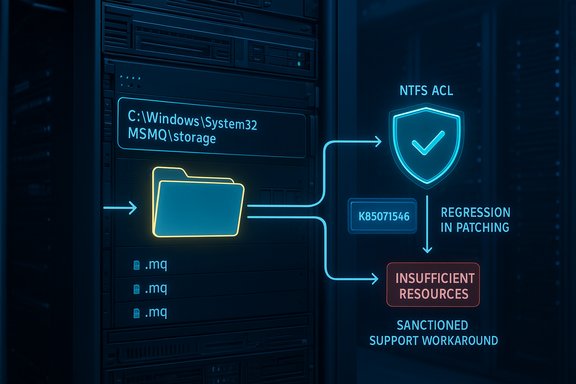
MSMQ is a decades‑old Windows subsystem that persists messages as files on disk and provides reliable, asynchronous delivery for on‑premises and legacy applications. Because it writes message files into a system folder (C:\Windows\System32\MSMQ\storage), its behavior is tightly coupled to NTFS permissions and to the effective rights of service identities such as IIS application pool accounts, LocalService/NetworkService, or dedicated service accounts. The December cumulative updates included an MSMQ security hardening intended to close privilege‑escalation and related vulnerabilities, but that change also altered the folder’s security descriptor and inheritance flags — producing practical write‑access failures for non‑administrative identities that historically worked without explicit ACL entries. Microsoft’s update pages now list MSMQ as a known issue and point to the NTFS permission change as the observable cause.
Conclusion
This incident is an operationally expensive but instructive case: security hardening is essential, but changes to foundational OS permission models must be rolled out with explicit enterprise mitigations and clear documentation. The immediate focus for IT teams is pragmatic — triage quickly, choose the mitigation that aligns with your risk tolerance, and prepare to reverse temporary changes once Microsoft publishes a tested, vendor‑approved fix.
Source: Neowin https://www.neowin.net/news/microso...ore-windows-updates-to-fix-several-msmq-bugs/
 Background
MSMQ is a decades‑old Windows subsystem that persists messages as files on disk and provides reliable, asynchronous delivery for on‑premises and legacy applications. Because it writes message files into a system folder (C:\Windows\System32\MSMQ\storage), its behavior is tightly coupled to NTFS permissions and to the effective rights of service identities such as IIS application pool accounts, LocalService/NetworkService, or dedicated service accounts. The December cumulative updates included an MSMQ security hardening intended to close privilege‑escalation and related vulnerabilities, but that change also altered the folder’s security descriptor and inheritance flags — producing practical write‑access failures for non‑administrative identities that historically worked without explicit ACL entries. Microsoft’s update pages now list MSMQ as a known issue and point to the NTFS permission change as the observable cause. Which updates are implicated
- Windows 10 (ESU / 22H2 family): KB5071546 (December LCU).
- Windows Server 2019 and Windows Server 2016: the corresponding December 2025 cumulative rollups (for example KB5071544 / KB5071543 and related monthly rollups such as KB5071505).
- In some server channels Microsoft published out‑of‑band updates (for older branches) that explicitly include fixes for the MSMQ regression. Administrators should check their SKU‑specific KB pages for precise package names and OS build numbers.
What broke — symptoms and operational fingerprints
Administrators across enterprise environments reported a repeatable set of symptoms after installing the December cumulative updates:- Queues appear inactive and refuse incoming messages.
- IIS‑hosted sites and .NET producers throw System.Messaging exceptions commonly logged as “Insufficient resources to perform operation.”
- Event logs show errors creating message files such as *“The message file 'C:\Windows\System32\MSMQ\storage.mq' cannot be created.”**
- System and application logs may misleadingly claim “There is insufficient disk space or memory” despite abundant resources.
The technical root cause (concise)
- The December LCU wave modified how MSMQ enforces access to its storage directory and altered the NTFS discretionary access control list (DACL) and inheritance flags of C:\Windows\System32\MSMQ\storage.
- Service identities that previously relied on implicit or inherited write permissions (IIS app pool identities, LocalService/NetworkService, IIS_IUSRS or custom service accounts) now frequently lack explicit Write/Modify entries and therefore cannot create or append the .mq files MSMQ depends on.
- MSMQ’s internal error translation reports these filesystem denials as resource‑style exceptions, producing the misleading “insufficient resources” messages seen in logs and application traces.
What Microsoft has said and how they’re handling it
Microsoft updated the affected KB pages to include a Known Issue entry describing MSMQ symptoms and explicitly pointing at the NTFS permissions change to the MSMQ storage folder. The vendor’s public posture has been:- Acknowledge the regression and list the symptoms and affected SKUs in the KBs.
- Investigate and offer mitigation/workaround assistance through Microsoft Support for business rather than publish a generic patchless script; the workaround is being made available to support customers through case channels. Microsoft’s Q&A community also reflects this guidance.
Immediate operational trade‑offs: rollback vs. narrow ACL workaround
Until Microsoft issues an out‑of‑band hotfix, administrators have two pragmatic — but imperfect — paths to restore MSMQ functionality. Each option carries explicit risks.- Option 1 — Roll back the December LCU (uninstall the KB):
- Pros: Restores prior ACL state and predictable MSMQ behavior; less immediate attack‑surface change.
- Cons: Re‑exposes systems to the security fixes contained in the removed cumulative update; on systems where the update was installed as a combined SSU + LCU bundle, uninstallation is more complex.
- Option 2 — Apply a targeted NTFS ACL workaround:
- Pros: Restores write access quickly and keeps the security patches in place.
- Cons: Grants additional write access under C:\Windows\System32 — a sensitive area — and therefore increases the local attack surface unless the change is tightly scoped and audited. Community responders have recommended limiting privileges to only the required identities and enabling auditing while the mitigation is live.
Practical triage and remediation runbook (playbook)
The following runbook is informed by vendor guidance, community triage, and industry reporting. Use it as a checklist — test thoroughly in staging before touching production.- Confirm the symptom set and affected hosts (fast triage):
- Identify hosts with MSMQ installed. PowerShell: Get‑WindowsOptionalFeature -Online | Where‑Object { $_.FeatureName -like "MSMQ*" } or on servers: Get‑WindowsFeature MSMQ.
- Verify the installed updates: Settings → Update history, or wusa /query, or DISM /Online /Get‑Packages. Look for the December LCUs (e.g., KB5071546, KB5071544, KB5071543).
- Reproduce failure in a controlled test host:
- Apply the same LCU to a staging host that mirrors production, then perform a queue write under the application’s identity. If the identity lacks explicit write on the storage folder, the write fails and the MessageQueueException is logged. This reproduction pattern is well documented.
- Inspect folder ACLs and SDDL diffs:
- Use PowerShell to capture the ACL: (Get‑Acl 'C:\Windows\System32\MSMQ\storage').Sddl. Compare to a known‑good host and look for added Auto‑Inherited flags or missing ACEs for identities such as IIS_IUSRS, LocalService, NetworkService, or your app pool/service account.
- Choose mitigation after risk assessment:
- If downtime or business impact is severe, prefer rollback to restore availability while you coordinate a safer long‑term fix. Note rollback reintroduces the security patches you just removed.
- If you keep the update and apply an ACL fix, scope the change to the minimum identity necessary (grant the app pool/service account a Write/Create permission on C:\Windows\System32\MSMQ\storage), set inheritance carefully, enable file and MSMQ auditing, and document the change for rapid reversion once Microsoft publishes a formal fix or guidance.
- If rolling back, follow vendor guidance for safe removal:
- Some cumulative updates include servicing stack changes; removal instructions and caveats are in the KB. Confirm the rollback process via DISM /Online /Get‑Packages and Remove‑Package where necessary. Validate MSMQ behavior post‑rollback and keep systems off the affected KB until a tested re‑deployment plan is in place.
- Open a Microsoft Support case if you require the sanctioned workaround:
- Microsoft is distributing a supported mitigation via Support for business customers. The company has advised customers to open a support ticket to receive the workaround so it can be validated per environment. This reduces the risk of misapplied ACL changes.
- Longer‑term controls:
- Audit and inventory all MSMQ hosts. Consider isolating and hardening those hosts (network restrictions, blocking port 1801 where appropriate) and plan a migration strategy away from legacy MSMQ to modern queuing platforms where feasible.
Step‑by‑step example: how to inspect ACLs safely
- Capture the ACL to a text file for offline comparison:
- PowerShell: (Get‑Acl 'C:\Windows\System32\MSMQ\storage').Sddl > C:\temp\msmq_storage_sddl_before.txt
- Compare against a gold‑standard host or an unpatched host using file comparison tools.
- If you opt for a narrowly scoped temporary permission change (community example — test first):
- Identify the account that needs access (e.g., “IIS APPPOOL\MyAppPool” or a service account).
- Use icacls to grant minimal write permission:
- icacls "C:\Windows\System32\MSMQ\storage" /grant "IIS APPPOOL\MyAppPool
 OI)(CI)(M)"
 - Restart MSMQ and dependent services and validate queue writes.
- Enable auditing for the folder and monitor unexpected writes.
- Document and plan to revert the ACL change after Microsoft publishes an approved remediation.
Critical analysis — strengths, risks and lessons
Strengths (what Microsoft did right)
- The December updates attempt to harden MSMQ and remediate real CVE‑class issues; the security intent is valid and necessary for preventing exploitation of legacy services. Correcting elevation‑of‑privilege paths is a legitimate engineering priority.
Weaknesses (where the rollout fell short)
- The update altered a low‑level file ACL for a system folder without an immediate, universally safe mitigation published in the KB, leaving field operators to triage with ad hoc ACL fixes or rollbacks. That documentation gap and the delay between field reports and an authoritative, prescriptive vendor mitigation increased confusion and operational risk.
Risks of community workarounds
- The two pragmatic community fixes — rollback and ACL changes — are both imperfect. Rollback removes security fixes; ACL changes expand write rights under C:\Windows\System32 and can create a new attack surface if mis‑scoped. Administrators applying ACL changes must compensate with auditing, limited scope, and an expiration/reversion plan.
Longer‑term lesson
- This regression is a reminder that deep OS hardening needs explicit compatibility shims and vendor‑provided mitigation paths for widely used legacy components. Enterprises should treat components like MSMQ as high‑risk assets, maintain inventories of legacy dependencies, and include compatibility gates in patch rollouts for middleware that persists on disk or relies on implicit privilege semantics.
What to watch next (timeline & signals)
- Microsoft’s KBs and Release Health pages are the authoritative source for an official remedial KB or out‑of‑band hotfix; administrators should monitor those pages for KB revisions and for an announced hotfix.
- If you are an enterprise customer affected by outages, open a business support case to request the validated workaround instead of applying community ACL scripts blind. Microsoft has signalled this path and will provide mitigations per environment.
- Validate any remediation in staging, monitor MSMQ metrics and Event Viewer for the specific storage file creation failures, and keep a strict change log for any temporary ACL modifications you apply.
Final verdict and practical takeaway
The December 2025 cumulative updates contained necessary security hardenings for MSMQ, but the same hardening produced a compatibility regression that affected real production workloads. The vendor has acknowledged the issue, documented it on affected KB pages, and is distributing mitigations via support while working on a formal fix. Administrators must choose between continuing to run with the security update and applying a narrowly scoped, audited ACL workaround — or rolling back the update to immediately restore availability at the cost of re‑exposure to the security vulnerabilities the LCU corrected. In either case, treat MSMQ hosts as high‑risk assets: inventory them, validate fixes in staging, enable auditing, and plan to migrate critical messaging workloads off legacy MSMQ where feasible. Cautionary note: references to KB5074976 in some third‑party reports could not be validated against Microsoft’s public KB listings and may be a typo or mis‑identification. Administrators should always check the SKU‑specific Microsoft KB page for the authoritative package name and known‑issue wording before taking corrective action.Conclusion
This incident is an operationally expensive but instructive case: security hardening is essential, but changes to foundational OS permission models must be rolled out with explicit enterprise mitigations and clear documentation. The immediate focus for IT teams is pragmatic — triage quickly, choose the mitigation that aligns with your risk tolerance, and prepare to reverse temporary changes once Microsoft publishes a tested, vendor‑approved fix.
Source: Neowin https://www.neowin.net/news/microso...ore-windows-updates-to-fix-several-msmq-bugs/
