


Solution
Two potential ways to recover data if you can't reassign a drive letter, off the top of my head:
1) Use R-Studio
2) Active@ Partition Recovery. Recover Deleted Partition. Undelete NTFS & FAT partitions.
1) Use R-Studio
2) Active@ Partition Recovery. Recover Deleted Partition. Undelete NTFS & FAT partitions.

CommonTater
New Member
- Joined
- Jul 21, 2010
- Messages
- 867
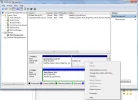
Actually this is pretty easy to fix... Your screen shot shows the problem... Your Drive E has somehow been disabled or deleted.
On the menu showing in your screenshot there is a right click for "Format"... So, Format it... Make it drive E and you're back in business.
I do hope you didn't have a lot of stuff on that drive without backups... because it's all been lost.
On the menu showing in your screenshot there is a right click for "Format"... So, Format it... Make it drive E and you're back in business.
I do hope you didn't have a lot of stuff on that drive without backups... because it's all been lost.
CommonTater
New Member
- Joined
- Jul 21, 2010
- Messages
- 867
If it was formatted it would have a drive letter...
But, it's worth a try, I guess...
But, it's worth a try, I guess...
It could be formatted and contain valid data without having a current drive letter. If it will not accept a new drive letter and there is very important data, it can still be recovered with the right tools.
Please let us know how you get on and if you need further help. We'll see what we can suggest.
Please let us know how you get on and if you need further help. We'll see what we can suggest.
CommonTater
New Member
- Joined
- Jul 21, 2010
- Messages
- 867
It could be formatted and contain valid data without having a current drive letter. If it will not accept a new drive letter and there is very important data, it can still be recovered with the right tools.
Please let us know how you get on and if you need further help. We'll see what we can suggest.
Please take a close look at the screen shot provided... Notice all the other partitions show their size and filesystem "99,6gb NTFS" and say "Healty" with a list of attributes such as "Boot" and "Logical Drive" etc... These are properly formatted drives. Drive letter or not...
The one in question does not have this attribute string because it is an unformatted partition.
Last edited:
CommonTater
New Member
- Joined
- Jul 21, 2010
- Messages
- 867
but I have many data inside that partition.
I really hate to be the one to say this... but it's probably lost.
The only way I know for a hard disk to wind up in that condition is if the second partition was deleted then a new one was created but never formatted...

k2s
New Member
- Joined
- Jun 22, 2011
- Messages
- 2
I ran into the same problem today while trying to extend my C: with partitionmagic. The program crashed my pc and after rebootind drive D: just disappeared. I went to disk managment to give the drive a letter but it kept saying that the console view had to be refreshed - nothing helped! So I read this thread and thought that I just have to format the "unnamed disk", but when I try it says "an unexpected error has occurred. Check system event log for more info", I check the log and find nothing about the error (maybe I just don't know where to look).
Damn you PartitionMagic and my silly attempt to mess with the drives!
Damn you PartitionMagic and my silly attempt to mess with the drives!
Last edited:

- Joined
- May 16, 2010
- Messages
- 5,703
you could try one of the file/partition recovery packages but when a partition management program crashes the consequences for the entire physical drive are invariably serious which is why complete backups should be made before starting. I would delete every partition on the drive and redo from scratch.
Similar threads
- Solved
- Replies
- 11
- Views
- 4K
