

Microsoft Planner is coming directly to the new Outlook for Windows, giving users a place to manage personal tasks and shared plans beside their email and calendar. The integration is another attempt to make Microsoft’s web-based Outlook client a broader productivity hub—and a more credible replacement for Outlook Classic.
Windows Latest reports that Planner will appear in Outlook’s left navigation bar alongside Microsoft To Do and other Microsoft 365 apps. Microsoft described the change in a Microsoft 365 admin center notice as a way to reduce context switching, allowing users to move between messages, meetings, tasks, plans, and Copilot without opening another application.
The feature will be enabled by default for Microsoft 365 tenants, while existing Planner permissions and policies will continue to apply. A Microsoft 365 Copilot license is not required to use Planner inside Outlook.
There is, however, some uncertainty around the rollout schedule. Microsoft originally announced the integration in Message Center post MC1309747 in May 2026, then paused deployment on May 18 without providing a new general-availability date. Windows Latest now says the rollout will begin in the coming weeks, suggesting Microsoft is preparing to restart deployment, but administrators should confirm the current status in their own tenant’s Message Center before notifying users.
Planner in Outlook is more than a shortcut to a separate website. Microsoft says users will be able to view and manage personal tasks and shared plans from within the Outlook interface, placing project work next to the messages and meetings that frequently generate it.
That positioning matters because Microsoft’s task-management portfolio has long felt fragmented. To Do handles personal lists and flagged email, Planner provides team boards and assigned work, Teams exposes Planner through its Tasks experience, and Copilot increasingly acts as another route into the same Microsoft 365 data.
The Outlook integration gives Microsoft a chance to make those connections more obvious. A message can become a task, the task can sit inside a shared Planner plan, and the same assignment can then be accessed through Teams or the Microsoft 365 Copilot app.
For users already working across Outlook, Teams, and Planner, that is a practical improvement. It removes some browser-tab and application switching without introducing another task database or migration requirement; Microsoft says Planner data will remain in its existing location.
The integration covers Outlook on the web and the new Outlook for Windows, but not Outlook Classic. That distinction fits Microsoft’s broader transition strategy: useful new Microsoft 365 experiences increasingly arrive first—or exclusively—in the new client.
But built-in Planner does not erase the remaining gap with Outlook Classic. Long-time Outlook users often depend on advanced rules, add-ins, local data workflows, specialized mailbox handling, and administrative controls that are more consequential than an additional app in the navigation rail.
That makes Planner an incentive rather than a decisive migration event. A department using Planner heavily may welcome having plans available beside its inboxes, while a legal, finance, support, or records-management team may still be blocked by one missing Classic feature.
Administrators should therefore evaluate the integration separately from any decision to remove Outlook Classic. The useful questions are whether Planner is already approved, whether users understand the difference between To Do and Planner, and whether placing both products inside Outlook will simplify work or produce more duplicate task lists.
Because the feature is enabled by default, help desks may also see questions from users who discover a new Planner icon without knowing why it appeared. Microsoft says no administrative preparation is required, but organizations with established training materials or tightly controlled application portfolios may want to update their guidance.
The lack of a Copilot licensing requirement should make deployment less complicated. Planner inside Outlook will respect existing Microsoft 365 permissions, Planner configuration, and Copilot policies, so its appearance should not independently grant access to plans or AI features that a user could not previously open.
Microsoft detailed the new capability in Message Center post MC1423106 and Microsoft 365 Roadmap ID 561330. Rollout is scheduled to begin in mid-August 2026 and finish in early September 2026 across worldwide, GCC, GCC High, and DoD tenants.
Cross-tenant recall will be disabled by default. The receiving organization must enable it and place the sender’s Microsoft Entra tenant ID on an allow list before that external organization can recall messages from its users’ mailboxes.
Exchange Online administrators will manage the feature through the
That design prevents the feature from becoming a general mechanism through which any external sender can remove delivered mail. It is instead a bilateral trust capability suited to closely connected organizations, subsidiaries, managed environments, or regular business partners.
The practical limitation is that users cannot assume an externally sent message is recallable merely because both parties use Outlook. Success depends on the recipient being hosted in Exchange Online, the recipient organization enabling the feature, and the sender’s tenant being present on its allow list.
Recall should consequently remain a last-resort correction mechanism, not a substitute for delayed sending, data-loss prevention policies, sensitivity labels, or careful recipient checks. Once enabled, however, it could reduce the damage caused by misaddressed drafts and attachments sent between trusted Microsoft 365 organizations.
Those changes are smaller than Planner or cross-tenant recall, but they illustrate how Microsoft is approaching the Outlook transition. Rather than relying on a single feature to convert Outlook Classic users, it is assembling a collection of conveniences around the new client’s Microsoft 365-connected architecture.
Planner may be one of the more persuasive additions for Teams-centric organizations because it puts actionable work beside the communication that created it. For administrators, the immediate task is to watch MC1309747 for confirmation that the paused rollout has formally resumed, then decide whether users need guidance before Planner appears automatically in Outlook’s sidebar.
Windows Latest reports that Planner will appear in Outlook’s left navigation bar alongside Microsoft To Do and other Microsoft 365 apps. Microsoft described the change in a Microsoft 365 admin center notice as a way to reduce context switching, allowing users to move between messages, meetings, tasks, plans, and Copilot without opening another application.
The feature will be enabled by default for Microsoft 365 tenants, while existing Planner permissions and policies will continue to apply. A Microsoft 365 Copilot license is not required to use Planner inside Outlook.
There is, however, some uncertainty around the rollout schedule. Microsoft originally announced the integration in Message Center post MC1309747 in May 2026, then paused deployment on May 18 without providing a new general-availability date. Windows Latest now says the rollout will begin in the coming weeks, suggesting Microsoft is preparing to restart deployment, but administrators should confirm the current status in their own tenant’s Message Center before notifying users.
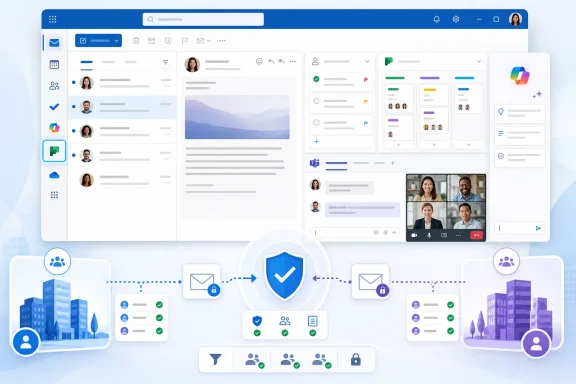 Outlook Becomes a Front Door for Planner
Planner in Outlook is more than a shortcut to a separate website. Microsoft says users will be able to view and manage personal tasks and shared plans from within the Outlook interface, placing project work next to the messages and meetings that frequently generate it.That positioning matters because Microsoft’s task-management portfolio has long felt fragmented. To Do handles personal lists and flagged email, Planner provides team boards and assigned work, Teams exposes Planner through its Tasks experience, and Copilot increasingly acts as another route into the same Microsoft 365 data.
The Outlook integration gives Microsoft a chance to make those connections more obvious. A message can become a task, the task can sit inside a shared Planner plan, and the same assignment can then be accessed through Teams or the Microsoft 365 Copilot app.
For users already working across Outlook, Teams, and Planner, that is a practical improvement. It removes some browser-tab and application switching without introducing another task database or migration requirement; Microsoft says Planner data will remain in its existing location.
The integration covers Outlook on the web and the new Outlook for Windows, but not Outlook Classic. That distinction fits Microsoft’s broader transition strategy: useful new Microsoft 365 experiences increasingly arrive first—or exclusively—in the new client.
Another Incentive, Not a Replacement for Missing Features
Microsoft has steadily added capabilities intended to answer objections to the new Outlook, including better PST support, mail merge improvements, offline behavior, shared calendar work, and multi-account changes. Planner adds another visible advantage, particularly for organizations already using Microsoft 365 for project coordination.But built-in Planner does not erase the remaining gap with Outlook Classic. Long-time Outlook users often depend on advanced rules, add-ins, local data workflows, specialized mailbox handling, and administrative controls that are more consequential than an additional app in the navigation rail.
That makes Planner an incentive rather than a decisive migration event. A department using Planner heavily may welcome having plans available beside its inboxes, while a legal, finance, support, or records-management team may still be blocked by one missing Classic feature.
Administrators should therefore evaluate the integration separately from any decision to remove Outlook Classic. The useful questions are whether Planner is already approved, whether users understand the difference between To Do and Planner, and whether placing both products inside Outlook will simplify work or produce more duplicate task lists.
Because the feature is enabled by default, help desks may also see questions from users who discover a new Planner icon without knowing why it appeared. Microsoft says no administrative preparation is required, but organizations with established training materials or tightly controlled application portfolios may want to update their guidance.
The lack of a Copilot licensing requirement should make deployment less complicated. Planner inside Outlook will respect existing Microsoft 365 permissions, Planner configuration, and Copilot policies, so its appearance should not independently grant access to plans or AI features that a user could not previously open.
Cross-Tenant Recall Gets a Controlled Expansion
A separate Exchange Online update will allow Outlook users to recall messages sent across Microsoft 365 tenant boundaries. Until now, Microsoft’s cloud-based Message Recall generally required the sender and recipient to be in the same organization.Microsoft detailed the new capability in Message Center post MC1423106 and Microsoft 365 Roadmap ID 561330. Rollout is scheduled to begin in mid-August 2026 and finish in early September 2026 across worldwide, GCC, GCC High, and DoD tenants.
Cross-tenant recall will be disabled by default. The receiving organization must enable it and place the sender’s Microsoft Entra tenant ID on an allow list before that external organization can recall messages from its users’ mailboxes.
Exchange Online administrators will manage the feature through the
Set-CrossTenantRecallConfiguration PowerShell cmdlet. Recall attempts from tenants that have not been approved will fail, giving the receiving organization control over which partners or affiliated companies can initiate the process.That design prevents the feature from becoming a general mechanism through which any external sender can remove delivered mail. It is instead a bilateral trust capability suited to closely connected organizations, subsidiaries, managed environments, or regular business partners.
The practical limitation is that users cannot assume an externally sent message is recallable merely because both parties use Outlook. Success depends on the recipient being hosted in Exchange Online, the recipient organization enabling the feature, and the sender’s tenant being present on its allow list.
Recall should consequently remain a last-resort correction mechanism, not a substitute for delayed sending, data-loss prevention policies, sensitivity labels, or careful recipient checks. Once enabled, however, it could reduce the damage caused by misaddressed drafts and attachments sent between trusted Microsoft 365 organizations.
Microsoft Keeps Building Around the New Client
Microsoft is also testing notification grouping in the new Outlook for Windows to reduce the number of individual alerts generated by busy conversations. Another planned warning will alert users when they begin replying to an older message in a thread even though a newer message is available.Those changes are smaller than Planner or cross-tenant recall, but they illustrate how Microsoft is approaching the Outlook transition. Rather than relying on a single feature to convert Outlook Classic users, it is assembling a collection of conveniences around the new client’s Microsoft 365-connected architecture.
Planner may be one of the more persuasive additions for Teams-centric organizations because it puts actionable work beside the communication that created it. For administrators, the immediate task is to watch MC1309747 for confirmation that the paused rollout has formally resumed, then decide whether users need guidance before Planner appears automatically in Outlook’s sidebar.
References
- Primary source: Windows Latest
Published: 2026-07-14T14:59:12+00:00
Microsoft wants you to ditch Outlook Classic for New Outlook, this time with built-in Planner
Microsoft says it'll roll out Planner to New Outlook for Windows in a move that the company hopes will convince Outlook Classic holdouts. www.windowslatest.com
- Official source: microsoft.com
Microsoft 365 Roadmap | Microsoft 365
The Microsoft 365 Roadmap lists updates that are currently planned for applicable subscribers. Check here for more information on the status of new features and updates.www.microsoft.com
- Official source: cdn.techcommunity.microsoft.com
Microsoft Planner FAQ
</rdf:Alt> </dc:description> <dc:creator> <rdf:Seq> <rdf:li>Microsoftcdn.techcommunity.microsoft.com
- Related coverage: windowscentral.com
Microsoft lists 15 new reasons to switch to the New Outlook but many users say it still isn’t ready | Windows Central
Microsoft lists 15 new features shipping to the New Outlook, potentially making the jump from the Classic client sweeter.www.windowscentral.com - Related coverage: windowsreport.com
Microsoft Outlook Is Finally Getting Cross-Tenant Email Recall
Microsoft is developing cross-tenant email recall for Outlook, allowing users to recall emails sent outside their organization. windowsreport.com
