

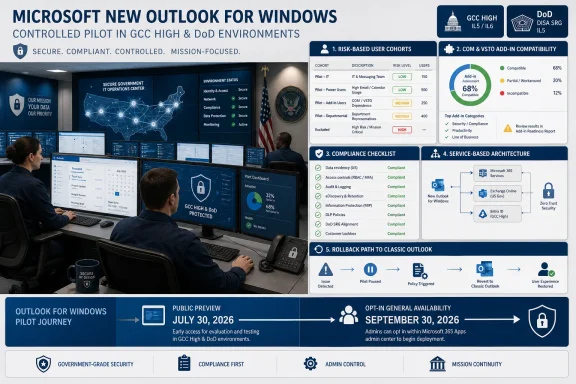
Microsoft’s new Outlook for Windows reaches Public Preview in GCC High and DoD on July 30, 2026, followed by General Availability beginning September 30—but government organizations should pilot it, not broadly migrate to it. The September rollout is an availability milestone: new Outlook remains off by default, requires administrative enablement, is opt-in for users, and permits a return to classic Outlook.
Microsoft’s Message Center schedule says General Availability is expected to roll out through late December 2026. Existing classic Outlook users are unaffected, and Microsoft says managed environments will receive at least 12 months’ notice before Microsoft-driven migration steps begin.
That makes the immediate decision narrower and more useful. GCC High and DoD administrators need to determine which user cohorts can safely operate on new Outlook’s web-aligned architecture while staff with COM add-ins, specialized records workflows, or other classic Outlook dependencies remain on the established client.
The July 30 Public Preview creates a two-month runway before General Availability begins. IT teams should use that period to validate a representative set of workflows rather than treating the preview as an invitation to move whole departments.
A practical pilot should proceed in five controlled stages:
A small pilot made exclusively of IT staff will miss the issues that matter. Executive assistants, records custodians, investigators, users of shared operational mailboxes, and employees who regularly work with limited connectivity are more likely to expose consequential differences.
That distinction can stop an adoption program before interface preferences, training, or performance enter the discussion. Classic Outlook has accumulated years of integrations that may provide document filing, message classification, encryption, customer or case management, telephony, meeting coordination, archiving, and custom workflow functions.
Administrators should not rely solely on an application catalog. They need to identify which add-ins are installed, which are loaded, which are actively used, and what business process each one enables. An add-in that appears obsolete may still be the only approved path for filing correspondence into a system of record.
Each dependency needs one of four dispositions:
PST files deserve similar scrutiny. New Outlook has gained additional PST capabilities over time, including government-cloud functionality discussed previously by WindowsForum, but the existence of a feature does not prove parity with a particular agency workflow. Pilots should test how users actually open, search, import, reference, and retain PST content rather than checking a generic “PST supported” box.
For administrators accustomed to validating a specific classic Outlook build and then deploying it through a managed ring, this is a governance change. The application package matters, but it is no longer the complete unit of change. Features and fixes can arrive through the service independently of the traditional desktop update cadence.
The pilot therefore needs to validate change monitoring as well as client functionality. IT should determine who owns Message Center review, who evaluates Outlook service changes, how relevant notices reach security and records teams, and what evidence is required before expanding adoption.
Network testing should also reflect the architecture. Pilot users should exercise new Outlook through normal agency routing, proxies, inspection controls, remote-access paths, and restricted network conditions. Testing only from a well-connected headquarters workstation will not represent users who work remotely, travel between facilities, or depend on unstable links.
Endpoint teams should confirm that installation, administrative enablement, application inventory, support telemetry, and coexistence with classic Outlook fit existing device-management practices. Identity teams should test normal sign-in, reauthentication, account recovery, conditional-access outcomes, and behavior when access policies interrupt an active session.
These are not assumptions that new Outlook will fail. They are recognition that a client tied closely to a service and web runtime must be evaluated differently from a conventional Win32 application.
Records teams should create representative messages and calendar items, apply the organization’s normal handling procedures, and verify that expected retention behavior follows the content. Tests should cover messages moved between folders, content handled through shared mailboxes, attachments, meeting updates, deleted items, and any workflow in which Outlook serves as the entry point to a records repository.
eDiscovery personnel should confirm that pilot-generated content can be located using the organization’s approved processes. They should test realistic custodians, date ranges, attachments, meeting artifacts, and deleted or moved messages rather than relying on a single keyword search.
Audit teams should verify that the events required for oversight and investigation remain available and understandable. If the user experience changes an action’s sequence or location, investigators need to know whether that changes how the activity appears in their existing review process.
Encryption testing should include every approved message-protection workflow used by the proposed cohort. A successful test means authorized recipients can open and process protected content, unauthorized handling remains blocked, and users receive understandable prompts when policy intervenes.
Accessibility validation must be performed by users who rely on the relevant tools, not inferred from a feature checklist. Keyboard navigation, focus order, screen-reader output, high-contrast behavior, message composition, calendar scheduling, search, notifications, and recovery from errors should all be tested in normal work scenarios.
Any failed compliance test should block expansion for the affected cohort until the issue is resolved or formally accepted by the responsible authority. General Availability does not override an organization’s records, accessibility, or security obligations.
Participants need a documented route back to classic Outlook and a clear support channel. The service desk should know which client the user is running, how to distinguish a service problem from a client-specific issue, and which failures require immediate reversion.
Rollback criteria should be concrete. Loss of an essential add-in, inability to complete an approved encryption workflow, inaccessible core functions, unreliable offline work, or disruption to a mission-critical shared mailbox should trigger a return to classic Outlook without forcing the user through prolonged experimentation.
IT should also record what happens after the user returns. Drafts, recently processed messages, calendar changes, mailbox state, and any local working material should be checked so that “switching back” is not mistaken for complete operational recovery.
The coexistence period will create support complexity, but that complexity is preferable to a premature migration. WindowsForum’s continuing coverage of Microsoft’s broader new Outlook transition has repeatedly highlighted the value of using schedule changes as governance time rather than treating every availability announcement as a deployment mandate.
Microsoft’s expected rollout through late December also means availability may not arrive everywhere simultaneously. Administrators should track tenant communications and avoid promising access on a single day.
The strongest outcome from the July preview is a defensible cohort decision: who can adopt, under what controls, with which known limitations, and with what rollback trigger. New Outlook’s arrival in GCC High and DoD starts that evaluation; it does not finish it.
Microsoft’s Message Center schedule says General Availability is expected to roll out through late December 2026. Existing classic Outlook users are unaffected, and Microsoft says managed environments will receive at least 12 months’ notice before Microsoft-driven migration steps begin.
That makes the immediate decision narrower and more useful. GCC High and DoD administrators need to determine which user cohorts can safely operate on new Outlook’s web-aligned architecture while staff with COM add-ins, specialized records workflows, or other classic Outlook dependencies remain on the established client.
 Turn the July Preview Into a Controlled Readiness Exercise
The July 30 Public Preview creates a two-month runway before General Availability begins. IT teams should use that period to validate a representative set of workflows rather than treating the preview as an invitation to move whole departments.A practical pilot should proceed in five controlled stages:
- Inventory classic Outlook dependencies before enabling new Outlook for anyone. Record active COM and VSTO add-ins, PST usage, shared and delegated mailbox workflows, offline requirements, accessibility needs, and connections to records, encryption, case-management, or document-management systems.
- Divide users into risk-based cohorts. Begin with technically capable users who have straightforward Exchange Online workflows, then add users with shared mailboxes, delegation, compliance responsibilities, intermittent connectivity, and assistive technology requirements.
- Apply administrative enablement only to the approved pilot population. Keep classic Outlook installed and available, document how users return to it, and avoid changing the default client for operationally sensitive groups.
- Run repeatable test cases instead of collecting only general user impressions. Record whether each workflow passes, fails, behaves differently, or requires an approved workaround.
- Review results at formal checkpoints before September 30. Expansion should depend on resolved blockers and support readiness, not simply on Microsoft changing the service’s availability designation.
A small pilot made exclusively of IT staff will miss the issues that matter. Executive assistants, records custodians, investigators, users of shared operational mailboxes, and employees who regularly work with limited connectivity are more likely to expose consequential differences.
Add-Ins Form the First Adoption Gate
Microsoft’s documentation is unambiguous: new Outlook for Windows does not support COM or VSTO add-ins. It supports web add-ins instead.That distinction can stop an adoption program before interface preferences, training, or performance enter the discussion. Classic Outlook has accumulated years of integrations that may provide document filing, message classification, encryption, customer or case management, telephony, meeting coordination, archiving, and custom workflow functions.
Administrators should not rely solely on an application catalog. They need to identify which add-ins are installed, which are loaded, which are actively used, and what business process each one enables. An add-in that appears obsolete may still be the only approved path for filing correspondence into a system of record.
Each dependency needs one of four dispositions:
- The workflow has a tested web-add-in replacement.
- New Outlook provides an acceptable native capability.
- The workflow can be redesigned and approved by its business owner.
- The affected users must remain on classic Outlook.
PST files deserve similar scrutiny. New Outlook has gained additional PST capabilities over time, including government-cloud functionality discussed previously by WindowsForum, but the existence of a feature does not prove parity with a particular agency workflow. Pilots should test how users actually open, search, import, reference, and retain PST content rather than checking a generic “PST supported” box.
Web Architecture Changes the Operating Model
New Outlook is built on a service-based architecture aligned with Outlook on the web. Microsoft says capabilities are flighted through the service rather than controlled solely through the build-update channels used for classic Outlook.For administrators accustomed to validating a specific classic Outlook build and then deploying it through a managed ring, this is a governance change. The application package matters, but it is no longer the complete unit of change. Features and fixes can arrive through the service independently of the traditional desktop update cadence.
The pilot therefore needs to validate change monitoring as well as client functionality. IT should determine who owns Message Center review, who evaluates Outlook service changes, how relevant notices reach security and records teams, and what evidence is required before expanding adoption.
Network testing should also reflect the architecture. Pilot users should exercise new Outlook through normal agency routing, proxies, inspection controls, remote-access paths, and restricted network conditions. Testing only from a well-connected headquarters workstation will not represent users who work remotely, travel between facilities, or depend on unstable links.
Endpoint teams should confirm that installation, administrative enablement, application inventory, support telemetry, and coexistence with classic Outlook fit existing device-management practices. Identity teams should test normal sign-in, reauthentication, account recovery, conditional-access outcomes, and behavior when access policies interrupt an active session.
These are not assumptions that new Outlook will fail. They are recognition that a client tied closely to a service and web runtime must be evaluated differently from a conventional Win32 application.
Compliance Testing Must Follow the Record
A government pilot cannot stop after confirming that users can send mail and create meetings. The meaningful test is whether information remains governable from creation through retention, investigation, export, and disposition.Records teams should create representative messages and calendar items, apply the organization’s normal handling procedures, and verify that expected retention behavior follows the content. Tests should cover messages moved between folders, content handled through shared mailboxes, attachments, meeting updates, deleted items, and any workflow in which Outlook serves as the entry point to a records repository.
eDiscovery personnel should confirm that pilot-generated content can be located using the organization’s approved processes. They should test realistic custodians, date ranges, attachments, meeting artifacts, and deleted or moved messages rather than relying on a single keyword search.
Audit teams should verify that the events required for oversight and investigation remain available and understandable. If the user experience changes an action’s sequence or location, investigators need to know whether that changes how the activity appears in their existing review process.
Encryption testing should include every approved message-protection workflow used by the proposed cohort. A successful test means authorized recipients can open and process protected content, unauthorized handling remains blocked, and users receive understandable prompts when policy intervenes.
Accessibility validation must be performed by users who rely on the relevant tools, not inferred from a feature checklist. Keyboard navigation, focus order, screen-reader output, high-contrast behavior, message composition, calendar scheduling, search, notifications, and recovery from errors should all be tested in normal work scenarios.
Any failed compliance test should block expansion for the affected cohort until the issue is resolved or formally accepted by the responsible authority. General Availability does not override an organization’s records, accessibility, or security obligations.
Rollback Is a Daily Pilot Function, Not an Emergency Plan
Microsoft says users can revert to classic Outlook, giving GCC High and DoD organizations a practical containment mechanism. The pilot should prove that rollback works before a user encounters an operational deadline.Participants need a documented route back to classic Outlook and a clear support channel. The service desk should know which client the user is running, how to distinguish a service problem from a client-specific issue, and which failures require immediate reversion.
Rollback criteria should be concrete. Loss of an essential add-in, inability to complete an approved encryption workflow, inaccessible core functions, unreliable offline work, or disruption to a mission-critical shared mailbox should trigger a return to classic Outlook without forcing the user through prolonged experimentation.
IT should also record what happens after the user returns. Drafts, recently processed messages, calendar changes, mailbox state, and any local working material should be checked so that “switching back” is not mistaken for complete operational recovery.
The coexistence period will create support complexity, but that complexity is preferable to a premature migration. WindowsForum’s continuing coverage of Microsoft’s broader new Outlook transition has repeatedly highlighted the value of using schedule changes as governance time rather than treating every availability announcement as a deployment mandate.
September Establishes Eligibility, Not Readiness
By September 30, government IT should have a tested eligibility map, not a universal migration date. Low-dependency users may be ready for opt-in adoption, while users tied to COM or VSTO add-ins, specialized PST processes, sensitive shared mailboxes, demanding offline scenarios, or unresolved compliance workflows should remain on classic Outlook.Microsoft’s expected rollout through late December also means availability may not arrive everywhere simultaneously. Administrators should track tenant communications and avoid promising access on a single day.
The strongest outcome from the July preview is a defensible cohort decision: who can adopt, under what controls, with which known limitations, and with what rollback trigger. New Outlook’s arrival in GCC High and DoD starts that evaluation; it does not finish it.
References
- Primary source: learn.microsoft.com
Release notes for Outlook for Windows (New) in Government Cloud - Office release notes | Microsoft Learn
Provides IT Pros with release notes for Outlook for Windows (New) in Government Cloud Channels.learn.microsoft.com - Independent coverage: support.microsoft.com
Copilot buttons are missing in classic Outlook for Windows | Microsoft Support
This article describes the issue regarding Copilit buttons missing in classic Outlook for Windowssupport.microsoft.com - Independent coverage: microsoft.com
Microsoft 365 Roadmap | Microsoft 365
The Microsoft 365 Roadmap lists updates that are currently planned for applicable subscribers. Check here for more information on the status of new features and updates.www.microsoft.com
- Independent coverage: techcommunity.microsoft.com
- Primary source: WindowsForum
New Outlook Rollout Extended to 2027: IT Readiness and Governance | Windows Forum
Microsoft’s quietly revised schedule for the New Outlook rollout gives enterprises more breathing room — but it also exposes the technical fault lines...windowsforum.com
