

Microsoft has marked Roadmap ID 496371 as launched, bringing the ability to attach files to draft messages while offline in the new Outlook for Windows. The change closes a conspicuous gap in the app’s offline mode: users could create drafts and queue mail in the Outbox without a connection, but could not add a local file to a message until connectivity returned.
According to Microsoft’s updated Message Center notice, the capability is now generally available worldwide, with the GCC rollout scheduled to complete by the end of June 2026. The original roadmap entry listed general availability for October 2025, but the staged rollout took considerably longer for some tenants.
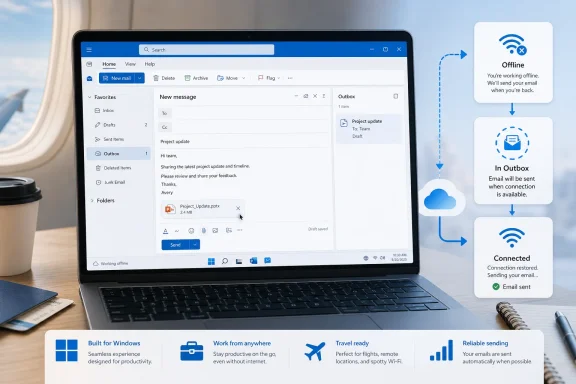
With offline access enabled, users can compose a new message, add a file from the PC, and leave it queued for delivery. Once the device reconnects, Outlook uploads the attachment and sends the message automatically.
That is a modest but practical improvement for laptops used on flights, in unreliable Wi-Fi environments, or during network outages. It also makes the new Outlook behave more like the traditional cached Outlook client in a basic, everyday workflow.
Microsoft’s offline mode keeps a local copy of selected mail, calendar, and people data. Its support documentation says users can choose folders to retain locally and select 7, 30, 90, or 180 days of email. Storage capacity still matters: Outlook may retain less content than requested, or disable offline access, if the device lacks sufficient free space.
Admins should note that this is not necessarily enabled across every tenant merely because the roadmap says “Launched.” Microsoft says the feature follows the existing
A short checklist:
The feature should require no client-side action beyond enabling offline mode, but availability can still depend on tenant policy and rollout state.
According to Microsoft’s updated Message Center notice, the capability is now generally available worldwide, with the GCC rollout scheduled to complete by the end of June 2026. The original roadmap entry listed general availability for October 2025, but the staged rollout took considerably longer for some tenants.
 What changes
With offline access enabled, users can compose a new message, add a file from the PC, and leave it queued for delivery. Once the device reconnects, Outlook uploads the attachment and sends the message automatically.That is a modest but practical improvement for laptops used on flights, in unreliable Wi-Fi environments, or during network outages. It also makes the new Outlook behave more like the traditional cached Outlook client in a basic, everyday workflow.
Microsoft’s offline mode keeps a local copy of selected mail, calendar, and people data. Its support documentation says users can choose folders to retain locally and select 7, 30, 90, or 180 days of email. Storage capacity still matters: Outlook may retain less content than requested, or disable offline access, if the device lacks sufficient free space.
How to enable it
For users, the relevant controls are in Settings > General > Offline. Offline email, calendar, and people access must be enabled; organizations may also expose an Include file attachments option.Admins should note that this is not necessarily enabled across every tenant merely because the roadmap says “Launched.” Microsoft says the feature follows the existing
OWAMailboxPolicy-OfflineEnabledWin configuration, so current policy settings remain in place. The policy can be used to control whether offline access is available in new Outlook for Windows.A short checklist:
- Enable offline access in new Outlook under Settings > General > Offline.
- Confirm that file attachments are included for offline use where the option appears.
- Check available local disk capacity, particularly on shared or virtual desktops.
- Review the organization’s
OWAMailboxPolicy-OfflineEnabledWinpolicy before broad deployment.
Documentation lag remains
There is one wrinkle: Microsoft’s current public support page for working offline in new Outlook still lists adding attachments and inline images to drafts as an upcoming Targeted Release capability. That conflicts with the newer Message Center update and the roadmap’s launched status. The support article appears not to have caught up with the rollout, so admins should test the feature in their own tenant rather than treating the older capability list as definitive.The feature should require no client-side action beyond enabling offline mode, but availability can still depend on tenant policy and rollout state.
References
- Primary source: Microsoft 365 Roadmap
Published: 2026-07-13T23:07:14.8221961Z
Microsoft 365 Roadmap | Microsoft 365
The Microsoft 365 Roadmap lists updates that are currently planned for applicable subscribers. Check here for more information on the status of new features and updates.www.microsoft.com
- Official source: support.microsoft.com
How to work offline in Outlook for Windows | Microsoft Support
You can make Outlook work online or offline with your mail server.support.microsoft.com - Related coverage: windowscentral.com
Microsoft Outlook for Windows enables offline file attachments | Windows Central
Outlook for Windows is getting a new feature that lets users attach files to emails offline, sending them automatically when the internet is restored.www.windowscentral.com
