

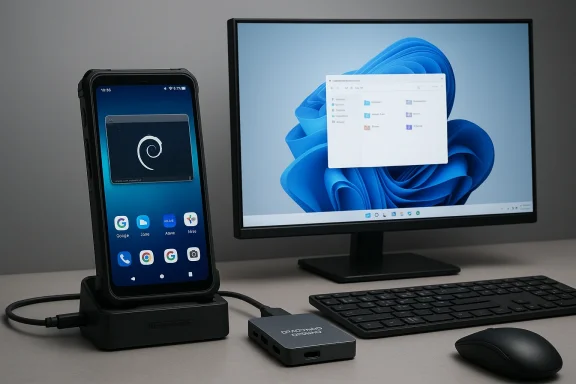
Almost a decade after Microsoft walked away from its own smartphone experiment, a small Hong Kong company is trying to answer a question enthusiasts keep asking: can a phone actually be a practical Windows PC in your pocket? Nex Computer’s NexPhone tries to answer that by shipping a single handset that runs Android as the everyday phone, offers a containerized Debian Linux desktop, and — most unusually — can reboot into a native Windows 11 on ARM installation that claims to be usable as a full desktop when docked. Early specs, pricing and the pre-order timeline are public, but so are the engineering headaches and unanswered questions that will decide whether this is a disruptive product or an intriguing prototype.
Nex Computer is best known for the NexDock family — laptop-like shells that turn phones into clamshell-style laptops by borrowing a phone’s compute. The NexPhone is the company’s leap into becoming the compute engine itself: a handset designed from the ground up to be docked and to run multiple OSes depending on the task. The headline pitch is simple: carry one device for mobile life (Android), development and web-first workflows (Debian Linux), and native Windows apps when you need them (Windows 11 on ARM). Early reporting and company materials consistently list the same core goals and hardware choices, which gives the project a plausible technical path — but plenty of risks remain.
Nex’s public messaging frames the NexPhone less as a nostalgia play for the dead Windows Phone platform and more as a continuum-first productivity device — a phone that becomes a real desktop when you plug it into a monitor or a lapdock. That emphasis on docking, multi‑OS flexibility, and practical price positioning is central to understanding the NexPhone’s market case.
Key hardware highlights (as consistently reported in prelaunch materials):
But this is where the most serious doubts appear. Historically, attempts to run full desktop Windows on phone-class hardware have faltered because of driver gaps, missing firmware, poor thermals and limited battery life. Nex must ship a Windows image with signed drivers, a robust update policy, and a clear plan for long-term support. Without that, the Windows partition will be a curiosity rather than a daily‑driver proposition. Early reporting repeatedly calls out the challenge of shipping signed drivers and integrating Windows Update for mobile hardware; buyers should expect that to be the first real test of Nex’s execution.
This is clever because it addresses one of the main usability failures of previous “Windows on phone” demos: tiny desktop UI elements that are hard to operate by touch. But UI design alone won’t compensate for missing drivers or broken telephony in the Windows image. The Mobile UI is necessary but not sufficient for success.
But remember: a docked phone that lacks modem support or dependable signed drivers is a limited desktop. For IT buyers and enthusiasts, Nex must make clear whether enterprise features like TPM-equivalent protections, BitLocker-style disk encryption, and secure boot policies are available and how they are implemented on phone hardware. These are not optional for enterprise use.
From a market perspective, Nex’s price positioning is smart: a $549 early price undercuts many ultraportable laptops and makes the experiment affordable for early adopters. But the company must convert early interest into satisfied, long‑term users — and that requires reliable updates, clear warranty and support terms, and a demonstrable strategy for Windows driver maintenance.
NexPhone is one of the most interesting phone‑as‑PC experiments in years. If Nex pulls off signed drivers, a credible Windows update strategy, and reasonable docked performance, the device could legitimately change how mobile professionals travel and work. But those are big “ifs.” The prelaunch phase shows consistency in the product story and sensible hardware choices, but also clear unresolved questions. For enthusiasts and early adopters who accept prelaunch risk, the NexPhone is worth a preorder for the novelty and potential utility. For everyone else — especially enterprise buyers and users who need guaranteed telephony in every OS — the prudent move is to wait for independent hands‑on reviews and verified firmware builds.
The NexPhone revives an old idea with a modern twist: it doesn’t try to resurrect a dead ecosystem so much as build a practical bridge between phone and PC using today’s ARM silicon and a dock‑friendly workflow. That approach could be the right way forward, but the roadmap’s success hinges on execution: signed drivers, robust updates, predictable thermals, and clear documentation about connectivity and enterprise features. Watch the shipping units and the first independent long‑term reviews closely — the next six months will tell whether Nex has delivered the first genuinely useful “Windows on a phone,” or an interesting experiment that never becomes a reliable daily driver.
Source: SlashGear This Smartphone Lets You Use Windows, But Is Far From A New Windows Phone - SlashGear
 Background and overview
Nex Computer is best known for the NexDock family — laptop-like shells that turn phones into clamshell-style laptops by borrowing a phone’s compute. The NexPhone is the company’s leap into becoming the compute engine itself: a handset designed from the ground up to be docked and to run multiple OSes depending on the task. The headline pitch is simple: carry one device for mobile life (Android), development and web-first workflows (Debian Linux), and native Windows apps when you need them (Windows 11 on ARM). Early reporting and company materials consistently list the same core goals and hardware choices, which gives the project a plausible technical path — but plenty of risks remain.Nex’s public messaging frames the NexPhone less as a nostalgia play for the dead Windows Phone platform and more as a continuum-first productivity device — a phone that becomes a real desktop when you plug it into a monitor or a lapdock. That emphasis on docking, multi‑OS flexibility, and practical price positioning is central to understanding the NexPhone’s market case.
What Nex is promising — the core claims
- A single handset that runs three distinct environments:
- Android as the daily mobile OS (Android 15 or Android 16 is cited in different places).
- A containerized Debian Linux desktop for near-instant development and desktop-class web workflows.
- A separate, rebootable Windows 11 on ARM partition that boots into a Windows desktop when docked.
- Hardware built around Qualcomm’s QCM6490 “Dragonwing” family chipset, chosen for expected cross‑OS compatibility and extended platform support.
- Midrange hardware targets: 12 GB RAM, 256 GB storage (expandable via microSD), a 6.58‑inch FHD+ 60–120 Hz display, a main 64 MP Sony IMX787 sensor, and ruggedization claims (IP68/IP69K, MIL‑STD‑810H in marketing).
- A docking-first accessory ecosystem, including a bundled multiport USB‑C hub to make the phone usable as a PC out of the box.
- Pricing and preorder mechanics: refundable reservation ($199) toward a reported $549 early price, with shipments targeted for Q3 2026.
Hardware deep-dive: pragmatic choices, not flagship bravado
Nex picked the Qualcomm QCM6490 platform for a reason: it’s one of the chip designs Qualcomm has positioned for long‑term support and — crucially — it’s among the SoCs Microsoft and other projects have demonstrated Windows on ARM with, giving Nex a technical pathway to a Windows image. Choosing a midrange Dragonwing-class chipset is a realistic trade‑off: it keeps cost and thermals reasonable while enabling multi‑OS work.Key hardware highlights (as consistently reported in prelaunch materials):
- SoC: Qualcomm QCM6490 (Dragonwing family).
- Memory / Storage: 12 GB RAM, 256 GB internal + microSD expansion.
- Display: 6.58" FHD+ (1080 × 2403), 60–120 Hz variable refresh.
- Camera: 64 MP main (Sony IMX787) + 13 MP ultrawide + 10 MP front.
- Battery: conflicting figures (4,200 mAh vs 5,000 mAh) appear in different vendor materials — confirm with retail documentation.
- Durability: IP68/IP69K and MIL‑STD‑810H are claimed in marketing blurbs; buyers should verify independent testing.
- Will the thermal solution sustain Windows‑level workloads without throttling or overheating?
- Are signed drivers available and actively maintained for Windows, Linux, and Android?
- How will battery life perform when the device is docked and running a desktop OS for hours?
Software architecture: three OSes, three different realities
Android: the daily driver
Android is the always‑on environment the NexPhone ships with and is where most buyers will spend their time. Nex positions Android as the handheld OS with a NexOS layer that enables desktop-like behavior when you connect to an external display. Expect Android’s usual ecosystem advantages: mature app stores, notifications, always-on connectivity, and low-power background handling. The practical significance: Android serves as the “phone” part of the promise, and its polish is critical because it’s what you’ll use walking down the street.Debian Linux: a containerized desktop for quick productivity
The NexPhone includes a Debian desktop environment that runs as a Linux app/container inside Android. This gives developers and web-first professionals fast access to a desktop shell and native Linux tooling without rebooting. That approach is practical: it avoids the user-experience cost of frequent reboots and covers a wide range of productivity tasks. The trade‑off is that the Debian instance still relies on Android’s kernel and drivers; it’s powerful for coding, terminal work, and web apps, but it won’t magically make the phone a full workstation for heavy native Linux workloads.Windows 11 on ARM: the headline act and the hardest part
Nex’s most provocative claim is the optional Windows 11 on ARM partition that reboots the phone into a native Windows environment. Nex says the QCM6490 makes this possible and that they have built a custom Mobile UI to make Windows usable on a phone screen while preserving the full desktop when the device is docked. The company’s demo behavior — a pared-down mobile UI on the handset and a full Windows desktop on an external monitor — is the clearest route to practical Windows‑on‑phone use.But this is where the most serious doubts appear. Historically, attempts to run full desktop Windows on phone-class hardware have faltered because of driver gaps, missing firmware, poor thermals and limited battery life. Nex must ship a Windows image with signed drivers, a robust update policy, and a clear plan for long-term support. Without that, the Windows partition will be a curiosity rather than a daily‑driver proposition. Early reporting repeatedly calls out the challenge of shipping signed drivers and integrating Windows Update for mobile hardware; buyers should expect that to be the first real test of Nex’s execution.
UI design: not a resurrection of Windows Phone, but an homage
Nex deliberately avoids the trap of shoehorning a desktop UI onto a small touchscreen. Instead of forcing the full Windows 11 shell onto the handset, the company built a Mobile UI that mimics the tile/grid aesthetic of the old Windows Phone start screen to deliver touch-friendly navigation and readable targets. That design choice is explicitly aesthetic and practical: it’s intended to make the Windows experience usable by touch when held in the hand, while enabling the complete desktop UI when attached to an external display. Nex’s founding chief has framed this as a pragmatic nod to the convenience of a touch-first, glanceable interface rather than a platform revival.This is clever because it addresses one of the main usability failures of previous “Windows on phone” demos: tiny desktop UI elements that are hard to operate by touch. But UI design alone won’t compensate for missing drivers or broken telephony in the Windows image. The Mobile UI is necessary but not sufficient for success.
Real-world limitations and engineering risks
No product risk analysis about the NexPhone would be complete without listing the practical constraints that could scuttle the experience:- Driver and firmware maturity. The Windows partition must have signed drivers for radio/modem, GPU, display, audio, sensors and power management. Historically, this is where projects stall. Nex needs vendor-supplied drivers or to partner with Qualcomm/Microsoft to ensure maintenance.
- Cellular connectivity under Windows. Several reports and early hands‑ons note that telephony and full cellular modem support may be absent or limited when the device runs Windows, which would mean the device is no longer a functioning phone in Windows mode. That undermines the “one device” premise for people who need simultaneous voice/data while using Windows. Buyers who require telephony while docked should treat this as a likely limitation until Nex provides definitive documentation.
- Thermals and sustained performance. A phone chassis is not a laptop chassis. Running CPU- and GPU-heavy Windows workloads for hours will test thermals and battery life. Expect throttling unless Nex overengineers cooling or throttles performance; both have trade‑offs.
- Battery life: conflicting claims. Vendor materials show mixed battery capacity figures (4,200 mAh vs 5,000 mAh) and optimistic “up to 22 hours” playback claims. These numbers should be treated as provisional until validated by independent testing and final firmware.
- Software updates and long‑term support. A tri‑OS product multiplies update surface area. Will Nex provide regular, timely security patches across Android, the Debian container runtime, and the Windows partition? Who will sign drivers and distribute Windows updates? These are the dull but essential operational questions buyers should get clarified before committing to a preorder.
- Spec drift pre‑retail. The prelaunch docs already show minor spec inconsistencies. Expect some features and figures to change between preorder and shipping; that’s normal, but buyers should verify the final spec sheet.
Docking, accessories and the practical workstation story
Nex’s dock-first DNA matters: the company bundles a multiport USB‑C hub to help customers use the phone as a PC immediately. That reduces one friction point: buyers won’t have to hunt for a compatible hub just to try out the Windows experience. The docking story also ties into the value proposition: if the NexPhone can deliver a smooth desktop experience when docked — stable display output, keyboard/mouse input, external storage, and network connectivity — it will be compelling for travelers and people who already rely on cloud-first workflows.But remember: a docked phone that lacks modem support or dependable signed drivers is a limited desktop. For IT buyers and enthusiasts, Nex must make clear whether enterprise features like TPM-equivalent protections, BitLocker-style disk encryption, and secure boot policies are available and how they are implemented on phone hardware. These are not optional for enterprise use.
Who should consider the NexPhone — and who should wait
The NexPhone will attract three clear user groups if it ships as promised:- Enthusiasts and tinkerers who value cutting-edge convergence, are comfortable troubleshooting, and enjoy early-adopter tradeoffs. These users will pre-order to be part of the experiment.
- Traveling professionals and consultants who want a single pocket device that can be a phone and a light-to-medium desktop replacement for web apps, documents, and remote access tools. Their acceptance will depend on verified docked performance and battery behavior.
- Developers and Linux-first users who value a ready Debian container and can tolerate limitations in Windows. The Debian container is a strong practical differentiator for this group.
- Users who require guaranteed Windows app performance and certified compatibility for heavy native workloads — wait for independent reviews and enterprise-grade certification.
- Anyone who needs full telephony while using Windows — treat reports of limited cellular support in Windows mode as a potential dealbreaker until Nex confirms otherwise.
- Mainstream consumers looking for a flagship-level camera or battery — the NexPhone is an engineering trade‑off, not a flagship camera bomber.
Comparative context: why this matters (and why it’s hard)
This isn’t the first time companies have tried to blur the line between phones and PCs. Microsoft’s Continuum and Windows Phone experiments, Samsung DeX and Motorola Ready For all showed parts of the dream. Nex’s difference is attempting to make native Windows bootable on a phone — not just a desktop-like environment layered on Android. That is both the product’s most powerful selling point and its largest technical risk. Historical lessons are clear: interface tweaks (like Mobile UI) can help, but driver/firmware support and thermal design ultimately make or break the product.From a market perspective, Nex’s price positioning is smart: a $549 early price undercuts many ultraportable laptops and makes the experiment affordable for early adopters. But the company must convert early interest into satisfied, long‑term users — and that requires reliable updates, clear warranty and support terms, and a demonstrable strategy for Windows driver maintenance.
Practical buying checklist (what to confirm before preordering)
- Confirm final retail specs (battery capacity, Android version, final camera configuration).
- Ask specifically whether the Windows partition includes signed drivers for modem, GPU and power management, and whether Windows Update will handle future driver distribution.
- Verify whether cellular voice and data work while booted into Windows (not just in Android).
- Request evidence or third‑party tests for sustained docked performance (thermal and battery behavior under Windows workloads).
- Check Nex’s policy on updates across Android, Debian container, and Windows partitions (frequency, signing, and rollback procedures).
Strengths, weaknesses, and the verdict
Strengths- Ambitious, pragmatic product vision: Nex isn’t chasing flagship benchmarks — it aims to be a versatile, dockable device that covers multiple real-world workflows. That makes the pitch accessible and compelling for certain users.
- Thoughtful hardware selection: Choosing the QCM6490 shows an understanding of the Windows on ARM ecosystem and balances cost, thermals and cross‑OS compatibility.
- Useful Linux inclusion: A containerized Debian desktop is immediately practical and differentiates the product from simpler “desktop mode” offerings.
- Driver and Windows support are unresolved: The single largest risk is whether Nex can ship and sustain a fully functional Windows image with signed drivers and a Windows Update story. Without that, Windows becomes a demo, not a product.
- Cellular limitations under Windows: Early reports suggest telephony may not work in Windows mode, which would undermine the “one device” promise for many buyers. Confirm this before committing.
- Thermals and battery life under sustained use: Phone thermals are the limiting factor for desktop workloads. Expect trade‑offs unless validated by independent testing.
NexPhone is one of the most interesting phone‑as‑PC experiments in years. If Nex pulls off signed drivers, a credible Windows update strategy, and reasonable docked performance, the device could legitimately change how mobile professionals travel and work. But those are big “ifs.” The prelaunch phase shows consistency in the product story and sensible hardware choices, but also clear unresolved questions. For enthusiasts and early adopters who accept prelaunch risk, the NexPhone is worth a preorder for the novelty and potential utility. For everyone else — especially enterprise buyers and users who need guaranteed telephony in every OS — the prudent move is to wait for independent hands‑on reviews and verified firmware builds.
The NexPhone revives an old idea with a modern twist: it doesn’t try to resurrect a dead ecosystem so much as build a practical bridge between phone and PC using today’s ARM silicon and a dock‑friendly workflow. That approach could be the right way forward, but the roadmap’s success hinges on execution: signed drivers, robust updates, predictable thermals, and clear documentation about connectivity and enterprise features. Watch the shipping units and the first independent long‑term reviews closely — the next six months will tell whether Nex has delivered the first genuinely useful “Windows on a phone,” or an interesting experiment that never becomes a reliable daily driver.
Source: SlashGear This Smartphone Lets You Use Windows, But Is Far From A New Windows Phone - SlashGear
