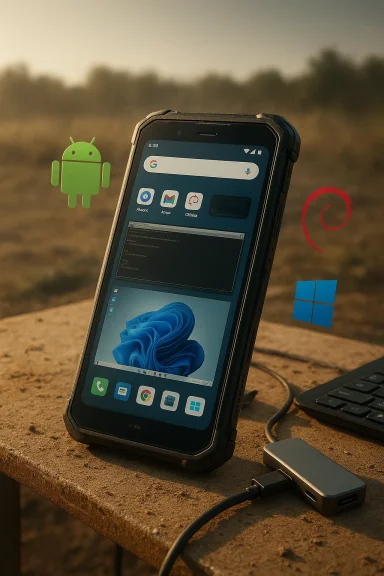
Nex Computer’s new NexPhone is less a revival of Windows Phone than a deliberately compromised attempt to put a pocketable, dockable Windows PC into a smartphone form factor — a bold experiment that trades peak mobile performance and carrier integration for the convenience of carrying a Windows 11 desktop in your pocket. s://nexphone.com/tech-specs)
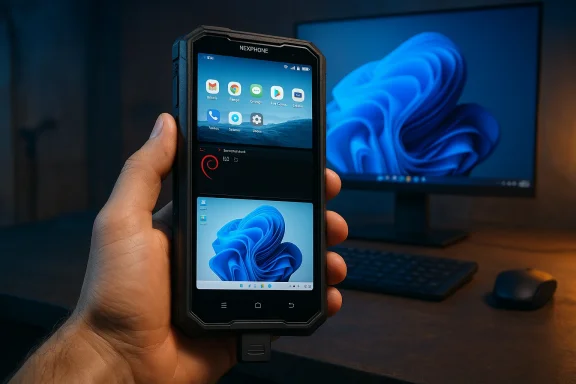
NexPhone arrives as a purpose-built three‑OS device: Android 16 for everyday telephony and apps, a Debian Linux environment that runs as an app/desktop, and a separate Windows 11 partition that boots into a desktop-optimized shell. The company pitches the phone as a secondary or backup device: use Android for calls and SMS, Debian for lightweight Unix workflows, and reboot into Windows 11 whenever you need a proper desktop with native Windows applications. These OS choices are implemented as distinct partitions or containers rather than a single, integrated environment — a design decision that drives much of the device’s usability tradeoffs.
From a hardware standpoint, NexPhone is rugged and practical rather than flashy. Key headline specs the company lists are a Qualcomm QCM6490 (Dragonwing) SoC, 12 GB of RAM, 256 GB of storage (expandable via microSD), a 6.58‑inch 120 Hz LCD, a 5,000 mAh battery with wired and wireless charging, MIL‑STD‑810H durability plus IP68/IP69K ingress protection, and a 64 MP main camera. The company is asking for a $199 refundable reservation deposit against a $549 retail price and expects to ship units in Q3 2026.
Practically, that means:
However, the three‑OS strategy surfaces the practical engineering and business problems that have felled other convergence experiments: driver availability, thermal constraints, and update complexity. Until Nex demonstrates retail stability and publishes driver/firmware commitments, the NexPhone will remain an intriguing experiment more than a mass‑market solution.
Those compromises matter. The separation of telephony from the Windows partition, the reboot requirement to switch OSes, the three‑OS maintenance burden, and the midrange thermal envelope mean NexPhone is an adjunct device, not a replacement for a laptop or daily phone for most people. Independent reviews that validate driver completeness, sustained Windows performance, and real‑world battery/thermal behavior will be the decisive data points. Until then, treat NexPhone as a high‑value proof of concept with real potential — but also with tangible limits you must accept before you buy.
Source: AOL.com This Smartphone Lets You Use Windows, But Is Far From A New Windows Phone
 Background
NexPhone arrives as a purpose-built three‑OS device: Android 16 for everyday telephony and apps, a Debian Linux environment that runs as an app/desktop, and a separate Windows 11 partition that boots into a desktop-optimized shell. The company pitches the phone as a secondary or backup device: use Android for calls and SMS, Debian for lightweight Unix workflows, and reboot into Windows 11 whenever you need a proper desktop with native Windows applications. These OS choices are implemented as distinct partitions or containers rather than a single, integrated environment — a design decision that drives much of the device’s usability tradeoffs.From a hardware standpoint, NexPhone is rugged and practical rather than flashy. Key headline specs the company lists are a Qualcomm QCM6490 (Dragonwing) SoC, 12 GB of RAM, 256 GB of storage (expandable via microSD), a 6.58‑inch 120 Hz LCD, a 5,000 mAh battery with wired and wireless charging, MIL‑STD‑810H durability plus IP68/IP69K ingress protection, and a 64 MP main camera. The company is asking for a $199 refundable reservation deposit against a $549 retail price and expects to ship units in Q3 2026.
What NexPhone actually offers
Three OSes, three workflows
- Android 16 (primary phone mode): This is the phone you’ll use for daily communications, carrier services, and mobile apps. Android handles cellular calling, SMS, mobile data, and Android apps optimized for touch screens. NexPhone’s Android image also provides a desktop mode for productivity when connected to a monitor.
- Debian Linux (containerized): Debian runs as an app/desktop inside Android for Unix-style workflows and developer tooling. Nex markets this as a fast-switch option for people who need access to a Linux terminal or GUI apps on the go. The Debian session shares storage with Android in Nex’s implementation.
- Windows 11 (separate partition): Windows boots from a distinct partition and offers a full Windows 11 desktop when connected to external peripherals. To make Windows more usable on a phone screen, Nex built a custom mobile UI that mimics the old Windows Phone Start tile look; the full Windows desktop resumes when an external monitor is attached. This is the central novelty: a proper Windows 11 environment that fits in a pocket if you accept that it’s really meant to be used on an external display.
Hardware and build: rugged and conservative
NexPhone’s hardware choices prioritize longevity and compatibility with tri‑OS operation rather than raw mobile speed. The QCM6490 (Dragonwing) is an industrial/IoT/edge‑oriented Qualcomm platform with a long lifecycle and Windows/Linux support baked into its DNA — traits Nex highlights as enabling triple‑OS support. The chipset provides respectable midrange performance (Adreno 643 GPU, Kryo 670 CPU configuration) but is not in the flagship performance class. The rugged polycarbonate body, IP68/IP69K, MIL‑STD‑810H certification, and large 5,000 mAh battery underline Nex’s positioning as a practical tool for fieldwork, backups, or secondary computing rather than a mainstream camera/metal flagship.The UX reality: where the promise collides with constraints
1) You must treat NexPhone as a dock-first device, not a phone-first PC
Nex’s UI choreography makes one thing clear: this is a phone that becomes a PC when docked. When you boot Windows you get a phone‑friendly tile UI on the handset, but you lose carrier features such as voice calls and SMS in Windows mode — those remain the province of Android. In practice that means:- Use Android for cellular calls, SMS and the mobile‑first apps.
- Connect to a monitor, keyboard and mouse to use Windows 11 comfortably.
- Reboot to switch OSes (there is no seamless, instant context switch).
2) Cellular is restricted when Windows runs
A major constraint to understand: when the phone boots into Windows, cellular calling and SMS are not available. Nex has been explicit about that tradeoff: Windows boots from a separate partition that doesn’t expose the phone’s modem to the native Windows image, so telephony stays on the Android side. That means users who want to use Windows while maintaining phone functionality will device for calls or rely on Wi‑Fi and third‑party apps (WhatsApp, Teams, etc.) for communications — with the additional caveat that some third‑party services log out of companion sessions after extended inactivity and may require re‑authentication via the Android phone. This is a practical limitation that will be a dealbreaker for many prospective buyers.3) Windows on Arm is real but still constrained
Windows 11 on Arm has improved substantially thanks to Microsoft’s PRISM/x86 emulation and a growing number of Arm‑native Windows builds, but it remains a platform with two important caveats:- Emulation limits and performance variability: While Microsoft has improved x86/x64 emulation, workloads compiled for native x86/x64 silicon can still run slower under emulation than on equivalent x86 machines, particularly for vectorized or CPU‑heavy workloads. Expect variability—productivity apps tend to fare well, some legacy or niche apps may not.
- Drivers and signed firmware are the wild card: A phone designed to run Windows depends on full driver stacks for modem, display bridges, GPU acceleration and power management. Nex must provide signed drivers and commitments to updates; until independent review units validate Windows driver completeness, every statement about smooth Windows operation should be treated as provisional.
Performance: don’t expect laptop‑class sustained throughput
The QCM6490 is an industrial‑grade, extended‑life implementation of Qualcomm’s Kryo/Adreno family — a capable midrange SoC. Benchmarks and comparisons position the QCM6490 close to midrange consumer chips such as Samsung’s Exynos 1380 and Google’s Tensor G2 in single‑thread and mixed workloads, meaning it can handle everyday productivity, web apps, office suites and light content editing, but it will not match Intel/AMD laptop silicon for sustained heavy compute or thermal headroom. Multiple independent comparisons and benchmark aggregators show the QCM6490 grouping with upper midrange silicon rather than flagship SoCs.Practically, that means:
- Excellent battery life potential for light to moderate tasks in Android.
- Adequate responsiveness for Windows desktop apps that are either Arm‑native or well‑behaved under emulation.
- Noticeable thermal throttling and slower sustained performance on long heavy workloads (video rendering, large compiles, gaming at high fidelity) compared with laptops that have larger thermal envelopes.
The software and maintenance burden: a three‑headed support problem
Shipping and supng systems on one device multiplies the software lifecycle complexity:- Three update trains: Android, Debian and Windows each have independent update schedules and security patches. Coordinating firmware, bootloader and driver updates across these OSes is nontrivial and will require Nex to be explicit about long‑term support commitments.
- Driver signing and stability: Windows needs signed drivers for critical components. If Nex cannot provide robust, signed drivers, Windows performance and stability will suffer — and customers should demand clarity on driver delivery and update cadence before they hand over money.
- App compatibility and user expectations: Although Windows‑on‑Arm compatibility has improved, there will still be edge cases. Buyers relying on niche, legacy, or tightly integrated enterprise apps should verify compatibility before assuming the NexPhone will be a seamless substitute for a laptop.
Practical scenarios where NexPhone makes sense
The device is not for everyone. It is, however, compelling for specific use cases:- Field technicians and first responders who need a rugged device that can be both a phone and a desktop for configuration and diagnostics when docked.
- Journalists or consultants who require an offline Windows machine for last‑minute edits, file compatibility, or access to local Windows ng on cloud VMs.
- Enthusiasts and developers who value experimentation, tri‑OS flexibility, and the novelty of a pocketable Windows 11 desktop.
Risks and red flags
- No cellular in Windows mode: This is the clearest functional compromise — you lose native ng Windows. If you need to take calls while working in Windows, you will need a second phone or a soft‑phone setup over Wi‑Fi. This will matter a lot for users who expect single‑device continuity.
- Prelaunch specs and marketing friction: Some prelaunch materials show minor discrepancies in storage, microSD claims, and battery figures across outlets and Nex’s own marketing. Preorder buyers should insist on final retail spec confirmation and transparent refund/return terms.
- Driver and update responsibilities: Multi‑OS devices compound risk: if Nex fails to keep Windows drivers current, the Windows experience could degrade, regardless of the underlying hardware. Buyers who need certified, mission‑critical Windows compatibility should wait for independent reviews and verified driver disclosures.
- Thermals and sustained Windows workloads: The QCM6490 is efficient but the phone’s chassis has limited thermal headroom compared with laptops. Expect throttling under long Windows workloads; independent battery and thermal tests will be the decisive metric.
- App ecosystem limits: While Microsoft’s emulation (Prism) and native Arm app growth reduce friction, some complex desktop applications or games may still not behave as they would on x86 hardware. Validate critical applications before relying on NexPhone for deadlines.
How to evaluate NexPhone if you’re considering buying
- Identify your must-have apps. Make a short list of the Windows apps you depend on and verify whether they run natively on Arm, under Windows 11 emulation, or have known issues. If a vendor or app requires x86‑only drivers or kernel‑level integrations (VPN clients, anti‑cheat, certain enterprise tools), treat that as a potential blocker.
- Clarify carrier needs. If you must take cellular calls while using Windows, NexPhone’s current architecture makes that difficult. Ask Nex to show how Android/Windows handoffs work in practice and whether soft‑phone solutions meet your needs.
- Demand driver transparency. Ask for a public roadmap: how will Nex deliver driver updates for Windows, and what is their plan for long‑term support of the Windows partition? Signed drivers and a clear update cadence are non‑negotiable for a device that advertises Windows compatibility.
- Wait for independent benchmarks. Don’t rely solely on marketing numbers. Look for third‑party thermal, battery and Windows workload tests before committing to a purchase. Independent reviews will show sustained performance, throttling curves and real‑world5. Use the refundable reservation to your advantage. Nex’s $199 reservation model reduces prelaunch risk; use it to secure a unit but keep expectations calibrated until retail reviews validate the claims.
Why this matters for the broader “phone‑as‑PC” conversation
NexPhone is not an attempt to resurrect the Windows Phone ecosystem — there’s no carrier ecosystem, app store revival, or Microsoft platform pivot here. Instead, Nex is pursuing a pragmatic version of Continuum: a pocket computer that becomes a conventional desktop when you need it. That approach is useful because modern work increasingly tolerates short‑lived, web‑first or document‑centric sessions where a disconnected offline Windows instance can be critically useful for compatibility or security reasons. If Nex can deliver stable drivers and an update cadence, the device proves a meaningful point: the hardware and software tooling are finally mature enough for plausible phone‑to‑desktop convergence without needing a Microsoft‑led platform relaunch.However, the three‑OS strategy surfaces the practical engineering and business problems that have felled other convergence experiments: driver availability, thermal constraints, and update complexity. Until Nex demonstrates retail stability and publishes driver/firmware commitments, the NexPhone will remain an intriguing experiment more than a mass‑market solution.
Bottom line: who should preorder, and who should wait
- Preorder if:
- You are an enthusiast who values experimentation and can tolerate software rough edges.
- You need a rugged, secondary device that can become an offline Windows desktop occasionally.
- You want to support a niche hardware experiment and understand the refundable reservation model.
- Wait if:
- You need a single device that must handle calls, SMS and Windows apps simultaneously without compromise.
- Your workflows include heavy, sustained Windows workloads that require laptop‑class performance or guaranteed driver support.
- You require enterprise certification, predictable update SLAs or mission‑critical app compatibility today.
Final assessment
NexPhone is one of the clearest, most coherent attempts in recent years to make a real pocket‑sized Windows desktop. Its strengths are obvious: a durable chassis, long‑life industrial silicon (Dragonwing QCM6490) that supports Android, Linux and Windows, and a price that makes experimenters and niche professionals take notice. The device reframes the Continuum dream in a pragmatic way: it doesn’t resurrect Windows Phone as a platform, it simply gives you Windows in a pocket — with compromises.Those compromises matter. The separation of telephony from the Windows partition, the reboot requirement to switch OSes, the three‑OS maintenance burden, and the midrange thermal envelope mean NexPhone is an adjunct device, not a replacement for a laptop or daily phone for most people. Independent reviews that validate driver completeness, sustained Windows performance, and real‑world battery/thermal behavior will be the decisive data points. Until then, treat NexPhone as a high‑value proof of concept with real potential — but also with tangible limits you must accept before you buy.
Source: AOL.com This Smartphone Lets You Use Windows, But Is Far From A New Windows Phone