A aimpacc New Member Joined Oct 20, 2010 Messages 8 Jan 28, 2012 Thread Author #1 ||windows 7 64bit hp|| ||acer 4830tg|| i need to record sound from my computer... i have a conexant sound card. how do i get stereo mix to show and do i have to change to a realtek sound card? thx Link Removed
||windows 7 64bit hp|| ||acer 4830tg|| i need to record sound from my computer... i have a conexant sound card. how do i get stereo mix to show and do i have to change to a realtek sound card? thx Link Removed
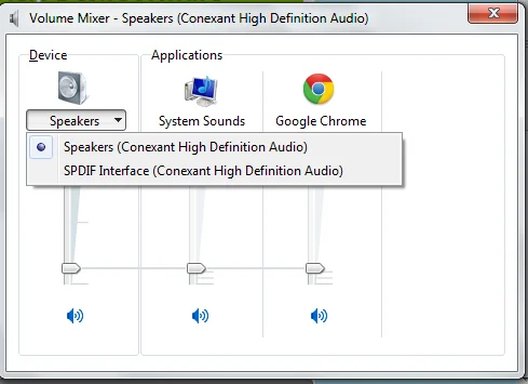
Solution Drew Jan 28, 2012 1. Look @ the Playback tab 2. > Speaker icon on Taskbar/Sys Tray, Rt. Click > Open Volume Mixer Drew
Drew Banned Joined Mar 25, 2006 Messages 3,574 Jan 28, 2012 #2 1. Look @ the Playback tab 2. > Speaker icon on Taskbar/Sys Tray, Rt. Click > Open Volume Mixer Drew Upvote 1 Downvote Solution
A aimpacc New Member Joined Oct 20, 2010 Messages 8 Jan 28, 2012 Thread Author #3 now what?.... Attachments sss.webp 15.2 KB · Views: 373 Upvote 0 Downvote
Drew Banned Joined Mar 25, 2006 Messages 3,574 Jan 28, 2012 #4 Maybe I'm not really catching on to what it is you seek but, I think it may be that you need a 'higher level'/more sophisticated sound card. Drew Upvote 0 Downvote
Maybe I'm not really catching on to what it is you seek but, I think it may be that you need a 'higher level'/more sophisticated sound card. Drew
A aimpacc New Member Joined Oct 20, 2010 Messages 8 Jan 28, 2012 Thread Author #5 i seek to record from stereo mix -_- Upvote 0 Downvote
R Roromax Well-Known Member Joined Mar 7, 2013 Messages 2 Mar 7, 2013 #6 Exactly the same problem here! Any clue? I can't find any suitable driver Upvote 0 Downvote