

I was locked out of Notepad by a Microsoft service error, and the experience revealed a larger problem: parts of Windows that used to be predictably local now depend on cloud services, accounts, and packaged app behavior in ways that surprise — and sometimes strand — users.
Notepad has been the archetypal "tiny, local" Windows app for decades: open it, type, save, done. That implicit guarantee — that an OS-provided utility will work the moment you need it, offline and without fuss — is part of what earns Windows users’ patience when other parts of the platform are messy.
Over the past year Microsoft has treated Notepad as a testbed for larger platform shifts: a modern Store-packaged Notepad now exposes Markdown-like formatting, table insertion, and streaming AI-assisted actions (Write, Rewrite, Summarize). Those new features make the app more useful for quick authoring and editing, but they also introduce dependencies: sign-in for AI actions, hardware gating for local model runs (Copilot+ certified devices), and an updated packaging model that can change which binary Windows launches when you type notepad.exe. The feature rollout for Notepad — introduced to Insiders as Notepad 11.2510.6.0 on November 21, 2025 — is explicit about these trade-offs.
That evolution is sensible in isolation: small tables and lightweight Markdown keep files portable; streaming AI reduces perceived latency for generative tasks; on-device Copilot+ inference protects some privacy-sensitive workflows. But the cumulative effect is a fragile surface where a Store licensing error, a Microsoft account glitch, or a staged rollout can stop an inbox app from opening the modern packaged version — and, in some configurations, can end up preventing the user from reaching the local fallback they relied on for years.
Whether the particular error was transient or local to a small set of sign-in states, the key point is structural: when the packaged app is the default path for a function and the Store licensing/entitlement layer is involved, a service glitch can interrupt basic productivity. That risk exists because modern inbox apps now run in two shapes: the classic system binary (C:\Windows\notepad.exe) and a Store/MSIX-packaged modern app that may register an app execution alias. Which one runs depends on alias registration and system settings, and when the packaged version fails, a naive user may see only a confusing "not available" message. Practical mechanics and mitigations for this behavior are well-documented by community and admin guidance.
The Notepad lockout exemplifies where the company can trip over its own ambitions. The OS should not surprise users by requiring online checks for the most basic utilities. Expectations are simple and durable: a PC should remain useful when offline, and inbox apps should be predictable. When that contract is broken — even briefly — trust degrades faster than any feature rollout can rebuild it.
The Notepad incident is a narrow failure of rollout and resilience, not a death knell for local computing. But it’s an important warning: as inbox apps accumulate cloud dependencies, platform designers must preserve the explicit offline, always‑available contract that made the PC the place to do work when and where you want to do it. If they do, Windows can evolve without turning into a thin client; if they don’t, frustrated users will find alternatives — and the goodwill Microsoft needs to maintain will erode faster than any AI feature can replace it.
Source: Windows Central If Windows can lock me out of Notepad, is Windows too reliant on the cloud?
 Background: why a simple text editor became a political fault line
Notepad has been the archetypal "tiny, local" Windows app for decades: open it, type, save, done. That implicit guarantee — that an OS-provided utility will work the moment you need it, offline and without fuss — is part of what earns Windows users’ patience when other parts of the platform are messy.Over the past year Microsoft has treated Notepad as a testbed for larger platform shifts: a modern Store-packaged Notepad now exposes Markdown-like formatting, table insertion, and streaming AI-assisted actions (Write, Rewrite, Summarize). Those new features make the app more useful for quick authoring and editing, but they also introduce dependencies: sign-in for AI actions, hardware gating for local model runs (Copilot+ certified devices), and an updated packaging model that can change which binary Windows launches when you type notepad.exe. The feature rollout for Notepad — introduced to Insiders as Notepad 11.2510.6.0 on November 21, 2025 — is explicit about these trade-offs.
That evolution is sensible in isolation: small tables and lightweight Markdown keep files portable; streaming AI reduces perceived latency for generative tasks; on-device Copilot+ inference protects some privacy-sensitive workflows. But the cumulative effect is a fragile surface where a Store licensing error, a Microsoft account glitch, or a staged rollout can stop an inbox app from opening the modern packaged version — and, in some configurations, can end up preventing the user from reaching the local fallback they relied on for years.
What happened: the lockout scenario explained
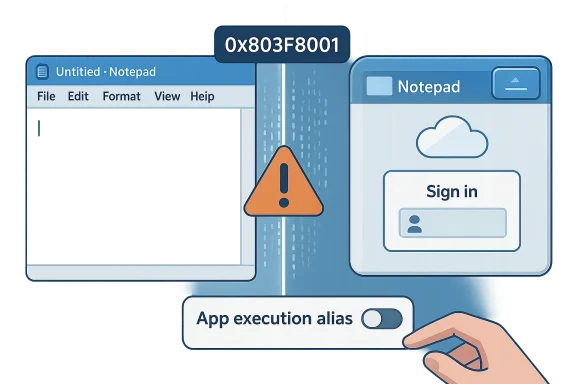
The root cause in the anecdote that started this conversation was an error coming from the Microsoft Store licensing/entitlement system (reported to users as 0x803f8001 in some cases). That error made Windows report certain first‑party Store-packaged inbox apps as "not available in your account" and blocked them from launching. The consequence: modern Notepad, Snipping Tool, and other packaged utilities failed to start — sometimes removing the simple "open a text file" escape hatch for diagnosing the problem in the first place.Whether the particular error was transient or local to a small set of sign-in states, the key point is structural: when the packaged app is the default path for a function and the Store licensing/entitlement layer is involved, a service glitch can interrupt basic productivity. That risk exists because modern inbox apps now run in two shapes: the classic system binary (C:\Windows\notepad.exe) and a Store/MSIX-packaged modern app that may register an app execution alias. Which one runs depends on alias registration and system settings, and when the packaged version fails, a naive user may see only a confusing "not available" message. Practical mechanics and mitigations for this behavior are well-documented by community and admin guidance.
Technical primer: how Notepad went from local binary to cloud‑aware app
The packaging and alias model
- Modern inbox apps are often delivered or updated via the Microsoft Store as MSIX/Appx packages. Those packages can register an App execution alias with the OS. When Windows resolves a call to notepad.exe, it may hand execution to the packaged app rather than the classic system binary.
- That alias behavior is reversible: users can disable the packaged app’s execution alias so Windows falls back to the on-disk binary at C:\Windows\notepad.exe or C:\Windows\System32\notepad.exe. This is the nondestructive, supported way to restore the deterministic, local Notepad behavior.
AI features, sign-in, and Copilot+ gating
- Notepad’s new Write/Rewrite/Summarize actions require signing in with a Microsoft account. When those flows call cloud services, text may transit Microsoft endpoints; on Copilot+ certified devices, local model inference can be used instead, changing the privacy equation.
- Microsoft has tied certain streaming behaviors and low-latency local inference to hardware certification (Copilot+), which may require an NPU baseline (reported in community threads as ~40 TOPS). That means the experience differs across hardware classes, creating a Copilot+/non-Copilot+ divide in feature parity and privacy characteristics.
Licensing, entitlements and subscription nuance
- Some AI operations in Microsoft’s ecosystem use an "AI credit" model or may be influenced by Microsoft 365 entitlements and subscription states. Reporting on what is free, what requires credits, and what is gated behind subscriptions has been mixed; independent analysis has flagged these areas as requiring careful verification. In short: the monetization model is still fluid and the user-visible entitlements are evolving.
Practical mitigations for users and administrators
If you care about having a deterministic, offline-capable Notepad experience, there are simple and supported ways to regain control. These are the steps you should know — and they work without deleting anything or relying on third‑party scripts.For individual users: fast recovery steps
- Open Settings → Apps → Advanced app settings → App execution aliases.
- Locate the entry for Notepad (or Notepad.exe) and toggle the packaged app’s alias to Off.
- Press Win + R, type notepad.exe, and hit Enter. Windows will resolve the command to the classic on-disk binary if it exists.
- If the classic binary is missing, restore it from Optional Features: Settings → System → Optional features → Add a feature (search for "Notepad (system)") or use DISM to reinstall. Log off and back on if the alias change doesn’t immediately take effect.
If you only dislike the AI prompts
- Open modern Notepad → Settings (gear icon) → find the AI/Copilot section → toggle off Rewrite/Summarize/Write, or sign out of the Microsoft account inside the app. This preserves the modern app while removing the cloud-backed features you don’t want.
For IT administrators: policy, inventory and governance
- Use the Notepad ADMX/Group Policy template field DisableAIFeaturesInNotepad to centrally disable AI features across managed fleets. Deploy via Group Policy or Intune and pilot the setting on a representative device matrix before broad rollout.
- Inventory devices for Copilot+ certification and NPUs. Map AI credit consumption and Microsoft 365 entitlements against device assignments to understand potential financial or governance impact.
- Perform a privacy impact assessment: determine which data classes should never transit cloud AI services and enforce appropriate policies (preventing AI use, requiring on-device inference where available, or using containerized VMs for sensitive text).
Strengths of Microsoft’s direction — why these changes exist
It’s important to acknowledge the legitimate benefits driving these choices. Microsoft’s additions are not random; they solve real problems for many users.- Low-friction authoring: Adding small tables and Markdown rendering to Notepad reduces context switches for common micro-tasks like README edits or quick notes. The Markdown-first design preserves portability and avoids proprietary formats.
- Progressive AI UX: Streaming responses and on-device inference (when available) make AI-assisted edits feel interactive and snappy. For users who rely on lightweight generative edits, that can be a real productivity boost.
- Staged, testable rollouts: Microsoft uses the Windows Insider pipeline to iterate on behavior and collect feedback before full GA, which can reduce large-scale regressions if managed correctly.
Risks and hard trade‑offs Microsoft and users must address
The Notepad incident is a useful microcosm for a list of platform-level risks that accumulate when cloud, accounts, and packaged apps become the default shape of inbox functionality.- Perceived loss of ownership: When a user builds a PC and expects local control, the experience of a core utility being unavailable because of a license or sign-in check creates cognitive dissonance. It feeds the "thin client" narrative: the PC as a terminal to remote services rather than a machine you own.
- Fragmentation and support complexity: Copilot+ hardware gating and staged rollouts produce inconsistent behavior across a fleet. IT teams now need matrixed documentation for Copilot+, non-Copilot+, signed-in, signed-out, and alias-toggled states — a burden on support and training.
- Monetization creep and entitlements confusion: If certain features consume AI credits or require Microsoft 365 entitlements, users and admins will face surprise bills or behavior changes. Reports on exactly which flows are free versus paid have been mixed and flagged for verification; Microsoft should clarify entitlements in plain language.
- Single point-of-failure of service-linked features: Store licensing services, account authentication endpoints, or entitlement checks are now single points-of-failure for certain in-box behaviors. A transient server glitch or certificate problem should not stop you from opening a text editor. Real-world incidents prove this is a credible risk. (The anecdotal error discussed earlier is one such example.)
- Privacy and compliance hazards: Cloud-assisted flows can expose snippets to remote models. On-device inference is a mitigation but only if available and respected; otherwise organizations handling regulated data will need to lock down or disable AI features.
What Microsoft should do (practical, non‑ideological recommendations)
If Microsoft truly wants to modernize Windows while preserving user trust, here are actionable steps the company can take — they’re small, concrete, and would materially reduce surprise and risk.- Guarantee an offline baseline: ship and document an unambiguous, always-local fallback for every inbox function that historically worked offline. Make that fallback discoverable and easy to enable. The App execution alias toggle is a start; normalize it with clearer UI prompts and an "Always use local version" setting.
- Publish clear entitlement documentation: which Notepad features need sign-in, which consume credits, and which are free. Put this in a short, non-legal FAQ and surface it in the app’s settings. Flag subscription gating that’s still evolving as "subject to change" rather than letting users discover it accidentally.
- Expand enterprise control surfaces: admins want one-click ways to disable AI flows, prevent sign-in prompts, and whitelist on-device inference. ADMX templates are good — extend them where needed and make group policy defaults conservative.
- Improve fault tolerance: where an entitlement or license check is required, fail open for core app launch (not for gated features). In practice this means allow the app to start in a degraded local mode and only block specific AI flows until entitlement checks succeed. That prevents a server-side problem from taking down essential functionality.
- Be transparent about telemetry and retention for AI flows: list what’s sent, how long it’s kept, and what controls users and admins have to opt out. That’s essential for privacy and compliance trust-building.
What users should do now (practical checklist)
- If you value deterministic local behavior: disable the Notepad packaged app alias and pin the system notepad.exe shortcut. This is reversible and supported.
- If you manage many machines: test the Notepad ADMX and deploy DisableAIFeaturesInNotepad in controlled rings before wide deployment.
- For privacy-sensitive work: assume cloud AI may be used unless on-device Copilot+ is explicitly enabled and certified on your device. Do not paste confidential data into any AI flow without confirming data handling policies.
- Want to avoid change entirely? Keep a lightweight third-party editor (Notepad++, Sublime, VS Code with a lean profile) available in your toolkit. That’s the pragmatic choice for users who prefer control over convenience.
Bigger picture: is this the thin client era?
The short answer is: not yet — but the direction matters. Microsoft’s platform strategy pushes value to cloud services and AI, and that strategy brings clear benefits: better productivity features, unified models, and new capabilities. But platform decisions become problems when they change user expectations without consultation.The Notepad lockout exemplifies where the company can trip over its own ambitions. The OS should not surprise users by requiring online checks for the most basic utilities. Expectations are simple and durable: a PC should remain useful when offline, and inbox apps should be predictable. When that contract is broken — even briefly — trust degrades faster than any feature rollout can rebuild it.
Conclusion: how to keep the benefits without losing the guarantee
Microsoft can have both worlds: modern productivity in the cloud and a dependable, local-first baseline for essential workflows. Achieving that balance requires modest design discipline:- keep the baseline local and discoverable,
- gate advanced features clearly and optionally,
- and make enterprise controls and entitlement boundaries explicit.
The Notepad incident is a narrow failure of rollout and resilience, not a death knell for local computing. But it’s an important warning: as inbox apps accumulate cloud dependencies, platform designers must preserve the explicit offline, always‑available contract that made the PC the place to do work when and where you want to do it. If they do, Windows can evolve without turning into a thin client; if they don’t, frustrated users will find alternatives — and the goodwill Microsoft needs to maintain will erode faster than any AI feature can replace it.
Source: Windows Central If Windows can lock me out of Notepad, is Windows too reliant on the cloud?
