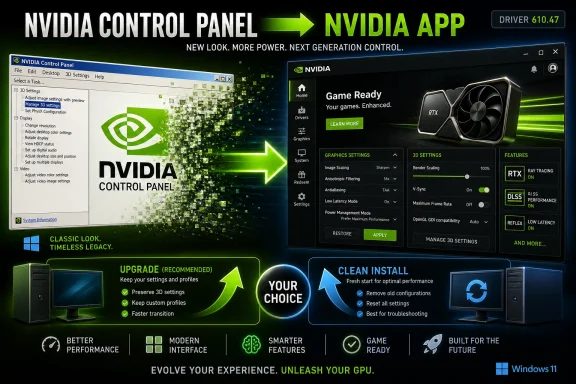
Nvidia is removing the classic Nvidia Control Panel from default GeForce Game Ready and Studio driver installs starting with driver version 610.47, released in late May 2026, after roughly 20 years as the familiar Windows utility for managing GPU settings. The old panel is not being ripped off existing systems during a normal upgrade, but a clean install will leave users in the newer Nvidia app instead. That distinction matters because this is less a sudden deletion than a forced migration: Nvidia has decided the future of GeForce configuration belongs in one modern client, not in a Windows XP-era settings relic.
The Nvidia Control Panel survived long enough to become part of the furniture. It was never beautiful, rarely fast, and only occasionally friendly, but it did one thing that matters in PC land: it stayed put. While launchers, overlays, account systems, telemetry toggles, game optimizers, and brand refreshes came and went, the old Control Panel remained the place where users could force V-Sync, tune 3D settings, adjust displays, and recover from whatever a game or monitor had decided to do that week.
That is why its retirement lands with more force than its feature list suggests. Nvidia says all actively supported Control Panel features for GeForce users have been “modernized and transitioned” into the Nvidia app. The company’s pitch is predictable: the new app is faster, more efficient, and more capable, with driver updates, game settings, overlay tools, DLSS controls, and newer RTX-era functionality in one place.
But utility software is judged differently from showcase software. Users do not become attached to a control panel because it delights them. They become attached because, after enough failed launches and half-loaded overlays, the boring old thing still opens.
That consolidation makes sense from Nvidia’s side of the screen. Maintaining two separate interfaces for overlapping GPU configuration is expensive, confusing, and strategically awkward. The newer app is where Nvidia can surface DLSS overrides, RTX features, driver updates, performance tools, and per-game settings in a way that maps to how it now sells graphics cards: not as rasterization appliances, but as AI-accelerated platforms.
The old Control Panel was built for a different Nvidia. Its design language belongs to the era when SLI bridges, DVI ports, Windows XP themes, and driver-level antialiasing overrides were central to enthusiast culture. The modern Nvidia app belongs to an era of DLSS models, frame generation, Reflex, broadcast filters, game profiles, and GPU features that are increasingly updated like services rather than static driver checkboxes.
That shift is not cosmetic. It reflects the way Nvidia wants users to think about their GPUs. A GeForce card is no longer just hardware plus a driver; it is a managed software ecosystem with features that change over time.
That creates a slow retirement instead of an instant disappearance. Power users who have carried the Control Panel forward for years may not notice anything immediately. New builds, fresh Windows installs, DDU cleanups, and troubleshooting-driven reinstallations are where the change becomes visible.
For Windows enthusiasts, that distinction will be familiar. The PC ecosystem often buries major transitions inside installer behavior. A normal upgrade preserves legacy assumptions; a clean install reveals the vendor’s intended future.
Nvidia is also keeping the old Control Panel available through the Microsoft Store for now. That is a release valve, but not a reprieve. The company says it will not add new features, fixes, or other changes to the classic utility, which means it has effectively entered maintenance retirement without the maintenance.
It also gives Nvidia a cleaner path for features that the old panel was never built to expose elegantly. DLSS overrides are a good example. Users can apply newer upscaling models to games that shipped with older DLSS implementations, which makes sense in an app that treats game profiles as living configuration objects rather than dusty registry-backed settings.
Still, this is where the skepticism from longtime Windows users comes from. A modern app can be more capable and still feel less trustworthy if it is heavier, more network-aware, more promotional, or more tightly bound to a vendor’s preferred workflow. Control panels are expected to be dull. Apps are expected to engage, notify, recommend, optimize, and occasionally get in the way.
That tension is not unique to Nvidia. Microsoft has spent years moving Windows settings from Control Panel into the Settings app, often improving presentation while frustrating administrators who know exactly where the old switch used to be. The problem is not modernization itself. The problem is that modernization often arrives carrying product strategy in one hand and user convenience in the other.
That last point deserves attention. If two machines on the same driver branch behave differently because one preserved the legacy panel and the other did not, help desks will need to account for it. Documentation, golden images, and troubleshooting scripts may need updating. Even if the technical feature parity is real, the visible interface change can generate tickets.
There is also the Microsoft Store angle. Making the legacy Control Panel available separately through the Store is convenient for consumer machines, but less elegant in locked-down enterprise or lab environments where Store access is disabled, restricted, or managed. Nvidia’s professional GPU line appears to have a longer runway for Control Panel support while remaining professional features are migrated, but GeForce systems in mixed environments may still feel the cutover first.
The irony is that a unified app can reduce complexity in the long run while increasing it during the transition. That is the usual tax of deprecating legacy tools: the vendor gets a cleaner stack, and administrators get a temporary period where every support answer begins with “it depends how the driver was installed.”
That matters because many PC users have developed a defensive relationship with vendor software. Motherboard utilities, RGB suites, laptop control centers, peripheral hubs, and GPU apps often promise convenience while adding services, startup tasks, update nags, and background processes. In that landscape, an ancient settings panel can feel almost virtuous.
Nvidia’s challenge is not merely to move checkboxes into a new interface. It is to convince users that the new app will not become another branded layer between them and their hardware. The company has improved its software story, and the Nvidia app is a more coherent product than the old GeForce Experience plus Control Panel split. But trust in PC utilities is earned by being boring at the right moments.
For enthusiasts, the old panel’s death is another reminder that the Windows desktop is being steadily tidied into app-shaped experiences. Sometimes that is overdue. Sometimes it erases the rough but reliable tools that made PC ownership feel controllable.
Driver software has also become part of the product cadence. A new Game Ready driver is not just a compatibility bundle; it is a delivery mechanism for profiles, fixes, performance changes, and feature exposure. The Nvidia app lets the company put that cadence in front of users more directly.
This is good product management and slightly uncomfortable platform politics at the same time. The more functionality moves into a vendor hub, the more the user’s relationship with the hardware is mediated by that hub. For many gamers, that will be fine, even welcome. For tinkerers and administrators, it raises the usual questions about offline behavior, minimal installs, account independence, service footprint, and long-term stability.
Nvidia can answer those questions by making the app fast, optional where it should be optional, transparent about what it runs, and respectful of users who only want settings. The company does not need to preserve the old Control Panel forever. It does need to avoid teaching users that the replacement is something to work around.
That is the logic behind ending feature and fix updates for the legacy panel. Keeping two interfaces alive would slow Nvidia down and confuse users about which settings matter. At some point, a company has to stop letting the old tool define the boundaries of the new platform.
The risk is that PC users remember previous transitions too well. They remember when “modern” meant fewer options. They remember when “simplified” meant harder to troubleshoot. They remember when a vendor app became mandatory in all but name because the useful settings slowly stopped appearing anywhere else.
Nvidia’s move will be judged less by this week’s release notes than by the next year of edge cases. If the Nvidia app opens quickly, preserves advanced controls, behaves well without nagging, and remains dependable during driver failures, the Control Panel will become a fond memory. If not, its absence will become a recurring complaint every time a user needs one obscure setting and cannot find it.
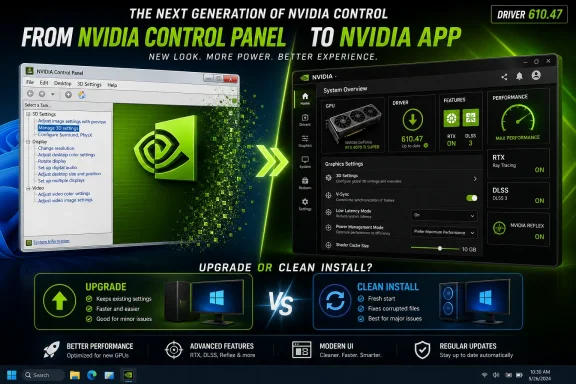 Nvidia Finally Retires the Utility Everyone Forgot Was Holding the Line
The Nvidia Control Panel survived long enough to become part of the furniture. It was never beautiful, rarely fast, and only occasionally friendly, but it did one thing that matters in PC land: it stayed put. While launchers, overlays, account systems, telemetry toggles, game optimizers, and brand refreshes came and went, the old Control Panel remained the place where users could force V-Sync, tune 3D settings, adjust displays, and recover from whatever a game or monitor had decided to do that week.That is why its retirement lands with more force than its feature list suggests. Nvidia says all actively supported Control Panel features for GeForce users have been “modernized and transitioned” into the Nvidia app. The company’s pitch is predictable: the new app is faster, more efficient, and more capable, with driver updates, game settings, overlay tools, DLSS controls, and newer RTX-era functionality in one place.
But utility software is judged differently from showcase software. Users do not become attached to a control panel because it delights them. They become attached because, after enough failed launches and half-loaded overlays, the boring old thing still opens.
The New Nvidia App Is Not Just a Replacement, It Is a Consolidation Play
Nvidia’s move is part of a larger clean-up of its Windows software stack. For years, GeForce users lived with a strange split: core driver and display settings lived in the Nvidia Control Panel, while game optimization, recording, overlays, and driver notifications lived in GeForce Experience. Then Nvidia began replacing GeForce Experience with the simply named Nvidia app, a modernized hub meant to collapse the company’s consumer GPU software into a single front door.That consolidation makes sense from Nvidia’s side of the screen. Maintaining two separate interfaces for overlapping GPU configuration is expensive, confusing, and strategically awkward. The newer app is where Nvidia can surface DLSS overrides, RTX features, driver updates, performance tools, and per-game settings in a way that maps to how it now sells graphics cards: not as rasterization appliances, but as AI-accelerated platforms.
The old Control Panel was built for a different Nvidia. Its design language belongs to the era when SLI bridges, DVI ports, Windows XP themes, and driver-level antialiasing overrides were central to enthusiast culture. The modern Nvidia app belongs to an era of DLSS models, frame generation, Reflex, broadcast filters, game profiles, and GPU features that are increasingly updated like services rather than static driver checkboxes.
That shift is not cosmetic. It reflects the way Nvidia wants users to think about their GPUs. A GeForce card is no longer just hardware plus a driver; it is a managed software ecosystem with features that change over time.
The Clean Install Caveat Is Where the Real Migration Happens
The most important practical detail is also the least dramatic one: existing installations of the Nvidia Control Panel will remain in place unless users perform a clean installation. If a system already has the old panel and the user installs driver 610.47 as a normal upgrade, the app should remain available. If the user wipes the previous Nvidia software during installation, the classic panel will not come back by default.That creates a slow retirement instead of an instant disappearance. Power users who have carried the Control Panel forward for years may not notice anything immediately. New builds, fresh Windows installs, DDU cleanups, and troubleshooting-driven reinstallations are where the change becomes visible.
For Windows enthusiasts, that distinction will be familiar. The PC ecosystem often buries major transitions inside installer behavior. A normal upgrade preserves legacy assumptions; a clean install reveals the vendor’s intended future.
Nvidia is also keeping the old Control Panel available through the Microsoft Store for now. That is a release valve, but not a reprieve. The company says it will not add new features, fixes, or other changes to the classic utility, which means it has effectively entered maintenance retirement without the maintenance.
A Better App Can Still Be a Worse Escape Hatch
There is a strong argument that the Nvidia app is, in ordinary use, a better home for most users. The Control Panel was dense, slow to evolve, and often indifferent to how people actually used gaming PCs in the 2020s. The newer app can combine driver installation, game profiles, overlay controls, performance monitoring, and modern RTX settings in a single interface.It also gives Nvidia a cleaner path for features that the old panel was never built to expose elegantly. DLSS overrides are a good example. Users can apply newer upscaling models to games that shipped with older DLSS implementations, which makes sense in an app that treats game profiles as living configuration objects rather than dusty registry-backed settings.
Still, this is where the skepticism from longtime Windows users comes from. A modern app can be more capable and still feel less trustworthy if it is heavier, more network-aware, more promotional, or more tightly bound to a vendor’s preferred workflow. Control panels are expected to be dull. Apps are expected to engage, notify, recommend, optimize, and occasionally get in the way.
That tension is not unique to Nvidia. Microsoft has spent years moving Windows settings from Control Panel into the Settings app, often improving presentation while frustrating administrators who know exactly where the old switch used to be. The problem is not modernization itself. The problem is that modernization often arrives carrying product strategy in one hand and user convenience in the other.
Sysadmins Will Care Less About Nostalgia Than Predictability
For managed environments, the old Nvidia Control Panel’s retirement is not primarily a sentimental event. It is a packaging and workflow event. IT teams care whether settings remain scriptable, whether user-facing controls can be restricted, whether Store dependencies complicate deployment, and whether clean installs produce a different software surface than in-place updates.That last point deserves attention. If two machines on the same driver branch behave differently because one preserved the legacy panel and the other did not, help desks will need to account for it. Documentation, golden images, and troubleshooting scripts may need updating. Even if the technical feature parity is real, the visible interface change can generate tickets.
There is also the Microsoft Store angle. Making the legacy Control Panel available separately through the Store is convenient for consumer machines, but less elegant in locked-down enterprise or lab environments where Store access is disabled, restricted, or managed. Nvidia’s professional GPU line appears to have a longer runway for Control Panel support while remaining professional features are migrated, but GeForce systems in mixed environments may still feel the cutover first.
The irony is that a unified app can reduce complexity in the long run while increasing it during the transition. That is the usual tax of deprecating legacy tools: the vendor gets a cleaner stack, and administrators get a temporary period where every support answer begins with “it depends how the driver was installed.”
The Windows XP Look Was a Feature, Not Just a Fossil
The Control Panel looked old because it was old, but that was part of its appeal. Its rotating green Nvidia logo and tree-view settings hierarchy belonged to a Windows era when vendor utilities were ugly, direct, and local. They exposed settings without asking to become a destination.That matters because many PC users have developed a defensive relationship with vendor software. Motherboard utilities, RGB suites, laptop control centers, peripheral hubs, and GPU apps often promise convenience while adding services, startup tasks, update nags, and background processes. In that landscape, an ancient settings panel can feel almost virtuous.
Nvidia’s challenge is not merely to move checkboxes into a new interface. It is to convince users that the new app will not become another branded layer between them and their hardware. The company has improved its software story, and the Nvidia app is a more coherent product than the old GeForce Experience plus Control Panel split. But trust in PC utilities is earned by being boring at the right moments.
For enthusiasts, the old panel’s death is another reminder that the Windows desktop is being steadily tidied into app-shaped experiences. Sometimes that is overdue. Sometimes it erases the rough but reliable tools that made PC ownership feel controllable.
Nvidia Is Choosing the Future Its Hardware Already Implied
The timing is not accidental. Nvidia’s consumer GPU story now revolves around features that are difficult to explain through a 2006 settings interface. RTX cards are sold on AI-assisted rendering, low-latency pipelines, upscaling models, content tools, and game-specific integrations. A static control panel is a poor storefront for a moving target.Driver software has also become part of the product cadence. A new Game Ready driver is not just a compatibility bundle; it is a delivery mechanism for profiles, fixes, performance changes, and feature exposure. The Nvidia app lets the company put that cadence in front of users more directly.
This is good product management and slightly uncomfortable platform politics at the same time. The more functionality moves into a vendor hub, the more the user’s relationship with the hardware is mediated by that hub. For many gamers, that will be fine, even welcome. For tinkerers and administrators, it raises the usual questions about offline behavior, minimal installs, account independence, service footprint, and long-term stability.
Nvidia can answer those questions by making the app fast, optional where it should be optional, transparent about what it runs, and respectful of users who only want settings. The company does not need to preserve the old Control Panel forever. It does need to avoid teaching users that the replacement is something to work around.
The Driver Package Becomes the Policy Statement
Version 610.47 is not just another driver release with game support and bug fixes. It is a policy statement about where Nvidia thinks control belongs. The driver installs the foundation, but the app becomes the interface, the updater, the profile manager, and the place where new consumer-facing GPU features are expected to appear.That is the logic behind ending feature and fix updates for the legacy panel. Keeping two interfaces alive would slow Nvidia down and confuse users about which settings matter. At some point, a company has to stop letting the old tool define the boundaries of the new platform.
The risk is that PC users remember previous transitions too well. They remember when “modern” meant fewer options. They remember when “simplified” meant harder to troubleshoot. They remember when a vendor app became mandatory in all but name because the useful settings slowly stopped appearing anywhere else.
Nvidia’s move will be judged less by this week’s release notes than by the next year of edge cases. If the Nvidia app opens quickly, preserves advanced controls, behaves well without nagging, and remains dependable during driver failures, the Control Panel will become a fond memory. If not, its absence will become a recurring complaint every time a user needs one obscure setting and cannot find it.
The Green Logo Leaves Behind a Very Practical Checklist
The Control Panel’s retirement is not a crisis, but it is a meaningful transition for anyone who maintains Windows gaming rigs, lab machines, creator workstations, or family PCs with GeForce hardware. The safest reading is simple: Nvidia has not deleted the past overnight, but it has stopped investing in it.- Driver 610.47 is the cutover point where the classic Nvidia Control Panel stops being installed by default for GeForce Game Ready and Studio driver users.
- Existing Control Panel installations should remain after a normal driver upgrade, but a clean install changes the expected software layout.
- Users who still need the legacy panel can obtain it separately from the Microsoft Store for now, but Nvidia says it will not receive new features or fixes.
- The Nvidia app is now the strategic home for modern GeForce settings, including newer RTX and DLSS-related controls.
- Administrators and power users should update deployment notes and troubleshooting habits because machines may differ depending on install history.
- The real test is not whether the new app has feature parity on paper, but whether it behaves like a dependable control surface when something goes wrong.
References
- Primary source: Ars Technica
Published: Wed, 27 May 2026 15:06:01 GMT
Nvidia kills Windows XP-era Control Panel "after 20 years of dedicated service" - Ars Technica
Nvidia says the Control Panel's features have been migrated to the Nvidia app.arstechnica.com - Related coverage: tomshardware.com
Nvidia is finally ditching its iconic GPU Control Panel after 20 years — new driver updates only ship in the Nvidia App | Tom's Hardware
The Nvidia Control Panel will no longer have features added to it, but it will still be available for download from the Microsoft Store.www.tomshardware.com - Related coverage: en.gamegpu.com
NVIDIA Control Panel has been removed from the new NVIDIA GeForce 610.47 drivers.
NVIDIA has officially discontinued support for the classic control panel. Control Panel with the release of driver 610.47, completely transferring its functions to the NVIDIA App.en.gamegpu.com - Related coverage: technetbooks.com
NVIDIA Control Panel Retires After 20 Years of Service in Latest Driver Release | Technetbook
NVIDIA officially retires the classic Control Panel after 20 years, transitioning all GeForce settings to the modern NVIDIA App.www.technetbooks.com
- Related coverage: techtimes.com
After 20 Years, Nvidia Officially Retires the Legendary Nvidia Control Panel With New Driver Update
Nvidia retires the Nvidia Control Panel after 20 years, shifting Nvidia GPU settings into the Nvidia app with GeForce GRD 610.47.www.techtimes.com - Related coverage: pcgamesn.com
Nvidia just killed Control Panel, ending 20 years of its driver interface - PCGamesN
All good things come to an end, and that time has come for the classic Nvidia Control Panel, with Nvidia App replacing the old interface.www.pcgamesn.com
- Related coverage: unwire.hk
NVIDIA Control Panel 服務逾 20 年正式退役 驅動程式不再支援 用家要改用 NVIDIA App
NVIDIA 於 2026 年 5 月 26 日宣告,服務玩家超過 20 年的 NVIDIA Control Panel 正式退役。Game Ready 及 Studio 驅動程式不再支援此介面,建議用戶全面遷移至 NVIDIA App。unwire.hk - Related coverage: heise.de
Nvidia: GeForce Control Panel discontinued after 20 years | heise online
With driver 610.47, Nvidia is ending the era of the GeForce Control Panel – more or less. All important functions have moved to the Nvidia App. www.heise.de
- Related coverage: hothardware.com
NVIDIA’s Classic Control Panel Hits EOL After 20 Years, Settings Shift To Modern App | HotHardware
NVIDIA is retiring its classic Control Panel after two decades and moving the same GPUs settings into the official NVIDIA app, the company confirmed.hothardware.com
- Related coverage: clubic.com
Panneau de contrôle NVIDIA : fin de support après 20 ans
NVIDIA met fin au support du panneau de contrôle avec les pilotes 610.47 WHQL. Après 20 ans, tous les utilisateurs devront migrer vers la NVIDIA App. www.clubic.com
- Related coverage: nvidia.com
- Related coverage: docs.nvidia.com
- Related coverage: schneider-digital.com
NVIDIA RTX Enterprise Drivers
For NVIDIA RTX, Quadro, Quadro Notebook, NVS, and Data Center GPUswww.schneider-digital.com