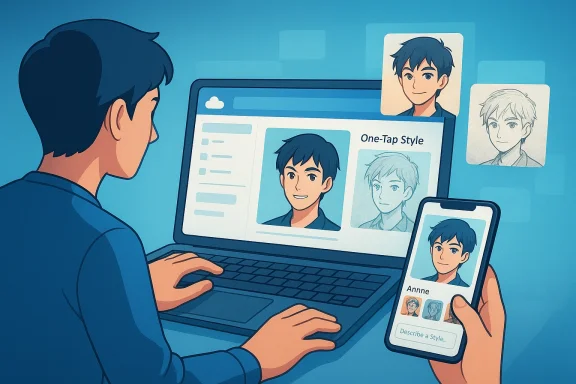
Microsoft is quietly pushing generative AI deeper into OneDrive, but the newest photo feature arrives with a notable branding twist: it’s called AI Restyle rather than Copilot. That small naming choice says a lot about where Microsoft’s consumer AI strategy is heading in 2026. The tool lets users transform photos into anime, sketch, cinematic, and other visual styles while trying to preserve the original subject, and it is rolling out across iOS, Android, and the web for Microsoft 365 Premium subscribers.
The headline feature is straightforward enough: AI Restyle takes a personal photo and reinterprets it in a new artistic style without obliterating the identity of the people or places in the image. Microsoft’s own pitch emphasizes that the subject remains unmistakably yours, which is important because image-generation tools often drift away from the original composition when asked to make something “more anime” or “more cinematic.” That preservation-first approach makes the feature feel less like a blank-canvas generator and more like a controlled transformation tool.
What makes this announcement interesting is not just the effect itself, but the placement. OneDrive is not the place most people expect to find a playful image remix tool, yet that is precisely where Microsoft is embedding it. The company has been steadily turning OneDrive into a more active layer of the Microsoft 365 experience, rather than just a file bucket, and AI Restyle extends that logic from productivity into personal media.
The absence of the Copilot brand is equally revealing. For much of the last two years, Microsoft attached Copilot to nearly every AI-facing feature it could reasonably touch, sometimes to the point that branding felt louder than product design. Now the company seems more selective, and AI Restyle suggests a willingness to let certain features stand on their own when the job is more about utility or creativity than chat. That is a subtle but meaningful course correction.
Microsoft says AI Restyle is arriving with a rotating set of one-tap styles, and users can also refine results with optional prompts. That combination matters because it lowers friction for casual users while leaving room for more deliberate editing. In other words, this is not a pro-grade creative suite feature; it is a mass-market consumption feature designed to produce fun, shareable results quickly.
At the same time, Microsoft has had to contend with a growing perception that its AI branding was becoming cluttered. The company has previously used Copilot as a universal label for very different experiences, from chat to document analysis to image generation. That strategy created consistency, but it also created fatigue, especially when the feature in question didn’t actually feel like a conversational assistant. AI Restyle may be an early sign that Microsoft understands that distinction better now.
There is also a clear product lineage here. Microsoft has already offered image restyling concepts through other surfaces, including Microsoft Designer and Windows-linked creative tools, where users could transform photos into stylized interpretations. The OneDrive version appears to be a streamlined adaptation of that idea, optimized for mobile and cloud-first consumption rather than full creative editing. This is classic Microsoft platform behavior: develop a capability, then distribute it into adjacent surfaces where engagement is already high.
The service also benefits from a wider distribution footprint than many standalone AI tools. Since AI Restyle is available on iOS, Android, and the web, Microsoft can reach users where their photo libraries already live. That cross-platform presence is vital for consumer AI adoption, because the winning product is often the one that removes the most steps between a camera roll and a result.
Microsoft says the tool is designed to preserve the original subject, which directly addresses a common complaint with generative image tools: the result looks great, but it no longer resembles the actual person or scene. For personal photos, that is a deal-breaker. A child’s face, a vacation backdrop, or a pet’s posture are not optional details; they are the whole point.
The styles mentioned so far include anime, sketch, and cinematic variants, but Microsoft also says the list will rotate and expand over time. That makes the feature feel less like a one-time novelty and more like a lightweight creative engine with regular refreshes. In consumer software, that kind of rotation can be valuable because it gives people a reason to check back even when they are not actively hunting for a new app.
That said, preservation is a relative term. Maintaining the original subject does not guarantee that every detail remains accurate or flattering, and users should expect some stylization artifacts. But for a mainstream audience, the tradeoff is likely acceptable as long as the face, body, and composition stay recognizable.
There is also a practical reason for the shift. When everything is Copilot, nothing stands out. A feature called AI Restyle tells users what it does immediately, which is often more useful than a generic branded noun. This is especially true in a product like OneDrive, where users are scanning for specific file and media actions rather than looking for a chatbot personality.
Microsoft has not abandoned Copilot by any means. The brand still anchors many consumer and commercial AI efforts, including more advanced services and subscription plans. But AI Restyle suggests that Microsoft is beginning to separate product identity from AI infrastructure, which is probably healthier in the long run.
Consumers are also more likely to trust a feature when the name describes the function. If users open OneDrive and see AI Restyle, they immediately understand the use case. If they see Copilot, they may expect a chat assistant, a document explainer, or a workflow agent instead, which creates friction.
The subscription context matters because AI features are increasingly being used as retention tools. Microsoft wants users to see enough incremental value in the premium tier that the monthly fee feels justified, and image transformation features help with that calculus because they are easy to demo and easy to understand. The feature may not be used daily, but it can still be a decisive selling point at renewal time.
There is also a distribution wrinkle: even eligible subscribers may not see the feature immediately. Microsoft says rollout is gradual and depends on region, which means access will likely be uneven for a while. That’s typical for Microsoft, but it also creates a perception gap where some users think a feature exists broadly when in fact it is still in controlled release.
For Microsoft, the benefit is clear: premium AI features increase the attractiveness of the subscription bundle. The risk is that too many features become examples of nice-to-have rather than must-have, which can weaken the narrative around value. Microsoft will need to keep proving that its AI services are useful beyond novelty.
That integration matters because the battle is no longer just about model quality. It is about how many steps a user must take before a photo becomes something shareable. Microsoft’s advantage is distribution: OneDrive is already a default destination for many Windows users, and extending creative features into it creates a tighter ecosystem loop.
The competitive question is whether rivals can match that convenience without copying the exact bundle. Google can integrate into Photos, Apple can lean into its device and library workflow, and Adobe can preserve its reputation among creators. But Microsoft’s strength is its cross-device enterprise-to-consumer reach, which gives it a unique shot at normalizing AI editing as a routine cloud action rather than a specialist creative task.
Microsoft also risks provoking the market into asking a harder question: why does a storage service need generative AI at all? The answer is that the modern cloud suite is no longer just about storage; it is about action. If Microsoft can keep making that case credibly, the competitive move will look smart instead of gimmicky.
For enterprise users, the direct relevance is smaller, but the indirect signal is important. Microsoft is still training users to accept AI inside familiar products, and that normalization can spill into workplace tools over time. The same brand trust, interface familiarity, and model confidence that make AI Restyle easy to try can also make more serious Copilot features feel less intimidating.
There is a strategic distinction here between productive AI and expressive AI. Productive AI aims to save time and reduce effort. Expressive AI aims to delight, personalize, and encourage exploration. Microsoft is now clearly investing in both, and OneDrive is a smart place to test the emotional side of that equation.
The company also has a messaging challenge. It has to keep explaining why some AI tools are Copilot-branded while others are not, without making the whole ecosystem feel fragmented. If Microsoft gets that balance right, AI Restyle could become a model for how the company introduces lighter, more playful AI experiences without overloading the Copilot identity.
Source: Windows Central https://www.windowscentral.com/soft...ive-ai-photo-tool-and-it-isnt-called-copilot/
 Overview
The headline feature is straightforward enough: AI Restyle takes a personal photo and reinterprets it in a new artistic style without obliterating the identity of the people or places in the image. Microsoft’s own pitch emphasizes that the subject remains unmistakably yours, which is important because image-generation tools often drift away from the original composition when asked to make something “more anime” or “more cinematic.” That preservation-first approach makes the feature feel less like a blank-canvas generator and more like a controlled transformation tool.What makes this announcement interesting is not just the effect itself, but the placement. OneDrive is not the place most people expect to find a playful image remix tool, yet that is precisely where Microsoft is embedding it. The company has been steadily turning OneDrive into a more active layer of the Microsoft 365 experience, rather than just a file bucket, and AI Restyle extends that logic from productivity into personal media.
The absence of the Copilot brand is equally revealing. For much of the last two years, Microsoft attached Copilot to nearly every AI-facing feature it could reasonably touch, sometimes to the point that branding felt louder than product design. Now the company seems more selective, and AI Restyle suggests a willingness to let certain features stand on their own when the job is more about utility or creativity than chat. That is a subtle but meaningful course correction.
Microsoft says AI Restyle is arriving with a rotating set of one-tap styles, and users can also refine results with optional prompts. That combination matters because it lowers friction for casual users while leaving room for more deliberate editing. In other words, this is not a pro-grade creative suite feature; it is a mass-market consumption feature designed to produce fun, shareable results quickly.
Background
To understand why this matters, it helps to look back at Microsoft’s AI trajectory. In early 2024, the company introduced Copilot Pro and pushed Copilot deeper into Microsoft 365, signaling that AI would be treated as a premium layer across consumer subscriptions and productivity software. That effort accelerated through 2025, when Microsoft folded more features into a broader consumer AI story and kept expanding the footprint of image generation, summarization, and assistance across products.At the same time, Microsoft has had to contend with a growing perception that its AI branding was becoming cluttered. The company has previously used Copilot as a universal label for very different experiences, from chat to document analysis to image generation. That strategy created consistency, but it also created fatigue, especially when the feature in question didn’t actually feel like a conversational assistant. AI Restyle may be an early sign that Microsoft understands that distinction better now.
There is also a clear product lineage here. Microsoft has already offered image restyling concepts through other surfaces, including Microsoft Designer and Windows-linked creative tools, where users could transform photos into stylized interpretations. The OneDrive version appears to be a streamlined adaptation of that idea, optimized for mobile and cloud-first consumption rather than full creative editing. This is classic Microsoft platform behavior: develop a capability, then distribute it into adjacent surfaces where engagement is already high.
Why OneDrive is the right container
OneDrive is increasingly the shared memory layer of Microsoft’s consumer ecosystem. Photos, documents, and personal media already flow through it, so adding a style-transformation feature is a logical extension rather than a random bolt-on. If Microsoft can keep users inside OneDrive for the act of viewing, organizing, and now remixing their memories, it increases the service’s strategic value without requiring a totally new app.The service also benefits from a wider distribution footprint than many standalone AI tools. Since AI Restyle is available on iOS, Android, and the web, Microsoft can reach users where their photo libraries already live. That cross-platform presence is vital for consumer AI adoption, because the winning product is often the one that removes the most steps between a camera roll and a result.
What AI Restyle Actually Does
AI Restyle is not trying to make users into prompt engineers. The feature appears to be built around preselected styles that can be applied with a tap, with optional prompts for extra control. That combination is important because it puts the visual output ahead of the language interaction, which is exactly how many people want consumer AI to behave when they are editing family photos or social posts.Microsoft says the tool is designed to preserve the original subject, which directly addresses a common complaint with generative image tools: the result looks great, but it no longer resembles the actual person or scene. For personal photos, that is a deal-breaker. A child’s face, a vacation backdrop, or a pet’s posture are not optional details; they are the whole point.
The styles mentioned so far include anime, sketch, and cinematic variants, but Microsoft also says the list will rotate and expand over time. That makes the feature feel less like a one-time novelty and more like a lightweight creative engine with regular refreshes. In consumer software, that kind of rotation can be valuable because it gives people a reason to check back even when they are not actively hunting for a new app.
Preservation over invention
The most important design choice is the focus on fidelity. Unlike pure text-to-image generation, AI Restyle begins with a user-owned photo and transforms it while keeping identity cues intact. That makes the feature easier to trust and more likely to be used for real memories rather than speculative art.That said, preservation is a relative term. Maintaining the original subject does not guarantee that every detail remains accurate or flattering, and users should expect some stylization artifacts. But for a mainstream audience, the tradeoff is likely acceptable as long as the face, body, and composition stay recognizable.
The Branding Shift Away from Copilot
The lack of Copilot branding is perhaps the most telling part of the story. Microsoft has spent years training the market to associate Copilot with AI, yet it now appears willing to let some features live under more descriptive names. That can be read as a maturity signal: not every AI-powered capability needs the same umbrella label to be valuable.There is also a practical reason for the shift. When everything is Copilot, nothing stands out. A feature called AI Restyle tells users what it does immediately, which is often more useful than a generic branded noun. This is especially true in a product like OneDrive, where users are scanning for specific file and media actions rather than looking for a chatbot personality.
Microsoft has not abandoned Copilot by any means. The brand still anchors many consumer and commercial AI efforts, including more advanced services and subscription plans. But AI Restyle suggests that Microsoft is beginning to separate product identity from AI infrastructure, which is probably healthier in the long run.
Brand fatigue and product clarity
The public conversation around Microsoft AI has included a fair amount of skepticism, including jokes about overbranding and feature bloat. In that environment, a quieter label can sometimes be an advantage because it lets the product speak for itself. That is not a retreat from AI ambition; it is an attempt to reduce noise.Consumers are also more likely to trust a feature when the name describes the function. If users open OneDrive and see AI Restyle, they immediately understand the use case. If they see Copilot, they may expect a chat assistant, a document explainer, or a workflow agent instead, which creates friction.
Subscription Economics and Access
AI Restyle is not free for everyone. Microsoft is linking the feature to Microsoft 365 Premium, the company’s higher-tier consumer plan priced at $19.99 per month. That price point is consistent with Microsoft’s broader move to bundle advanced AI access into premium subscriptions rather than giving it away as a universal perk.The subscription context matters because AI features are increasingly being used as retention tools. Microsoft wants users to see enough incremental value in the premium tier that the monthly fee feels justified, and image transformation features help with that calculus because they are easy to demo and easy to understand. The feature may not be used daily, but it can still be a decisive selling point at renewal time.
There is also a distribution wrinkle: even eligible subscribers may not see the feature immediately. Microsoft says rollout is gradual and depends on region, which means access will likely be uneven for a while. That’s typical for Microsoft, but it also creates a perception gap where some users think a feature exists broadly when in fact it is still in controlled release.
Consumer value versus bundle pressure
For consumers, the question is whether AI Restyle adds enough fun and utility to justify another premium reason to subscribe. The answer may depend on how often they already use OneDrive for family photos, travel albums, or social sharing. If OneDrive is central to their media habits, the feature feels like a bonus; if not, it may read as a clever but optional extra.For Microsoft, the benefit is clear: premium AI features increase the attractiveness of the subscription bundle. The risk is that too many features become examples of nice-to-have rather than must-have, which can weaken the narrative around value. Microsoft will need to keep proving that its AI services are useful beyond novelty.
Competitive Implications
Microsoft is not alone in the photo-enhancement and AI styling space. Apple, Google, Adobe, and a host of startup tools all offer varying degrees of generative editing, style transfer, and media enhancement. What Microsoft is doing differently is embedding the experience inside a cloud storage product that already holds the user’s memories, which could make the feature feel more native and less like a separate creative app.That integration matters because the battle is no longer just about model quality. It is about how many steps a user must take before a photo becomes something shareable. Microsoft’s advantage is distribution: OneDrive is already a default destination for many Windows users, and extending creative features into it creates a tighter ecosystem loop.
The competitive question is whether rivals can match that convenience without copying the exact bundle. Google can integrate into Photos, Apple can lean into its device and library workflow, and Adobe can preserve its reputation among creators. But Microsoft’s strength is its cross-device enterprise-to-consumer reach, which gives it a unique shot at normalizing AI editing as a routine cloud action rather than a specialist creative task.
Where rivals may respond
Expect competitors to lean harder on their own photo ecosystems and “one-tap” creative tools. If Microsoft proves that users will pay for stylized transforms inside a storage app, others may emphasize simplicity, privacy, or tighter integration with their own cameras and galleries. The most likely response is not a direct clone, but a broader push to make image editing feel embedded rather than exported.Microsoft also risks provoking the market into asking a harder question: why does a storage service need generative AI at all? The answer is that the modern cloud suite is no longer just about storage; it is about action. If Microsoft can keep making that case credibly, the competitive move will look smart instead of gimmicky.
Enterprise Versus Consumer Impact
For consumers, AI Restyle is primarily about fun, self-expression, and social sharing. It turns ordinary photos into more polished or imaginative versions without requiring creative software skills. That makes it a low-friction entry point into Microsoft’s broader AI ecosystem.For enterprise users, the direct relevance is smaller, but the indirect signal is important. Microsoft is still training users to accept AI inside familiar products, and that normalization can spill into workplace tools over time. The same brand trust, interface familiarity, and model confidence that make AI Restyle easy to try can also make more serious Copilot features feel less intimidating.
There is a strategic distinction here between productive AI and expressive AI. Productive AI aims to save time and reduce effort. Expressive AI aims to delight, personalize, and encourage exploration. Microsoft is now clearly investing in both, and OneDrive is a smart place to test the emotional side of that equation.
Why the separation matters
The more Microsoft can differentiate between consumer delight and enterprise efficiency, the less likely it is to overextend a single AI brand. That separation also gives the company more flexibility in pricing and packaging. In practical terms, it means a family photo filter can exist without dragging the entire Copilot identity into a place where it may feel unnecessary.Strengths and Opportunities
Microsoft’s biggest strength here is that it is turning a feature people already understand—photo restyling—into something embedded in a product they already use. That makes adoption easier and helps OneDrive feel more alive than a passive storage folder. It also gives Microsoft a stronger story for why its premium subscription should matter in daily consumer life.- Simple user experience with one-tap styles and optional prompts.
- Preservation of subjects reduces the “my photo became a stranger” problem.
- Cross-platform rollout on iOS, Android, and web broadens reach.
- Subscription leverage strengthens the value of Microsoft 365 Premium.
- Ecosystem integration makes OneDrive more than a file vault.
- Rotating styles can drive repeat engagement over time.
- Clear naming may resonate better than generic Copilot branding.
Risks and Concerns
The same qualities that make AI Restyle attractive also create risks. If users feel the feature is too limited, too stylized, or too tied to a premium plan, it could be dismissed as a novelty rather than a genuine reason to subscribe. Microsoft also has to be careful that the visual output stays close enough to the source image to avoid disappointment or privacy concerns.- Feature fatigue if Microsoft keeps adding AI without clear user value.
- Brand confusion if consumers still expect everything to be Copilot.
- Uneven rollout may frustrate eligible subscribers who cannot access it yet.
- Quality drift could undermine trust if photos are over-stylized.
- Paywall friction may limit casual adoption.
- Privacy sensitivity could rise when family photos are processed by AI.
- Novelty risk if users try it once and never return.
Looking Ahead
The next phase will be about execution, not announcement. Microsoft needs AI Restyle to feel fast, reliable, and consistent across devices if it wants users to associate OneDrive with creative utility rather than a one-off trick. The broader test is whether this kind of feature becomes a habit, especially for consumers who already live inside the Microsoft 365 ecosystem.The company also has a messaging challenge. It has to keep explaining why some AI tools are Copilot-branded while others are not, without making the whole ecosystem feel fragmented. If Microsoft gets that balance right, AI Restyle could become a model for how the company introduces lighter, more playful AI experiences without overloading the Copilot identity.
- Watch for new style categories beyond anime, sketch, and cinematic.
- Watch for regional expansion as rollout widens.
- Watch for integration with other Microsoft 365 surfaces if the feature proves popular.
- Watch for pricing pressure if consumers question the Premium-only access model.
- Watch for competitor responses in Photos, cloud storage, and creative suites.
Source: Windows Central https://www.windowscentral.com/soft...ive-ai-photo-tool-and-it-isnt-called-copilot/
Last edited: