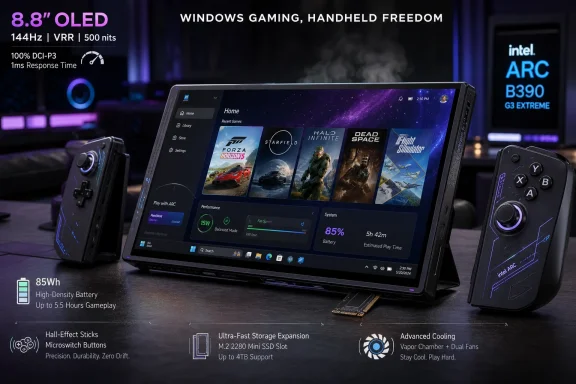
Intel’s Arc G3 Extreme-powered OneXPlayer 3 arrived in June 2026 as a premium Windows gaming handheld built around an 8.8-inch 144Hz OLED display, detachable controllers, an 85Wh battery, and Intel’s new B390-class integrated graphics. The pitch is not subtle: this is a handheld PC that wants to be a console, a tablet, and a tiny Windows laptop without apologizing for any of those identities. The more interesting story is that Intel may finally have found the mobile gaming lane it has been chasing for years. If the early testing holds up beyond launch-window enthusiasm, OneXPlayer 3 looks less like another boutique handheld and more like a signal that the Windows handheld market is entering its efficiency era.
For the last few years, Windows handhelds have been caught between two truths. They can run a staggering library of PC games, launchers, mods, emulators, and productivity apps, but they also inherit all the messiness of Windows, x86 power scaling, driver behavior, and thermal compromise. The best devices have tended to win not by brute force alone, but by finding a tolerable balance between performance, heat, battery life, controls, and software friction.
That is why Intel’s Arc G3 Extreme matters. The chip is not being framed as a general laptop processor that happens to fit inside a handheld. It is being sold as silicon tuned for this class of machine, where 17W, 25W, and 35W behavior matters more than synthetic peak performance.
That distinction is important because handheld gaming is not desktop gaming with smaller fans. A chip that looks impressive at 45W but wilts at 15W is the wrong chip for a commuter device. A chip that can hold playable frame rates at sensible power limits changes the daily experience far more than a spec-sheet maximum.
The OneXPlayer 3 leans into that reality. Its reported performance at 20W to 25W is the part that should make enthusiasts pay attention, not merely the existence of a 35W ceiling. The higher TDP mode is there for heavy games, but the practical win is that the device reportedly spends much of its useful gaming life below that ceiling without feeling starved.
Intel has had credibility problems in handhelds before. The early MSI Claw generation was a reminder that branding an integrated GPU as Arc does not automatically make a handheld competitive with AMD’s Ryzen Z-series designs. Arc G3 Extreme is therefore a reputational test as much as a technical one: Intel has to prove it can deliver predictable performance, mature drivers, and credible battery life in a market where users notice every watt.
The 8.8-inch OLED panel is the centerpiece. A 1200p resolution, 144Hz refresh rate, variable refresh support, strong brightness, and effective anti-reflective coating are exactly the kind of upgrades that make handheld gaming feel expensive in the right way. The display is not just a place to show frames; it determines whether 45fps feels acceptable, whether Windows scaling is tolerable, and whether a game looks modern without needing desktop-class rendering power.
OLED also changes the perceived performance equation. A stable 48fps or 60fps on a high-quality variable-refresh panel can feel better than higher but erratic numbers on a lesser screen. In handheld gaming, smoothness is a sensory judgment as much as a benchmark.
The detachable controllers are the second major bet. OneXPlayer is clearly borrowing from the Nintendo Switch and Lenovo Legion Go school of modular design, but the execution matters more than the inspiration. Hall-effect sticks, tighter stick tension, microswitch face buttons, and a more natural grip layout all point toward a device designed by people who know handheld controls can make or break long sessions.
There is a caveat. The controllers reportedly do not contain batteries or Bluetooth, meaning detached play requires a USB Type-A receiver. That is a less elegant solution than fully wireless side controllers, but it may also avoid pairing weirdness, charging chores, and latency complaints. In the Windows handheld world, boring reliability often beats cleverness.
A 1200p OLED screen at 8.8 inches gives the OneXPlayer 3 enough pixel density to look crisp without forcing the GPU into absurd territory. It also gives XeSS and other upscaling techniques a useful target. Render below native, upscale intelligently, and use the panel’s contrast and response time to make the final image feel sharper than the raw render budget suggests.
This is where Intel’s broader platform story starts to matter. Arc G3 Extreme with B390 graphics is not only about raster performance; it is also about the supporting technologies Intel can bring to modern games. XeSS, frame-generation features in supported titles, and improving Arc driver maturity are all part of the package.
That does not mean every game will behave. Windows handhelds remain PC gaming devices, which means shader compilation, anti-cheat restrictions, launcher sprawl, game-specific driver bugs, and power-profile tuning are still part of the bargain. But a great screen widens the range of acceptable settings.
The NoobFeed testing cited games running at 1200p with medium or high settings and sensible power limits, including steady 60fps behavior in some heavier titles. Those results should be treated as early device-level impressions rather than universal promises. Still, they align with the broader argument: Intel’s new handheld silicon appears strongest when paired with a display and battery that reward efficiency instead of chasing desktop substitution.
Battery life is also where Intel’s new handheld pitch has to survive contact with reality. Enthusiasts love TDP sliders because they turn every device into a science project. Most users, however, want a simple answer: can I play the games I bought for long enough that this feels portable?
The OneXPlayer 3 seems to answer yes, with conditions. Heavy games still demand heavy power. The device can run up to 35W, but doing so predictably shortens runtime and raises the thermal stakes. The more meaningful claim is that 25W may now be a sweet spot rather than a compromise that constantly reminds the player what has been lost.
This is a subtle but important shift in the market. Earlier Windows handhelds often asked users to choose between a good-looking game and a portable session. Newer devices are increasingly asking users to choose between good enough for handheld and unnecessarily ambitious. That is a healthier tradeoff.
The reported cooling behavior helps. Automatic fan profiles at 20W to 25W keeping noise low and the chassis comfortable suggests the thermal system is not merely designed for benchmark bursts. Sustained comfort matters because handheld heat is personal in a way laptop heat is not; users are literally holding the thermal solution.
The downside is also obvious to anyone who has used Windows with thumbsticks. Desktop UI targets, pop-ups, launchers, update prompts, driver panels, and authentication boxes were not designed for a couch-sized touchscreen PC. A small trackpad helps, as does a fingerprint power button, but the platform still carries a level of friction that dedicated gaming operating systems avoid.
That is why the optional keyboard matters more than it may appear. The pogo-pin keyboard turns the OneXPlayer 3 into a miniature laptop, or at least a credible emergency workstation. It does not need to be a great laptop to be useful; it only needs to make Windows maintenance, launcher setup, chat, browsing, and file management less annoying.
The device’s ports reinforce that hybrid identity. Two USB4 Type-C ports, one USB Type-A port, a headphone jack, and expandable storage options make the OneXPlayer 3 feel closer to an ultra-mobile PC than a sealed console. That is exactly what some buyers want, especially the WindowsForum crowd that sees a handheld not only as a gaming device but as a portable troubleshooting box, media machine, and test platform.
The tax is that buyers will need to manage Windows like Windows. Driver updates will matter. Intel graphics releases will matter. BIOS updates may matter. Power profiles will matter. The OneXPlayer 3 can reduce friction, but it cannot make Windows disappear.
The mini SSD slot is especially notable. If the format becomes more common, it could give handhelds a better middle ground between slow removable cards and opening the chassis to replace an internal drive. Reported transfer speeds around 3000MB/s would put it in a different class from microSD for game loading and large file movement.
The problem, at least for now, is cost and ecosystem maturity. A 1TB mini SSD may be expensive enough that many buyers treat the slot as future-proofing rather than an immediate upgrade path. That is not necessarily bad. Handhelds tend to age into storage constraints, and an accessible expansion option can make a device more durable over a three- or four-year ownership cycle.
There is also a broader platform angle. Windows handhelds are often used by tinkerers who maintain multiple boot setups, emulator libraries, modded games, and capture workflows. Removable high-speed storage could become the kind of niche feature that power users overvalue at first and the rest of the market appreciates later.
The microSD slot still matters for cheaper expansion, media, ROM libraries, and lighter games. But the mini SSD slot points toward a future where handheld PCs borrow more from laptops than from tablets. That is a good thing if the market wants these devices to be more than sealed gaming appliances.
But handhelds punish excess quickly. More wattage means more heat, more fan noise, shorter battery life, and thicker cooling. It may also mean diminishing returns if the silicon is already near its efficient performance plateau. In that context, a 35W limit can be read less as a restriction and more as a design boundary.
The early impression that 35W is “more than enough for most games” is plausible because the OneXPlayer 3 is not trying to be a 4K docked console replacement. Its native screen is 1200p. Its best experience is likely at 800p-to-1200p internal rendering, upscaling where appropriate, and frame targets that respect the handheld format.
That matters because the Windows handheld market has sometimes chased the wrong enemy. The real competitor is not a desktop GPU. It is the moment when the user decides the device is too hot, too loud, too short-lived, or too fiddly to bother carrying. Efficiency is not a secondary feature; it is the condition that makes the product category viable.
Intel’s challenge is to make that efficiency feel repeatable across games. Arc drivers have improved enormously since Intel’s first discrete GPU launch, but handhelds add another layer of sensitivity. A driver regression that costs five frames on a desktop may be annoying; on a handheld at a tight power limit, it can break the experience.
Intel’s Arc G3 Extreme does not erase that advantage overnight. AMD still has broad developer familiarity, strong OEM relationships, and years of accumulated credibility in integrated graphics. But Intel now appears to have a chip that can challenge AMD on the specific terms that matter for handhelds.
That is the important part. Intel does not need to win every synthetic benchmark or every docked scenario to change the market. It needs to make buyers believe that an Intel handheld is no longer a compromise choice. The OneXPlayer 3, along with other Arc G3 devices arriving around the same generation, helps make that argument.
Competition should be good for users. It pressures AMD to keep improving low-watt performance, pushes Intel to maintain driver quality, and gives OEMs more leverage when designing different classes of handhelds. A market with credible AMD and Intel options is healthier than one built around a single silicon supplier.
There is also a software consequence. If Intel-powered handhelds gain traction, more game developers will test against Arc integrated graphics as a first-class target. That would benefit not only handhelds but also thin-and-light laptops using related graphics architectures. The handheld market may be niche compared with laptops, but it is visible, demanding, and influential among enthusiasts.
That changes the standard of judgment. At a high price, “good for a handheld” is not enough. Buyers will expect build quality, firmware support, spare parts availability, responsive software tools, and a stable update path. OneXPlayer has to compete not only with other handhelds but also with gaming laptops, compact PCs, and the simple argument that a Steam Deck OLED costs much less.
The counterargument is that the OneXPlayer 3 is more flexible than a cheaper console-like handheld. It has a larger OLED display, Windows compatibility, modular controls, high-speed expansion, robust I/O, and a laptop-adjacent mode. For the right buyer, those are not luxuries; they are the reason to buy the device.
But the “right buyer” matters. This is not the obvious recommendation for someone who plays a few verified Steam games and wants the least friction. It is for users who want Windows compatibility, high-end handheld performance, and hardware flexibility enough to tolerate price and complexity. That is a smaller audience, but it is also a passionate one.
The risk for OneXPlayer is that the premium handheld market becomes crowded quickly. MSI, Lenovo, ASUS, Acer, GPD, Ayaneo, and others are all capable of producing compelling devices. The OneXPlayer 3 has to keep its advantage after reviews, firmware updates, and competitor launches settle the Computex glow.
That flexibility is why the detachable controller system, keyboard connector, and kickstand all matter. They let the device shift modes. Handheld on the couch, tabletop with detached controls, tiny laptop for setup or travel, docked PC at a desk — none of these modes has to be perfect if the transitions are useful.
The kickstand reportedly could use more viewing angles, and the keyboard is optional rather than included. Those are small annoyances, but they highlight the design tension. A 3-in-1 handheld has to avoid becoming a device where every mode feels slightly compromised.
Still, the overall package sounds unusually coherent. The controls are not an afterthought. The display is not a checkbox. The battery is sized for the performance target. The storage options acknowledge how people actually use Windows gaming machines. The ports recognize that enthusiasts still own wired accessories.
That is why the OneXPlayer 3 stands out. It does not simply add more power to the standard handheld recipe. It takes seriously the idea that a Windows handheld is a different kind of PC, with its own ergonomics, storage needs, power curves, and display priorities.
For the OneXPlayer 3, that appears to be the 20W to 25W range. The reported ability to run major games smoothly there, while delivering roughly two to two-and-a-half hours of battery life, is the kind of real-world result that makes a handheld feel trustworthy. It is also where Intel’s Arc G3 Extreme can begin to redefine expectations.
This is a lesson the whole category is absorbing. Bigger batteries help, but only if the platform uses them intelligently. Better screens help, but only if the GPU can feed them at reasonable settings. Detachable controllers help, but only if they do not introduce friction. Every part of the device has to serve the portable session.
The OneXPlayer 3 does not eliminate the need for tuning. Users will still adjust TDP, resolution, XeSS settings, refresh targets, and graphics presets. But if the hardware’s default behavior is closer to the sweet spot, that tuning becomes optimization rather than rescue work.
That distinction is the difference between a hobby device and a recommendable product. Windows handhelds will always attract tinkerers, but the market grows when tinkering becomes optional. Arc G3 Extreme may be one of the first Intel platforms in this category that makes that outcome plausible.
A few practical conclusions stand out from the early picture.
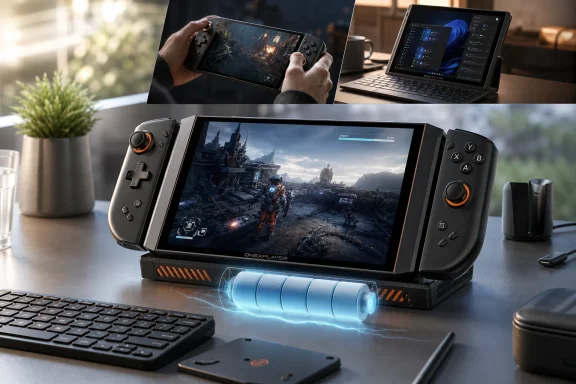 Intel Finally Stops Fighting the Handheld Form Factor
For the last few years, Windows handhelds have been caught between two truths. They can run a staggering library of PC games, launchers, mods, emulators, and productivity apps, but they also inherit all the messiness of Windows, x86 power scaling, driver behavior, and thermal compromise. The best devices have tended to win not by brute force alone, but by finding a tolerable balance between performance, heat, battery life, controls, and software friction.That is why Intel’s Arc G3 Extreme matters. The chip is not being framed as a general laptop processor that happens to fit inside a handheld. It is being sold as silicon tuned for this class of machine, where 17W, 25W, and 35W behavior matters more than synthetic peak performance.
That distinction is important because handheld gaming is not desktop gaming with smaller fans. A chip that looks impressive at 45W but wilts at 15W is the wrong chip for a commuter device. A chip that can hold playable frame rates at sensible power limits changes the daily experience far more than a spec-sheet maximum.
The OneXPlayer 3 leans into that reality. Its reported performance at 20W to 25W is the part that should make enthusiasts pay attention, not merely the existence of a 35W ceiling. The higher TDP mode is there for heavy games, but the practical win is that the device reportedly spends much of its useful gaming life below that ceiling without feeling starved.
Intel has had credibility problems in handhelds before. The early MSI Claw generation was a reminder that branding an integrated GPU as Arc does not automatically make a handheld competitive with AMD’s Ryzen Z-series designs. Arc G3 Extreme is therefore a reputational test as much as a technical one: Intel has to prove it can deliver predictable performance, mature drivers, and credible battery life in a market where users notice every watt.
OneXPlayer Builds a Handheld Around the Chip Instead of Around a Gimmick
The OneXPlayer 3 is not a minimalist device. It is large, heavy by handheld standards, and clearly aimed at buyers who want a full-featured Windows machine rather than a Steam Deck-style appliance. But the design choices described in early testing suggest One-Netbook is making a more coherent argument than some past boutique handhelds: if the device is going to be big, it should earn the space.The 8.8-inch OLED panel is the centerpiece. A 1200p resolution, 144Hz refresh rate, variable refresh support, strong brightness, and effective anti-reflective coating are exactly the kind of upgrades that make handheld gaming feel expensive in the right way. The display is not just a place to show frames; it determines whether 45fps feels acceptable, whether Windows scaling is tolerable, and whether a game looks modern without needing desktop-class rendering power.
OLED also changes the perceived performance equation. A stable 48fps or 60fps on a high-quality variable-refresh panel can feel better than higher but erratic numbers on a lesser screen. In handheld gaming, smoothness is a sensory judgment as much as a benchmark.
The detachable controllers are the second major bet. OneXPlayer is clearly borrowing from the Nintendo Switch and Lenovo Legion Go school of modular design, but the execution matters more than the inspiration. Hall-effect sticks, tighter stick tension, microswitch face buttons, and a more natural grip layout all point toward a device designed by people who know handheld controls can make or break long sessions.
There is a caveat. The controllers reportedly do not contain batteries or Bluetooth, meaning detached play requires a USB Type-A receiver. That is a less elegant solution than fully wireless side controllers, but it may also avoid pairing weirdness, charging chores, and latency complaints. In the Windows handheld world, boring reliability often beats cleverness.
The OLED Screen Is Not a Luxury; It Is the Performance Strategy
The temptation with a device like this is to treat the OLED panel as a premium flourish. That misses the point. On a handheld, the screen is part of the performance stack because it determines what compromises are visible.A 1200p OLED screen at 8.8 inches gives the OneXPlayer 3 enough pixel density to look crisp without forcing the GPU into absurd territory. It also gives XeSS and other upscaling techniques a useful target. Render below native, upscale intelligently, and use the panel’s contrast and response time to make the final image feel sharper than the raw render budget suggests.
This is where Intel’s broader platform story starts to matter. Arc G3 Extreme with B390 graphics is not only about raster performance; it is also about the supporting technologies Intel can bring to modern games. XeSS, frame-generation features in supported titles, and improving Arc driver maturity are all part of the package.
That does not mean every game will behave. Windows handhelds remain PC gaming devices, which means shader compilation, anti-cheat restrictions, launcher sprawl, game-specific driver bugs, and power-profile tuning are still part of the bargain. But a great screen widens the range of acceptable settings.
The NoobFeed testing cited games running at 1200p with medium or high settings and sensible power limits, including steady 60fps behavior in some heavier titles. Those results should be treated as early device-level impressions rather than universal promises. Still, they align with the broader argument: Intel’s new handheld silicon appears strongest when paired with a display and battery that reward efficiency instead of chasing desktop substitution.
Battery Life Becomes the New Benchmark War
The 85Wh battery may be the most consequential number in the OneXPlayer 3 spec sheet. It is large enough to make the device heavier, but also large enough to change expectations for a Windows handheld. If the device can deliver roughly two to two-and-a-half hours in demanding games at 20W to 25W, and three-plus hours in lighter games at lower TDPs, that moves it out of the “wall outlet with controllers” category.Battery life is also where Intel’s new handheld pitch has to survive contact with reality. Enthusiasts love TDP sliders because they turn every device into a science project. Most users, however, want a simple answer: can I play the games I bought for long enough that this feels portable?
The OneXPlayer 3 seems to answer yes, with conditions. Heavy games still demand heavy power. The device can run up to 35W, but doing so predictably shortens runtime and raises the thermal stakes. The more meaningful claim is that 25W may now be a sweet spot rather than a compromise that constantly reminds the player what has been lost.
This is a subtle but important shift in the market. Earlier Windows handhelds often asked users to choose between a good-looking game and a portable session. Newer devices are increasingly asking users to choose between good enough for handheld and unnecessarily ambitious. That is a healthier tradeoff.
The reported cooling behavior helps. Automatic fan profiles at 20W to 25W keeping noise low and the chassis comfortable suggests the thermal system is not merely designed for benchmark bursts. Sustained comfort matters because handheld heat is personal in a way laptop heat is not; users are literally holding the thermal solution.
Windows Is Still the Feature and the Tax
OneXPlayer 3 is a Windows handheld, which remains both its strongest selling point and its most stubborn liability. The upside is obvious. It can run PC storefronts without waiting for Linux compatibility layers, access Game Pass titles, install mod managers, connect peripherals, use productivity software, and behave like a tiny computer when docked or paired with a keyboard.The downside is also obvious to anyone who has used Windows with thumbsticks. Desktop UI targets, pop-ups, launchers, update prompts, driver panels, and authentication boxes were not designed for a couch-sized touchscreen PC. A small trackpad helps, as does a fingerprint power button, but the platform still carries a level of friction that dedicated gaming operating systems avoid.
That is why the optional keyboard matters more than it may appear. The pogo-pin keyboard turns the OneXPlayer 3 into a miniature laptop, or at least a credible emergency workstation. It does not need to be a great laptop to be useful; it only needs to make Windows maintenance, launcher setup, chat, browsing, and file management less annoying.
The device’s ports reinforce that hybrid identity. Two USB4 Type-C ports, one USB Type-A port, a headphone jack, and expandable storage options make the OneXPlayer 3 feel closer to an ultra-mobile PC than a sealed console. That is exactly what some buyers want, especially the WindowsForum crowd that sees a handheld not only as a gaming device but as a portable troubleshooting box, media machine, and test platform.
The tax is that buyers will need to manage Windows like Windows. Driver updates will matter. Intel graphics releases will matter. BIOS updates may matter. Power profiles will matter. The OneXPlayer 3 can reduce friction, but it cannot make Windows disappear.
Expandable Storage Is the Quiet Enthusiast Feature
The addition of both microSD and mini SSD expansion is one of the more interesting parts of the hardware design. Game installs are not getting smaller, and 1TB can vanish quickly when modern AAA titles, emulated libraries, shader caches, and multiple storefronts enter the picture. Expandability is not a bonus anymore; it is a survival mechanism.The mini SSD slot is especially notable. If the format becomes more common, it could give handhelds a better middle ground between slow removable cards and opening the chassis to replace an internal drive. Reported transfer speeds around 3000MB/s would put it in a different class from microSD for game loading and large file movement.
The problem, at least for now, is cost and ecosystem maturity. A 1TB mini SSD may be expensive enough that many buyers treat the slot as future-proofing rather than an immediate upgrade path. That is not necessarily bad. Handhelds tend to age into storage constraints, and an accessible expansion option can make a device more durable over a three- or four-year ownership cycle.
There is also a broader platform angle. Windows handhelds are often used by tinkerers who maintain multiple boot setups, emulator libraries, modded games, and capture workflows. Removable high-speed storage could become the kind of niche feature that power users overvalue at first and the rest of the market appreciates later.
The microSD slot still matters for cheaper expansion, media, ROM libraries, and lighter games. But the mini SSD slot points toward a future where handheld PCs borrow more from laptops than from tablets. That is a good thing if the market wants these devices to be more than sealed gaming appliances.
The 35W Ceiling Says More About Discipline Than Limitation
Some enthusiasts will look at the 35W maximum TDP and ask why the OneXPlayer 3 does not go higher, especially when docked. That instinct is understandable. PC gaming culture has trained users to equate more power with more seriousness, and handheld PC makers have often fed that instinct with increasingly aggressive performance modes.But handhelds punish excess quickly. More wattage means more heat, more fan noise, shorter battery life, and thicker cooling. It may also mean diminishing returns if the silicon is already near its efficient performance plateau. In that context, a 35W limit can be read less as a restriction and more as a design boundary.
The early impression that 35W is “more than enough for most games” is plausible because the OneXPlayer 3 is not trying to be a 4K docked console replacement. Its native screen is 1200p. Its best experience is likely at 800p-to-1200p internal rendering, upscaling where appropriate, and frame targets that respect the handheld format.
That matters because the Windows handheld market has sometimes chased the wrong enemy. The real competitor is not a desktop GPU. It is the moment when the user decides the device is too hot, too loud, too short-lived, or too fiddly to bother carrying. Efficiency is not a secondary feature; it is the condition that makes the product category viable.
Intel’s challenge is to make that efficiency feel repeatable across games. Arc drivers have improved enormously since Intel’s first discrete GPU launch, but handhelds add another layer of sensitivity. A driver regression that costs five frames on a desktop may be annoying; on a handheld at a tight power limit, it can break the experience.
AMD Now Has a Real Fight in the Category It Helped Define
AMD has dominated the modern Windows handheld conversation for a reason. Ryzen APUs gave device makers a credible GPU, good power behavior, and a familiar driver foundation. The Steam Deck used custom AMD silicon to define the category in the public imagination, and Ryzen Z-series chips gave Windows handheld makers an obvious path.Intel’s Arc G3 Extreme does not erase that advantage overnight. AMD still has broad developer familiarity, strong OEM relationships, and years of accumulated credibility in integrated graphics. But Intel now appears to have a chip that can challenge AMD on the specific terms that matter for handhelds.
That is the important part. Intel does not need to win every synthetic benchmark or every docked scenario to change the market. It needs to make buyers believe that an Intel handheld is no longer a compromise choice. The OneXPlayer 3, along with other Arc G3 devices arriving around the same generation, helps make that argument.
Competition should be good for users. It pressures AMD to keep improving low-watt performance, pushes Intel to maintain driver quality, and gives OEMs more leverage when designing different classes of handhelds. A market with credible AMD and Intel options is healthier than one built around a single silicon supplier.
There is also a software consequence. If Intel-powered handhelds gain traction, more game developers will test against Arc integrated graphics as a first-class target. That would benefit not only handhelds but also thin-and-light laptops using related graphics architectures. The handheld market may be niche compared with laptops, but it is visible, demanding, and influential among enthusiasts.
Premium Hardware Still Has to Justify Premium Pricing
The uncomfortable part of the OneXPlayer 3 story is price. Boutique Windows handhelds have never been cheap, and a device with an OLED panel, detachable controllers, 32GB of fast memory, 1TB of storage, an 85Wh battery, and new Intel silicon was never going to land in impulse-buy territory. Early global pricing around the premium tier puts this closer to an enthusiast laptop purchase than a console purchase.That changes the standard of judgment. At a high price, “good for a handheld” is not enough. Buyers will expect build quality, firmware support, spare parts availability, responsive software tools, and a stable update path. OneXPlayer has to compete not only with other handhelds but also with gaming laptops, compact PCs, and the simple argument that a Steam Deck OLED costs much less.
The counterargument is that the OneXPlayer 3 is more flexible than a cheaper console-like handheld. It has a larger OLED display, Windows compatibility, modular controls, high-speed expansion, robust I/O, and a laptop-adjacent mode. For the right buyer, those are not luxuries; they are the reason to buy the device.
But the “right buyer” matters. This is not the obvious recommendation for someone who plays a few verified Steam games and wants the least friction. It is for users who want Windows compatibility, high-end handheld performance, and hardware flexibility enough to tolerate price and complexity. That is a smaller audience, but it is also a passionate one.
The risk for OneXPlayer is that the premium handheld market becomes crowded quickly. MSI, Lenovo, ASUS, Acer, GPD, Ayaneo, and others are all capable of producing compelling devices. The OneXPlayer 3 has to keep its advantage after reviews, firmware updates, and competitor launches settle the Computex glow.
The Best Version of This Device Is the One That Knows It Is Not a Console
The OneXPlayer 3 is most persuasive when judged as a compact Windows gaming PC that happens to have excellent handheld controls. That framing avoids the trap of comparing it too directly with closed consoles or even the Steam Deck. It is not trying to deliver a curated appliance experience; it is trying to make PC gaming portable without sanding away PC gaming’s flexibility.That flexibility is why the detachable controller system, keyboard connector, and kickstand all matter. They let the device shift modes. Handheld on the couch, tabletop with detached controls, tiny laptop for setup or travel, docked PC at a desk — none of these modes has to be perfect if the transitions are useful.
The kickstand reportedly could use more viewing angles, and the keyboard is optional rather than included. Those are small annoyances, but they highlight the design tension. A 3-in-1 handheld has to avoid becoming a device where every mode feels slightly compromised.
Still, the overall package sounds unusually coherent. The controls are not an afterthought. The display is not a checkbox. The battery is sized for the performance target. The storage options acknowledge how people actually use Windows gaming machines. The ports recognize that enthusiasts still own wired accessories.
That is why the OneXPlayer 3 stands out. It does not simply add more power to the standard handheld recipe. It takes seriously the idea that a Windows handheld is a different kind of PC, with its own ergonomics, storage needs, power curves, and display priorities.
The Handheld PC Market Learns to Care About the Middle Watts
The most important performance numbers for devices like this increasingly live in the middle. Not the 10W indie-game crawl, though that matters. Not the 35W or 45W maximum, though that sells spec sheets. The decisive range is where demanding games are playable, fans are tolerable, and battery life does not feel like a countdown timer.For the OneXPlayer 3, that appears to be the 20W to 25W range. The reported ability to run major games smoothly there, while delivering roughly two to two-and-a-half hours of battery life, is the kind of real-world result that makes a handheld feel trustworthy. It is also where Intel’s Arc G3 Extreme can begin to redefine expectations.
This is a lesson the whole category is absorbing. Bigger batteries help, but only if the platform uses them intelligently. Better screens help, but only if the GPU can feed them at reasonable settings. Detachable controllers help, but only if they do not introduce friction. Every part of the device has to serve the portable session.
The OneXPlayer 3 does not eliminate the need for tuning. Users will still adjust TDP, resolution, XeSS settings, refresh targets, and graphics presets. But if the hardware’s default behavior is closer to the sweet spot, that tuning becomes optimization rather than rescue work.
That distinction is the difference between a hobby device and a recommendable product. Windows handhelds will always attract tinkerers, but the market grows when tinkering becomes optional. Arc G3 Extreme may be one of the first Intel platforms in this category that makes that outcome plausible.
The OneXPlayer 3 Bet Comes Into Focus
The OneXPlayer 3 is not important because it is the absolute fastest handheld someone can imagine. It is important because it shows where the next generation of serious Windows handhelds is heading: larger high-quality displays, efficient integrated graphics, bigger batteries, modular controls, and storage schemes that respect modern game sizes.A few practical conclusions stand out from the early picture.
- The OneXPlayer 3’s strongest argument is its balance of OLED display quality, 85Wh battery capacity, and Intel Arc G3 Extreme efficiency.
- The most meaningful performance range appears to be 20W to 25W, where demanding games can remain smooth without turning the device into a short-lived furnace.
- The detachable controllers and optional keyboard make more sense when the device is treated as a tiny Windows PC rather than a pure console rival.
- The mini SSD slot could become a forward-looking feature if removable high-speed storage becomes cheaper and more widely available.
- Intel’s success will depend as much on driver consistency and game compatibility as on the B390 iGPU’s raw performance.
- The premium price means the OneXPlayer 3 is best suited to enthusiasts who value flexibility, Windows compatibility, and high-end handheld hardware over simplicity.
References
- Primary source: NoobFeed
Published: 2026-06-29T16:10:14.190828
Intel G3 Extreme Makes the OneXPlayer 3: One of the Best Gaming Handhelds | NoobFeed
OneXPlayer 3 takes that approach and is equipped with Intel's new G3 Extreme processor, a large OLED screen, detachable controllers, and expandable storage...www.noobfeed.com - Related coverage: windowscentral.com
MSI Claw 8 EX AI+ review: the handheld gaming dream realized | Windows Central
MSI Claw 8 EX AI+ delivers the handheld experience enthusiasts have waited for, but steep NAND and RAM pricing make it unreachable for many.www.windowscentral.com - Related coverage: notebookcheck.net
OneXPlayer 3 launching globally in June 2026 with Intel Arc G3 Extreme and 144 Hz OLED display - Notebookcheck News
OneXPlayer has announced a new Windows gaming handheld. Launching globally in June 2026, the OneXPlayer 3 combines the Intel Arc G3 Extreme with a 144 Hz OLED display. The handheld features an 85 Wh built-in battery and Hall effect joysticks, too. www.notebookcheck.net
- Related coverage: notebookcheck.org
Lanzamiento mundial del OneXPlayer 3 en junio de 2026 con Intel Arc G3 Extreme y pantalla OLED de 144 Hz - NotebookCheck.org News
OneXPlayer ha anunciado un nuevo dispositivo portátil para juegos con Windows. Lanzado mundialmente en junio de 2026, el OneXPlayer 3 combina el Intel Arc G3 Extreme con una pantalla OLED de 144 Hz. El dispositivo portátil incorpora una batería de 85 Wh y también joysticks de efecto Hall. www.notebookcheck.org
- Related coverage: pcworld.com
OneXPlayer 3 is a new Intel Arc G3 Extreme handheld gaming PC | PCWorld
PCWorld's Adam Patrick Murray is one of the first people to go hands-on with the OneXPlayer 3 at Computex 2026, and this Intel Arc G3 Extreme handheld PC looks promising thanks to its adoption of the detachable controller design popularized by the Nintendo Switch and Lenovo Legion Go.www.pcworld.com - Related coverage: notebookcheck.com
OneXPlayer 3 startet im Juni 2026 weltweit – mit Intel Arc G3 Extreme und 144-Hz-OLED - Notebookcheck News
OneXPlayer hat einen neuen Windows-Gaming-Handheld angekündigt. Der OneXPlayer 3 erscheint weltweit im Juni 2026 und kombiniert die Intel Arc G3 Extreme mit einem 144-Hz-OLED-Display. Außerdem bietet der Handheld einen integrierten 85-Wh-Akku sowie Hall-Effekt-Joysticks. www.notebookcheck.com
- Related coverage: basic-tutorials.com
OneXPlayer 3: 3-in-1 handheld with Intel Arc G3 Extreme starts at $1,399 - Basic Tutorials
The OneXPlayer 3 is here: Intel Arc G3 Extreme, an 8.8-inch 144 Hz OLED display, an 85 Wh battery, and a 3-in-1 design that functions as a handheld device, tablet, and mini-laptop. All specs and prices.basic-tutorials.com - Related coverage: minixpc.com
OneXPlayer 3 Gaming Handheld Launches with Intel Arc G3 Extreme, OLED – Minixpc
OneXPlayer has officially released the OneXPlayer 3, a new Windows-based gaming handheld designed to combine portable gaming with laptop-style productivity. The latest device arrives with a focus on high-performance gaming, featuring Intel Arc G3 Extreme graphics, a large OLED display, an 85Wh...minixpc.com - Related coverage: intel.com

Intel® Arc™ G3 EXTREME Processor (12M Cache, up to 4.70 GHz) - Product Specifications | Intel
Intel® Arc™ G3 EXTREME Processor (12M Cache, up to 4.70 GHz) quick reference with specifications, features, and technologies.
www.intel.com
- Related coverage: technopat.net
ONEXPLAYER 3 geliyor - Technopat
ONEXPLAYER 3; Intel Arc G3 Extreme, 8.8 inç 144 Hz OLED ekran, 85 Wh pil ve ayrılabilir kontrolcüleriyle Windows el konsolu pazarına geliyor.www.technopat.net - Related coverage: tomshardware.com
Intel challenges AMD’s handheld dominance with new Arc G3 chips — Panther Lake silicon brings up to 14 cores, Arc B390 graphics to handhelds | Tom's Hardware
Intel has lined up partners for the range, including Acer and OneXPlayer.www.tomshardware.com - Related coverage: news.lavx.hu
OneXPlayer 3 launches globally in June 2026 with Intel Arc G3 Extreme and 144 Hz OLED screen | LavX News
OneXPlayer’s third handheld brings an Intel Arc G3 Extreme GPU, an 8.8‑inch 144 Hz OLED panel and a detachable controller with built‑in touchpad. The device ships with an 85 Wh battery, Hall‑effect joysticks and a kick‑stand for laptop‑mode use, and will hit Indiegogo in mid‑to‑late June 2026.news.lavx.hu - Related coverage: computerbase.de
Mit Intel Arc G3 Extreme-Chip: Gaming-Handheld OneXPlayer 3 kommt mit 8,8-Zoll-OLED-Display - ComputerBase
Der OneXPlayer 3 ist ein Handheld-PC mit Intels Arc G3 Extreme-Chip, der ein 8,8 Zoll großes AMOLED-Display mit bis zu 144 Hertz besitzt.www.computerbase.de
- Related coverage: pcgamer.com
Intel's new handheld gaming chip rumoured to be called 'Core G3 Extreme' and rocks a full-spec Xe3 iGPU with 12 graphics cores | PC Gamer
It's the Panther Lake laptop chip, just slightly tweaked.www.pcgamer.com - Related coverage: techradar.com
MSI Claw 8 EX AI+ with Intel Arc G3 Extreme inside revealed at Computex 2026 | TechRadar
True MFG for the handheld PC gaming marketwww.techradar.com - Related coverage: t3.com
I tried every major gaming handheld at Computex – here are the 4 best to know about | T3
These handhelds are going to push the envelopewww.t3.com - Related coverage: download.intel.com
- Related coverage: builders.intel.com
DisplayPort IP Icon
Icon for Intel FPGA Support Resources webpage. Hi-res image with embedded 1x1, 4x3, and 16x9 renditions for intel.com AEM usage.builders.intel.com