

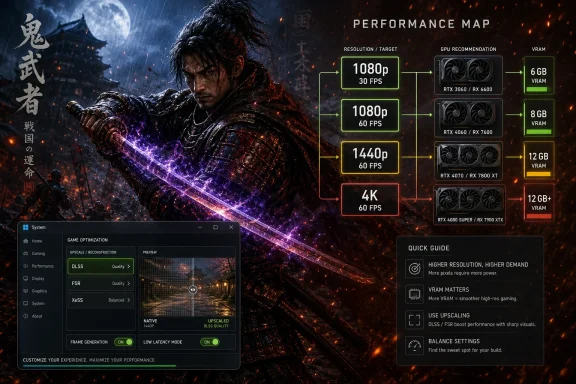
Capcom has listed Onimusha: Way of the Sword for a September 25, 2026 launch on Windows PC, PlayStation 5, Xbox Series X|S, and Nintendo Switch 2, with published PC targets ranging from 1080p at 30fps on a GTX 1660 to upscaled 4K at 60fps on an RTX 4070 Ti. The headline is not that the game looks lightweight; it is that Capcom appears to be drawing a clear performance map before launch. For PC players and WindowsForum readers, that matters because modern AAA requirements have become less about whether a game boots and more about whether the promised experience survives shader compilation, VRAM limits, and upscaling reality. Onimusha’s published targets look unusually sensible, but the fine print still deserves attention.
The new Onimusha arrives at a moment when PC players are tired of being told to treat day-one performance as a patchable inconvenience. Over the past few years, the industry has normalized launch-window stutter, oversized VRAM appetites, and system requirement tables that read less like engineering guidance than marketing insulation. Capcom’s own record has been mixed enough that a tidy spec sheet now carries more weight than it might have in another era.
On paper, Onimusha: Way of the Sword looks like a relatively disciplined PC release. The minimum tier targets 1080p at 30fps with an Intel Core i5-8400 or AMD Ryzen 3 3100, 16GB of memory, and either a GeForce GTX 1660 with 6GB of VRAM or a Radeon RX 5500 XT with 8GB. That is not “potato PC” territory, but it is far below the fearsome requirements that have accompanied some recent current-generation-only games.
The recommended tier is equally notable. Capcom’s 1080p 60fps target calls for an Intel Core i5-10400 or Ryzen 5 3600, 16GB of RAM, and either a GeForce RTX 2060 Super or Radeon RX 6600 with 8GB of VRAM. In 2026, that is a midrange-to-aging desktop, not a showcase build, and it suggests Capcom wants Onimusha to land beyond the enthusiast class.
The high and ultra targets are where the modern assumptions appear. For 1440p 60fps, Capcom lists the same i5-10400 or Ryzen 5 3600 class CPUs but asks for a GeForce RTX 4060 Ti 16GB or Radeon RX 6750 XT 12GB. For 4K 60fps, the CPU climbs to an Intel Core i5-12400 or Ryzen 7 5700, while the GPU recommendation rises to a GeForce RTX 4070 Ti or Radeon RX 7900 XT.
The shape of that table tells a story. CPU requirements scale modestly, while GPU and VRAM requirements do the real climbing. That is what Windows gamers should want to see from a visually ambitious action game: the implication that frame rate is not being held hostage by one main thread or an overburdened simulation layer.
That matters because many “minimum” specs have become theoretical in practice. A game may technically launch on an older GPU, but texture streaming, traversal stutter, or image quality compromises can make the experience feel second-class. Onimusha’s minimum spec will still need real-world testing, but the absence of a forced RTX baseline is good news for older Windows systems.
The RAM requirement is less surprising. Capcom lists 16GB across all PC tiers, which has become the de facto floor for current AAA games. The more useful detail is that the storage requirement is a 50GB SSD, not merely 50GB of disk space. That wording should not be ignored.
The SSD requirement reflects where PC gaming has gone. Current engines increasingly assume fast asset streaming, and mechanical hard drives are now a liability even when raw frame rates look acceptable. If you are still running a large HDD as a game library drive, Onimusha is another reminder that Windows gaming has moved on.
The minimum CPU pairing also looks measured. The Core i5-8400 is a six-core Coffee Lake chip from 2017, while the Ryzen 3 3100 is a four-core, eight-thread Zen 2 part. Neither is exotic today, but both remain competent enough if the engine is not wildly CPU-bound. That is the optimistic read: Onimusha may be built around tight combat, controlled environments, and GPU-heavy presentation rather than open-world chaos.
The RTX 2060 Super requirement is especially telling. It gives Nvidia users 8GB of VRAM and access to DLSS, but it does not require the newer Ada or Blackwell feature stack. The Radeon RX 6600 equivalent similarly points to mainstream raster performance rather than top-end hardware. This is a sane target for a single-player action game that needs responsiveness more than benchmark vanity.
The 16GB RAM requirement across every tier also means Capcom is not segmenting performance around system memory. That may disappoint users hoping 32GB would be reflected in official recommendations, but it makes the table easier to parse. The real limiter is graphics hardware, not total memory capacity.
There is, however, an important caveat. Official requirement tables are generally built around controlled scenarios, not the messiness of a real Windows desktop. Browser tabs, capture software, RGB utilities, overlays, antivirus scans, and launchers all eat into the margin. A machine that exactly matches the recommended tier may hit the target in Capcom’s scenario and still feel less consistent in a cluttered user environment.
That is not a Capcom-specific criticism. It is the difference between a lab target and a home PC. For anyone planning to stream, record, or run Discord overlays while playing, the recommended spec should be treated as a baseline, not a comfort zone.
At 1080p, 8GB remains viable if texture settings and reconstruction are handled sensibly. At 1440p, 12GB looks increasingly like the practical floor for higher settings. At 4K, even a 12GB card may require careful texture management depending on how aggressively the game allocates memory.
This is why the 1440p tier names the RTX 4060 Ti 16GB rather than the more common 8GB model. The 4060 Ti 16GB has been a controversial card because its memory capacity is generous relative to its bus and overall performance profile. But in a requirements table, it makes a specific point: Capcom appears to be valuing capacity at higher resolutions.
The Radeon RX 6750 XT’s 12GB listing lands in the same logic. AMD’s last-generation mid-to-upper card may not have Nvidia’s reconstruction ecosystem, but it offers enough memory to keep high-resolution textures from becoming an immediate bottleneck. For Windows gamers who bought AMD partly for VRAM headroom, Onimusha’s high preset may be one of the cases where that choice ages well.
The ultra tier is less tidy. The RTX 4070 Ti has 12GB of VRAM, while the RX 7900 XT has 20GB. Those cards are not memory equivalents, and the disparity makes the 4K target worth testing carefully. If the game’s ultra texture package genuinely fits within 12GB at 4K with upscaling, Nvidia users are fine. If it flirts with the edge, AMD’s larger framebuffer could produce smoother behavior even when average frame rates look similar.
This is the kind of distinction average FPS charts often miss. Frame pacing, texture pop-in, traversal stutter, and VRAM overflow behavior can matter more than a headline 60fps number. Onimusha’s table looks reasonable, but the VRAM spread is where reviewers should spend time when the final build arrives.
This is not inherently bad. Upscaling has become good enough that many players prefer a high-quality reconstructed image with steadier frame rates to a native image that drops frames. The problem is that “4K 60” has become marketing shorthand for a bundle of assumptions: internal resolution, reconstruction mode, sharpening, frame generation status, and visual settings.
For Onimusha, the important question is not whether upscaling is used. The important question is whether the game remains visually stable in motion. Sword combat punishes image instability because the player’s eye tracks fast weapon arcs, enemy tells, particle effects, and camera movement. Reconstruction artifacts that are tolerable in a slow exploration game can become distracting in a parry-heavy action game.
DLSS and FSR also do not help every bottleneck equally. They can reduce GPU rendering load, but they do not solve CPU bottlenecks, shader compilation hitches, storage stalls, or VRAM exhaustion. If Onimusha’s final PC version is smooth, it will be because the engine pipeline is well managed, not because the requirement table says “upscaling.”
This is where Windows users should keep their skepticism calibrated. Upscaling is no longer a cheat code, but it is also no substitute for optimization. Capcom’s listed targets are encouraging because the base specs are grounded; the final judgment will depend on whether those targets reflect stable frame pacing on real systems.
That lines up with the PC ultra tier. A 4070 Ti or RX 7900 XT for upscaled 4K 60fps is a plausible ask if the base consoles are also leaning on reconstruction. It suggests the PC table is not wildly inflated relative to console performance, which is often a useful sanity check.
The Xbox Series S target is more modest but still notable. Capcom lists 1080p output at 60fps in performance mode and 1080p output at 30 to 50fps in quality mode. That implies the engine can scale down, but it also reinforces that Series S remains a 1080p-oriented box for demanding games.
Nintendo Switch 2 is the outlier. The listed targets put TV mode at 1920×1080 and handheld mode at 1600×900, both at 30fps. That is not surprising for a portable hybrid, but it will make the Switch 2 version a different proposition: convenience and portability rather than the full high-frame-rate spectacle.
For PC buyers, the console modes are useful because they reveal Capcom’s likely design priorities. The game seems built to provide a 60fps path on the higher-end living-room boxes, while preserving a 30fps path for quality settings and portable play. That bodes well for Windows users who care about latency, but it also means PC benchmarking should compare multiple modes rather than treating “max settings” as the only legitimate experience.
From a publisher’s perspective, Windows 11 simplifies the support matrix. It aligns better with current driver stacks, newer DirectX 12 behavior, modern scheduling expectations, and Microsoft’s current consumer platform strategy. From a player’s perspective, it is another nudge away from Windows 10 gaming rigs that still feel perfectly usable.
This will annoy some users, and not without reason. Many Windows 10 machines still run modern games well, and the underlying hardware may be more relevant than the OS version. But official support matters when troubleshooting begins. If a game lists Windows 11 only, support channels can treat Windows 10 issues as outside the guaranteed path.
The DirectX 12 requirement is less controversial. DX12 is now standard for current AAA rendering, particularly when engines lean on explicit GPU control and advanced resource management. The bigger practical issue is not the API itself but shader compilation behavior, one of the recurring pain points in PC releases.
If Capcom has a robust precompilation process and avoids runtime shader chaos, Windows 11 users may see a smooth launch. If not, even strong PCs can suffer. That is why the OS line is less important than the total pipeline: drivers, compilation, caching, storage, and engine streaming all need to cooperate.
Dragon’s Dogma 2 remains the obvious cautionary tale. Its demanding city performance and CPU-heavy behavior became a launch narrative, especially for players expecting their GPUs to do most of the work. Monster Hunter Wilds also drew performance scrutiny during its public test periods and launch conversation, reinforcing the sense that Capcom’s RE Engine era is not automatically frictionless.
Onimusha may be a better fit for smooth scaling. It is not an open-world RPG with dense city simulation, and it does not appear to be built around large multiplayer hunts. A focused action-adventure structure gives Capcom more control over scene complexity, camera behavior, and asset streaming.
That structural difference matters. A game with curated environments can be optimized more predictably than a systemic open world. If the demo’s strong impressions carry into the final build, it may be because Onimusha’s design gives the technology room to breathe.
Still, demos are not shipping games. They are slices, often heavily controlled and sometimes polished more aggressively than later sections. The demo can tell us that Capcom’s combat loop and rendering pipeline are promising; it cannot guarantee that every environment, boss encounter, and late-game effect stack will behave the same way.
But a demo is still a curated argument. It is designed to make the case for the full release. It may not include the densest areas, the most expensive particle scenes, the longest play sessions, or the worst-case traversal conditions. It also may not represent final drivers, final patches, or final content.
That does not make it meaningless. A bad demo is a warning sign, and a good demo is a useful confidence builder. The correct stance is somewhere between hype and cynicism: Onimusha’s demo suggests Capcom has a strong foundation, while the official requirements suggest the studio has at least thought carefully about scaling.
For Windows players, the demo’s most useful role is personal validation. If your PC is near the recommended tier, running the demo with your normal background apps and preferred settings will tell you more than any table. Pay attention not only to average frame rate but to hitching after new effects, loading transitions, and repeated combat encounters.
The final build may differ, but your system’s behavior in the demo is still a better guide than a generic “can I run it” page. It is the closest thing to a pre-release compatibility test PC gamers are likely to get.
If you are between minimum and recommended, the upgrade path depends on your target. For 1080p 30fps, the listed floor is forgiving by 2026 standards. For 1080p 60fps, an 8GB GPU and a six-core CPU class system look like the meaningful threshold. That is where the experience should stop feeling like a compromise and start feeling like the intended game.
For 1440p, VRAM becomes the smart buyer’s concern. A faster 8GB card may look attractive in older benchmarks, but Onimusha’s high tier points toward 12GB or more. If you are upgrading specifically for modern action games, memory capacity should weigh heavily in the decision.
For 4K, the table is honest enough: you are in high-end GPU territory. The RTX 4070 Ti and RX 7900 XT are not casual recommendations, and the use of upscaling should be assumed. Anyone expecting native 4K, maximum settings, and uncompromised 60fps should wait for independent benchmarks before declaring victory.
The least glamorous upgrade may be the most important one. If you already have a decent CPU and GPU but still install games on a hard drive, move this one to an SSD. The requirement is not decorative, and no amount of GPU horsepower fully hides poor streaming behavior if the storage path is wrong.
That hierarchy is not a scandal; it is the market behaving like the hardware. The Switch 2 version is not competing with a 4070 Ti desktop, and it should not be judged as though it were. Its value is whether the game remains readable, responsive, and visually coherent at 900p handheld and 30fps.
The Series S version is more interesting because it is still part of the Xbox current-generation family. A 1080p 60fps performance target is a respectable outcome if the image reconstruction and asset settings hold up. The danger is that quality mode’s variable 30 to 50fps window may feel uneven without a good VRR display.
For PS5 and Xbox Series X, the quality mode’s 30 to 40fps range is also worth scrutiny. A 40fps mode can feel excellent on 120Hz displays when properly frame-paced, but a loose 30-to-40 window can feel inconsistent if not managed carefully. Capcom’s implementation will matter more than the table.
This is where PC retains its advantage. Windows players can choose their own trade-offs: resolution, reconstruction mode, texture quality, frame cap, VRR, and latency settings. The price of that control is complexity, but for enthusiasts that complexity is the point.
That should be welcomed. It is better for a publisher to publish clear performance targets than to hide behind vague minimum specs. It is also better to acknowledge upscaling as part of the output target than to let players infer native resolution where none is promised.
But the table should not be mistaken for a review. It cannot tell us whether shader compilation is clean, whether late-game areas are heavier than the demo, whether ultra textures exceed 12GB in edge cases, or whether the final build introduces new bottlenecks. Those are empirical questions, not marketing questions.
The practical advice is simple: match your expectations to the tier, not to the prettiest trailer. If your PC meets recommended specs, expect 1080p 60fps to be the sensible target. If you want 1440p or 4K, treat VRAM and reconstruction quality as central concerns. If you want certainty, wait for final-code testing.
 Capcom Is Selling Predictability as Much as Spectacle
The new Onimusha arrives at a moment when PC players are tired of being told to treat day-one performance as a patchable inconvenience. Over the past few years, the industry has normalized launch-window stutter, oversized VRAM appetites, and system requirement tables that read less like engineering guidance than marketing insulation. Capcom’s own record has been mixed enough that a tidy spec sheet now carries more weight than it might have in another era.On paper, Onimusha: Way of the Sword looks like a relatively disciplined PC release. The minimum tier targets 1080p at 30fps with an Intel Core i5-8400 or AMD Ryzen 3 3100, 16GB of memory, and either a GeForce GTX 1660 with 6GB of VRAM or a Radeon RX 5500 XT with 8GB. That is not “potato PC” territory, but it is far below the fearsome requirements that have accompanied some recent current-generation-only games.
The recommended tier is equally notable. Capcom’s 1080p 60fps target calls for an Intel Core i5-10400 or Ryzen 5 3600, 16GB of RAM, and either a GeForce RTX 2060 Super or Radeon RX 6600 with 8GB of VRAM. In 2026, that is a midrange-to-aging desktop, not a showcase build, and it suggests Capcom wants Onimusha to land beyond the enthusiast class.
The high and ultra targets are where the modern assumptions appear. For 1440p 60fps, Capcom lists the same i5-10400 or Ryzen 5 3600 class CPUs but asks for a GeForce RTX 4060 Ti 16GB or Radeon RX 6750 XT 12GB. For 4K 60fps, the CPU climbs to an Intel Core i5-12400 or Ryzen 7 5700, while the GPU recommendation rises to a GeForce RTX 4070 Ti or Radeon RX 7900 XT.
The shape of that table tells a story. CPU requirements scale modestly, while GPU and VRAM requirements do the real climbing. That is what Windows gamers should want to see from a visually ambitious action game: the implication that frame rate is not being held hostage by one main thread or an overburdened simulation layer.
The Minimum Spec Is Old, But It Is Not Meaningless
A GTX 1660 as the minimum GPU is a more interesting line in the sand than it first appears. It is a pre-RTX Turing card, which means no hardware ray tracing and no DLSS support. If Capcom is comfortable naming it for 1080p 30fps, the studio is effectively saying that the base rendering path is not dependent on modern Nvidia reconstruction features.That matters because many “minimum” specs have become theoretical in practice. A game may technically launch on an older GPU, but texture streaming, traversal stutter, or image quality compromises can make the experience feel second-class. Onimusha’s minimum spec will still need real-world testing, but the absence of a forced RTX baseline is good news for older Windows systems.
The RAM requirement is less surprising. Capcom lists 16GB across all PC tiers, which has become the de facto floor for current AAA games. The more useful detail is that the storage requirement is a 50GB SSD, not merely 50GB of disk space. That wording should not be ignored.
The SSD requirement reflects where PC gaming has gone. Current engines increasingly assume fast asset streaming, and mechanical hard drives are now a liability even when raw frame rates look acceptable. If you are still running a large HDD as a game library drive, Onimusha is another reminder that Windows gaming has moved on.
The minimum CPU pairing also looks measured. The Core i5-8400 is a six-core Coffee Lake chip from 2017, while the Ryzen 3 3100 is a four-core, eight-thread Zen 2 part. Neither is exotic today, but both remain competent enough if the engine is not wildly CPU-bound. That is the optimistic read: Onimusha may be built around tight combat, controlled environments, and GPU-heavy presentation rather than open-world chaos.
The Recommended Tier Is the Real Audience
The recommended spec is where most WindowsForum readers should focus. A Core i5-10400 or Ryzen 5 3600 paired with an RTX 2060 Super or RX 6600 is a familiar class of machine: the sort of system many players built during the late Windows 10 era and carried forward into Windows 11. If Capcom’s numbers hold, Onimusha will not demand a wholesale rebuild for a clean 1080p 60fps experience.The RTX 2060 Super requirement is especially telling. It gives Nvidia users 8GB of VRAM and access to DLSS, but it does not require the newer Ada or Blackwell feature stack. The Radeon RX 6600 equivalent similarly points to mainstream raster performance rather than top-end hardware. This is a sane target for a single-player action game that needs responsiveness more than benchmark vanity.
The 16GB RAM requirement across every tier also means Capcom is not segmenting performance around system memory. That may disappoint users hoping 32GB would be reflected in official recommendations, but it makes the table easier to parse. The real limiter is graphics hardware, not total memory capacity.
There is, however, an important caveat. Official requirement tables are generally built around controlled scenarios, not the messiness of a real Windows desktop. Browser tabs, capture software, RGB utilities, overlays, antivirus scans, and launchers all eat into the margin. A machine that exactly matches the recommended tier may hit the target in Capcom’s scenario and still feel less consistent in a cluttered user environment.
That is not a Capcom-specific criticism. It is the difference between a lab target and a home PC. For anyone planning to stream, record, or run Discord overlays while playing, the recommended spec should be treated as a baseline, not a comfort zone.
VRAM Is the Quiet Divider Between Good and Great
The most revealing part of the PC table is the VRAM ladder. Capcom lists 6GB for minimum, 8GB for recommended, 12GB for high, and 12GB or more for ultra depending on the card. That progression is not unusual, but it does expose the pressure point for current PC gaming.At 1080p, 8GB remains viable if texture settings and reconstruction are handled sensibly. At 1440p, 12GB looks increasingly like the practical floor for higher settings. At 4K, even a 12GB card may require careful texture management depending on how aggressively the game allocates memory.
This is why the 1440p tier names the RTX 4060 Ti 16GB rather than the more common 8GB model. The 4060 Ti 16GB has been a controversial card because its memory capacity is generous relative to its bus and overall performance profile. But in a requirements table, it makes a specific point: Capcom appears to be valuing capacity at higher resolutions.
The Radeon RX 6750 XT’s 12GB listing lands in the same logic. AMD’s last-generation mid-to-upper card may not have Nvidia’s reconstruction ecosystem, but it offers enough memory to keep high-resolution textures from becoming an immediate bottleneck. For Windows gamers who bought AMD partly for VRAM headroom, Onimusha’s high preset may be one of the cases where that choice ages well.
The ultra tier is less tidy. The RTX 4070 Ti has 12GB of VRAM, while the RX 7900 XT has 20GB. Those cards are not memory equivalents, and the disparity makes the 4K target worth testing carefully. If the game’s ultra texture package genuinely fits within 12GB at 4K with upscaling, Nvidia users are fine. If it flirts with the edge, AMD’s larger framebuffer could produce smoother behavior even when average frame rates look similar.
This is the kind of distinction average FPS charts often miss. Frame pacing, texture pop-in, traversal stutter, and VRAM overflow behavior can matter more than a headline 60fps number. Onimusha’s table looks reasonable, but the VRAM spread is where reviewers should spend time when the final build arrives.
Upscaling Is Now Part of the Spec, Not a Bonus
Capcom’s notes indicate that super resolution technologies are part of the performance picture, including Nvidia DLSS and AMD FSR. That is now normal for high-end PC gaming, but it changes how players should read the targets. A listed 4K 60fps experience may not mean native 4K rendering, and in most modern AAA contexts it probably does not.This is not inherently bad. Upscaling has become good enough that many players prefer a high-quality reconstructed image with steadier frame rates to a native image that drops frames. The problem is that “4K 60” has become marketing shorthand for a bundle of assumptions: internal resolution, reconstruction mode, sharpening, frame generation status, and visual settings.
For Onimusha, the important question is not whether upscaling is used. The important question is whether the game remains visually stable in motion. Sword combat punishes image instability because the player’s eye tracks fast weapon arcs, enemy tells, particle effects, and camera movement. Reconstruction artifacts that are tolerable in a slow exploration game can become distracting in a parry-heavy action game.
DLSS and FSR also do not help every bottleneck equally. They can reduce GPU rendering load, but they do not solve CPU bottlenecks, shader compilation hitches, storage stalls, or VRAM exhaustion. If Onimusha’s final PC version is smooth, it will be because the engine pipeline is well managed, not because the requirement table says “upscaling.”
This is where Windows users should keep their skepticism calibrated. Upscaling is no longer a cheat code, but it is also no substitute for optimization. Capcom’s listed targets are encouraging because the base specs are grounded; the final judgment will depend on whether those targets reflect stable frame pacing on real systems.
The Console Modes Reveal the PC Priorities
The console performance table gives us a second way to read the PC requirements. On PlayStation 5 and Xbox Series X, Capcom is targeting 3840×2160 output at 60fps in performance mode and 3840×2160 output at roughly 30 to 40fps in quality mode. The key phrase is output resolution, because the measured image reportedly uses upscaling rather than native 4K rendering.That lines up with the PC ultra tier. A 4070 Ti or RX 7900 XT for upscaled 4K 60fps is a plausible ask if the base consoles are also leaning on reconstruction. It suggests the PC table is not wildly inflated relative to console performance, which is often a useful sanity check.
The Xbox Series S target is more modest but still notable. Capcom lists 1080p output at 60fps in performance mode and 1080p output at 30 to 50fps in quality mode. That implies the engine can scale down, but it also reinforces that Series S remains a 1080p-oriented box for demanding games.
Nintendo Switch 2 is the outlier. The listed targets put TV mode at 1920×1080 and handheld mode at 1600×900, both at 30fps. That is not surprising for a portable hybrid, but it will make the Switch 2 version a different proposition: convenience and portability rather than the full high-frame-rate spectacle.
For PC buyers, the console modes are useful because they reveal Capcom’s likely design priorities. The game seems built to provide a 60fps path on the higher-end living-room boxes, while preserving a 30fps path for quality settings and portable play. That bodes well for Windows users who care about latency, but it also means PC benchmarking should compare multiple modes rather than treating “max settings” as the only legitimate experience.
Windows 11 as the Only Listed OS Is a Line in the Sand
Capcom lists Windows 11 across the PC requirement table. That does not necessarily prove the game cannot be made to run on Windows 10, but it does mean Windows 10 users should not assume support. In 2026, that distinction is increasingly important.From a publisher’s perspective, Windows 11 simplifies the support matrix. It aligns better with current driver stacks, newer DirectX 12 behavior, modern scheduling expectations, and Microsoft’s current consumer platform strategy. From a player’s perspective, it is another nudge away from Windows 10 gaming rigs that still feel perfectly usable.
This will annoy some users, and not without reason. Many Windows 10 machines still run modern games well, and the underlying hardware may be more relevant than the OS version. But official support matters when troubleshooting begins. If a game lists Windows 11 only, support channels can treat Windows 10 issues as outside the guaranteed path.
The DirectX 12 requirement is less controversial. DX12 is now standard for current AAA rendering, particularly when engines lean on explicit GPU control and advanced resource management. The bigger practical issue is not the API itself but shader compilation behavior, one of the recurring pain points in PC releases.
If Capcom has a robust precompilation process and avoids runtime shader chaos, Windows 11 users may see a smooth launch. If not, even strong PCs can suffer. That is why the OS line is less important than the total pipeline: drivers, compilation, caching, storage, and engine streaming all need to cooperate.
Capcom’s Recent Performance Reputation Cuts Both Ways
It is tempting to treat Onimusha’s spec sheet as proof that Capcom has solved performance. That would be premature. Capcom has delivered technically impressive PC versions, but it has also shipped games where CPU load, traversal behavior, or early patches complicated the experience.Dragon’s Dogma 2 remains the obvious cautionary tale. Its demanding city performance and CPU-heavy behavior became a launch narrative, especially for players expecting their GPUs to do most of the work. Monster Hunter Wilds also drew performance scrutiny during its public test periods and launch conversation, reinforcing the sense that Capcom’s RE Engine era is not automatically frictionless.
Onimusha may be a better fit for smooth scaling. It is not an open-world RPG with dense city simulation, and it does not appear to be built around large multiplayer hunts. A focused action-adventure structure gives Capcom more control over scene complexity, camera behavior, and asset streaming.
That structural difference matters. A game with curated environments can be optimized more predictably than a systemic open world. If the demo’s strong impressions carry into the final build, it may be because Onimusha’s design gives the technology room to breathe.
Still, demos are not shipping games. They are slices, often heavily controlled and sometimes polished more aggressively than later sections. The demo can tell us that Capcom’s combat loop and rendering pipeline are promising; it cannot guarantee that every environment, boss encounter, and late-game effect stack will behave the same way.
The Demo Is Encouraging, But It Is Not the Contract
The user-facing demo reportedly presents a polished early slice, and that is valuable. It lets players feel input latency, camera response, animation weight, and basic frame pacing before money changes hands. In an action game, those sensations are not secondary; they are the game.But a demo is still a curated argument. It is designed to make the case for the full release. It may not include the densest areas, the most expensive particle scenes, the longest play sessions, or the worst-case traversal conditions. It also may not represent final drivers, final patches, or final content.
That does not make it meaningless. A bad demo is a warning sign, and a good demo is a useful confidence builder. The correct stance is somewhere between hype and cynicism: Onimusha’s demo suggests Capcom has a strong foundation, while the official requirements suggest the studio has at least thought carefully about scaling.
For Windows players, the demo’s most useful role is personal validation. If your PC is near the recommended tier, running the demo with your normal background apps and preferred settings will tell you more than any table. Pay attention not only to average frame rate but to hitching after new effects, loading transitions, and repeated combat encounters.
The final build may differ, but your system’s behavior in the demo is still a better guide than a generic “can I run it” page. It is the closest thing to a pre-release compatibility test PC gamers are likely to get.
The Best Upgrade for Onimusha May Not Be the Flashiest One
If your PC sits below the minimum spec, the answer is straightforward: this is probably not the game that will magically forgive outdated hardware. A GTX 1050 Ti-era machine, a four-core CPU without modern thread performance, or an HDD-only setup will likely struggle. The SSD requirement alone should end the debate for some systems.If you are between minimum and recommended, the upgrade path depends on your target. For 1080p 30fps, the listed floor is forgiving by 2026 standards. For 1080p 60fps, an 8GB GPU and a six-core CPU class system look like the meaningful threshold. That is where the experience should stop feeling like a compromise and start feeling like the intended game.
For 1440p, VRAM becomes the smart buyer’s concern. A faster 8GB card may look attractive in older benchmarks, but Onimusha’s high tier points toward 12GB or more. If you are upgrading specifically for modern action games, memory capacity should weigh heavily in the decision.
For 4K, the table is honest enough: you are in high-end GPU territory. The RTX 4070 Ti and RX 7900 XT are not casual recommendations, and the use of upscaling should be assumed. Anyone expecting native 4K, maximum settings, and uncompromised 60fps should wait for independent benchmarks before declaring victory.
The least glamorous upgrade may be the most important one. If you already have a decent CPU and GPU but still install games on a hard drive, move this one to an SSD. The requirement is not decorative, and no amount of GPU horsepower fully hides poor streaming behavior if the storage path is wrong.
The Published Numbers Make the Series S and Switch 2 Choices Clear
On consoles, Onimusha’s modes create a clean hierarchy. PS5 and Xbox Series X players get the straightforward choice between fluidity and heavier visuals at 4K output. Xbox Series S players get 1080p targets with a 60fps performance path. Switch 2 players get portable access at 30fps.That hierarchy is not a scandal; it is the market behaving like the hardware. The Switch 2 version is not competing with a 4070 Ti desktop, and it should not be judged as though it were. Its value is whether the game remains readable, responsive, and visually coherent at 900p handheld and 30fps.
The Series S version is more interesting because it is still part of the Xbox current-generation family. A 1080p 60fps performance target is a respectable outcome if the image reconstruction and asset settings hold up. The danger is that quality mode’s variable 30 to 50fps window may feel uneven without a good VRR display.
For PS5 and Xbox Series X, the quality mode’s 30 to 40fps range is also worth scrutiny. A 40fps mode can feel excellent on 120Hz displays when properly frame-paced, but a loose 30-to-40 window can feel inconsistent if not managed carefully. Capcom’s implementation will matter more than the table.
This is where PC retains its advantage. Windows players can choose their own trade-offs: resolution, reconstruction mode, texture quality, frame cap, VRR, and latency settings. The price of that control is complexity, but for enthusiasts that complexity is the point.
The Spec Sheet Says “Reasonable,” Not “Guaranteed”
The most concrete reading of Onimusha’s requirements is that Capcom is not asking for absurd hardware at the lower and middle tiers. A GTX 1660 minimum, RTX 2060 Super recommended target, 16GB RAM requirement, and 50GB SSD footprint make the PC version look accessible by modern AAA standards. The higher tiers scale in a way that mostly tracks resolution and VRAM rather than pretending 4K is cheap.That should be welcomed. It is better for a publisher to publish clear performance targets than to hide behind vague minimum specs. It is also better to acknowledge upscaling as part of the output target than to let players infer native resolution where none is promised.
But the table should not be mistaken for a review. It cannot tell us whether shader compilation is clean, whether late-game areas are heavier than the demo, whether ultra textures exceed 12GB in edge cases, or whether the final build introduces new bottlenecks. Those are empirical questions, not marketing questions.
The practical advice is simple: match your expectations to the tier, not to the prettiest trailer. If your PC meets recommended specs, expect 1080p 60fps to be the sensible target. If you want 1440p or 4K, treat VRAM and reconstruction quality as central concerns. If you want certainty, wait for final-code testing.
The Numbers Windows Players Should Actually Remember
Onimusha’s requirements are unusually readable because they describe a game that appears to scale in a conventional way. That makes the buying decision easier, but not automatic. The important details are less about brand names and more about the target experience each tier implies.- The minimum PC target is 1080p at 30fps with a Core i5-8400 or Ryzen 3 3100, 16GB of RAM, an SSD, and a GTX 1660-class or RX 5500 XT-class GPU.
- The recommended PC target is 1080p at 60fps with a Core i5-10400 or Ryzen 5 3600 and an RTX 2060 Super or RX 6600-class GPU with 8GB of VRAM.
- The 1440p high target raises the graphics expectation to 12GB-plus territory, with Capcom naming the RTX 4060 Ti 16GB and RX 6750 XT.
- The 4K ultra target moves into RTX 4070 Ti or RX 7900 XT territory, and players should assume upscaling is part of that 60fps promise.
- The console targets favor 60fps on PS5 and Xbox Series X performance modes, 1080p scaling on Xbox Series S, and 30fps portability on Nintendo Switch 2.
- The demo is useful evidence, but final-code benchmarks will still be needed before declaring the PC version fully optimized.
References
- Primary source: Beebom
Published: 2026-06-16T12:57:07.550822
Onimusha Way of The Sword System Requirements and Performance (Minimum and Recommended) | Beebom
Onimusha Way of the Sword's PC system requirements and console performance have been revealed. Learn about them here.beebom.com - Related coverage: store.steampowered.com
Pre-purchase Onimusha: Way of the Sword on Steam
An Oni Gauntlet-wielding samurai makes a stand in Kyoto against the encroaching Genma menace. Through gritty, blood-soaked brawls, he searches for his reason to fight. What fate awaits at the end of his path?store.steampowered.com
- Related coverage: gematsu.com
Onimusha: Way of the Sword launches September 25, demo now available - Gematsu
Onimusha: Way of the Sword will launch for PlayStation 5, Xbox Series, and PC via Steam, Epic Games Store, and Microsoft Store on September 25, Capcom announced.www.gematsu.com - Related coverage: blog.playstation.com
Onimusha: Way of the Sword out September 25 on PS5, demo out today – PlayStation.Blog
Details on the game’s combat, and the game’s different launch editions revealed as pre-orders go live.blog.playstation.com - Related coverage: tech.sportskeeda.com
Onimusha: Way of the Sword Performance specs for PS5, Xbox Series X|S, and Switch 2 revealed
Onimusha: Way of the Sword is shaping up to be one of Capcom’s biggest action releases of 2026, and the publisher has now shared new details about how the game will perform across current-generation ctech.sportskeeda.com - Related coverage: onimusha-way-of-the-sword.wiki
Onimusha: Way of the Sword Wiki - Release & Demo Guide
Onimusha: Way of the Sword Wiki with release date, demo guide, combat tips, bosses, characters, weapons, locations, editions, and platform details.www.onimusha-way-of-the-sword.wiki
- Related coverage: altchar.com
Onimusha: Way of the Sword graphics modes and PC requirements revealed | AltChar
Capcom has revealed Onimusha: Way of the Sword's graphics modes, console resolutions, frame rates, and PC system requirements ahead of its September launch. www.altchar.com
- Related coverage: xbox.com
Get Onimusha: Way of the Sword DEMO | Xbox
Wield Oni Armament attacks and experience the varied swordplay action on offer in this demo that will see you face off against the formidable boss, Sasaki Ganryu.www.xbox.com - Related coverage: notebookcheck.net
Onimusha: Way of the Sword gets a fall release date and you can play the demo today - Notebookcheck News
Capcom has confirmed a September 25, 2026 release date for Onimusha: Way of the Sword, announced during Sony's June 2026 PlayStation State of Play. The game launches on PS5, Windows PC, and Xbox Series X, and marks a series reboot set in Edo-era Kyoto with legendary swordsman Miyamoto... www.notebookcheck.net
- Related coverage: gamesradar.com
Capcom finally confirms Onimusha: Way of the Sword is coming this September, demo releases today | GamesRadar+
A real shot in the armwww.gamesradar.com - Related coverage: as.com
- Related coverage: techradar.com
Onimusha: Way of the Sword channels what made the PS2 originals so great, while adding brutally cinematic flair to its combat | TechRadar
Onimusha: Way of the Sword drips with atmosphere as much as Miyamoto’s katana does with demonic blood.www.techradar.com
